Octoprint: [RC Feedback] Feedback on the 1.3.10rc2 Release Candidate
Please provide general feedback on your experience with the 1.3.10rc2 Release Candidate here. An "All is working fine" is valuable feedback as well, because it tells me that people in fact are testing the RC and just not finding any problems. Thanks :)
If you run into any obvious bugs not yet listed below the following line, please open a new ticket and follow "How to file a bug report".
Currently known bugs
- ✔️ #2897: [1.3.10rc2] Exception in is_lan_address nukes all requests - fixed, ready for 1.3.10rc3
- ✔️ #2898: [1.3.10rc2] Forcelogin interferes with websocket messages sent by plugins right on UI load - fixed, ready for 1.3.10rc3
- ✔️ #2903: [1.3.10rc2] Backup plugin fails silently when read permissions are lacking or size exceeds 2GB - fixed, ready for 1.3.10rc3
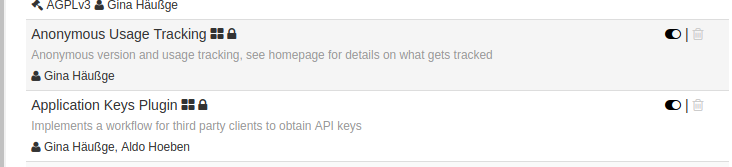
- ✔️ Anonymous Usage Tracking plugin lacks link to referred homepage to learn more - fixed in ff53a82, ready for 1.3.10rc3
Unreproduced and lacking necessary information to look into, awaiting full bug report
 foosel
All 50 comments
Installed with no issues. The gcode viewer is working again. First print is running now with no issues thus far.
 FormerLurker
on 13 Nov 2018
FormerLurker
on 13 Nov 2018
Working fine for me, Gcode viewer also working again. Printing as we speak.
 GhostlyCrowd
on 13 Nov 2018
GhostlyCrowd
on 13 Nov 2018
After the update i cannot login via my reverse proxy only internally
my setup is IIS8 > url rewrite(with basic auth) > OctoPrint
i tried disabling the Forced Login plugin but its still acting strange
I have Anon usage tracking turned on if that helps diagnose the issue
 BigWebstas
on 13 Nov 2018
BigWebstas
on 13 Nov 2018
RC2 is working well for me. GCode Viewer is once again working. Octoslack, Telegram, Print History plug-ins are all working well too. This is connected to a Prusa i3 MK3 with firmware 3.4.0.
 JohnOCFII
on 13 Nov 2018
JohnOCFII
on 13 Nov 2018
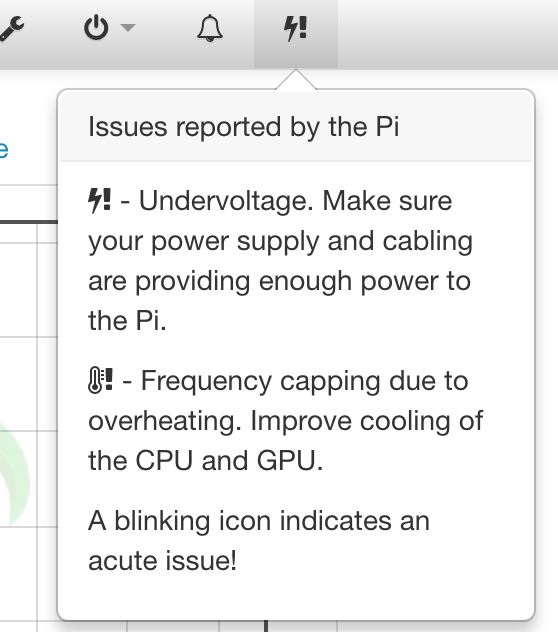
Seems that Pi Support Plugin shows false alarms on my _Raspberry Pi 3 Model B Rev 1.2_. I checked the temperature using the /usr/bin/vcgencmd measure_temp command and it shows temp=37.0'C, also checked the CPU frequency using the command /sys/devices/system/cpu/cpu0/cpufreq/scaling_cur_freq which returns 1200000 Hz (full frequency of the BCM2837 is 1.2 GHz. I also measured the output voltage of my USB power adapter (original Raspberry) while it was connected to my RPi and it always shows more than 5V.
However both warnings "Undervoltage" and "Frequency capping" are displayed:
 DominikPalo
on 13 Nov 2018
DominikPalo
on 13 Nov 2018
Upgrade good. No issues. GCODE viewer working. Print running now.
Keep up the good work.
Tech-Rat
 tech-rat
on 13 Nov 2018
tech-rat
on 13 Nov 2018
Update: my print finished with no obvious issues. I installed this RC on 2 other machines (both RPis) without issue.
However, I do notice something different. I have a few subnets within my local network, and I allow communication via port 443 between my OctoPrint servers and a few PCs/phones on a different subnet. When I initially connect to the Octoprint server from a PC on a different subnet I now get only a login box. This is just fine, actually, but I'm wondering if this is intended behavior, as in a possible enhancement to access control?
Also, hi @tech-rat! Fancy meeting you here ;)
FormerLurker
on 13 Nov 2018
@DominikPalo those are basically 'historic' issues, meaning they aren't currently happening, but have happened since you last rebooted. Don't believe Octoprint? Run vcgencmd get_throttled. It is probably 0x50000. That 5 (or any other nonzero in its place) indicates this issue. I'm sure we're gonna need a FAQ for this, and @foosel I suspect the language may need improving to explain historic vs current better.
 tedder
on 13 Nov 2018
tedder
on 13 Nov 2018
@tedder you are right, the vcgencmd get_throttled returns throttled=0x50000, so the 18th bit is set which means "arm frequency capped has occurred" and I also found that "arm frequency capped occurs when temp > 80'C" - but I'm sure that since my last reboot there wasn't a temperature peak over ~40'C nor a voltage drop... so maybe some issue with my RasPi
DominikPalo
on 13 Nov 2018
It isn't actually overheating- it's frequency capping due to [some reason]. In this case it's due to a power sag.
tedder
on 13 Nov 2018
Thanks, I will try another power supply and will see if it helps... but in my case text "Frequency capping due to overheating" is a bit confusing and should be replaced with a more generic wording (it's actually not related to the overheating issues)
DominikPalo
on 14 Nov 2018
Updated from 1.3.9. Looking good!!!
 gdombiak
on 14 Nov 2018
gdombiak
on 14 Nov 2018
@Webstas Please open a full bug report for this
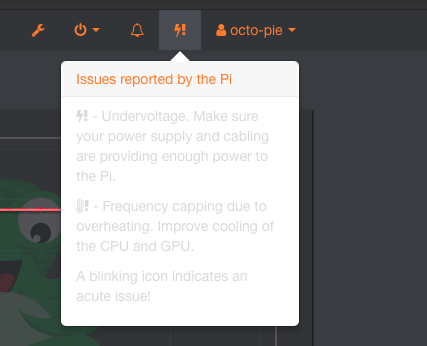
@DominikPalo the content of the drop down you've opened there is a legend to what the symbols mean. Your Pi is reporting undervoltage in the past (lightning bolt + exclamation mark), not overheating (thermometer + exclamation mark). I'll think about wording that better transports the fact that this is a legend to translate the possible symbols in the navbar.
@FormerLurker Read only access for not logged in users is now disabled by default (through the new bundled ForcedLogin plugin), new feature in 1.3.10. Or am I misunderstanding what you are seeing? If so please provide a screenshot.
foosel
on 14 Nov 2018
Upgraded and kicked off a 12-hour print before getting out of bed this morning.
tedder
on 14 Nov 2018
@foosel, you are not misunderstanding, I just happened to miss this in the release notes, but now it is all clear. I think this disabling read-only access is a great idea when access control is enabled!
FormerLurker
on 14 Nov 2018
@FormerLurker that and the new "looks like you are accessing this from a remote IP" notification were responses to the constant insistence of people to do port forwarding ;)
foosel
on 14 Nov 2018
I misunderstood the legend of the throttling. I thought those were there because they were a problem, and additionally the icons in the dropdown would flash if it was current.
Instead, the dropdown is informational only.
Perhaps having it faded would help? Or only show what is relevant?
tedder
on 14 Nov 2018
How about this?
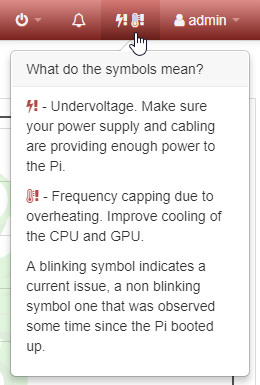
Currently active icons will be made red. If they are reported as a current ongoing issue they'll also pulsate in the legend just as the navbar entry.
foosel
on 14 Nov 2018
- Printer Safety Plugin: Added Ender 3 stock firmware to detection
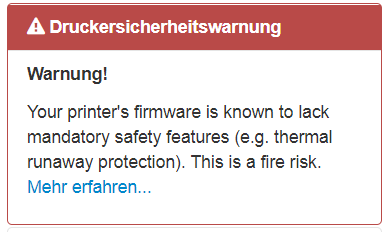
... works... grummel...
 tteckenburg
on 14 Nov 2018
tteckenburg
on 14 Nov 2018
All good here on three different printers running various versions of OctoPi. There are so many new features that I keep discovering and they are very useful. Thank you!
 thisiskeithb
on 15 Nov 2018
thisiskeithb
on 15 Nov 2018
@tteckenburg
... works... grummel...
Sorry 😅
But your screenshot made me notice that the translation is missing there. Odd. Need to look into why.
foosel
on 15 Nov 2018
I also added slight fading after all:
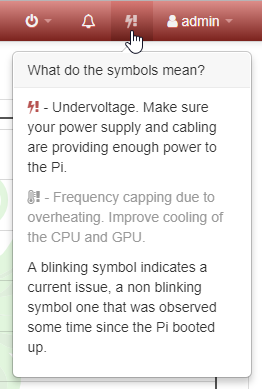
Pushed as a8c91ff
foosel
on 15 Nov 2018
RC2 works like a charm ! Thank you very much for your pretty good job !
 rtbon
on 15 Nov 2018
rtbon
on 15 Nov 2018
Missing translation of the printer safety warning is now also fixed (335e635 & d79e777).
foosel
on 15 Nov 2018
Not sure if it was mentioned in the rc1 feedback but the anonymous usage tracking suggests checking the "homepage" for details, yet no homepage is listed. New users might not know that means OctoPrint's home page, since some other plugins provide their own homepage links. Might it not be a good idea to include a link directly to octoprint's homepage/tracking page? Or at least clarify that it means octoprint's homepage?
 ntoff
on 16 Nov 2018
ntoff
on 16 Nov 2018
Fixed in ff53a82 - I actually managed to use the wrong control property 🤦♀️
foosel
on 16 Nov 2018
RPI 3b+ doesnt show undervoltage ( have attached lcd to that ), but octoprint - does. Powersupply can give up to 2.5A, most i've seen RPI eats - ±1A. I think pale "blinking" in legend is wrong. Id go on activating (blinking) exclamation maks, near bolt and thermometer icons
 dimkin-eu
on 18 Nov 2018
dimkin-eu
on 18 Nov 2018
RC2 was working on my octopi 0.15.1 (fresh install), until i’ve upgraded with an "apt-get update && apt-get upgrade”, now the backup plugin doesn't work, not sure what else doesn't.
Trying to determine what dependancy the update may have broken...
 autonumous
on 18 Nov 2018
autonumous
on 18 Nov 2018
Logs, please, @autonumous.
tedder
on 18 Nov 2018
Dimkin, the screenshot doesn't show voltage problems.
tedder
on 18 Nov 2018
I constantly get the login screen, doesn't seem to matter if I select the remember me - when I go back to the site, it asks me to Login again...
Edit: seems to trigger easily when accessing from different devices
Otherwise everything else seem to be working great!
 louispires
on 18 Nov 2018
louispires
on 18 Nov 2018
Yeah, I'm noticing I have to constantly log in from my Android phone.
tedder
on 18 Nov 2018
RC2 was working on my octopi 0.15.1 (fresh install), until i’ve upgraded with an "apt-get update && apt-get upgrade”, now the backup plugin doesn't work, not sure what else doesn't.
Trying to determine what dependancy the update may have broken...
My Bad, not due to the upgrade, but the soft link i added at the sametime.
~/.octoprint/timelapse pointing to an external USB.
The same when i directly mounted the USB to ~/.octoprint/timelapse-EXT and soft linked the timelapse there.
The above above happen irrespective of excluding timelapse in backup config.
Not determined why though
autonumous
on 19 Nov 2018
Let me reiterate this:
If you run into any obvious bugs not yet listed below the following line, please open a new ticket and follow "How to file a bug report".
@dimkin-eu what does `vcgencmd get_throttled" output when issued via a SSH connection while this is showing? My money would be on an undervoltage issue in the past.
@tedder that throttling screenshot shows undervoltage, rc2 doesn't yet have the muting/rewording on of the popover but the custom theme there makes it look all wrong.
Regarding the having to login again problem, I cannot reproduce this here, someone encountering this please open a full ticket.
foosel
on 19 Nov 2018
No problems with TouchUI, however the ForcedLogin plugin did messup the flow of local touchscreen devices, but I have created an installer that will also setup autoLoginAs.
 BillyBlaze
on 19 Nov 2018
BillyBlaze
on 19 Nov 2018
@BillyBlaze I'm wondering if it might make sense to ship with autoLoginAs from localhost... Then again it only takes one misconfigured reverse proxy and everything will look like it's coming from localhost, so I'm kinda on the fence about this.
foosel
on 19 Nov 2018
@autonumous please open a full bug report. I need full reproduction steps, logs, the usual suspects. "Doesn't work" isn't a proper error description 😞
foosel
on 19 Nov 2018
Not sure if it is an RC2 issue or just a quirk at the moment so throwing the question out there in case others are experiencing it.
Just noticed on a long print that the gcode preview is actually way ahead of the print job when synced with job progress.
 Crowlord
on 20 Nov 2018
Crowlord
on 20 Nov 2018
I had multiple problems as a result of trying 1.3.10RC2.
Firmware Updater plugin seems to be broken. Things were fine with 1.3.9. going to the 1.3.10.rc2, it just didn't work. Rolling back to 1.3.9, everything works just as before.
I am also getting a temp callback related error.
I also had trouble just connecting to the printer.
Logs here- https://pastebin.com/j6MjmwEs
Terminal output from controller is here for #3. https://pastebin.com/ks4UBQ4F
Printer is plain jane RAMPS 1.4 on Mega2560 running Marlin 1.1.8.
- With RC2, running the firmware updater plugin it will error out with a 'non-specific' error. However, I can ssh to the pi and run avrdude manually and upload firmware. The issue seems to be timeouts when using the updater. It makes no sense to me since all the updater is doing is calling avrdude.
Rolling back to 1.3.9 the problem goes away.
~ line 1308 in the log.
There seems to be an issue with Temperature callbacks, ~line 1294. I dont know if this is pre-exisitng issue with the plugin or RC2.
Using the previous connection settings, the printer connects to Octoprint half the time. USB01 and 115200 are prior settings that just work.
 nionio6915
on 22 Nov 2018
nionio6915
on 22 Nov 2018
... why is it so incredibly complicated to get people to open proper bug reports for observed issues for this RC round? 😭😭😭
- Firmware Updater plugin seems to be broken. Things were fine with 1.3.9. going to the 1.3.10.rc2, it just didn't work. Rolling back to 1.3.9, everything works just as before.
Known issue with the firmware updater plugin due to a necessary upgrade of a third party dependency as mentioned in the release notes of RC1 already:
Heads-up for plugin authors regarding the
sargedependencyOctoPrint has updated its
sargedependency. The new version 0.1.5 has a small breaking change - theasynckeyword was renamed toasync_for compatibility reasons with Python 3.7. This might also affect your plugin if you happen to usesargesomewhere therein. If so, make sure you to update your plugin to useasync_instead ofasync(or just use OctoPrint's ownoctoprint.util.commandline.CommandlineCallerclass which takes care of this and various other things).See also here for the
sargechangelog.
Afaik @benlye is looking into a fix, see here.
- I am also getting a temp callback related error.
That is an error from a third party plugin. I have no idea what it's doing there, but it certainly should never be assuming anything about returned temperature data. I cannot analyse this further without a proper bug report that contains a lot more information, especially a serial.log from communication with the printer while this issue happens.
- I also had trouble just connecting to the printer.
What printer. What firmware. Connected in what way. I need a proper bug report
foosel
on 22 Nov 2018
Short update on the firmware updater issue (that might also affect other plugins), I've come up with a way to work around it that will be in 1.3.10rc3.
Since I'm still waiting on some test results regarding #2903 plus some more info on the issues marked with ❓ in the OP and it's also pretty much friday already, I've decided to wait with RC3 until next week after all. I would prefer to have it be the last RC and hence want to tackle ideally all issues currently observed.
foosel
on 22 Nov 2018
So far so good except the FirmwareUpdater plugin (as already reported by others). Will see with RC3 if it is better. Also see that there is already a PR to fix the problem in Firmware Updater: https://github.com/OctoPrint/OctoPrint-FirmwareUpdater/pull/62
 andrivet
on 24 Nov 2018
andrivet
on 24 Nov 2018
Found several problems with rc 2, hope this will help a little.
gcode viewer exclude regions doesn´t work any more. You can specify an area but print goes on as if not excluded any region. Gcode viewer still is not as fast as in last stable version.
Temperature changes doesn´t work. If I reduce temperature, new temperature is show, but extruder temp falls down to room temperature. It only will work occasonally if after reducing temp, causing free fall I swich back to high start temperature and while heating up and not having reached the new lower temperature it might be possible that the new lower temp is accepted.
Filament out sensor plugin NG on one machine is working fine, on the second it only works at the first ckeck up after heading up and allows printing only if sensor is closed as defined. Any sensor change afterwards is ignored. From the fight getting it running on the first machine I know, that plugins do interfear each other. So especially all sensor out plugins leave some kind of blocking stuff - mainly if beeing uninstalled from a deactivated state in pluginmanager.
 Charly333
on 25 Nov 2018
Charly333
on 25 Nov 2018
The exclude region feature is not working properly. I have tried using it twice. The first time it excluded a circular region with the dimensions that i supplied but at a different location. The second time it ignored me altogether
 Nervemanna
on 25 Nov 2018
Nervemanna
on 25 Nov 2018
Working well for me. Prusa Mk3 and Mk2.5 on two Rpi 2 and 3.
 markuskruse
on 25 Nov 2018
markuskruse
on 25 Nov 2018
- gcode viewer exclude regions doesn´t work any more. You can specify an area but print goes on as if not excluded any region.
The exclude region feature is not working properly.
@Charly333 @Nervemanna
While this is a third party plugin and hence not something I have direct control over, please open a full bug report for this so I can take a look at why there's a difference in behaviour between 1.3.9 and 1.3.10rc2. Make sure to include all requested logs, including the JS error console. I'd also strongly suggest to report this on the tracker of the plugin itself. Thank you.
Gcode viewer still is not as fast as in last stable version.
@Charly333
Please open a full bug report for this. Make sure to include a file with which to reproduce. Thank you.
2. Temperature changes doesn´t work. If I reduce temperature, new temperature is show, but extruder temp falls down to room temperature. It only will work occasonally if after reducing temp, causing free fall I swich back to high start temperature and while heating up and not having reached the new lower temperature it might be possible that the new lower temp is accepted.
@Charly333 Please open a full bug report for this. Make sure to include all requested logs. Thank you.
foosel
on 26 Nov 2018
@nionio6915 I'm still waiting on full bug reports from you on your issues 2 and 3. I cannot analyse these without the data collected as part of the bug form. 😕
The current goal is to release RC3 ideally tomorrow, possibly Wednesday. If I don't have enough information to look into anything so far reported without a full bug report those issues will go unfixed for this RC and possibly the stable release, which I either need to get out before December 10th or won't be able to get out until 2019 (which I really want to avoid). Why the time pressure? 1) I won't release anything less than 14 days before Christmas because otherwise I won't have time to fix any critical problems anymore should anything arise before people start unpacking their new printer, and I honestly also don't want to work through the holidays. 2) There are bug fixes in 1.3.10 I want to get out.
So all of you who have reported issues on here but have so far failed to open fully filled out tickets for them, @louispires, @nionio6915, @Charly333, @Nervemanna, please do so now. I'd rather analyse and if needed fix them than risk having them in 1.3.10 stable, but if push comes to shove that's the choice I'll have to make, I can't keep this release sitting on my desk forever.
foosel
on 26 Nov 2018
I am sorry that I have not submitted a proper report. I am traveling for my day job and do not have access to my computer and printers right now.
I will try to do it on Friday when I return.
On Nov 26, 2018, at 02:22, Gina Häußge notifications@github.com wrote:
gcode viewer exclude regions doesn´t work any more. You can specify an area but print goes on as if not excluded any region.
The exclude region feature is not working properly.@Charly333 https://github.com/Charly333 @Nervemanna https://github.com/Nervemanna
While this is a third party plugin and hence not something I have direct control over, please open a full bug report https://github.com/foosel/OctoPrint/blob/master/CONTRIBUTING.md#what-should-i-include-in-a-bug-report for this so I can take a look at why there's a difference in behaviour between 1.3.9 and 1.3.10rc2. Make sure to include all requested logs, including the JS error console. I'd also strongly suggest to report this on the tracker of the plugin itself. Thank you.Gcode viewer still is not as fast as in last stable version.
@Charly333 https://github.com/Charly333
Please open a full bug report https://github.com/foosel/OctoPrint/blob/master/CONTRIBUTING.md#what-should-i-include-in-a-bug-report for this. Make sure to include a file with which to reproduce. Thank you.
- Temperature changes doesn´t work. If I reduce temperature, new temperature is show, but extruder temp falls down to room temperature. It only will work occasonally if after reducing temp, causing free fall I swich back to high start temperature and while heating up and not having reached the new lower temperature it might be possible that the new lower temp is accepted.
@Charly333 https://github.com/Charly333 Please open a full bug report https://github.com/foosel/OctoPrint/blob/master/CONTRIBUTING.md#what-should-i-include-in-a-bug-report for this. Make sure to include all requested logs. Thank you.
—
You are receiving this because you were mentioned.
Reply to this email directly, view it on GitHub https://github.com/foosel/OctoPrint/issues/2889#issuecomment-441570702, or mute the thread https://github.com/notifications/unsubscribe-auth/AeDdf8aYawKxMBjV1AZa6eJnVwOpHN85ks5uy7LNgaJpZM4YbrNv.
Nervemanna
on 28 Nov 2018
I just checked GitHub and it looks like the developer of ExcludeRegion is aware of this, has reproduced the behavior, and is looking in to it.
On Nov 26, 2018, at 02:22, Gina Häußge notifications@github.com wrote:
gcode viewer exclude regions doesn´t work any more. You can specify an area but print goes on as if not excluded any region.
The exclude region feature is not working properly.@Charly333 https://github.com/Charly333 @Nervemanna https://github.com/Nervemanna
While this is a third party plugin and hence not something I have direct control over, please open a full bug report https://github.com/foosel/OctoPrint/blob/master/CONTRIBUTING.md#what-should-i-include-in-a-bug-report for this so I can take a look at why there's a difference in behaviour between 1.3.9 and 1.3.10rc2. Make sure to include all requested logs, including the JS error console. I'd also strongly suggest to report this on the tracker of the plugin itself. Thank you.Gcode viewer still is not as fast as in last stable version.
@Charly333 https://github.com/Charly333
Please open a full bug report https://github.com/foosel/OctoPrint/blob/master/CONTRIBUTING.md#what-should-i-include-in-a-bug-report for this. Make sure to include a file with which to reproduce. Thank you.
- Temperature changes doesn´t work. If I reduce temperature, new temperature is show, but extruder temp falls down to room temperature. It only will work occasonally if after reducing temp, causing free fall I swich back to high start temperature and while heating up and not having reached the new lower temperature it might be possible that the new lower temp is accepted.
@Charly333 https://github.com/Charly333 Please open a full bug report https://github.com/foosel/OctoPrint/blob/master/CONTRIBUTING.md#what-should-i-include-in-a-bug-report for this. Make sure to include all requested logs. Thank you.
—
You are receiving this because you were mentioned.
Reply to this email directly, view it on GitHub https://github.com/foosel/OctoPrint/issues/2889#issuecomment-441570702, or mute the thread https://github.com/notifications/unsubscribe-auth/AeDdf8aYawKxMBjV1AZa6eJnVwOpHN85ks5uy7LNgaJpZM4YbrNv.
Nervemanna
on 28 Nov 2018
1.3.10rc3 was just released, new ticket is here.
foosel
on 28 Nov 2018
Related issues
 bbatchelder
·
120Comments
foosel
·
50Comments
bbatchelder
·
120Comments
foosel
·
50Comments
 eivilo
·
144Comments
foosel
·
67Comments
eivilo
·
144Comments
foosel
·
67Comments
 gege2b
·
64Comments
gege2b
·
64Comments
Most helpful comment
How about this?
Currently active icons will be made red. If they are reported as a current ongoing issue they'll also pulsate in the legend just as the navbar entry.