Octoprint: Octoprint just stop mid print
What were you doing?
Note : I've looked at similar issues first and found #2647 but the difference with my problem is that Octoprint server was still up (didn't try to log on SSH but forced refresh worked)
Maybe it's a different issue, maybe it's a variant, I don't know, feel free to close if needed
- printing something (thru USB, not SD Card)
- wait for it
- kaboom ! print stopped
It's a really random stop, I just run into that problem once as long as I remember, and maybe I'll never face it again...
Just in case, here is the GCode where the problem occured (I have sucessfully printed these objects before, but not this particular file)
20180607-154849-PhoneSupport_Base_0.2-15%.gcode.zip
What did you expect to happen?
Print to complete without problem
What happened instead?
Printer stopped
Also, temperature graph was showing "Off" in both the "actual" and the "target" column but the bed and the hotend was still heating
As far as I know, the only state when this is shown is when Octoprint is disconnected from the printer
Did the same happen when running OctoPrint in safe mode?
Not tried
Version of OctoPrint
OctoPrint 1.4.0.dev1274+gf8e6e4e3
Operating System running OctoPrint
raspbian strech 9.4 on rpi3
Printer model & used firmware incl. version
prusa mendel with marlin 1.1.8
Browser and version of browser, operating system running browser
firefox 60 on windows 10
Link to octoprint.log
Link to contents of terminal tab or serial.log
Serial logging wasn't enabled :-(
Link to contents of Javascript console in the browser
Unfortunatly I unexpectedly closed the browser before copying, but there was only an error about the connection to websocket, I don't know if it's related to the issue
I have read the FAQ.
 gege2b
All 64 comments
I got the same problem right now, fortunately it hangs in the heating phase so no waste of material
And I had Serial logging enabled :
As you can see in the log, I set the hotend target temp manually while the bed was heating after launching the print, it's not the first time I does this and I don't know if it's related to the problem
There is also a cancel in the begining, it's because mjpeg streamer wasn't running and octolapse canceled the print
Except from that, I see nothing weird...
Here's a screenshot from the UI
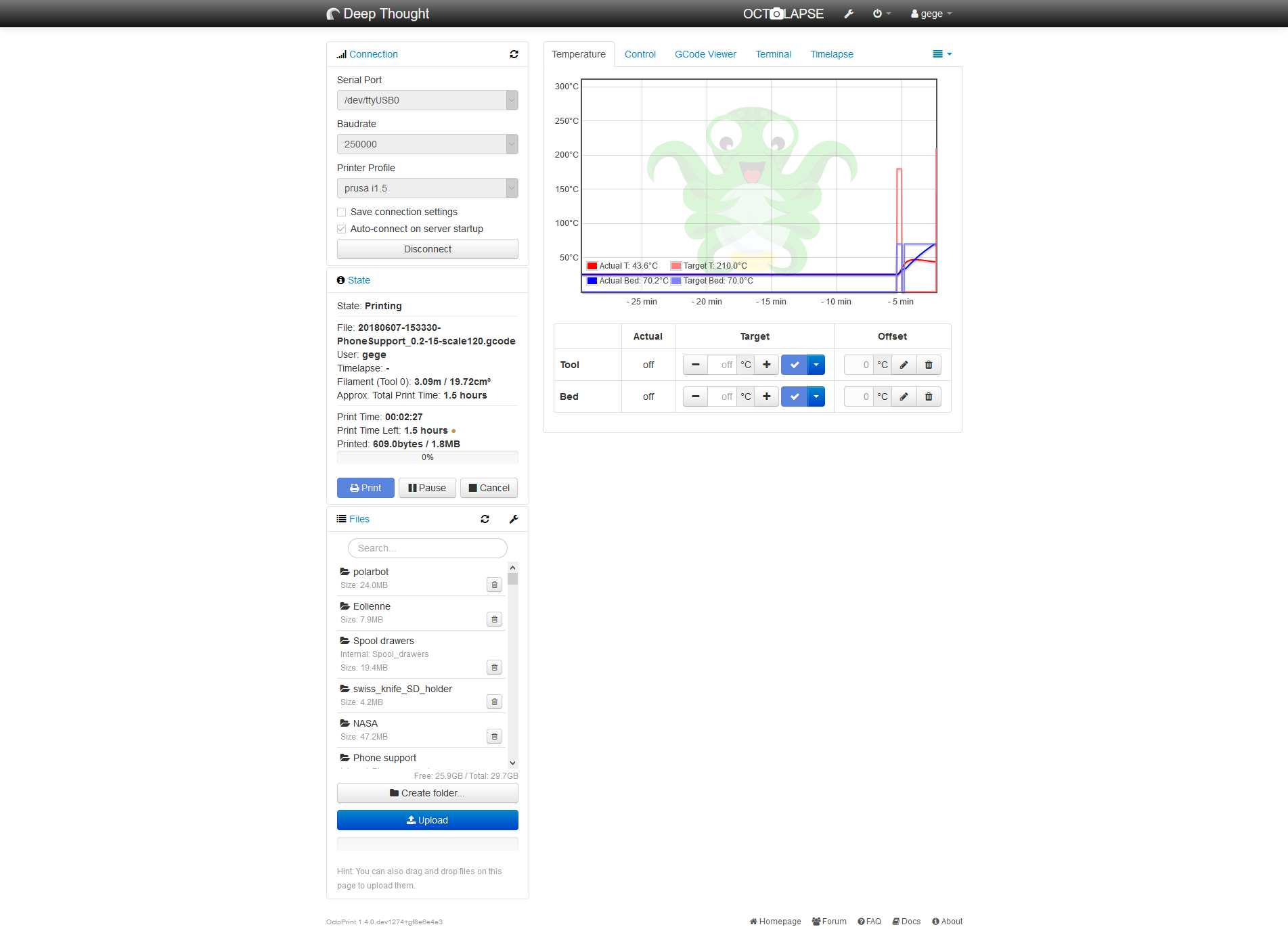
When the problem occurs, temp graph stalls and all temperature shows "off" but the printer is still heating (this can be dangerous)
I should add that my syslog.log has some "under-voltage detected" line, this is due to the not-so-stable 5v line of the ATX PSU I'm using, I use it since few months without any problem BTW, the Sanguinololu board is connected to the 12v of the same PSU
To ensure that this is not the problem, I'll switch to a more conventionnal PSU for the pi3 after my current print
gege2b
on 8 Jun 2018
The interesting thing in the screenshot is that it shows off in the table but on the graph it's still showing a target temperature. Which is weird since the data for both comes from the same source.
Anything in the browser's error console?
Does the serial.log really just stop there like this?
 foosel
on 8 Jun 2018
foosel
on 8 Jun 2018
Oh right, this time I didn't close the browser so here are the two errors showed in the console :
La connexion avec http://prusa.home:5000/sockjs/530/qfe2ldjp/eventsource a été interrompue pendant le chargement de la page.         packed_libs.js:24600:21
La connexion avec ws://prusa.home:5000/sockjs/530/1aawxqt0/websocket a été interrompue pendant le chargement de la page.
it says that connection with eventsource and websocket was lost during the page load
And yes, the serial.log just stop here, with nothing else
gege2b
on 8 Jun 2018
What happens when you reload the page in this mode? If anything happens at all that is. It feels a bit like something might be crashing, but in your octoprint.log it looks like the server is still reacting just fine, it's just the connection to the printer that becomes weird.
foosel
on 8 Jun 2018
Except for the last time, the server is responding and the UI is loading fine
But I can't disconnect from the printer and I can't set temperatures
I didn't try to make some manual moves, but I guess it won't move too
gege2b
on 8 Jun 2018
I tried, again, with the same Gcode, and it still hangs (but never at the same spot)
Browser console (as soon as I refresh the page, not before) :
La connexion avec ws://prusa.home:5000/sockjs/083/jlal5oxr/websocket a été interrompue pendant le chargement de la page. packed_libs.js:24036:9
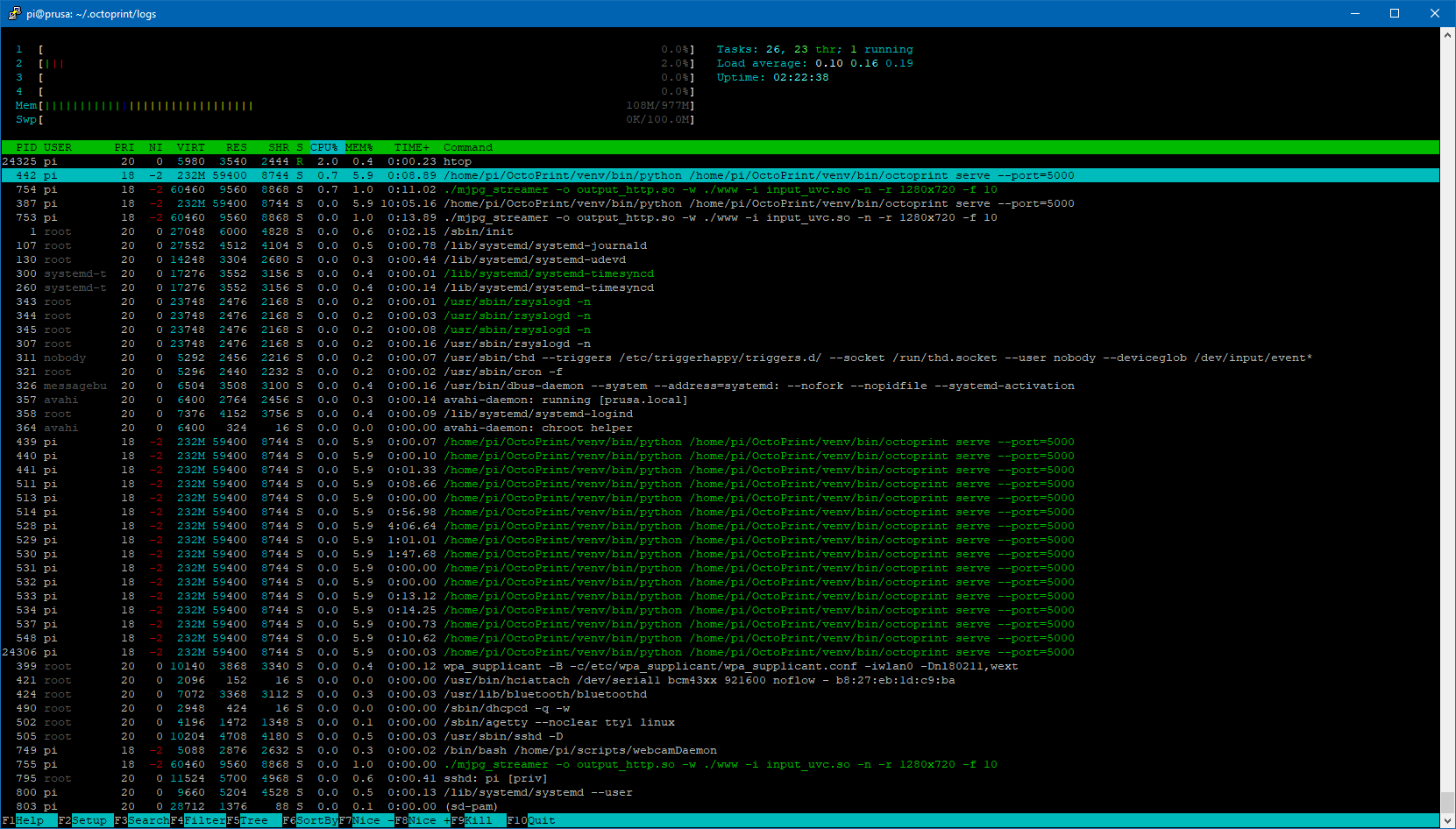
Htop output on the pi :
Last lines of Serial.log :
2018-06-11 11:27:16,297 - Send: N23378 G1 X68.365 Y72.381 E2.08828*102
2018-06-11 11:27:16,323 - Recv: ok
2018-06-11 11:27:16,334 - Send: N23379 G1 X68.365 Y73.034 E2.09774*108
2018-06-11 11:27:16,355 - Recv: ok
2018-06-11 11:27:16,365 - Send: N23380 G1 X69.978 Y74.648 E2.13079*102
2018-06-11 11:27:16,397 - Recv: ok
2018-06-11 11:27:16,402 - Send: N23381 G1 X69.326 Y74.649 E2.14023*111
2018-06-11 11:27:16,422 - Recv: ok
2018-06-11 11:27:16,427 - Send: N23382 G1 X68.365 Y73.687 E2.15992*109
2018-06-11 11:27:16,452 - Recv: ok
2018-06-11 11:27:16,457 - Send: N23383 G1 X68.365 Y73.687 F7200*64
2018-06-11 11:27:16,644 - Recv: ok
2018-06-11 11:27:16,649 - Send: N23384 M400*41
2018-06-11 11:27:17,522 - Recv: ok
2018-06-11 11:27:17,533 - Send: N23385 M114*40
2018-06-11 11:27:17,553 - Recv: X:68.36 Y:73.69 Z:1.75 E:2.16 Count X:5497 Y:5806 Z:4590
2018-06-11 11:27:17,563 - Recv: ok
2018-06-11 11:27:17,722 - Send: N23386 G1 X77.199 Y77.949*32
2018-06-11 11:27:17,731 - Recv: ok
2018-06-11 11:27:17,736 - Send: N23387 G1 F3000*64
Last lines of octoprint.log :
2018-06-11 10:33:09,629 - octoprint.util.pip - INFO - pip installs to /home/pi/OctoPrint/venv/lib/python2.7/site-packages/ (writable -> yes), --user flag needed -> no, virtual env -> yes
2018-06-11 10:33:09,629 - octoprint.util.pip - INFO - ==> pip ok -> yes
2018-06-11 10:33:09,688 - octoprint.plugins.softwareupdate - INFO - Saved version cache to disk
2018-06-11 10:33:11,078 - octoprint.server.util.sockjs - INFO - User gege logged in on the socket from client 192.168.1.129
2018-06-11 10:34:18,195 - octoprint.util.comm - INFO - Changing monitoring state from "Operational" to "Printing"
2018-06-11 10:34:18,240 - octoprint.util.comm - INFO - M110 detected, setting current line number to 0
2018-06-11 10:34:18,296 - octoprint.util.comm - INFO - Changing monitoring state from "Printing" to "Cancelling"
2018-06-11 10:34:18,684 - octoprint.util.comm - INFO - Changing monitoring state from "Cancelling" to "Operational"
2018-06-11 10:34:32,265 - octoprint.server.api.system - INFO - Performing command for custom:streamon
2018-06-11 10:34:37,058 - octoprint.util.comm - INFO - Changing monitoring state from "Operational" to "Printing"
2018-06-11 10:34:37,096 - octoprint.util.comm - INFO - M110 detected, setting current line number to 0
2018-06-11 10:34:39,635 - octoprint.util.comm - INFO - Printer seems to support the busy protocol, telling it to set the busy interval to our "communicationBusy" timeout - 1s = 2s
2018-06-11 10:38:06,972 - octoprint.util.comm - INFO - Changing monitoring state from "Printing" to "Pausing"
2018-06-11 10:38:37,250 - octoprint.util.comm - INFO - Changing monitoring state from "Pausing" to "Paused"
2018-06-11 10:39:28,344 - octoprint.util.comm - INFO - Changing monitoring state from "Paused" to "Resuming"
2018-06-11 10:39:28,369 - octoprint.util.comm - INFO - Changing monitoring state from "Resuming" to "Printing"
2018-06-11 10:42:45,972 - octoprint.server.heartbeat - INFO - Server heartbeat <3
2018-06-11 10:57:45,973 - octoprint.server.heartbeat - INFO - Server heartbeat <3
2018-06-11 11:12:45,976 - octoprint.server.heartbeat - INFO - Server heartbeat <3
2018-06-11 11:27:45,978 - octoprint.server.heartbeat - INFO - Server heartbeat <3
I've truncated the begining of the logs but there really is nothing else important, they're just like the previous full log I uploaded earlier in this thread
I tried to make some actions on the UI (setting temps, moving axis, manually send GCode...) but nothing works.
Actually, it seems that the server, for whatever reason, stop responding but stays active ( = still sends his heartbeat)
Note : on my first message I said that server was still OK after a forced refresh - that was true, but maybe that was a bug of the crash ? :D
gege2b
on 11 Jun 2018
well, I finally tried in safe mode and the print went fine
(I should have tried earlier, gives a slap on his hand )
I'll investigate more deeply my plugins, begining with Octolapse because it's the only one witch mess with the GCode while printing, but the last octolapse log I got has nothing weird inside)
gege2b
on 11 Jun 2018
Octolapse at least is the only plugin that I so far know of that utilizes the job_on_hold flag which could explain the print halting. I'm not aware of any such issues though. Still, just to make sure he's looped in, tagging @FormerLurker.
foosel
on 12 Jun 2018
Yeah, that's why I think there should be an obscure race condition involved here with Octolapse (and maybe with this particuliar GCode, because until now I didn't have any problem)
As recommended in issue #2424 I ran octoprint in a screen to catch any exception but nothing...
The log shown above has a blank line that I inserted right when the print stopped, and you can see 2 hearbeat still sent, but the UI was unreachable
2018-06-12 09:04:19,430 - octoprint.server - INFO - Reset webasset folder /home/pi/.octoprint/generated/webassets...
2018-06-12 09:04:19,447 - octoprint.server - INFO - Reset webasset folder /home/pi/.octoprint/generated/.webassets-cache...
2018-06-12 09:04:19,459 - octoprint.plugins.octolapse - INFO - Octolapse is loading assets.
2018-06-12 09:04:19,700 - octoprint.server - INFO - Shutting down intermediary server...
2018-06-12 09:04:20,164 - octoprint.server - INFO - Intermediary server shut down
2018-06-12 09:04:20,167 - octoprint.events - INFO - Processing startup event, this is our first event
2018-06-12 09:04:20,168 - octoprint.events - INFO - Adding 1 events to queue that were held back before startup event
2018-06-12 09:04:20,173 - octoprint.filemanager - INFO - Adding backlog items from all storage types to analysis queue...
2018-06-12 09:04:20,400 - octoprint.plugins.pluginmanager - INFO - Loaded plugin repository data from disk, was still valid
2018-06-12 09:04:20,820 - octoprint.plugins.pluginmanager - INFO - Loaded notice data from disk, was still valid
2018-06-12 09:04:21,036 - octoprint.filemanager - INFO - Added 0 items from storage type "local" to analysis queue
2018-06-12 09:04:21,202 - octoprint.util.comm - INFO - Changing monitoring state from "Offline" to "Opening serial port"
2018-06-12 09:04:21,203 - octoprint.plugins.discovery - INFO - Registered OctoPrint instance "Deep Thought" for SSDP
2018-06-12 09:04:21,206 - octoprint.util.comm - INFO - Changing monitoring state from "Opening serial port" to "Connecting"
2018-06-12 09:04:21,207 - octoprint.server - INFO - Listening on http://[::]:5000
2018-06-12 09:04:21,216 - octoprint.util.comm - INFO - M110 detected, setting current line number to 0
2018-06-12 09:04:21,235 - octoprint.util.comm - INFO - Changing monitoring state from "Connecting" to "Operational"
2018-06-12 09:04:21,274 - octoprint.plugins.firmwareupdater - INFO - Got CONNECTED event
2018-06-12 09:04:21,300 - octoprint.plugins.octolapse - INFO - Loading existing settings file from: /home/pi/.octoprint/data/octolapse/settings.json.
2018-06-12 09:04:21,301 - octoprint.util.comm - INFO - M110 detected, setting current line number to 0
2018-06-12 09:04:21,302 - octoprint.plugins.firmwareupdater - INFO - Run postflash flag is not set
2018-06-12 09:04:21,483 - octoprint.util.comm - INFO - Printer reports firmware name "Marlin 1.1.8 (Github)"
2018-06-12 09:04:21,796 - octoprint.plugins.pluginmanager - INFO - Loaded plugin repository data from disk, was still valid
2018-06-12 09:04:22,112 - octoprint.plugins.pluginmanager - INFO - Loaded notice data from disk, was still valid
2018-06-12 09:04:22,118 - octoprint.server.preemptive_cache - INFO - Preemptively caching / (ui _default) for {'query_string': 'l10n=en', 'path': '/', 'base_url': 'http://prusa.home:5000/'}
2018-06-12 09:04:25,125 - octoprint.server.util.sockjs - INFO - New connection from client: 192.168.1.129
2018-06-12 09:04:25,486 - octoprint.server.util.sockjs - INFO - User gege logged in on the socket from client 192.168.1.129
2018-06-12 09:04:35,221 - octoprint.server.api.system - INFO - Performing command for custom:streamon
2018-06-12 09:04:39,375 - octoprint.util.comm - INFO - Changing monitoring state from "Operational" to "Printing"
2018-06-12 09:04:39,404 - octoprint.util.comm - INFO - M110 detected, setting current line number to 0
2018-06-12 09:04:39,472 - octoprint.server.preemptive_cache - INFO - ... done in 17.35s
2018-06-12 09:04:41,762 - octoprint.util.comm - INFO - Printer seems to support the busy protocol, telling it to set the busy interval to our "communicationBusy" timeout - 1s = 2s

2018-06-12 09:19:07,888 - octoprint.server.heartbeat - INFO - Server heartbeat <3
2018-06-12 09:34:07,891 - octoprint.server.heartbeat - INFO - Server heartbeat <3
For now I will just disable Octolapse ( 😢 ) and keep tuned on future updates
please ask if you or @FormerLurker needs more info
gege2b
on 12 Jun 2018
This could have something to do with Octolapse for sure, though i would expect the print to continue after a timeout period has expired (it's a few minutes). You might want to try sending an M114 through the console when it locks up. If printing resumes it's probably caused by Octolapse.
I should have a chance to take a look at this after I get back from vacation. @gege2b, if you don't hear from me by July 1, please send me a message to remind me about this, or open an issue in the Octolapse repositiory where I'll be sure to see it.
 FormerLurker
on 12 Jun 2018
FormerLurker
on 12 Jun 2018
Hey hi
I already tried to send a M114 and it changed nothing, clicking on "send" doesn't even clear the textbox
I also waited half an hour (to see if server was still sending heartbeats) and still locked
I keep up to see the progress, have a nice vacations! :)
gege2b
on 12 Jun 2018
Just for the record, I discovered the M85 Gcode witch act like a watchdog and turn off the printer in case of inactivity
I've added this to my start GCode with a timeout of 5 minutes, just to be sure
gege2b
on 14 Jun 2018
OK so today I ran into this problem BUT octolapse was disabled... (I mean really disabled, from the plugin manager,not from the ON/OFF button in octolapse)
Unfortunately, I disabled serial logging thinking the problem wouldn't occurs anymore, but here are the last lines of the terminal (I snipped the begining because really there was nothing weird)
Send: N40078 G11*18
Send: N40079 G92 E0*77
Recv: ok
Send: N40080 G1 F3000*65
Recv: ok
Send: N40081 G1 X44.767 Y142.799 E0.01583*86
Recv: X:67.21 Y:98.73 Z:1.15 E:0.00 Count X:5404 Y:7779 Z:3016
Recv: ok
Recv: ok
Send: N40082 G1 X45.038 Y142.752 E0.02047*80
Send: N40083 G1 X45.557 Y142.767 E0.02920*83
Recv: ok
Send: N40084 G1 X46.154 Y142.171 E0.04339*85
Recv: X:45.43 Y:142.13 Z:1.15 E:0.00 Count X:3653 Y:11200 Z:3016
Recv: ok
Recv: ok
Send: N40085 G1 X46.207 Y142.172 E0.04428*85
Recv: ok
Recv: ok
Send: N40086 G1 X46.547 Y142.536 E0.05267*93
Send: !SNAP
Recv: ok
* BOOM * <= manually added :P
M85 saved the day here :)
@foosel just a question, can the "!" in my trigger GCode for octolapse actually break something ?
Even if octolapse was disabled, I was printing a Gcode where my trigger word was inserted ("!SNAP")
And as you can see, it's the very last thing sent to the printer.
I don't remember well, but it's possible this problem shows up when I switched from '@snap' to "!snap" for an obscure reason
Interestingly, there was a lot more triggers before, but I don't know why this particular one seems to have made octoprint to lost his mind (this was about 15% to the end of the print)
Right now I'm stripping all the triggers from this GCode and will run another print to see if the problem still occurs
gege2b
on 20 Jun 2018
That might be the reason. "At commands" (like @snap) should never be sent to the printer by OctoPrint. !snap however is something OctoPrint doesn't recognize as a known command type and will send on in case your printer happens to support it. It then depends on your configuration whether OctoPrint will expect an ok back for such a command or not. Usually it shouldn't, but this here looks like maybe it is after all and that's causing things to lock up. It certainly is never a good idea to send anything that the printer doesn't understand over the line, since considering the state of the protocol between hosts and printer (= not well defined) all odds are pretty much off at that point.
foosel
on 20 Jun 2018
Seems legit.
So, I tried with two GCode variant :
- One with "[at]SNAP" instead of "!SNAP" : same problem, at almost the same spot on a slighlty higher layer. I didn't see any "[at]SNAP" sent to the printer in the terminal tab
- One with no SNAP at all : print went fine
My interpretation is that's my snapshot commands are probably the culprit here, instead of only Octolapse
For now, I'll use a "M118" command, so Marlin and Octoprint shouldn't complain
I'll keep this thread updated according to the results
gege2b
on 20 Jun 2018
I have experienced this same issue. I can provide logs.. sample code..
I did try to fiddle with the exact command to trigger snapshots and it didn't seem to make much difference. An M118 or an @snap produced the same result.
When it does "hang", it hangs hard. I can't always recover without a reboot of the raspberry pi.
 iaglet
on 8 Jul 2018
iaglet
on 8 Jul 2018
in my case, a restart of the octoprint service is sufficient
I couldn't try for now because octolapse didn't run anymore since the last octoprint upgrade
gege2b
on 8 Jul 2018
@gege2b, try updating Pip and reinstalling Octolapse. I have been able to get it working on 1.3.9 rc2 after updating, but I too am now seeing this hard-lock issue. To double check, I downgraded to 1.3.8, and the issue went away, or was greatly reduced.
@foosel,
I have noticed that when Octoprint locks up it seems to occur after I call set_job_on_hold(False). Here is a simplified version of the code I'm using:
self.Settings.current_debug_profile().log_info("Resuming Job.")
self.OctoprintPrinter.set_job_on_hold(False)  # It sometimes locks up here
self.Settings.current_debug_profile().log_info("Job Resumed.") # this is never reached when it locks
So I dug a bit deeper into the set_job_on_hold function and found that it is hanging when calling _send_from_job_queue from the _continue_sending function. Within _send_from_job_queue, it attempts to call self._sendCommand, which cannot acquire the _sendingLock, and it just stalls there. Here is the exact place where the killer stall seems to occur with comm.py:
def _sendCommand(self, cmd, cmd_type=None, on_sent=None, tags=None):
        # Make sure we are only handling one sending job at a time
        self._logger.info("_sendCommand - getting sending lock")
        with self._sendingLock:  # It locks up here
            self._logger.info("_sendCommand - lock acquired")
I will keep playing with it over the next few days to see if I can come up with any additional info. I'll also see if I can figure out which commit caused this issue, but that's a slow process so it might take me a while.
FormerLurker
on 9 Jul 2018
I've got confirmation from a few users now that downgrading to 1.3.8 fixes the issue, at least when using the devel branch of Octolapse. I'll update again if I learn otherwise.
FormerLurker
on 9 Jul 2018
Great progress !!
Right now I cannot use my printer because his fellow raspberry pi is on a Wanhao D7 with nanodlp for testing purpose :D
gege2b
on 9 Jul 2018
Sounds like a dead lock here, but of course one that doesn't always trigger. I did have to change some things there to get the script holding to work, and also did some things to remove the race condition on pause/cancel, so maybe one of these changes introduced this issue.
foosel
on 9 Jul 2018
I would be happy to help with any testing.
iaglet
on 9 Jul 2018
I'm not sure this will help but I've been debugging for a long time and need to tell somebody what I've been seeing :)
Ive been digging into the comm.py file, logging and watching threads get and release locks, and I can tell you that the typical pattern is this:
Octolapse calls set_job_on_hold(True) at some point, then calls set_job_on_hold(False). At some point _handle_ok is called on the main thread (not the one running Octolapse) and it acquires the sending lock. It will never release this lock.
Now the thread running Octolapse picks up and is running _continue_sending and makes it all the way to _sendCommand, where it is waiting to acquire the lock which is not released by _handle_ok.
Meanwhile the main thread is also running the _continue_sending function but stops executing once it runs out of items in the _send_from_command_queue function (within the except queue.Empty) and returns false . For some reason the logs just stop there, even though I can see no reason why I wouldn't be seeing evidence that other functions within _continue_sending are executed (I added logging to practically every line). I have checked and double checked and can't see what I'm missing (but will keep looking).
This might not be useful, but if I remove the sending lock from _handle_ok, things start to work. Is is possible that a _sendCommand from one thread is being handled by _handle_ok from another, before the lock is released?
Also, it's worth noting that the UI continues to respond even after the lockup, and I can see logs from the UI being generated. It seems to be the comm library is locking and that's all.
FormerLurker
on 11 Jul 2018
Wow, seems to be a beast hidden in the shadow :wow:
I'm sorry I can't help to dig into all that code :(
About the UI still responding, I think the only things goind bad are all commands to/from the printer (and this make sense given what you found here)
As mentionned earlier, the problem also occured once while Octolapse was disabled, but it's almost always happens when it's enabled
So maybe the problem isn't octolapse-only, but it is a catalyst at least
gege2b
on 11 Jul 2018
I'm trying to wrap my head around how _handle_ok can lock here and am so far failing.
The only way that could happen as far as I understand is if the call to continue_sending would keep on looping. It should exit the loop however since the job_on_hold flag gets set. Unless that locks (which I'm unsure right now if it can).
My guess is, this is another of these cases where the fix will be one line at most, which will take ages to figure out however 😕
foosel
on 11 Jul 2018
I agree. I'm going to switch gears and see if I can figure out which commit started this issue.
FormerLurker
on 11 Jul 2018
My money would be on d124efdb71c743fbc690ef5be5f5a368974afceb since that introduced the lock inside _handle_ok to work around a race condition under specific resend scenarios.
foosel
on 11 Jul 2018
Ok, finally I've found out where the lock in the main thread is happening. I didn't have enough logging to catch a conditional within _continue_sending.
Within the def job_on_hold(self) function there is a conditional that checks self.job_on_hold.counter. It stalls here while attempting to evaluate this:
self._job_on_hold.counter > 0
I haven't looked through 'CountedEvent' yet, but my bet is that it's happening here:
@property
    def counter(self):
        with self._mutex:
            return self._counter
The main thread is waiting for the counter value to return and the Octolapse thread is waiting for the sending lock, hence the deadlock (I think).
I'll keep digging as time permits, but if you have any additional insight I'd love to hear it :)
FormerLurker
on 11 Jul 2018
Argh. I feared it might be the counter evaluation. So probably a case of two locks fighting and beginning deadlocked in the process. Didn't think of that. And of course that's been in there since 1.3.7 but only now came to light due to the lock working around the other race condition.
I'll have to think a bit on how best to solve this without risking an issue at another place...
foosel
on 11 Jul 2018
In any case, huge thanks for debugging this! It definitely makes sense now!
foosel
on 11 Jul 2018
No problem! If I keep this up I might just start to understand what's going on in the comm library before you swap it out with v2.0, lol! I'd like to be more proficient with your code anyway so I can track down issues and send pull requests instead of bug reports.
As far as solutions go, why not add a lock to set_job_on_hold too? That way the sendCommand wouldn't be issued until handle_ok is finished. I'm sure I"m missing something, but that was my first thought.
FormerLurker
on 11 Jul 2018
I might just have pushed a commit that fixes this to staging/maintenance but I'm currently unable to test it. Any tests are welcome :)
I simply moved the continue_sending call outside of the lock instead of adding more. I'm not 100% sure though if that's the right solution.
No problem! If I keep this up I might just start to understand what's going on in the comm library before you swap it out with v2.0, lol!
Careful, it might steal your soul or something. I mentally prepare every time I have to dig into this as to not abandon all hope.
foosel
on 11 Jul 2018
I'll try that out right now, thanks!
If it's of any interest, I can tell you that using the sending lock to wrap set_job_on_hold seems to work except one issue where I had to manually send an 'OK' via the terminal. I'll try out your solution next.
FormerLurker
on 11 Jul 2018
With that change it runs much longer (through several job_on_hold True/False cycles), but eventually deadlocks while acquiring the _jobLock in _send_from_job. This time faking an OK in the terminal doesn't fix the issue. I don't have enough logging to figure out what is happening exactly though. Will keep digging.
FYI, this error is pretty easy to replicate if you install Octolapse. I have a 1mmx1mmx100mm test object that can trigger a deadlock in under a minute. I was thinking of writing a test plugin for job_on_hold too, if that would be easier. Just brainstorming.
FormerLurker
on 11 Jul 2018
This might be a dead end, but if I wrap the entire set_job_on_hold with the following:
with self._sendingLock:
I get the following at approximately the same place in a longish test file, and so far it only happens once during the print:
Send: N104 G1 F1200*72
Recv: ok
Send: N105 G1 Y104.725 X124.725*47
Recv: Error: Missing checksumRecv:
Resend:105
Recv: ok
Send: N105 G1 Y104.725 X124.725*47
Recv: wait
Recv: wait
Recv: wait
Forcing an OK fixes this without any deadlocks. In fact, temp requests keep going through (hence the wait) on the main thread and Octolapse is not waiting for any locks.
I'm curious why the checksum error appears (maybe a virtual printer thing) in the first place, and I'm not sure why no OK is issued.
I think I need more logging somewhere, any ideas?
FormerLurker
on 11 Jul 2018
You've run into a virtual printer feature there, it simulates a bunch of resend errors at line 100 and 105 - nothing to do with your changes :)
Also: sh..., I'd really hoped the above commit would fix it
foosel
on 11 Jul 2018
In that case, something involving resend sometimes results in no OK when set_job_on_hold requires the _sendingLock. If I switch 'Simulate OK for resend requests' to either 'Always' or 'Never' it always fails very quickly during resend. Only 'if detected as necessary' works, and only sometimes.
I hoped your commit would fix it also, but the coding gods were somehow not pleased :)
FormerLurker
on 11 Jul 2018
Here are lots of logs detailing the issue I mentioned above (OK not received after resend):
| Send: N105 G1 F1200*73
| Recv: Error: Missing checksum
| Recv: Resend:105
2018-07-11 12:19:25,614 - octoprint.util.comm - INFO - _sendCommand - entering - Thread:16232
2018-07-11 12:19:25.647000 - info - Sent to printer: Command Type:None, gcode:G1, cmd: G1 F1200, tags: None
2018-07-11 12:19:25,615 - octoprint.util.comm - INFO - _sendCommand - entering for command: G1 Z0.600 F6000
2018-07-11 12:19:25,617 - octoprint.util.comm - INFO - _sendCommand - getting sending lock - Thread:16232
2018-07-11 12:19:25,618 - octoprint.util.comm - INFO - _sendCommand - lock acquired - Thread:16232
2018-07-11 12:19:25,619 - octoprint.util.comm - INFO - _sendCommand - setting gcode and subcode - Thread:16232
2018-07-11 12:19:25,621 - octoprint.util.comm - INFO - _handle_ok - entering - Thread:6136
2018-07-11 12:19:25.652000 - info - Queuing Command: Command Type:None, gcode:G90, cmd: G90, tags: set(['trigger:printer.commands', 'plugin:octolapse', 'source:plugin', 'snapshot_gcode'])
2018-07-11 12:19:25,621 - octoprint.util.comm - INFO - _sendCommand - Not Streaming - Thread:16232
2018-07-11 12:19:25,622 - octoprint.util.comm - INFO - _handle_ok - getting sending lock - Thread:6136
2018-07-11 12:19:25,624 - octoprint.util.comm.command_phases - DEBUG - phase: queuing | command: G1 Z0.600 F6000 | gcode: G1 | tags: [ plugin:octolapse, snapshot_gcode, source:plugin, trigger:printer.commands ]
2018-07-11 12:19:25,628 - octoprint.util.comm - INFO - _sendCommand - Processing last command and complete the on_sent callback
2018-07-11 12:19:25,630 - octoprint.util.comm.command_phases - DEBUG - phase: queued | command: G1 Z0.600 F6000 | gcode: G1 | tags: [ plugin:octolapse, snapshot_gcode, source:plugin, trigger:printer.commands ]
2018-07-11 12:19:25,631 - octoprint.util.comm - INFO - _sendCommand process - exiting - Thread:16232
2018-07-11 12:19:25,631 - octoprint.util.comm - INFO - _sendCommand - completed, return True
2018-07-11 12:19:25,632 - octoprint.util.comm - INFO - _sendCommand - exiting f65634ad-f370-4f93-9fe6-1ae038072c54 - Thread:16232
2018-07-11 12:19:25,634 - octoprint.util.comm - INFO - job_on_hold - Entering - Thread:16232
2018-07-11 12:19:25,634 - octoprint.util.comm - INFO - _handle_ok - sending lock acquired - Thread:6136
2018-07-11 12:19:25,634 - octoprint.util.comm - INFO - job_on_hold - ISOnHold: True - Thread:16232
2018-07-11 12:19:25,634 - octoprint.util.comm - INFO - _handle_ok - entering _resendNextCommand - Thread:6136
2018-07-11 12:19:25,637 - octoprint.util.comm - INFO - _sendCommand - entering - Thread:16232
2018-07-11 12:19:25,637 - octoprint.util.comm - INFO - _resendNextCommand - entering - Thread:6136
2018-07-11 12:19:25,638 - octoprint.util.comm - INFO - _sendCommand - entering for command: G90
2018-07-11 12:19:25,638 - octoprint.util.comm - INFO - _resendNextCommand - getting sending lock - Thread:6136
2018-07-11 12:19:25.669000 - info - Queuing Command: Command Type:None, gcode:G1, cmd: G1 X123.500 Y103.500 F10320, tags: set(['trigger:printer.commands', 'plugin:octolapse', 'source:plugin', 'snapshot_gcode'])2018-07-11 12:19:25,638 - octoprint.util.comm - INFO - _sendCommand - getting sending lock - Thread:16232

2018-07-11 12:19:25,638 - octoprint.util.comm - INFO - _resendNextCommand - sending lock acquired - Thread:6136
2018-07-11 12:19:25,641 - octoprint.util.comm - INFO - _resendNextCommand - exiting - Thread:6136
2018-07-11 12:19:25,641 - octoprint.util.comm - INFO - _handle_ok - exiting _resendNextCommand - Thread:6136
2018-07-11 12:19:25,642 - octoprint.util.comm.command_phases - DEBUG - phase: sent | command: G1 F1200 | gcode: G1
2018-07-11 12:19:25,642 - octoprint.util.comm - INFO - _handle_ok - exiting - Thread:6136
2018-07-11 12:19:25,642 - octoprint.util.comm - INFO - _sendCommand - lock acquired - Thread:16232
2018-07-11 12:19:25,645 - octoprint.util.comm - INFO - _sendCommand - setting gcode and subcode - Thread:16232
2018-07-11 12:19:25,648 - octoprint.util.comm - INFO - _sendCommand - Not Streaming - Thread:16232
2018-07-11 12:19:25,648 - octoprint.util.comm.command_phases - DEBUG - phase: queuing | command: G90 | gcode: G90 | tags: [ plugin:octolapse, snapshot_gcode, source:plugin, trigger:printer.commands ]
2018-07-11 12:19:25,653 - octoprint.util.comm - INFO - _sendCommand - Processing last command and complete the on_sent callback
2018-07-11 12:19:25,654 - octoprint.util.comm.command_phases - DEBUG - phase: queued | command: G90 | gcode: G90 | tags: [ plugin:octolapse, snapshot_gcode, source:plugin, trigger:printer.commands ]
2018-07-11 12:19:25,654 - octoprint.util.comm - INFO - _sendCommand process - exiting - Thread:16232
2018-07-11 12:19:25,657 - octoprint.util.comm - INFO - _sendCommand - completed, return True
2018-07-11 12:19:25,657 - octoprint.util.comm - INFO - _sendCommand - exiting d23385e3-8d2d-4d91-80ea-ae8c0e438fe4 - Thread:16232
2018-07-11 12:19:25,657 - octoprint.util.comm - INFO - job_on_hold - Entering - Thread:16232
2018-07-11 12:19:25,658 - octoprint.util.comm - INFO - job_on_hold - ISOnHold: True - Thread:16232
2018-07-11 12:19:25.686000 - info - Queuing Command: Command Type:None, gcode:M400, cmd: M400, tags: set(['trigger:printer.commands', 'plugin:octolapse', 'source:plugin', 'snapshot_gcode'])
2018-07-11 12:19:25,660 - octoprint.util.comm - INFO - _sendCommand - entering - Thread:16232
2018-07-11 12:19:25,661 - octoprint.util.comm - INFO - _sendCommand - entering for command: G1 X123.500 Y103.500 F10320
2018-07-11 12:19:25,661 - octoprint.util.comm - INFO - _sendCommand - getting sending lock - Thread:16232
2018-07-11 12:19:25,663 - octoprint.util.comm - INFO - _sendCommand - lock acquired - Thread:16232
2018-07-11 12:19:25,664 - octoprint.util.comm - INFO - _sendCommand - setting gcode and subcode - Thread:16232
2018-07-11 12:19:25,664 - octoprint.util.comm - INFO - _sendCommand - Not Streaming - Thread:16232
2018-07-11 12:19:25,665 - octoprint.util.comm.command_phases - DEBUG - phase: queuing | command: G1 X123.500 Y103.500 F10320 | gcode: G1 | tags: [ plugin:octolapse, snapshot_gcode, source:plugin, trigger:printer.commands ]
2018-07-11 12:19:25,670 - octoprint.util.comm - INFO - _sendCommand - Processing last command and complete the on_sent callback
2018-07-11 12:19:25,671 - octoprint.util.comm.command_phases - DEBUG - phase: queued | command: G1 X123.500 Y103.500 F10320 | gcode: G1 | tags: [ plugin:octolapse, snapshot_gcode, source:plugin, trigger:printer.commands ]
2018-07-11 12:19:25,673 - octoprint.util.comm - INFO - _sendCommand process - exiting - Thread:16232
2018-07-11 12:19:25,674 - octoprint.util.comm - INFO - _sendCommand - completed, return True
2018-07-11 12:19:25,674 - octoprint.util.comm - INFO - _sendCommand - exiting faee4d5a-1b61-4eb7-97d0-f68fdf5b2135 - Thread:16232
2018-07-11 12:19:25,676 - octoprint.util.comm - INFO - job_on_hold - Entering - Thread:16232
2018-07-11 12:19:25,677 - octoprint.util.comm - INFO - job_on_hold - ISOnHold: True - Thread:16232
2018-07-11 12:19:25,677 - octoprint.util.comm - INFO - _sendCommand - entering - Thread:16232
2018-07-11 12:19:25,678 - octoprint.util.comm - INFO - _sendCommand - entering for command: M400
2018-07-11 12:19:25,680 - octoprint.util.comm - INFO - _sendCommand - getting sending lock - Thread:16232
2018-07-11 12:19:25.703000 - info - Queuing Command: Command Type:None, gcode:M114, cmd: M114, tags: set(['trigger:printer.commands', 'plugin:octolapse', 'source:plugin', 'snapshot_gcode'])
2018-07-11 12:19:25,680 - octoprint.util.comm - INFO - _sendCommand - lock acquired - Thread:16232
2018-07-11 12:19:25,681 - octoprint.util.comm - INFO - _sendCommand - setting gcode and subcode - Thread:16232
2018-07-11 12:19:25,683 - octoprint.util.comm - INFO - _sendCommand - Not Streaming - Thread:16232
2018-07-11 12:19:25,684 - octoprint.util.comm.command_phases - DEBUG - phase: queuing | command: M400 | gcode: M400 | tags: [ plugin:octolapse, snapshot_gcode, source:plugin, trigger:printer.commands ]
2018-07-11 12:19:25,687 - octoprint.util.comm - INFO - _sendCommand - Processing last command and complete the on_sent callback
2018-07-11 12:19:25,688 - octoprint.util.comm.command_phases - DEBUG - phase: queued | command: M400 | gcode: M400 | tags: [ plugin:octolapse, snapshot_gcode, source:plugin, trigger:printer.commands ]
2018-07-11 12:19:25,690 - octoprint.util.comm - INFO - _sendCommand process - exiting - Thread:16232
2018-07-11 12:19:25,690 - octoprint.util.comm - INFO - _sendCommand - completed, return True
2018-07-11 12:19:25,691 - octoprint.util.comm - INFO - _sendCommand - exiting e76d8901-7f09-49e6-a692-6ab56f1e9159 - Thread:16232
2018-07-11 12:19:25,693 - octoprint.util.comm - INFO - job_on_hold - Entering - Thread:16232
2018-07-11 12:19:25,694 - octoprint.util.comm - INFO - job_on_hold - ISOnHold: True - Thread:16232
2018-07-11 12:19:25,694 - octoprint.util.comm - INFO - _sendCommand - entering - Thread:16232
2018-07-11 12:19:25,696 - octoprint.util.comm - INFO - _sendCommand - entering for command: M114
2018-07-11 12:19:25,697 - octoprint.util.comm - INFO - _sendCommand - getting sending lock - Thread:16232
2018-07-11 12:19:25,697 - octoprint.util.comm - INFO - _sendCommand - lock acquired - Thread:16232
2018-07-11 12:19:25,697 - octoprint.util.comm - INFO - _sendCommand - setting gcode and subcode - Thread:16232
2018-07-11 12:19:25,698 - octoprint.util.comm - INFO - _sendCommand - Not Streaming - Thread:16232
2018-07-11 12:19:25,700 - octoprint.util.comm.command_phases - DEBUG - phase: queuing | command: M114 | gcode: M114 | tags: [ plugin:octolapse, snapshot_gcode, source:plugin, trigger:printer.commands ]
2018-07-11 12:19:25,703 - octoprint.util.comm - INFO - _sendCommand - Processing last command and complete the on_sent callback
2018-07-11 12:19:25,704 - octoprint.util.comm.command_phases - DEBUG - phase: queued | command: M114 | gcode: M114 | tags: [ plugin:octolapse, snapshot_gcode, source:plugin, trigger:printer.commands ]
2018-07-11 12:19:25,707 - octoprint.util.comm - INFO - _sendCommand process - exiting - Thread:16232
2018-07-11 12:19:25,707 - octoprint.util.comm - INFO - _sendCommand - completed, return True
2018-07-11 12:19:25,709 - octoprint.util.comm - INFO - _sendCommand - exiting 82b56583-3a24-4127-8e42-99269fd2bedb - Thread:16232
2018-07-11 12:19:25,864 - octoprint.util.comm - INFO - job_on_hold - Entering - Thread:22796
2018-07-11 12:19:25,864 - octoprint.util.comm - INFO - job_on_hold - ISOnHold: True - Thread:22796
2018-07-11 12:19:25,865 - octoprint.util.comm - INFO - _sendCommand - entering - Thread:22796
2018-07-11 12:19:25,865 - octoprint.util.comm - INFO - _sendCommand - entering for command: M105
2018-07-11 12:19:25,867 - octoprint.util.comm - INFO - _sendCommand - getting sending lock - Thread:22796
2018-07-11 12:19:25,868 - octoprint.util.comm - INFO - _sendCommand - lock acquired - Thread:22796
2018-07-11 12:19:25,868 - octoprint.util.comm - INFO - _sendCommand - setting gcode and subcode - Thread:22796
2018-07-11 12:19:25,868 - octoprint.util.comm - INFO - _sendCommand - Not Streaming - Thread:22796
2018-07-11 12:19:25,869 - octoprint.util.comm.command_phases - DEBUG - phase: queuing | command: M105 | command_type: temperature_poll | gcode: M105 | tags: [ trigger:comm.poll_temperature ]
2018-07-11 12:19:25.872000 - info - Queuing Command: Command Type:temperature_poll, gcode:M105, cmd: M105, tags: set(['trigger:comm.poll_temperature'])
2018-07-11 12:19:25,874 - octoprint.util.comm - INFO - _sendCommand - exiting  - Thread:22796
2018-07-11 12:19:26.677000 - info - Received from printer: line:wait
2018-07-11 12:19:26,677 - octoprint.util.comm - INFO - job_on_hold - Entering - Thread:6136
2018-07-11 12:19:26,678 - octoprint.util.comm - INFO - job_on_hold - ISOnHold: True - Thread:6136
2018-07-11 12:19:26,680 - octoprint.util.comm - INFO - job_on_hold - Entering - Thread:6136
2018-07-11 12:19:26,681 - octoprint.util.comm - INFO - job_on_hold - ISOnHold: True - Thread:6136
2018-07-11 12:19:27.658000 - info - Received from printer: line:wait
As far as I can tell the only problem is that an OK was not received. Again, this is with the _sendingLock wrapped around the set_job_on_hold function.
I'm really sad that I've probably ruined your otherwise productive day with this. Get some rest and maybe a solution will come to you. I sometimes dream of code and fix problems in my sleep, but it's more of a curse than anything, lol!
FormerLurker
on 11 Jul 2018
Oh, I forgot to add the terminal lines for the above, which might be helpful:
Send: N105 G1 F1200*73
Recv: Error: Missing checksum
Recv: Resend:105
Recv: ok
Send: N105 G1 F1200*73
Recv: wait
Recv: wait
Recv: wait
Recv: wait
Recv: wait
Sadly nothing really productive about this day since I'm fighting a summer flu (but I seem to be winning, hah!), so no worries ;) also getting this fixed for 1.3.9rc3 (and in the process also 1.3.10 and 1.4.0) has top priority anyhow.
Thanks for the log - admittedly right now I'm unable to make heads or tails from this, but I'll have to take a proper look with a rested brain ;)
Also, if you could shoot me your test file and octolapse config, that would be great. I want to be sure I reproduce properly.
foosel
on 11 Jul 2018
Just took another quick look at the virtual printer - that it doesn't answer with an ok at the 105 resend is intentional - part of the default test cases. However OctoPrint should properly handle that ("timeout during an active resend") and resend the line again after a bit.
foosel
on 11 Jul 2018
Also, can you really quick point me to where the 'timeout during an active resend' code is implemented? If so I'll take a look and see what's going on there.
FormerLurker
on 11 Jul 2018
So the trigger in the virtual printer is at https://github.com/foosel/OctoPrint/blob/d3871e34873aa55476a8173859239a1a490fa279/src/octoprint/plugins/virtual_printer/virtual.py#L336-L342
Handling in OctoPrint is at https://github.com/foosel/OctoPrint/blob/staging/maintenance/src/octoprint/util/comm.py#L2119-L2125
foosel
on 11 Jul 2018
you both rocks !
that's being said, if I can be of any help by testing/logging/making some ritual sacrifice to dev gods, feel free to ask
gege2b
on 11 Jul 2018
Good news I think! I managed to repro the issue (after upgrading my Octolapse install to the devel branch, for some reason I couldn't get it to run at all with 1.3.9rc3.dev otherwise - my fault? Do I need to fix anything there @FormerLurker?) and I can say, it doesn't look like that stalling after the ok lacking resend is a deadlock but rather a mismanagement of these situations in an active job_on_hold situation on my part. I'm currently preparing another git commit with which I at least can't seem to reproduce any stalls so far in my tests hah, spoke too soon.
making some ritual sacrifice to dev gods
If push comes to shove, you could ritually prepare a plate of fried calamari rings and sacrifice them to your stomach, that will threaten the OctoPrint mascot and maybe force it into compliance ;)
foosel
on 12 Jul 2018
I'm not sure what's going on with the current release and 1.3.9 x, but I will take a look ASAP, probably tomorrow.
When you think you have everything else working you might want to test cancelling the print while Octolapse is taking a snapshot. It's easy to do if you crank the camera delay up to 5000MS. I find this to be a very useful test myself.
FormerLurker
on 12 Jul 2018
The issue with 1.3.9x might also have been caused by my current config, I'm not sure. It simply didn't start - interface was there, config made sense, but it would neither show a snapshot nor do anything on start of a print. Then I switched to the devel branch and it worked as expected. I haven't yet had a chance to dig deeper, BUT I've now hopefully found a different solution for #2632 which will allow to remote remove (I can't type today) the send lock in handle_ok again and thus hopefully get rid of those lock ups.
foosel
on 12 Jul 2018
Ok, so, I haven't been able to trigger any deadlocks with the current state on staging/maintenance anymore (the above commit and its predecessors - diff). I won't rule out that there's might still be another hidden in there, but right now I took care of all that I could find and also fixed resend/timeout handling during an active job_on_hold state to boot.
I also tried cancelling multiple times with a snapshot timeout of 5s and so far could not trigger any weird issues, dead locks or stalls either.
I got briefly confused when I noticed that temperature commands where no longer sent from the job, but then noticed that I had selected "Full Diagnostic - Test Mode" ;)
Since I've now been exclusively looking on this code for the past couple of hours and am not seeing the forest due to all the trees by now, "third party test" are highly welcome (regardless of outcome ;))
foosel
on 12 Jul 2018
I got the same problem too (mentionned that on the feedback issue for rc1 & 2)
I did a test print right now with 1.4-dev and 0.3.2 and same problem
(...)
2018-07-12 16:55:13,575 >>> ok
2018-07-12 16:55:13,588 <<< N92325 G1 X64.326 Y114.215 E0.24601*91
2018-07-12 16:55:13,592 >>> ok
2018-07-12 16:55:13,606 <<< N92326 G1 X64.603 Y114.868 E0.25596*86
2018-07-12 16:55:13,611 >>> ok
2018-07-12 16:55:13,618 <<< N92327 G1 X64.991 Y115.620 E0.26782*84
2018-07-12 16:55:13,638 >>> ok
2018-07-12 16:55:13,660 <<< N92328 G1 X65.017 Y115.833 E0.27083*86
2018-07-12 16:55:13,670 >>> ok
2018-07-12 16:55:13,681 <<< N92329 G1 X65.018 Y116.242 E0.27656*89
2018-07-12 16:55:13,683 >>> ok
2018-07-12 16:55:13,691 <<< N92330 G1 X65.018 Y116.242 F7200*121
2018-07-12 16:55:13,699 >>> ok
2018-07-12 16:55:13,706 <<< N92331 M400*45
2018-07-12 16:55:13,711 >>> ok
2018-07-12 16:55:13,716 <<< N92332 M114*46
2018-07-12 16:55:13,721 >>> ok X:65.018 Y:116.242 Z:10.15 E:0.27656 Count: A:6501 B:11624 C:1015
2018-07-12 16:55:14,080 <<< N92333 G1 X65.361 Y117.074*18
2018-07-12 16:55:14,099 >>> ok
2018-07-12 16:55:14,109 <<< N92334 G1 F1800*72
* boom *
I haven't merged those changes yet to 1.4.0 aka devel, they are so far only available on staging/maintenance, so I'm not surprised you are still seeing the same problem there.
foosel
on 12 Jul 2018
So far I haven't encountered any deadlocks or stalls! Cancel seems to work. Cancel when paused seems to work. Cancel during a snapshot seems to work. I tried with and without start/end gcode in Octoprint, and that worked as well (hooray!).
I'm running a longer file through the virtual printer, then later today I'll try it out on my prusa and see how things go!
FormerLurker
on 12 Jul 2018
Hey, I'm having a bit of trouble after updating my octopi instance. The OctoPrint version is showing as 0+unknown, which triggers some version checking within Octolapse to prevent print start. I installed this way:
~/oprint/bin/pip install https://github.com/foosel/OctoPrint/archive/staging/maintenance.zip
But maybe there is a better way, or a way to change the current version number?
FormerLurker
on 12 Jul 2018
For development versions best use a git checkout. The direct pip install has - as you noticed - issues resolving the correct version (since it depends on the git history on the development branches).
You could also try the correct git+https url, but to be honest I can't get that together from the top of my head and I'm not 100% sure it will work.
edit Seems to be pip install git+https://github.com/foosel/OctoPrint.git@staging/maintenance, at least as far as I understand what I found with Google, but as I said, no idea if that will actually work.
foosel
on 12 Jul 2018
Yes, the checkout worked as expected. My first very small test print finished as expected! I'll do a bit more testing and will get back with you.
FormerLurker
on 12 Jul 2018
A longer print (about an hour) finished without issue! I've got lots of testing to do, and will report any additional issues immediately, but it's really looking good!
FormerLurker
on 12 Jul 2018
I'll dare to be carefully optimistic ;)
foosel
on 13 Jul 2018
Just for the record (although slightly off topic):
It simply didn't start - interface was there, config made sense, but it would neither show a snapshot nor do anything on start of a print.
I can no longer reproduce this with 0.3.1 after nuking the config an reinstalling it seems, so it might just have been my local configuration being wonky in some way.
foosel
on 13 Jul 2018
I just had this happen today where the print stopped at 50% (approx) and server locked up but heatbed and hotend still going. I am now running in safe mode to see what happens. Does it matter if octolapse is turned off (not removed)? First print after insta;;ing 1.3.9rc2.
 GeekDad63
on 14 Jul 2018
GeekDad63
on 14 Jul 2018
@geekdad63, disabling octolapse and removing it should be roughly equivalent. Were you running octolapse when it locked up? If so, the issue may be resolved in the next Octoprint rc, and with the devel branch of octolapse.
FormerLurker
on 14 Jul 2018
Tentatively marked as solved
foosel
on 16 Jul 2018
Fixing commit is now also available on maintenance & devel and also part of the just released 1.3.9rc3
foosel
on 16 Jul 2018
Ahh, I ran into this issue when I was having issues with the 3.3.0 prusa firmware and running 1.3.9rc2. I didn't realize it was unrelated. I'll snag 1.3.9rc3 and give it a go!
 chatrat12
on 17 Jul 2018
chatrat12
on 17 Jul 2018
Did a real condition test print and all went fine with rc3 and octolapse dev
gege2b
on 17 Jul 2018
Just realized that I forgot to close this now that rc3 (and in a couple minutes even rc4) is out.
foosel
on 20 Jul 2018
Related issues
 razerraz
·
88Comments
foosel
·
50Comments
razerraz
·
88Comments
foosel
·
50Comments
 bbatchelder
·
120Comments
bbatchelder
·
120Comments
 ZhuDaHai
·
42Comments
ZhuDaHai
·
42Comments
 szafran81
·
40Comments
szafran81
·
40Comments
Most helpful comment
Did a real condition test print and all went fine with rc3 and octolapse dev