Octoprint: [RC Feedback] Feedback on the 1.4.0rc3 Release Candidate
Please provide general feedback on your experience with the 1.4.0rc3 Release Candidate here. An "All is working fine" is valuable feedback as well, because it tells me that people in fact are testing the RC and just not finding any problems. Thanks :)
If you run into any obvious bugs not yet listed below the following line, please open a new ticket and follow "How to file a bug report".
Currently known issues
- ✔ #3396 Time-lapse with libx264 lists incorrect (0 byte) file size in GUI
- ✔ #3398 Permission issue, can start print from Cura without such permission - fix ready for 1.4.0rc4
- ✔ #3400 JS-Function onDataUpdaterPluginMessage not ready after Events.CLIENT_OPENED - fix/workaround ready for 1.4.0rc4
- ✔ #3409 Python 3 Timelapse "expected a bytes-like object, str found" - fix ready for 1.4.0rc4
- ✔ #3419 Switch to PRINT permission without FILES_LIST - fix ready for 1.4.0rc4
- ✔ #3425 /api/settings accessible for guests
- ✔ #3426 "Remember me" doesn't stick - fix ready for 1.4.0rc4
- ✔ #3428 Windows Py3 Unable to Install Plugins
- ✔ #3431 Folder Test fails
Unreproduced issues
Unreproduced and information for further analysis missing
- ❓ #3394 comm port autodetection still broken
Unrelated third party issues
- ❌ #3391 Exception uploading a gcode file (using Python 3)
- ❌ #3402 The Spaghetti Detective isn't receiving PrintStarted event because Octoprint isn't sending it out
- ❌ #3421 Your account is deactivated
Issues needing analysis
 foosel
All 50 comments
Testing... for now, #3370 seems gone, but I can't manage to connect to my instance with the .local "domain", just by the IP.. This is not new, I got this problem frequently and I don't think it's related to octoprint but rather to some weird behaviour of avahi
So I'll wait until the .local works again :D
 gege2b
on 12 Dec 2019
gege2b
on 12 Dec 2019
Yeah, .local resolution definitely happens outside of OctoPrint's control. Funnily enough I also have a problem with that on one PC and not on the other. Mdns is sadly always a bit hit and miss, especially under Windows.
foosel
on 12 Dec 2019
 reloxx13
on 12 Dec 2019
reloxx13
on 12 Dec 2019
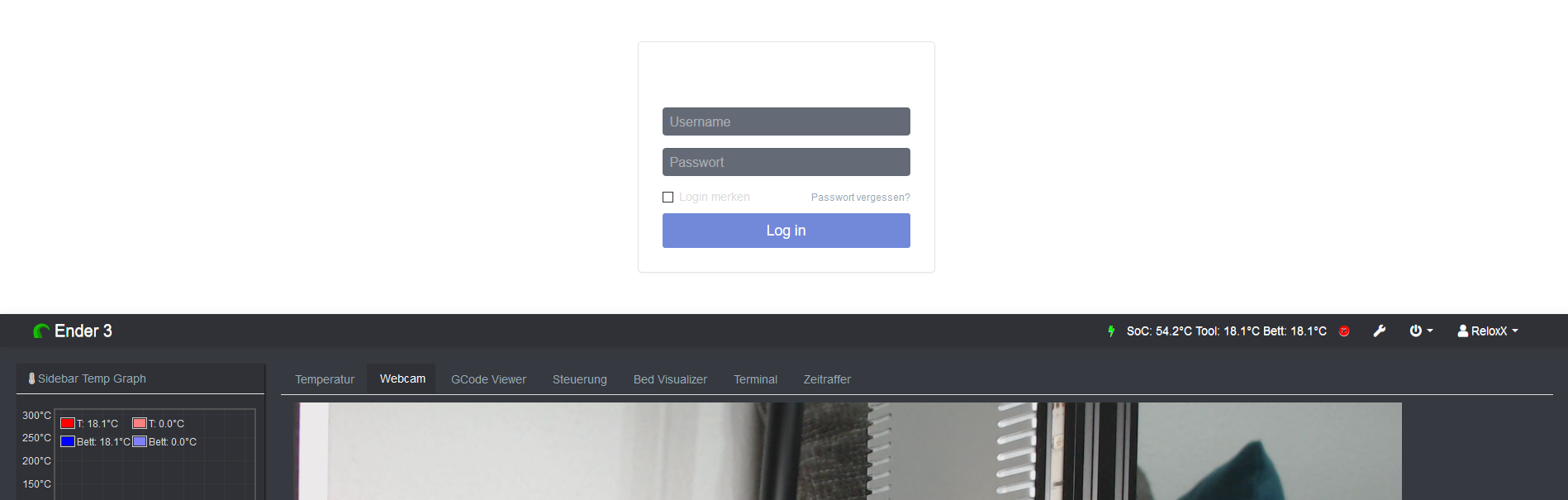
Got some downtime today so installed rc3 and checking out more things. Clicked through everything I could think to click through and not seeing any issues.
 ChrisHeerschap
on 12 Dec 2019
ChrisHeerschap
on 12 Dec 2019
Just tested permissions in rc3.
API Keys and Application Keys seem to bypass permissions.
I set up the default 'Users' group to have only upload and monitor capabilities:
File Download, File List, File Upload, GCODE viewer, Status, Terminal, Timelapse Download, Timelapse List, Webcam, Printer Safety Check: Display printer safety warnings
Then added a group with the abilities to print:
Connection, Control, File Delete, File Download, File List, File Select, File Upload, GCODE viewer, Print, Status, Terminal, Timelapse Admin, Timelapse Delete, Timelapse Download, Timelapse List, Webcam, Action Command Prompt Support: Interact with printer prompts, Printer Safety Check: Display printer safety warnings
Added a user to the default (Upload/monitor only) group, and used it to generate an API key for Cura Slicer. That user API key was able to start and stop prints, and control the printer despite that user not having the permission to do so.
When directly logged in as that user, I was unable to start or stop prints, and had no terminal ot control access, but could do so through Cura with the OctoPrint plugin utilizing the API/Application key.
The desire is for the API user to be able to upload the file with the slicer software, but require an actual user to login and start the print. This may also require the ability to deny API key abilities to users through the granular permissions as well.
 gcurtis79
on 13 Dec 2019
gcurtis79
on 13 Dec 2019
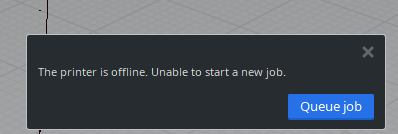
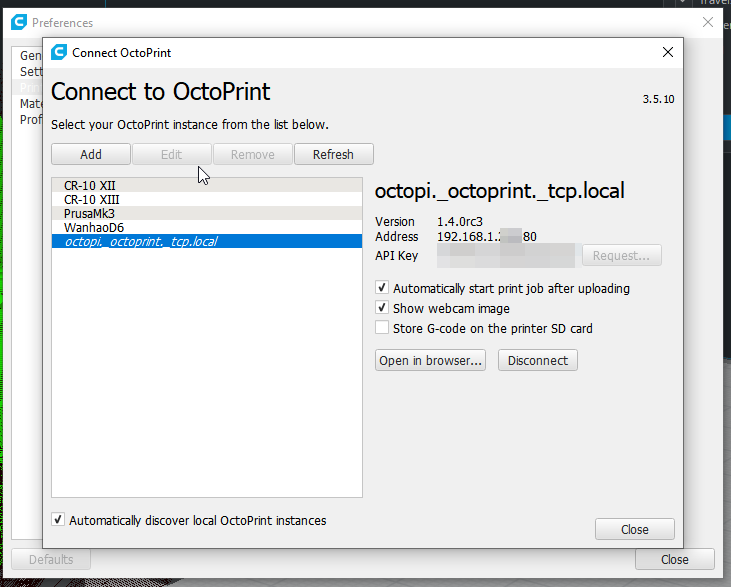
After I upgraded I lost the ability to send files to Octoprint from Cura 4.4. Worked in RC2. As you can see it's connected. Disconnectng and reconnecting or rebooting doesn't restore the link.
 Deneteus
on 13 Dec 2019
Deneteus
on 13 Dec 2019
EDIT: I forgot to mention that I had this problem also a few days BEFORE rc3
EDIT2 : It works fine on my linux machine, so I think it's something related to windows/mdns again....
avahi/mdns is working again annnnnd...
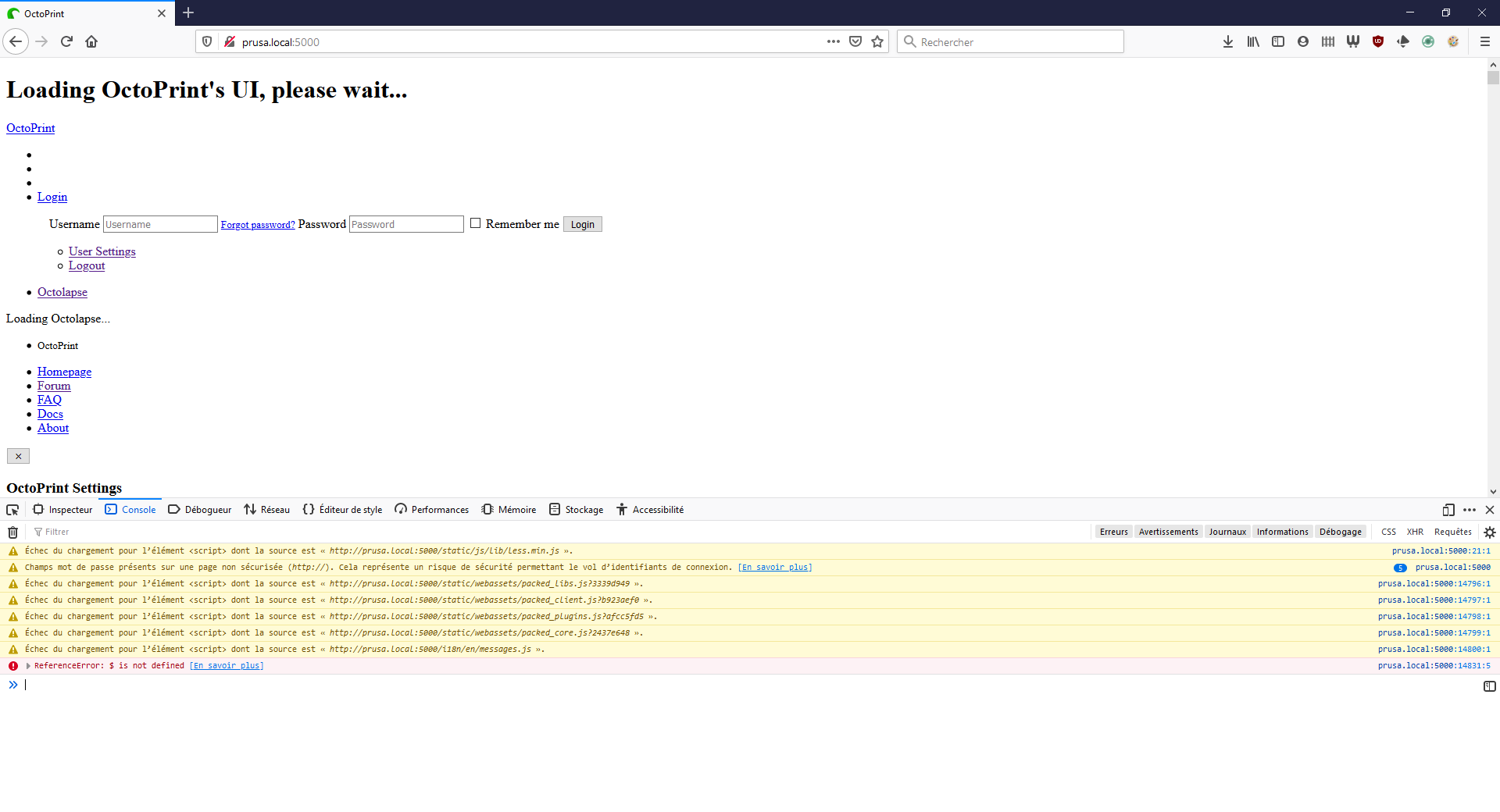
With some variant too :
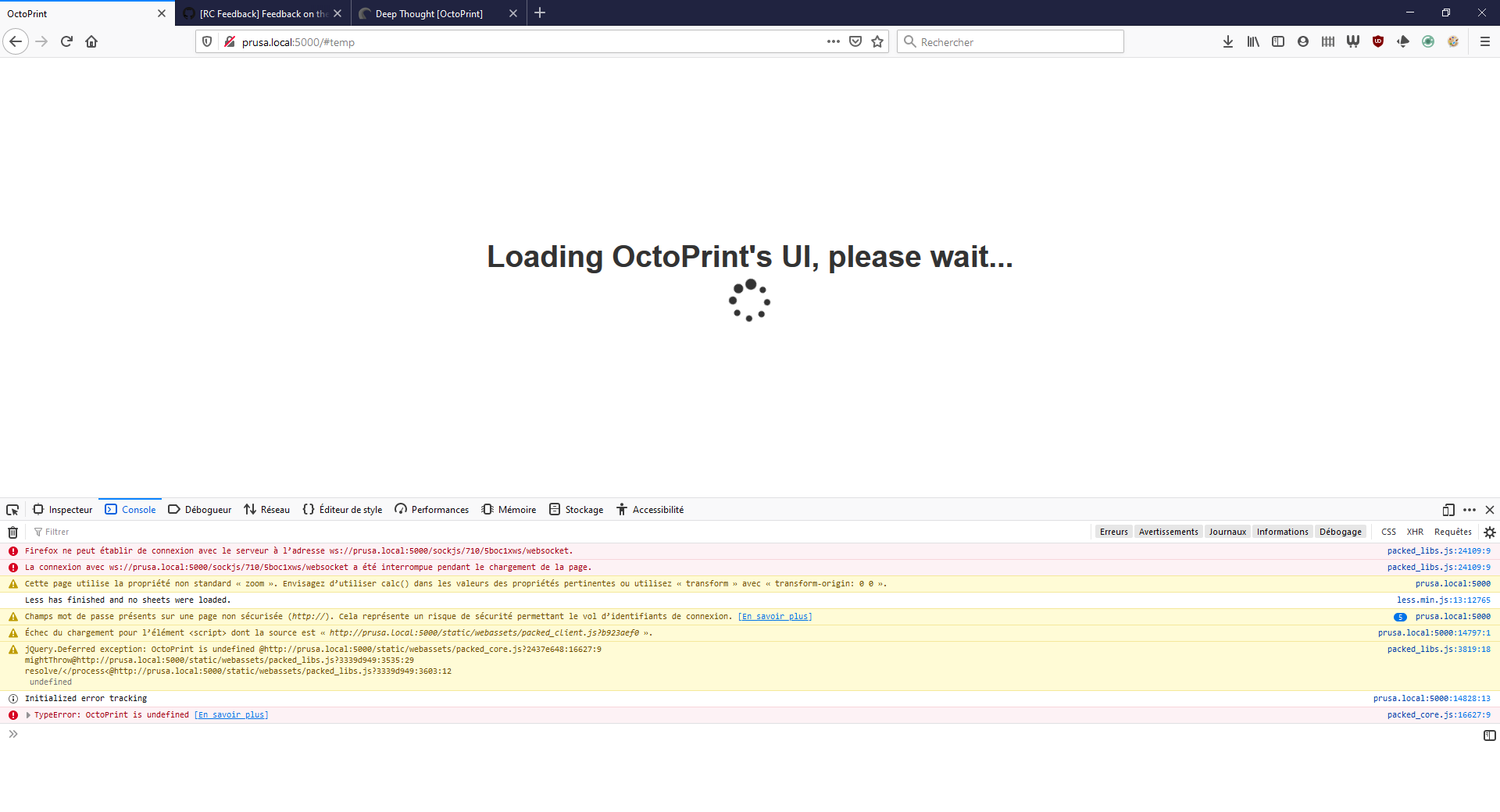
If I click on the url of source unable to load, it loads fine in a tabs
If I access the instance by its IP, it's OK... That's let me think it's still something about mdns, but I'll let you judge if it's the case here
After a few clear cache & ctrl+f5, I managed to get into it but there was some errors in the browser console :
Cette page utilise la propriété non standard « zoom ». Envisagez d’utiliser calc() dans les valeurs des propriétés pertinentes ou utilisez « transform » avec « transform-origin: 0 0 ». prusa.local:5000
Less has finished and no sheets were loaded. less.min.js:13:12765
Champs mot de passe présents sur une page non sécurisée (http://). Cela représente un risque de sécurité permettant le vol d’identifiants de connexion. 4 prusa.local:5000
Champs mot de passe présents sur une page non sécurisée (http://). Cela représente un risque de sécurité permettant le vol d’identifiants de connexion. prusa.local:5000
Starting dependency resolution... packed_core.js:16949:13
... dependency resolution done packed_core.js:17059:13
Initial application setup done, connecting to server... packed_core.js:17369:13
Initialized error tracking prusa.local:5000:14828:13
Firefox ne peut établir de connexion avec le serveur à l’adresse http://prusa.local:5000/sockjs/874/bw4eizlz/eventsource. packed_libs.js:24673:21
Échec du chargement pour l’élément <script> dont la source est « http://prusa.local:5000/sockjs/874/v5nzcuy1/jsonp?c=_jp.a1uz1sp ». prusa.local:5000:1:1
Firefox ne peut établir de connexion avec le serveur à l’adresse ws://prusa.local:5000/sockjs/874/kstfgun0/websocket. packed_libs.js:24109:9
Connected to the server packed_core.js:14996:13
Error calling onDataUpdaterReconnect on view model GcodeViewModel : startCanvas@http://prusa.local:5000/static/webassets/packed_core.js?2437e648:10223:9
init@http://prusa.local:5000/static/webassets/packed_core.js?2437e648:10879:13
doRender@http://prusa.local:5000/static/webassets/packed_core.js?2437e648:10979:36
clear@http://prusa.local:5000/static/webassets/packed_core.js?2437e648:10971:18
clear@http://prusa.local:5000/static/webassets/packed_core.js?2437e648:9742:28
GcodeViewModel/self.clear@http://prusa.local:5000/static/webassets/packed_core.js?2437e648:9155:22
GcodeViewModel/self.reset@http://prusa.local:5000/static/webassets/packed_core.js?2437e648:9130:18
GcodeViewModel/self.onDataUpdaterReconnect@http://prusa.local:5000/static/webassets/packed_core.js?2437e648:9460:18
callViewModelIf@http://prusa.local:5000/static/webassets/packed_core.js?2437e648:16528:34
callViewModelsIf/<@http://prusa.local:5000/static/webassets/packed_core.js?2437e648:16474:28
Pn@http://prusa.local:5000/static/webassets/packed_libs.js?3339d949:11208:530
ur/<@http://prusa.local:5000/static/webassets/packed_libs.js?3339d949:11229:66
callViewModelsIf@http://prusa.local:5000/static/webassets/packed_core.js?2437e648:16472:7
callViewModels@http://prusa.local:5000/static/webassets/packed_core.js?2437e648:16466:21
DataUpdater/self._onConnectMessage/<@http://prusa.local:5000/static/webassets/packed_core.js?2437e648:14980:31
fire@http://prusa.local:5000/static/webassets/packed_libs.js?3339d949:3269:31
fireWith@http://prusa.local:5000/static/webassets/packed_libs.js?3339d949:3399:7
Deferred/</deferred[tuple[0]]@http://prusa.local:5000/static/webassets/packed_libs.js?3339d949:3737:36
DataUpdater/self.initialized@http://prusa.local:5000/static/webassets/packed_core.js?2437e648:14856:39
onServerConnect/<@http://prusa.local:5000/static/webassets/packed_core.js?2437e648:17412:33
fire@http://prusa.local:5000/static/webassets/packed_libs.js?3339d949:3269:31
fireWith@http://prusa.local:5000/static/webassets/packed_libs.js?3339d949:3399:7
done@http://prusa.local:5000/static/webassets/packed_libs.js?3339d949:9306:14
callback/<@http://prusa.local:5000/static/webassets/packed_libs.js?3339d949:9549:17
sentryWrapped@http://prusa.local:5000/static/webassets/packed_core.js?2437e648:12087:39315
packed_core.js:16538:17
Finalizing application startup packed_core.js:17334:17
Going to bind 37 view models... packed_core.js:17209:21
Binding element to streamLoading packed_core.js:12087:44093
Did not bind view model UsageViewModel to target #wizard_plugin_tracking since it does not exist packed_core.js:17262:41
Did not bind view model SoftwareUpdateViewModel to target #softwareupdate_confirmation_dialog since it does not exist packed_core.js:17262:41
Did not bind view model SoftwareUpdateViewModel to target #wizard_plugin_softwareupdate since it does not exist packed_core.js:17262:41
User gege logged in packed_core.js:3334:29
... binding done packed_core.js:17301:21
Application startup complete packed_core.js:17313:21
Stream Closing. packed_core.js:12087:44093
But it's really unreliable (the next refresh leads to the same problem again)
There was nothing interesting in octoprint.log btw
2019-12-13 08:56:31,072 - octoprint.server.heartbeat - INFO - Server heartbeat <3
2019-12-13 08:56:35,078 - octoprint.server.util.sockjs - INFO - Client connection closed: 192.168.1.129
2019-12-13 08:56:45,531 - octoprint.plugins.tracking - INFO - Sent tracking event ping, payload: {'octoprint_uptime': 60307}
2019-12-13 08:59:35,718 - octoprint.server.util.sockjs - INFO - New connection from client: 192.168.1.129
2019-12-13 08:59:36,191 - octoprint.server.util.flask - INFO - Passively logging in user gege from 192.168.1.129
2019-12-13 08:59:38,322 - octoprint.plugins.announcements - INFO - Loaded channel _important from https://octoprint.org/feeds/important.xml in 0.28s
2019-12-13 08:59:38,884 - octoprint.plugins.announcements - INFO - Loaded channel _releases from https://octoprint.org/feeds/releases.xml in 0.24s
2019-12-13 08:59:40,128 - octoprint.plugins.announcements - INFO - Loaded channel _blog from https://octoprint.org/feeds/octoblog.xml in 0.25s
2019-12-13 08:59:40,459 - octoprint.plugins.announcements - INFO - Loaded channel _plugins from https://plugins.octoprint.org/feed.xml in 0.24s
2019-12-13 08:59:40,860 - octoprint.plugins.announcements - INFO - Loaded channel _octopi from https://octoprint.org/feeds/octopi.xml in 0.27s
2019-12-13 08:59:41,357 - octoprint.plugins.pluginmanager - INFO - Loaded plugin notices data from https://plugins.octoprint.org/notices.json
2019-12-13 08:59:42,746 - octoprint.server.util.sockjs - INFO - User gege logged in on the socket from client 192.168.1.129
2019-12-13 09:00:20,487 - tornado.access - WARNING - 404 GET /favicon.ico (192.168.1.129) 28.50ms
2019-12-13 09:01:55,485 - octoprint.server.util.sockjs - INFO - New connection from client: 192.168.1.129
2019-12-13 09:01:56,224 - octoprint.server.util.sockjs - INFO - New connection from client: 192.168.1.129
2019-12-13 09:01:56,511 - octoprint.server.util.flask - INFO - Passively logging in user gege from 192.168.1.129
2019-12-13 09:01:58,047 - octoprint.server.util.sockjs - INFO - User gege logged in on the socket from client 192.168.1.129
2019-12-13 09:02:00,203 - octoprint.server.util.sockjs - INFO - Client connection closed: 192.168.1.129
2019-12-13 09:02:17,643 - octoprint.printer.standard.job - INFO - Print job selected - origin: local, path: 20191212-142443-Christmas_tree_2013-11-17_0.2-15-.gcode, owner: gege, user: gege
2019-12-13 09:06:04,620 - octoprint.server.util.sockjs - INFO - New connection from client: 192.168.1.129
2019-12-13 09:06:10,039 - octoprint.server.util.sockjs - INFO - Client connection closed: 192.168.1.129
2019-12-13 09:06:16,846 - octoprint.server.util.sockjs - INFO - Client connection closed: 192.168.1.129
@reloxx13
Works fine in secure mode.
I take it you mean safe mode by that? Then it's caused by a third party plugin. I cannot reproduce this here locally on any of my test installs either.
@gcurtis79
The desire is for the API user to be able to upload the file with the slicer software, but require an actual user to login and start the print. This may also require the ability to deny API key abilities to users through the granular permissions as well.
I agree. I'll try to reproduce this on my end because I certainly implemented it so it should do what you describe as the expected behaviour.
@Deneteus
After I upgraded I lost the ability to send files to Octoprint from Cura 4.4. Worked in RC2. As you can see it's connected. Disconnectng and reconnecting or rebooting doesn't restore the link.
I'll need logs and such to look into this, please open a ticket and fill out the full template. Thank you.
@gege2b
It works fine on my linux machine, so I think it's something related to windows/mdns again....
I tend to agree, this is something with your local environment. It looks like it's not loading all assets it needs to load and hence is in a broken state. I cannot reproduce this here locally. Take a look at the network tab (you'll need to reload for that to populate), maybe that gives some hints. I think it's "Réseau" in your screenshots.
foosel
on 13 Dec 2019
@deneteus, please see my response to the issue you opened at the plugin issue queue:
https://github.com/fieldOfView/Cura-OctoPrintPlugin/issues/138
Make sure that your printer is connected in OctoPrint before starting a print in Cura.
 fieldOfView
on 13 Dec 2019
fieldOfView
on 13 Dec 2019
@gcurtis79 So I just replicated your setup and checked the user's API key and it was properly limited. Which brings me to a question...
and used it to generate an API key for Cura Slicer
I take it you mean through the appkeys workflow in Cura? Where you logged in as that user when you completed that workflow? If the plugin doesn't specify a user name for which to request a key (which it doesn't seem to, maybe something that should be added @fieldOfView, or at least tell the user to make sure they are logged in with the intended account?), the appkeys dialog will be displayed to all users and the key generated to whoever acknowledges the request:
POST /plugin/appkeys/request
[...]
The optional
userparameter should be used to limit the authorization process to a specified user. If the parameter is left unset, any user will be able to complete the authorization process and grant access to the app with their account. E.g. if a usermestarts the process in an app, the app should request that name from the user and use it in theuserparameter. OctoPrint will then only display the authorization request on browsers the usermeis logged in on.
(from here, emphasis mine)
So if you were logged in as admin when you completed the workflow, you got an admin key, not one for your user.
Could you please check what appkeys exist in your system and for which users, and that the key in Cura is actually for the user you expect it to be? You can do so via Settings > Application Keys.
foosel
on 13 Dec 2019
After I upgraded I lost the ability to send files to Octoprint from Cura 4.4. Worked in RC2. As you can see it's connected. Disconnectng and reconnecting or rebooting doesn't restore the link.
Running Cura 4.4 here with rc3 and have now sent 3 prints direct, last one sent a couple minutes ago. Had 502 errors in rc1 but it's been 👍 since rc2.
ChrisHeerschap
on 13 Dec 2019
Just tested rc3 on Debian GNU/Linux 10 (buster) on an x86-64 PC, without an attached printer, to see if uploading a gcode file with an Umlaut in its name works, even if LC_CTYPE is set to C (which python3 really hates).
:heavy_check_mark: it does!
 schumar
on 13 Dec 2019
schumar
on 13 Dec 2019
Not sure if this is intentional, but it looks like the print button within the file manager is gray if the gcode file is selected. This does not seem to affect the Print button itself. Here is an example:

Here is a post in the discourse pages where this was discovered.
 FormerLurker
on 13 Dec 2019
FormerLurker
on 13 Dec 2019
Have tested with a Gigabot and an Anet A8. Everything is working well.
 jim-thompson
on 13 Dec 2019
jim-thompson
on 13 Dec 2019
@FormerLurker that's always been this way because that button is not "print" but "select and print" and it doesn't make much sense to select that which is already selected.
But you are the third person in as many weeks to get puzzled by this so I'll change it in 1.4.1 I guess, if I don't forget ;)
foosel
on 13 Dec 2019
@foosel, thank you!
I've never noticed an issue until it was reported in the discourse page, but it seemed sensible to me for it to print a file that was already selected. However, I suspected something like this would not slip by your eagle like eyes, and that it was indeed by design.
FormerLurker
on 13 Dec 2019
I'm running Klipper firmware on my test printer (Ender 3 Pro) and when I
cancel a print, it seems to get stuck and I can't restart another until I
pass a 'firmware_restart' command to Klipper.
I have not confirmed if it is a firmware bug, or OctoPrint. Will test more
later and report back.
On Fri, Dec 13, 2019, 4:35 PM FormerLurker notifications@github.com wrote:
@foosel https://github.com/foosel, thank you!
I've never noticed an issue until it was reported in the discourse page,
but it seemed sensible to me for it to print a file that was already
selected. However, I suspected something like this would not slip by your
eagle like eyes, and that it was indeed by design.—
You are receiving this because you were mentioned.
Reply to this email directly, view it on GitHub
https://github.com/foosel/OctoPrint/issues/3389?email_source=notifications&email_token=AK35UJQHZ3BEXLMPZWVLZ4LQYQE2TA5CNFSM4JZ6YMZ2YY3PNVWWK3TUL52HS4DFVREXG43VMVBW63LNMVXHJKTDN5WW2ZLOORPWSZGOEG3ONAQ#issuecomment-565634690,
or unsubscribe
https://github.com/notifications/unsubscribe-auth/AK35UJRF6S6AMFA76SQRYLLQYQE2TANCNFSM4JZ6YMZQ
.
gcurtis79
on 13 Dec 2019
Is it just me or is the "DisplayLayerProgress" plugin broken in RC3? Initially wouldn't seem read height from a gcode file but on clearing out all my plugins and reinstalling just "DisplayLayerProgress" for testing I can't even enable it now.
Just wanted a "sanity check" before taking this up with the author - Cheers!
 Andy-ABTec
on 14 Dec 2019
Andy-ABTec
on 14 Dec 2019
@Andy-ABTec see https://github.com/foosel/OctoPrint/issues/3360#issuecomment-564958889. Plugin's depending on long (!) deprecated field, author is informed.
foosel
on 15 Dec 2019
Thanks! Sorry I missed the earlier reference...
Andy-ABTec
on 15 Dec 2019
@foosel I'll look into getting a user API key, I was using Cura to fetch the key, and I was logged in as a restricted user, but it may have bypassed it how you thought.
Other note: M73 Progress is not right. "M73 P100" only fills the bar (I didn't count pixels) about 10%.
EDIT: Also now that I think about it, the M73 Progress might be a marlin thing, not an OctoPrint thing. Just confirmed this, I had "#define SHOW_REMAINING_TIME" enabled and that messed it up'
I'm running Klipper firmware on my test printer (Ender 3 Pro) and when I cancel a print, it seems to get stuck and I can't restart another until I pass a 'firmware_restart' command to Klipper. I have not confirmed if it is a firmware bug, or OctoPrint. Will test more later and report back.
This was likely a Klipper issue. Switched back to Marlin bugfix-2.0.x and it's fine.
gcurtis79
on 16 Dec 2019
I've run 5 prints now on rc3 to a Prusa MK3 with MMU2S. All seemed to work fine. GCODE viewer worked well. Time-lapse issue from RC1 is fixed. Some plug-in issues, but that is up to the plug-in authors to fix.
 JohnOCFII
on 16 Dec 2019
JohnOCFII
on 16 Dec 2019
I was logged in as a restricted user, but it may have bypassed it how you thought.
@gcurtis79 you can check what user the AppKey is associated with in the OctoPrint settings. See Features / Application Keys.
fieldOfView
on 16 Dec 2019
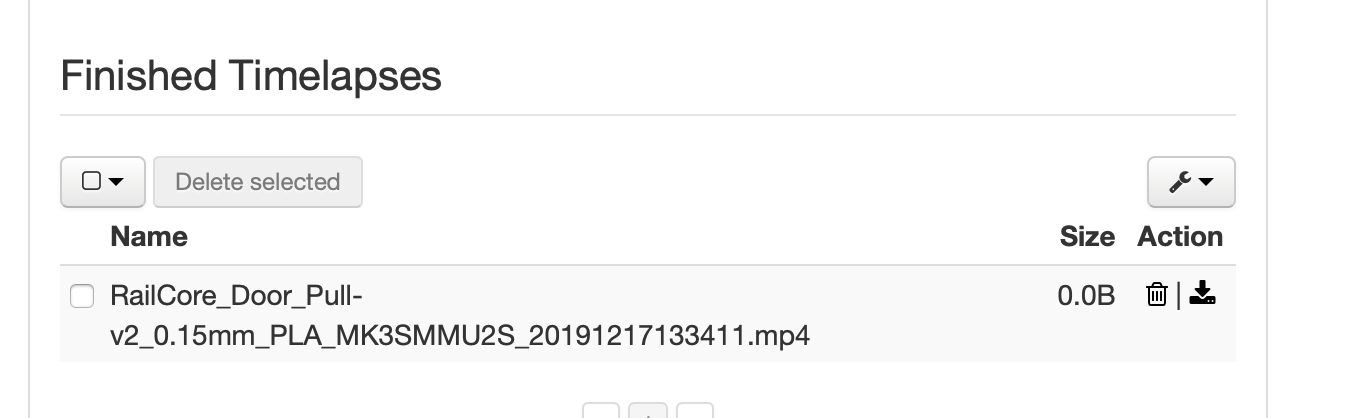
I switched time-lapse to use libx264 and while the time-lapse was created successfully, the size reported in the GUI is 0 bytes. I'll create a separate ticket. as well but wanted to get this here as well. https://github.com/foosel/OctoPrint/issues/3396
JohnOCFII
on 17 Dec 2019
@foosel
Could you please check what appkeys exist in your system and for which users, and that the key in Cura is actually for the user you expect it to be? You can do so via Settings > Application Keys.
I just tested again, making sure to be logged in as the api_user to get the API key (that has limited access) and although I can not move or preheat the printer within Cura, slicing and clicking "Print with OctoPrint" does in fact upload the file (allowed) and start the print (shouldn't be allowed).
gcurtis79
on 18 Dec 2019
@gcurtis79 I've created a ticket for it: https://github.com/foosel/OctoPrint/issues/3398
@JohnOCFII Thanks!
At all of you, I'm currently wrapping things up for 2019 here and will soon drop the hammer for good for this year. I'll take care of everything open or to be opened when I'm back at work after a battery recharge in mid January. Happy Holidays and Happy New Year! 🎄
foosel
on 18 Dec 2019
Thank you and enjoy!
ChrisHeerschap
on 18 Dec 2019
I seem to be getting a lot of failed time-lapse renders on 1.4.0rc3 that fail with "Unknown Error" return code 255. Any ideas?

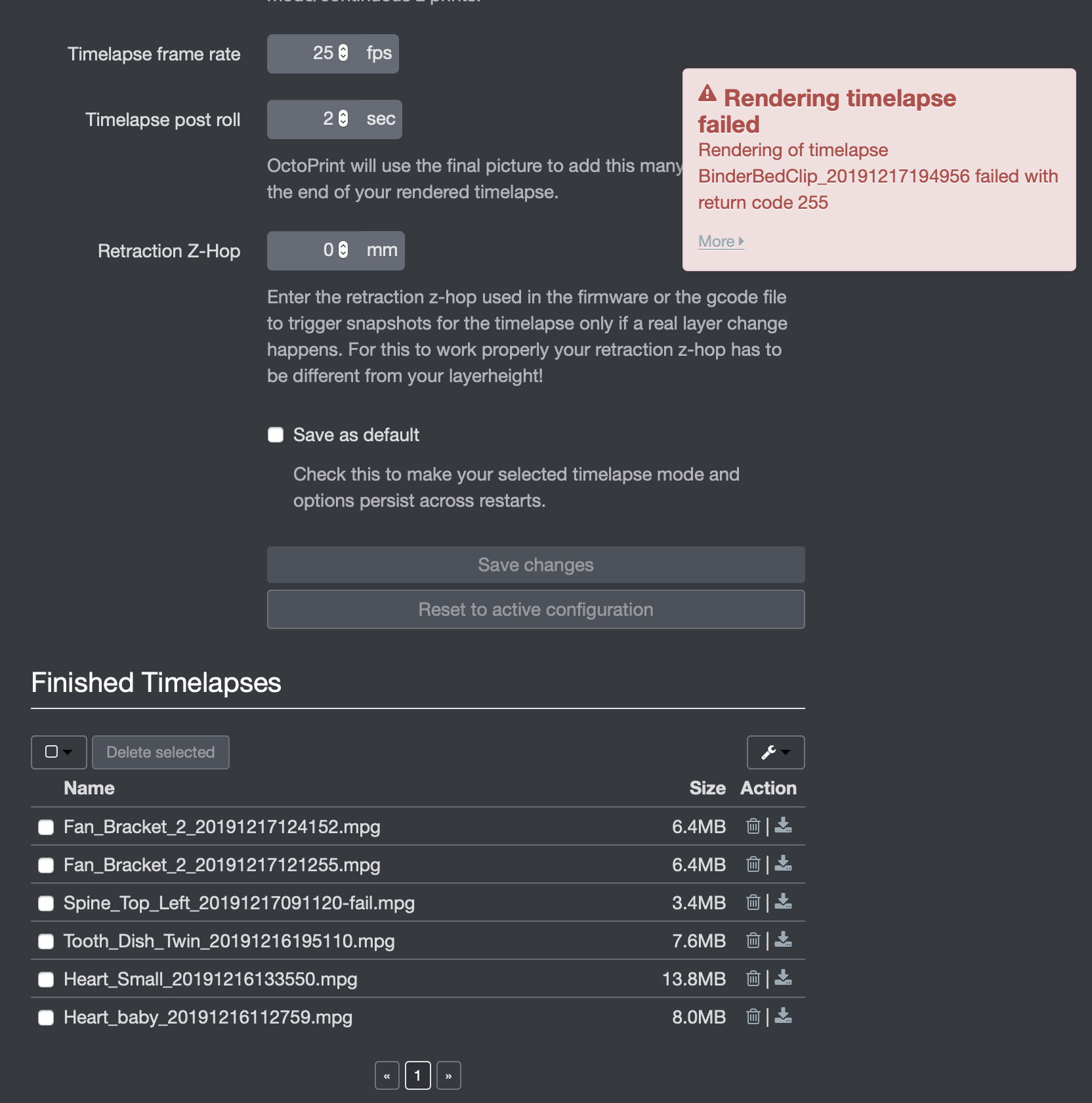
Thanks
Plasma
 PlasmaSoftUK
on 23 Dec 2019
PlasmaSoftUK
on 23 Dec 2019
Had some time to perform some prints (48h)
Klipper with Ubuntu 18 System.
==> No problem
Btw. Happy Holidays and a happy new year
 schnello
on 23 Dec 2019
schnello
on 23 Dec 2019
Hi Gina,
I did a major upgrade from OctoPi 0.13 to 0.17 (on a new SD card) and thought why not try OctoPrint 1.4.0rc3. I was quite happy that the OctoPrint Backup/Restore worked flawlessly and I was up and running with all new releases fairly quickly. Did a few prints using the API to send GCode files from Simplify3D to my TEVO Tarantula running Merlin firmware. No issues at all.
I'll also add my request to enable the "Select and Print" icon also even for already-selected prints.
Thanks so much for all the work you do with this amazing piece of software. And I hope you have a restful well-deserved holiday!
 jbjones27
on 30 Dec 2019
jbjones27
on 30 Dec 2019
Not a huge issue, and probably part of the new permissions system, but I often find I've been logged out. I checked the "Remember me" button but it's seeming like my sessions only last about a day or so. I've clicked through the options to see if there is an auto-timeout configured anywhere and don't see anything like that. I have created a second user to test the access permissions, don't know if that might trigger an auto-logout, or if maybe the issue is possibly something on my browser. (Chrome running at latest version on mac)
If there is some sort of new auto-logout feature, I'd suggest having the ability to disable that, especially for single-user setups. I'm guessing many installs are a simple at-home setup (like mine) and most folks aren't going to want to login repeatedly.
ChrisHeerschap
on 5 Jan 2020
Using Spaghetti Detective, it seems to rely on the PrintStarted events, have those been replaced by something else?
 ciordia9
on 8 Jan 2020
ciordia9
on 8 Jan 2020
Can someone test if API key checking is broken? http://octopi/api/settings (without the api key specified!) returns a full settings dict for me. It shouldn't, right?
fieldOfView
on 9 Jan 2020
Hi Aldo.


If my test can help you I've tried to
  send a print using slicer3d changing some character of the API
  key.


This is the result:


Then I've deleted the key.... and the test work 8-|


But the print no.


Leo


  Can someone test if API key checking is broken? http://octopi/api/settings (without
    the api key specified!) returns a full settings dict for me. It
    shouldn't, right?
  —
    You are receiving this because you commented.
    Reply to this email directly, view it on GitHub, or unsubscribe.
  [
{
"@context": "http://schema.org",
"@type": "EmailMessage",
"potentialAction": {
"@type": "ViewAction",
"target": "https://github.com/foosel/OctoPrint/issues/3389?email_source=notifications\u0026email_token=ALKRHMTJUX6IOT7TDYRDTOTQ45IMXA5CNFSM4JZ6YMZ2YY3PNVWWK3TUL52HS4DFVREXG43VMVBW63LNMVXHJKTDN5WW2ZLOORPWSZGOEIQ7FCI#issuecomment-572650121",
"url": "https://github.com/foosel/OctoPrint/issues/3389?email_source=notifications\u0026email_token=ALKRHMTJUX6IOT7TDYRDTOTQ45IMXA5CNFSM4JZ6YMZ2YY3PNVWWK3TUL52HS4DFVREXG43VMVBW63LNMVXHJKTDN5WW2ZLOORPWSZGOEIQ7FCI#issuecomment-572650121",
"name": "View Issue"
},
"description": "View this Issue on GitHub",
"publisher": {
"@type": "Organization",
"name": "GitHub",
"url": "https://github.com"
}
}
]
 Lantoit
on 9 Jan 2020
Lantoit
on 9 Jan 2020
@Lantoit thanks for testing. Attachments in emails don't come across in github issues, so I cannot see the images, but the text says enough. I think this is a sideeffect of the granular permission system, but lets see what @foosel has to say about this when she is back.
Edit: Confirmed with curl http://octopi/api/settings (ie: no API key or other headers specified, no client-side cache) that 1.4.0 RC3 returns the full settings dict and 1.3.12 returns a Forbidden error.
fieldOfView
on 9 Jan 2020
@fieldOfView confirmed as well, will look into it: #3425
@ciordia9 they haven't, but there seems to be an issue, tracked in #3402
@ChrisHeerschap created #3426 for it. It's certainly not intentional, and @PowerWiesel also mentioned it to me. Haven't yet noticed it myself, but I'll try to reproduce and hunt it down 🏹
@PlasmaSoftUK looks like for some reason the ffmpeg process is dying. The question is why, and also how OctoPrint could influence that even because it just calls it and then waits for it to finish its job and that's it. What happens when you switch back to 1.3.12 on the same install, does the issue tag along or does it vanish?
At everyone monitoring this ticket, has anyone else seen an increase in timelapse render failures?
foosel
on 13 Jan 2020
@PlasmaSoftUK, are you rendering in H.264? I've noticed that rendering dies in octolapse too using that codec, especially when the images are high res, the bitrate is high, and there are a lot of images. Probably has something to do with memory usage, but I'm not sure. I've not been able to get any error messages from ffmpeg/avconv, though I just added support for logging stdout and stderr if the process fails for some reason. Maybe I'll be able to catch ffmpeg in the act of dying.
Also, FYI, this has NEVER happened in my development environment, no matter how huge my image files are. I'm running Windows with a ton of ram, though, so maybe that has something to do with it. I'll try to capture a log from the PI.
If you can post a zip of your images somewhere, I will see if I can trigger an error.
FormerLurker
on 13 Jan 2020
FYI, I just got an out-of-memory error while rendering a h.264 video with 500 1mb frames at a bitrate of 64M. I rendered two of these, but the second one crashed. I will keep investigating this.
FormerLurker
on 13 Jan 2020
I'm using "mpeg2video" not H264 with the same camera and settings I was using happily under 1.3.x and I never had a failure. I'm running it on a Pi 4 with 4Gb.
Sent from my iPhone
On 13 Jan 2020, at 15:49, FormerLurker notifications@github.com wrote:
@PlasmaSoftUK, are you rendering in H.264? I've noticed that rendering dies in octolapse too using that codec, especially when the images are high res, the bitrate is high, and there are a lot of images. Probably has something to do with memory usage, but I'm not sure. I've not been able to get any error messages from ffmpeg/avconv, though I just added support for logging stdout and stderr if the process fails for some reason. Maybe I'll be able to catch ffmpeg in the act of dying.Also, FYI, this has NEVER happened in my development environment, no matter how huge my image files are. I'm running Windows with a ton of ram, though, so maybe that has something to do with it. I'll try to capture a log from the PI.
If you can post a zip of your images somewhere, I will see if I can trigger an error.
—
You are receiving this because you were mentioned.
Reply to this email directly, view it on GitHub, or unsubscribe.
PlasmaSoftUK
on 13 Jan 2020
@PlasmaSoftUK, maybe your issue is not memory related. It looks like error code 255 means the process was terminated, but I'm not 100% sure it means that in every case. It's hard to see how the timelapse module code would be terminating the process, unless it's some problem with sarge. I do see new code for parsing progress from stdout, but I'm not sure how that would terminate the process. I wonder if forcing an exception while reading from stdout would cause ffmpeg to terminate.
FormerLurker
on 13 Jan 2020
Installing plugins on Windows with Python 3 doesn't work. Ticket opened https://github.com/foosel/OctoPrint/issues/3428.
 jneilliii
on 16 Jan 2020
jneilliii
on 16 Jan 2020
Everyone... does anyone else face issues with serial port autodetection with the RC? Especially if more than one potential device is connected to the system?
I'm trying to understand #3394, but so far haven't found a pattern of "used to work and now doesn't" with my own hardware on hand here...
foosel
on 20 Jan 2020
Everyone... does anyone else face issues with serial port autodetection with the RC? Especially if more than one potential device is connected to the system?
I'm trying to understand #3394, but so far haven't found a pattern of "used to work and now doesn't" with my own hardware on hand here...
Works fine for me with a Prusa MK3S with MMU2S. Only other device connected to the Pi is a Logitech USB camera.
JohnOCFII
on 20 Jan 2020
Il 20/01/20 15:18, Gina Häußge ha
  scritto:


  Everyone... does anyone else face issues with serial port
    autodetection with the RC? Especially if more than one potential
    device is connected to the system?
  I'm trying to understand #3394, but so far haven't found a
    pattern of "used to work and now doesn't" with my own hardware
    on hand here...

I've set the speed on autodetection and I've changed from the
  board speed from  115200 to 250000 (Rumba board ATmega) without
  problem with RC3.
I've a PSU with 12 volt service and a 12 to 5 adapter for Rumba
  logic and Octoprint Pi3A+ board,  when is needed the Rumba send
  the "power up" signal to PSU.
Leo
Everyone... does anyone else face issues with serial port autodetection with the RC? Especially if more than one potential device is connected to the system?
Another Prusa Mk3 running 1.4.0rc3 with no problems autodetecting. Mind you it had just been connected with non-auto options but I don't know if it caches.
Tried with an Anycubic i3 Mega (250000baud) and that also worked. Unfortunately in neither case I had more than one serial device available. I've got a Raspberry Pi console cable and I can connect that and see what happens.
Also asked a friend with a Crealtiy Ender 3 to give it a try. He had no problem but he's on the latest non-RC.
ChrisHeerschap
on 27 Jan 2020
My stock Ender 3 can be a pain and may take 3 or 4 attempts to connect. Sometimes I have to reboot both the Pi and the printer to get a connection.
Don't know if its related but I can't tick "Save connection settings" or "Auto-connect on server startup" when the Pi is connected.
Easy to reproduce so happy to provide logs if it will help (but not just now I'm in the middle of a 17Hr print :sunglasses:)
Andy B.
Andy-ABTec
on 27 Jan 2020
Don't know if it's just me being thick, but I'm running:
OctoPrint version : 1.4.0rc3
OctoPi version : 0.17.0
Which I thought was meant to be Python 3 based; so how come: -
pi@octopi:~ $ cd oprint
pi@octopi:~/oprint $ cd lib
pi@octopi:~/oprint/lib $ ls
python2.7
pi@octopi:~/oprint/lib $ cd python2.7/
pi@octopi:~/oprint/lib/python2.7 $ ls
_abcoll.py genericpath.pyc posixpath.pyc stat.py
_abcoll.pyc lib-dynload re.py stat.pyc
abc.py linecache.py re.pyc types.py
abc.pyc linecache.pyc site-packages types.pyc
codecs.py locale.py site.py UserDict.py
codecs.pyc locale.pyc site.pyc UserDict.pyc
copy_reg.py no-global-site-packages.txt sre_compile.py warnings.py
copy_reg.pyc ntpath.py sre_compile.pyc warnings.pyc
distutils ntpath.pyc sre_constants.py _weakrefset.py
encodings orig-prefix.txt sre_constants.pyc _weakrefset.pyc
fnmatch.py os.py sre_parse.py
fnmatch.pyc os.pyc sre_parse.pyc
genericpath.py posixpath.py sre.py
Me confused!
Andy-ABTec
on 27 Jan 2020
OctoPrint 1.4.0 will be able to run on Python 3, but upgrading an older Python 2 installation of OctoPrint will not magically upgrade to using Python 3. You would have to setup a fresh Python 3 (virtual)environment.
fieldOfView
on 27 Jan 2020
OK thanks for that, I just thought fresh install of OctoPrint 1.4.0rc3 and OctoPi 0.17.0 would do it, no worries...
Andy-ABTec
on 27 Jan 2020
1.4.0rc4 is out, new ticket is #3432. Thanks everyone!
foosel
on 28 Jan 2020
Related issues
 bbatchelder
·
120Comments
bbatchelder
·
120Comments
 lakay
·
44Comments
foosel
·
67Comments
lakay
·
44Comments
foosel
·
67Comments
 devildant
·
59Comments
devildant
·
59Comments
 razerraz
·
88Comments
razerraz
·
88Comments
Most helpful comment
@gcurtis79 I've created a ticket for it: https://github.com/foosel/OctoPrint/issues/3398
@JohnOCFII Thanks!
At all of you, I'm currently wrapping things up for 2019 here and will soon drop the hammer for good for this year. I'll take care of everything open or to be opened when I'm back at work after a battery recharge in mid January. Happy Holidays and Happy New Year! 🎄