Octoprint: shredded moving while printing circle
What were you doing?
I want to print this: https://www.thingiverse.com/thing:2105393
It works with 1.3.8 but not with 1.3.9
What did you expect to happen?
A good and smooth print.
What happened instead?
Always when printing circles or round lines it makes shreded moves
Did the same happen when running OctoPrint in safe mode?
yes
Version of OctoPrint
1.3.9
Operating System running OctoPrint
Octopi 0.15.1
Printer model & used firmware incl. version
Anycubic Kossel Linear Plus
Marlin 1.1.9
Browser and version of browser, operating system running browser
firefox and chromium on ubuntu 18.04
Link to octoprint.log
https://gist.github.com/eivilo/22fcd19018bfd20be230461a432eee32
Link to contents of terminal tab or serial.log
Link to contents of Javascript console in the browser
Screenshot(s)/video(s) showing the problem:
I have read the FAQ.
 eivilo
All 144 comments
Please provide _all_ requested information and a file with which to reproduce. Without that information this ticket cannot be looked into and will be closed. Thanks.
 foosel
on 27 Aug 2018
foosel
on 27 Aug 2018
I have already provided the file to reproduce: https://www.thingiverse.com/thing:2105393
What information is missing please ?
eivilo
on 27 Aug 2018
I'm running Marlin 1.1.9 on a Kossel, Octoprint 1.3.9 and first noticed the stutters (erratic movement on the hot end) when printing the top smoke stack on a #3D Benchy. The rest of the object printed flawlessly and smooth.
It was very helpful that @eivilo had a link to a perfect small file for testing!
With the test file, indeed the hot end literally stutters from one end to the other on those curves after the first layer (first layers are typically always printed slower; half the speed in my gcode).
I then printed the exact same file from the SD card and the stuttering movement was completely gone.
For the "why" it would be that the data coming in over the USB port can't keep up. To see if that might be the case, I slowed the feed rate of the printer down 15% reprinted the exact same file, it printed smoothly again.
I didn't do any testing with an older version of Octoprint to see if there was any difference.
 wabbitguy
on 30 Aug 2018
wabbitguy
on 30 Aug 2018
@eivilo I need a gcode file, not the STL. And I need a serial.log.
foosel
on 31 Aug 2018
wabbitguy
on 1 Sep 2018
@foosel here's my serial.log and gcode file:
eivilo.zip
eivilo
on 1 Sep 2018
@wabbitguy @eivilo assuming you are on a Raspberry Pi, what does vcgencmd get_throttled return?
 tedder
on 13 Sep 2018
tedder
on 13 Sep 2018
@tedder Raspberry Pi 3 Model B Rev 1.2
And vcgencmd get_throttled returns:
throttled=0x0
I don't use WIFI on the PI, it's wired into my ethernet network (cat 6).
Mel
wabbitguy
on 14 Sep 2018
@tedder
root@octopi:/# cat /proc/device-tree/model
Raspberry Pi 2 Model B Rev 1.1
root@octopi:/# vcgencmd get_throttled
throttled=0x0
I use WIFI on the PI.
eivilo
on 14 Sep 2018
@eivilo
It seems like I'm having the exact same problem as you, also using a Pi2 Model B, get_throttled Returns "throttled=0x0" and using WiFi.
Is the Pi 2 just too underpowered too handle the gcode commands?
 HerrChick
on 14 Sep 2018
HerrChick
on 14 Sep 2018
My "works for me"™ solution was to change the movement buffer to 64. I'm using Repetier and anet A8, so plenty of free ram because of the microcontroller used: ATmega1284P.
The default value is 16, which it's small for very tiny segments (circles), 32 should work too If not enough ram available. I guess Marlin has an equivalent value/s to tune the movements buffer. Also I'm using orange pi zero as octoprint host.
 hashashin
on 14 Sep 2018
hashashin
on 14 Sep 2018
@HerrChick I'm using a Pi 3 and it's faster than the Pi 2 and it still stutters at my normal 60mm/s print speed on curves.
@hashashin on the mega/ramps setup I have, not enough memory to bump the buffer to 64 (951 bytes of memory left), but I did bump it to 32. Stutters on every curve except the first layer. The first layer is printed at half speed of the remaining layers (30 vs 60).
I'm using a delta, it is driving three steppers. Thus extra maths, one more stepper, the USB comm speed between the PI and the MEGA, and how Marin 1.1.9/Octo 1.3.9 interact.
My options for a non-stutter "curvy" print are either slow down the print speed, or print off the SD card. I don't have any answers, just work arounds...:-)
wabbitguy
on 14 Sep 2018
I'm having a similar problem with a Monoprice Mini Delta printer.
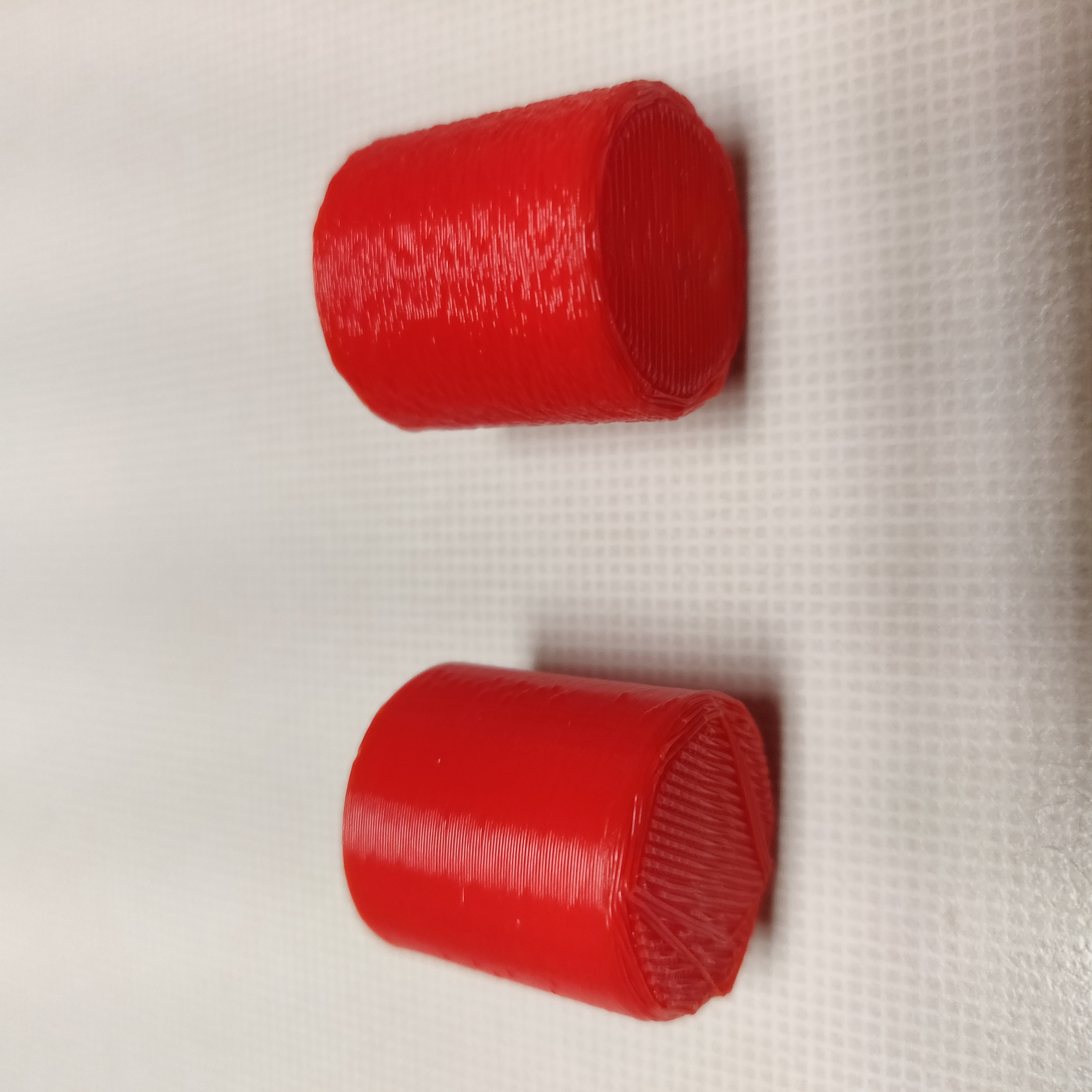
SD on the left, Octoprint on the right. Exact same gcode.

I have tried two different MP Mini Deltas.
RPi 3B (have tried two different units plus a 3B+)
OctoPrint 1.3.9 running on OctoPi 0.15.1, clean install with no plugins except for Monoprice Connection Fix.
No throttling
No obvious communication error
Log and gcode attached.
cat..gcode.zip
 cosmith71
on 15 Sep 2018
cosmith71
on 15 Sep 2018
My "works for me"™ solution was to change the movement buffer to 64. I'm using Repetier and anet A8, so plenty of free ram because of the microcontroller used: ATmega1284P.
The default value is 16, which it's small for very tiny segments (circles), 32 should work too If not enough ram available. I guess Marlin has an equivalent value/s to tune the movements buffer. Also I'm using orange pi zero as octoprint host.
All this is likely just sloppy firmware on the printer itself, for what it's worth.
Just noting some Marlin settings from configuration.h:
- Serial Command Buffer
#define MAX_CMD_SIZE 96
#define BUFSIZE 4
The ASCII buffer for serial input. Individual command line length is set by MAX_CMD_SIZE, and should be long enough to hold a complete G-code line. Set the number of lines with BUFSIZE.
- Transmit to Host Buffer
#define TX_BUFFER_SIZE 0
Transmission to Host buffer size. To save 386 bytes of PROGMEM (and TX_BUFFER_SIZE+3 bytes of SRAM) set to 0. To buffer a simple “ok” you need 4 bytes. An ADVANCED_OK (M105) needs 32 bytes. For debug-echo: 128 bytes for the optimal speed. Other output doesn’t need to be that speedy.
- Host Receive Buffer
//#define RX_BUFFER_SIZE 1024
#if RX_BUFFER_SIZE >= 1024
  // Enable to have the controller send XON/XOFF control characters to
  // the host to signal the RX buffer is becoming full.
  //#define SERIAL_XON_XOFF
#endif
Host Receive buffer size. Without XON/XOFF flow control (see SERIAL_XON_XOFF below) 32 bytes should be enough. To use flow control, set this buffer size to at least 1024 bytes.
 OutsourcedGuru
on 16 Sep 2018
OutsourcedGuru
on 16 Sep 2018
MP Mini Delta
RPi 2B
OctoPrint 1.3.9 running on OctoPi 0.15.1, clean install with no plugins except for Monoprice Connection Fix.
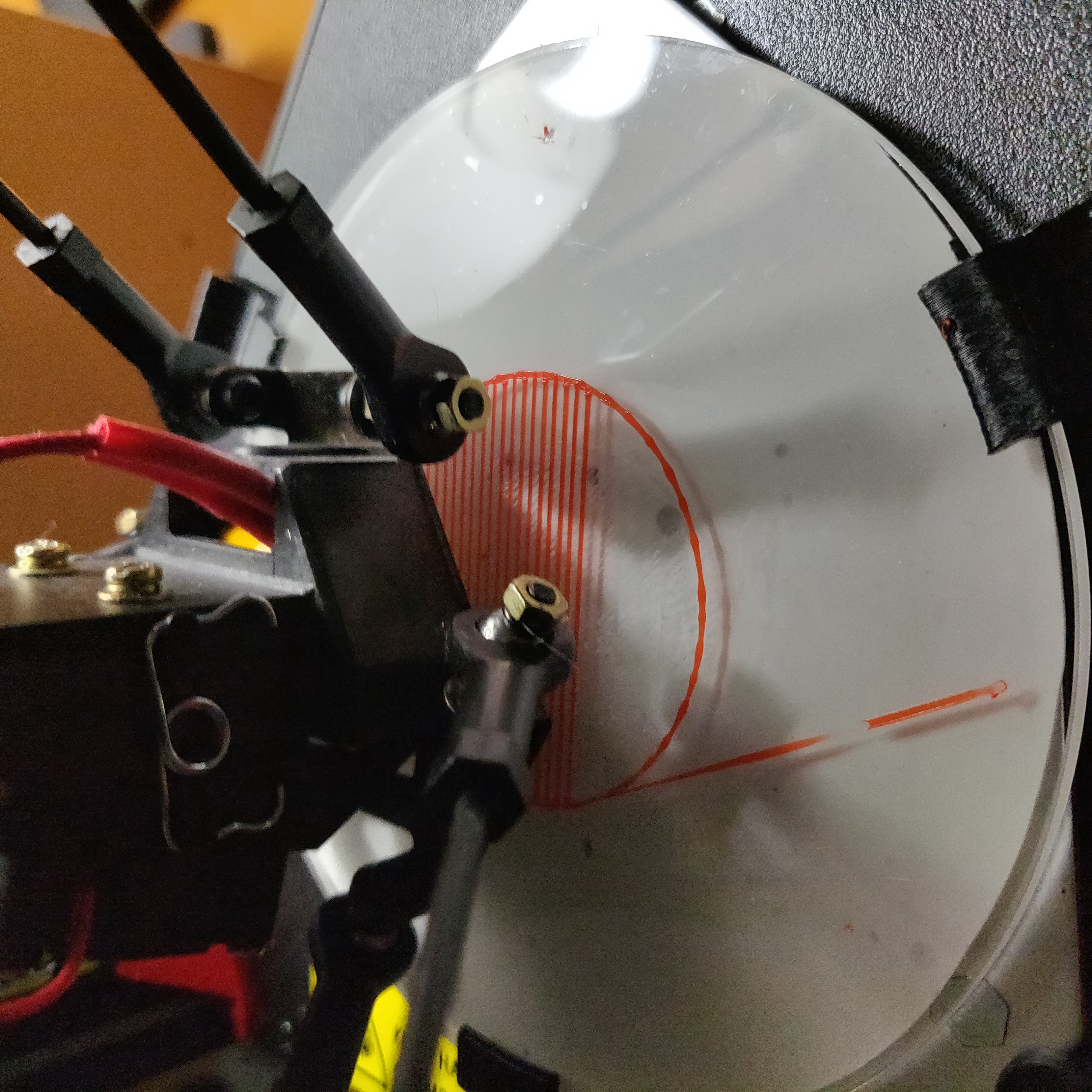
First image is the first layer raft printing from OctoPrint. Note the blobby circle, but normal straight lines. I could tell visually and audibly that the printer head was stuttering while printing the circle parts
Second image is identical gcode 20x20mm cylinder, left printed from SD card, right printed via OctoPrint.
Log and gcode attached.
MDM_20mmCylinder.zip
 devhammer
on 18 Sep 2018
devhammer
on 18 Sep 2018
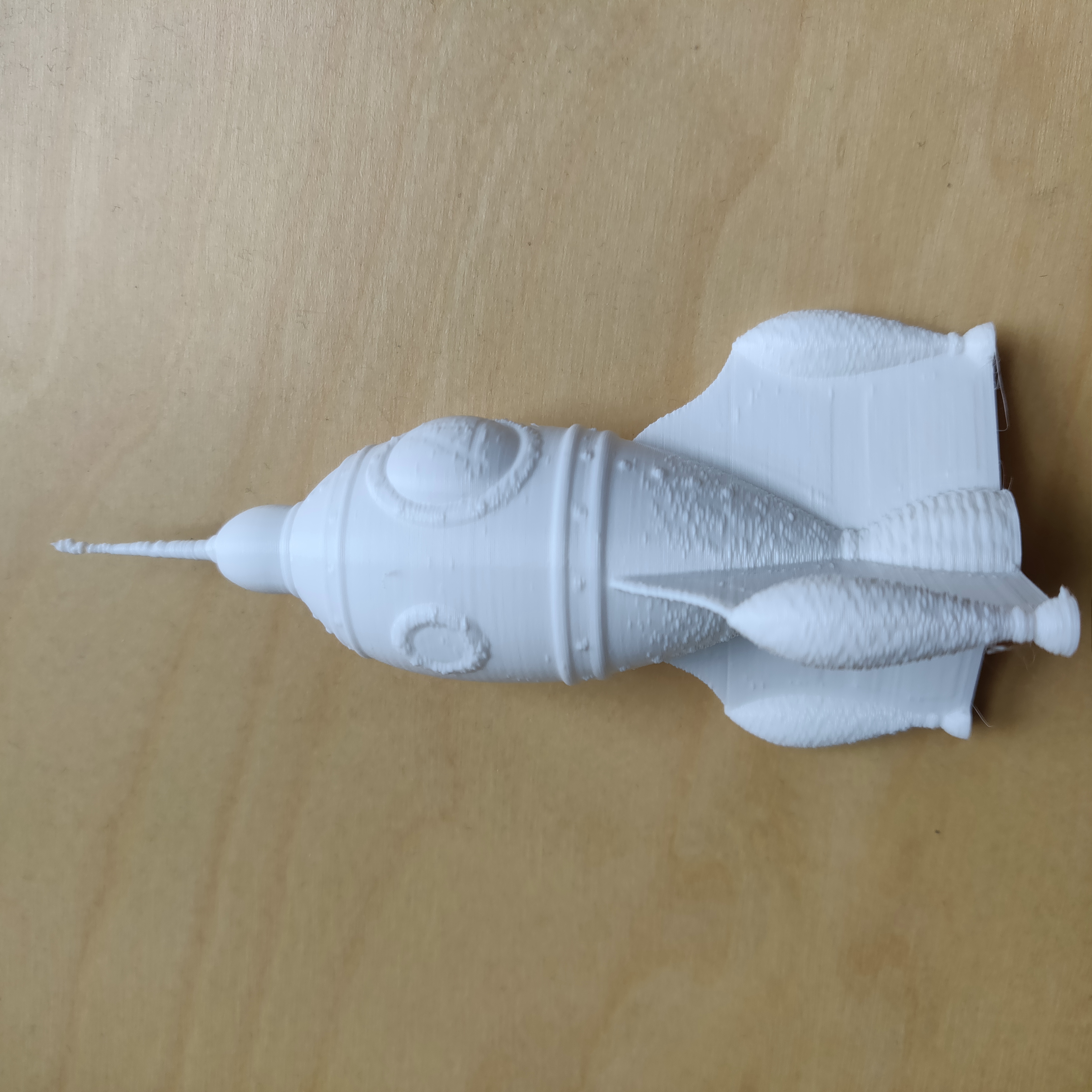
For purposes of another data point, I tried printing something that wasn't the same diameter throughout, in my case the GCreate Spaceship, found here, and using Vase Mode (Spiralize Outer Contour in Cura) to see if that made a difference.
Turns out that the printing issues when printing from OctoPrint appear to vary with the diameter of the curve being printed. I'm attaching my gcode and serial log.
The photo below shows the difference between the fins and the upper body. Perhaps in combination with the log, this might help pinpoint the cause.
devhammer
on 18 Sep 2018
Does this seem to be mainly a problem with delta style printers?
cosmith71
on 19 Sep 2018
Does this seem to be mainly a problem with delta style printers?
Possibly, but it would appear it does not affect all deltas, not even all MP Mini Deltas. I posted about the issue on the MP Mini Delta reddit group, and there's at least one person not seeing the issue, though another person had encountered the issue, and just gave up and went back to printing from SD.
https://www.reddit.com/r/mpminidelta/comments/9gp517/octoprint_on_rpi_and_mp_mini_delta_poor_print/
devhammer
on 19 Sep 2018
What slicers are all of you using? And what are the profile settings?
foosel
on 19 Sep 2018
I'm using Cura 3.2.1.
Which settings? There are a lot of settings, but I'm using 0.2mm layer height. For the cylinder, I used the default line width of 0.35mm. For the rocket (vase mode) I bumped that up to 0.7mm.
Are there other specific settings that I should be looking for in the profile?
I'm willing to test with a different slicer, if you think that would be helpful. I do not own Simplfy3D, so that one is out for me.
devhammer
on 19 Sep 2018
@devhammer @cosmith71 please try slicing and printing the 'rod dampener' from the thingiverse link in the original post, the post a picture and your gcode. It's prints quickly and doesn't require much filament.
tedder
on 19 Sep 2018
@wabbitguy using your gcode I get a good print. it doesn't pause.
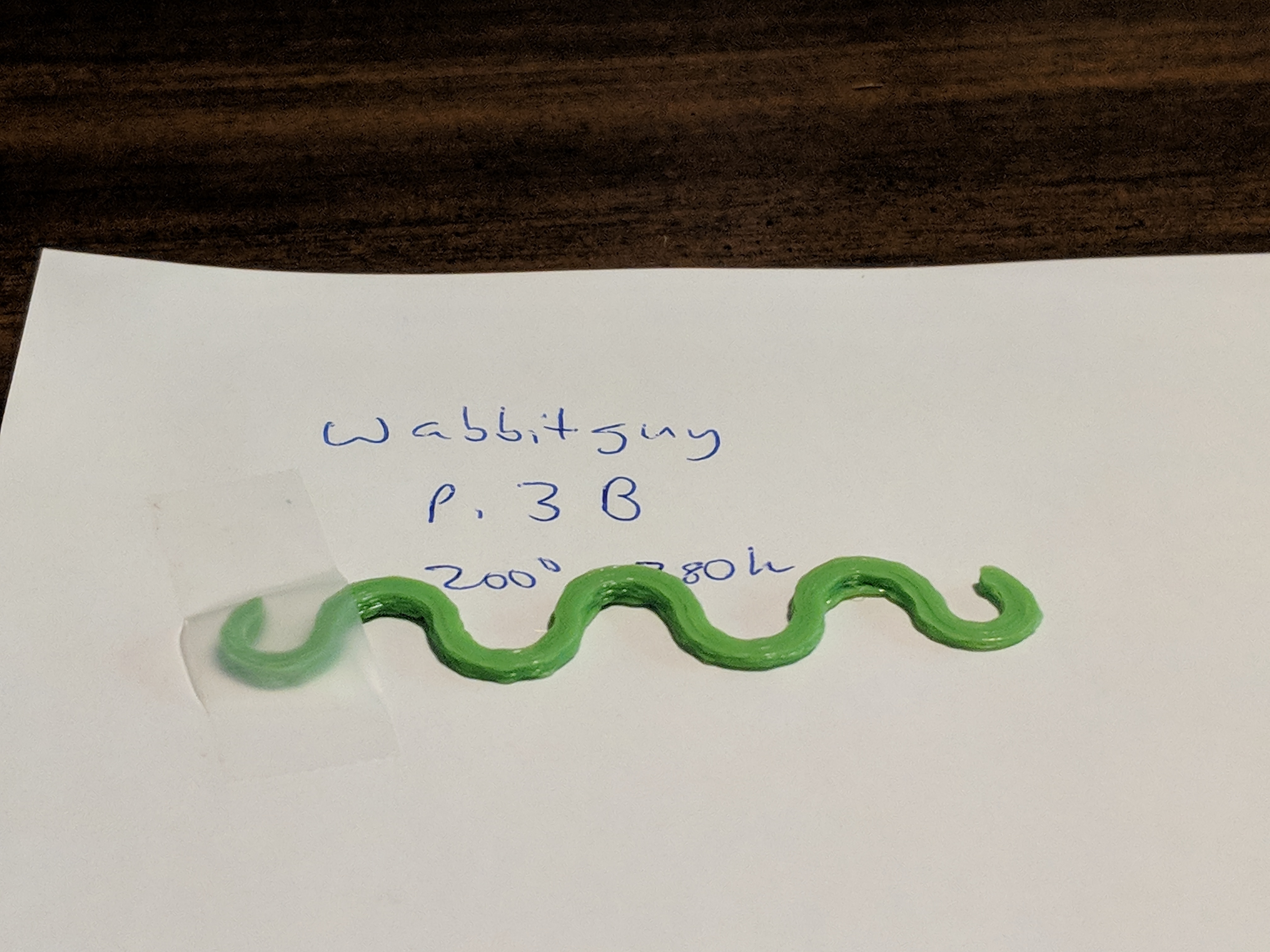
@eivilo using your gcode I get.. problems. First it doesn't do a bed alignment, second it seems to have ABS style settings (hot bed and nozzle). It hesitated while printing, but I don't know if that is relevant, given the bed level issues. Manually calling G29 beforehand didn't solve it.
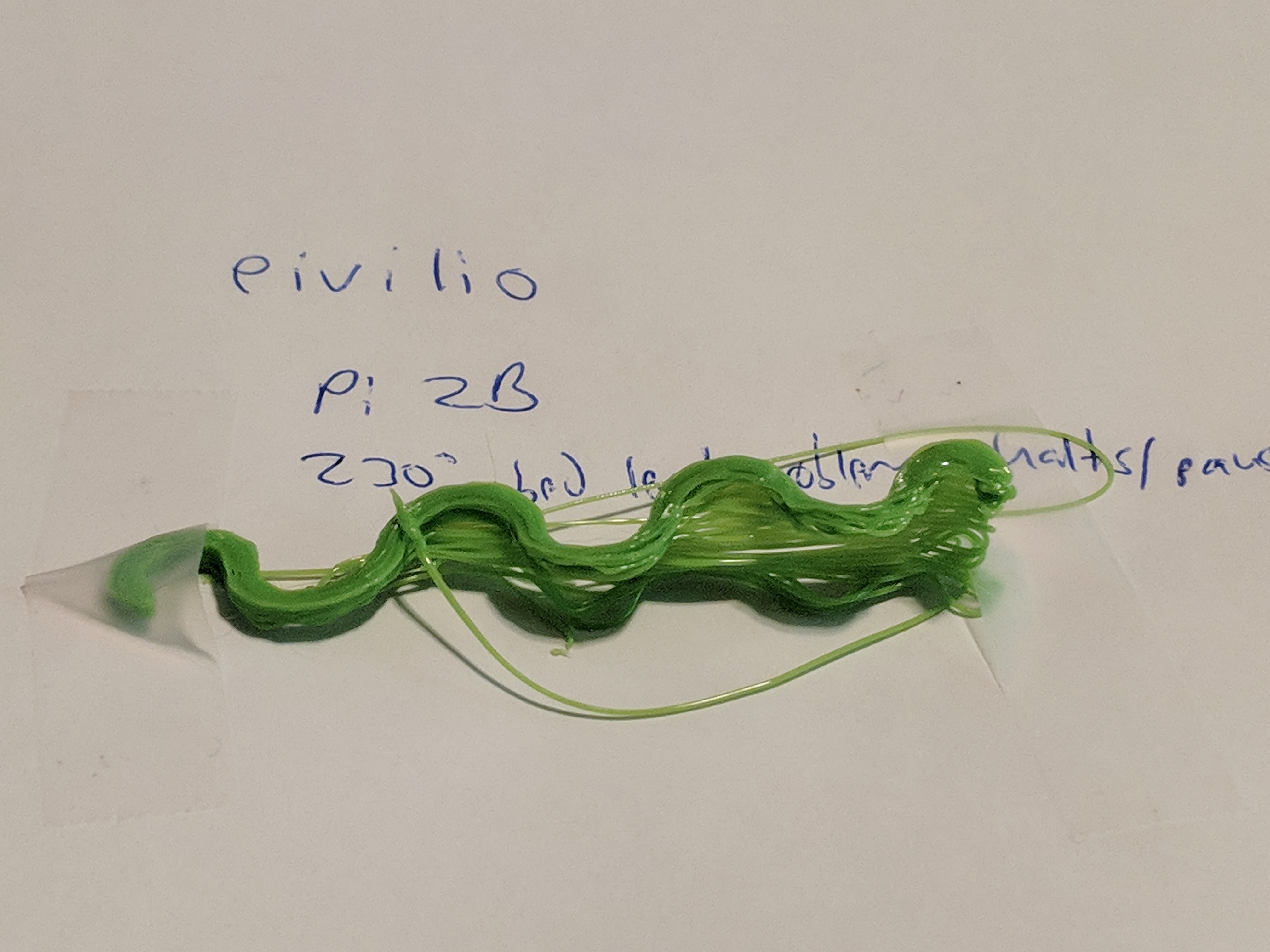
When I print mine it appears to be at the limit of what the kinematics can handle- it doesn't quite pause but it doesn't move smoothly.
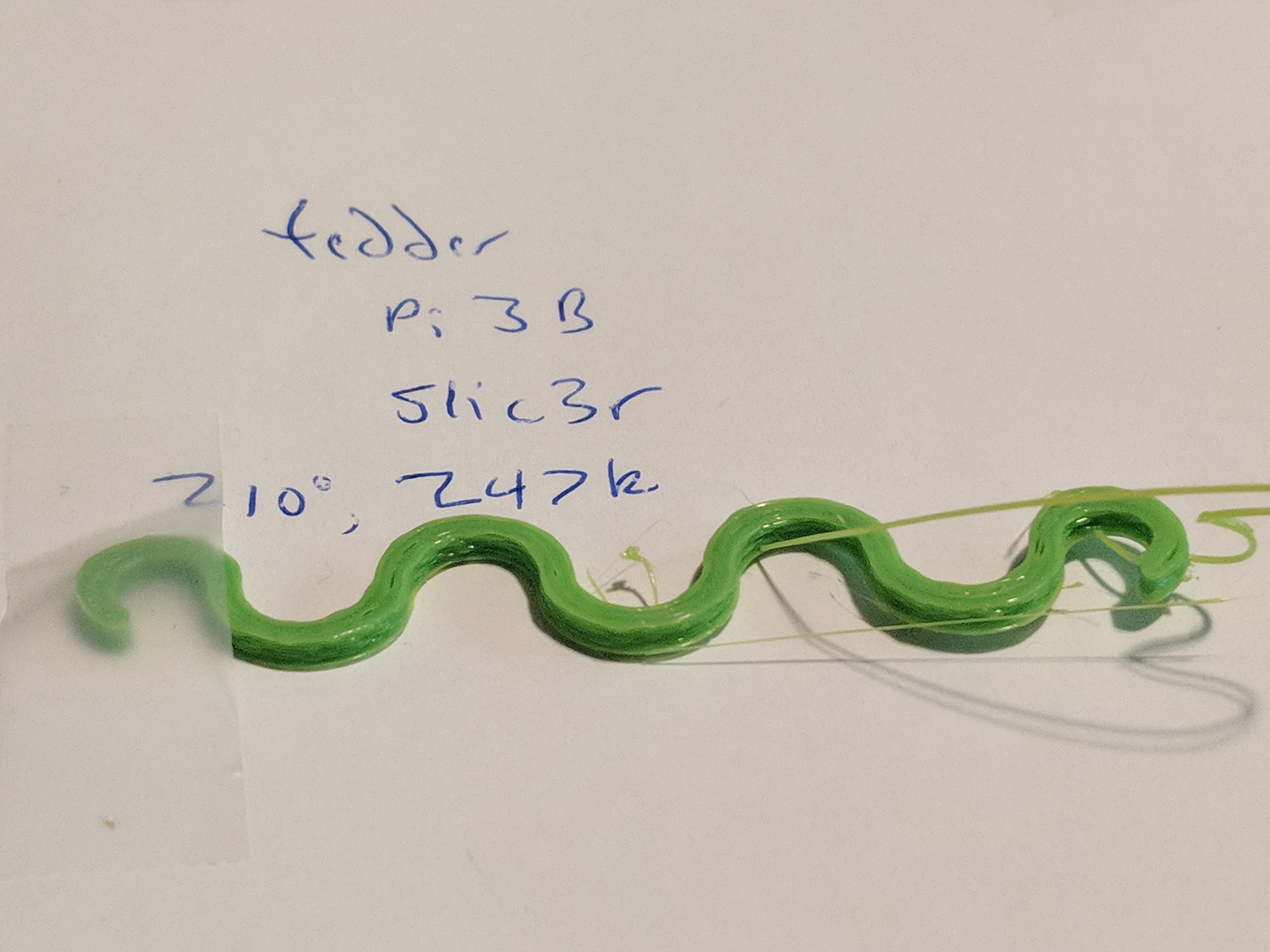
My gcode from slic3r:
ted_delta_rod_dampener_MiniDelta.gcode.zip
tedder
on 19 Sep 2018
serial_09192018.zip
Sliced both my simple 20mm cylinder and the damper using both Cura and Slic3r. For the cylinder, I also tried AstroPrint (online slicer, uses Cura 15.x under the covers. Including all the relevant gcode files, along with serial logs, in the attached Zip.
For the damper, sliced in Cura 3.2.1, I saw no difference between printing from OctoPrint vs. printing from SD. Both came out with smooth curves, no bumpiness.
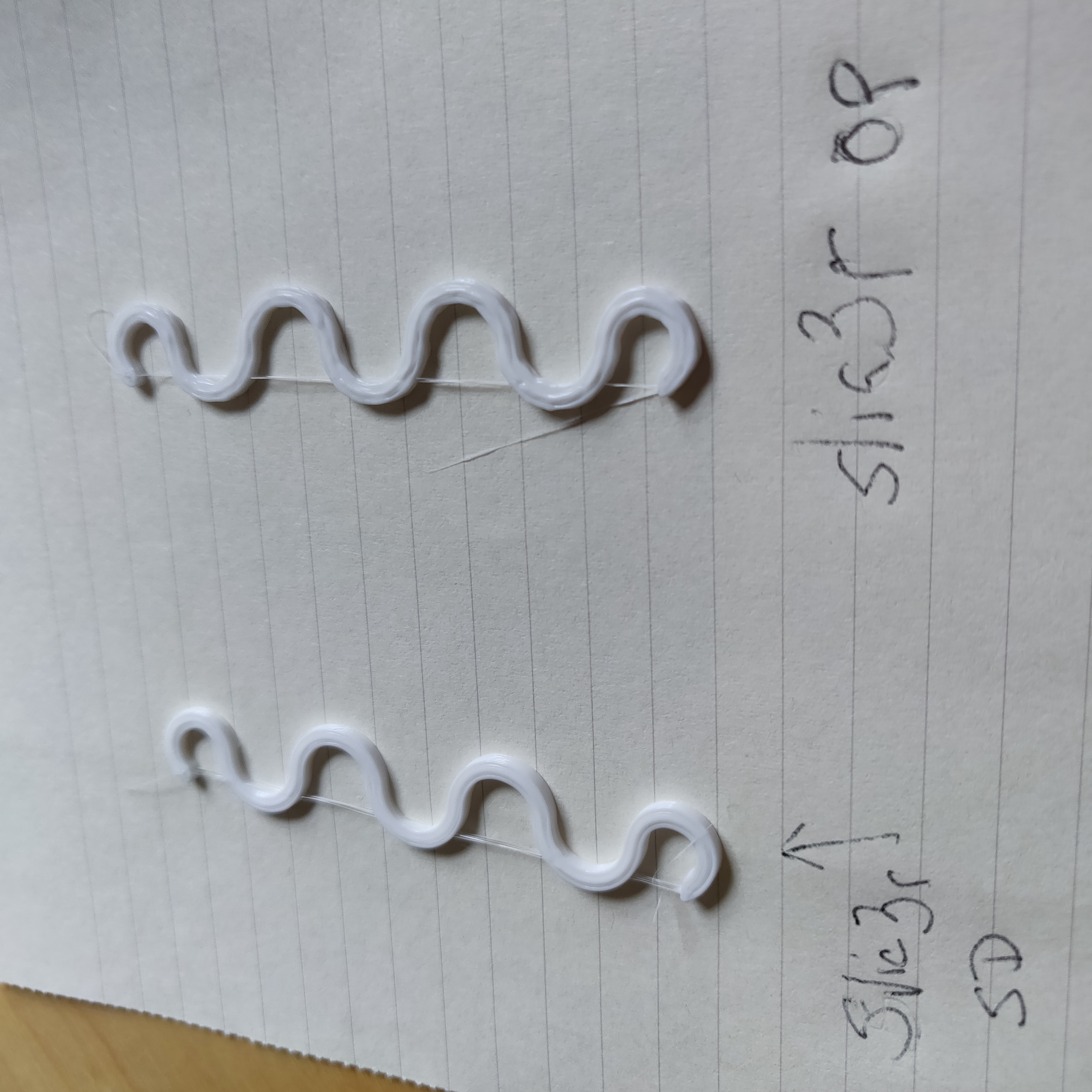
For the damper sliced in Slic3r 1.2.9, the one printed from SD came out smooth, while the one printed from OctoPrint exhibited the same bumpiness as I've seen on other prints:
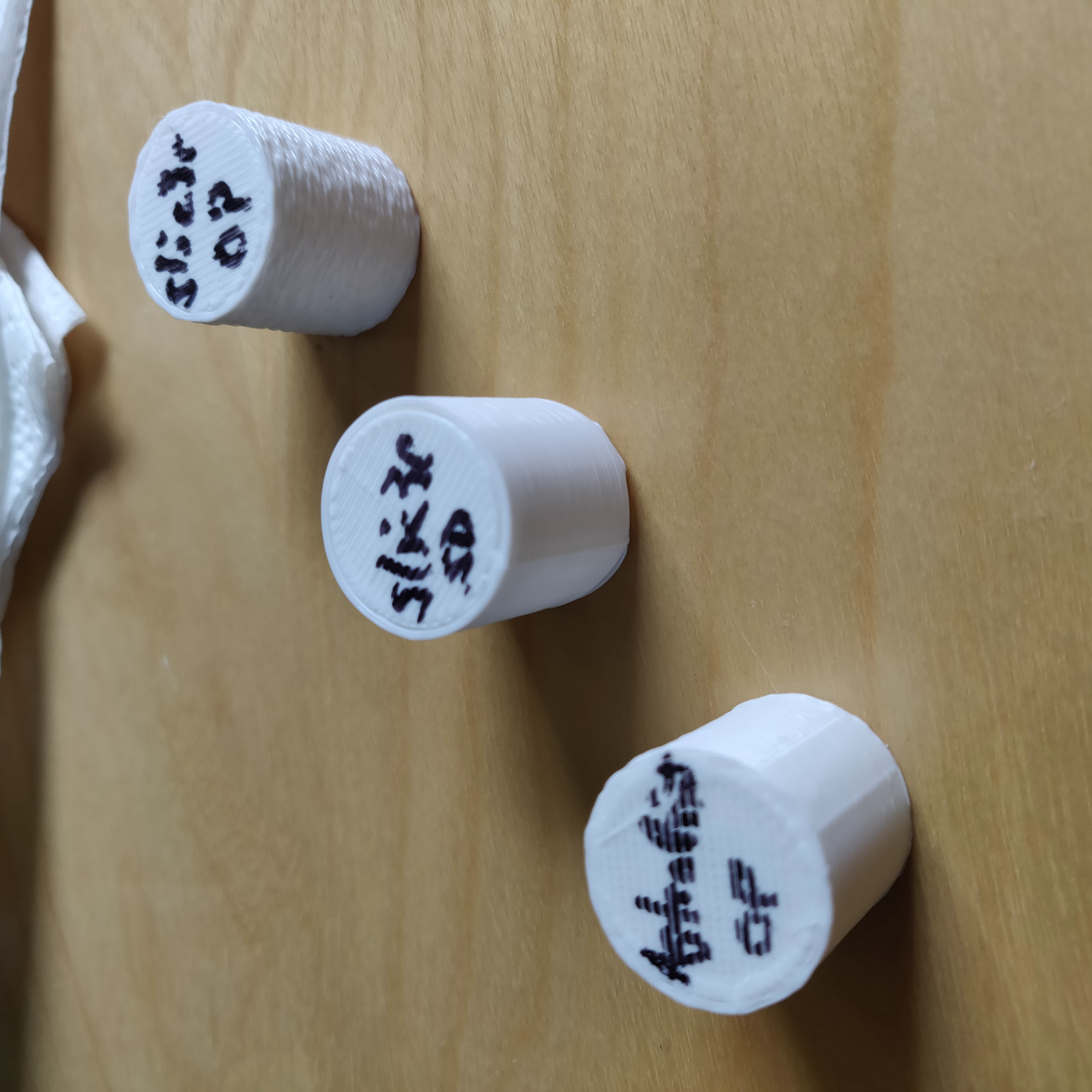
For the cylinder, the one sliced in AstroPrint exhibited a small amount of bumpiness when printed from OctoPrint (did not print one of these from SD). The cylinder sliced in Slic3r 1.2.9 was massively bumpy when printed from OctoPrint, but smooth when printed from SD.
devhammer
on 19 Sep 2018
That's starting to smell of suboptimal slicing output producing way too short segments for the curves. There is a hard limit of lines per second that can be processed, sent over serial and then parsed by the firmware, and if you have thousands of small line segments per miniature curvature that limit can be hit. The limit is way higher when printing from SD since here those thousands of lines don't have to first be checksummed, then sent over a more or less slow serial, then de-checksummed and validated by the firmware, then acknowledged... Instead they are just read from the file on the sd and immediately interpreted. Way less overhead, making it more forgiving of excessive micro moves.
foosel
on 19 Sep 2018
foosel, is it worse with deltas, perhaps deltas with weak (slow) microcontrollers?
devhammer, your pictures always hurt my brain because they are "exif rotated", so they look wrong from a desktop computer.
tedder
on 19 Sep 2018
@tedder possibly, afaik the delta kinematics certainly take a higher toll on the computational resources of the commonly used 8bit mcus, possibly leaving less air to breathe so to speak.
Are only deltas affected though? Quick look though indicates yes, but I could have sworn I saw a cartesian in the mix as well. Huh 🤔
foosel
on 19 Sep 2018
This issue's printer, the MP Mini Delta, appears to use the STM32, which rules out the theory of "delta on 8bit" that you and I were theorizing, foosel. Can checksum calculating/sending be disabled? It'd be interesting to know if that changes things.
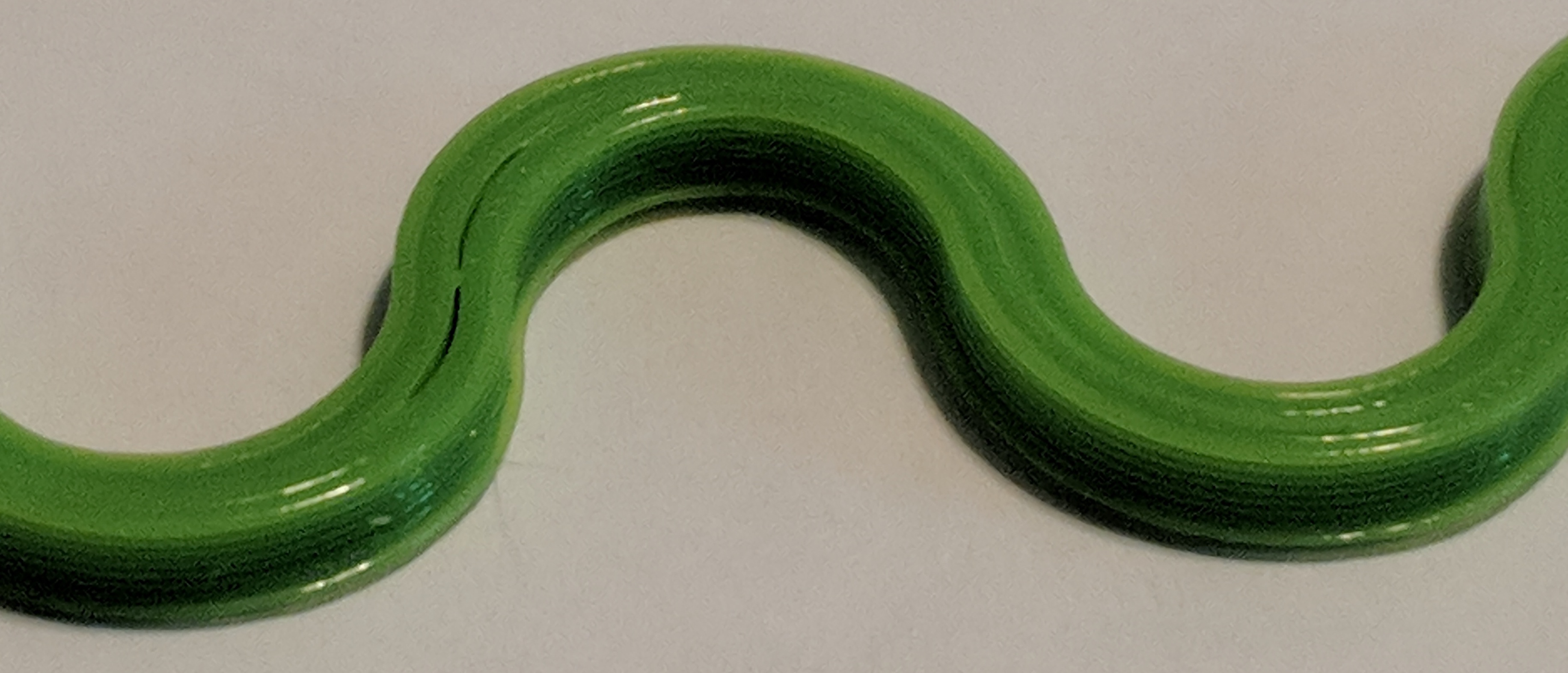
Secondly, I thought my gcode looked okay on the Pi, but I went back and printed it from the SD and it looks much better, even with poor lighting it is noticeable.
SD card:
Pi:
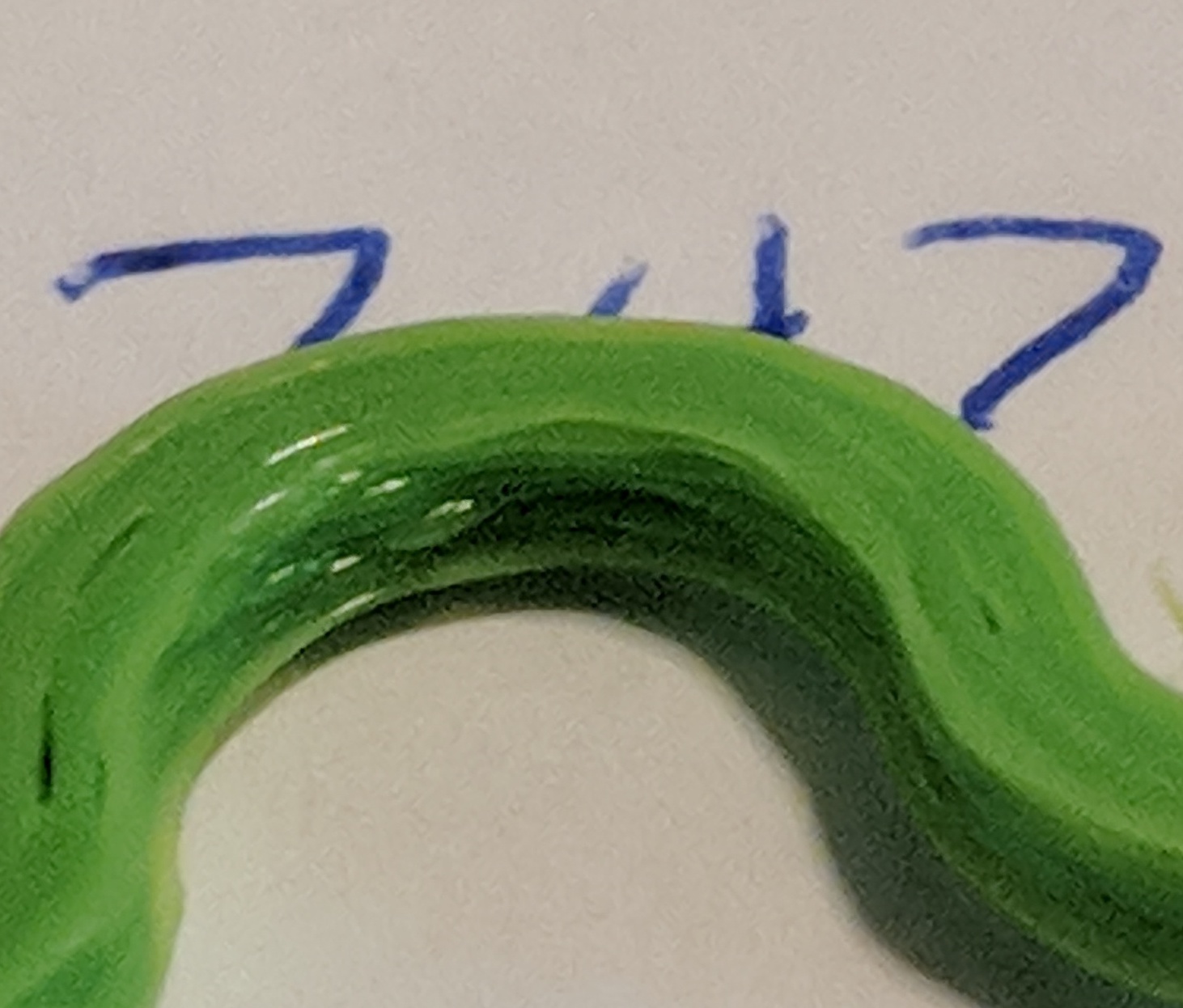
tedder
on 19 Sep 2018
Disabled serial log, shut off webcam service, watched top, printed from Pi. No big CPU load, the print still looks poor, so that rules out non-serial CPU or IO issues to me.
tedder
on 19 Sep 2018
devhammer, your pictures always hurt my brain because they are "exif rotated", so they look wrong from a desktop computer.
Yeah, sorry about that...taking them from my phone with a 1:1 aspect, so it's easy to forget which direction I should shoot in.
possibly, afaik the delta kinematics certainly take a higher toll on the computational resources of the commonly used 8bit mcus, possibly leaving less air to breathe so to speak.
Do you mean MCU in the printer, or in the Pi? If the former, then I'd expect the prints to be poor whether or not printed from SD. If the latter, then I'd expect to see better prints from the faster Pi3 than my Pi2, but that isn't what Colin is seeing.
devhammer
on 19 Sep 2018
That's starting to smell of suboptimal slicing output producing way too short segments for the curves.
Forgive me if this is a dumb question, but is there a way in Cura to tweak that?
devhammer
on 19 Sep 2018
@foosel Slicer - PRUSA's slicer from the releases on GITHUB. From 1.34.x, through to the 1.40.1. Since the latest release 1.40.1 finally helps with the delta feed rate based on effector movement rather than the older version carriage movement, it's the one I use most.
Normally delta's keep Marlin's DELTA_SEGMENTS_PER_SECOND upwards of 160 to 200. Thus curves can create a lot of math operations. Mine are set at 120.
It may indeed be the number of short segments, lowering the resolution in Slicer might be something to try.
Speed wise, any perimeter speed (PRUSA Slicer 1.40.1) on my two Kossels over 45mm/s will start to stutter in that test print, or any print with tight curves like the rocket ship. Even in vase mode. Print with perimeters 40mm/s or less and it's smooth without stutters. Or simply pick a any speed and print from SD as a work around.
Straight lines on the other hand are perfect.
My latest test work around is to use a Toshiba FlashAir SD card that I can upload the GCODE to quickly, but control the printer with Octoprint. Working well this way.
@tedder my sample you printed looks lumpy on the perimeters (like mine) but during my print I don't get a pause, I get a pronounced stutter as it rounds all those curves (inside and out). I was printing out the samples at .3 and .2 layer heights. The faster I print, the worse the stutter.
Off hand, I'd guess that lots of short segments for curves, Marlin's processing speed on 8 bit, and the USB speed are making their limitations known.
wabbitguy
on 19 Sep 2018
Normally delta's keep Marlin's DELTA_SEGMENTS_PER_SECOND upwards of 160 to 200. Thus curves can create a lot of math operations. Mine are set at 120.
Interesting. When I checked, it seemed mine was set to 500. I dropped it to 100, and printed a new 20mm cylinder from the file I sliced with Slic3r 1.5.9, and it appears to be bump-free.
Going to try a few more tests to see if this is a consistent result. Might be that the default on the MP Mini Delta is too high when printing from USB. Seems weird that the setting would work fine when printing from SD, but not when printing from USB/OctoPrint, unless what's happening is that the printer is attempting to print segments faster than OctoPrint can deliver them over the USB/Serial.
devhammer
on 19 Sep 2018
Interesting. When I checked, it seemed mine was set to 500. I dropped it to 100
You're changing the header file and pushing new firmware to your MPMD? Or do I misunderstand where this is?
tedder
on 19 Sep 2018
Kind of curious myself. I was referring to the Marlin firmware "Configuration.h" file setting (line 505 in Marlin 1.1.9). I know when I have tested values previously, anything over 225 caused the printer to slow to the speed of the last ice age on anything other than a straight line.
wabbitguy
on 19 Sep 2018
You're changing the header file and pushing new firmware to your MPMD? Or do I misunderstand where this is?
With OctoPrint, I can use the Terminal tab to send command M503, which reports the current settings, including M665. Sending that told me that the S parameter, which corresponds to DELTA_SEGMENTS_PER_SECOND, per http://marlinfw.org/docs/gcode/M665.html.
I then sent M665 S100 to drop the value to 100 from 500.
I'm printing another rocket, and it appears that 100 may have some other impacts (perhaps too low), as I'm getting some sloppy printing on really small diameter curves, but the curve motion appears to be smoother by far. May try bumping back up a bit to see if there's a happy medium. Seems like a promising avenue for investigation, though, even if only as a workaround.
devhammer
on 19 Sep 2018
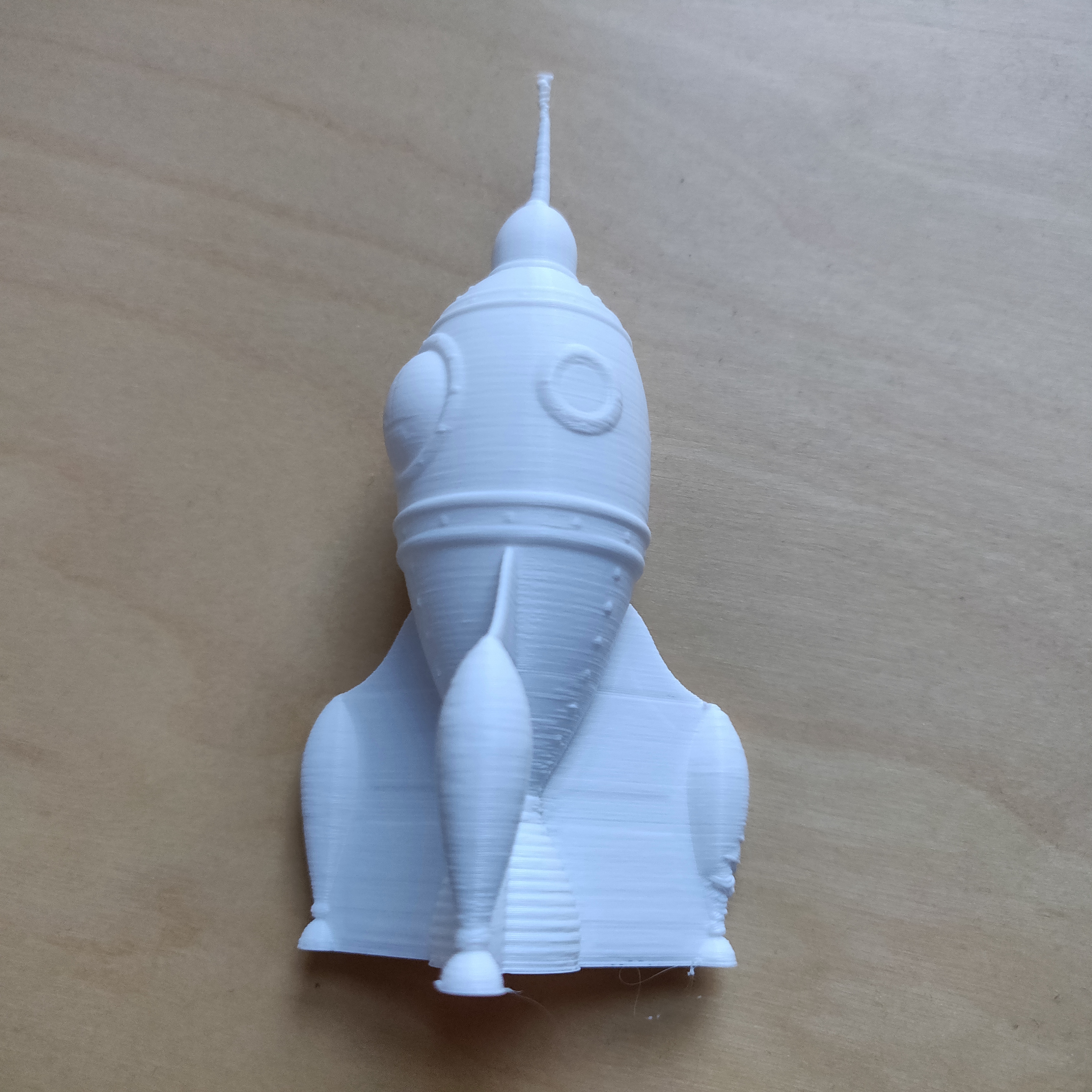
So here's the rocket printed from OctoPrint, with the only difference between the one I posted earlier and this one being the change in the delta segments per second setting from 500 down to 100.
As I mentioned earlier, there's some sloppiness in the lower left fin, and my guess is that because I reduced the segments per second, it's printing the curves more slowly, and since I doubled the line width and bumped the flow rate to make the vase mode print more solid, it was probably overheating in that area.
Now printing another cylinder with the segments per second set to 200, and that does not seem to be working as well.
devhammer
on 20 Sep 2018
Just noting that the Raspberry Pi has two UARTs: a good one and a cheap one. The cheap one is barely functional and it's entirely possible that some of these printer configurations are using it. So it might be worthwhile to try disabling both Bluetooth and serial port terminal shell to maximize the chances of using the good UART for your printer's communications.
OutsourcedGuru
on 20 Sep 2018
Just did a quick test of printing from the SD card using OctoPrint to kick off the print. That probably would resolve (or at least minimize) the issues in the curves, but I realized that printing that way would not allow me to pause a print using the @pause command, which is somewhat critical for doing two-color prints, as it seems to be the most reliable way to pause safely to change filament. Pretty sure that it would also preclude using the timelapse feature of the webcam, too.
But for stuff that doesn't require a filament change, printing remotely from the SD may at least be a reasonable workaround for the print quality.
devhammer
on 21 Sep 2018
@OutsourcedGuru that's why I dropped all my rpi's to "toy projects" and use orangepi for anything important :D octoprint with 2 cameras and some additional apps running and controlling stuff trough gpio's run withoutn any glitch shile rpiB was dying ... so while octopi image is very popular and rpi's are where hype is I'm suggesting ppl to test oranges...
I'm not sure why allwin H5 quad core Cortex A53 with NEON, FPU, 64KB I/D cache per core, and 512KB L2 cache performs so much better then rpi's broadcom BCM283.. quad-core ARM Cortex-A7 CPU ... I mean yes H5 is 64bit and AES in hw but none of that is too important for what we are doing ... anyhow... oranges are easier to get, no limit in quantity and work awesome so.. one might try if one have too much issues with rpi's
as for the issue discussed here, there's a very simple test, export a cylinder with 0.0001mm "deviation" from solidworks or fusion or .. and slice with s3d v3.0 for e.g. and export same cylinder with 0.1mm "deviation" and slice with s3d v4.0.1 / cura / slic3r ... and print them both..
 arhi
on 21 Sep 2018
arhi
on 21 Sep 2018
Just did a quick test of printing from the SD card using OctoPrint to kick off the print. That probably would resolve (or at least minimize) the issues in the curves, but I realized that printing that way would not allow me to pause a print using the @pause command, which is somewhat critical for doing two-color prints, as it seems to be the most reliable way to pause safely to change filament. Pretty sure that it would also preclude using the timelapse feature of the webcam, too.
But for stuff that doesn't require a filament change, printing remotely from the SD may at least be a reasonable workaround for the print quality.
Except that you either have to wait forever for Octoprint to copy the gcode to the SD card or physically move the SD card around, which negates the reason I use Octoprint.
cosmith71
on 21 Sep 2018
Just noting that the Raspberry Pi has two UARTs: a good one and a cheap one. The cheap one is barely functional and it's entirely possible that some of these printer configurations are using it. So it might be worthwhile to try disabling both Bluetooth and serial port terminal shell to maximize the chances of using the good UART for your printer's communications.
Tried this, didn't help.
cosmith71
on 21 Sep 2018
@cosmith71 It's good to rule that out, at least.
OutsourcedGuru
on 21 Sep 2018
@OutsourcedGuru absolutely!
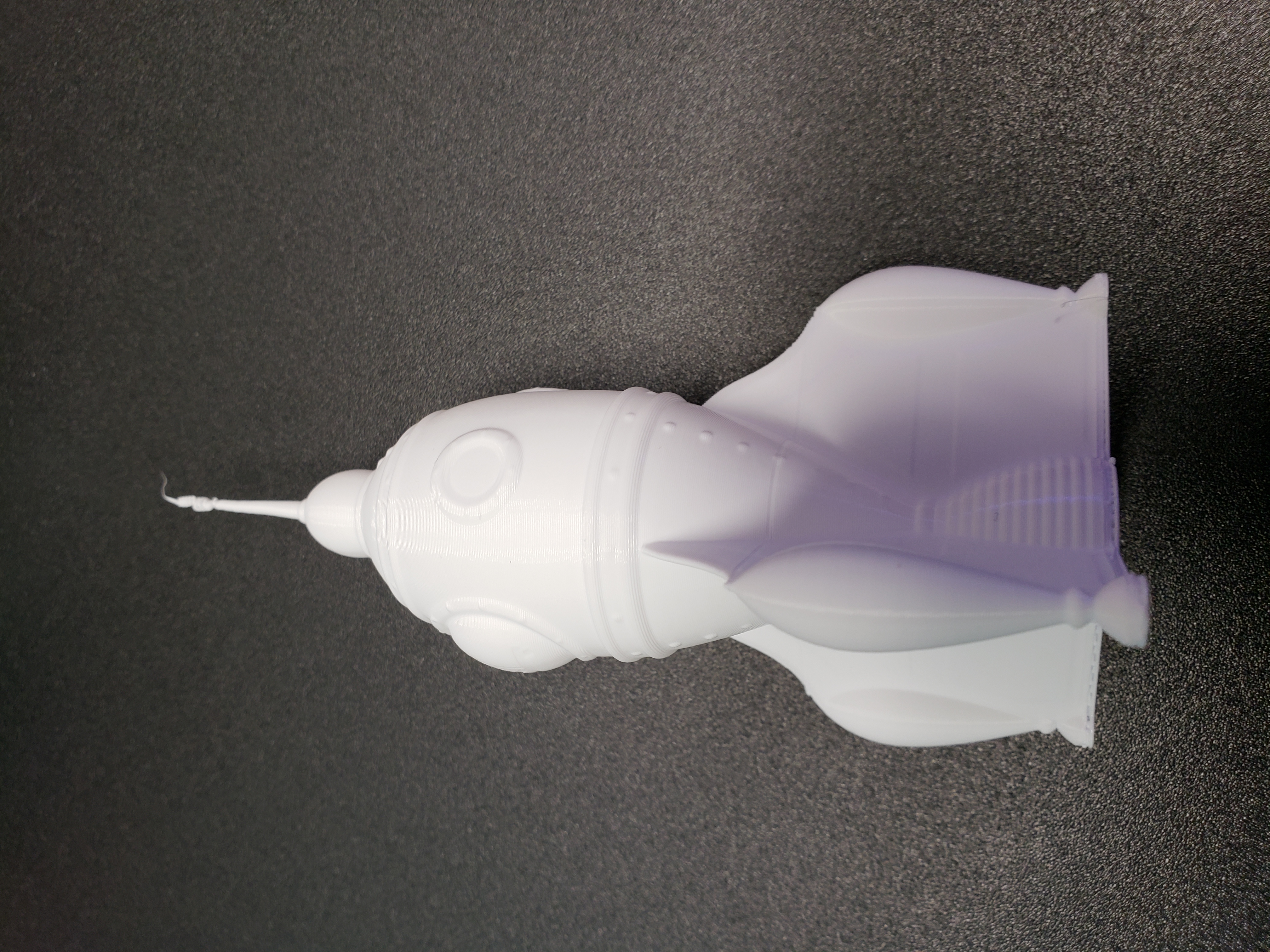
@devhammer I reprinted the rocket at 100 and didn't get that effect. I'm wondering if this is a good workaround.
cosmith71
on 21 Sep 2018
I don't have a delta. Never have owned one. Hence my knowledge of them is strictly theoretical. Could someone with a bit more experience with these things explain to me what exactly DELTA_SEGMENTS_PER_SECOND does and how it influences the planner? 😅
foosel
on 21 Sep 2018
/me passes the hat to buy Gina a $160 MP Mini Delta..
tedder
on 21 Sep 2018
@foosel I'm not an expert, but I found this. Specifically the second answer.
https://3dprinting.stackexchange.com/questions/631/how-are-delta-movements-calculated
cosmith71
on 21 Sep 2018
DELTA_SEGMENTS_PER_SECOND is simply the amount of subdivisions the firmware takes to convert the move to nonlinear coordinates. Take a 100mm/s move and DELTA_SEGMENTS_PER_SECOND = 100 then it will compute for each mm a new xyz motor position. So the higher the value the closer the move follows the required nonlinear kinematic, but also the more cpu time firmware needs to compute all these updates. The other question is at which step in planner this subdivision takes place. If you have 16 buffer moves and the small segments land into that you can not build up a communication buffer time. If it is later firmware should behave like with cartesian printers. I know repetier-firmware does the last one which is why it takes so much memory. Can not speak for other firmwares.
 repetier
on 21 Sep 2018
repetier
on 21 Sep 2018
Based on that, I wouldn't be surprised that if that segmentation is done in the reception loop it would simply take too long in some cases to send the ok fast enough to keep the command buffer filled, in which case that would explain small pauses.
foosel
on 21 Sep 2018
I reprinted the rocket at 100 and didn't get that effect.
Probably because I had line width and flow rate modified for better layer adhesion in vase mode. With slower movement on the smallest parts of the fins, that probably didn't allow sufficient cooling time for the layers.
devhammer
on 21 Sep 2018
Except that you either have to wait forever for Octoprint to copy the gcode to the SD card or physically move the SD card around, which negates the reason I use Octoprint.
I hadn't tried uploading to the SD card, until just now. You're right, it's really, really slow.
Have you checked your segments per second setting? You can find it by going to the terminal tab, and running the M503 command, then look for M665, which should have an S parameter for the segments per sec.
I set mine to 200 (from 500), and going to run a few prints to see how that setting works out.
devhammer
on 21 Sep 2018
@devhammer, the rocket above was printed at 100 segments per second. I've been printing cats and Benchies all day. At 200 I start to see artifacts. Interestingly enough, even at 500, printing from Pronterface and my PC produced SD card quality results.
cosmith71
on 22 Sep 2018
@foosel I had a cartesian for about two weeks, then sold it and built two Kossels. I know next to nothing about cartesians but deltas here are old friends.
The bottleneck is the Marlin planner, DELTA_SEGMENTS_PER_SECOND and the quest for quality/speed from these plastic droolers.
A slow world example. Printing a line. In slow motion. The line is 200mm and the effector is moving 1mm per second.
Short math says this is going to take 200 seconds. I.e. 1mm/second, 200mm length.
With the stepper motors we have "steps per unit(mm)", and in most of the printers (16x set stepping) it will be set to 80 (on most deltas; 8825 or 4988's). So the move will be 80 * 200 = 16,000 steps long.
For the deltas we have a setting in Marlin that looks like this:
DELTA_SEGMENTS_PER_SECOND = 200
So our original 200 seconds, gets expanded: 200 x DELTA_SEGMENTS_PER_SECOND = 40,000 segments total.
Each of the segments is 16,000 / 40,000 = .4 steps
Marlin then feeds these segments to the planner. But the planner has a minimum number of steps it has to have before it will move, anything shorter than that is handled differently.
The first segment is handed to the planner, but at .4 steps it's too short for a move, so it's left there to be appended to and so on until the total gets above the minimum (a setting in the firmware). I.e. hand it 'x' steps to finally get it to move. Then that gets repeated all again until it can move again.
Dropping the segments per second count to a lower value works to a point. Each printer seems to have it's own sweet spot where going lower will reduce the accuracy to the point where if you're prototyping you end up wasting material. For mine, that's 120.
Marlin 1.1.9 has had a lot of revision to the planner. None the less I've seen minor artifacts with Octoprint as far back as Marlin 1.1.6. Going way back to 1.02 there was next to no artifacts. No doubt because the planner was extremely primitive compared to what it is now.
I still use Octoprint on my deltas, but I don't print from Octoprint or use a camera with them. Octoprint merely allows me a modicum of control over the printer and selections from the SD card (Toshiba FlashAir).
wabbitguy
on 22 Sep 2018
At 200 I start to see artifacts.
Just printed a vase at 200 seg/sec, and it does have some artifacts. Interestingly, in this case the artifacts actually kind of work, since they give an appearance of cloth, and since it's a "cloth vase" design, that works well. Go figure that a limitation could also be used to lend artistry...
But back to the original question...is there anything that could be tweaked in OctoPrint to compensate for the issue? Or is it just going to be a matter of finding the "sweet spot" for segments per second that @wabbitguy suggests?
UPDATE:
Also printed a Lucky Cat with 120 seg/sec, and I see almost no artifacts at all. Possibly a very few by the ears. Very good print overall. So may be that 120 is at or near the sweet spot for the MPMD as well.
devhammer
on 22 Sep 2018
I believe I'm seeing this on my 32 bit cartesian build too. In Marlin, increasing BUFSIZE to 64 and BLOCK_BUFFER_SIZE to 64 seems to help somewhat but not enough to eliminate the problem.
 patternseek
on 22 Sep 2018
patternseek
on 22 Sep 2018
@patternseek that's very interesting. I would have thought 32 bit wouldn't have any issues at all. Kind of derails that thought train.
What printer controller board do you use and does printing speed make any difference?
wabbitguy
on 24 Sep 2018
It could be caused by something else but the symptoms seen similar. Bobbing
and stuttering on curves with ok performance on straight lines (im in the
middle of a load of upgrades so my overall performance isn't stellar)
It's an mks sbase running marlin 2.x bugfix branch with tmc2130 stepper
drivers. 100mm/s infill, 60mm/s inner walls, 40mm/s outer walls.
I'll do some tests with the models people are using elsewhere in the thread
at different speeds when I get time and post the results.
On 24 September 2018 8:56:42 pm Mel notifications@github.com wrote:
@patternseek that's very interesting. I would have thought 32 bit wouldn't
have any issues at all. Kind of derails that thought train.
What printer controller board do you use and does printing speed make any
difference?
—
You are receiving this because you were mentioned.
Reply to this email directly, view it on GitHub, or mute the thread.
patternseek
on 24 Sep 2018
@wabbitguy - ahem, I pointed that out a few days ago.
tedder
on 24 Sep 2018
The bottleneck is the Marlin planner, DELTA_SEGMENTS_PER_SECOND and the quest for quality/speed from these plastic droolers.
...hence the need for something like Klipper to move the planning back up the foodchain so that it's not happening at the last moment on the controller board.
OutsourcedGuru
on 25 Sep 2018
@OutsourcedGuru looks like Klipper has the same issue with Octoprint and short segments.
wabbitguy
on 26 Sep 2018
Interesting. (Thanks.)
At some point, though, one has to wonder if we're asking too much of all this.
- I want you (the printer) to have ultimate quality
- and yet I still want to be able to manage things from a computer which isn't the controller board
There's the rub. Imagine some of the most automated assembly line machines out there which package food into plastic and then into a box. It's not like you can quickly shut down the machine. I've seen the old-school newspaper presses which produced, say, the Los Angeles Times. That puppy used to run at some breakneck speed and a 115200 baud serial line is about the same. Imagine inserting a ping-pong protocol into something like a firehose. But if you don't have that, you start making something uncontrollable, right?
OutsourcedGuru
on 26 Sep 2018
My case (issues with a 32bit board on a cartesian) appears to have largely been down to using an original model B. I've upgraded to a Pi 3 B+ and done a like for like print on the same gcode and the issue is significantly improved, though still not completely gone. Printing at 100mm/s inner wall and 60mm/s outer wall.
patternseek
on 3 Oct 2018
Just wanted to chime in I solved the stuttering issue with my Ramps 1.4 cartesian running marlin alongside a pib3+ op box (no changes to uart buffer settings). The fix was simply changing my slicer settings to eliminate the super small segments in circles. I use Cura... "Experimental/Max Resolution" is by default 0.01mm... I get smooth circles with 0.1mm. I've attached some files that may be of interest: 2 'dry run' gcode files in the zip, one with default cura max res (0.01mm), the other with max res set to 0.1mm, and 2 screen grabs from htop while printing in the troublesome areas. The troublesome areas were printing at 60mm/s (the outside walls never had issues at 30mm/s). Incidentally, when I decreased speed to 40/20mm/sec, the 40mm/sec areas still had stuttering issues at 0.01mm res.
At any rate, you can clearly see the processor load getting up there with the higher res file, where as the haproxy thread becomes the biggest hog with the lower res file. Obviously the haproxy (webui stream) isn't a big deal on a pib3+... it's the cramming of gcode that gets to be too much I think. I can't say if the higher cpu load on the pi results in stuttering, or if it's the comms end limiting things. Like I said, I haven't played with marlin buffer settings (yet), but from other posts above I think there isn't much performance to gain out of that anyways.
I am an utter nube when it comes to the what/why/how to fix this, but to me that it smells like (as foosel said) a limitation of the usb/uart chip method of communication. Hopefully at 0.1mm res I don't see too many artifacts in practice (I haven't actually printed anything with the fix yet, but I can say with 100% certainty there stuttering has improved at ton if not gone altogether, and so I 100% expect much better looking prints). I'd like to experiment with tuning max res to find where the actual limit may be, but that would take a lot of time/effort.
Ideally, I'd like to see this limitation be considered upstream in my workflow. It would be great if I can input a 'baud limit' or similar in my slicer, and the slicer obey that by adjusting print speeds and/or x/y resolution. The method of simply chopping resolution in slicers (by increasing 'max res' in cura for example) typically leads to artifacts as triangles are removed/combined without using 3d maths (thus you have inconsistencies layer to layer). So I believe some combination including speed adjustments may be more ideal. Further, arriving at the 'actual' baud limit for a particular machine would be much easier if there was a way to measure it. To that end, it would be nice to see some 'test firmwares' and special op routines that could accomplish benchmarking baud for a given setup... then that could be used in the slicer corrections I mentioned above.
Check out this page for a similar discussion regarding resolution and artifacts:
https://groups.google.com/forum/#!topic/octoprint/sY-VbTcTtAI
You might note that the reduction of resolution can be done when creating an stl... but that is useless when it comes to printing free stl's available online that were produced with high res. ;)
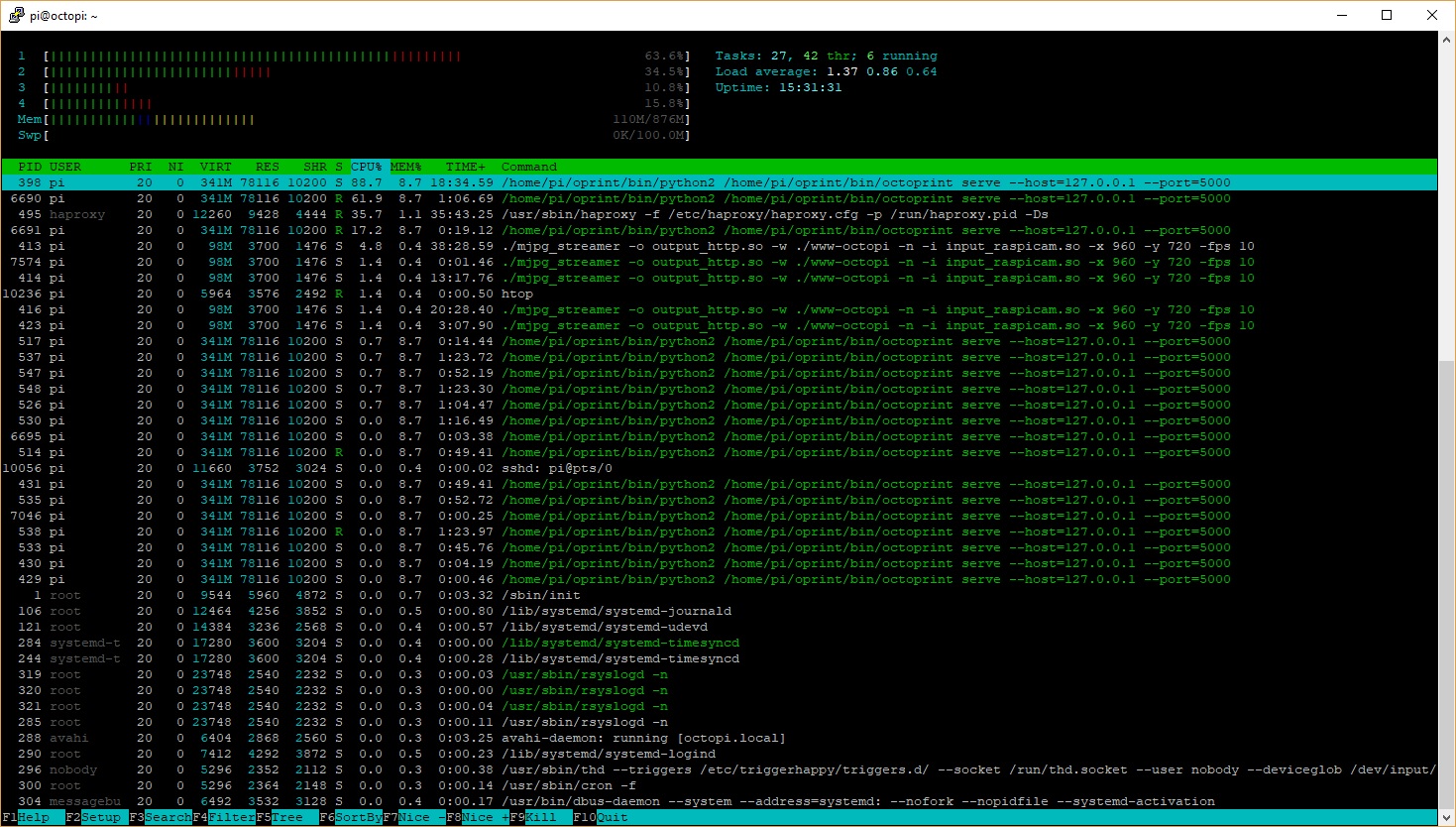
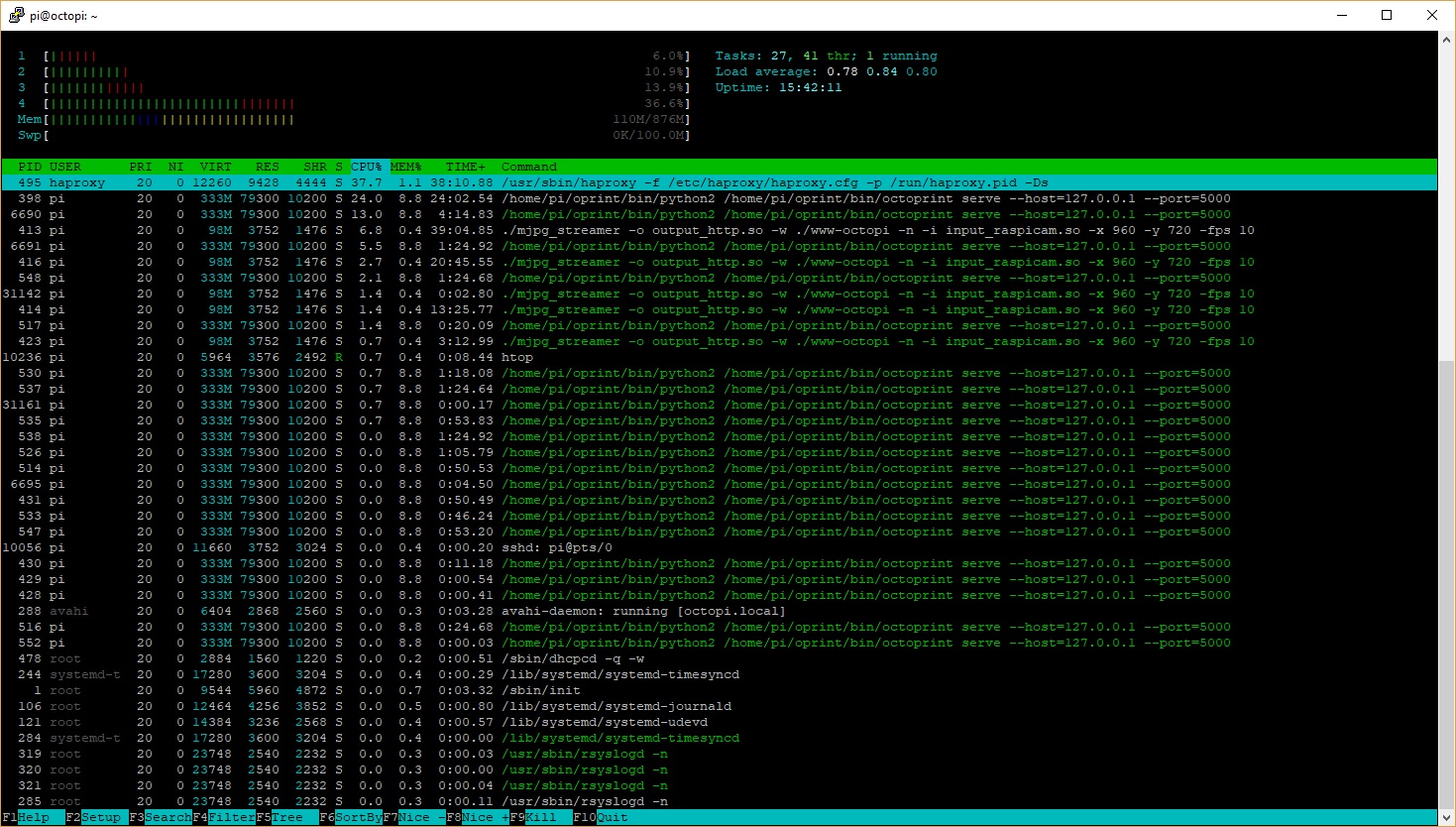
 truglodite
on 13 Oct 2018
truglodite
on 13 Oct 2018
Out of pure curiosity, I downloaded the latest image of Astrobox, set it up, printed the same GCODE files that caused a stutter on those curves (Octoprint 1.3.9) and they print perfectly smooth from Astrobox.
wabbitguy
on 14 Oct 2018
@wabbitguy Did you have any issues getting Astrobox Gateway to connect to the MPMD? Figured it was worth a try, so I set it up on a second RPi2b, and it shows me Malyan 3D Printer under USB Device, but does not seem to want to connect.
Did you do anything special, or did it "just work" for you? I've tried all available Baud rates, 3 different USB cables (one of which didn't work at all, so I trashed it), and no luck connecting.
devhammer
on 15 Oct 2018
@devhammer I connected my Astrobox to a Kossel. The Kossels are using nothing more than a MEGA with a RAMPS board. Astrobox says, "Unknown serial device" for the USB connection, but it connects at 250K baud since that's what I set the Marlin firmware to (1.1.9).
Top right in Astrobox are two icons and one is "Connected to Printer", the other is "Connected to myPrintersName".
For setup, I didn't use Wifi, just the same ethernet as Octoprint was using. Then I used the Astro app to let it find the printer and go into the configuration page. I have an Astro account but I don't use it. LAN usage only here.
According to Astroprints web site they have the MPMD listed as fully capable.
wabbitguy
on 15 Oct 2018
Quick update... I had interesting results when I did some test prints aimed at determining the source of my stuttering problems. Turns out it is actually Marlin 2.x firmware causing the problem. With 'advanced_ok' enabled, you can watch the serial buffer (B) and the planner buffer (P) as a print is running. Regardless if I was printing from SD or OP, the planner buffer would dip in to slow down territory during faster/smaller segment areas. Further, while printing from OP the serial buffer remained full throughout all the troublesome areas. Thus there was no noticeable difference in print quality between OP and SD... of course!
This may not be the case for everyone running Marlin 2... I'm using a rr_discount full graphic display, sd card, tmc2130 drivers (monitor, debug, sensorless home), and linear advance. All of these items gobble up a decent amount of cycles and/or ram.
Another thing that cropped up in my testing (kinda OT)... loading the OP webui while printing often results in a few long stalls. It seems to be worse if I happen to open the webui while it is in the middle of printing a 'troublesome area'. According to htop, normally the print server uses almost no CPU, and normally during troublesome areas it uses up to ~30% CPU. When I get these long stalls opening the webui, cpu usage spikes quite high (well over 75%). So that's another problem that looks like it's in OP's court to solve (I've already seen that issue report).
I've started looking in why marlin's planner buffer is emptying out, and possible work arounds/solutions. From what I've read It looks like it may come down to a need for better hardware if I want to print very smooth curves more than 30mm/sec (I just have a 2560). :(
On a final note... I tried reducing my slicer resolution and got poor results. IIRC nophead mentioned this was a valid solution to stuttering (it should help both serial or planner buffers). He specified 1/2 line width res for acceptable results. In cura 3.5, the default resolution in 0.01mm... increasing that to just 0.1mm (lower than 0.24mm = my line width/2) resulted in no stuttering, but then I got "ribbed" cylinders instead of smooth. That's not an acceptable compromise FOR ME, as the results with stuttering are much better looking. However I do wonder if some folks have much uglier results when stuttering occurs because of other variables like bowden vs direct... direct can change filament flow much faster/accurately and therefore is better suited to handling the stutters. So I imagine folks with sloppy bowdens may actually see better looking prints when they chop resolution.
truglodite
on 15 Oct 2018
I am having this same issue after upgrading from 1.3.8 to 1.3.9. I'm using an OctoPi 0.15.1 image. I have a delta Kossel running Marlin. Printing is fine with direct from USB on my computer, similar to the described discrepancy others are having with direct SD prints and Octoprint. All was running fine/great with my previous Octoprint installation on a Raspi 2 until this upgrade. I've disabled the GCODE visualizer, changed USB cables, etc. I've checked other hardware aspects, and made no changes to the firmware - the only thing that I've changed is the Octoprint upgrade. Please let me know what logs I might upload to help resolve this issue in an upcoming update.
 MechaNickW
on 21 Oct 2018
MechaNickW
on 21 Oct 2018
My case (issues with a 32bit board on a cartesian) appears to have largely been down to using an original model B. I've upgraded to a Pi 3 B+ and done a like for like print on the same gcode and the issue is significantly improved, though still not completely gone. Printing at 100mm/s inner wall and 60mm/s outer wall.
My issue was also with the original Model B - I lied in my previous comment, that's what I was running this on. I just upgraded to a Raspi 2 V1, everything is working as normal. It's what I get for using ultra-outdated hardware. @foosel commented about people using ancient images and hardware in OctoPrint on Air #19, I guess I am one of them but have no gripes - OctoPrint worked smoothly for me for years on the old model B with a single core for processing, it was very much time to upgrade! It might be worth mentioning to people that the old Model B running OctoPi 0.15.1 is not a sufficient hardware system anymore (for delta printers at least).
MechaNickW
on 22 Oct 2018
Both my Deltas run a Rasp PI 3 Model B+, ethernet (no wifi used here), no camera attached, Marlin 1.1.9, MEGA with 16U2, RAMPS 1.4. Speeds somewhere between 45 and 50mm/s on curves will stutter, bump up to 70mm/s and communication tends to get lost and the printer stops. Slow down to <45mm/s or less and all is well (40mm/s is rock solid).
Interestingly enough when printing from SD card (when SD card file is selected with OP and "print" initiated) with speeds over 60mm/s, OP tends to lose communication at some point but the print will complete just fine.
wabbitguy
on 22 Oct 2018
I was dealing with stuttering organic shapes until recently when I was checking plugin configurations after updating octoprint. I'm embarrassed to say it was the print time genius plugin all along. I had the 'analyze while printing' check box enabled. After disabling it my printer is now flying smoothly over organic shapes at full speed. Hope this helps others narrow down their problems here.
truglodite
on 7 Nov 2018
@truglodite Probably a good idea to create an issue over on his plugin's repository to give him the head's up.
OutsourcedGuru
on 7 Nov 2018
I'm only using the plugins Octoprint installs with, nothing else so about as plain jane as it gets.
wabbitguy
on 9 Nov 2018
What information is needed to proceed with troubleshooting this issue?
OctoPrint is completely unusable for me in its current state.
I've got a delta, powered by Gen_L motherboard, with TMC2208's in STANDALONE configuration in Marlin 1.1.9.
Printing via cable, straight from Simplify3D creates some stuttering but not nearly as much as what I get printing via OctoPrint (the same GCode).
 Mawkes
on 15 Nov 2018
Mawkes
on 15 Nov 2018
My first comment on GitHub! (Yay)
Thanks to everyone here for giving pointers and helping out, I solved my stuttering with the serial buffer changes. I only had problems on small circumferences that printed from OctoPrint. PC/Serial and SD Card prints worked smooth. Also, OctoPrint would smooth out in relation to speed reduction.
Foldertech Kossel Mini
Mega2560/RAMPS 1.4 a4988 drivers
Marlin version : 1.1.9
OctoPrint version : 1.3.9
OctoPi version    : 0.15.1
I changed the following from their default values to these. This seems to have fixed the stuttering with the same GCode that was stuttering this morning. I still have some memory left, so I may increase further if I see the need.
Configuration_adv.h:
#define MAX_CMD_SIZE 128
#define BUFSIZE 8

#define TX_BUFFER_SIZE 256
Would the RX Buffer and Flow Control improve things further? I don't really know a lot about serial communication, but if i enable with the other buffer setting changes, it warns about potential performance loss due to lower free memory (just under 1024 I think)
 gcurtis79
on 4 Dec 2018
gcurtis79
on 4 Dec 2018
Wow. I suggested this back on September 16th. I'm glad someone tried this tactic.
OutsourcedGuru
on 4 Dec 2018
I'm doing a slightly larger print with some small parts right now and there's still a noticeable bit of stuttering but it is a lot better than earlier this morning. I'll try to report back if I make additional changes that have any effect.
I also have some DRV8825 drivers coming, but I'm wondering if the increased micro-stepping will tax the CPU even more and make it worse.
gcurtis79
on 4 Dec 2018
In a case like this, if I were trying to tweak-and-watch Raspbian performance, I often will bring up an htop session (itself fairly proc/mem intensive) and watch what's happening. The watch command in conjunction with other performance-related CLI tools is also useful. Search: unix watch command ram performance
OutsourcedGuru
on 4 Dec 2018
I have this problem in my Corexy with small circles.
 Alissonverd
on 16 Dec 2018
Alissonverd
on 16 Dec 2018
I have got the same problem with an Anycubic i3 Mega shredding heavily on small circles.
Octoprint is running on Octopi on a Raspberry Pi2B and 3B+.
 dinomueller
on 27 Dec 2018
dinomueller
on 27 Dec 2018
My attempts at speeding up serial communication made little to no change. Although OctoPrint recently updated and it seems a bit better.
I thought this was only a Delta issue though because of the math going on. I'm surprised to see it happening with i3 and other Cartesian style printers.
Maybe I'm misunderstanding how the convert lines to radius works, but it doesn't seem to change anything either.
gcurtis79
on 27 Dec 2018
I had the same issue on my prints with Octoprint 1.3.10 on a Raspberry Pi 2 B. The solution mentioned by @truglodite to disable "Allow analysis while printing" in PrintTimeGenius Plugin solved the issue for me.
 Norberg
on 29 Dec 2018
Norberg
on 29 Dec 2018
I never used PrintTimeGenius, so that can't be the problem.
And when I print directly from the SD-Card without using Octoprint, the problem is gone, so it's also not a problem with the gcode-file.
dinomueller
on 30 Dec 2018
This seems to be a long lasting ever-present bug in the way how OctoPrint does serial, or something... This related issue was opened back in 2014: #450
 Thorinair
on 30 Jan 2019
Thorinair
on 30 Jan 2019
I solved that problem by using Klipper and printing from Virtual SD. Smooth.
 lar3ry
on 1 Feb 2019
lar3ry
on 1 Feb 2019
@OutsourcedGuru looks like Klipper has the same issue with Octoprint and short segments.
Yes, but you can bypass the sending of GCODE through Octoprint by printing from Virtual SD. Makes Klipper send it directly to the printer. Makes a BIG difference.
lar3ry
on 1 Feb 2019
I'm gonna say its a combo of lower powered hardware ( the raspberry PI ), and the GIL. Octopi does use a thread to manage the serial port, but that thread is in-process and so it has to share the GIL with everything else. I've heard this issue largely goes away if you use a laptop or other beefier hardware running octoprint.
Does the stutter improve / reduce if you use the serial communication to send serial commands but turn off gcode visualization? ( could be turned off? )
Another problem is Flask is a synchronous webserver, so every time it talks to the network its gonna block, which blocks the webserver thread, which if it blocks in the GIL, also keeps the serial port thread from doing its work.
One architectural idea is to run the serial port thread in a seperate process and send/receive data over local sockets or shared memory. Another would be to switch to a async web framework, like Twisted. They idea is to keep things outside the Gil as much as possible and things non-blocking.
 DanielJoyce
on 8 Feb 2019
DanielJoyce
on 8 Feb 2019
Hmm, also smells like differences in slicer settings between cura and slic3r. Lot more segments means more comm chatter means messier prints.
DanielJoyce
on 8 Feb 2019
Can we test reslicing in Slic3r?
https://manual.slic3r.org/topics/draft-quality Try setting to 0.05 / 0.1 mm, section on Print Settings > Advanced > Resolution. You can't print anything finer than the bore (0.4/0.35 for most 1.7mm filament printers) with your extruder anyways. So even 0.2mm would work ( 1/2 bore size ).
DanielJoyce
on 8 Feb 2019
To me this means when setting up Cura, and slicing, we should ask the bore size, and if cura supports it, then setting the slicing resolution to 1/2 that.
DanielJoyce
on 8 Feb 2019
Just a side note: I've setup Octoprint on a Pi Zero and also have the stuttering. Tried all sugested Marlin settings, but nothing really helped.
Then I installed Printrun on said Pi Zero: No problems at all with the same gcode.
Since Printrun is also Python based, the solution on how to do the serial handling may be in their sourcecode.
 XL-Reaper
on 27 Feb 2019
XL-Reaper
on 27 Feb 2019
They have a much simpler serial port interface, and a lot of printer control logic is moved out from it.
Also Octoprint appears to try and roll its own serial port polling/wait/timeout code while Pronterface makes of the 'select' module which should be much more efficient as it uses OS level functions.
Hmm, its a bit of a gordian knot in the octoprint comm code.
I'd split the comm.py module into seperate files. One for merely reading/writing to the serial port. One for the command queue management, and one for buffering.
DanielJoyce
on 27 Feb 2019
Hi
My first post here too- ;)
I also have this exact same problem. Slow/stuttering movements in circles
I made a testfile and tried it 3 ways: SD, Cura-PC tethered, Octoprint.
SD and Cura via USB was aprox 3:20 min - Octoprint was 4:30! (Preheated and spiralize contours)
Octoprint (octopi) running on Raspberry Pi 3 B+ (fully updated)
Printer: Creality Ender 3 with Marlin TH3D U1.R2.7 firmware
The Pi has sufficient power source
If i can assist further in any way, please let me know.
 migger80
on 16 Mar 2019
migger80
on 16 Mar 2019
Ran into these symptoms after printing something with details for the first time in a few months.
My printer is a Colido DIY, attached via USB to an Atom N455 1.66GHz 1GB RAM netbook.
OctoPrint installed with the recommended pip venv on Ubuntu 18.04.
To simplify, here's a pre-sliced gcode from my printer's manufacturer:
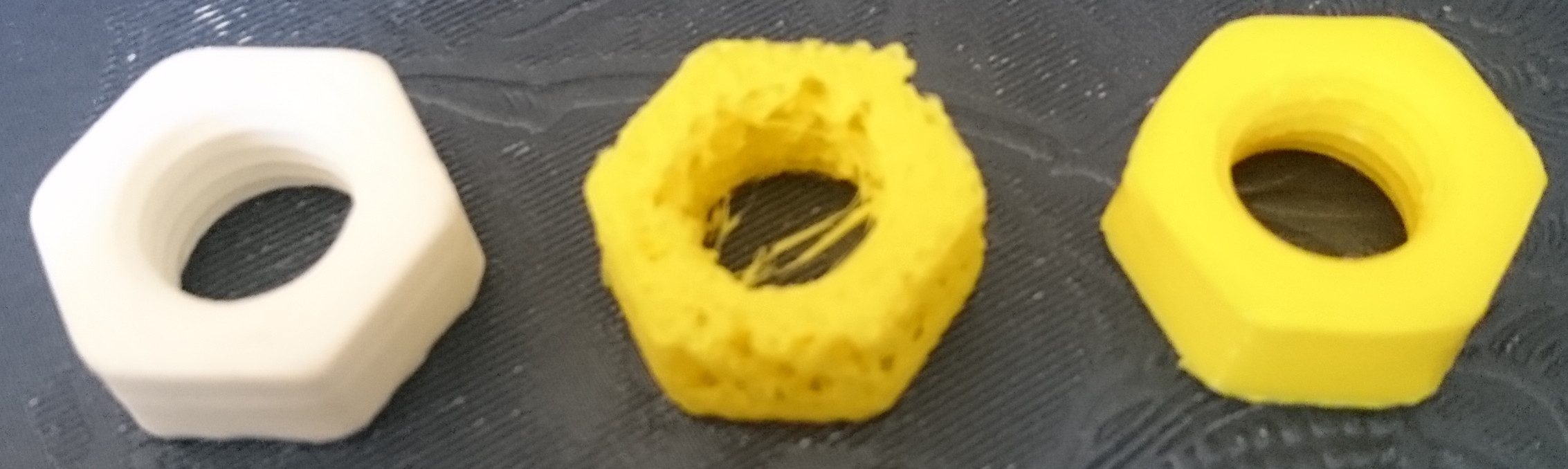
Left: OctoPrint from ~September 2018.
Center: OctoPrint 1.3.10 on the same hardware. Zero changes except filament and the OctoPrint version.
Right: just re-attached the USB cable to a ThinkPad T460p and printed with Repetier-Host.
This is not a hardware issue, USB transfer is evidently completely fine, the printer is doing well, the filament is good, slicer is irrelevant.
OctoPrint at some point started to not work properly on low-end hardware with configurations such as mine.
Due to time, I'm not going to build OctoPrint myself... but I've read some users reporting improvement with increased movement/read buffer sizes. How do I go about adjusting that in OctoPrint?
 donjan
on 21 Mar 2019
donjan
on 21 Mar 2019
I just installed Repetier-Host on the netbook and it printed nicely (looks just like the rightmost output on my previous comment's image).
The configuration step had me look up the baud rate, which is 115200 for my printer.
So I tried OctoPrint again with two changes:
- set a fixed baud rate
- turned off the X server on the netbook and made sure everything fits into RAM (no swapping)
Lo and behold, it printed decently!
This means that for recent OctoPrint verions either:
- the baud rate autodetection is wonky
- it has become more resource hungry and doesn't perform well on my low-end hardware
I do observe slight bubbles/defects at the places I run 'apt search' or launch htop and a few other things. Which likely means that the machine performance for running OctoPrint earlier was barely sufficient with a GUI and now is barely sufficient without (but Repetier-Host works nicely).
donjan
on 21 Mar 2019
This still isn’t addressed...
How can I downgrade back to 1.3.8?
 TaylorDeeves
on 24 Mar 2019
TaylorDeeves
on 24 Mar 2019
This still isn’t addressed...
How can I downgrade back to 1.3.8?
Umm... write another SD card with 1.3.8, perhaps?
lar3ry
on 24 Mar 2019
After some more testing, i have found that, i can print better if:
I lower the resolution in the STL file or set "Maximum resulution" in Cura to 0.1 instead of 0.01
BUT!
Theres is still a big diffence in how well the same file prints over USB serial, at my PC VS octopi (on Raspberry Pi)
This tells me that theres is something with USB Serial on either the RPi or in octoprint, thats is slower than it should be. I can't imagine RPi being slower than my Creality mainboard.
I have tried to downgrade to 1.3.8 via the instructions given here: https://community.octoprint.org/t/how-can-i-revert-to-an-older-version-of-the-octoprint-installation-on-my-octopi-image/205
That did absolutely nothing
I tried putting the whole instalation on a much faster SD card - Did nothing
I can see, when looking around the internet, for a solution, that we, in this thread, aren't the only ones batteling this issue.
migger80
on 26 Mar 2019
I'm rewriting the comm layer. That takes a ton of time. Time I have to make free from regular maintenance work, ticket triage, support and so on. I can't do anything but that, try to refactor it in a way that will allow a version with comm in a different process to work around the GIL.
Contrary to other solutions OctoPrint does more than just stream a file to the printer. It has to do a ton of stuff that allows the plugins to work that are out there. I'm constantly struggling to keep that working without sacrificing on performance in interpreted code that can only run on one core. Of COURSE a host that doesn't have to do all that and/or is also written in C will outperform OctoPrint. Of COURSE printing from SD card will always outperform printing via serial - the whole protocol overhead falls away which includes calculating and checking checksums, keeping track of line numbers, stupid ping-pong situations, protocol inconsistencies left and right that make parsing tricky and resend handling. If you are seeing issues in your print results with OctoPrint then by all means use a different solution until I or someone else manage to improve things. Personally I have no issues at all with my own printers, but YMMV obviously.
But please for the love of all that is holy stop claiming I'm ignoring these reports or claiming there are no issues under certain usage scenarios. I simply cannot do anything against this any faster than I am on top of everything else that I already have to do to keep this project running pretty much singlehandedly. Constantly repeating what I've already explained in several threads like this one and on several OctoPrint On Air episodes is not a sensible use of time that would be better spent working on the code.
I'm not happy with how slow things are moving forward but getting constant slightly passive aggressive "this is a problem I'm facing too, why won't you do something about it already" comments aren't really helping that either.
PS: This ticket used to be specifically about people suffering from issues with (Monoprice Mini) delta printers yet by now it's completely unclear how many of you chiming in here even have that printer configuration, or what printer + firmware configuration they do have, making it utterly impossible to even suggest possible solutions. Not helpful either.
foosel
on 26 Mar 2019
Hi @foosel
It's so nice hearing from you. :-)
I am very sorry if my comments in this thread, seems pressuring in any way. That was never my intent.
The reason i wrote was to give information that i thought could help. I don't fully understand all that is going on behind the scenes in octoprint/linux. So please forgive me, if i'm having unreasonable expectations, about what is possible.
I totally understand your situation though, and respect I you for the work you are doing.
Thank you VERY much for a great software! I think I forgot to mention that, in my other posts.
Again, if theres is anything i can do to assist in this. - Testing etc. Please let me know.
I will not be bothering you about this again, unless you want me too.
Keep up the good work 👍
migger80
on 26 Mar 2019
Hi, there seems to be a few of these posts about this issue.
Anyways, I too am having this issue.
I have a CoreXY built by myself using an Arduino Mega 2560 with current version of marlin, sorry cant remember what that is right now, but current as of this date, and a ramps board.
I went with repiter server over usb and it works flawlessly. I didn’t realize though all the plugins octoprint has to handle where as rep server doesn’t seem to have plugins.
I don’t use plugins in octoprint though so it’s basically a stock install.
I’m just mentioning this because I have seen it posted it may be a limitation of the power of the raspberry pi. I don’t believe that to be the case since rep server can do it just fine with the same hardware.
Not saying there’s is better, just pointing out there seems to be something in the Octo print code causing the serial transfer issues.
Hope it gets resolved soon. If I knew more about coding, I would be glad to offer help on it. Sadly I don’t.
Thanks for all your hard work.
 changedsoul
on 26 Mar 2019
changedsoul
on 26 Mar 2019
@foosel you know what they say about FOSS maintainership and thick skin ;)
It's not even entitlement, some of the frustration is legit. For instance, I have produced 11 versions of the nut presented above while ruling out possible error sources, only to find it to be something out of my direct control.
Still kept my reporting comments without passive agressiveness, but the maintainer interacting visibly in the thread at least every few weeks counts for a lot in a project such as this, and it's great to see (most of us don't check your other channels).
And as usual, you can safely ignore those comments you feel pressure from when reading them, you don't actually have a real responsibility towards us in this context. At least that's how I do it.
Now enough diluting the thread with good (meaning) advice.
OctoPrint doesn't currently work for me for finer detailed gcodes than the one above, so I'm using Repetier-Host via WebDAV instead of OctoPrint via http until this is fixed.
The original issue was for a specific printer, but it does seem to be more universal... do you want a separate report per setup for bookkeeping once this moves forward?
donjan
on 26 Mar 2019
you know what they say about FOSS maintainership and thick skin ;)
Yes, and it sucks. Share something with the world for free, learn to take all kinds of abuse for it or perish. Please note that I'm not talking about this ticket specifically here but more the general situation.
but the maintainer interacting visibly in the thread at least every few weeks counts for a lot in a project such as this
The problem with that is simply that from a certain project size onward that doesn't scale anymore. I read all the tickets, I triage all the tickets, I track all the tickets. I do the same with the forum posts. I simply can't give regular feedback on all of them or I'd be doing nothing else. If it isn't closed, it's on my mind and I'm looking into it in some way.
The original issue was for a specific printer, but it does seem to be more universal... do you want a separate report per setup for bookkeeping once this moves forward?
Somewhere on this tracker there's a general ticket for stuttering during printing via serial... #450. That's more of a general one for all kinds of printers. This one here should go back to delta issues only so that there's a chance to figure out what is caused by DELTA_SEGMENT issues and what is more of a general problem with the comm layer + pyserial + rpi + python.
@everyone: In general, please 👍 a ticket:

and sub to it if you are affected/want to monitor its progress. If you want to add information, always make sure to also include printer type + firmware + version information + logs + .... A ton of info I get is on the level of "I'm seeing this too" and not "I have the following setup: ...... and have tried x, y and z already". "I'm seeing this too" is not helping, it doesn't tell me anything to further analysis. So if all you have to add is that, rather just 👍 and sub.
And in the specific case of general performance issues on prints with a ton of short line segments, aka #450, there's not much use at the current point for any kind of additional information either sadly since with the current comm layer we are simply at a point where there's a hard limit in transmission speed. As said above, I'm working on a new one for 1.4.0 that will allow to further look into optional decoupling of the communication into a separate process (at the cost of a ton of functionality that plugins like Octolapse and others rely on), but that takes time and before its done I can't tell you anything or give you anything to try what hasn't already been said several times.
foosel
on 27 Mar 2019
comm layer
If GIL is a concern here in comm layer wouldn't it make sense to rewrite this part in (lets say) Rust?
 mpapierski
on 27 Mar 2019
mpapierski
on 27 Mar 2019
As said above, I'm working on a new one for 1.4.0 that will allow to further look into optional decoupling of the communication into a separate process (at the cost of a ton of functionality that plugins like Octolapse and others rely on)
foosel
on 27 Mar 2019
I came across this issue, too.
i set a higher buffer and bandwidth in marlin and it got better, but not perfect.
After more research i disabled the checksum check in octoprint and its almost gone besides a few blobs (had like hundreds blobs before).
What about to have an adaptive checksum check.
Check checksum with everyline the first 100lines of gcode and lower it if there does not occur checksum mismatches like only all 500lines send a checksum or completly disable it.
Would be also good to have a counter of checksum mismatches to get a clue how good/bad the connection is. For now its printing fine w/o checksum check.
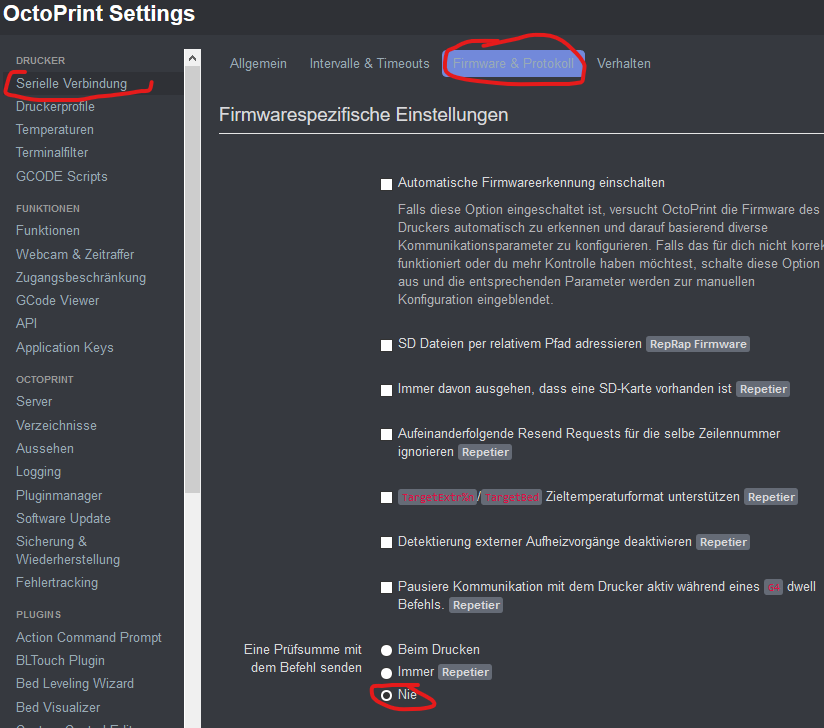
Ender 3, Marlin 2.0.x
#define BAUDRATE 250000
#define DEFAULT_MINSEGMENTTIME 50000
//#define SLOWDOWN
#define BLOCK_BUFFER_SIZE 64
#define MAX_CMD_SIZE 96
#define BUFSIZE 32
#define TX_BUFFER_SIZE 32
#define RX_BUFFER_SIZE 1024
#define SERIAL_XON_XOFF
And the last thing to completly remove the blobs in cylinders:
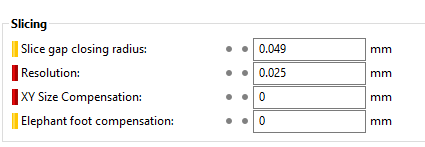
Lower the resolution in ur slicer.
I use slic3r pe with 0.05 or 0.025.
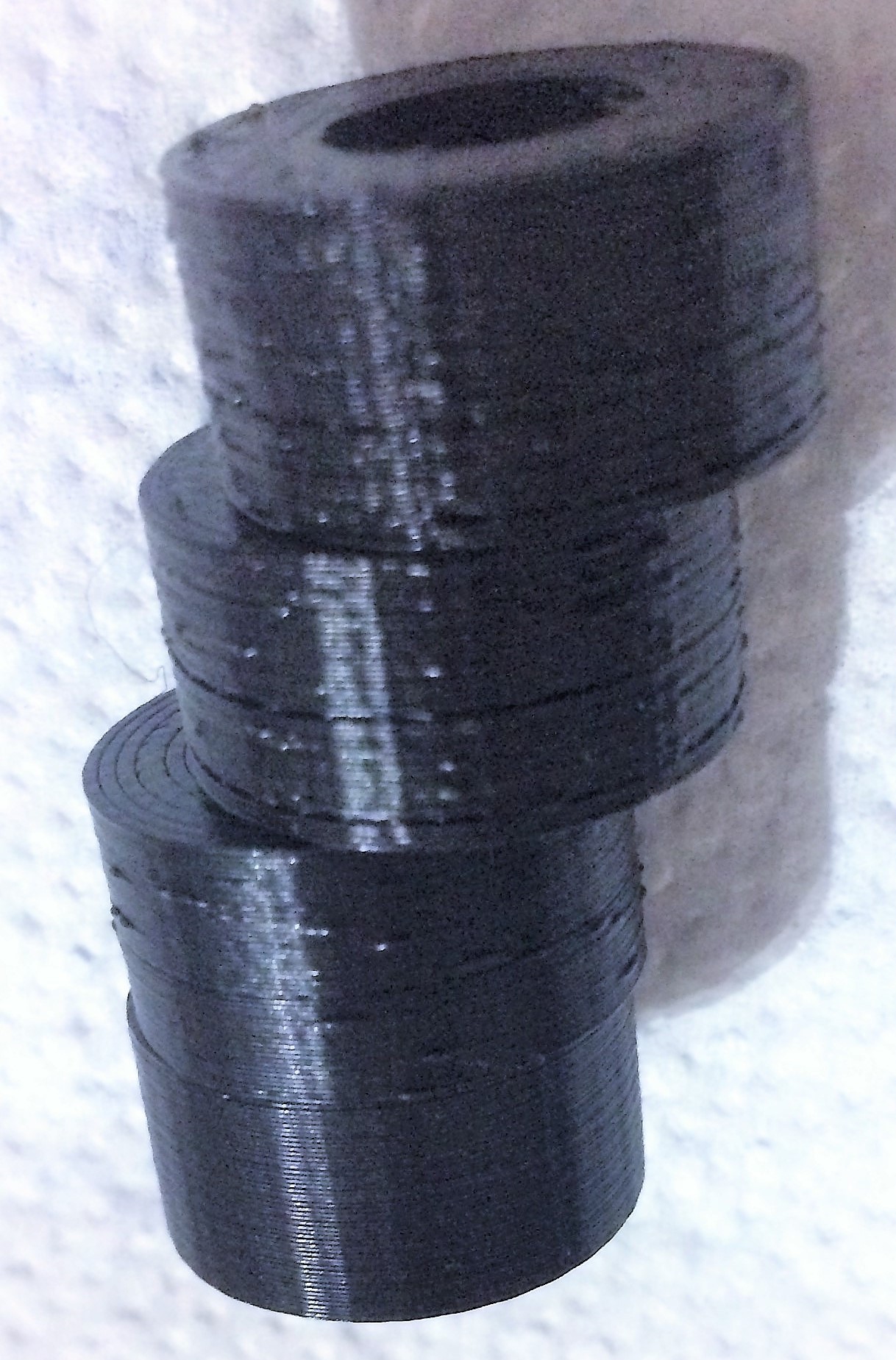
Results:
Testfile: https://www.thingiverse.com/thing:32203
1: Default config
2: Higher Buffer/baudrate
3: Disabled checksum
4: resolution 0.05 (producing less gcode in curves)
Not in picture: resolution 0.025 also prints fine.
Im going down with resolution now to see how low i can set it without stuttering.
 reloxx13
on 23 Apr 2019
reloxx13
on 23 Apr 2019
Hey foosel, sorry to hear the struggles. I don't see the jitter as much as I did last year when I checked in on this thread, but it does still do it on tight radiuses. I don't have my printer super tuned, and don't expect top shelf quality, so I just print a little slower.
Thank you for all the effort you put in to this project. I still use it on both of my printers, and love it. If it gets better, awesome. Either way I'll keep using it as long as it still prints.
My Delta is the only one that seems to jitter, albeit minor. My hack-job FrankenCube seems to be unaffected, despite running on a Pi Zero W. But I only run that little guy at 30mm/sec. It's a cantilever style Cartesian and wobbles horrible if I go faster, but it's a damn trooper for running unattended.
I wish you the best of luck on fixing everything, and look forward to poking around in the code if I get some time.
gcurtis79
on 25 Apr 2019
@gcurtis79 thank you so much, you just made my day with this comment.
foosel
on 26 Apr 2019
Are there any issues that can be expected to occur when disabling checksum?
 kulfuerst
on 18 May 2019
kulfuerst
on 18 May 2019
running it without checksum for almost a month now, no problems.
reloxx13
on 18 May 2019
I saw this on a 256mb RPI1 - updating to an rpi2 seems to have mitigated it - though I’ve not done extensive tests. Might a workaround be for OctoPrint to upload to the printer SD and then execute a print from SD rather than via Serial? I’m using an Anycubic i3 mega.
 MrBill1234
on 29 Sep 2019
MrBill1234
on 29 Sep 2019
I saw this on a 256mb RPI1 - updating to an rpi2 seems to have mitigated it - though I’ve not done extensive tests. Might a workaround be for OctoPrint to upload to the printer SD and then execute a print from SD rather than via Serial? I’m using an Anycubic i3 mega.
did you use newly installed-octoprint on rpi2?
it seems my only solution to this is reinstalling octoprint
 zirho
on 10 Nov 2019
zirho
on 10 Nov 2019
This issue has been mentioned on OctoPrint Community Forum. There might be relevant details there:
https://community.octoprint.org/t/th3dstudio-com-report-of-problem-with-octoprint/16573/19
 GitIssueBot
on 1 Mar 2020
GitIssueBot
on 1 Mar 2020
This issue has been mentioned on OctoPrint Community Forum. There might be relevant details there:
https://community.octoprint.org/t/blobs-on-the-surface-of-prints/17631/4
GitIssueBot
on 28 Mar 2020
Hey everyone, I'm curious to see if this thread is still a little bit active. I have been wondering about the ancient Type B USB ports in most 3D printers.
Firstly, how is it that these outdated ports are found on almost all boards? Why not something faster?
This leads me to my second questions. Could USB ports be swapped out? Maybe I could move to a less ancient USB type. Could this help with this issue?
kulfuerst
on 4 Apr 2020
Could this help with this issue?
No, or at best very, very minimally. The problem is with the resource-limited microcontroller on the board and the inefficient protocol between the printer and the computer.
 fieldOfView
on 4 Apr 2020
fieldOfView
on 4 Apr 2020
This issue has been mentioned on OctoPrint Community Forum. There might be relevant details there:
https://community.octoprint.org/t/printing-with-octoprint-causing-stuttering-and-blobs/18930/2
GitIssueBot
on 25 Apr 2020
Hi, I just want to add that I have the same shredding on an Anycubic i3 Mega printer with a 32bit board. So it's not limited to 8bit boards and thus I think the problem is not the limitated resources on these boards.
dinomueller
on 3 May 2020
There is a limit to how much data can be sent over a serial link. We are
basically bottlenecking ourselves by taking something as advanced as USB is
these days, and limiting it to serial data transfer. We're literally
hitting the limit of what g-code over serial can handle. Unless someone
wants to develop a better (more efficient) machine control language, we'll
be stuck here for a bit longer.
On Sun, May 3, 2020, 11:13 AM dinomueller notifications@github.com wrote:
Hi, I just want to add that I have the same shredding on an Anycubic i3
Mega printer with a 32bit board. So it's not limited to 8bit boards and
thus I think the problem is not the resource-limitation on these boards.—
You are receiving this because you were mentioned.
Reply to this email directly, view it on GitHub
https://github.com/OctoPrint/OctoPrint/issues/2799#issuecomment-623133643,
or unsubscribe
https://github.com/notifications/unsubscribe-auth/AK35UJUL3ZRLCFYSB7H33QLRPWJZVANCNFSM4FRTGUOA
.
gcurtis79
on 4 May 2020
It would be nice if the slicer or octoprint could analyze the data rate
required for the gcode and give a warning if it's too high. Not sure if
that's possible. Or if nothing else at least retroactively warn that they
rate sent reached the limit so you can know when a printing issue was
caused by transmission rate over USB.
On Sun, May 3, 2020, 6:41 PM gcurtis79 notifications@github.com wrote:
There is a limit to how much data can be sent over a serial link. We are
basically bottlenecking ourselves by taking something as advanced as USB is
these days, and limiting it to serial data transfer. We're literally
hitting the limit of what g-code over serial can handle. Unless someone
wants to develop a better (more efficient) machine control language, we'll
be stuck here for a bit longer.On Sun, May 3, 2020, 11:13 AM dinomueller notifications@github.com
wrote:Hi, I just want to add that I have the same shredding on an Anycubic i3
Mega printer with a 32bit board. So it's not limited to 8bit boards and
thus I think the problem is not the resource-limitation on these boards.—
You are receiving this because you were mentioned.
Reply to this email directly, view it on GitHub
<
https://github.com/OctoPrint/OctoPrint/issues/2799#issuecomment-623133643
,
or unsubscribe
<
https://github.com/notifications/unsubscribe-auth/AK35UJUL3ZRLCFYSB7H33QLRPWJZVANCNFSM4FRTGUOA.
—
You are receiving this because you are subscribed to this thread.
Reply to this email directly, view it on GitHub
https://github.com/OctoPrint/OctoPrint/issues/2799#issuecomment-623194661,
or unsubscribe
https://github.com/notifications/unsubscribe-auth/ABPYQ2NFIMTKZF4GTDFCAOLRPXXIVANCNFSM4FRTGUOA
.
 napter
on 4 May 2020
napter
on 4 May 2020
Well most prints ship with cheap CH341G usb uart chips, but a true FTDI chip could top out with serial speeds of 3Mbps.
DanielJoyce
on 4 May 2020
I'm sorry, but the serial connection is clearly not the problem here. If it were, a faster Octoprint host or another software on the host would not lessen / solve the problem.
XL-Reaper
on 4 May 2020
Yes, its mostly people trying to run on a tiny small host. That's a bigger issue.
DanielJoyce
on 8 May 2020
The issue happens on beefy hosts too, I've used a gaming laptop. It's due
to USB transfer speed
On Thu, May 7, 2020, 6:08 PM Daniel notifications@github.com wrote:
Yes, its mostly people trying to run on a tiny small host. That's a bigger
issue.—
You are receiving this because you are subscribed to this thread.
Reply to this email directly, view it on GitHub
https://github.com/OctoPrint/OctoPrint/issues/2799#issuecomment-625521481,
or unsubscribe
https://github.com/notifications/unsubscribe-auth/ABPYQ2MCRQK3URJC4X2PZPTRQMWMXANCNFSM4FRTGUOA
.
napter
on 8 May 2020
You realize that the low speed of the original (slowest) USB 1.0 spec was 1.5 Mbit/s, yeah?
tedder
on 8 May 2020
I have always wondered about uart baudrates being the limiting factor. It should be easy to calculate required bitrate of the link based on the gcode and print speeds. A finely resolved circular path at decent speeds could easily blow past 256k.
As mentioned, even ancient usb has about 6 times the max speed of uart. It doesn't sound like an impossible task developing a better system, in fact I bet most of the popular 32bit micros used on printers today already have native usb-2 built in. A challenge would be found in getting all wheels of the project moving in that direction for it to happen sooner than later... might mean temporarily stalling the feature creep. Until then, we either slow down prints or use the sd for models with finer arcs.
Along those lines, I wonder if the current standard hardware could be improved by somehow using the marlin sd card to cache moves... the idea it would hold enough data to get past rapid segments, and refill the buffer during longer segs... guessing marlin wont agree with printing and writing to the card at the same time though.
truglodite
on 8 May 2020
I've ordered a BigTreeTech SKR 1.4 board and was going to cross wire the TX/RX directly from my Raspberry Pi 3B+
I'm doing it mostly for perceived neatness but would that bypass the UART bottleneck or is that simply bypassing the USB port?
 darkporpoise
on 8 May 2020
darkporpoise
on 8 May 2020
I'm sorry, but the serial connection is clearly not the problem here. If it were, a faster Octoprint host or another software on the host would not lessen / solve the problem.
That's assuming an effect can have only a single cause. For some people increasing the processing power on the host has resolved the bottleneck but there seems to be strong evidence that a more commonly encountered bottleneck is the serial connection.
darkporpoise
on 8 May 2020
Agreed - there is probably a combination of issues. I updated my RPi1 (256mb version) to an rpi 2 and the issue went away for me - at least in my use case. It may well reappear in future with different prints.
MrBill1234
on 8 May 2020
If the serial data rate is 256k, could octoprint or a plug-in detect when
this rate is reached and give a warning? That would really help identifying
and trouble shooting the issue.
On Thu, May 7, 2020, 8:48 PM truglodite notifications@github.com wrote:
I have always wondered about uart baudrates being the limiting factor. It
should be easy to calculate required bitrate of the link based on the gcode
and print speeds. A finely resolved circular path at decent speeds could
easily blow past 256k.As mentioned, even ancient usb has about 6 times the max speed of uart. It
doesn't sound like an impossible task developing a better system, in fact I
bet most of the popular 32bit micros used on printers today already have
native usb built in. A challenge would be found in getting all wheels of
the project moving in that direction for it to happen sooner than later...
might mean temporarily stalling the feature creep.—
You are receiving this because you are subscribed to this thread.
Reply to this email directly, view it on GitHub
https://github.com/OctoPrint/OctoPrint/issues/2799#issuecomment-625569160,
or unsubscribe
https://github.com/notifications/unsubscribe-auth/ABPYQ2KSKSQMQP5AMMV6CZLRQNJHTANCNFSM4FRTGUOA
.
napter
on 8 May 2020
Background
Thank you, maintainers of Octoprint. This software was recommended to me early on and the ease of use plus plugins architecture is quite good.
I use an Ender 3 with an original motherboard and parts. I have flashed the firmware with TH3D's Marlin 1.x fork. I noticed the same issue after printing a circular item, though my part was only affected cosmetically. I tried this users item and noticed slowdowns on certain curves. I've never seen serial errors, that points more towards a faulty cable, USB port or serial controller.
Causes
- 8bit motherboard with tightly constrained memory and a slow CPU causes buffer exhaustion
- Slow or faulty OctoPrint device/USB cable/SD card
If you've got cause number two, and/or serial errors, double check that another computer doesn't have the same issues before trying to solve 1.
Firmware solution
You can reduce the effect of the first item on an Ender 3 by increasing BLOCK_BUFFER_SIZE from 16 to 32. Increase BUFSIZE to 20 or so. I increased the BAUDRATE to 2500000 but I'm not certain if this improves or degrades print quality.
BUFSIZE is the serial buffer.
BLOCK_BUFFER_SIZE is the movement planner buffer.
I tried increasing the BUFSIZE significantly while leaving BLOCK_BUFFER_SIZE at 16, but performance was same/worse.
I tried increasing BLOCK_BUFFER_SIZE to 64 but had some issues connecting over serial. This may have been low memory causing corruption, or user error. I haven't bothered revisiting it - the increase to 32 was enough to reduce the effect while I wait for a new Ender 3 motherboard.
With these changes, the slowdown lasted for a shorter duration of the curve. I was having trouble with the heaters turning off before the last 16 movements are completed. This issue is now exacerbated to 32 movements, which has significant side effects when the last 32 moves are very long lines. M400 is supposed to help, but it doesn't seem to. That's something I'll just have to figure out.
Slicer solution
Reduce the resolution of the final GCODE. The location and name of these settings vary slicer to slicer. Lowering the resolution reduces the impact of buffer exhaustion by reducing the number of commands sent to the printer to execute a curve. I did this and noted it worked well, but lacked the patience to tweak those values for each type of object I wanted to print.
 somehibs
on 4 Jun 2020
somehibs
on 4 Jun 2020
I run three printers so my final solution was to change to Repetier Server running on a Raspberry Pi3. Had to give up the plug ins in Octoprint, but am now able to run two delta printers and a PRUSA MK3S at the same time from a single Raspberry PI3 with no issues all via USB. No firmware modifications needed.
While the full version of Repetier Server isn't free (Pro version), in doing the change I didn't need a Raspberry Pi on each printer so I ended up with two spares...
wabbitguy
on 4 Jun 2020
So @wabbitguy maybe your issue was plugin related not just octoprint?
 jneilliii
on 4 Jun 2020
jneilliii
on 4 Jun 2020
I run three printers so my final solution was to change to Repetier Server running on a Raspberry Pi3. Had to give up the plug ins in Octoprint, but am now able to run two delta printers and a PRUSA MK3S at the same time from a single Raspberry PI3 with no issues all via USB. No firmware modifications needed.
While the full version of Repetier Server isn't free (Pro version), in doing the change I didn't need a Raspberry Pi on each printer so I ended up with two spares...
So, were you able to print something on Repetier using an RPI3 that stuttered on Octoprint - and were they both using the same gcode file?
I recall that someone used Astroprint (which uses Octoprint code) with similar effect - the stuttering went away.
If this is the case, perhaps some analyisis of what Repetier/Astroprint are doing may help solve this issue.
MrBill1234
on 4 Jun 2020
Hello everyone,
I use Astroprint with no problems! But, the exact same Raspberry Pi, with an SD card with Octoprint stutters all the time, with the same gcode.
Cheers
 hugoboc
on 4 Jun 2020
hugoboc
on 4 Jun 2020
I use Astroprint with no problems! But, the exact same Raspberry Pi, with an SD card with Octoprint stutters all the time, with the same gcode.
What do you mean by 'with an SD card with Octoprint'?
MrBill1234
on 4 Jun 2020
@MrBill1234 I could use the same GCODE file that caused the stutters on the deltas, print both at the same time since the printers are identical. I didn't use two copies of the GCODE file on the server, just the same file and sent it to both printers.
I had to re-slice for the MK3S because it's a cartesian so different GCODE but from the same STL.
I used Astroprint for a while and found the same stutters but it allowed me a slightly higher print speed, about 15%, before the stuttering showed up. Astroprint is a fork of Octoprint so the same problem didn't come as a big surprise.
The biggest differences between Repetier Server and Octopring seems to be the way they communicate. Octoprint waits for an OK from the printer before sending the next line, plus it does a fair amount of parsing of the GCODE. For example if you have an MMU, you have to tell Octoprint it has 5 extruders and one nozzle.
Repetier Server is more of a server, you send it the GCODE, it checks to make sure the code is within the bounds set for the printer and it sends it without waiting for the "ok" ping pong communication or doing any parsing to speak of. Hence entirely different method of sending via USB.
wabbitguy
on 4 Jun 2020
This sounds like a good solution for Klipper/OctoPrint combo.
jneilliii
on 4 Jun 2020
@MrBill1234 I mean, I have one Raspberry Pi connected to my Ultimaker 2 and 2 SD cards, one with an Astroprint image and one with Octoprint.
With Astroprint card inserted on my RPi, I can print with no problems. I can even access the Astroprint's web interface, take some snapshots with the webcam that I have conected to the RPi, and the print does not stutter at all.
With the exact same hardware, if I take out the Astroprint's card from the RPi and insert Octoprint's card on it, I can no longer print without stuttering. No chance!
The SD cards are same brand and model by the way.
hugoboc
on 4 Jun 2020
@MrBill1234 by that I mean Octopi image :)
hugoboc
on 4 Jun 2020
Now that you mention it, lately I have noticed quite a bit of pausing when I log in to octoprint during a print. Sometimes it can be for several seconds, other times it is hard to tell of it is the 'normal' shredded circle behavior, but the longer pauses only occur on login. I do have a lot of plugins running, webcam, etc. I like having the swiss army knife if you will, but wondering how smart it is piping gcode through said knife... vs separating the tasks and not letting the 'luxury features' interfere with the mission critical task of delivering gcode to marlin.
I need to look more into using the sdcard on marlin together with octoprint. However I still have concerns with delays since I'm guessing octo will still need the comms to have any use in this context (difference being marlin sending gcode to OP, vs the other way around)... and that might cause issues even when printing from sd?
truglodite
on 4 Jun 2020
If you are printing from the SD Card on your printer's board then I believe Octoprint is very unlikely to cause any issues printing as it is no longer involved in sending GCODE to the processor. Octoprint can still initiate, cancel and monitor SD Card prints but isn't otherwise really involved in the process.
As mentioned already in this thread, printing from SD Card is likely to completely resolve this issue but that is an unsatisfactory solution for many Octoprint users because it will also severely limit Octoprint's usefulness!
If Octoprint isn't sending the GCODE then it can't change it (or even respond to it) which renders many features and plugins unusable. For instance, I like to create timelapse videos using the Octolapse plugin but that can't work if printing from SD Card.
The "Virtual SD Card" that Klipper can provide with Octoprint works differently but in practice has much the same pros and cons.
darkporpoise
on 5 Jun 2020
Upgraded from my original Creality 1.1.3 motherboard still running Marlin 1.x to the BTT SKR 1.4 Turbo and TMC2209 stepper drivers running Marlin 2.0.x.x.
My USB print issues went away. I'm printing highly curved objects at 60mm/s as if I were printing off an SD card. No changes to Octoprint and minimal BTT-related changes required for Marlin. This points to these 8bit boards being insufficient for USB printing, or requiring protocol level hacks (transmitting data ahead of OK, etc). Nice to have a near silent printer too. It's like having a new printer again.
somehibs
on 11 Jun 2020
Upgraded from my original Creality 1.1.3 motherboard still running Marlin 1.x to the BTT SKR 1.4 Turbo and TMC2209 stepper drivers running Marlin 2.0.x.x.
That's exactly what I've got coming (slowly) from AliExpress for my Ender 3. Glad to hear it works so well for you!
I can't pretend to fully understand but I think many 8bit boards use the USB port but can't cope with a full blown USB protocol. Hopefully what you're reporting signifies that the 32bit boards will support
higher rate protocols and that Octoprint can take advantage of it out of the box.
It cost me $40 for both the 32bit board and 4 new stepper drivers so should be a significant improvement for the money.
darkporpoise
on 11 Jun 2020
I'm closing this as at this point it is pretty much the same as #450 and thus a duplicate.
In general, there's a limit to how many line segments OctoPrint (or any host really) can send to the printer and have validated, parsed and executed on the printer. There's some optimization potential in OctoPrint (currently limited by the architecture) that is going to be tackled in a rewrite and as part of #450. In the meantime make sure to not have your slicer produce insanely small segments below your extrusion width and also experiment with the ArcWelder plugin by FormerLurker.
foosel
on 18 Jun 2020
Related issues
foosel
·
50Comments
 razerraz
·
88Comments
razerraz
·
88Comments
 gregopti
·
81Comments
gregopti
·
81Comments
 ZhuDaHai
·
42Comments
ZhuDaHai
·
42Comments
 szafran81
·
40Comments
szafran81
·
40Comments
Most helpful comment
I'm rewriting the comm layer. That takes a ton of time. Time I have to make free from regular maintenance work, ticket triage, support and so on. I can't do anything but that, try to refactor it in a way that will allow a version with comm in a different process to work around the GIL.
Contrary to other solutions OctoPrint does more than just stream a file to the printer. It has to do a ton of stuff that allows the plugins to work that are out there. I'm constantly struggling to keep that working without sacrificing on performance in interpreted code that can only run on one core. Of COURSE a host that doesn't have to do all that and/or is also written in C will outperform OctoPrint. Of COURSE printing from SD card will always outperform printing via serial - the whole protocol overhead falls away which includes calculating and checking checksums, keeping track of line numbers, stupid ping-pong situations, protocol inconsistencies left and right that make parsing tricky and resend handling. If you are seeing issues in your print results with OctoPrint then by all means use a different solution until I or someone else manage to improve things. Personally I have no issues at all with my own printers, but YMMV obviously.
But please for the love of all that is holy stop claiming I'm ignoring these reports or claiming there are no issues under certain usage scenarios. I simply cannot do anything against this any faster than I am on top of everything else that I already have to do to keep this project running pretty much singlehandedly. Constantly repeating what I've already explained in several threads like this one and on several OctoPrint On Air episodes is not a sensible use of time that would be better spent working on the code.
I'm not happy with how slow things are moving forward but getting constant slightly passive aggressive "this is a problem I'm facing too, why won't you do something about it already" comments aren't really helping that either.
PS: This ticket used to be specifically about people suffering from issues with (Monoprice Mini) delta printers yet by now it's completely unclear how many of you chiming in here even have that printer configuration, or what printer + firmware configuration they do have, making it utterly impossible to even suggest possible solutions. Not helpful either.