Octoprint: [RC Feedback] Feedback on the 1.4.1rc3 Release Candidate
Please provide general feedback on your experience with the 1.4.1rc3 Release Candidate here. An "All is working fine" is valuable feedback as well, because it tells me that people in fact are testing the RC and just not finding any problems. Thanks :)
If you run into any obvious bugs not yet listed below the following line, please open a new ticket and follow "How to file a bug report". I need full bug reports, not just a statement that something doesn't work!
Currently known issues
- [x] 🐛 Duplicated id on control panel (
control-jog-feedratex 2 instead ofcontrol-jog-feedrateandcontrol-jog-flowrate) - fix ready for 1.4.1rc4 - [x] 🐛 #3653 - Aborting auto-connection makes the connection box crash - fix ready for 1.4.1rc4
- [x] 🐛 #3655 - File List API with location broken - fix ready for 1.4.1rc4
- [x] 🥅 #3661 - Plugin Manager can run into an error if the plugin repository data contains null values for latest_release - primarily an issue with the plugin repository, however error resilience improvement ready for 1.4.1rc4
Unreproduced issues
Unreproduced and information for further analysis missing
- ❓ "when upload to SD, the heaters turn on with the g-code specified temp" - awaiting full bug report
Third party issues
- fabianonline/OctoPrint-Telegram#269 - Telegram plugin doesn't load anymore - plugin uses long deprecated imports, PR submitted
- BillyBlaze/OctoPrint-TouchUI#413 - Misplaced buttons and a missing file list on 1.4.1rc3 - TouchUI plugin issue, PR merged
- #3650 - Free/Used Space is Blank on rc3. and Unable to successfully upload gcode - GcodeViewer plugin issue, filed as ieatacid/OctoPrint-GcodeEditor#17
- "There might be a bug with the serial port detection. When I reset my board (or do a firmware upgrade), Octoprint does not connect until [I] restart [it]." - appears to be caused by OctoScreen somehow, see https://github.com/OctoPrint/OctoPrint/issues/3643#issuecomment-662097611
- NotExpectedYet/OctoFarm#85 - OctoPrint 1.4.1 and Websocket Error - looks like an implementation error of the socket authentication on part of OctoFarm that so far was covered by a bug in OctoPrint
Issues needing analysis
 foosel
All 43 comments
Installed successfully from 1.4.1rc2 on OctoPi 0.17.0, Python 2.7.16.
 b-morgan
on 15 Jul 2020
b-morgan
on 15 Jul 2020
Other than a couple of missing plugins, this version installed fine and my first print is going good 👌
 louispires
on 15 Jul 2020
louispires
on 15 Jul 2020
all seems OK here
 gege2b
on 16 Jul 2020
gege2b
on 16 Jul 2020
All running well on my actual printer now, except for TouchUI - It is looking a bit messy with the new options on control tab, and files list has disappeared. Will open issue over there, if I can make sure it is an actual problem 1.4.0 -> 1.4.1
Edit: here's the issue: https://github.com/BillyBlaze/OctoPrint-TouchUI/issues/413
 cp2004
on 16 Jul 2020
cp2004
on 16 Jul 2020
So I'm not exactly sure why but when updating to 1.4.1RC[1-3] via git I would get an error starting.
Previous version was installed via regular install process (factory image / octoprint update).
git clone [email protected]:OctoPrint/OctoPrint.git
cd OctoPrint
source ~/oprint/bin/activate
python setup.py clean
python setup.py install
~/oprint/bin/octoprint serve
resulted in
Traceback (most recent call last):
  File "./octoprint", line 11, in <module>
    load_entry_point('OctoPrint==1.4.1rc3', 'console_scripts', 'octoprint')()
  File "/home/pi/oprint/lib/python2.7/site-packages/OctoPrint-1.4.1rc3-py2.7.egg/octoprint/__init__.py", line 625, in main
    from octoprint.util.fixes import patch_sarge_async_on_py2
  File "/home/pi/oprint/lib/python2.7/site-packages/OctoPrint-1.4.1rc3-py2.7.egg/octoprint/util/__init__.py", line 40, in <module>
    from octoprint.util.net import interface_addresses, address_for_client, server_reachable
  File "/home/pi/oprint/lib/python2.7/site-packages/OctoPrint-1.4.1rc3-py2.7.egg/octoprint/util/net.py", line 17, in <module>
    import requests
  File "/home/pi/oprint/lib/python2.7/site-packages/requests-2.24.0-py2.7.egg/requests/__init__.py", line 43, in <module>
    import urllib3
  File "/home/pi/oprint/lib/python2.7/site-packages/urllib3/__init__.py", line 21, in <module>
    from logging import NullHandler
ImportError: cannot import name NullHandler
After that I did pip install octoprint==1.4.1RC3 and OctoPrint would start. Re-ran the manual process from the git repo and that worked as well.
OctoPrint 1.4.0 (previous)
OctoPi 0.17.0
Py 2.7.16
 kantlivelong
on 17 Jul 2020
kantlivelong
on 17 Jul 2020
Not sure why it caused an issue for you, but this:
python setup.py clean
python setup.py install
is outdated and should be
python setup.py clean
pip install .
I suspect some weird shenanigans caused by left overs due to the old approach not cleaning up after itself.
foosel
on 17 Jul 2020
@foosel that was likely it. I was able to recreate the issue (not exact) in a fresh venv on my dev box but the newer method worked. Is that an OctoPrint specific install process change? I'm familiar w/ using pip install . but never needed to before when installing/upgrading OctoPrint.
kantlivelong
on 17 Jul 2020
@foosel issue
when upload to SD, the heaters turn on with the g-code specified temp
 spling-du-futur
on 17 Jul 2020
spling-du-futur
on 17 Jul 2020
@spling-du-futur
If you run into any obvious bugs not yet listed below the following line, please _open a new ticket and follow "How to file a bug report"_. I need full bug reports, not just a statement that something doesn't work!
foosel
on 17 Jul 2020
@kantlivelong I'm not aware of any specific changes that might cause this, but pip install has been recommended for a couple years now actually, so I can't even remember when I last tested with python setup.py install myself. I could imagine that one of the third party dependencies that saw an update in 1.4.1 cause this. But again, no clue really and frankly considering that its now recommended anyhow not too keen to investigate, considering that the fix is literally the proper pip install OctoPrint should this happen in the field on some ancient OctoPi setups (that aren't officially supported anymore, 0.15 and later are but didn't show an issue in any of my tests) or on manual installs (which their users did themselves and should thus be able to run a quick command against)
foosel
on 17 Jul 2020
Upgrade and print work fine :)
There might be a bug with the serial port detection. When I reset my board (or do a firmware upgrade), Octoprint does not connect until a restart the service.
2020-07-17 16:27:28,385 - octoprint.plugins.firmwareupdater - INFO - Unmounting SD card: 'sudo umount /media/usb'
2020-07-17 16:27:28,461 - octoprint.plugins.firmwareupdater - INFO - Firmware update reset: attempting to reset the board
2020-07-17 16:27:28,463 - octoprint.plugins.firmwareupdater - INFO - Resetting LPC1768 at '/dev/ttyACM0'
2020-07-17 16:27:28,532 - octoprint.plugins.firmwareupdater - INFO - Waiting for LPC1768 at '/dev/ttyACM0' to reset
2020-07-17 16:27:30,130 - octoprint.util.comm - ERROR - Unexpected error while reading from serial port
Traceback (most recent call last):
  File "/home/pi/OctoPrint/venv/local/lib/python2.7/site-packages/octoprint/util/comm.py", line 2894, in _readline
    ret = self._serial.readline()
  File "/home/pi/OctoPrint/venv/local/lib/python2.7/site-packages/octoprint/util/comm.py", line 5047, in readline
    c = self.read(1)
  File "/home/pi/OctoPrint/venv/local/lib/python2.7/site-packages/serial/serialposix.py", line 501, in read
    'device reports readiness to read but returned no data '
SerialException: device reports readiness to read but returned no data (device disconnected or multiple access on port?)
2020-07-17 16:27:30,148 - octoprint.plugins.firmwareupdater - DEBUG - Waiting for reset to init [7/50]
2020-07-17 16:27:30,270 - octoprint.util.comm - ERROR - Please see https://faq.octoprint.org/serialerror for possible reasons of this.
2020-07-17 16:27:30,379 - octoprint.util.comm - INFO - Changing monitoring state from "Operational" to "Offline (Error: SerialException: 'device reports readiness to read but returned no data (device disconnected or multiple access on port?)' @ comm.py:_readline:2894)"
2020-07-17 16:27:30,397 - octoprint.plugins.firmwareupdater - INFO - LPC1768 at '/dev/ttyACM0' is resetting
2020-07-17 16:27:30,398 - octoprint.plugin - DEBUG - Calling on_event on action_command_notification
..........
2020-07-17 16:27:32,301 - octoprint.plugins.mqtt - DEBUG - Sent message: octoPrint/event/PrinterStateChanged - {"_timestamp": 1594996052, "state_string": "Detecting serial connection", "_event": "PrinterStateChanged", "state_id": "DETECT_SERIAL"}, retain=True
2020-07-17 16:27:32,313 - octoprint.plugins.thespaghettidetective - DEBUG - Sending to server:
{'current_print_ts': -1, 'octoprint_temperatures': {}, 'octoprint_event': {'data': {'state_string': u'Detecting serial connection', 'state_id': 'DETECT_SERIAL'}, 'event_type': u'PrinterStateChanged'}, 'octoprint_data': {u'progress': {'completion': None, 'printTimeLeftOrigin': None, 'printTime': None, 'printTimeLeft': None, 'filepos': None}, u'state': {'text': $
2020-07-17 16:27:32,332 - octoprint.util.comm - INFO - Serial detection: Performing autodetection with 0 port/baudrate candidates:
2020-07-17 16:27:32,334 - octoprint.util.comm - INFO - Changing monitoring state from "Detecting serial connection" to "Error: No more candidates to test, and no working port/baudrate combination detected."
2020-07-17 16:27:32,364 - octoprint.plugins.mqtt - DEBUG - Sent message: octoPrint/event/PrinterStateChanged - {"_timestamp": 1594996052, "state_string": "Error: No more candidates to test, and no working port/baudrate combination detected.", "_event": "PrinterStateChanged", "state_id": "ERROR"}, retain=True
 hamster65
on 17 Jul 2020
hamster65
on 17 Jul 2020
My latest update on rc3 is the same non-update as I had with RC2 - got it running on two instances and haven't seen any issues yet.
 ChrisHeerschap
on 20 Jul 2020
ChrisHeerschap
on 20 Jul 2020
@jneilliii Hm... It works here, against the virtual printer:
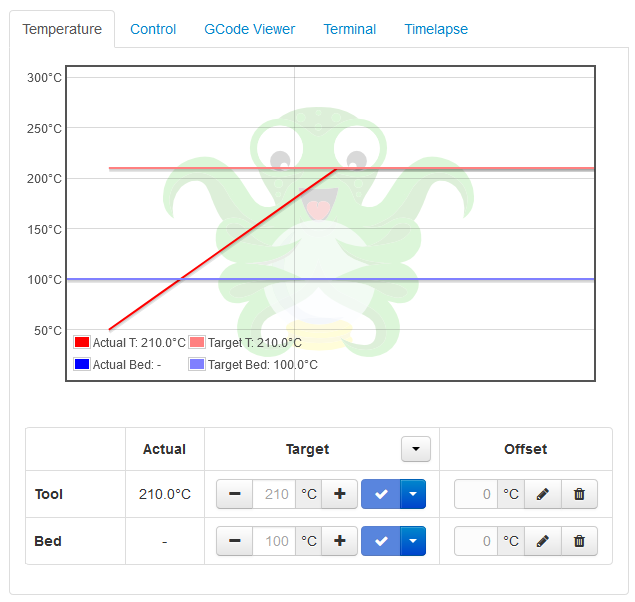
Send: N5 M140 S100*97
Recv: ok N5
Send: N6 M104 S210*96
Recv: ok N6
Send: N7 M105*32
Recv: ok N7 T:49.74 /210.00 C:21.30 /0.00 T0:49.74 /210.00 T1:21.30 /0.00 T2:21.30 /0.00 T3:21.30 /0.00 @:64
@hamster65 That looks like it fails to enumerate in the underlying OS in such cases, as OctoPrint doesn't even see the serial port:
2020-07-17 16:27:32,332 - octoprint.util.comm - INFO - Serial detection: Performing autodetection with 0 port/baudrate candidates:
2020-07-17 16:27:32,334 - octoprint.util.comm - INFO - Changing monitoring state from "Detecting serial connection" to "Error: No more candidates to test, and no working port/baudrate combination detected."
If that's indeed the case there's nothing really I can do here, as OctoPrint can only connect to ports it can actually see. You said you can reconnect after you "restart the service". What service? OctoPrint? Restart how, reboot or just a restart? I'd like to see the output of dmesg right after a firmware flash/board reset.
foosel
on 20 Jul 2020
lol, that's why I deleted the comment...there was something else going on as my testing was being done in my dev environment and stupid me had a breakpoint that apparently was blocking something.
 jneilliii
on 20 Jul 2020
jneilliii
on 20 Jul 2020
Aaaah... I went straight from my mail notifications and didn't even notice that you had deleted it XD
foosel
on 20 Jul 2020
Just updated from 1.4.0 at the gui after setting the release channel to "Maintenance RCs". OctoPrint won't start and this is the last thing in the octoprint.log.
Hardware is Pi 4 (2GB)
2020-07-20 21:29:46,588 - octoprint.cli.server - ERROR - Uncaught exception
Traceback (most recent call last):
  File "/home/pi/oprint/bin/octoprint", line 8, in <module>
    sys.exit(main())
  File "/home/pi/oprint/local/lib/python2.7/site-packages/octoprint/__init__.py", line 629, in main
    octo(args=args, prog_name="octoprint", auto_envvar_prefix="OCTOPRINT")
  File "/home/pi/oprint/local/lib/python2.7/site-packages/click/core.py", line 829, in __call__
    return self.main(*args, **kwargs)
  File "/home/pi/oprint/local/lib/python2.7/site-packages/click/core.py", line 782, in main
    rv = self.invoke(ctx)
  File "/home/pi/oprint/local/lib/python2.7/site-packages/click/core.py", line 1259, in invoke
    return _process_result(sub_ctx.command.invoke(sub_ctx))
  File "/home/pi/oprint/local/lib/python2.7/site-packages/click/core.py", line 1066, in invoke
    return ctx.invoke(self.callback, **ctx.params)
  File "/home/pi/oprint/local/lib/python2.7/site-packages/click/core.py", line 610, in invoke
    return callback(*args, **kwargs)
  File "/home/pi/oprint/local/lib/python2.7/site-packages/click/decorators.py", line 21, in new_func
    return f(get_current_context(), *args, **kwargs)
  File "/home/pi/oprint/local/lib/python2.7/site-packages/octoprint/cli/server.py", line 207, in serve_command
    ignore_blacklist)
  File "/home/pi/oprint/local/lib/python2.7/site-packages/octoprint/cli/server.py", line 119, in run_server
    octoprint_server.run()
  File "/home/pi/oprint/local/lib/python2.7/site-packages/octoprint/server/__init__.py", line 832, in run
    observer.start()
  File "/home/pi/oprint/local/lib/python2.7/site-packages/watchdog/observers/api.py", line 260, in start
    emitter.start()
  File "/home/pi/oprint/local/lib/python2.7/site-packages/watchdog/utils/__init__.py", line 110, in start
    self.on_thread_start()
  File "/home/pi/oprint/local/lib/python2.7/site-packages/watchdog/observers/polling.py", line 81, in on_thread_start
    self._snapshot = self._take_snapshot()
  File "/home/pi/oprint/local/lib/python2.7/site-packages/watchdog/observers/polling.py", line 78, in <lambda>
    self.watch.path, self.watch.is_recursive, stat=stat, listdir=listdir)
  File "/home/pi/oprint/local/lib/python2.7/site-packages/watchdog/utils/dirsnapshot.py", line 257, in __init__
    for p, st in self.walk(path):
  File "/home/pi/oprint/local/lib/python2.7/site-packages/watchdog/utils/dirsnapshot.py", line 265, in walk
    for entry in self.listdir(root)]
AttributeError: 'unicode' object has no attribute 'name'
 gmccauley
on 20 Jul 2020
gmccauley
on 20 Jul 2020
I had a print stop midway into it this afternoon. This was not the first print on this RC and is similar to a print I completed earlier. Octoprint just stopped responding and printing, the printer was found heated but not moving. systemctl status showed "Active (Exited)" as the status. A restart kicked it back to life again and I am printing that job again. I collected the logs from today and yesterday but didn't notice anything off in them but I am not one who normally looks at the logs.
Addendum: Printing the same file ended without issue.
 ctgreybeard
on 21 Jul 2020
ctgreybeard
on 21 Jul 2020
What service? OctoPrint? Restart how, reboot or just a restart?
Restart of Octoprint service helps, reboot is not necessary.
This is the output of dmesg. I pressed the reset/emergency button.
[ 1810.744768] usb 1-1.3: reset full-speed USB device number 7 using dwc_otg
[ 1810.844694] usb 1-1.3: device descriptor read/64, error -32
[ 1811.064719] usb 1-1.3: device descriptor read/64, error -32
[ 1811.284699] usb 1-1.3: reset full-speed USB device number 7 using dwc_otg
[ 1811.384709] usb 1-1.3: device descriptor read/64, error -32
[ 1811.604811] usb 1-1.3: device descriptor read/64, error -32
[ 1811.824793] usb 1-1.3: reset full-speed USB device number 7 using dwc_otg
[ 1812.264726] usb 1-1.3: device not accepting address 7, error -32
[ 1812.364727] usb 1-1.3: reset full-speed USB device number 7 using dwc_otg
[ 1812.804790] usb 1-1.3: device not accepting address 7, error -32
[ 1812.805177] usb 1-1.3: USB disconnect, device number 7
[ 1813.074756] usb 1-1.3: new full-speed USB device number 8 using dwc_otg
[ 1814.324748] usb 1-1.3: new full-speed USB device number 9 using dwc_otg
[ 1814.458386] usb 1-1.3: New USB device found, idVendor=1d50, idProduct=6029, bcdDevice= 1.00
[ 1814.458397] usb 1-1.3: New USB device strings: Mfr=1, Product=2, SerialNumber=3
[ 1814.458401] usb 1-1.3: Product: Marlin USB Device
[ 1814.458406] usb 1-1.3: Manufacturer: marlinfw.org
[ 1814.458411] usb 1-1.3: SerialNumber: 1800F00AAF3C1C665C661EA2F50020C2
[ 1814.459355] cdc_acm 1-1.3:1.0: ttyACM0: USB ACM device
[ 1814.461850] usb-storage 1-1.3:1.2: USB Mass Storage device detected
[ 1814.462766] scsi host1: usb-storage 1-1.3:1.2
[ 1815.527062] scsi 1:0:0:0: Direct-Access Marlin SDCard 01 1.0 PQ: 0 ANSI: 0 CCS
[ 1815.527588] sd 1:0:0:0: Attached scsi generic sg0 type 0
[ 1815.531312] sd 1:0:0:0: [sdb] 996352 512-byte logical blocks: (510 MB/487 MiB)
[ 1815.537703] sd 1:0:0:0: [sdb] Write Protect is off
[ 1815.537715] sd 1:0:0:0: [sdb] Mode Sense: 00 00 00 00
[ 1815.539963] sd 1:0:0:0: [sdb] Asking for cache data failed
[ 1815.539973] sd 1:0:0:0: [sdb] Assuming drive cache: write through
[ 1815.582473] sdb: sdb1
[ 1815.590561] sd 1:0:0:0: [sdb] Attached SCSI removable disk
[ 1822.846790] FAT-fs (sdb1): Volume was not properly unmounted. Some data may be corrupt. Please run fsck.
I can select AUTO or /dev/ttyACM0 from the drop down menu on the webinterface, so octoprint sees the port.
ls -alh /dev/ttyACM0
crw-rw----+ 1 root dialout 166, 0 Jul 21 10:32 /dev/ttyACM0
hamster65
on 21 Jul 2020
@gmccauley have never before seen something like this happen and it looks like something got seriously confused, as it does fail in a third party dependency. Please create a full bug report and be sure to include full octoprint.log and also plugin_softwareupdate_console.log, plus the output of ~pi/oprint/bin/pip freeze.
@hamster65
I can select AUTO or /dev/ttyACM0 from the drop down menu on the webinterface, so octoprint sees the port.
In this case, does connecting to the port work if you explicitly select it but leaving the baudrate at AUTO?
edit I don't seem to be able to reproduce this over here.
@ctgreybeard I don't see anything suspicious in the logs either, not even an indicator that something went south. Might have been a one-off fluke? Certainly sounds like the whole service crashed, but that can be caused by a LOT of things, including third party plugins, of which you have quite a number. So... for now I can't see anything I could do here.
foosel
on 21 Jul 2020
Quick status update from my side: I'm giving this RC until early next week. Either we have found something that's definitely wrong with it until then (in which case I'll fix that and push out a fourth one) or I'll release.
foosel
on 21 Jul 2020
No, apart from a restart of octoprint, I cannot make it re-connect to the printer after a reset of the board.
I also cannot disconnect... well, it disconnects, when I press the button, but it immediately reconnects:
Terminal says:
[...]
Connection closed, closing down monitor
Changing monitoring state from "Operational" to "Offline"
Changing monitoring state from "Offline" to "Opening serial connection"
Connecting to port /dev/ttyACM0, baudrate 250000
Changing monitoring state from "Opening serial connection" to "Connecting"
Connected to: Serial
hamster65
on 21 Jul 2020
The Port was missing from the drop down list just now, but appeared after I clicked on the small refresh symbol. I still could not connect, though.
hamster65
on 21 Jul 2020
If even directly selecting the port and baudrate from the dropdown menu works, the issue is with some quirk of the board in question. I just tried repeatedly hard-resetting a printer here and reconnecting and it worked flawlessly each time. Please open a full bug report, provide full (not just excerpts please!) octoprint.log and serial.log (don't forget to enable that first!) and also test if you can reproduce in 1.4.0.
foosel
on 21 Jul 2020
Free/Used Space is Blank on rc3. and Unable to successfully upload gcode.
3650 opened 4 minutes ago by dcodom
 dcodom
on 21 Jul 2020
dcodom
on 21 Jul 2020
Safe mode did not change anything, so not plugin related, but:
I did a 'service stop octoscreen' and now everything is fine. I wonder how this is connected... does octoscreen mess with the serial port or the octoprint connection? Hm.
hamster65
on 21 Jul 2020
@hamster65 I honestly don't know, but considering that the issue vanishes when you disable OctoScreen and me not being able to reproduce without OctoScreen I'd lean towards that being the cause for whatever reason.
foosel
on 22 Jul 2020
Seem to have an issue with aborting the auto-connect. I have 2 serial ports, COM3(Bluetooth something) & VIRTUAL and if it is autodetecting and I press disconnect then the connection hangs. It tries to disconnect, sends disconnected event but the UI is not updated. Can file full bug report later.
Edit: Done #3653
cp2004
on 23 Jul 2020
@gmccauley have never before seen something like this happen and it looks like something got seriously confused, as it does fail in a third party dependency. Please create a full bug report and be sure to include _full_
octoprint.logand alsoplugin_softwareupdate_console.log, plus the output of~pi/oprint/bin/pip freeze.
I think there's definitely something wonky with that instance of OctoPrint. I also noticed that the Shutdown/Reboot/Restart buttons were missing and the setting with the commands that back them are empty. I have 3 other instances and they all upgraded just fine.
gmccauley
on 23 Jul 2020
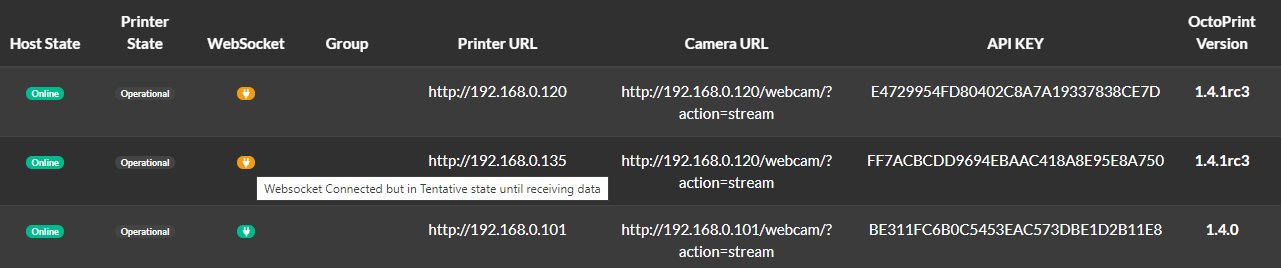
Putting a placeholder here in case it's an issue. @gmccauley also noticed the same but OctoFarm is showing weird websocket connections from OctoFarm and was wondering if something changed that could be effecting this? It does not occur in 1.4.0 as shown in the screenshot below. I will be cross posting an issue in OctoFarm repo as well.
jneilliii
on 24 Jul 2020
From my end it seems the websocket is connecting but looking at OctoPrint logs I received the following:
2020-07-24 06:39:52,627 - octoprint.server.util.flask - INFO - Passively logging in user s1mpleman from 192.168.1.50
2020-07-24 06:39:52,627 - octoprint.access.users - INFO - Logged in user: s1mpleman
2020-07-24 06:39:52,654 - octoprint.server.util.sockjs - INFO - Client connection closed: 192.168.1.50
2020-07-24 06:39:53,098 - octoprint.server.util.sockjs - INFO - New connection from client: 192.168.1.50
2020-07-24 06:39:53,118 - octoprint.server.util.flask - INFO - Passively logging in user s1mpleman from 192.168.1.50
2020-07-24 06:39:53,119 - octoprint.access.users - INFO - Logged in user: s1mpleman
2020-07-24 06:39:53,653 - octoprint.server.util.sockjs - INFO - User s1mpleman logged in on the socket from client 192.168.1.50
2020-07-24 06:39:57,795 - octoprint.server.util.sockjs - INFO - Client connection closed: 192.168.1.50
2020-07-24 06:39:57,878 - octoprint.server.util.sockjs - INFO - New connection from client: 192.168.1.50
2020-07-24 06:39:57,881 - octoprint.server.util.sockjs - WARNING - Unknown user/session combo: s1mpleman:{removedAPIKEY}
The API checks all pass fine with the same key. I've tried with global keys/application keys and user specific keys all gave me the unknown user/session combo. Hope that helps.
Edit: Running on Ubuntu 18.04.4 LTS with setup in python2. Not tried 3 as of yet.
I've attached the octoprint log anyway. Did a safe mode test as well and same result.
octoprint (3).log
 NotExpectedYet
on 24 Jul 2020
NotExpectedYet
on 24 Jul 2020
Will take a look at the websocket issues and #3653.
foosel
on 24 Jul 2020
Missing ability to turn off GCode Viewer tab. Here's a screenshot of 1.4.0
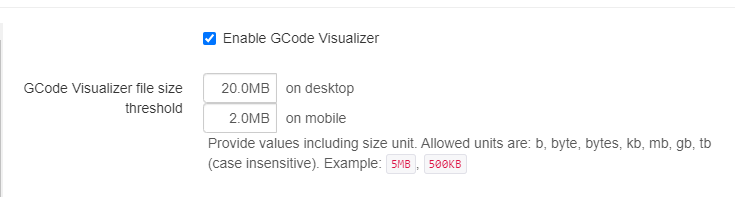
and a screenshot of 1.4.1RC3
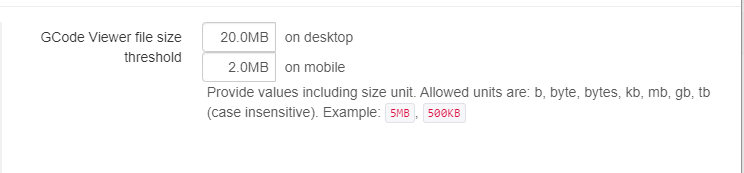
It seems that this tab doesn't adhere to the disabled section of appearance > components in config.yaml either. I tried disabling it from there and it didn't work.
jneilliii
on 24 Jul 2020
Probably something to do with splitting the gode viewer into it's own plugin, would it have to be disabled in the plugin manager instead?
cp2004
on 24 Jul 2020
Thanks @cp2004, missed that. All good now.
jneilliii
on 24 Jul 2020
All good so far:
Upgraded (from 1.4.0 to 1.4.1rc1 to 1.4.1rc2 to 1.4.1rc3) with no issues
Uploaded new GCODE
Printed GCODE on Prusa MK3S/wMMU2 in single extruder mode
GCODE viewer worked well
Terminal worked well
Timelapse worked well
Prusa MMU2 Select Filament plugin worked well
OctoSlack plugin worked well
Print Job History plugin worked well
 JohnOCFII
on 25 Jul 2020
JohnOCFII
on 25 Jul 2020
Just opened new issue https://github.com/OctoPrint/OctoPrint/issues/3655, API with location seems to cause 500 Internal Server error.
jneilliii
on 26 Jul 2020
So, in light of #3653 and #3655 we'll get another RC either tomorrow or Wednesday.
Which is good news for @cp2004 I guess, since I know he's still working on a plugin he wants to push out with stable 😉 Might also give the maintainers of the third party plugins and clients affected by the one or other deprecation or bug fix some time to push updated versions, if not already done.
foosel
on 27 Jul 2020
Yay, thanks Gina.... I was away at the weekend and now need to figure out the small bits (but the hardest, 😐....) Seems my issue was 3 things crashing into one? Will give it another go now and hopefully it works!
cp2004
on 27 Jul 2020
@spling-du-futur @gmccauley I sadly still haven't gotten full bug reports for the issues you mentioned.
@gmccauley apologies, overlooked your comment that it's probably instance related
foosel
on 27 Jul 2020
All is working fine, but I found something odd in the browser console :
Champs mot de passe présents sur une page non sécurisée (http://). Cela représente un risque de sécurité permettant le vol d’identifiants de connexion.
4 prusa-1.home:5000
Certains cookies utilisent incorrectement l’attribut recommandé « sameSite » 29
Cette page utilise la propriété non standard « zoom ». Envisagez d’utiliser calc() dans les valeurs des propriétés pertinentes ou utilisez « transform » avec « transform-origin: 0 0 ». prusa-1.home:5000
Less has finished and no sheets were loaded. packed_libs.js:1219:12849
Starting dependency resolution... packed_core.js:850:521
... dependency resolution done packed_core.js:860:5
Initial application setup done, connecting to server... packed_core.js:883:867
Initialized error tracking prusa-1.home:5000:16129:13
Connected to the server packed_core.js:702:350
Triggering connect on all view models packed_core.js:707:240
Server (re)connect processed packed_core.js:709:5
Finalizing application startup packed_core.js:883:243
Going to bind 41 view models... packed_core.js:866:39
Did not bind view model BackupViewModel to target #wizard_plugin_backup since it does not exist packed_core.js:876:44
Did not bind view model UsageViewModel to target #wizard_plugin_tracking since it does not exist packed_core.js:876:44
Did not bind view model SoftwareUpdateViewModel to target #softwareupdate_confirmation_dialog since it does not exist packed_core.js:876:44
Did not bind view model SoftwareUpdateViewModel to target #wizard_plugin_softwareupdate since it does not exist packed_core.js:876:44
User gege logged in packed_core.js:158:560
... binding done packed_core.js:881:152
Application startup complete packed_core.js:881:444
Uncaught TypeError: Unable to process binding "text: function(){return $data.github !== undefined && $data.github.latest_release !== undefined ? $data.github.latest_release.date.substring(0,10):'' }"
Message: $data.github.latest_release.date is null
    text http://prusa-1.home:5000/static/webassets/packed_libs.js?df208d52 line 3 > Function:3
    update http://prusa-1.home:5000/static/webassets/packed_libs.js?df208d52:7
    m http://prusa-1.home:5000/static/webassets/packed_libs.js?df208d52:3
    Pc http://prusa-1.home:5000/static/webassets/packed_libs.js?df208d52:2
    Qc http://prusa-1.home:5000/static/webassets/packed_libs.js?df208d52:2
    aa http://prusa-1.home:5000/static/webassets/packed_libs.js?df208d52:2
    B http://prusa-1.home:5000/static/webassets/packed_libs.js?df208d52:2
    m http://prusa-1.home:5000/static/webassets/packed_libs.js?df208d52:3
    q http://prusa-1.home:5000/static/webassets/packed_libs.js?df208d52:1
    m http://prusa-1.home:5000/static/webassets/packed_libs.js?df208d52:3
    k http://prusa-1.home:5000/static/webassets/packed_libs.js?df208d52:3
    g http://prusa-1.home:5000/static/webassets/packed_libs.js?df208d52:3
    k http://prusa-1.home:5000/static/webassets/packed_libs.js?df208d52:3
    g http://prusa-1.home:5000/static/webassets/packed_libs.js?df208d52:3
    k http://prusa-1.home:5000/static/webassets/packed_libs.js?df208d52:3
    g http://prusa-1.home:5000/static/webassets/packed_libs.js?df208d52:3
    k http://prusa-1.home:5000/static/webassets/packed_libs.js?df208d52:3
    g http://prusa-1.home:5000/static/webassets/packed_libs.js?df208d52:3
    k http://prusa-1.home:5000/static/webassets/packed_libs.js?df208d52:3
    g http://prusa-1.home:5000/static/webassets/packed_libs.js?df208d52:3
    k http://prusa-1.home:5000/static/webassets/packed_libs.js?df208d52:3
    Rb http://prusa-1.home:5000/static/webassets/packed_libs.js?df208d52:4
    c http://prusa-1.home:5000/static/webassets/packed_libs.js?df208d52:7
    b http://prusa-1.home:5000/static/webassets/packed_libs.js?df208d52:7
    c http://prusa-1.home:5000/static/webassets/packed_libs.js?df208d52:7
    p http://prusa-1.home:5000/static/webassets/packed_libs.js?df208d52:7
    Bb http://prusa-1.home:5000/static/webassets/packed_libs.js?df208d52:9
    w http://prusa-1.home:5000/static/webassets/packed_libs.js?df208d52:2
    kd http://prusa-1.home:5000/static/webassets/packed_libs.js?df208d52:7
    Pc http://prusa-1.home:5000/static/webassets/packed_libs.js?df208d52:2
    Qc http://prusa-1.home:5000/static/webassets/packed_libs.js?df208d52:2
    aa http://prusa-1.home:5000/static/webassets/packed_libs.js?df208d52:2
    ac http://prusa-1.home:5000/static/webassets/packed_libs.js?df208d52:2
    notifySubscribers http://prusa-1.home:5000/static/webassets/packed_libs.js?df208d52:2
    Qc http://prusa-1.home:5000/static/webassets/packed_libs.js?df208d52:2
    aa http://prusa-1.home:5000/static/webassets/packed_libs.js?df208d52:2
    ac http://prusa-1.home:5000/static/webassets/packed_libs.js?df208d52:2
    notifySubscribers http://prusa-1.home:5000/static/webassets/packed_libs.js?df208d52:2
    fa http://prusa-1.home:5000/static/webassets/packed_libs.js?df208d52:2
    c http://prusa-1.home:5000/static/webassets/packed_libs.js?df208d52:2
    _updateItems http://prusa-1.home:5000/static/webassets/packed_core.js?3fb354c1:740
    updateItems http://prusa-1.home:5000/static/webassets/packed_core.js?3fb354c1:720
    _fromRepositoryResponse http://prusa-1.home:5000/static/webassets/packed_core.js?3fb354c1:575
    fromResponse http://prusa-1.home:5000/static/webassets/packed_core.js?3fb354c1:575
    requestData http://prusa-1.home:5000/static/webassets/packed_core.js?3fb354c1:577
    u http://prusa-1.home:5000/static/webassets/packed_libs.js?df208d52:1
    fireWith http://prusa-1.home:5000/static/webassets/packed_libs.js?df208d52:1
    k http://prusa-1.home:5000/static/webassets/packed_libs.js?df208d52:1
    n http://prusa-1.home:5000/static/webassets/packed_libs.js?df208d52:1
    sentryWrapped http://prusa-1.home:5000/static/webassets/packed_core.js?3fb354c1:430
As long as I remember, I never see this error before (but maybe I overlooked it)
gege2b
on 28 Jul 2020
That is actually a bug in the plugin repository, it's generating empty data into the json export for a newly added plugin due to it having only prereleases tagged so far, and the plugin manager isn't prepared to handle that kind of data. Will fix the plugin repo export but will also see that I harden the plugin manager against that.
foosel
on 28 Jul 2020
Should be fixed on both ends.
foosel
on 28 Jul 2020
1.4.1rc4 has just been released, new feedback ticket is #3662.
foosel
on 29 Jul 2020
Related issues
 lakay
·
44Comments
lakay
·
44Comments
 Givemeyourgits
·
76Comments
Givemeyourgits
·
76Comments
 szafran81
·
40Comments
foosel
·
67Comments
szafran81
·
40Comments
foosel
·
67Comments
 ZhuDaHai
·
42Comments
ZhuDaHai
·
42Comments
Most helpful comment
Thanks @cp2004, missed that. All good now.