Octoprint: Cancel/Abort much slower in 1.3.4
What were you doing?
Canceling prints via Cura/Octoprint Web
If you encountered a problem with specific files of any sorts, make sure
to also include a link to a file with which to reproduce the problem.]
What did you expect to happen?
Cancel within 1 second
What happened instead?
Cancels within 4-5+ seconds. In 1.34 cancel was nearly instant.
Did the same happen when running OctoPrint in safe mode?
Have not tried
Branch & Commit or Version of OctoPrint
OctoPrint 1.3.4 (master branch)
Operating System running OctoPrint
Octopi
Printer model & used firmware incl. version
Anet A8
Browser and Version of Browser, Operating System running Browser
Google Chrome, Windows 10 Pro x64
Link to octoprint.log
N/A
Link to contents of terminal tab or serial.log
N/A
Link to contents of Javascript console in the browser
N/A
Screenshot(s)/video(s) showing the problem:
N/A
I have read the FAQ.
 Givemeyourgits
All 76 comments
Please provide all requested log files and you javascript console output. It's impossible to begin looking into this without that kind of information (especially since "cancelling" is basically just "stopping to send commands" and nothing there was changed between 1.3.2 and 1.3.4).
 foosel
on 2 Jun 2017
foosel
on 2 Jun 2017
Have observed the delay myself - though octoprint.log doesn't really capture anything that would help with the issue.
Will see whether I can troubleshoot and capture some data from my end.
 felixleong
on 5 Jun 2017
felixleong
on 5 Jun 2017
The JavaScript error log and the serial.log are also requested for a reason, not just octoprint.log ;)
Also make sure to also please test in safe mode. It might be a third party plugin as well. I just noticed that OP didn't do that either.
foosel
on 6 Jun 2017
I noticed another issue besides slow cancelling. When cancelling in the heating up fase, the set temp will stay that way and the printer is unresponsive. I have to (re)connect to the printer to reset it before being able to reset the set temp to off. When it is actually printing and you cancel, all is as expected.
Also Skynet 2.3.2 Anet and Octoprint latest stable 1.3.4. Tried multiple browsers.
 JurikRistjouw
on 7 Jun 2017
JurikRistjouw
on 7 Jun 2017
@JurikRistjouw https://github.com/foosel/OctoPrint/wiki/FAQ#octoprint-wont-cancel-when-my-printer-is-heating-up
foosel
on 7 Jun 2017
aha, thanx! will read the rest now...
JurikRistjouw
on 7 Jun 2017
Also, let me reiterate this snippet from the Contribution Guidelines:
Very important: Please make absolutely sure that if you find a bug that looks like
it is the same as your's, it actually behaves the same as your's. E.g. if someone gives steps
to reproduce his bug that looks like your's, reproduce the bug like that if possible,
and only add a "me too" if you actually can reproduce the same
issue. Also provide all information as described below
and whatever was additionally requested over the course of the ticket
even if you "only" add to an existing ticket. The more information available regarding a bug, the higher
the chances of reproducing and solving it.
So far, the only thing I've heard is "cancelling is slow", but I have gotten no logs at all that might help me figuring out why it is (perceived as) slow. I cannot reproduce this myself at the moment, so if you want to get this fixed, give me the information I need to be able to fix this instead of just saying "I'm seeing this too" and waiting for me to develop magic skills ;)
foosel
on 7 Jun 2017
Sorry not to have provided more info. I just wanted to confirm the findings. My 2 cents: I guess same with the temperature, the printer will not react to the command as quickly. It will do so after finishing it's current command. For instance finish the line it started or finish leveling. I think it can be reproduce by trying to cancel a G29 command after it just started. I can see that can be perceived as "slow". If that is the case, no magic programming skills can help us ;)
JurikRistjouw
on 7 Jun 2017
G29 definitely is in the same league as blocking heatups (as is something like an M600 filament change btw), as in, the firmware won't accept any new commands until it is done with that stuff.
There's one thing that changed in behaviour starting with OctoPrint 1.3.0 already (so back in December, not 1.3.4 just now), which is that to support things like disaster recovery scripting, OctoPrint will try to query the current print head position from the printer before it runs the print cancel script. Which means it will send an M400 and wait for the firmware's reply to that. Which - if the firmware is currently in some blocking routine like a heatup, an auto leveling procedure or even just a very long move or homing - can take a moment. And stuff like "switch heaters off" also requires the printer to listen and accept new commands on the serial, so again, if its busy and not listening, no chance (sadly not even a chance to send an emergency shutdown M112 in most cases). It's sadly a huge design flaw in most firmware variants.
foosel
on 7 Jun 2017
OP here, my printer is down right now so I can't get logs. But it seems there is either a delay or some sort of buffering going on as it is no longer responsive when you hit cancel / abort. It could be a plugin as I have a few and will try safe mode when my printer is back online in a few days. I had a few people on our Facebook group say they had the same problem so it doesn't seem to be isolated but it maybe related to a plugin. I will get those logs and post them up when I am back online.
I was rebooting octoprint to get around the problem.
Givemeyourgits
on 7 Jun 2017
I also experience a slow response to cancel. This is visible because I have a Z-home gcode script on cancel. This used to run immediately after all remaining gcodes were flushed, but now (1.3.4) it takes 4-5 secs for Z to home after last flushed movement.
 mrvanes
on 8 Jun 2017
mrvanes
on 8 Jun 2017
I can confirm the issue, the G28 command is sometimes executed as long as 15 seconds after the printer stops moving, but always at least 10 seconds for me.
My abort gcode looks like this:
G91 ; Relative positioning
T0
G1 E-1 ; Reduce filament pressure
M107 ; Turn off fan
G28; Home extruder
G90 ; Absolute positioning
G92 E0 ; Reset extruder position
M84 ; Turn steppers off
 beeb
on 9 Jun 2017
beeb
on 9 Jun 2017
Also, let me reiterate this snippet from the Contribution Guidelines:
Very important: Please make absolutely sure that if you find a bug that looks like
it is the same as your's, it actually behaves the same as your's. E.g. if someone gives steps
to reproduce his bug that looks like your's, reproduce the bug like that if possible,
and only add a "me too" if you actually can reproduce the same
issue. Also provide all information as described below
and whatever was additionally requested over the course of the ticket
even if you "only" add to an existing ticket. The more information available regarding a bug, the higher
the chances of reproducing and solving it.So far, the only thing I've heard is "cancelling is slow", but I have gotten no logs at all that might help me figuring out why it is (perceived as) slow. I cannot reproduce this myself at the moment, so if you want to get this fixed, give me the information I need to be able to fix this instead of just saying "I'm seeing this too" and waiting for me to develop magic skills ;)
foosel
on 9 Jun 2017
I have no time for this at the minute but put in my gcode in your settings and you should be able to get the logs yourself. Sorry for this
beeb
on 9 Jun 2017
I have GCODE in place that moves to a safe resting position on cancel. Which it immediately does right after all movements already sent to the printer have been processed.
I'm not lying when I say I cannot reproduce this (and trust me, I'm trying). I need a serial.log from an actual reproduction if this is to go anywhere.
foosel
on 9 Jun 2017
Give me a couple of hours, I might have time after this print!
beeb
on 9 Jun 2017
Just as one data point from my side (with your cancel code @beeb), I'm seeing this:
2017-06-09 08:59:02,524 - Send: N6432 M105*20
2017-06-09 08:59:02,547 - Recv: ok
2017-06-09 08:59:02,551 - Send: N6433 G1 X117.063 Y159.517 E1.7892*105
2017-06-09 08:59:02,556 - Recv: ok T:210 /210 B:54 /55 @:72 B@:127
2017-06-09 08:59:02,565 - Send: N6434 G1 X117.180 Y159.512 E1.7939*103
2017-06-09 08:59:02,568 - Recv: ok
2017-06-09 08:59:02,571 - Send: N6435 G1 X117.719 Y159.540 E1.8154*107
2017-06-09 08:59:02,590 - Recv: ok
2017-06-09 08:59:02,594 - Send: N6436 G1 X119.718 Y157.540 E1.9282*96
2017-06-09 08:59:02,626 - Recv: ok
2017-06-09 08:59:02,630 - Send: N6437 G1 X119.938 Y157.849 E1.9434*98
2017-06-09 08:59:02,670 - Changing monitoring state from 'Printing' to 'Operational'
2017-06-09 08:59:02,676 - Send: M400
2017-06-09 08:59:02,677 - Recv: ok
2017-06-09 08:59:02,690 - Send: M114
2017-06-09 08:59:02,691 - Recv: ok
2017-06-09 08:59:04,716 - Recv: ok
2017-06-09 08:59:04,733 - Recv: X:119.94 Y:157.85 Z:0.38 E:1.94 Count X:19190 Y:25256 Z:3034
2017-06-09 08:59:04,762 - Send: G91
2017-06-09 08:59:04,771 - Send: T0
2017-06-09 08:59:04,775 - Send: G1 E-1
2017-06-09 08:59:04,952 - Recv: ok
2017-06-09 08:59:04,956 - Recv: ok
2017-06-09 08:59:04,957 - Send: M107
2017-06-09 08:59:04,963 - Send: G28
2017-06-09 08:59:05,026 - Recv: echo:Active Extruder: 0
2017-06-09 08:59:05,071 - Recv: ok
2017-06-09 08:59:05,082 - Send: G90
2017-06-09 08:59:05,086 - Recv: ok
2017-06-09 08:59:05,091 - Send: G92 E0
2017-06-09 08:59:05,094 - Recv: ok
2017-06-09 08:59:05,097 - Send: M84
2017-06-09 08:59:15,249 - Recv: echo:busy: processing
2017-06-09 08:59:19,962 - Recv: X:71.00 Y:133.00 Z:3.21 E:0.94 Count X:11360 Y:21280 Z:25680
2017-06-09 08:59:19,971 - Recv: ok
2017-06-09 08:59:19,975 - Send: M105
2017-06-09 08:59:19,978 - Recv: ok
2017-06-09 08:59:19,984 - Recv: X:71.00 Y:133.00 Z:3.21 E:0.00 Count X:11360 Y:21280 Z:25680
2017-06-09 08:59:19,990 - Recv: ok
2017-06-09 08:59:19,993 - Recv: ok
2017-06-09 08:59:19,997 - Recv: ok T:215 /210 B:54 /55 @:10 B@:0
2017-06-09 08:59:21,555 - Send: M105
2017-06-09 08:59:21,570 - Recv: ok T:214 /210 B:54 /55 @:22 B@:127
2017-06-09 08:59:23,556 - Send: M105
2017-06-09 08:59:23,571 - Recv: ok T:213 /210 B:54 /55 @:26 B@:127
2017-06-09 08:59:25,565 - Send: M105
2017-06-09 08:59:25,580 - Recv: ok T:212 /210 B:55 /55 @:40 B@:127
2017-06-09 08:59:27,574 - Send: M105
2017-06-09 08:59:27,589 - Recv: ok T:211 /210 B:55 /55 @:45 B@:0
2017-06-09 08:59:29,576 - Send: M105
2017-06-09 08:59:29,590 - Recv: ok T:210 /210 B:56 /55 @:56 B@:0
2017-06-09 08:59:31,584 - Send: M105
2017-06-09 08:59:31,599 - Recv: ok T:210 /210 B:55 /55 @:51 B@:0
2017-06-09 08:59:33,585 - Send: M105
2017-06-09 08:59:33,600 - Recv: ok T:209 /210 B:55 /55 @:48 B@:0
Cancel code gets fired off immediately after the position report comes back. M400 just before that takes 2s to complete ("all movement done"). That's what I described in this earlier comment of me with regards to slightly different behaviour of a cancel since 1.3.0/December.
So, I'm not seeing anything weird here on my end. Which is not saying something wonky isn't going on for any of those of you who commented here, but I can't analyse that without at least a serial.log from a reproduction.
All I'm saying is - please include that with any kind of "I'm seeing this too" comment unless your goal is to make feel completely helpless and frustrated ;)
foosel
on 9 Jun 2017
Oh, and: please also take note how long it takes for those of you experiencing this from you clicking the cancel button and that "Changing monitoring state from 'Printing' to 'Operational'" to show up. From what I heard so far it sounds more like it's actually the cancel code that you are seeing to be delayed, not the actual cancelling, but just to make sure it's not the cancel command from the frontend to the backend getting delayed that kind of timing information should also be valuable.
foosel
on 9 Jun 2017
There you go! It was instantaneously set to Operational after clicking the cancel button. The homing started 5 seconds after the cancel command, which is definitely the quickest it managed since the update. It looks like in my case, it is waiting for the ok from each command to send the next (mostly), whereas yours fires all the commands and receives the ok messages later.
EDIT: actually, that's not true, I need to pair the OK with their respective commands to see which one is offending.
EDIT2: G91 and G28 are the commands that resulted in the ok being so late, see updated log below
      2017-06-09 12:44:23,773 - Send: N955 G1 X28.171 Y-3.596 E1.8600*77
      2017-06-09 12:44:23,807 - Changing monitoring state from 'Printing' to 'Operational'
      2017-06-09 12:44:23,819 - Send: N956 M400*45
G1    2017-06-09 12:44:23,820 - Recv: ok
      2017-06-09 12:44:23,824 - Send: N957 M114*44
M400  2017-06-09 12:44:24,110 - Recv: ok
M114  2017-06-09 12:44:24,114 - Recv: ok C: X:28.1710 Y:-3.5960 Z:0.5000 E:1.860
      2017-06-09 12:44:24,136 - Send: N958 G91*21
      2017-06-09 12:44:24,140 - Send: N959 T0*63
G91   2017-06-09 12:44:29,513 - Recv: ok
      2017-06-09 12:44:29,518 - Send: N960 G1 E-1*94
T0    2017-06-09 12:44:29,548 - Recv: ok
      2017-06-09 12:44:29,551 - Send: N961 M107*43
G1    2017-06-09 12:44:29,554 - Recv: ok
      2017-06-09 12:44:29,563 - Send: N962 G28*30
M107  2017-06-09 12:44:29,650 - Recv: ok
      2017-06-09 12:44:29,652 - Send: N963 G90*28
G28   2017-06-09 12:44:34,904 - Recv: ok
      2017-06-09 12:44:34,907 - Send: N964 G92 E0*76
G90   2017-06-09 12:44:34,908 - Recv: ok
      2017-06-09 12:44:34,914 - Send: N965 M84*21
G92   2017-06-09 12:44:34,915 - Recv: ok
M84   2017-06-09 12:44:34,916 - Recv: ok
Aha!
2017-06-09 12:44:23,824 - Send: N957 M114*44
2017-06-09 12:44:24,110 - Recv: ok
2017-06-09 12:44:24,114 - Recv: ok C: X:28.1710 Y:-3.5960 Z:0.5000 E:1.860
2017-06-09 12:44:24,136 - Send: N958 G91*21
2017-06-09 12:44:24,140 - Send: N959 T0*63
2017-06-09 12:44:29,513 - Recv: ok
2017-06-09 12:44:29,518 - Send: N960 G1 E-1*94
2017-06-09 12:44:29,548 - Recv: ok
2017-06-09 12:44:29,551 - Send: N961 M107*43
So right after the M114 gets answered (ok C: X:...) it starts sending the cancel GCODE. But the first command from that (G91) does take 5s to get acknowledged by the firmware (and without an ok OctoPrint must not send new data to the printer since that might easily overwhelm its serial buffers - I've seen controllers crash and lock up for that reason, or just throw commands away, either is a bad thing).
So for some reason the G91 makes your firmware go "huh" for 5s and not signal via serial that a new command may be sent. Which means all the other commands for which no ok/sending slot is available have to wait until an acknowledgement arrives. After that everything starts flowing smoothly again until G28, for which the acknowledgement takes another 5s. Which makes sense, homing usually is a bit slow.
If you are wondering how I come to the conclusion that it's G91 and G28 being slow to be acknowledged here even though it looks differently - manual match up of the ok for M114 which is very easily recognizable, then pairing stuff up after that (the offset between command and response in the log happens due to various internal reasons).
If all of your reproductions look like this (slow G91) I'd suggest to take a critical look at that particular command's implementation in your firmware. If the commands at which it gets "stuck" vary, some more digging might be in order to have some kind of pattern emerge. But from OctoPrint's side, so far everything looks completely fine here - it can't continue sending your cancel GCODE containing your homing command until it gets the "go go go" for that from the firmware, so it patiently waits for that. Why your firmware is doing that delay game though (or why at least the G91 takes 5s to arrive on the serial line), no idea.
foosel
on 9 Jun 2017
And of course, just after typing this up I saw your edit and that you already saw that delay from the firmware yourself.
foosel
on 9 Jun 2017
Alright, we agree on this. Now to find out why this happened after the octoprint update and was not happening before? I surely didn't upgrade my firmware (smoothieware) in a while, so did you or someone change the way octoprint handles commands that take some time to respond?
beeb
on 9 Jun 2017
Or maybe the cancel commands are sent in a different way than before, which results in the board being overloaded for a little bit? I must say it's a 32bit board form a reputable french manufacturer.
beeb
on 9 Jun 2017
As I said, there was no change in how cancelling is handled since the release of 1.3.0 in December.
And the only changes to the comm layer at all between 1.3.2 and 1.3.4 were:
- a documentation fix
- fix of a race condition related to SD printing and
M110 - addition of a link to the FAQ in case of a particular SerialException being caught
- auto detection of Malyan firmware (= setting of some parameters when the firmware name is detected)
- improvement of the regex detecting resend requests
- reset line numbers when the printer sends
startafter already connected - synchronization of lines from the print job wrapper
None of this even touches on the cancel handling, the handling of ok responses and what they trigger or the way long running commands are handled. So if 1.3.2 was not showing this but 1.3.4 is, I'm a bit at a loss.
It definitely would be interesting to collect some more data points (also from other people who chimed in here) to figure out if it's always at the same location that it delays, or if there's variance in it. You already said that this time it was shorter than before, so that hints at things not being always the same, so more logs might give us some more input to work with.
foosel
on 9 Jun 2017
You already said that this time it was shorter than before, so that hints at things not being always the same, so more logs might give us some more input to work with
Absolutely, let's wait for more logs. If there is anything else I can try, let me know for sure.
beeb
on 9 Jun 2017
Oh wait, something just struck me: my end gcode (in my slicer) is actually very close to the cancel gcode that I posted here.
G91
T0
G1 E-1
M104 T0 S0
M107
G28
G90
G92 E0
M140 S0
M84
But when the print finishes, the homing happens immediately, no delay whatsoever. Weird huh?
beeb
on 9 Jun 2017
When the print finishes there is no M400 and no M114 sent right before the cancel code being run. But that's about the only difference between a cancel and a finish.
If you don't see delays during regular printing or on finish that also makes it sound like there's no general "too many commands sent" issue here or anything like it, otherwise that would surely also show up then and not only on cancel (which is basically a forced end of file followed by a preconfigured script but otherwise identical).
Really weird. What printer and firmware is that? That's also a question for all the others who chimed in here.
Just for the record, you are 100% positive that this did not yet happen with 1.3.2? Or did you directly go from 1.2.x to 1.3.4 and can't say?
foosel
on 9 Jun 2017
What printer and firmware is that?
eMotion Tech MicroDelta Rework running their own flavor of Smoothieware (actually I suspect it's stock but pre-configured) on their own 32bit board
you are 100% positive that this did not yet happen with 1.3.2
I was on 1.3.2, there was always "some" delay but of the order of 1 second, never as bad as now, 100% sure.
the plot thickens
beeb
on 9 Jun 2017
Here's my log from a "delayed" cancel:
2017-06-09 15:36:22,363 - Send: N13007 G1 X59.909 Y59.811 E0.01666*104
2017-06-09 15:36:22,378 - Recv: ok
2017-06-09 15:36:22,387 - Send: N13008 G1 X60.554 Y59.403 E0.01428*110
2017-06-09 15:36:22,391 - Changing monitoring state from 'Printing' to 'Operational'
2017-06-09 15:36:22,398 - Recv: ok
2017-06-09 15:36:22,406 - Send: M400
2017-06-09 15:36:22,652 - Recv: ok
2017-06-09 15:36:22,654 - Send: M114
2017-06-09 15:36:22,665 - Recv: X:60.55 Y:59.40 Z:1.70 E:213.62 Count X: 6086 Y:5970 Z:2698
2017-06-09 15:36:24,874 - Recv: ok
2017-06-09 15:36:24,876 - Send: M84
2017-06-09 15:36:24,885 - Recv: ok
2017-06-09 15:36:24,891 - Send: M104 T0 S0
2017-06-09 15:36:24,897 - Recv: ok
2017-06-09 15:36:24,924 - Send: M140 S0
2017-06-09 15:36:24,929 - Recv: ok
2017-06-09 15:36:24,944 - Send: M106 S0
2017-06-09 15:36:24,950 - Recv: ok
2017-06-09 15:36:24,952 - Send: G28 Z0
2017-06-09 15:36:46,057 - Recv: X:60.55 Y:59.40 Z:158.00 E:213.62 Count X: 6086 Y:5970 Z:252800
2017-06-09 15:36:46,059 - Recv: ok
2017-06-09 15:36:46,067 - Send: M105
2017-06-09 15:36:46,078 - Recv: ok T:229.8 /0.0 B:78.0 /0.0 B@:0 @:0
2017-06-09 15:36:50,028 - Send: M105
2017-06-09 15:36:50,046 - Recv: ok T:226.4 /0.0 B:77.5 /0.0 B@:0 @:0
2017-06-09 15:36:55,033 - Send: M105
2017-06-09 15:36:55,050 - Recv: ok T:222.2 /0.0 B:76.9 /0.0 B@:0 @:0
2017-06-09 15:37:00,035 - Send: M105
2017-06-09 15:37:00,047 - Recv: ok T:218.1 /0.0 B:76.2 /0.0 B@:0 @:0
I can confirm that the delay definately "feels" longer than it was on 1.3.2. I also want to add that for me, it's not a showstopper, I just concur the perceived change in cancel behaviour that was raised in this issue.
My firmware is a Lulzbot Mini customized version of Marlin.
mrvanes
on 9 Jun 2017
@mrvanes In your case it's interesting that after the firmware receives M114 and reports the print head position back, it takes over 2s until the accompanying ok is received. That looks weird:
2017-06-09 15:36:22,406 - Send: M400
2017-06-09 15:36:22,652 - Recv: ok
2017-06-09 15:36:22,654 - Send: M114
2017-06-09 15:36:22,665 - Recv: X:60.55 Y:59.40 Z:1.70 E:213.62 Count X: 6086 Y:5970 Z:2698
2017-06-09 15:36:24,874 - Recv: ok
2017-06-09 15:36:24,876 - Send: M84
2017-06-09 15:36:24,885 - Recv: ok
And it would definitely explain why anything in the cancel code takes longer to be sent out - no sending of things without that ok, as explained above. Was the change to "Operational" close to you clicking the button?
So far we have two serial.logs that hint at delays in the firmware/the communication to be at fault here, produced by different printers and firmwares and at least absolutely no idea on my part what might be up here that could be caused by OctoPrint (and especially any of the changes between 1.3.2 and 1.3.4 on the comm layer). Sadly it just doesn't make any sense yet :/
What I'm going to suggest doesn't relate to the changes between 1.3.2 and 1.3.4 but rather 1.2.x and 1.3.x with regards to how cancelling is handled, but it still might be interesting. What (both of) you could do is try putting M400 and M114 at the end of your GCODE files/make it part of your slicer's end GCODE, to see if that also triggers delays, and also put it into the "on job done" GCODE script of OctoPrint and test with a normal file (no adjusted end GCODE) if delays are introduced. What I'm trying to understand here is if there is a difference in printer behaviour with the same GCODE combination that appears to cause issues on cancel when its part of a regular print job.
Also interesting would be if M114 also "takes a bit longer" to handle when sent while the printer is idle.
Also just for the record, my own test above was done against a one or two week old version of Marlin 1.1.x-bugfix. I do not perceive any delays.
foosel
on 12 Jun 2017
Okay will try this asap and report. It might be next week though because I'm away on vacation for the rest of the week.
beeb
on 12 Jun 2017
@beeb 👍 Next week is no problem.
foosel
on 12 Jun 2017
OP here.
Here are the logs, sorry for the delay, just got my replacement hot end.
Terminal:
https://hastebin.com/emifexeqih.pl
Octoprint Log:
https://hastebin.com/abodawitar.rb
It takes about 10-20 seconds for a print job to stop since going on 1.3.4, prior it was instant.
I just tried safe mode, and it seems to be a lot quicker to abort. Maybe not as fast as before, but certainly not as slow as it is without safe mode.
Plugins I am running:
Custom Control Editor
Cyborg Theme
Detailed Progress Plugin
M84 Motors Off
NavBar Temp Plugin
Printer Stats
Push Over
Temp Failsafe
TempsGraph Plugin
Touchtest Plugin
TouchUI
Givemeyourgits
on 15 Jun 2017
I have the same problem since the update.
Here it tooks 44 seconds until the abort script is running. In this time the hotend and heatbed are still heating.
Shall I try to get an serial.log too? (How?)
 TylonHH
on 15 Jun 2017
TylonHH
on 15 Jun 2017
@Givemeyourgits a serial.log would have been better since it also includes the timestamps that allow analysis of the message timings. Looking at your terminal output, it looks like this is a Repetier firmware (ok comes before command output) but identifying as "ANET A8" instead of "Repetier". Just to make sure, did you enable all options marked as "Repetier" under Settings > Features? If not, that would explain a lot of problems, including the series of wait at the end.
Since you didn't provide a serial.log with timings but only the terminal output, I'll need a bit more information to properly diagnose what's going on here, most importantly when you did perceive the delay and how your cancel script looks. From the looks of it, OctoPrint happily stopped sending data when you clicked the cancel button, sent an M400 to wait for all movements, then an M114 to record the position (again, all this it has been doing since 1.3.0 already), then continued on with what appears to be the cancel script, wrapped in two M117 Print done lines. What strikes me as odd is the multiple wait responses from the printer during that time, which signals that the printer didn't have any more commands to process. Combined with the fact that this thing in general behaves like a Repetier firmware, this could be because OctoPrint's detecting the standalone M105 replies as external heatups unless configured otherwise (one of the "Repetier" flagged options I mentioned), which would explain not only the waits during the cancel and the associated delays but also the string of wait at the end.
So, please check these options, they should probably all be checked for you:
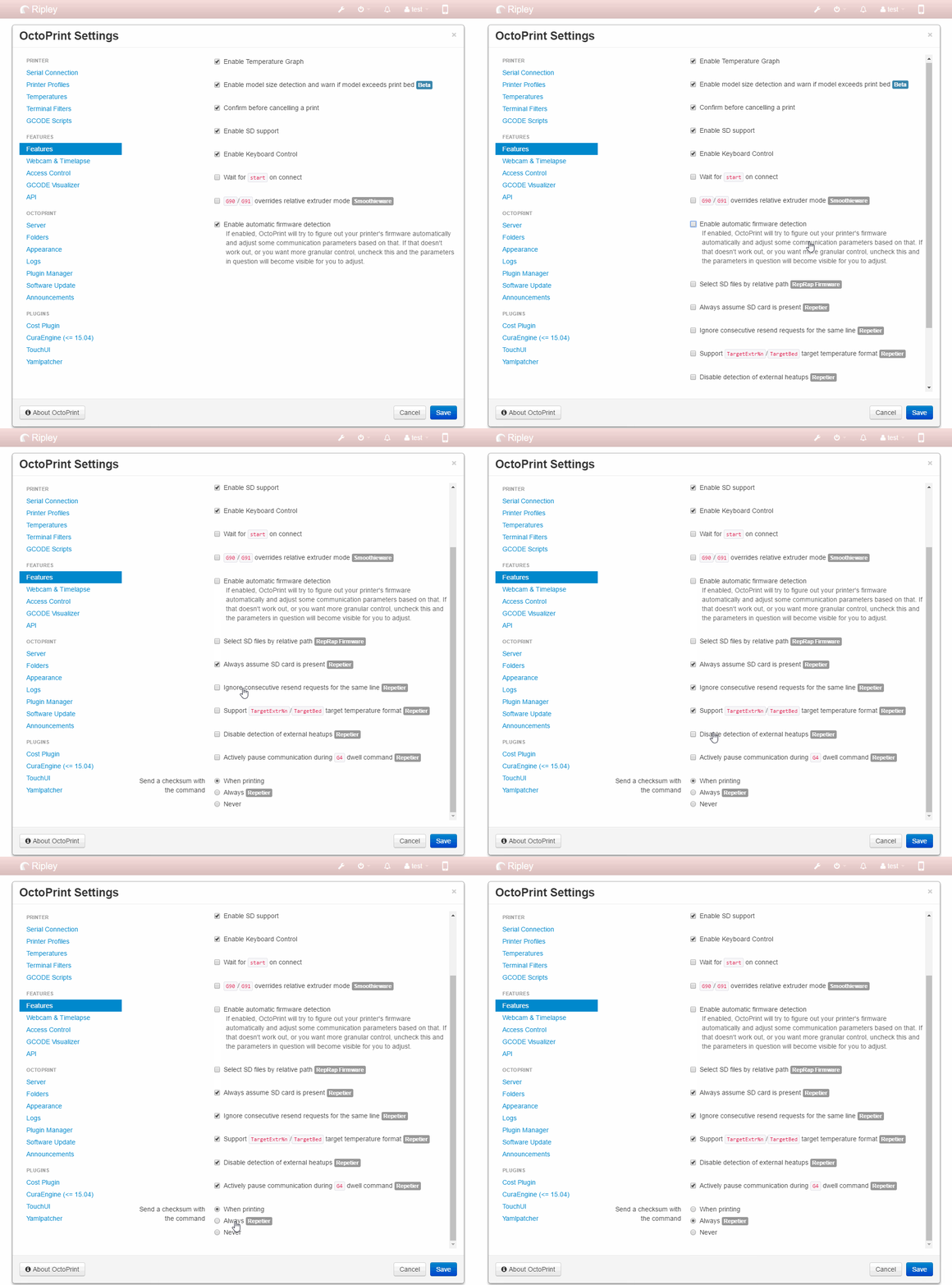
@TylonHH
Shall I try to get an serial.log too? (How?)
Yes. The answer to "should I provide a log" is always yes, and here it even is "HECK YES!" ;) The more solid info the better. "How" is described here in the contribution guidelines (which have been linked repeatedly already in this thread :P).
foosel
on 19 Jun 2017
Hey all, I'm back from vacation! Just tried a print with M400 and M114 in the end gcode of my slicer. Here are the logs:
2017-06-19 11:47:22,575 - Send: N3675 G1 E-1.0000 F2400*40
2017-06-19 11:47:22,588 - Recv: ok
2017-06-19 11:47:22,591 - Send: N3676 M400*19
2017-06-19 11:47:22,947 - Recv: ok
2017-06-19 11:47:22,949 - Send: N3677 M114*18
2017-06-19 11:47:22,954 - Recv: ok C: X:-41.0410 Y:-15.2870 Z:0.8500 E:-1.000
2017-06-19 11:47:22,956 - Send: N3678 G91*43
2017-06-19 11:47:22,960 - Recv: ok
2017-06-19 11:47:22,963 - Send: N3679 T0*1
2017-06-19 11:47:22,964 - Recv: ok
2017-06-19 11:47:22,967 - Send: N3680 G1 E-1*108
2017-06-19 11:47:22,969 - Recv: ok
2017-06-19 11:47:22,973 - Send: N3681 M104 T0 S0*29
2017-06-19 11:47:23,063 - Recv: ok
2017-06-19 11:47:23,066 - Send: N3682 M107*26
2017-06-19 11:47:23,068 - Recv: ok
2017-06-19 11:47:23,073 - Send: N3683 G28*45
2017-06-19 11:47:28,468 - Recv: ok
2017-06-19 11:47:28,474 - Send: N3684 G90*41
2017-06-19 11:47:28,487 - Recv: ok
2017-06-19 11:47:28,490 - Send: N3685 G92 E0*127
2017-06-19 11:47:28,492 - Recv: ok
2017-06-19 11:47:28,495 - Send: N3686 M140 S0*94
2017-06-19 11:47:28,500 - Recv: ok
2017-06-19 11:47:28,502 - Send: N3687 M84*37
2017-06-19 11:47:28,505 - Recv: ok
2017-06-19 11:47:28,507 - Send: N3688 M400*18
2017-06-19 11:47:28,510 - Recv: ok
2017-06-19 11:47:31,385 - Changing monitoring state from 'Printing' to 'Operational'
As you can see, there is no delay for those, nor for G91. The homing command appears to have a 5 sec delay in the logs but it felt much quicker by looking at the printer, don't know why this is.
EDIT: I did the print again, and I can see the same result regarding G28. The log says 5 seconds to "ok" but I watched it closely and it's instantaneous after the last move. Meaning the printer has some kind of buffer probably. Could it be that in the case of canceling, the buffer gets emptied and this is why we see a freeze? When the print ends normally, the printer has time to anticipate the next commands better and minimize inactive time maybe?
beeb
on 19 Jun 2017
@beeb thanks for getting back on this. Sadly that rules out the only idea I had (M400 or M114 being the culprit here in some way). And of course I've also not been able to observe and delays in person so far, everything just smooth sailing over here.
foosel
on 19 Jun 2017
I did have auto detect firmware enabled. I turned that off and checked all the Repetier options available. I believe that fixed it somewhat. I need to do more testing, but it stopped within 2 seconds or so when I last checked it.
If I try to stop it while heating up, it still will finish heating up first, and it is easier to just restart octoprint.
Here is a serial.log:
https://hastebin.com/bafulofugo.pl
Givemeyourgits
on 20 Jun 2017
it stopped within 2 seconds or so when I last checked it
And most of the time gets lost here:
2017-06-20 04:40:49,326 - Send: N87 M114*24
2017-06-20 04:40:49,543 - Recv: ok 87
2017-06-20 04:40:51,405 - Recv: X:106.65 Y:127.22 Z:0.30 E:3.62
2017-06-20 04:40:51,586 - Send: N88 M117 Print Done*101
2017-06-20 04:40:53,044 - Recv: wait
2017-06-20 04:40:53,069 - Recv: ok 88
For some reason the firmware only acknowledges the first of your two M117 after 1.5s, and in between even notices it has no queued commands and hence sends a wait. That M117 is also the first command right after the M400 and M114 that OctoPrint injects on a cancel before the cancel code, just like the G91 that stalled for @beeb. Plus generating the response from M114 takes nearly 2s, basically reversed to what @mrvanes observed (where the response comes pretty much instantaneous, but the accompanying ok takes ages).
But we already established that M400 and M114 do not cause delays in general, at least not for @beeb. This still doesn't make sense :/
If I try to stop it while heating up, it still will finish heating up first, and it is easier to just restart octoprint.
See this entry in the FAQ, that's sadly a firmware behaviour issue. No way I can fix that (as much as I'd like to).
1.3.5 will detect ANET A8 printers as Repetier firmware (well, if they have the stock firmware on there, if they run Skynet/Marlin they will be detected as Marlin of course), so auto detection should then work. I wish firmware vendors would stop trying to personalize everything and killing any possibility of stable auto detection in the process.
foosel
on 20 Jun 2017
Here is my part of the serial.log
2017-06-22 16:11:24,943 - Send: N1214 G1 X130.300 Y141.289 E5.0992*101
2017-06-22 16:11:24,962 - Recv: ok
2017-06-22 16:11:24,964 - Send: N1215 G1 X130.665 Y140.651 E5.1212*96
2017-06-22 16:11:24,995 - Recv: ok
2017-06-22 16:11:24,997 - Send: N1216 G1 X131.050 Y140.019 E5.1433*109
2017-06-22 16:11:25,039 - Recv: ok
2017-06-22 16:11:25,041 - Send: N1217 G1 X131.450 Y139.397 E5.1654*96
2017-06-22 16:11:25,076 - Changing monitoring state from 'Printing' to 'Operational'
2017-06-22 16:11:25,078 - Recv: ok
2017-06-22 16:11:25,098 - Send: M400
2017-06-22 16:11:25,666 - Recv: ok
2017-06-22 16:11:25,689 - Send: M114
2017-06-22 16:11:26,025 - Recv: X:131.45 Y:139.40 Z:0.20 E:5.17 Count A: 21668 B:-636 Z:32
2017-06-22 16:12:12,652 - Recv: ok
2017-06-22 16:12:12,665 - Send: M117 Print Done
2017-06-22 16:12:12,708 - Recv: ok
2017-06-22 16:12:12,714 - Send: M104 S0 -< Here starts my Abort Script
2017-06-22 16:12:12,748 - Recv: ok
2017-06-22 16:12:12,823 - Send: M140 S0
I use Marlin RC8 with an Ramps and Arduino on a CoreXY
TylonHH
on 22 Jun 2017
@TylonHH your log shows the same behaviour as the one from @mrvanes. Takes nearly a minute for the ok to be received after the actual output of the M114 gets generated.
I'm starting to wonder if some processing triggered by the cancel event or the position report might be the issue here. Could those of you experiencing this who have not yet tried it test if that behaviour is reproducible in safe mode as well? That at least would rule out any problems caused by third party plugins.
Oh, and also, did you have timelapse enabled? If so, with what parameters? (Asking for the same reason, possible processing overhead elsewhere causing delays in the comm layer, only idea I have right now).
foosel
on 23 Jun 2017
It's a crazy time for me at work so I won't be able to test safe mode very soon but I never had time-lapse enabled during my tests. I'll try to enable it, see if it makes the problem worse, as well as test safe mode too when I have time.
beeb
on 23 Jun 2017
@beeb thank you :)
foosel
on 23 Jun 2017
Here is a serial.log in safe mode with timelaps (layer change)
2017-06-23 11:04:12,829 - Send: N816 G1 X173.645 Y134.312 E1.5015*89
2017-06-23 11:04:12,855 - Recv: ok
2017-06-23 11:04:12,858 - Send: N817 G1 X174.175 Y134.803 E1.5275*84
2017-06-23 11:04:12,889 - Changing monitoring state from 'Printing' to 'Operational'
2017-06-23 11:04:12,901 - Recv: ok
2017-06-23 11:04:12,906 - Send: M400
2017-06-23 11:04:13,396 - Recv: ok
2017-06-23 11:04:13,398 - Send: M114
2017-06-23 11:04:13,408 - Recv: X:174.18 Y:134.80 Z:0.24 E:1.53 Count A: 24718 B:3150 Z:38
2017-06-23 11:04:21,956 - Recv: ok
2017-06-23 11:04:21,960 - Send: M104 S0
2017-06-23 11:04:21,989 - Recv: ok
2017-06-23 11:04:21,997 - Send: M140 S0
And here a log in safe mode without timelaps
2017-06-23 11:09:08,914 - Send: N692 G1 X149.054 Y181.798 E4.0696*81
2017-06-23 11:09:08,936 - Recv: ok
2017-06-23 11:09:08,938 - Send: N693 G1 X147.875 Y181.509 E4.1131*84
2017-06-23 11:09:08,977 - Recv: ok
2017-06-23 11:09:08,980 - Send: N694 G1 X147.192 Y181.316 E4.1387*84
2017-06-23 11:09:09,010 - Changing monitoring state from 'Printing' to 'Operational'
2017-06-23 11:09:09,015 - Recv: ok
2017-06-23 11:09:09,021 - Send: M400
2017-06-23 11:09:09,437 - Recv: ok
2017-06-23 11:09:09,438 - Send: M114
2017-06-23 11:09:09,449 - Recv: X:147.19 Y:181.32 Z:0.24 E:4.14 Count A: 26280 B:-2730 Z:38
2017-06-23 11:09:17,655 - Recv: ok
2017-06-23 11:09:17,660 - Send: M104 S0
2017-06-23 11:09:17,739 - Recv: ok
2017-06-23 11:09:17,766 - Send: M140 S0
It's still too long.
Did I mentioned that I use an raspberry with OctoPrint? Just in case...
TylonHH
on 23 Jun 2017
@TylonHH that rules out third party plugins or timelapse processing.
Do you also get delay between the coordinates and the follow-up ok when issuing that command manually? As in, printer is connected, no print is going on, you send that command via the Terminal tab?
foosel
on 23 Jun 2017
@TylonHH also, this definitely 100% only started with 1.3.4, was not present in 1.3.2 and you didn't change your firmware in between?
I'm still puzzled by the fact that in all cases it seems to relate to the M400/M114 combo just before the cancel script, which has been in since 1.3.0 already.
foosel
on 23 Jun 2017
When I use M114 manually everything looks fine.
2017-06-26 16:46:49,474 - Send: M114
2017-06-26 16:46:49,488 - Recv: X:60.00 Y:60.00 Z:0.00 E:0.00 Count A: 9600 B:0 Z:0
2017-06-26 16:46:49,492 - Recv: ok
Yeah it started since 1.3.4 thats why I also found this issue here. And no, I didn't change something in the firmware for a while.
I guess I should try a downgrade to 1.3.2, if I figure out how.
Edit: Please keep I mind that I used OctoPi to install OctoPrint.
TylonHH
on 26 Jun 2017
If I try to stop it while heating up, it still will finish heating up first, and it is easier to just restart octoprint.
See this entry in the FAQ, that's sadly a firmware behaviour issue. No way I can fix that (as much as I'd like to).
I'm using the same Rigidbot 1 printer for the past 2+ years. Never had changed the firmware after the very first time while being adding a cusotom LCD. I've got the RPi2 and discoverd the OctoPrint much later. I swear it was possible with OctoPrint to instantly stop printing before the target temp reached and to adjust the target nozzle themperature on the fly while it was still ramping up. But now all of that stopped workking and in a weird way.
Perhaps, that's not bugs really, but just the lack of features and/or the bad UI/UX design? e.g. if the firmware is really blocking the temperature change mid ramp-up (you should be able to detect that actually) the target temp line on the graph could at least reflect the fact that after getting there it will go where the user sets it (an Octo must monitor for that event and issue the new temp command as soon as possible); instead now even the temp edit field value on the screen jumps back to 0 (or current, don't remember) on "Set" button, which looks like UI glitch, not like firmware ignoring it (even if the later is true).
 halxinate
on 3 Jul 2017
halxinate
on 3 Jul 2017
I swear it was possible with OctoPrint to instantly stop printing before the target temp reached and to adjust the target nozzle themperature on the fly while it was still ramping up.
Not if you used M109/M190. That never was possible simply due to how these commands behave. A look into the firmware sources confirms that, what happens there boils down to "read command from serial - oh, it's a blocking heatup! - enter a loop until provided target is reached and ignore anything else until then".
Could things be better communicated to the user? Yes. But it's tricky to solve properly in a way that doesn't cause issues elsewhere, and there are more serious issues in place that keep me from looking into this at the moment.
In any case though, the behaviour with regards to M109/M190 is not the subject of this ticket, we are trying to debug a potential cancel issue here caused by actual delays in communication - a derail is not helping in achieving this :)
foosel
on 3 Jul 2017
I've been getting slow downs on abort again, without any changes I know of. Now it is worse than ever in that it takes a good 30 seconds to a minute or so before it cancels. I am still running 1.3.4 and I have made the changes after turning off detect firmware automatically. That helped for a few prints (at least it seemed to be fairly instant except for canceling heat up phase, that still wasn't working) but now it is really bad again and I just do a restart octoprint when I want to cancel.
Givemeyourgits
on 6 Jul 2017
@Givemeyourgits serial.log? :) I really can't do anything without the serial.log in general when it comes to any kind of communication issues.
foosel
on 7 Jul 2017
Sorry, thought you had enough from the old logs.
I recently switched from Anet A8 stock firmware to Skynet but I did not notice any difference. When I did this, I turned off all the Repetier settings and turned Auto Detect Firmware on again. Although I did attempt a few prints prior to changing it back and there is no difference.
I attached my most recent serial logs.
serial.log.txt
serial.log.2017-07-08_01-09-00.txt
serial.log.2017-07-08_01-41-57.txt
serial.log.2017-07-08_23-07-20.txt
Givemeyourgits
on 9 Jul 2017
As a general rule of thumb, unless the ticket is marked as solved, I always need more logs ;)
And in that specific case I still have no reproduction myself, but a couple of manifestation variants from all logs I saw so far, all of which appear to be slow downs in the firmware which for some reason are not present on print end or when sending the cancel code manually.
So - I'm still completely in the dark about what those of you experiencing this are running into here (and no, I still haven't experienced it myself or it would probably be way easier to debug) and why all(?) of you didn't have that problem yet with 1.3.2 because there really was nothing changed in the cancel routine since december.
Sadly your serial.logs also didn't help here ... the only thing I'm again seeing here is your firmware first taking 6s until all moves are finished on M400 (might be valid or not but nothing I can control from OctoPrint):
2017-07-08 01:32:47,249 - Send: N60 G1 E-2.5000 F1800*32
2017-07-08 01:32:48,058 - Changing monitoring state from 'Printing' to 'Operational'
2017-07-08 01:32:49,397 - Recv: ok
2017-07-08 01:32:49,402 - Send: N61 M400*16
2017-07-08 01:32:55,659 - Recv: ok
2017-07-08 01:32:55,664 - Send: N62 M114*19
2017-07-08 01:32:55,667 - Recv: echo:endstops hit:  Y:20.07
2017-07-08 01:32:55,691 - Recv: X:7.05 Y:20.00 Z:0.18 E:-2.50 Count X:705 Y:2006 Z:72
2017-07-08 01:32:55,826 - Recv: ok
2017-07-08 01:32:55,828 - Send: N63 M117 Print Done*96
2017-07-08 01:32:55,835 - Recv: ok
2017-07-08 01:32:55,837 - Send: N64 M84*45
2017-07-08 01:32:55,854 - Recv: ok
2017-07-08 01:32:55,855 - Send: N65 M104 T0 S0*18
2017-07-08 01:32:55,886 - Recv: ok
2017-07-08 01:32:55,887 - Send: N66 M140 S0*85
2017-07-08 01:32:55,892 - Recv: ok
2017-07-08 01:32:55,893 - Send: N67 M106 S0*86
2017-07-08 01:32:55,898 - Recv: ok
2017-07-08 01:32:55,899 - Send: N68 M117 Print Done*107
2017-07-08 01:32:55,905 - Recv: ok
and in another case not even that, looks like a regularly fast cancel to me:
2017-07-08 00:52:54,796 - Send: N82 M117 ETA 01 46 44 Day 08*25
2017-07-08 00:52:54,816 - Changing monitoring state from 'Printing' to 'Operational'
2017-07-08 00:52:54,819 - Recv: ok
2017-07-08 00:52:54,826 - Send: N83 M105*28
2017-07-08 00:52:54,844 - Recv: ok T:203.53 /205 B:65.50 /60 @:44 B@:0
2017-07-08 00:52:54,853 - Send: N84 M400*27
2017-07-08 00:52:55,908 - Recv: ok
2017-07-08 00:52:55,913 - Send: N85 M114*26
2017-07-08 00:52:55,924 - Recv: X:81.76 Y:78.43 Z:0.15 E:5.30 Count X:8176 Y:7843 Z:60
2017-07-08 00:52:56,092 - Recv: ok
2017-07-08 00:52:56,094 - Send: N86 M117 Print Done*107
2017-07-08 00:52:56,108 - Recv: ok
2017-07-08 00:52:56,111 - Send: N87 M84*32
2017-07-08 00:52:56,117 - Recv: ok
2017-07-08 00:52:56,118 - Send: N88 M104 T0 S0*17
2017-07-08 00:52:56,123 - Recv: ok
2017-07-08 00:52:56,124 - Send: N89 M140 S0*84
2017-07-08 00:52:56,130 - Recv: ok
2017-07-08 00:52:56,132 - Send: N90 M106 S0*94
2017-07-08 00:52:56,137 - Recv: ok
2017-07-08 00:52:56,139 - Send: N91 M117 Print Done*109
2017-07-08 00:52:56,145 - Recv: ok
I mentioned it above somewhere but you also should make sure that your cancel command actually goes through - if your network is slow or something stupid like DNS lookup interferes (I've seen this happen with octopi.local addresses under Windows), there will be a delay after you click on the cancel button since the request to cancel first has to go through from your browser to the backend in order to be handled there. That's also why I asked a while back if the delay happens between clicking cancel and that Changing monitoring state from 'Printing' to 'Operational' line showing up in the terminal tab or the serial.log. If the delay is before that line, it's probably something between web interface and server, if it's after that it's communication or firmware.
it seemed to be fairly instant except for canceling heat up phase, that still wasn't working
Just again for the record: this not working won't change, for the reason see the FAQ.
foosel
on 12 Jul 2017
What Log do you need?
Here is an serial.log
```2017-07-12 21:52:13,787 - Send: N75 G1 X178.324 Y158.712 E7.9028103
2017-07-12 21:52:13,801 - Recv: ok
2017-07-12 21:52:13,804 - Send: N76 G1 X111.663 Y158.712 E11.893693
2017-07-12 21:52:14,040 - Changing monitoring state from 'Printing' to 'Operational'
2017-07-12 21:52:14,272 - Recv: ok
2017-07-12 21:52:14,274 - Send: M400
2017-07-12 21:52:16,284 - Recv: echo:busy: processing
2017-07-12 21:52:18,283 - Recv: echo:busy: processing
2017-07-12 21:52:20,286 - Recv: echo:busy: processing
2017-07-12 21:52:21,244 - Recv: ok
2017-07-12 21:52:21,246 - Send: M114
2017-07-12 21:52:21,256 - Recv: X:111.66 Y:158.71 Z:0.20 E:11.89 Count A: 21630 B:-3764 Z:32
2017-07-12 21:52:30,617 - Recv: ok
2017-07-12 21:52:30,622 - Send: M117 Print Done
2017-07-12 21:52:30,634 - Recv: ok
2017-07-12 21:52:30,639 - Send: M104 S0 ; Beginn of EndScript
2017-07-12 21:52:30,670 - Recv: ok
2017-07-12 21:52:30,698 - Send: M140 S0
Here an octoprint.log
```2017-07-12 21:49:50,170 - octoprint.filemanager.analysis - INFO - Starting analysis of local:Support_50x15.gcode
2017-07-12 21:49:50,197 - octoprint.plugins.autoselect - INFO - Selecting Support_50x15.gcode on local that was just uploaded
2017-07-12 21:49:51,068 - octoprint.filemanager.analysis - INFO - Analysis of entry local:Support_50x15.gcode finished, needed 0.90s
2017-07-12 21:50:01,041 - octoprint.plugins.detailedprogress - INFO - Printing started. Detailed progress started.
2017-07-12 21:50:01,069 - octoprint.util.comm - INFO - M110 detected, setting current line number to 0
2017-07-12 21:52:21,268 - octoprint.plugins.detailedprogress - INFO - Printing stopped. Detailed progress stopped.
2017-07-12 21:52:30,913 - octoprint.plugins.detailedprogress - INFO - Printing stopped. Detailed progress stopped.
I just startet a test print and stoped it after some second.
When I confirm the abort it took some gcode (empty the buffer) until it realy stop, wait, wait, wait and run the endscript.
TylonHH
on 12 Jul 2017
I can't imagine it is networking. I am using IP and not hostname so there is no DNS and my network is all hard wired outlets switched 1gbit. Also, every other command is instant, moving the bed, turning on temps, temps match printer LCD in real time, the only delay is cancel.
I will try to test 1.3.2 again, but I remember it was instant when I used it there.
Givemeyourgits
on 13 Jul 2017
@Givemeyourgits I can't know your network setup, but yes, in that case it sounds unlikely. I'm just saying that this might also be a possibility which is why the timing between clicking cancel & the printer state change in the log is also important.
As a quick summary what we currently have from the logs here:
M114reporting position immediately but then taking some sweet time to send the accompanyingok(in logs from @mrvanes, @TylonHH ) - only here did we actually see values above 10sec delay, and only in the logs from @TylonHH, so the perceived delays in the other cases must come from something elseM114taking its sweet time to come up with the position report in the first place (in logs from @TylonHH, @Givemeyourgits)M400taking a while (depending on your firmware's buffer size this is to be expected btw, seen in logs from everyone)- the first command after the
M400&M114pair having a delay in the accompanyingok(in logs from @beeb)
The only idea I have left right now is to prepare a separate branch with the M114 and M400 pair removed on cancel for you to test against. Again, this stuff has been in there since 1.3.0/December 2016, so if you did not see your delays in 1.3.2 but are now seeing them in 1.3.4, this will most likely not change anything. But it's something to try and the only something I can come up with right now to maybe get some additional data points, especially since there simply were no changes in cancel behaviour at all between 1.3.2 and 1.3.3/1.3.4.
foosel
on 13 Jul 2017
This test is now outdated, please read below for updated test steps
Outdated instructions for historical reasons
Test branch is now live at test/cancelWithoutM114M400 and should report as
OctoPrint 1.3.4.post1+gdd494a7 (test/cancelWithoutM114M400 branch)
To switch to that you'll need to do some manual steps. Those are outlined for OctoPi in the FAQ and for a more general setup in this guide.
In a nutshell, for OctoPi, to switch to the branch:
cd ~/OctoPrint
git pull
git checkout test/cancelWithoutM114M400
~/oprint/bin/python setup.py clean
~/oprint/bin/python setup.py install
sudo service octoprint restart
and back:
cd ~/OctoPrint
git pull
git checkout master
~/oprint/bin/python setup.py clean
~/oprint/bin/python setup.py install
sudo service octoprint restart
And for installations following the general setup guide, to switch to the branch:
cd path/to/your/OctoPrint/checkoutfolder
git pull
git checkout test/cancelWithoutM114M400
./venv/bin/python setup.py clean
./venv/bin/python setup.py install
and restart. Back to regular stable:
cd path/to/your/OctoPrint/checkoutfolder
git pull
git checkout master
./venv/bin/python setup.py clean
./venv/bin/python setup.py install
and restart.
The only change compared to 1.3.4 is the removal of the M400 & M114 position recording on cancel. Everything else is completely identical to stock 1.3.4.
Please test with this branch and report back (with serial.log and information on delay between clicking cancel & seeing the state switch in the terminal). Thanks.
foosel
on 13 Jul 2017
Have seen the same issue. I have a cancel GCode setup that raises the bed 10mm and homes the Y axis. On cancelling, the printer the printer stops for 4-5 seconds (maybe more) before the cancel GCode is run. So generally I get a big blob of plastic at the point the print was cancelled. This did not happen earlier.
 dushyantahuja
on 13 Jul 2017
dushyantahuja
on 13 Jul 2017
@dushyantahuja please specify what "earlier" means. Also provide a serial.log of a reproduction and information on your printer firmware (what firmware, what version).
foosel
on 13 Jul 2017
Earlier means before I updated to 1.3.4.
I'm using Smoothieware, will have to check on the version and logs.
Will revert back in the evening once I reach home.
dushyantahuja
on 13 Jul 2017
Here we go.
This is Version 1.3.4 (test/cancelWithoutM114M400 branch)
2017-07-13 19:59:52,069 - Send: N209 G1 X150.876 Y138.601 E1.9224*85
2017-07-13 19:59:52,119 - Recv: ok
2017-07-13 19:59:52,122 - Send: N210 G1 X150.078 Y139.157 E1.9806*84
2017-07-13 19:59:52,182 - Changing monitoring state from 'Printing' to 'Operational'
2017-07-13 19:59:52,186 - Recv: ok
2017-07-13 19:59:52,189 - Send: M117 ETL 00h00m44s
2017-07-13 19:59:52,198 - Recv: ok
2017-07-13 19:59:52,207 - Send: M117 Print Done
2017-07-13 19:59:52,219 - Recv: ok
2017-07-13 19:59:52,260 - Send: M104 S0; beginn GCODE Script
And just to verify I switched back to Version 1.3.4 (master branch)
2017-07-13 20:08:39,375 - Recv: ok
2017-07-13 20:08:39,378 - Send: N107 G1 X137.370 Y128.601 E2.8151*86
2017-07-13 20:08:39,403 - Recv: ok
2017-07-13 20:08:39,406 - Send: N108 G1 X137.651 Y127.841 E2.8637*93
2017-07-13 20:08:39,442 - Changing monitoring state from 'Printing' to 'Operational'
2017-07-13 20:08:39,446 - Recv: ok
2017-07-13 20:08:39,456 - Send: M400
2017-07-13 20:08:39,846 - Recv: ok
2017-07-13 20:08:39,848 - Send: M114
2017-07-13 20:08:39,859 - Recv: X:137.65 Y:127.84 Z:0.20 E:2.86 Count A: 21239 B:785 Z:32
2017-07-13 20:08:49,095 - Recv: ok
2017-07-13 20:08:49,115 - Send: M117 Print Done
2017-07-13 20:08:49,239 - Recv: ok
2017-07-13 20:08:49,306 - Send: M104 S0; GCODE Script
Just for the protocol
Send: M115
Recv: FIRMWARE_NAME:Marlin 1.1.0-RC8 (Github) SOURCE_CODE_URL:https://github.com/MarlinFirmware/Marlin PROTOCOL_VERSION:1.0 MACHINE_TYPE:Rens MKC EXTRUDER_COUNT:2 UUID:cede2a2f-41a2-4748-9b12-c55c62f367ff
So, thanks to @CapnBry getting touch and running a git bisect with some constant back and forth via chat plus having what I'd consider an epiphany right in the middle of that we might have a solution now.
The culprit was moving the print logging on cancel to another location between 1.3.2 and 1.3.3/1.3.4 in order to fix a wrong order of sent events, which then caused some hefty I/O to take place in the thread responsible of receiving data from the serial line. I've just pushed a commit to maintenance that should decouple that again so having to write the file metadata doesn't bog down the serial comms anymore on cancel.
This being the issue makes a lot of sense and also explains why I couldn't reproduce it - my metadata file simply wrote too fast, but if you have a lot of files in the folder of the file you just cancelled and/or a slower SD card (less than Class 10), that would bog things down seriously, the more files the more delay.
And it also makes sense that removing the cancel M400/M114 made that go away since that moved the triggering of the logging back outside of the receiving thread.
In order to allow you to easier test this proposed fix I've also prepared another test branch at test/issue1946_decouple_print_logging. It should report as
OctoPrint 1.3.4.post1+g688f2f6 (test/issue1946_decouple_print_logging branch)
Note the different bit after + compared to the earlier test branch. Switch procedure as follows:
For OctoPi, to switch to the branch:
cd ~/OctoPrint
git pull
git checkout test/issue1946_decouple_print_logging
~/oprint/bin/python setup.py clean
~/oprint/bin/python setup.py install
sudo service octoprint restart
and back:
cd ~/OctoPrint
git pull
git checkout master
~/oprint/bin/python setup.py clean
~/oprint/bin/python setup.py install
sudo service octoprint restart
And for installations following the general setup guide, to switch to the branch:
cd path/to/your/OctoPrint/checkoutfolder
git pull
git checkout test/issue1946_decouple_print_logging
./venv/bin/python setup.py clean
./venv/bin/python setup.py install
and restart. Back to regular stable:
cd path/to/your/OctoPrint/checkoutfolder
git pull
git checkout master
./venv/bin/python setup.py clean
./venv/bin/python setup.py install
and restart.
Please test with that and report back. I'd like to make sure this is the only issue that was at play here. It's at least the only issue that @CapnBry and therefore later also me could reproduce. If this works out I'll push it into 1.3.5.
foosel
on 13 Jul 2017
Great catch @foosel and @CapnBry ! This is why git is best XD
 ghost
on 13 Jul 2017
ghost
on 13 Jul 2017
Nice job!! I almost thought I was crazy for a second there. Will test asap
beeb
on 13 Jul 2017
OK, then let's finish it.
Version 1.3.4 (test/issue1946_decouple_print_logging branch)
2017-07-13 21:38:18,115 - Send: N197 G1 X153.821 Y127.209 E1.1647*91
2017-07-13 21:38:18,166 - Recv: ok
2017-07-13 21:38:18,168 - Send: N198 G1 X154.159 Y128.122 E1.2230*87
2017-07-13 21:38:18,236 - Changing monitoring state from 'Printing' to 'Operational'
2017-07-13 21:38:18,237 - Recv: ok
2017-07-13 21:38:18,254 - Send: M400
2017-07-13 21:38:19,030 - Recv: ok
2017-07-13 21:38:19,032 - Send: M114
2017-07-13 21:38:19,054 - Recv: X:154.16 Y:128.12 Z:0.20 E:1.22 Count A: 22583 B:2083 Z:32
2017-07-13 21:38:19,083 - Recv: ok
2017-07-13 21:38:19,086 - Send: M117 Print Done
2017-07-13 21:38:19,296 - Recv: ok
2017-07-13 21:38:19,362 - Send: M104 S0
For me it's much better but not as fast as usual. I still got a blob.
I know it's just 1 second, but as you can see in my log above its ten times faster (0,1s).
What else can I do?
TylonHH
on 13 Jul 2017
BTW: wich files do you mean? It's also on my ToDo-List to clean up my gcodes and timelaps files.
timelaps: 102 files / 1,6GB
uploads: 82 / 493MB
TylonHH
on 14 Jul 2017
Sorry, the uploads is what I meant with "files".
You have to be a bit careful when directly comparing one M400's runtime with another ones. How long an M400 takes (or rather, in general how long it takes for all moves in the firmware's planner buffer to finish processing) also highly depends on the number of moves buffered in your firmware and how long those moves are. E.g. if you cancel right in the middle of printing a solid layer of a very large flat surface, it will take ages because your firmware already got a bunch of follow up lines which take long to complete (and for the record, apart from nuking the printer completely with an M112 there's no way to tell the firmware to throw away the contents of that buffer). If you are in the process of printing a circle (= many small line segments) it will go blazingly fast.
You said it created a blob though. If your cancel GCODE doesn't immediately move the print head out of the way and retract the filament, it will always do that, also without the M400 and M114 routine in place - or I'm misunderstanding you. In your example log I don't see any movement commands as part of your cancel code, only shutting down the extruder heater. I also didn't see any movement commands in any of your prior examples. If you want to prevent blobbing on cancel (or pause for that matter), the first thing you need to do is get the nozzle away from the printed object as fast as possible or it will "drool", and how much it will do that depends on how much pressure was in the nozzle at the time of print interruption.
In a nutshell, a certain delay on cancel is and always has been present thanks to firmware buffering of commands. That will only change if some kind of command is introduced in firmware that allows to clear the planner buffer without nuking everything else, and preferably with that command returning how many moves were cleared (otherwise it won't be possible to reliably track from the host side what was executed and what was cleared, making stuff like resuming and recovery impossible to achieve).
How large that acceptable delay is depends highly on the model being printed. In general though, once the head actually does stop moving, the cancel gcode script should start to go out immediately, which so far it didn't but should now again with the above fix. If there are still delays there (e.g. you see M400 in the log, printer stops moving, but ok for that M400 arrives only later with delay, or M114 takes ages to log output to serial.log), then we still have a different issue to take a closer look at. I sincerely hope not though, because this one already cost me some of my sanity ;)
foosel
on 14 Jul 2017
I calculated the time in serial.log between the last movement and the first comand of the gcode script. Thats for me the gap wich we try here to reduce. And just this gab making the blobbs.
I chooesd I round shape of model, because there are very short moves. So after hitting the abort button (and confirm) its emptying the buffer, wich is ok and not making any blobbs because its technicaly printing correct. After buffer end its stops (gap), wait, and then running the gcode script.
For sure I use movements in my gcode script, but you're right I just showed my 1st line of that script.
Here is my full gcode script
M104 S0 ; turn off extruder
M140 S0 ; turn off bed
G92 E1
G1 E-1 F300
G28 X0 Y0 ; homing axis
G1 X5 Y5 F300
G1 F1500 Z322 ; run down heatbed
M84 ; disable motors
M107 ; Turn off Fan
So here is another serial.log with more lines:
2017-07-14 15:52:01,439 - Send: N6384 G1 X131.623 Y132.367 E0.5424*106
2017-07-14 15:52:01,462 - Recv: ok
2017-07-14 15:52:01,464 - Send: N6385 G1 X131.833 Y132.326 E0.5456*100
2017-07-14 15:52:01,497 - Changing monitoring state from 'Printing' to 'Operational'
2017-07-14 15:52:01,516 - Recv: ok
2017-07-14 15:52:01,521 - Send: M400
2017-07-14 15:52:01,978 - Recv: ok
2017-07-14 15:52:01,983 - Send: M114
2017-07-14 15:52:02,240 - Recv: X:131.83 Y:132.33 Z:1.30 E:0.55 Count A: 21133 B:-39 Z:208
2017-07-14 15:52:02,604 - Recv: ok
2017-07-14 15:52:02,630 - Send: M105
2017-07-14 15:52:03,643 - Recv: ok T:209.9 /210.0 B:54.7 /55.0 @:57 B@:29
2017-07-14 15:52:03,745 - Send: M117 Print Done
2017-07-14 15:52:04,147 - Recv: ok
2017-07-14 15:52:04,448 - Send: M104 S0
2017-07-14 15:52:04,583 - Recv: ok
2017-07-14 15:52:04,608 - Send: M140 S0
2017-07-14 15:52:04,630 - Recv: ok
2017-07-14 15:52:04,653 - Send: G92 E1
2017-07-14 15:52:04,774 - Recv: X:131.83 Y:132.33 Z:1.30 E:1.00 Count A: 21133 B:-39 Z:208
2017-07-14 15:52:04,785 - Recv: ok
2017-07-14 15:52:04,806 - Send: G1 E-1 F300
2017-07-14 15:52:04,827 - Recv: ok
2017-07-14 15:52:04,875 - Send: G1 F1500 Z323
2017-07-14 15:52:04,925 - Recv: ok
2017-07-14 15:52:04,947 - Send: G28 X0 Y0
I guess I can improve the script with moving the G1 part to the 1st line.
TylonHH
on 14 Jul 2017
Can confirm the decoupling branch also solves this problem for me. I had been observing similar delays after cancelling print. Now cancel is instant.
2017-07-16 16:00:19,605 - Send: M400
2017-07-16 16:00:19,633 - Recv: ok
2017-07-16 16:00:19,637 - Send: M114
2017-07-16 16:00:19,667 - Recv: X:4.22 Y:0.31 Z:0.90 E:45.20 Count X:13981 Y:14290 Z:14155
2017-07-16 16:00:26,151 - Recv: ok
2017-07-16 16:00:26,170 - Send: G92 E0
2017-07-16 16:00:26,199 - Recv: X:4.22 Y:0.31 Z:0.90 E:0.00 Count X:13981 Y:14290 Z:14155
2017-07-16 16:00:26,204 - Recv: ok
2017-07-16 16:00:26,211 - Send: G0 E-3 F2000
2017-07-16 16:00:26,220 - Recv: ok
2017-07-16 16:00:26,226 - Send: G28 X0
 aequitas
on 16 Jul 2017
aequitas
on 16 Jul 2017
Perfect. Marking this as solved then. Fix will roll out with 1.3.5. First release candidate for that I'll try to put out ASAP so people affected by this issue can run that then.
I also added two new options via the commit referenced just above this post that adds this to Settings > Serial > Advanced options:
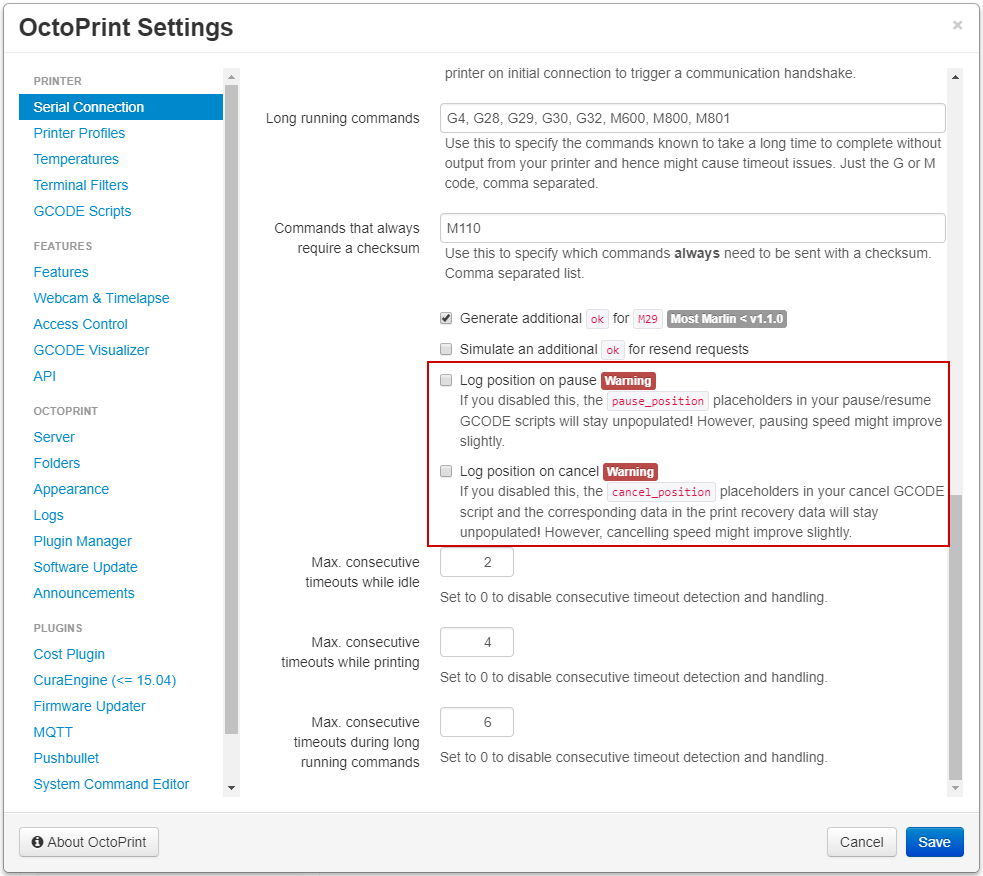
So if anyone runs into issues with the M400 & M114 pairing in the future and doesn't need the recorded positions for more intelligent pause/resume/cancel scripting, that can then just be disabled.
foosel
on 17 Jul 2017
As I mentioned here it's much better but still not immediately.
Here are some examples
2017-07-19 18:33:37,847 - Send: N1401 G1 X156.503 Y137.034 E3.0970*109
2017-07-19 18:33:37,861 - Recv: ok
2017-07-19 18:33:37,873 - Send: N1402 G1 X157.068 Y137.034 E3.1140*109
2017-07-19 18:33:37,946 - Changing monitoring state from 'Printing' to 'Operational'
2017-07-19 18:33:38,057 - Recv: ok
2017-07-19 18:33:38,070 - Send: M400
2017-07-19 18:33:39,627 - Recv: ok
2017-07-19 18:33:39,629 - Send: M114
2017-07-19 18:33:39,925 - Recv: X:157.07 Y:137.03 Z:0.80 E:3.11 Count A: 23528 B:1602 Z:128
2017-07-19 18:33:40,288 - Recv: ok
2017-07-19 18:33:40,299 - Send: M104 S0
2017-07-19 18:33:40,339 - Recv: ok
2017-07-19 18:33:40,390 - Send: M140 S0
2017-07-19 18:33:40,457 - Recv: ok
2017-07-19 18:33:40,556 - Send: G92 E1
2017-07-19 18:33:42,088 - Recv: X:157.07 Y:137.03 Z:0.80 E:1.00 Count A: 23528 B:1602 Z:128
2017-07-19 18:33:42,195 - Recv: ok
2017-07-19 18:33:42,224 - Send: G1 E-1 F300
2017-07-19 18:33:42,355 - Recv: ok
2017-07-19 18:33:42,401 - Send: M117 Print Done
2017-07-19 18:33:42,500 - Recv: ok
2017-07-19 18:33:42,535 - Send: G1 F1500 Z323
2017-07-19 18:33:42,581 - Recv: ok
2017-07-19 18:33:42,594 - Send: G28 X0 Y0
2017-07-19 14:55:33,240 - Send: N605 G1 X101.600 Y118.400 E5.0228*86
2017-07-19 14:55:33,398 - Recv: ok
2017-07-19 14:55:33,400 - Send: N606 G1 X106.600 Y118.400 E5.3221*88
2017-07-19 14:55:34,249 - Changing monitoring state from 'Printing' to 'Operational'
2017-07-19 14:55:34,696 - Recv: ok
2017-07-19 14:55:34,698 - Send: M400
2017-07-19 14:55:36,707 - Recv: echo:busy: processing
2017-07-19 14:55:38,497 - Recv: ok
2017-07-19 14:55:38,499 - Send: M114
2017-07-19 14:55:38,510 - Recv: X:106.60 Y:118.40 Z:0.20 E:5.32 Count A: 18000 B:-944 Z:32
2017-07-19 14:55:38,537 - Recv: ok
2017-07-19 14:55:38,640 - Send: M117 Print Done
2017-07-19 14:55:38,799 - Recv: ok
2017-07-19 14:55:38,801 - Send: M104 S0
2017-07-19 14:55:38,866 - Recv: ok
2017-07-19 14:55:38,868 - Send: M140 S0
2017-07-19 14:55:39,106 - Recv: ok
2017-07-19 14:55:39,450 - Send: G92 E1
2017-07-19 14:55:40,462 - Recv: X:106.60 Y:118.40 Z:0.20 E:1.00 Count A: 18000 B:-944 Z:32
2017-07-19 14:55:40,478 - Recv: ok
2017-07-19 14:55:40,484 - Send: G1 E-1 F300
2017-07-19 14:55:40,516 - Recv: ok
2017-07-19 14:55:40,526 - Send: G1 F1500 Z323
2017-07-19 14:55:40,568 - Recv: ok
2017-07-19 14:55:40,570 - Send: G28 X0 Y0
2017-07-19 18:33:37,861 - Recv: ok
2017-07-19 18:33:37,873 - Send: N1402 G1 X157.068 Y137.034 E3.1140*109
2017-07-19 18:33:37,946 - Changing monitoring state from 'Printing' to 'Operational'
2017-07-19 18:33:38,057 - Recv: ok
2017-07-19 18:33:38,070 - Send: M400
2017-07-19 18:33:39,627 - Recv: ok
2017-07-19 18:33:39,629 - Send: M114
2017-07-19 18:33:39,925 - Recv: X:157.07 Y:137.03 Z:0.80 E:3.11 Count A: 23528 B:1602 Z:128
2017-07-19 18:33:40,288 - Recv: ok
2017-07-19 18:33:40,299 - Send: M104 S0
2017-07-19 18:33:40,339 - Recv: ok
2017-07-19 18:33:40,390 - Send: M140 S0
2017-07-19 18:33:40,457 - Recv: ok
2017-07-19 18:33:40,556 - Send: G92 E1
2017-07-19 18:33:42,088 - Recv: X:157.07 Y:137.03 Z:0.80 E:1.00 Count A: 23528 B:1602 Z:128
2017-07-19 18:33:42,195 - Recv: ok
2017-07-19 18:33:42,224 - Send: G1 E-1 F300
2017-07-19 18:33:42,355 - Recv: ok
2017-07-19 18:33:42,401 - Send: M117 Print Done
2017-07-19 18:33:42,500 - Recv: ok
2017-07-19 18:33:42,535 - Send: G1 F1500 Z323
2017-07-19 18:33:42,581 - Recv: ok
2017-07-19 18:33:42,594 - Send: G28 X0 Y0
I'm still on Version 1.3.4 (test/issue1946_decouple_print_logging branch)
TylonHH
on 20 Jul 2017
And as I mentioned here a slight delay is unavoidable due to how printer firmware and the communication with it works. And if the delay induced by waiting for movements to finish in order to log the current position prior to running the cancel/pause script is a problem I added options to maintenance to disable the overall position logging as mentioned here.
I've spent several work days now on that code, and other than what @CapnBry found and I fixed, there's nothing glaringly obvious in there, and certainly no observable difference to prior versions. If anyone wants to take another stab at it to check if there are still issues with response parsing left that could be causing any further delays, be my guest, but I simply can't justify that I fear 🙁
Your M400 response times look like there were some long-ish moves still enqueued in the printer. There's a small delay on G92 but since for some reason that's also logging the position in your firmware that might be related. Other than that all looks fine, but of course having the "move stuff out of the way" only after switching off heaters and resetting positions is a bad idea if you want to avoid blobs (as a side note, why avoiding blobs on a cancelled and such failed print is so essential here is a bit beyond me). Move your print head out of the way ASAP (first thing in your cancel code, ideally combining the retract with that instead of doing it separately), that will most likely improve things a lot.
foosel
on 20 Jul 2017
Do the retract first, before moving, is the best way to avoid a blob or a string. That is the normal action when finishing an extrusion run, so it shouldn't leave a blob. Retracting while moving away will leave a fine string.
 nophead
on 20 Jul 2017
nophead
on 20 Jul 2017
@TylonHH Looking at that serial dump, it is pretty odd how long it takes the firmware to respond to some commands. G92 E1 taking 1.0-1.5 seconds?! M114 also takes 300ms in two of the three captures which makes no sense unless you're running at 1200 baud-- it should take about 30-50ms. Is this running on a single core Pi with like mjpg-streamer or something else running in the background? Do you have any OctoPrint plugins installed? If this is a single core Pi then maybe there's a chance that the background metadata flush is slowing the serial thread down? That seems unlikely because that thread should be blocked on I/O, leaving the CPU free, but I am not sure how the Python GIL might botch that up.
You can also just type G92 E1 in the OctoPrint terminal tab and then check the serial.log to see how long it is taking to come back. If it still takes a second to come back, that's a problem. You can also try G91 : G1 E-1.0 F300 : G90 to see if a relative move retracts more quickly on your firmware (skipping the G92 delay completely).
 CapnBry
on 20 Jul 2017
CapnBry
on 20 Jul 2017
Confirmed fix for me on 1.3.5rc3. Thank you.
against repetier v0.91
 fessyfoo
on 25 Sep 2017
fessyfoo
on 25 Sep 2017
1.3.5 was released yesterday.
foosel
on 17 Oct 2017
Related issues
foosel
·
58Comments
 Smuk3D
·
47Comments
Smuk3D
·
47Comments
 devsfan1830
·
55Comments
devsfan1830
·
55Comments
 szafran81
·
40Comments
szafran81
·
40Comments
 devildant
·
59Comments
devildant
·
59Comments
Most helpful comment
I noticed another issue besides slow cancelling. When cancelling in the heating up fase, the set temp will stay that way and the printer is unresponsive. I have to (re)connect to the printer to reset it before being able to reset the set temp to off. When it is actually printing and you cancel, all is as expected.
Also Skynet 2.3.2 Anet and Octoprint latest stable 1.3.4. Tried multiple browsers.