Octoprint: [Feature request] Use Slic3r PE ETA
It would be great if OP would use the estimated print time which is generated by the new Slic3r PE (it's written at the end of the gcode file with all the settings) instead of analysing by itself.
 szafran81
All 40 comments
+1
 fixing-it
on 19 Mar 2018
fixing-it
on 19 Mar 2018
I vote for this +1
And since the description above is not very good:
Feature request
Current implementation
The current print time estimation is often rather off the reality and inaccurate
Improvement suggestion
Prusa's sli3r branch writes (in Version 1.39.1) a line "estimated printing time" at the end of the gcode file. If this line is present it can be used for the time estimation from the start up.
I think it would be even ok if (given the line is present) to switch off octoprints own internal estimation.
Comment
In my cases the time estimation done by sli3r is within one minute accurate.
code example
G1 X0 Y200; home X axis
M84 ; disable motors
; filament used = 6015.6mm (14.5cm3)
; filament used = 18.8
; filament cost = 0.5
; total filament cost = 0.5
; estimated printing time = 1h 53m 29s

; avoid_crossing_perimeters = 0
; bed_shape = 0x0,250x0,250x210,0x210
; bed_temperature = 75
; before_layer_gcode = ;BEFORE_LAYER_CHANGE\n;layerhight [layer_z]\n;layernum [layer_num]\n\n
 bdynamic
on 4 Apr 2018
bdynamic
on 4 Apr 2018
Sorry for being lazy and not giving it a nice description as @bdynamic did (thank you for that).
One thing to note for those that want to try this. If the default time estimation in Slic3r PE doesn't work for you then you should include some additional info in the start g-code script, like:
M201 X1000 Y1000 Z200 E5000 ; sets maximum accelerations, mm/sec2
M203 X200 Y200 Z12 E120 ; sets maximum feedrates, mm/sec
M204 S1250 T1250 ; sets acceleration (S) and retract acceleration (T)
M205 X10 Y10 Z0.4 E2.5 ; sets the jerk limits, mm/sec
M205 S0 T0 ; sets the minimum extruding and travel feed rate, mm/sec
Those are the settings from your printers FW (those are needed for precise time calculation - and since Slic3r doesn't connect with printers then you have to provide those manually).
szafran81
on 4 Apr 2018
OctoPrint 1.3.9 will ship with two new hooks octoprint.filemanager.analysis.factory and octoprint.printer.estimation.factory that will allow plugins to override both the initial gcode analysis implementation as well as the live print time estimation.
That should allow people to experiment with this stuff and find better but possibly more hardware/workflow/setup specific approaches that provide more accurate results than a stock option that has to always work can.
Knock yourselves out with this ;)
 foosel
on 17 May 2018
foosel
on 17 May 2018
This issue is fixed for the slic3r case by https://github.com/OctoPrint/OctoPrint-Slic3r/pull/37
 eyal0
on 24 Jun 2018
eyal0
on 24 Jun 2018
@bdynamic Your example has two lines that say filament_used. Is that because you used multiple materials? I am interested in more examples of gcode output that use multimaterial. If you can provide those, I will update the OctoPrint-Slic3r plugin to support the analysis.
eyal0
on 24 Jun 2018
@eyal0 No - I do not have a multi material. I guess the following lines
; filament used = 6015.6mm (14.5cm3)
; filament used = 18.8
; filament cost = 0.5
; total filament cost = 0.5
appear if you fill the filament attributes "Density" and "Cost".
bdynamic
on 24 Jun 2018
@eyal0 Would you consider providing your patch as a standalone plugin as well? This would be great for a lot of people who would like to have accurate print time information but do not want to slice on the raspberry....
bdynamic
on 24 Jun 2018
I agree on that. Or maybe just isolate on a branch the code that overrides estimates so we can use it as a base for other implementations.
 marcboivin
on 24 Jun 2018
marcboivin
on 24 Jun 2018
I agree with @bdynamic, please add as a separate plugin for those of us that slice outside of the octoprint instance. I was thinking of writing one specifically for reading that line out of uploaded gcode files, just haven't got around to it yet.
 jneilliii
on 24 Jun 2018
jneilliii
on 24 Jun 2018
I didn't use density and cost. What values did you put for density and cost, @bdynamic ? Maybe the filament volume of 14.5 is related to the 18.8 by the density?
Regarding a patch for OctoPrint... Hmm. Only recently did OctoPrint add the feature where plugins can provide an estimation service. That could be useful. Maybe a standalone plugin that would read gcode and use the estimate embedded inside it? I'm not sure how to make it more accurate than what OctoPrint is already doing, however. Except at the very start where slic3r provides a good estimate.
Do you have a suggestion about how it could work? @bdynamic ?
eyal0
on 24 Jun 2018
It seems that the path to plugin option for this estimator would be by using the octoprint.filemanager.analysis.factory plugin hook and defining custom_gcode_analysis_queue in the plugin implementation to point to your gcode analysis that reads the gcode file. See here for the docs.
jneilliii
on 24 Jun 2018
So something like the following maybe...
# coding=utf-8

from octoprint.filemanager.analysis import AbstractAnalysisQueue

class OctoPrint-Slic3rEstimate(AbstractAnalysisQueue):
    def custom_gcode_analysis_queue(self, *args, **kwargs):
        return dict(gcode=get_analysis_from_gcode)

def __plugin_load__():
    global __plugin_implementation__
    __plugin_implementation__ = OctoPrint-Slic3rEstimate()

    global __plugin_hooks__
    __plugin_hooks__ = {
        "octoprint.plugin.softwareupdate.check_config": __plugin_implementation__.get_update_information,
        "octoprint.filemanager.analysis.factory": __plugin_implementation__.custom_gcode_analysis_queue
    }
Yup, looks good. It seems that there are two types of factory: one for providing the analysis on uploaded files, which you mentioned, and other for providing the estimate while printing, which is the estimation factory. The data in the file would only be useful for the former, I think, not the latter. There would need to be more info in the file for the streaming estimation.
Okay, so say that we make the plugin. How does it work? Options:
- The easiest way is to have fixed strings to search for in the gcode. That's how the OctoPrint-Slic3r plugin does it. But every time that we want to add a new type of analyzer, there needs to be a new release.
- The harder way is to make it somehow user programmable. For example, let the user add regular expressions to find strings to use as estimated time, etc.
I think that the regex idea will be more work and not really useful. For slic3r, there's some complex parsing to convert the time into seconds. I think that the first idea is best: Just hard code it. I can add new slicer gcode parsing as needed. cura and slic3r would probably cover the most of it.
eyal0
on 24 Jun 2018
@eyal0 Regarding your question: Not sure which settings I had in this case (if I used PTEG or PLA). My PLA Settings are:
Density 1.24 g/cm³
Cost: 18.77 money [€]/kg
Here I have some up to date values of a different project (using mentioned density and cost)
; filament used = 3103.3mm (7.5cm3)
; filament used = 9.3 //the used grams of filament
; filament cost = 0.2 // the rounded cost in money [€] (display in the slicer is 0.17)
; total filament cost = 0.2
; estimated printing time = 45m 17s
bdynamic
on 24 Jun 2018
IMHO: If it was called slic3r_printtime_plugin hardcoding it would be fine....
A regex option which parameter to evaluate (in the config) could be added later.
bdynamic
on 24 Jun 2018
I agree, hard coding the initial release and naming the plugin appropriately (in this case something like OctoPrint-Slic3rPrintTime) makes total sense. This would allow for different plugins based on the end-user's preference of slicer. Then for cura and other slicers you could have separate plugins also named appropriately (OctoPrint-CuraPrintTime, OctoPrint-MatterPrintTime, etc.). In my experience most people don't switch between slicers too often and only in certain circumstances. I would assume there would be a way to default to the stock GcodeAnalysisQueue in the case where the estimate was not able to be found in the gocde file itself.
jneilliii
on 24 Jun 2018
I'd also be up for testing/assisting in any way possible as you start the project, just let me know.
jneilliii
on 24 Jun 2018
+1 for testing...
bdynamic
on 24 Jun 2018
I think that I might as well make a single plugin that handles slic3r and cura both. For two reasons.
First, adding a new slicer to support is pretty easy. So if I'm already going to the work of doing it for slic3r, adding cura is easy.
Second, if someone wants to make one for simplify3d or something else, they can just modify a few lines in this plugin rather than make a while new plugin. Making a new plugin is a lot of overhead.
OctoPrint-GcodePrintTime or something like that? I'd like to distinguish the name so that it's clear that we are just taking the number from the file and not computing the print time.
Or maybe OctoPrint-GcodeAnalyzer? Because in the OctoPrint source code, it's called an analyzer. And in the future, maybe it'll do more than just print time?
eyal0
on 24 Jun 2018
When you publish, I’ll do S3d
marcboivin
on 24 Jun 2018
Either of those names make total sense to me.
jneilliii
on 25 Jun 2018
@bdynamic @jneilliii @marcboivin Okay, here's my first try. Remember, you must have OctoPrint 1.3.9 or greater. OctoPrint 1.3.9rc1 will work.
https://github.com/eyal0/OctoPrint-GcodeAnalyzer#setup
If you want to help me with testing, here are some things to try:
- Upload a gcode file that was sliced by slic3r. It doesn't matter if you use slic3r or slic3r Prusa edition.
- Try files that have "filament used" and "estimated print time" lines in them.
- Try files that have just "filament used" and not "estimated print time" or vice-versa. The unknown one will be left blank.
- Try files that have none of those lines. It should fallback to OctoPrint's built-in calculator.
- Look at your log file in ~/.octoprint/logs/octoprint.log and you should see some messages about what it found and how long it took.
- If cura/simplify3d/etc make similar comments, send me examples so that I can support those, too.
- If you think of other features, let me know.
eyal0
on 25 Jun 2018
Awesome @eyal0, I'll give it some testing and let you know.
jneilliii
on 25 Jun 2018
Hi! Just found this while looking for a plugin, I'll test it as soon as I get home. In the meantime, here are some examples for Slic3r and Cura gcodes.
gcodes.zip
In CuraEngine 15.04 (the slicer included in OctoPi) the estimated print time is rounded to minutes (it shows "0 minutes" if less than a minute):
;Print time: 5 minutes
;Filament used: 0.093m 0.0g
In Cura 3, time is in seconds:
;TIME:446
;Filament used: 0.0944825m
It also has a line with the estimated accumulated time for every layer, e.g.:
;TIME_ELAPSED:28.609076
Hope this helps.
 pscrespo
on 27 Jun 2018
pscrespo
on 27 Jun 2018
@pscrespo Very useful, thanks! I'll start adding it in. In the meanwhile, you can look at some of my results and let me know if you think that they would be interesting to you:
https://github.com/eyal0/OctoPrint-PrintTimeGenius/blob/master/README.md
I haven't yet completed the instructions. If you think that it is interesting, let me know and I will complete the instructions so that you can start using it.
eyal0
on 4 Jul 2018
@eyal0 is this going to replace the GCodeAnalyzer plugin or work in conjunction with it?
jneilliii
on 4 Jul 2018
This will replace it. I'm putting both analysis and estimation into a single plugin. They'll work together, providing minute-by-minute estimation. You can see the graph for the results. Estimation accuracy is off by less than 3% at worst, compared to just GCodeAnalyzer that was off by 16% at one point.
eyal0
on 4 Jul 2018
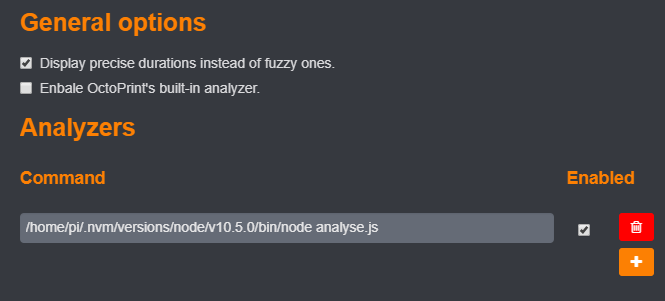
Thanks. I assume this is the correct config to utilize the improved GCodeAnalyser?
jneilliii
on 4 Jul 2018
Almost! You should leave OctoPrint's built in analyzer enabled because it will determine the physical size of the object that you are printing. The analyzers are run in the order that they are listed so the one that you wrote will potentially override the built-in one.
Also, the line that you wrote needs adjustment. Replace "analyse.js" with "/home/pi/GCodeAnalyser/js/analyse.js {gcode}".
Sorry that the instructions aren't online yet. I'll add those.
It will only work on files that are newly upload so reupload a file to have it analyzed. It doesn't work on files that sliced on the RPi. You must upload.
The analysis results are written into a log file named PrintTimeGenius_engine. If you open OctoPrint settings and go to logging, you'll be able to see the log file there. Download it and you'll see the steps that it took and how it merged the built-in results with your script results.
Also in the logging setting, you have the option to set PrintTimeGenius logs to be at DEBUG level. If you do that then the PrintTimeGenius will write to the log a comma-separated file. Each row is a sample of: print time so far, time remaining using OctoPrint algorithm, time remaining using genius. In my testing I put those rows into Excel and I can see how good or bad the time estimate is over time, comparing the built-in algorithm to the genius.
Genius only works on files that you've never printed before. If you've printed a file before, Genius will use the historical total print time as the estimate because that is usually super accurate. You can tell when genius is working because the time estimate circle will change to a gold star. If you want to clear the history, delete the gcode file and then reupload it.
Let me know how it works for you or if you have suggestions! Thanks.
eyal0
on 4 Jul 2018
Thanks, that fixed it. I was thinking this would be a total replacement not an augmentation to the built in analysis like the other plugin that just reads Slic3r's estimate from gcode (which works great by the way). From my testing, I think the discrepancy I'm seeing is probably related to heat up times for the bed, but was wondering if there are plans/options to account/adjust for that? If the plugin could learn that over time it would be great.
Slic3r Estimate: 01:20:55
OctoPrint Estimate: 01:09:52
PrintTimeGenius with GCodeAnalyzer: 01:19:49
ActualPrintTime with heating: 01:31:56
jneilliii
on 4 Jul 2018
I thought about that, too. I had an idea to add two factors to the Settings, a scale factor and an offset factor. All estimates would be multiplied by the scale and then have the offset added. Users could type the two numbers in.
There would also be a button that would read ~/.octoprint/uploads/.metadata.json and extract all the previously successful runs, run analysis on each of them, and then use all the results to make a best fit. It could find the scale and offset automatically. That only works if users have enough history data in the file. Maybe most users are deleting old gcode after use. Do you have many files listed in .metadata.json with history available and success: true?
Another thing that might help you get a better answer is adjusting the analyzer with your printer's settings. You can look at ~/GCodeAnalyser/js/analyse.js and see the settings variable in there which has values like max speed and max jerk. Those can be compared to the output from running M503 on your printer. And you can test out new settings at GCodeAnalyser.com , which is written by the same person who wrote GCodeAnalyser (wasn't me, I just forked it). It didn't make a big difference for me, though.
There are other gcode analyzers on the internet that I might try, too. gcodestat is one of them, available on GitHub. There is another called marlin-estimate. Those two have the advantage of running faster than GCodeAnalyser. I need to learn about statistics and fitting so that I can figure out how to compare the different results and pick the best.
eyal0
on 5 Jul 2018
Not a ton since I recently re-flashed, but some with some multiple prints history. Here is my file.
jneilliii
on 5 Jul 2018
I know estimating the time to heat up would vary based on starting temp, ambient temp, etc. but definitely think that some kind of extrapolated scale could be figured out. I'm not really a math stats guru either.
jneilliii
on 5 Jul 2018
@foosel It seems that the gcode analysis hook is only called for files that are uploaded and not for files that are sliced on the RPi, because it is assumed that the slicer will supply the analysis.
But that's not great because it makes it difficult to write a hook that can override the results of the slicer. Do you have an idea how this can be solved?
eyal0
on 9 Jul 2018
It appears in the code that filemanager.add_file() get the analysis as an argument and only if the analysis is None does it queue the file for analysis. The hook doesn't get analysis and so has no way to modify it. :disappointed:
I can patch the add_file command and it'll work, but it doesn't seem like a great solution.:
self._file_manager.original_add_file = self._file_manager.add_file
def new_add_file(destination, path, file_object, links=None, allow_overwrite=False, printer_profile=None, analysis=None, display=None):
  return self._file_manager.original_add_file(destination, path, file_object, links, allow_overwrite, printer_profile, None, display)
self._file_manager.add_file = new_add_file
Doing that, I think that I don't even need the analysis factory hook!
I think that a good solution would be to always call the GCodeAnalyser, even if the add_file was provided an analysis. The GCodeAnalyser should receive the analysis and return a possibly modified one.
The change would be here: https://github.com/foosel/OctoPrint/blob/maintenance/src/octoprint/filemanager/__init__.py#L479
Rather that only call the analyser when there is no existing analysis, call it always. Pass the analysis in and allow the analyser to return a new analysis. The current GCodeAnalyser could be modified to return the original analysis if it isn't None, that way the behavior of OctoPrint is unchanged.
If you like the idea, let me know and I'll prepare the PR.
eyal0
on 9 Jul 2018
@jneilliii I finished it, it's working pretty well. If you want to try it out, add this plugin:
https://github.com/eyal0/OctoPrint-PrintTimeGenius/archive/master.zip
It has built in to it a Marlin firmware simulator so it'll actually run your gcode through a Marlin firmware simulation and then output the estimated time.
Also, it tracks how long it takes for your printer to heat up and uses the last 5 prints to make a guess, then it adds that to the estimate.
It can also compensate for any minor errors in the simulation, so if the simulation is consistently off by, say, 5%, it will adjust future simulation results by -5% to compensate.
The default is for all that to be enabled so you should be able to just install it and go. The first time that you slice or upload a file, it'll get the "Genius" treatment.
You can see a graph that I made showing the difference between OctoPrint's results and mine:
https://github.com/eyal0/OctoPrint-PrintTimeGenius
Let me know if you try it and what you think. Also, I expect that there are still some bugs and I appreciate any help in finding them. Enjoy!
eyal0
on 13 Jul 2018
Yeah, I've had it on my machine and got the notice when you release the new version and upgraded. Just haven't had any time lately to do any printing/testing and now I'm sucked into a new plugin request from the community forum. I'll let you know if there are any problems in the issue tracker on the repo.
jneilliii
on 14 Jul 2018
@eyal0 sorry for the delay regarding the analysis PR, had a bit of a backlog due to personal reasons. Just merged it, will be part of 1.3.10 though (1.3.9 is already in feature freeze mode and has been for a while).
foosel
on 18 Jul 2018
No prob, @foosel . I have a workaround that is ugly but works well.
eyal0
on 18 Jul 2018
Related issues
 ZhuDaHai
·
42Comments
foosel
·
50Comments
ZhuDaHai
·
42Comments
foosel
·
50Comments
 Givemeyourgits
·
76Comments
Givemeyourgits
·
76Comments
 thedoble
·
85Comments
thedoble
·
85Comments
 dm3942
·
49Comments
dm3942
·
49Comments
Most helpful comment
I think that I might as well make a single plugin that handles slic3r and cura both. For two reasons.
First, adding a new slicer to support is pretty easy. So if I'm already going to the work of doing it for slic3r, adding cura is easy.
Second, if someone wants to make one for simplify3d or something else, they can just modify a few lines in this plugin rather than make a while new plugin. Making a new plugin is a lot of overhead.
OctoPrint-GcodePrintTime or something like that? I'd like to distinguish the name so that it's clear that we are just taking the number from the file and not computing the print time.
Or maybe OctoPrint-GcodeAnalyzer? Because in the OctoPrint source code, it's called an analyzer. And in the future, maybe it'll do more than just print time?