Octoprint: [RC Feedback] Feedback on the 1.4.0rc2 Release Candidate
Please provide general feedback on your experience with the 1.4.0rc2 Release Candidate here. An "All is working fine" is valuable feedback as well, because it tells me that people in fact are testing the RC and just not finding any problems. Thanks :)
If you run into any obvious bugs not yet listed below the following line, please open a new ticket and follow "How to file a bug report".
Currently known issues
- 🐛✔ #3365: global API KEY don't have all permission - fix ready for 1.4.0rc3
- 🐛✔ #3366: Appkeys request returns 500/Internal server error - fix ready for 1.4.0rc3
- ☔✔ #3367: UI fails to load due to MIME type issues under Windows 10 - workaround ready for 1.4.0rc3
- 🐛✔ #3370: Losing session and running into permission errors - fix ready for 1.4.0rc3
- 🐛✔ #3371: rolling_window size is not an integer, serial loop crash - fix ready for 1.4.0rc3
- 🐛✔ #3375: exception - Insufficient permissions - fix ready for 1.4.0rc3
- ☔✔ #3381: /api/login?passive=true as sent by printoid causes Bad Request - workaround ready for 1.4.0rc3
- 🐛✔ #3384: PY3: login using http basic auth is broken - fix ready for 1.4.0rc3
- 🐛✔ #3385: PY3: COMM autodetection is broken - fix ready for 1.4.0rc3
- 🐛✔ #3388: extruder control visible without control permission - fix ready for 1.4.0rc3
Unreproduced issues
Unreproduced and information for further analysis missing
Unrelated third party plugin issues
- #3374: Exception in callback functools.partial
 foosel
All 32 comments
Loaded up and used rc1 - noticed 502 errors when sending prints from Cura using the API but that's fixed now. I think there was something else I noticed but can't remember for the life of me. My current plugins seem fine and I've done several prints with no issues. Well, I mean the prints themselves had issues but pretty sure that's my fault, or the printer's.
Update: I'm using octoslack plugin and I don't get a print finished message. Do get a print started. I think this is new to 1.4.0 but I have done absolutely nothing to diagnose this so don't worry about it quite yet. I'll post once I've done anything useful.
 ChrisHeerschap
on 2 Dec 2019
ChrisHeerschap
on 2 Dec 2019
Hello @foosel ,
I use API Key present in the API section inside custom python scripts (http) to trigger events on my plugins ...
but since the transition to the RC2 I systematically get error 403
(I did not create an issue, because I'm not sure that it's a bug)
 devildant
on 2 Dec 2019
devildant
on 2 Dec 2019
the global key should have all the authorization, right?
devildant
on 2 Dec 2019
It should, yes. Please open an issue.
foosel
on 2 Dec 2019
@foosel , it's open : https://github.com/foosel/OctoPrint/issues/3365
devildant
on 2 Dec 2019
@ChrisHeerschap
Update: I'm using octoslack plugin and I don't get a print finished message. Do get a print started. I think this is new to 1.4.0 but I have done absolutely nothing to diagnose this so don't worry about it quite yet. I'll post once I've done anything useful.
Do your Slack messages without snapshots succeed, and those with snapshots fail? I ran into this issue, see https://github.com/fraschetti/Octoslack/issues/71.
 kazibole
on 4 Dec 2019
kazibole
on 4 Dec 2019
Hi
I upgraded the RC2 yesterday, and right after the upgrade, there was a bunch full of errors (UI was cluttered in all ways. I cleared the cache and then all was fine as far as I can tell
I still ran accros an issue mentionned here but not octoprint related
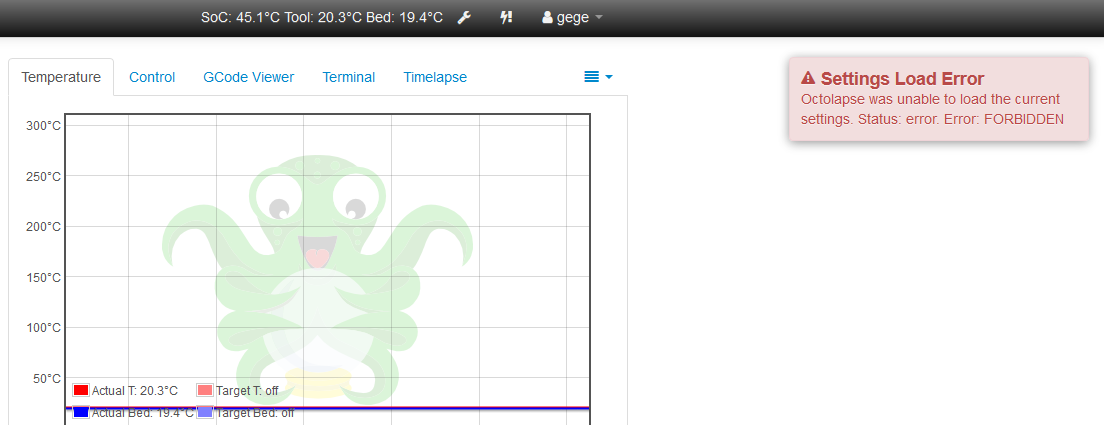
I also got something certainly related to #3365 (with Octolapse showing me it didn't had the permission to load settings)

EDIT
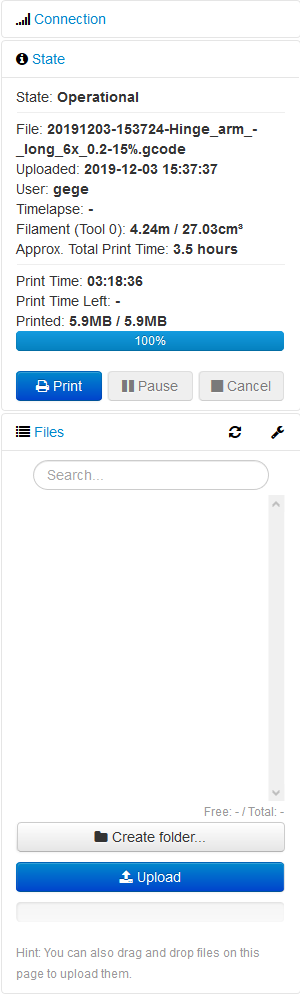
And finally, right now, I see that the file list isn't populated (it was yesterday after the upgrade)
Note : it's OK now after some hard refresh, I keep the folowing informations for the record :
Even if files are listed, I can't open/print them anymore
2019-12-04 11:49:33,119 - tornado.access - WARNING - 403 POST /api/files/local/20191204-091625-Hinge_arm_-_long_6x_0.2-15-.gcode (192.168.1.129) 56.24ms
2019-12-04 09:35:48,965 - octoprint.server.util.sockjs - INFO - Client connection closed: fe80::89f3:31bb:ced0:2093%wlan0
2019-12-04 09:35:56,901 - octoprint.server.util.sockjs - INFO - New connection from client: fe80::89f3:31bb:ced0:2093%wlan0
2019-12-04 09:35:57,175 - octoprint.server.util.flask - INFO - Passively logging in user gege from 192.168.1.129
2019-12-04 09:35:58,037 - octoprint.plugins.cancelobject - INFO - No active object id!
2019-12-04 09:35:58,324 - tornado.access - WARNING - 403 GET /api/access/groups (fe80::89f3:31bb:ced0:2093%wlan0) 28.72ms
2019-12-04 09:35:58,449 - tornado.access - WARNING - 403 GET /api/printerprofiles (fe80::89f3:31bb:ced0:2093%wlan0) 114.33ms
2019-12-04 09:35:58,489 - tornado.access - WARNING - 403 GET /api/system/commands (fe80::89f3:31bb:ced0:2093%wlan0) 28.42ms
2019-12-04 09:35:58,526 - tornado.access - WARNING - 403 GET /plugin/announcements/channels (fe80::89f3:31bb:ced0:2093%wlan0) 26.55ms
2019-12-04 09:35:58,566 - tornado.access - WARNING - 403 GET /api/printer/command/custom (fe80::89f3:31bb:ced0:2093%wlan0) 28.98ms
2019-12-04 09:35:58,620 - tornado.access - WARNING - 403 GET /api/plugin/pluginmanager (fe80::89f3:31bb:ced0:2093%wlan0) 43.22ms
2019-12-04 09:35:58,661 - tornado.access - WARNING - 403 GET /api/plugin/printer_safety_check (fe80::89f3:31bb:ced0:2093%wlan0) 30.16ms
2019-12-04 09:35:58,698 - tornado.access - WARNING - 403 GET /plugin/softwareupdate/check (fe80::89f3:31bb:ced0:2093%wlan0) 25.82ms
2019-12-04 09:35:58,738 - tornado.access - WARNING - 403 GET /api/files?recursive=true (fe80::89f3:31bb:ced0:2093%wlan0) 29.26ms
2019-12-04 09:35:58,771 - octoprint.server.api - ERROR - Error calling SimpleApiPlugin action_command_prompt
Traceback (most recent call last):
  File "/home/pi/OctoPrint/venv/local/lib/python2.7/site-packages/octoprint/server/api/__init__.py", line 70, in pluginData
    response = api_plugin.on_api_get(request)
  File "/home/pi/OctoPrint/venv/lib/python2.7/site-packages/octoprint/plugins/action_command_prompt/__init__.py", line 124, in on_api_get
    return flask.abort(403, "Insufficient permissions")
  File "/home/pi/OctoPrint/venv/local/lib/python2.7/site-packages/werkzeug/exceptions.py", line 772, in abort
    return _aborter(status, *args, **kwargs)
  File "/home/pi/OctoPrint/venv/local/lib/python2.7/site-packages/werkzeug/exceptions.py", line 753, in __call__
    raise self.mapping[code](*args, **kwargs)
Forbidden: 403 Forbidden: Insufficient permissions
2019-12-04 09:35:59,039 - tornado.access - ERROR - 500 GET /api/plugin/action_command_prompt (fe80::89f3:31bb:ced0:2093%wlan0) 288.91ms
2019-12-04 09:35:59,791 - tornado.access - WARNING - 403 GET /api/slicing (192.168.1.129) 31.45ms
2019-12-04 09:35:59,846 - tornado.access - WARNING - 403 POST /plugin/octolapse/loadSettings (192.168.1.129) 43.49ms
2019-12-04 09:35:59,854 - octoprint.server.util.sockjs - INFO - User gege logged in on the socket from client fe80::89f3:31bb:ced0:2093%wlan0
2019-12-04 09:36:11,564 - octoprint.plugins.navbartemp - INFO - Checking SoC internal temperature
2019-12-04 09:36:41,630 - octoprint.plugins.navbartemp - INFO - Checking SoC internal temperature
2019-12-04 09:36:57,560 - tornado.access - WARNING - 403 GET /api/files?recursive=true&force=true (fe80::89f3:31bb:ced0:2093%wlan0) 39.05ms
2019-12-04 09:37:11,694 - octoprint.plugins.navbartemp - INFO - Checking SoC internal temperature
2019-12-04 09:37:17,716 - octoprint.server.util.sockjs - INFO - Client connection closed: fe80::89f3:31bb:ced0:2093%wlan0
2019-12-04 09:37:30,380 - octoprint.server.util.sockjs - INFO - New connection from client: fe80::89f3:31bb:ced0:2093%wlan0
2019-12-04 09:37:30,671 - octoprint.server.util.flask - INFO - Passively logging in user gege from 192.168.1.129
2019-12-04 09:37:32,451 - octoprint.plugins.cancelobject - INFO - No active object id!
2019-12-04 09:37:32,728 - tornado.access - WARNING - 403 GET /api/access/groups (fe80::89f3:31bb:ced0:2093%wlan0) 29.44ms
2019-12-04 09:37:32,855 - tornado.access - WARNING - 403 GET /api/printerprofiles (fe80::89f3:31bb:ced0:2093%wlan0) 116.39ms
2019-12-04 09:37:32,896 - tornado.access - WARNING - 403 GET /api/system/commands (fe80::89f3:31bb:ced0:2093%wlan0) 29.42ms
2019-12-04 09:37:32,933 - tornado.access - WARNING - 403 GET /plugin/announcements/channels (fe80::89f3:31bb:ced0:2093%wlan0) 27.27ms
2019-12-04 09:37:32,977 - tornado.access - WARNING - 403 GET /api/slicing (fe80::89f3:31bb:ced0:2093%wlan0) 32.32ms
2019-12-04 09:37:33,015 - tornado.access - WARNING - 403 GET /api/printer/command/custom (fe80::89f3:31bb:ced0:2093%wlan0) 27.54ms
2019-12-04 09:37:33,056 - tornado.access - WARNING - 403 GET /api/plugin/printer_safety_check (fe80::89f3:31bb:ced0:2093%wlan0) 31.81ms
2019-12-04 09:37:33,097 - tornado.access - WARNING - 403 GET /api/files?recursive=true (fe80::89f3:31bb:ced0:2093%wlan0) 30.56ms
2019-12-04 09:37:33,127 - octoprint.server.api - ERROR - Error calling SimpleApiPlugin action_command_prompt
Traceback (most recent call last):
  File "/home/pi/OctoPrint/venv/local/lib/python2.7/site-packages/octoprint/server/api/__init__.py", line 70, in pluginData
    response = api_plugin.on_api_get(request)
  File "/home/pi/OctoPrint/venv/lib/python2.7/site-packages/octoprint/plugins/action_command_prompt/__init__.py", line 124, in on_api_get
    return flask.abort(403, "Insufficient permissions")
  File "/home/pi/OctoPrint/venv/local/lib/python2.7/site-packages/werkzeug/exceptions.py", line 772, in abort
    return _aborter(status, *args, **kwargs)
  File "/home/pi/OctoPrint/venv/local/lib/python2.7/site-packages/werkzeug/exceptions.py", line 753, in __call__
    raise self.mapping[code](*args, **kwargs)
Forbidden: 403 Forbidden: Insufficient permissions
2019-12-04 09:37:33,337 - tornado.access - ERROR - 500 GET /api/plugin/action_command_prompt (fe80::89f3:31bb:ced0:2093%wlan0) 229.39ms
2019-12-04 09:37:33,950 - tornado.access - WARNING - 403 GET /api/plugin/pluginmanager (fe80::89f3:31bb:ced0:2093%wlan0) 28.20ms
2019-12-04 09:37:33,989 - tornado.access - WARNING - 403 GET /plugin/softwareupdate/check (fe80::89f3:31bb:ced0:2093%wlan0) 27.79ms
2019-12-04 09:37:34,030 - octoprint.server.util.sockjs - INFO - User gege logged in on the socket from client fe80::89f3:31bb:ced0:2093%wlan0
2019-12-04 09:37:34,403 - tornado.access - WARNING - 403 POST /plugin/octolapse/loadSettings (192.168.1.129) 56.97ms
2019-12-04 09:37:41,756 - octoprint.plugins.navbartemp - INFO - Checking SoC internal temperature
2019-12-04 09:37:50,703 - octoprint.server.heartbeat - INFO - Server heartbeat <3
2019-12-04 09:38:05,263 - octoprint.plugins.tracking - INFO - Sent tracking event ping, payload: {'octoprint_uptime': 78308}
2019-12-04 09:38:11,816 - octoprint.plugins.navbartemp - INFO - Checking SoC internal temperature
2019-12-04 09:38:41,878 - octoprint.plugins.navbartemp - INFO - Checking SoC internal temperature
2019-12-04 09:39:11,940 - octoprint.plugins.navbartemp - INFO - Checking SoC internal temperature
 gege2b
on 4 Dec 2019
gege2b
on 4 Dec 2019
@gege2b does the same thing happen in safe mode? Please open a full ticket.
foosel
on 4 Dec 2019
No It doesn't, but it was not easy to restart it in safe mode :)
I'll open a new ticket
gege2b
on 4 Dec 2019
Do your Slack messages without snapshots succeed, and those with snapshots fail? I ran into this issue, see fraschetti/Octoslack#71.
Yes! Thanks you! Work has had me troubleshooting boring stuff so i haven't been able to look at this yet. Disabled snapshots and alerts work again. One for the "Unrelated third party plugin issues", I think.
ChrisHeerschap
on 4 Dec 2019
Thank you for all of your hard work!
The program works awesome as usual. The only very minor issue I have found so far is, I upload a file from simplify3d to the watched folder and print it. If I want to print that same file a second time the print button is grayed out and will not allow me to select it to print. I have tried sending the file and overwriting the one in the watched folder with no success. I have to delete the file from the watched folder and resend it. Has to be a fresh file to be printed. Same goes if you cancel a file. This is not a huge issue for me. I am just wondering if this is expected behavior or if I am doing something wrong.
Thank you in advance,
Kevin
Raspberry pi 3b
simplify3d
windows 10
Klipper firmware
 krpepe
on 5 Dec 2019
krpepe
on 5 Dec 2019
I wrote a small plugin that cloned the custom controls to the temp-tab.
Unfortunately this doesn't work with the 1.4.0rc2 anymore (with the 1.3.12 it works fine).
When I write console.log commands to the .js I see that it is running but apparently the div-container (.custom_section) does not exist yet.
If I try the parent container (#control-jog-custom) this will be cloned but empty.
I tried using onStartupComplete instead of onAllBound to move the execution to a later point, but the result is the same.
If I execute the line for cloning after startup from the browser console, the buttons will be cloned without problems.
Bug? Feature? or am I missing something?
 BerndJM
on 5 Dec 2019
BerndJM
on 5 Dec 2019
Finished today my first bigger print (12h) with RC2 1.4.0. All fine.
 schnello
on 6 Dec 2019
schnello
on 6 Dec 2019
@krpepe are you talking about button 1 or button 2?

Button 2 being greyed out if the file is already selected is correct behaviour - it selects and prints it, it is already selected, if you want to reprint it simply press the big blue print button. If 1 is greyed out, that sounds like a bug and I'd need a full ticket with reproduction steps and screenshots and logs for that.
@BerndJM That sounds like it might be due to the new permission system, which causes a bunch of components to initialize fully only after a permission fetch. I'm not 100% sure though and need to reproduce first. I'll take a look.
foosel
on 6 Dec 2019
Thank you for your response,
Button 2 is the grayed out button so expected behavior. Thank you for the wonderful program and the quick response.
Have a great weekend!
Kevin
krpepe
on 6 Dec 2019
@foosel
that's how it looks like in the browser console (the marked lines are from my plugin)
1.4.0rc2 - using onAllBound - not working

1.4.0rc2 - using onStartupComplete - not working

1.3.12 - using onAllBound - working

If you need further information, please let me know ...
BerndJM
on 6 Dec 2019
Feedback after running a couple of prints via 1.4.0 rc2: very positive
Issues from 1.4.0 rc1 that I've experienced are fixed.
Printing and functionality fine (I slice and upload from PrusaSlicer to OctoPrint via Api).
Webcam feeds (1 USB + 1 raspi) ok.
Plugin behaviour:
- BedVisualizer: ok
- HeaterTimeout: ok
- CostEstimation: ok
- Dashboard: ok
- Sidebar Webcam: ok
- Telegram: ok (2 warnings for deprecated call, see below)
- Tempsgraph Plugin: ok
- DisplayLayerProgress: error in call_plugin, file not found
- CancelObject: error in call_plugin, file not found
I know these are plugins and need to be fixed by the author. Below the error message in case they point towards something that breaks compatibility unintentional.
2019-12-06 09:49:33,196 - octoprint.plugins.tracking - INFO - Sent tracking event ping, payload: {'octoprint_uptime': 44127}
2019-12-06 09:51:22,962 - octoprint.printer.standard.job - INFO - Print job selected - origin: local, path: BagClip_85_0.1mm_PLA_MK3_1h12m.gcode, owner: octoadmin, user: octoadmin
2019-12-06 09:51:22,974 - octoprint.plugins.DisplayLayerProgress - INFO - File selected. Determining number of layers.
2019-12-06 09:51:23,019 - octoprint.plugin - ERROR - Error while calling plugin DisplayLayerProgress
Traceback (most recent call last):
  File "/home/pi/oprint/local/lib/python2.7/site-packages/octoprint/plugin/__init__.py", line 224, in call_plugin
    result = getattr(plugin, method)(*args, **kwargs)
  File "/home/pi/oprint/local/lib/python2.7/site-packages/octoprint_DisplayLayerProgress/__init__.py", line 344, in on_event
    with open(selectedFile, "r") as f:
IOError: [Errno 2] No such file or directory: ''
2019-12-06 09:51:23,037 - octoprint.util.comm - INFO - Changing monitoring state from "Operational" to "Starting"
2019-12-06 09:51:23,139 - octoprint.printer.standard.job - INFO - Print job started - origin: local, path: BagClip_85_0.1mm_PLA_MK3_1h12m.gcode, owner: octoadmin, user: octoadmin
2019-12-06 09:51:23,148 - octoprint.util.comm - INFO - M110 detected, setting current line number to 0
2019-12-06 09:51:23,184 - octoprint.util.comm - INFO - Changing monitoring state from "Starting" to "Printing"
2019-12-06 09:51:23,195 - octoprint.plugin - ERROR - Error while calling plugin cancelobject
Traceback (most recent call last):
  File "/home/pi/oprint/local/lib/python2.7/site-packages/octoprint/plugin/__init__.py", line 224, in call_plugin
    result = getattr(plugin, method)(*args, **kwargs)
  File "/home/pi/oprint/local/lib/python2.7/site-packages/octoprint_cancelobject/__init__.py", line 250, in on_event
    with open(selectedFile, "r") as f:
IOError: [Errno 2] No such file or directory: ''
telegram warning. Should the author be notified about that?
2019-12-05 17:17:14,396 - py.warnings - WARNING - /home/pi/oprint/local/lib/python2.7/site-packages/octoprint_telegram/__init__.py:5: ExtDeprecationWarning: Importing flask.ext.babel is deprecated, use flask_babel instead.
  from flask.ext.babel import gettext

2019-12-05 17:17:14,400 - py.warnings - WARNING - /home/pi/oprint/local/lib/python2.7/site-packages/octoprint_telegram/__init__.py:6: ExtDeprecationWarning: Importing flask.ext.login is deprecated, use flask_login instead.
  from flask.ext.login import current_user
 loskexos
on 6 Dec 2019
loskexos
on 6 Dec 2019
Hi,
my feedback after rc1 and rc2 are positive, my testing wasn't too much deeper because I've start 3d printing since 3 month ago, and I've started to use octoprint 20 days ago.
My proposal is to switch connection from http to https and secure all connection when possible to prevent enduser bad usage in the wild web.
Thank you to all for this fantastic work.
Leo
 Lantoit
on 6 Dec 2019
Lantoit
on 6 Dec 2019
@krpepe Perfect! And have a great weekend as well!
@BerndJM I'm seeing it here too. I'm pretty sure it has something to do with timing changes due to the new permission stuff but I'm still investigating.
@loskexos The warning in telegram should prolly be reported to the author, yes. The error is something that I'll still take a quick look at just in case it's an unintended change caused by something in 1.4.0. Currently my money is on it being caused by finally removing some bits from event payload that have been marked as deprecated for years.
@Lantoit SSL on the LAN is impossible to do in an end user friendly way that doesn't produce scary (and these days often no longer circumventable) browser warnings thanks to self signed certs (and not self signed is impossible for the LAN due to how SSL works, unless you build up a ridiculous infrastructure to map the full (!) v4 and v6 space per user to public subdomains). I went into this at length a while ago. And people should not put their OctoPrint instances on the public net anyhow - it's a home appliance with heaters it doesn't belong on the public internet, period.
foosel
on 6 Dec 2019
@BerndJM So the issue is that due to the introduction of the permission system the initialization of the custom controls has been moved to a slightly later spot, at a point where it will race with other requests, and that causes this problem. I strongly suggest to not try to rely on the timing of when the controls should have been queried from the server (that can also change easily due to network latency which would cause the exact same issues on earlier versions) but instead hook into the actual filling of the custom controls:
$(function() {
    function CloneCustomButtonsViewModel(parameters) {
        var self = this;

        self.controlViewModel = parameters[0];
        self.controlViewModel.controls.subscribe(function() {
            $('#cloned_controls').remove();
            $('#temp').append($('<div id="cloned_controls"></div>'));
            $('.custom_section').clone(true, true).appendTo($('#cloned_controls'));
        });
    }

    OCTOPRINT_VIEWMODELS.push({
        construct: CloneCustomButtonsViewModel,
        dependencies: ["controlViewModel"]
    });
});
Works great here and will also work if the controls are changed at runtime, other than your one time copy.
Since the request order of the individual components that make up the UI is not documented (which I btw also won't change because that would cause even MORE of a maintenance headache with regards to backwards compatibility) I don't consider this an issue of the RC, and it can be fixed with a slight modification to not rely on request timings but results, as shown.
foosel
on 6 Dec 2019
@loskexos Took a look at the DisplayLayerProgress issue, dug up the info needed for a fix for the plugin author and opened a ticket there, see above.
foosel
on 6 Dec 2019
@foosel
Thank you so much for your efforts.
Unfortunately this doesn't work for me, the cloned_controls div is created, but .custom_section still seems to be empty.
Funnily enough, the buttons are cloned exactly when I make a change in the settings and save it.
But no matter, I understand your point of view and through your explanations it became clear to me that it is not the best idea to rely on the presence of other elements.
Maybe it would make more sense to make a plugin that puts these buttons directly into the temp tab, I'll just continue to learn a bit more...
BerndJM
on 7 Dec 2019
@BerndJM Huh, weird. It worked perfectly fine for me with this... Maybe there's still some timing issue there after all.
Best solution would probably be to just create more extension points or better yet switch to a component based approach, but that's definitely put of scope of 1.4.0 😅
foosel
on 8 Dec 2019
@foosel
Gina, no problem at all.
Actually this cloning of the buttons serves only my own convenience.
I just thought I'd post it here, maybe there's a bug behind it and not just a "simple" timing problem.
Nevertheless, thank you very much for your commitment. I really appreciate you and your work on Octoprint!
(I should post this in German, in our mother tongue compliments and recognition simply sounds better. ;-) )
BerndJM
on 8 Dec 2019
Thanks so much for all the work put into Octoprint.
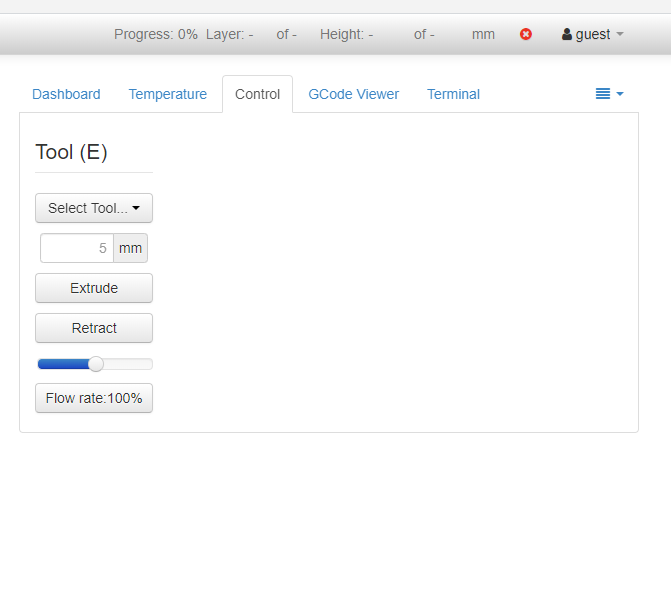
I notice when I remove the 'control' permission, control is removed for everything but the extruder.
I have access control on and you have to login to see anything. I removed control from the users group. Created a printer user group with printer control permissions.
 dragonflybog
on 10 Dec 2019
dragonflybog
on 10 Dec 2019
Been using rc2 as much as I can and have no complaints! Haven't subjected it to exhaustive testing but not seeing anything breaking in normal use.
ChrisHeerschap
on 10 Dec 2019
@dragonflybog I've turned your comment into issue #3388 and fixed it.
@ChrisHeerschap :)
foosel
on 11 Dec 2019
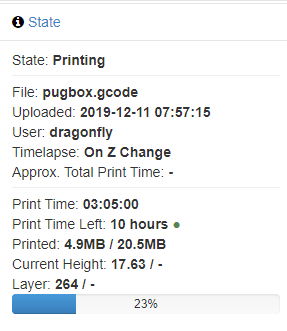
I'm not sure if this is an issue or a problem with my setup. I just noticed it. My total layers and height are not displaying.
dragonflybog
on 11 Dec 2019
Can you open a ticket and make sure to share everything asked for in the template and a GCODE file with which to reproduce?
foosel
on 11 Dec 2019
After my print finishes I will try in safe mode and follow the instructions mentioned above. Should have done that first.
dragonflybog
on 11 Dec 2019
@dragonflybog Just checked with my own DisplayZ plugin and that works just fine, so whatever it is, it's not a general issue with the RC not properly firing of needed events I think and looks rather like an issue of the involved third party plugins.
LayerDisplay doesn't show anything for me which I guess is caused by it still using a long deprecated event payload field that finally was removed in 1.4.0, so that's something the plugin author needs to fix:
2019-12-12 11:49:50,627 - octoprint.plugin - ERROR - Error while calling plugin layerdisplay
Traceback (most recent call last):
  File "C:\Devel\OctoPrint\OctoPrint\src\octoprint\plugin\__init__.py", line 224, in call_plugin
    result = getattr(plugin, method)(*args, **kwargs)
  File "C:\Devel\OctoPrint\devenv\lib\site-packages\layerdisplay\__init__.py", line 21, in on_event
    self.print_job = PrintJob(payload)
  File "C:\Devel\OctoPrint\devenv\lib\site-packages\layerdisplay\PrintJob.py", line 19, in __init__
    self.file_path = file_selected_payload['file']
KeyError: 'file'
DisplayLayerProgress has a similar issue that I reported last week. Tickets for both are here:
foosel
on 12 Dec 2019
1.4.0rc3 is out, new ticket is #3389
foosel
on 12 Dec 2019
Related issues
foosel
·
50Comments
foosel
·
50Comments
 razerraz
·
88Comments
razerraz
·
88Comments
 bbatchelder
·
120Comments
bbatchelder
·
120Comments
 LangBalthazar
·
163Comments
LangBalthazar
·
163Comments