Octoprint: [RC Feedback] Feedback on the 1.3.9rc1 Release Candidate
Please provide general feedback on your experience with the 1.3.9rc1 Release Candidate here. An "All is working fine" is valuable feedback as well, because it tells me that people in fact are testing the RC and just not finding any problems. Thanks :)
If you run into any obvious bugs, please open a new ticket and follow "How to file a bug report".
 foosel
All 58 comments
So far so good for me. Upgrade process went smooth, no issues. Thanks for the new api call...guess I have some work to do to improve my taborder plugin. May actually expand it to be an overall "Order Plugin" to control all elements.
 jneilliii
on 20 Jun 2018
jneilliii
on 20 Jun 2018
Updated successfully.
 b-morgan
on 20 Jun 2018
b-morgan
on 20 Jun 2018
Seems to work fine on Pi3/OctoPi 0.14.0 except for minor problem when connecting to Micro M3D printer with M33 Fio plugin. I had this problem with Octopi 0.15.1 also so I reverted to 0.14.0.
Files attached
octoprint_1.3.9RC1.log
 mod38
on 20 Jun 2018
mod38
on 20 Jun 2018
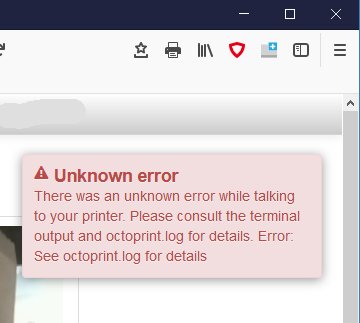
Message on screen after print completed: "Unknown M���code"
Extract from terminal log:
Recv: ok 14780
Changing monitoring state from "Printing" to "Finishing"
Send: N14781 M400*44
Recv: ok Unknown M���code
Changing monitoring state from "Finishing" to "Operational"
Send: N0 M110*35
Send: M114
Send: N1 G4*44
That's coming from your firmware which apparently doesn't understand M400 ("wait until all moves are finished"). That's more of an issue with the firmware than with OctoPrint, there's some common commands that I must be able to send without the other end starting to hiccup :/
foosel
on 20 Jun 2018
I think the Micro M3d printer and M33 Fio are both EOL anyway so it doesn't matter. Thanks for responding.
mod38
on 20 Jun 2018
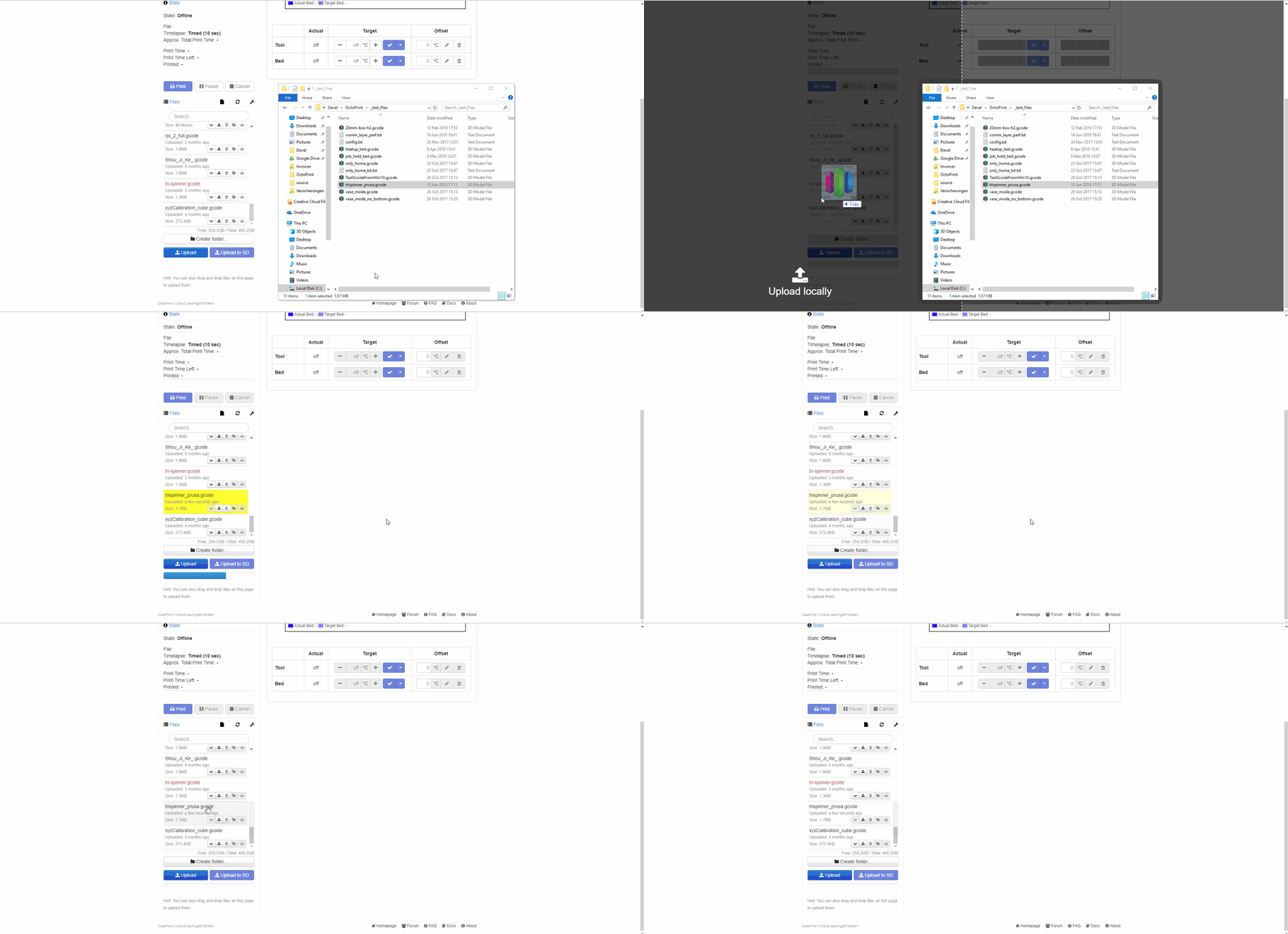
Two things: 1) Windows 10 dragging a gcode file to Octoprint web page doesn't work anymore, 2) heated bed actual temperature graph delays a minute or so at beginning of print. I have saved the log, if you need it.
 jwg3
on 20 Jun 2018
jwg3
on 20 Jun 2018
@jwg3 I always need logs ;) Also I can't reproduce the drag-n-drop issue, any more hints on how to trigger this?
foosel
on 20 Jun 2018
Upgrade process went fine. Nice and smooth.
I have my printer at work and use the local webpage to manage everything.
I got home (with a print running back at the office) and when I logged in remotely everything seemed to crash.
It appears to have started with the TouchUI plugin. Something went haywire.
Now Octo server itself wont respond. I do not have any info on if the print is still going or not. I can have that info tomorrow. Along with a log if needed.
.... just remoted back in and confirming that octoserver is hung/crashed.
 pingywon
on 20 Jun 2018
pingywon
on 20 Jun 2018
Updated successfully. Doing test print now. Verified TouchUI is working fine. Verified drag and drop file local is working fine with Win10. Test print completed successfully
All is fine..
 jjlink
on 21 Jun 2018
jjlink
on 21 Jun 2018
Well, as unluck would have it, Windows forced an update last night, so I’m going to blame the drag&drop on MS.
As for the temperature delay, I need to see it happen again under controlled circumstances. I’ll try to do that later this evening.
Thanks.
On Jun 20, 2018, at 5:11 PM, Gina Häußge notifications@github.com wrote:
@jwg3 https://github.com/jwg3 I always need logs ;) Also I can't reproduce the drag-n-drop issue, any more hints on how to trigger this?
https://user-images.githubusercontent.com/83657/41684913-2f238418-74df-11e8-9405-ee43e9a5c42f.gif
—
You are receiving this because you were mentioned.
Reply to this email directly, view it on GitHub https://github.com/foosel/OctoPrint/issues/2688#issuecomment-398898355, or mute the thread https://github.com/notifications/unsubscribe-auth/AmkTc9ypIYX5CE9GEFVTi6LsxofUYUqUks5t-rqTgaJpZM4UvR1z.
jwg3
on 21 Jun 2018
I have attached my log. Confirming that Octo crashed mid print. I rebooted the raspi, turned off Touch UI and remoted back in with out any issue.
If it is not TouchUI itself it is triggering something else in my set up. Looking forward to more testing. If you would like me to try and recreate a scenario just let me know. thanks!
Also worth noting the crash kept my bed and hot end hot. Glad I did not wait until tomorrow to look into this.
I will turn TouchUI back on and test from my phone some more while in front of the machine.
EDIT: Now that I am back in front of a proper desktop I have edited my octoprint.log and cut out all the files up until the upgrade. Makes it alot easier to read.
octoprint-edited.log
pingywon
on 21 Jun 2018
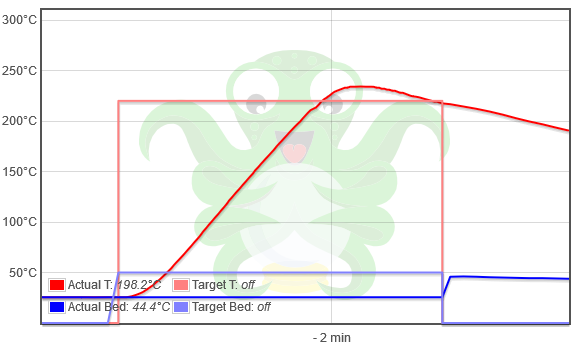
Included is a screen shot of the bed temperature plot and a log of the event. The relevant part of the log starts at time stamp, 2018-06-21 00:01:54,984. Btw, the date/time on the Pi is set incorrectly. I'll have to fix that.
Whereas, the hotend temperature plot is gradual, matching the printer, the heatbed plot is not, even though the printer's LCD is showing a gradual ramp.
Please advise.
 jwg3
on 21 Jun 2018
jwg3
on 21 Jun 2018
I just opened a bug https://github.com/foosel/OctoPrint/issues/2692 regarding the new version. A downgrade to 0a69dbeddb301d5a32827a3f0d561f875df24234 (current master) rendered OP start again (seems to be true even in normal mode with plug-ins enabled). Thus I assume problem in RC.
 christianlupus
on 22 Jun 2018
christianlupus
on 22 Jun 2018
I upgraded to this version and did 2 prints: first print was fine, second print had an issue so I tried cancelling it and it hangs (like before) :(
Attached the log from the point of the upgrade to the hang. Note that I 'fixed' it by resetting the printer to shut down the heaters.
octoprint.cancelling.139rc.log
 Cyberwizzard
on 22 Jun 2018
Cyberwizzard
on 22 Jun 2018
@Cyberwizzard do you also have a serial.log or at least the Terminal output to go with that? Without that it's sadly pretty much impossible to even get an idea of what still be wrong here :/
@christianlupus thanks
@jwg3 Please provide a serial.log
@pingywon when this happened, could you still reach the machine that was running OctoPrint in any way (SSH, ping) or was that impossible too?
foosel
on 22 Jun 2018
@foosel No, I never turned on serial logging :| Next time this happens I'll make sure to copy the serial transcript that led up to this.
Cyberwizzard
on 22 Jun 2018
@foosel - I was remote at the time, so I was able to ssh in and reboot the whole system.
pingywon
on 22 Jun 2018
I am getting lockups of OctoPrint when OctoLapse is enabled. Prusa MK3, Rasberry Pi 3 B+, latest OctoLapse. Printer stops, OctoPrint GUI is unresponsive, however OctoLapse tab is responsive. Seems to occur right after one of the OptoLapse snapshots. Here's the tail end of the octoprint.log:
`2018-06-22 18:40:56,318 - octoprint.util.comm - INFO - Changing monitoring state from "Offline" to "Opening serial port"
2018-06-22 18:40:56,321 - octoprint.util.comm - INFO - Changing monitoring state from "Opening serial port" to "Connecting"
2018-06-22 18:40:56,329 - octoprint.util.comm - INFO - M110 detected, setting current line number to 0
2018-06-22 18:40:57,341 - octoprint.util.comm - INFO - M110 detected, setting current line number to 0
2018-06-22 18:40:58,846 - octoprint.util.comm - INFO - Changing monitoring state from "Connecting" to "Operational"
2018-06-22 18:40:58,853 - octoprint.util.comm - INFO - M110 detected, setting current line number to 0
2018-06-22 18:40:58,880 - octoprint.plugins.firmwareupdater - INFO - Got CONNECTED event
2018-06-22 18:40:58,882 - octoprint.plugins.firmwareupdater - INFO - Run postflash flag is not set
2018-06-22 18:40:58,901 - octoprint.util.comm - INFO - Printer reports firmware name "Prusa-Firmware 3.2.1 based on Marlin"
2018-06-22 18:42:40,158 - octoprint.util.comm - INFO - Changing monitoring state from "Operational" to "Printing"
2018-06-22 18:42:40,272 - octoprint.util.comm - INFO - M110 detected, setting current line number to 0
2018-06-22 18:42:42,453 - octoprint.util.comm - INFO - Printer seems to support the busy protocol, telling it to set the busy interval to our "communicationBusy" timeout - 1s = 2s
2018-06-22 18:49:28,866 - octoprint.server.heartbeat - INFO - Server heartbeat <3`
That last entry in the log is the exact time when it locked up. I can repeat this with any print- at some point the print locks up, even when in OctoLapse "test" mode.
 HFMan
on 22 Jun 2018
HFMan
on 22 Jun 2018
Maybe the above is the issue and it just so happened to happen when I remoted in with TouchUI.
pingywon
on 22 Jun 2018
180622octoprint-a.log
180622serial-a.log
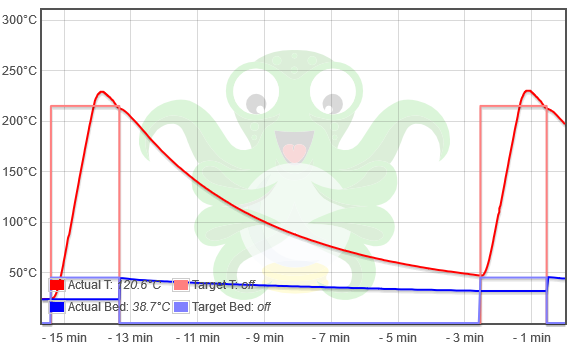
Attached are new files of: screenshot, octoprint.log, and serial.log .
I changed the date/time, so the newer part of the logs have the right time.
From what I can see from the serial.log, Octoprint is behaving as intended, but my printer (Tronxy X5 with Tronxy minimal controller board) is reporting hotend temperatures only. The printer firmware is Marlin 1.1.6 Dev, and unavailable from Tronxy, except as a .hex file (in violation of the Marlin license). I am going to upgrade this printer eventually to a MiniRambo with Marlin 1.1.8.
For now, unless you see something I don’t, I would blame the printer’s firmware for not reporting bed temperature on heat up. Not Octoprint’s fault.
Thanks for your attention and help,
John Gilbert
On Jun 22, 2018, at 4:52 AM, Gina Häußge notifications@github.com wrote:
@Cyberwizzard https://github.com/Cyberwizzard do you also have a serial.log or at least the Terminal output to go with that? Without that it's sadly pretty much impossible to even get an idea of what still be wrong here :/
@christianlupus https://github.com/christianlupus thanks
@jwg3 https://github.com/jwg3 Please provide a serial.log
@pingywon https://github.com/pingywon when this happened, could you still reach the machine that was running OctoPrint in any way (SSH, ping) or was that impossible too?
—
You are receiving this because you were mentioned.
Reply to this email directly, view it on GitHub https://github.com/foosel/OctoPrint/issues/2688#issuecomment-399371466, or mute the thread https://github.com/notifications/unsubscribe-auth/AmkTc_27Z3-ZO_dSleSdx6vet9ZNkKY9ks5t_LBPgaJpZM4UvR1z.
jwg3
on 22 Jun 2018
The upgrade went fine and have done two prints with out issues BUT...
My octolapse plugin doesn't seem to be doing anything.
The tab says its enabled but no snapshots are being taken and no video at the end.
MK3/Raspberry PI 3
Thanks
Tech-Rat
 tech-rat
on 23 Jun 2018
tech-rat
on 23 Jun 2018
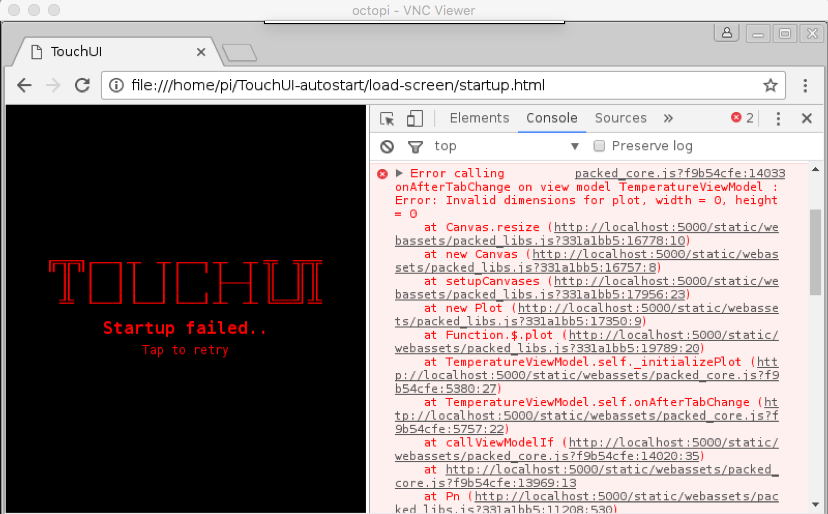
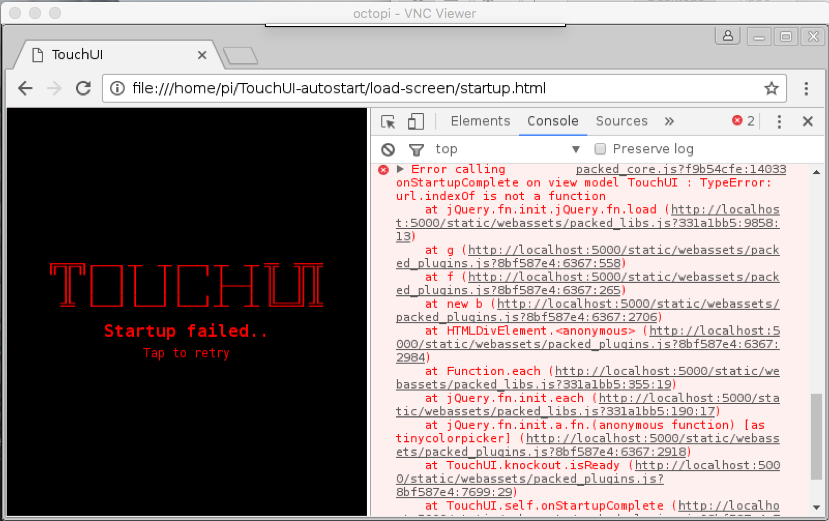
After the upgrade everything seems to work fine except when using TouchUI from the rPI that OctoPrint is running on. I've been chasing my tail for several hours, but it seems to be coming down to some errors in packed_core.js.
I believe this is something with Tornado to be honest as I don't think this is specifically your code. I may have to completely wipe the rPI to go back to the last stable release of OctoPrint, not sure how impactful it will be to not have the touch screen local. I have also ensured that the packages are up to date, so no worries there and this is on a rPI Model 3 b+.
What sucks is that it just stops loading, then dies. I'm attaching a couple screenshots of the errors if anyone wants to confirm that it is Tornado.
 tibmeister
on 23 Jun 2018
tibmeister
on 23 Jun 2018
I have the same problem as @tech-rat with octolapse (but with 1.4.0-dev)
 gege2b
on 23 Jun 2018
gege2b
on 23 Jun 2018
Is there an easy way to downgrade to the last stable release of OctoPrint from the RC or is it a re-install and re-configure?
As far as TouchUI, I opened a issue report there. So the workaround I am using is changing the chrome args from
CHROME_ARGS=" --no-first-run --kiosk $TOUCHUI_ARGS $TOUCHUI_DEBUG --dns-prefetch-disable --disable-sync-preferences --disk-cache-size=1048576 --disable-java --disable-plugins --disable-extensions --disable-infobars --user-agent='TouchUI (X11, Chrome $CHROME_VERSION) (P:$PORT)' --start-maximized --window-position=0,0 $(dirname "$0")/load-screen/startup.html"
to
CHROME_ARGS=" --no-first-run --kiosk #$TOUCHUI_ARGS $TOUCHUI_DEBUG --dns-prefetch-disable --disable-sync-preferences --disk-cache-size=1048576 --disable-java --disable-plugins --disable-extensions --disable-infobars --user-agent='TouchUI (X11, Chrome $CHROME_VERSION) (P:$PORT)' --start-maximized --window-position=0,0 $(dirname "$0")/load-screen/startup.html"
Seems to work for now.
tibmeister
on 24 Jun 2018
@tibmeister just switch back to the stable release channel the same way you switched to the "Maintenance RCs" channel: https://discourse.octoprint.org/t/how-to-use-the-release-channels-to-help-test-release-candidates/402
So the workaround I am using is changing the chrome args from [...] to [...]
Those look identical to me - copy paste error? 🤔 Never mind, just spotted it.
foosel
on 25 Jun 2018
@jwg3 Your attachments didn't make it through. Please post them to the ticket on Github itself, attachments on reply mails don't appear to work.
foosel
on 25 Jun 2018
Done.
On Jun 25, 2018, at 6:57 AM, Gina Häußge notifications@github.com wrote:
@jwg3 https://github.com/jwg3 Your attachments didn't make it through. Please post them to the ticket on Github itself, attachments on reply mails don't appear to work.
—
You are receiving this because you were mentioned.
Reply to this email directly, view it on GitHub https://github.com/foosel/OctoPrint/issues/2688#issuecomment-399912794, or mute the thread https://github.com/notifications/unsubscribe-auth/AmkTc9dXUrFFxUqfwEICRWNUbcuD5gg-ks5uAMIegaJpZM4UvR1z.
jwg3
on 25 Jun 2018
@jwg3 Thanks! After taking a look at your serial.log, I agree with your assessment - this is your firmware only reporting on the hotend temperature during a blocking heatup, hence no new data for the bed until that's finished.
foosel
on 25 Jun 2018
I have issue #1896.
 ClusterM
on 26 Jun 2018
ClusterM
on 26 Jun 2018
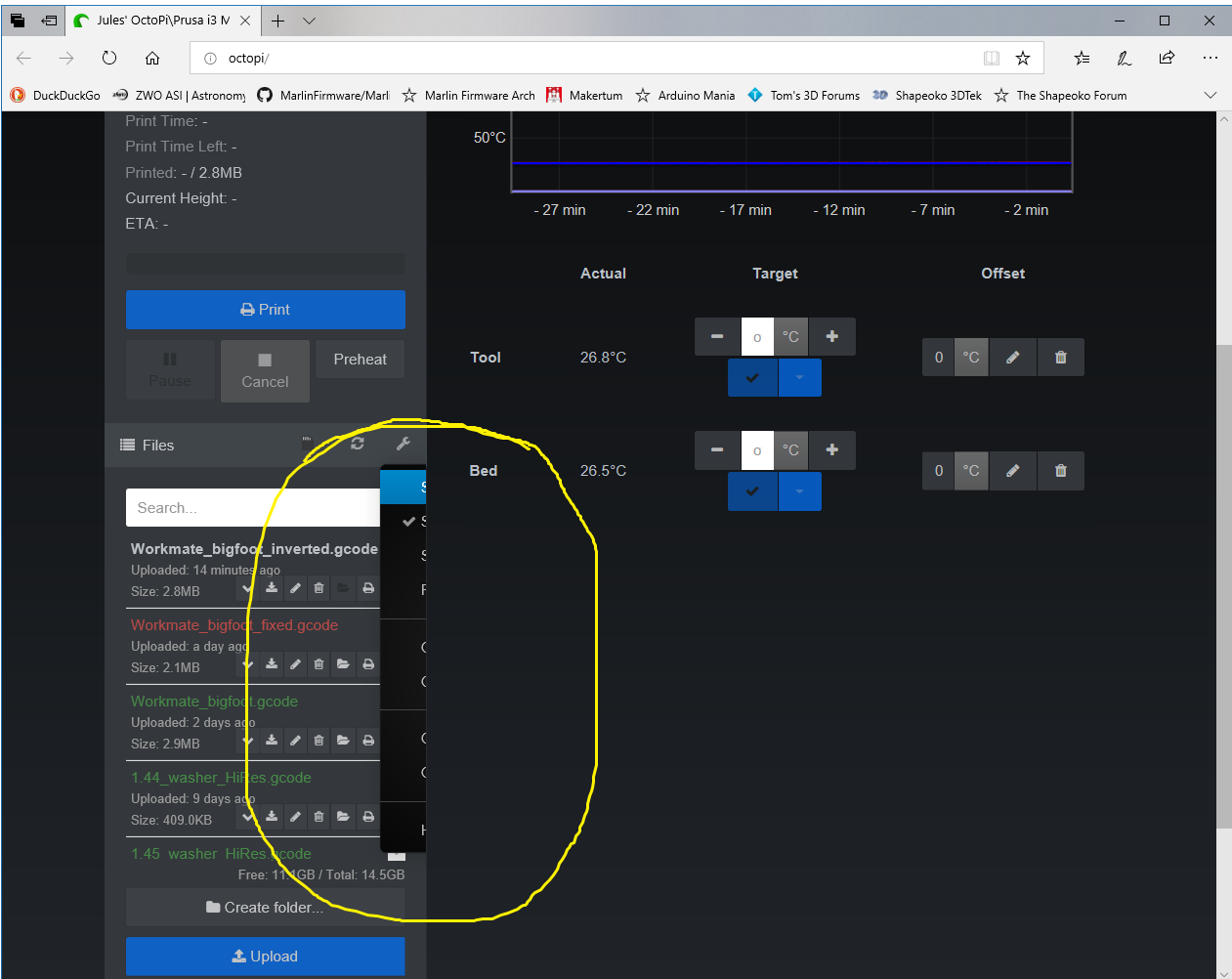
Sorry if this is already known, but when trying to use the file\tools drop menu, most is chopped off by the right hand pane (see image).
I'm using Win10, Microsoft Edge browser connecting to
OctoPrint version : 1.3.9rc1
OctoPi version : 0.14.0
 DrJuJu
on 26 Jun 2018
DrJuJu
on 26 Jun 2018
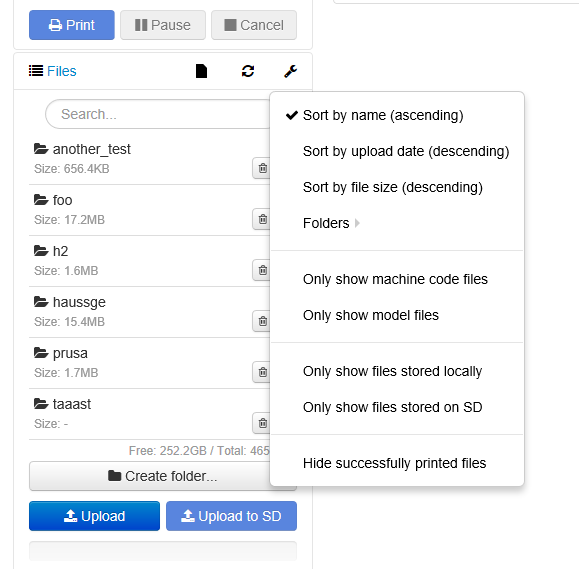
@DrJuJu Can you also reproduce this in safe mode? Because I can't which makes it possible this could be cause by your theme plugin:
foosel
on 26 Jun 2018
Yes Gina,
You were correct in that the Themeify was the culprit i.e.
Themeify (1.2.0)
Beautiful themes for octoprint
Homepage AGPLv3 Birk Johansson
Thanks for all your hard work.
DrJuJu
on 26 Jun 2018
So what about startup time? I described problem here: https://github.com/foosel/OctoPrint/issues/1896#issuecomment-400140438
ClusterM
on 26 Jun 2018
Everything working smoothly for me. Not sure if it is a bug or feature, but with both 1.3.8 and the rc after cancelling an print, it requires a page reload before the file can be started again.
 paukstelis
on 27 Jun 2018
paukstelis
on 27 Jun 2018
@paukstelis that doesn't ring a bell with any of those versions for me. Could you open a full ticket for this please?
@ClusterM there hasn't been any change in the implementation of preemptive caching between 1.3.8 and 1.3.9rc1. This is a feature that has been in there since 1.3.0 or even earlier and is supposed to reduce access times of first access (since the page will then already be cached instead of having to be rendered first, which takes time). If you don't want it (e.g. since you always access OctoPrint via varying IPs instead of a proper hostname), disable it via config.yaml by setting devel.cache.preemptive to false. See also the docs.
foosel
on 27 Jun 2018
Upgrade failed from 1.3.8 to 1.3.9. Logs attached.
updatescreen.txt
plugin_softwareupdate_console.log
octoprint.log
Andddd now after a reboot it's totally dead. lol
 McFly99
on 27 Jun 2018
McFly99
on 27 Jun 2018
I'm so stupid :( Sorry and thank you!
ClusterM
on 27 Jun 2018
I'm actually testing the 1.39rc1 in a not-really-conventional way (instead of a 3D printer, I use a polarbot - a vertical drawing plotter)
For now, except for a previsible mess in the GCode viewer, all seems fine (I'll post something about this setup on the forum later today if anyone is interested)
gege2b
on 28 Jun 2018
@McFly99 This looks like pip fell on its face trying to upgrade psutil, which I don't understand. I've done this very same update (OctoPrint 1.3.8 on OctoPi 0.14) a couple of times before pushing out this RC and didn't run into this particular problem. I'll see if I can reproduce this, but if not I might need more info from your side. It's not totally dead btw, the update just nuked some stuff and didn't get around to reinstalling that. Things should be fairly easy to fix though: SSH into your instance, then run
source ~/oprint/bin/activate
pip install https://get.octoprint.org/latest
sudo service octoprint restart
That will get you back on 1.3.8.
@gege2b I'd certainly be interested in such a post.
foosel
on 28 Jun 2018
@foosel I'll post something this afternoon then :)
Something weird just happened (but it's not really annoying), OP just told me to reload the UI because something has changed, but in fact I didn't do anything (I was "printrawing" something) and was away from my keyboard
gege2b
on 28 Jun 2018
Cannot upgrade from 1.3.8 to 1.3.9rc1 due to the sarge version hickup that results in a TypeError: __init__() got an unexpected keyword argument 'async' error describet here: https://github.com/foosel/OctoPrint/issues/2687
 chrisWhyTea-zz
on 29 Jun 2018
chrisWhyTea-zz
on 29 Jun 2018
@chrisWhyTea 1.3.9rc1 pins the sarge dependency to 0.1.4 specifically to work around this problem (see commit d3871e34873aa55476a8173859239a1a490fa279). So if this is affecting you, something's amiss. Please provide octoprint.log and plugin_softwareupdate_console.log.
foosel
on 29 Jun 2018
The telegram plugin is throwing errors getting the image that it attaches to its messages. I looked in the logs and couldn't see anything obvious, not sure where else to look.
Nevermind ... ;-{
 ctgreybeard
on 30 Jun 2018
ctgreybeard
on 30 Jun 2018
@ctgreybeard hm? Resolved?
foosel
on 2 Jul 2018
@foosel Yes 🤭 something loose between the keyboard and the chair ...
We had had a brief, unnoticed power outage which reset the pi. The webstream wasn't running.
ctgreybeard
on 2 Jul 2018
A week doing prints with with 1.3.9rc1 here, everything fine.
 pscrespo
on 4 Jul 2018
pscrespo
on 4 Jul 2018
So I'm still waiting on more details on this weird reload issue that @paukstelis reported earlier - anyone else seen this? Because I haven't.
I'm also still waiting on logs from @chrisWhyTea regarding the upgrade problem encountered there and a serial.log from @Cyberwizzard regarding the cancelling issue mentioned in this comment - anyone else here run into any kind of issues with stalling while pausing or cancelling?
Also still a bit unsure what to do about those reported crashes - I've gotten a bunch more crash reports for a couple weeks now, usually with either Octolapse or OctoPrint Anywhere installed, and recently another common factor is running stuff on an RPi3+. That leaves me a bit unsure how to proceed.
foosel
on 4 Jul 2018
@foosel, sorry I only recently got around to cancelling some prints and I did not see the behavior again. Whatever it was, it was not specific to the RC because I also saw it in 1.38. Maybe browser related?
All the issues with stalling on pause or cancel seem fixed in the RC.
paukstelis
on 4 Jul 2018
@foosel So far all my prints ran to completion so I did not manage to run into it again...
Cyberwizzard
on 4 Jul 2018
@foosel Oh totally forgot to answer.... after I started the system again I was able to update to 1.3.9rc1 without any problem...
chrisWhyTea-zz
on 5 Jul 2018
@foosel OctoPrint seems to hang when starting a print from the SD card on my Prusa i3 MK3 (firmware 3.3.0) initiated from the LCD control panel. OctoPrint's terminal shows a timeout communicating with the printer and then OctoPrint sort of crashes. Most parts of the web GUI no longer respond, however the webcam keeps refreshing just fine. I can restart OctoPrint from the web GUI.
Here are the relevant entries from the OctoPrint log:
2018-07-05 05:17:16,231 - octoprint.util.comm - INFO - Externally triggered heatup detected
2018-07-05 05:18:34,517 - octoprint.util.comm - INFO - Printer seems to support the busy protocol, telling it to set the busy interval to our "communicationBusy" timeout - 1s = 2s
2018-07-05 05:19:27,589 - octoprint.util.comm - INFO - Timeout while in an active heatup, considering heatup to be over.
2018-07-05 05:19:30,594 - octoprint.util.comm - INFO - Communication timeout while idle, trying to trigger response from printer.
2018-07-05 05:19:32,426 - octoprint.util.comm - INFO - Changing monitoring state from "Operational" to "Printing from SD"
2018-07-05 05:19:32,512 - octoprint.plugins.Octoslack - ERROR - Error processing event: PrintStarted, Error: 'Printer' object has no attribute '_estimator'
Traceback (most recent call last):
  File "/home/pi/oprint/local/lib/python2.7/site-packages/octoprint_Octoslack/__init__.py", line 591, in handle_event
    self.process_slack_event(event, event_settings, channel_override, payload)
  File "/home/pi/oprint/local/lib/python2.7/site-packages/octoprint_Octoslack/__init__.py", line 648, in process_slack_event
    printer_data = self._printer.get_current_data()
  File "/home/pi/oprint/local/lib/python2.7/site-packages/octoprint/server/__init__.py", line 384, in wrapper
    return f(*args, **kwargs)
  File "/home/pi/oprint/local/lib/python2.7/site-packages/octoprint/printer/standard.py", line 565, in get_current_data
    return util.thaw_frozendict(self._stateMonitor.get_current_data())
  File "/home/pi/oprint/local/lib/python2.7/site-packages/octoprint/printer/standard.py", line 1326, in get_current_data
    self._progress = self._get_current_progress()
  File "/home/pi/oprint/local/lib/python2.7/site-packages/octoprint/printer/standard.py", line 1255, in _get_current_progress
    return self._on_get_progress()
  File "/home/pi/oprint/local/lib/python2.7/site-packages/octoprint/printer/standard.py", line 773, in _updateProgressDataCallback
    printTimeLeft, printTimeLeftOrigin = self._estimator.estimate(progress,
AttributeError: 'Printer' object has no attribute '_estimator'
2018-07-05 05:20:41,680 - octoprint.util.comm - INFO - Communication timeout while printing, trying to trigger response from printer.
2018-07-05 05:20:41,718 - octoprint.util.comm - INFO - Changing monitoring state from "Printing from SD" to "Cancelling"
2018-07-05 05:20:41,880 - octoprint.util.comm - INFO - Changing monitoring state from "Cancelling" to "Operational"
2018-07-05 05:21:35,678 - octoprint.server.api.system - INFO - Performing command for core:restart: sudo service octoprint restart
Downgraded to 1.3.8 and the issue does not occur - OctoPrint continues to behave correctly and is able to monitor the SD card print.
2018-07-05 05:24:05,338 - octoprint.util.comm - INFO - Externally triggered heatup detected
2018-07-05 05:25:24,624 - octoprint.util.comm - INFO - Printer seems to support the busy protocol, telling it to set the busy interval to our "communicationBusy" timeout - 1s = 2s
2018-07-05 05:26:17,085 - octoprint.util.comm - INFO - Timeout while in an active heatup, considering heatup to be over.
2018-07-05 05:26:20,090 - octoprint.util.comm - INFO - Communication timeout while idle, trying to trigger response from printer.
2018-07-05 05:26:21,917 - octoprint.util.comm - INFO - Changing monitoring state from "Operational" to "Printing from SD"
I will try to collect more information and submit a bug report tomorrow. Looks like it may be related to the OctoSlack plugin?
 kazibole
on 5 Jul 2018
kazibole
on 5 Jul 2018
@kazibole I agree, looks like something triggered by the OctoSlack plugin. However, it's triggered inside of OctoPrint's Printer class, so there might be something off there caused by introducing the print time estimation hooks. I'll take a look, maybe I can reproduce it somehow even without that plugin (which I don't have access to, no Slack and no strong urge to change that).
foosel
on 5 Jul 2018
@kazibole I opened #2715 for this. That was actually already fixed on maintenance by pure accident. I backported the fix and will push out 1.3.9rc2 tomorrow.
Which means: Everyone, if you are still sitting on any so far unreported bugs, now is the time - I'd rather not push out a new RC tomorrow to get a new bug report right after for an issue I could easily have included a fix for ;)
foosel
on 5 Jul 2018
update failed on my custom frankenstein octopi but not octopi on armbian
https://gist.github.com/ntoff/d2019df161a3a7508a7dcd0916551481
Will maybe create a proper ticket once I figure out whether or not it's my weird install environment to blame
edit: but a reload shows I'm now running 1.3.9rc so... it didn't fail? me so confuse
 ntoff
on 5 Jul 2018
ntoff
on 5 Jul 2018
@ntoff known issue... update succeeds more or less, but pip throws an error. I worked around this in 1.3.7/1.3.8 so that the error is detected and corresponding measures taken by the update process, but you came from 1.3.6 and that doesn't yet have that work around.
The problem was discovered while upgrading the pyserial dependency, see https://github.com/foosel/OctoPrint/issues/2333#issuecomment-364926368 for some details.
I'll have to add an FAQ entry and a disclaimer on top of the release notes for this I guess, but I really should only affect people upgrading from 1.3.6 to future versions... versions before 1.3.6 still use another update procedure that doesn't run into this issue, versions after & including 1.3.7 contain a fix.
foosel
on 5 Jul 2018
ok I see, yeah I hadn't started my actual printer's octoprint server since about the time 1.3.6 came out so it was pretty out of date (while the VM I test stuff in gets updated / changed quite regularly).
ntoff
on 5 Jul 2018
Oops, nearly forgot, 1.3.9rc2 is out, so closing this.
foosel
on 6 Jul 2018
Related issues
gege2b
·
64Comments
 Givemeyourgits
·
76Comments
Givemeyourgits
·
76Comments
 szafran81
·
40Comments
szafran81
·
40Comments
 foulowl
·
58Comments
foulowl
·
58Comments
 lakay
·
44Comments
lakay
·
44Comments
Most helpful comment
I'm actually testing the 1.39rc1 in a not-really-conventional way (instead of a 3D printer, I use a polarbot - a vertical drawing plotter)
For now, except for a previsible mess in the GCode viewer, all seems fine (I'll post something about this setup on the forum later today if anyone is interested)