Notepad3: Should Notepad3 remember last used folder or not?
5.20.915.1
Win 7.
Put Notepad3.exe in D:\Program Files\Notepad3;
Run it;
Ctrl+S;
Browse to E:\!!!777 and save the file;
Exit;
Run again;
Ctrl+S;
The folder opened is NOT E:\!!!777, but D:\Program Files\Notepad3.
Now, put Notepad3.exe anywhere other than in D:\Program Files\Notepad3 (e.g. just in D:\Program Files\Notepad3_ , or in C:\Program Files\Notepad3 , ...);
(or just rename Notepad3.exe instead;)
Run it;
Ctrl+S;
Browse to E:\!!!777 and save the file;
Exit;
Run again;
Ctrl+S;
The folder opened is E:\!!!777.
(And as far as I know, this path is saved in HKEY_CURRENT_USER\Software\Microsoft\Windows\CurrentVersion\Explorer\ComDlg32\LastVisitedPidlMRU.)
So, which behavior is as expected?
(Notepad2 does NOT have the difference and remembers the path.)
 GH01
GH01
All 7 comments
I am able to reproduce this behavior.
Notepad3 does not manipulate any Registry-Settings directly (maybe subsequent system dialogs will do: open/save file, font picker, message box?).
These Registry-Keys belong to systems File Explorer, current user behavior:
HKEY_CURRENT_USER \ Software \ Microsoft \ Windows \ CurrentVersion \ Explorer \ ComDlg32 \ LastVisitedPidlMRU
HKEY_CURRENT_USER \ Software \ Microsoft \ Windows \ CurrentVersion \ Explorer \ ComDlg32 \ OpenSavePidlMRU
Notepad3 calls the Open/Save File dialog and sets the "Initial Directory" using following strategy:
- If in
Save Copy...case, the path of lastSave Copy...(session related) is set asInitial Save Dirfor Open/Save File Dialog. - Else if a current file is loaded, this path is used as
Initial Save Dirfor Open/Save File Dialog. - Else if
Settings2.DefaultDirectoryis defined, this directory is used asInitial Save Dirfor Open/Save File Dialog
(this case is currently broken and will not work) - Else (no current file, and no
Copy Save...) the user's Working-Directory (from where Notepad3 has been started) is used.
File Explorer Open/Save Dialog now has the possibility to override this Initial Save Dir:
(See https://docs.microsoft.com/en-us/windows/win32/api/commdlg/ns-commdlg-openfilenamew ):
lpstrInitialDir
Type: LPCTSTR
The initial directory. The algorithm for selecting the initial directory varies on different platforms.
Windows 7:
If lpstrInitialDir has the same value as was passed the first time the application used an Open or Save As dialog box, the path most recently selected by the user is used as the initial directory.
Otherwise, if lpstrFile contains a path, that path is the initial directory.
Otherwise, if lpstrInitialDir is not NULL, it specifies the initial directory.
If lpstrInitialDir is NULL and the current directory contains any files of the specified filter types, the initial directory is the current directory.
Otherwise, the initial directory is the personal files directory of the current user.
Otherwise, the initial directory is the Desktop folder.
In you case, no current file path is defined, always the working-dir is provided, which, if called the 2nd time (and subsequent calls), the File Explorer's MRU directory is used as Initial Save Dir (overridden working-dir by File Dialog itself).
This is the behavior, you will see if using the portable installation or a self copy-deployed Notepad3.exe.
The question now is, why does a Installler-Based setup of Notepad3 breaks this behavior ?
This needs further analysis ... 🤔
 RaiKoHoff
on 2 Oct 2020
RaiKoHoff
on 2 Oct 2020
Thank you very much for the detailed reply.
The fact is I only use portable (or manually-deployed) way.
My D:\Program Files\Notepad3 folder was created manually, not by the installer.
And I've searched in the registry. There's no registered path for Notepad3.
The issue (that Notepad3 does not use LastVisitedPidlMRU initially on next new empty session) only happens in D:\Program Files\Notepad3. Not in C:\ (system drive), or E:\, but in D:\.
How to understand why D:\Program Files\Notepad3 is so special (since it's not the installed path)?
GH01
on 2 Oct 2020
The fact is I only use portable (or manually-deployed) way.
Hello @GH01 ,
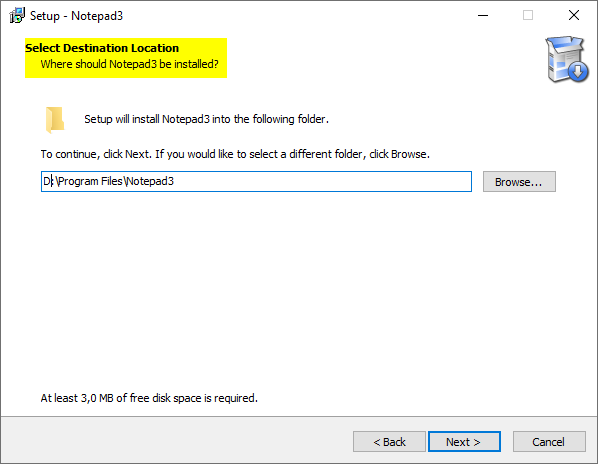
For Your Information: the installer version Notepad3_5.20.915.1_Setup.exe allows you to install Notepad3 correctly everywhere you want: e.g.: (C:\Program Files\Notepad3 (default) ; D:\Program Files\Notepad3 ; d:\Tools ; E:\temp ; etc...)
And all your "*.ini" files (Notepad3.ini ; Minipath.ini and grepWinNP3.ini), your "Favorites" folder and "themes" folder are correctly installed in your "Local User Data" folder": %APPDATA%\Rizonesoft\Notepad3
 hpwamr
on 3 Oct 2020
hpwamr
on 3 Oct 2020
Hello @GH01 ,
Feel free to test the "BETA/RC" version "Notepad3Portable_5.20.1004.1_beta.paf" or higher, see below or issue #1129.
"Notepad3Portable BETA/RC paf" version can be used with or without ".7z" extension.
To update "Notepad3 Setup" version with the latest features/fixes from the "BETA/RC" version, see issue #1105.
hpwamr
on 4 Oct 2020
I'm using 5.20.1004.1 now.
The issue is fixed. (Only tested in D:\Program Files\Notepad3, deployed manually.)
Thank you all.
GH01
on 5 Oct 2020
Hello @GH01 ,
As far as I'm concerned, I think you (requester) can close this issue...
hpwamr
on 5 Oct 2020
"can be closed" is a considerate label.
@RaiKoHoff ,
Since you added other labels on it, please close it if you think it should.
Thanks again.
GH01
on 6 Oct 2020
Related issues
 craigo-
·
4Comments
craigo-
·
4Comments
 RaffaeleBianc0
·
3Comments
RaffaeleBianc0
·
3Comments
 bravo-hero
·
3Comments
bravo-hero
·
3Comments
 blackcrack
·
3Comments
blackcrack
·
3Comments
 zb-z
·
3Comments
zb-z
·
3Comments
Most helpful comment
I'm using 5.20.1004.1 now.
The issue is fixed. (Only tested in
D:\Program Files\Notepad3, deployed manually.)Thank you all.