Notepad3: About the Theme/Skin after DarkMode update on Win 7
This new feature make to notepad look so ugly on win 7 =/
Now:
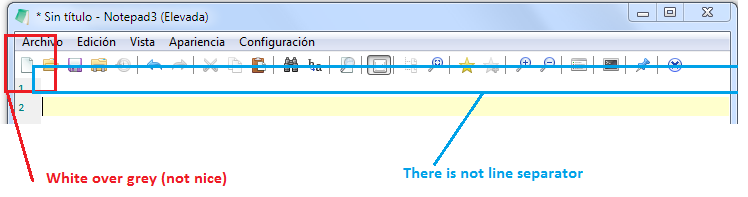
Before:

_So, my question:_
This skin/theme/colors (white toolbar) will keep on next releases of notepad, running on win 7 ?
Regards
Edit:
Look how disappear "Help" on the Menu . I can not repeat that issue (i do not know how happened) [Notepad3 (x86) v5.20.917.1 beta]
 Mitezuss
All 4 comments
Hello @Mitezuss ,
Feel free to test the "BETA/RC" version "Notepad3Portable_5.20.917.3_beta.paf" or higher, see below or issue #1129.
"Notepad3Portable BETA/RC paf" version can be used with or without ".7z" extension.
To update "Notepad3 Setup" version with the latest features/fixes from the "BETA/RC" version, see issue #1105.
Comments and suggestions are welcome... 😃
 hpwamr
on 17 Sep 2020
hpwamr
on 17 Sep 2020
Nice, the toolbar is fixed :d
But is all grey:
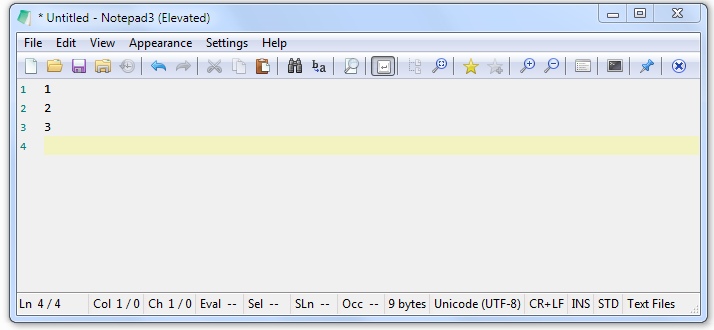
_Notepad3 (x86) v5.20.917.3 beta_
Mitezuss
on 17 Sep 2020
upps 😁
 RaiKoHoff
on 17 Sep 2020
RaiKoHoff
on 17 Sep 2020
@hpwamr : After PR #2844, you can try to remove the compile pre-processing define "D_NP3_WIN10_DARK_MODE" from Notepad3 Project:
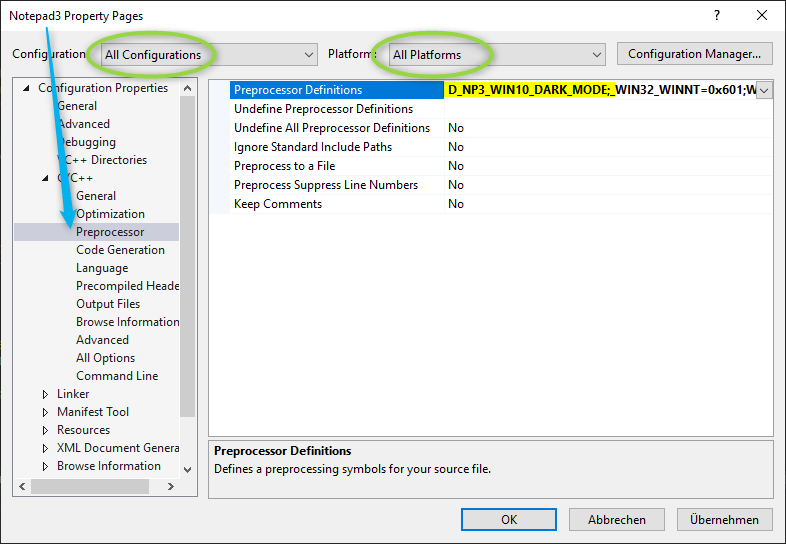
After removing, a fresh clean rebuild creates a version without the changes needed for Win10 DarkMode support.
You can try this version for Win7 - maybe we can come closer to the Win7 crash issue ... 🤔
RaiKoHoff
on 17 Sep 2020
Related issues
 omega32
·
3Comments
omega32
·
3Comments
 valhristov
·
3Comments
valhristov
·
3Comments
 vvyoko
·
3Comments
hpwamr
·
4Comments
hpwamr
·
3Comments
vvyoko
·
3Comments
hpwamr
·
4Comments
hpwamr
·
3Comments