At the moment I suggest the following changes (First line: default, Second line: My improve suggest):
Archivo > Establecer contraseña de encriptación
Archivo > Establecer contraseña de cifrado
Archivo > Camino al portapapeles
Archivo > Ruta al portapapeles
Archivo > Crear enlace en el escritorio
Archivo > Crear acceso directo en el escritorio
Edición > Copiar Añadir
Edición > Copiar añadiendo
Edición > Palabras > Palabra completa
Edición > Palabras > Completar palabra
Edición > Palabras > Eliminar la palabra a la izquierda
Edición > Palabras > Eliminar la palabra de la izquierda
Edición > Palabras > Eliminar la palabra a la derecha
Edición > Palabras > Eliminar la palabra de la derecha
Edición > Selección > Incluir selección
Edición > Selección > Envolver selección
Edición > Selección > Bloc con blancos
Edición > Selección > Completar columna con espacios
Edición > Selección > Eliminar los blancos al final de línea
Edición > Selección > Eliminar espacios al final de la línea
Edición > Selección > Comprimir blancos
Edición > Selección > Eliminar espacios innecesarios
Edición > Selección > Modificar líneas > Prefijo texto a
Edición > Selección > Modificar líneas > Prefijo de línea
Edición > Selección > Modificar líneas > Añadir texto a
Edición > Selección > Modificar líneas > Sufijo de línea
Edición > Selección > Modificar líneas > Documento número de línea
Edición > Selección > Modificar líneas > Número de línea del documento
Edición > Selección > Modificar líneas > Números contínuos
Edición > Selección > Modificar líneas > Números consecutivos (base 1)
Edición > Selección > Modificar líneas > Números contínuos (base 0)
Edición > Selección > Modificar líneas > Números consecutivos (base 0)
Edición > Selección > Ordenar líneas > Mezclar líneas
Edición > Selección > Ordenar líneas > Desordenar líneas
to be continue ...
 EdePC
EdePC
All 6 comments
Hello @EdePC ,
Many thanks for your es-ES suggestions.
I will add them "asap". 👍
 hpwamr
on 27 May 2020
hpwamr
on 27 May 2020
Hello @EdePC
Your update is merged. 👍
May I suggest you for the next series of modifications, to enter them in a .txt file, to compress it in .zip format and to attach it to this issue. 🤔
Feel free to test the BETA version "Notepad3Portable_5.20.528.1_BETA.paf.exe.7z" or higher.
See "Notepad3 BETA-channel access #1129" or here Notepad3Portable_5.20.528.1_BETA.paf.exe.7z_-s_
_Note1:_ "Notepad3Portable PAF" can be used in "2 flavors", see with or without extension ".7z".
_Note2:_ If you follow the instructions #1105, you can also update your "Notepad3 Installer version" with the latest BETA version (see #1129).
Your comments and suggestions are welcome... 😃
hpwamr
on 28 May 2020
to be continue ...
Hello @EdePC ,
Soon the RC2 version will be ended, no more improvements, before we release the Final version ?
Feel free to test the "Portable BETA/RC paf" version "Notepad3Portable_5.20.716.1_RC2.paf" or higher.
See the issue "Notepad3 BETA/RC-channel access #1129" or hereunder:
_Note1:_ The "Notepad3Portable_paf" version can be used in "2 flavors", see with or without extension ".7z".
_Note2:_ If you follow the instructions of #1105 , you can update your "Notepad3 Setup" version with the latest features/fixes of the "Portable BETA/RC paf" version (see #1129).
Also, feel free to test the "Setup BETA/RC" version "Notepad3_5.20.710.1_Setup_RC2" or higher.
See the issue "Notepad3 BETA/RC-channel access #1129" or hereunder:
Your comments and suggestions are welcome... 😃
hpwamr
on 19 Jul 2020
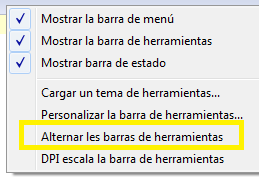
Alternar los estilos de la barra de herramientas
ó
Alternar las barras de herramientas
 Mitezuss
on 11 Aug 2020
Mitezuss
on 11 Aug 2020
Alternar las barras de herramientas
Done.
Thanks.
hpwamr
on 11 Aug 2020
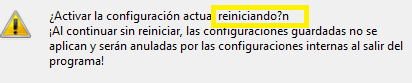
@hpwamr
Hi, look this: (se escapó un n =p)
Mitezuss
on 21 Aug 2020
Related issues
 blackcrack
·
3Comments
blackcrack
·
3Comments
 craigo-
·
4Comments
craigo-
·
4Comments
 dlong500
·
3Comments
dlong500
·
3Comments
 bravo-hero
·
3Comments
hpwamr
·
3Comments
bravo-hero
·
3Comments
hpwamr
·
3Comments