Notepad3: Updating installed version to 5.20.312.1 results in errors reading settings
Notepad3 (64-bit) v5.20.312.1 RC3:
Updating the installed version as per the instructions results in Notepad3 presenting the following error dialogue six times when launched (NB: the last instance does not have the OK button):
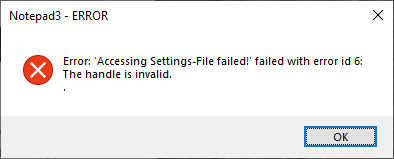
Notepad3 finally opens in a pretty unconfigured state. It looks like the application has failed to load a settings file.
It also presents the same dialogue when closing the application.
This does not happen if you run Notepad3 from its portable location.
Notepad3 (64-bit) v5.20.311.4 RC3 and earlier do not have this issue.
 craigo-
All 5 comments
I confirm: exactly same issue with: Notepad3 (64-bit) v5.20.312.5 RC3 (dkt1-amr) 😬
 hpwamr
on 13 Mar 2020
hpwamr
on 13 Mar 2020
Thank you for reporting.
Feel free to test the RC version "Notepad3Portable_5.20.313.1_RC3.paf.exe.7z" or higher.
See "Notepad3 BETA-channel access #1129" or here Notepad3Portable_5.20.313.1_RC3.paf.exe.7z.7z
Note: "Notepad3Portable RC" can be used in "2 flavors", see with or without extension ".7z".
Your comments and suggestions are welcome... 😃
 RaiKoHoff
on 13 Mar 2020
RaiKoHoff
on 13 Mar 2020
Small ini-file writing bug in above version, so:
Feel free to test the RC version "Notepad3Portable_5.20.313.2_RC3.paf.exe.7z" or higher.
See "Notepad3 BETA-channel access #1129" or here Notepad3Portable_5.20.313.2_RC3.paf.exe.7z.7z
Note: "Notepad3Portable RC" can be used in "2 flavors", see with or without extension ".7z".
Your comments and suggestions are welcome... 😃
RaiKoHoff
on 13 Mar 2020
Hello @RaiKoHoff ,
Updating the installed version with Notepad3 (64-bit) v5.20.313.2 RC3 (nebukadn) is OK. 👍 😃
hpwamr
on 13 Mar 2020
Yep, confirmed fixed in the mentioned version. Thanks.
craigo-
on 13 Mar 2020
Related issues
 ggordon-vispero
·
3Comments
ggordon-vispero
·
3Comments
 blackcrack
·
3Comments
blackcrack
·
3Comments
 wmsrww
·
3Comments
blackcrack
·
3Comments
wmsrww
·
3Comments
blackcrack
·
3Comments
 bravo-hero
·
3Comments
bravo-hero
·
3Comments
Most helpful comment
Small ini-file writing bug in above version, so:
Feel free to test the RC version "Notepad3Portable_5.20.313.2_RC3.paf.exe.7z" or higher.
See "Notepad3 BETA-channel access #1129" or here Notepad3Portable_5.20.313.2_RC3.paf.exe.7z.7z
Note: "Notepad3Portable RC" can be used in "2 flavors", see with or without extension ".7z".
Your comments and suggestions are welcome... 😃