Notepad3: "Open with notepad3" right-click menu
Could notepad3 support option that adds "Open with notepad3" to right-click menu?
This feature can be very helpful in Windows system.
 tianfudhe
All 5 comments
Add Open with Notepad3 Context Menu gives you the option of opening any file type with Notepad3 from the Context Menu by right-clicking on any file and then clicking on Open with Notepad3.
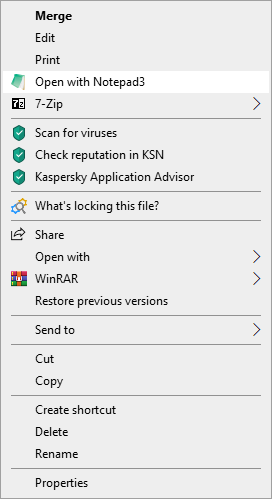
Anyone who has used Notepad3 is familiar with the minor frustration of needing to select All Files to open any file that isn't a text file in Notepad3.
This simple Registry hack allows you to open any file type in Notepad3 by simply right-clicking on it.
Download: Open_with_Notepad3_Context_Menu.zip
Five files are included:
- Open with Notepad3 Context Menu.png
Enable Open with Notepad3.reg
Remove Open with Notepad3.reg
- Replace with Notepad3.reg (see note hereunder)
Restore MS Notepad.reg
How to enable or remove the tool:
- Double-click on Enable or Remove reg file, click Yes on the UAC prompt, and click Yes one more time.
_Note:_
- This registry hack works with "Notepad3 Install" and when the replacement of "MS Notepad" has been accepted (if not, see the note for "Notepad3 Portable").
- For "Notepad3 Portable", it is necessary to merge "Replace with Notepad3.reg" after modifying the path of the "@=" key and the "Debugger" key to point to the path of your version of Notepad3 Portable version.
But if you want to maintain the functionality of "MS Notepad", then you have to modify the path of the "Icon" key and the "@=" key of the "Enable Open with Notepad3.reg" file to point to the "Notepad3.exe "of your "Notepad3 Portable" version.
e.g.: --> @="D:\Notepad3Portable\App\Notepad3\x64\notepad3.exe %1"
 hpwamr
on 19 Dec 2019
hpwamr
on 19 Dec 2019
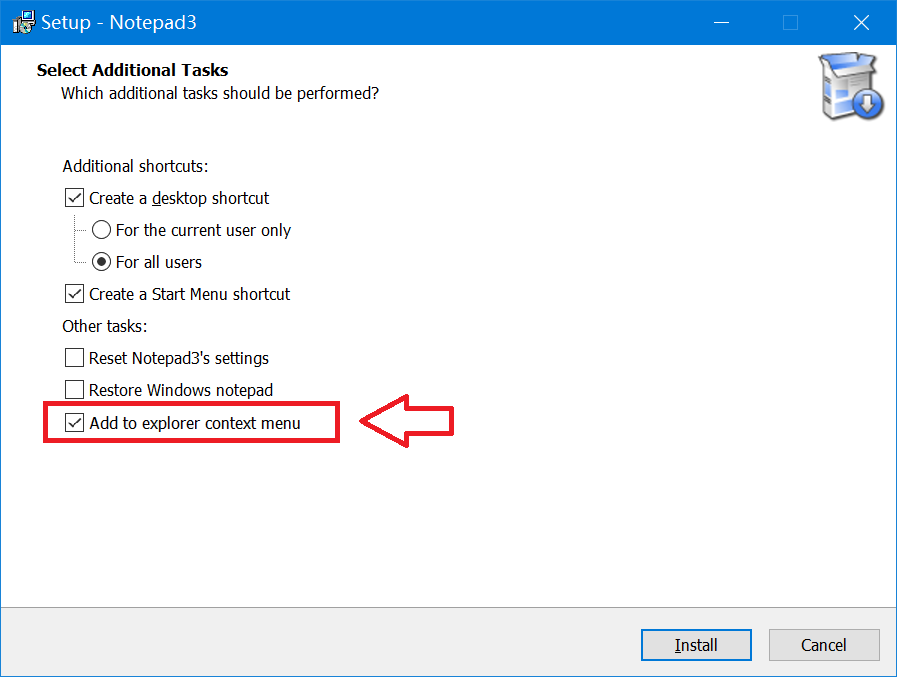
Could it be integrated into installation? 🤔
For example:
 fz0000
on 21 Dec 2019
fz0000
on 21 Dec 2019
Hello @rizonesoft ,
I tested this suggestion and I support it. It works very well. 👍
It seems to me that it would be easy to make this change in the "Installer" version ! 😉
hpwamr
on 21 Dec 2019
Hello @tianfudhe ,
Your suggestion will be implemented on the "Installer" version: Notepad3 Installer version
Feel free to test the RC3 version "Notepad3Portable_5.20.306.1_RC3.paf.exe.7z" or higher.
See "Notepad3 BETA-channel access #1129" or here Notepad3Portable_5.20.306.1_RC3.paf.exe.7z
Note: "Notepad3Portable RC3" can be used in "2 flavors", see with or without extension ".7z".
Your comments and suggestions are welcome... 😃
hpwamr
on 6 Mar 2020
Hello @tianfudhe , @fz0000 ,
Feel free to test the "Portable BETA paf" version "Notepad3Portable_5.20.607.1_BETA.paf" or higher.
See the issue "Notepad3 BETA-channel access #1129" or hereunder:
_Note1:_ The "Notepad3Portable_paf" version can be used in "2 flavors", see with or without extension ".7z".
_Note2:_ If you follow the instructions in issue #1105 , you can update your "Notepad3 Setup" version with the latest features/fixes of the "Portable BETA paf" version (see issue #1129).
Also, feel free to test the "Setup BETA" version "Notepad3_5.20.605.2_Setup_BETA" or higher.
See the issue "Notepad3 BETA-channel access #1129" or hereunder:
Your comments and suggestions are welcome... 😃
hpwamr
on 2 Jun 2020
Related issues
 blackcrack
·
3Comments
blackcrack
·
3Comments
 tzleon
·
3Comments
tzleon
·
3Comments
 valhristov
·
3Comments
valhristov
·
3Comments
 zb-z
·
3Comments
zb-z
·
3Comments
 omega32
·
3Comments
omega32
·
3Comments
Most helpful comment
Add Open with Notepad3 Context Menu gives you the option of opening any file type with Notepad3 from the Context Menu by right-clicking on any file and then clicking on Open with Notepad3.
Anyone who has used Notepad3 is familiar with the minor frustration of needing to select All Files to open any file that isn't a text file in Notepad3.
This simple Registry hack allows you to open any file type in Notepad3 by simply right-clicking on it.
Download: Open_with_Notepad3_Context_Menu.zip
Five files are included:
Enable Open with Notepad3.reg
Remove Open with Notepad3.reg
Restore MS Notepad.reg
How to enable or remove the tool:
_Note:_
But if you want to maintain the functionality of "MS Notepad", then you have to modify the path of the "Icon" key and the "@=" key of the "Enable Open with Notepad3.reg" file to point to the "Notepad3.exe "of your "Notepad3 Portable" version.
e.g.: --> @="D:\Notepad3Portable\App\Notepad3\x64\notepad3.exe %1"