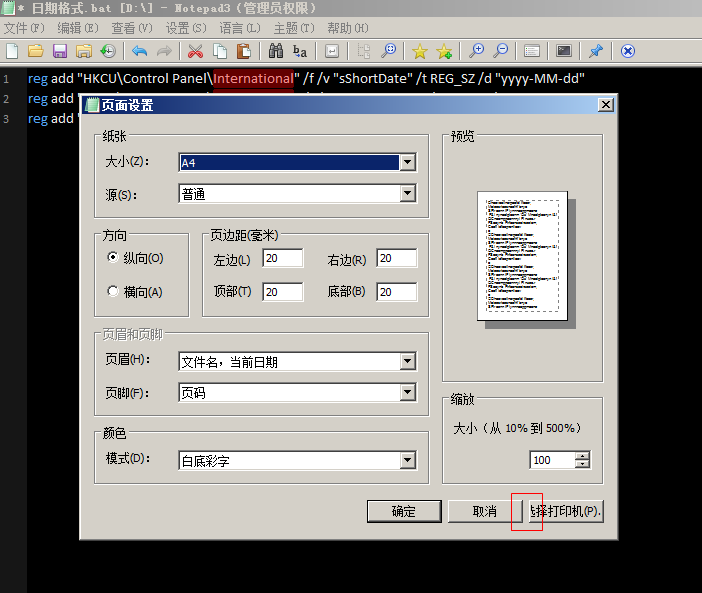
Notepad3: Part of the button text description part shows incomplete
Part of the button text description part shows incomplete

 freesoft0000
All 15 comments
Notepad3 5.19.528.2228 RC Released
freesoft0000
on 29 May 2019
Notepad3 GUI (all languages) is not checked against "Windows Classic" desktop theme.
(Some text-fields and buttons need some enlargement).
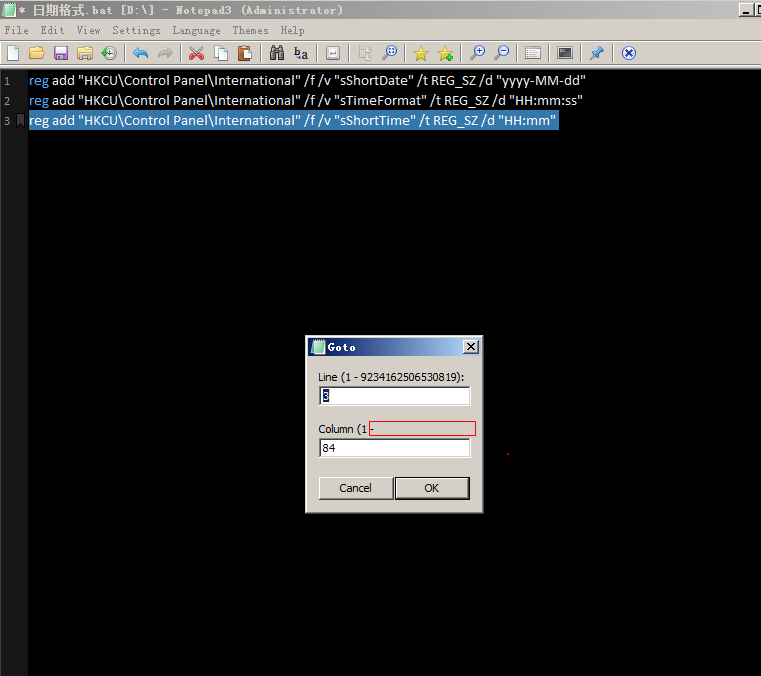
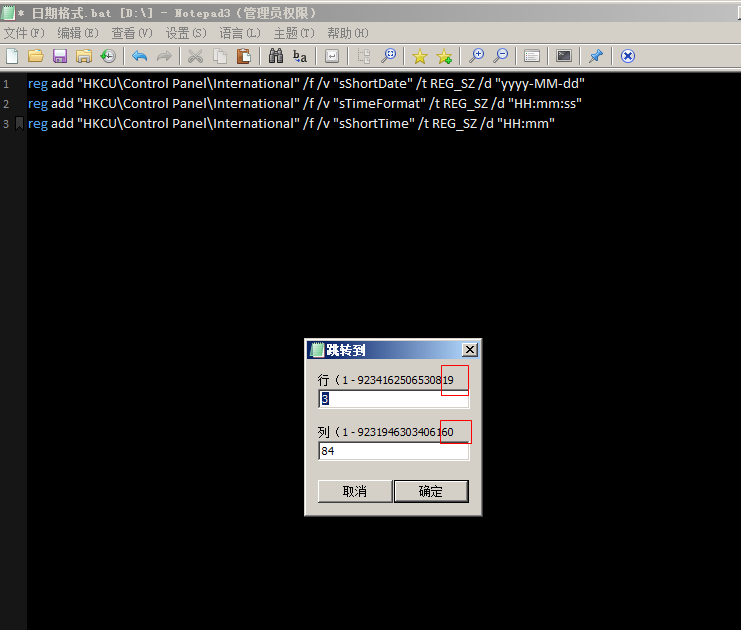
Bug in Goto-Dialog (maybe more dialogs?) in 32-bit (x86) version : Number format.
 RaiKoHoff
on 29 May 2019
RaiKoHoff
on 29 May 2019
@hpwamr : You and @rizonesoft have to decide to support "Windows Classic" mode or not.
If answer is "Yes", some dialogs (string widths and button widths) need to be adapted :thinking:
RaiKoHoff
on 29 May 2019
If there is a real demand for the "Windows Classic theme", I can put it on my medium-term task list. 😃
Let's wait for @rizonesoft's answer... 🤔
 hpwamr
on 29 May 2019
hpwamr
on 29 May 2019
The wrong number format for Win32-bit (x86) of the Goto-Dialog should be fine with beta RC2 version _5.19.529.2231_RC2 (see #1129 for beta channel access).
RaiKoHoff
on 29 May 2019
Tested: Notepad3 v5.19.529.2231 RC2 (x86)
The Goto-Dialog issue is solved. 👍
hpwamr
on 29 May 2019
@RaiKoHoff @hpwamr I do not think it will be a good idea to try and support classic themes. We should try to keep development focused on new and updated technologies.
 rizonesoft
on 30 May 2019
rizonesoft
on 30 May 2019
As far as I am concerned, this issue may be closed.... 😉
hpwamr
on 30 May 2019
@rizonesoft @hpwamr : Okay, I agree. It should be mentioned on the front pages (Rizonesoft and GitHub), that there will be no GUI fixes for "Windows Classic Theme".
RaiKoHoff
on 30 May 2019
Classic themes are used by many users
freesoft0000
on 30 May 2019
Classic themes are used by many users
Hello @freesoft0000
Could you explain a little more why you use "Windows Classic Theme" 🤔
- Which version of Windows do you use ( 7, 8, 8.1, 10 (32bit / 64bit) ) ?
- Do you use an "add-on" theme ? If yes, witch one ?
- Classic themes are used by many users ? Could you explain why ?
- Other reason... ?
Edit:
The opinions of other "Notepad3 users" are also welcome. 😃
hpwamr
on 30 May 2019
It's the windows7 system.
For example, the computer hardware is older, in order to be faster, will use the classic theme Or some of the classic themes that are used under Windows PE
freesoft0000
on 30 May 2019
There are some users Windows systems that are not registered and can only use classic themes, such as my
freesoft0000
on 30 May 2019
Hello @freesoft0000 ,
We support Windows 7 and now I understand why some Notepad3 users are using Classic Themes.
Your arguments have changed my opinion, so I put your request in my short-term to-do-list. 😉
hpwamr
on 31 May 2019
Hello @freesoft0000 ,
We checked the Notepad3 GUI against the "Windows XP Classic desktop theme" for all languages and all dialog boxes.
Conclusion: the changes needed to satisfy this old "Windows XP Classic desktop theme" will have a very negative impact on the overall appearance of Notepad3 GUI under the original desktop theme of "Windows 7, 8, 8.1 to Windows 10". 🤔
In these conditions, we have decided not to support the "Windows XP Classic desktop theme" at all !
As far as I am concerned, this issue may be closed....
hpwamr
on 27 Jun 2019
Related issues
 omega32
·
3Comments
omega32
·
3Comments
 tzleon
·
3Comments
tzleon
·
3Comments
 bravo-hero
·
3Comments
bravo-hero
·
3Comments
bravo-hero
·
3Comments
bravo-hero
·
3Comments
 wmsrww
·
3Comments
wmsrww
·
3Comments