Notepad3 (64-bit) RC v5.18.1003.1309 not open Hyperlink
when Ctrl+ Mouse Click not open hyperlink anymore
Right contextmenu - Open Hyperlink is not working too
 phonphen
All 8 comments
Good finding, please test development beta version _RC_5.18.1015.1315
 RaiKoHoff
on 15 Oct 2018
RaiKoHoff
on 15 Oct 2018
Hello @phonphen,
The latest RC (beta) can be found here: Notepad3 RC Development
 hpwamr
on 15 Oct 2018
hpwamr
on 15 Oct 2018
Hello @RaiKoHoff ,
Tested: Notepad3 (64-bit) RC v5.18.1015.1315
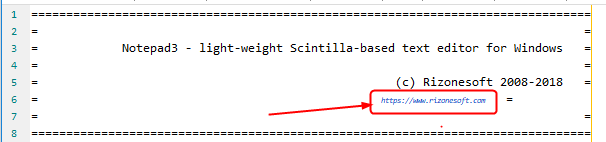
On After changing the Global Default Font... from 11p to 10p, the Hyperlink font is incorrect. 🤔
When reverting to 11p, it doesn't restore the correct font (seems to be "-1" more that the displaying font ?) .
hpwamr
on 15 Oct 2018
RC_5.18.1015.1315 fixed Open Hyperlink problem, thanks
phonphen
on 15 Oct 2018
@hpwamr :
I can not reproduce the smaller "HyperLink" font size with the default settings - How did you create this ?
RaiKoHoff
on 15 Oct 2018
HI @RaiKoHoff ,
Very simply, test with Notepad3 (64-bit) RC v5.18.1015.1316 Out-of-the-Box - Default Font 11pt.
Open the TXT_Readme_01.txt file, the Hyperlink is OK.
Menu
View=> SelectGlobal Default Font...

Change font from 11 to 10 , then hit OK
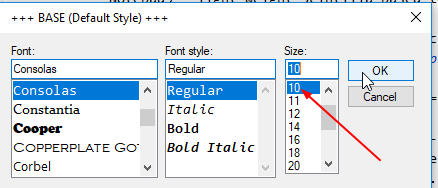
The text is change to Font 10 an the Hyperlink is font 8?
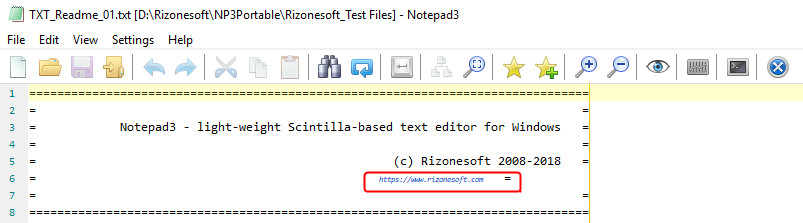
A copy of the changes in Notepad3.ini

PS: This issue is started after this version: Notepad3 (64-bit) TinyExpr v4.18.1004.1126
PS: This issue appeared for the fist time with: Notepad3 (64-bit) RC v5.18.1009.1310 🤔
hpwamr
on 15 Oct 2018
@hpwamr : please test development beta version _RC_5.18.1015.1317
RaiKoHoff
on 16 Oct 2018
Hello @RaiKoHoff , tested: Notepad3 (64-bit) RC v5.18.1015.1317
The issue "smaller "HyperLink" font size with the default settings" is resolved. 👍
hpwamr
on 16 Oct 2018
Related issues
 rizonesoft
·
4Comments
rizonesoft
·
4Comments
 blackcrack
·
3Comments
blackcrack
·
3Comments
 craigo-
·
3Comments
craigo-
·
3Comments
 omega32
·
3Comments
omega32
·
3Comments
 vvyoko
·
3Comments
vvyoko
·
3Comments