Notepad3: Font scaling on High-DPI displays
Notepad3 (64-bit) TinyExpr v4.18.816.1059
Please refer previous issues: #563 (Toolbar icons and DPI scaling), #451 (Status Bar: overhaul) (particularly comment).
I've finally laid hands on a laptop with a high(ish)-DPI display (1920 x 1080, 14", approximately 157 dpi). The Windows-recommended scaling factor for this display is 150%. When using this display, the text in Notepad3 looks like this:

i.e. the same font in Notepad3 is larger than in Word 2016. (I'll hazard a guess and say it's 50% larger :smile:)
When using an external display (1920 x 1080, 24" approximately 92dpi) and the Windows-recommended scaling factor of 100%, Notepad3 looks like this:
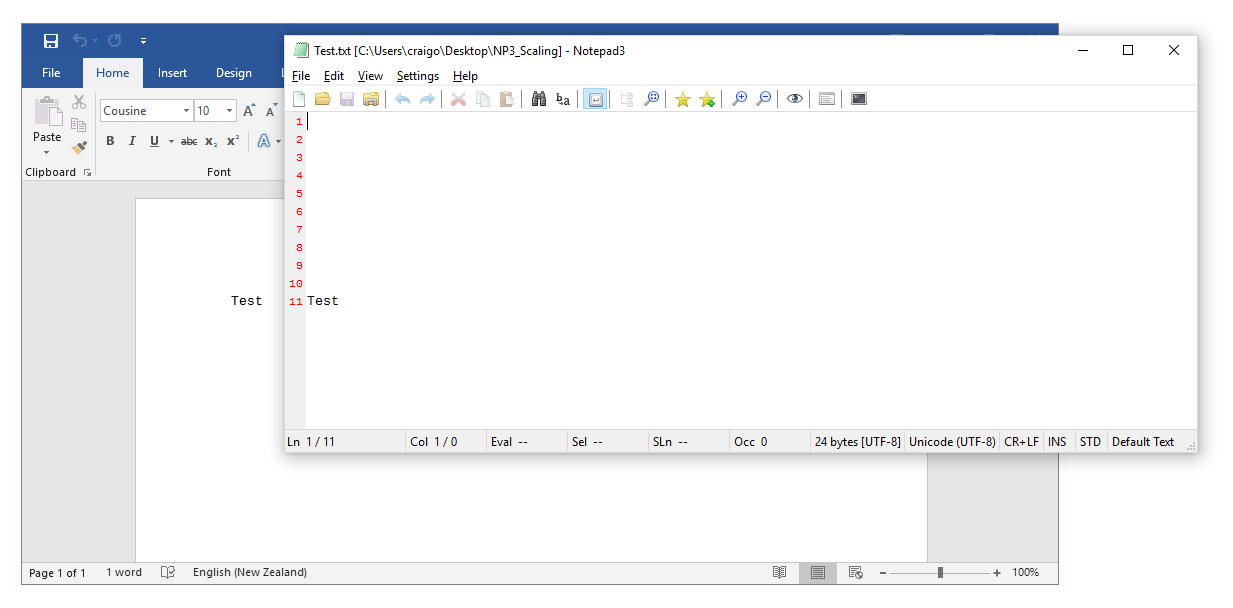
i.e. the same font in Notepad3 renders the same size as in Word 2016.
The font in both cases is Cousine Regular 10. The same phenomenon occurs with Notepad3's default font, Consolas Regular 10.
(I will test older versions of Notepad3 and see if any of them avoid this issue; will report back.)
Additionally, in both cases I am using fixed widths for the following Notepad3 status bar elements:
- Line Endings (-44)
- INS / OVR (-32)
- STD / 2ND (-32)
When scaled at 100% on the external display (the bottom image), these elements render how I want them: just large enough to accommodate the element's longest possible string.
When scaled at 150% on the built-in display (the top image), these elements render larger and no longer fit their allocated horizontal space.
I'm wondering if there is some way to make fixed-width status bar elements OS-scaling-aware. Is it as simple as scaling the status bar value by the Windows scaling factor, as I alluded to in my comment?
 craigo-
All 16 comments
🤔 - I have to dig deeper into that DPI scaling thing ... 🤔
 RaiKoHoff
on 18 Aug 2018
RaiKoHoff
on 18 Aug 2018
@craigo- Is https://github.com/zufuliu/notepad2/ has same problem? You can download from https://github.com/zufuliu/notepad2/releases or build from latest master code.
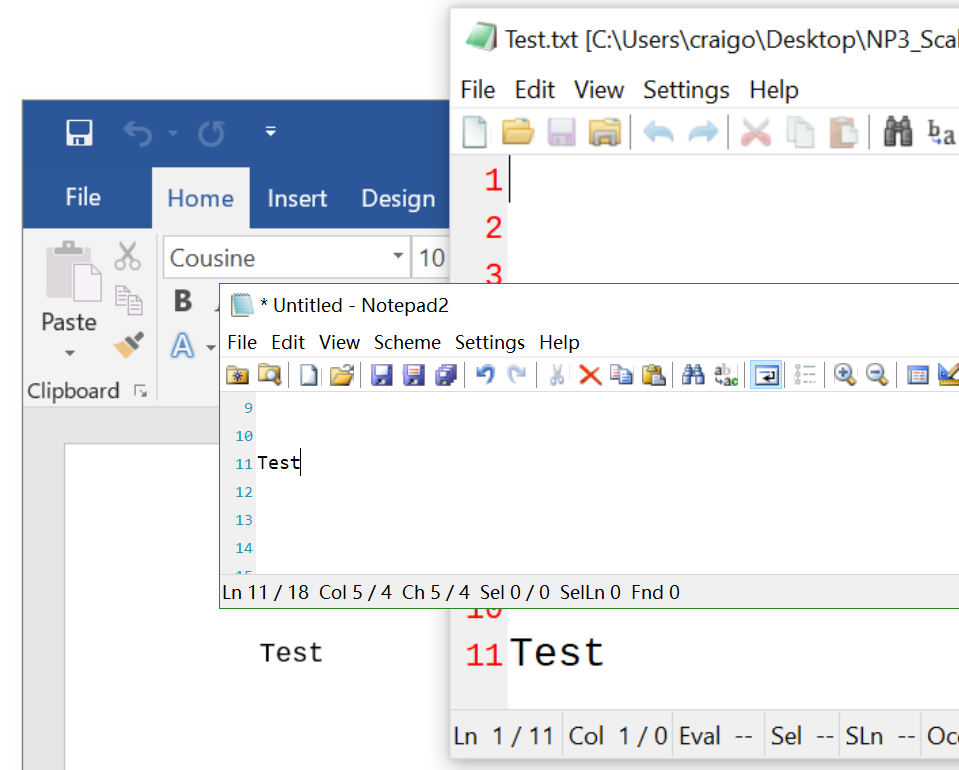
Those DPI scaling thing is written on a monitor with 100%, 125%, 150% and 175% scaling. Screenshot with 150%, looks not that bad.
 zufuliu
on 19 Aug 2018
zufuliu
on 19 Aug 2018
1920 x 1080, 14", 157ppi, 150% scaling; from left to right:
- Word 2016
- Wordpad
- Notepad3 (64-bit) TinyExpr v4.18.816.1059
- Zufuliu Notepad2 (64-bit) 4.2.25 r1172 (8d804e5)
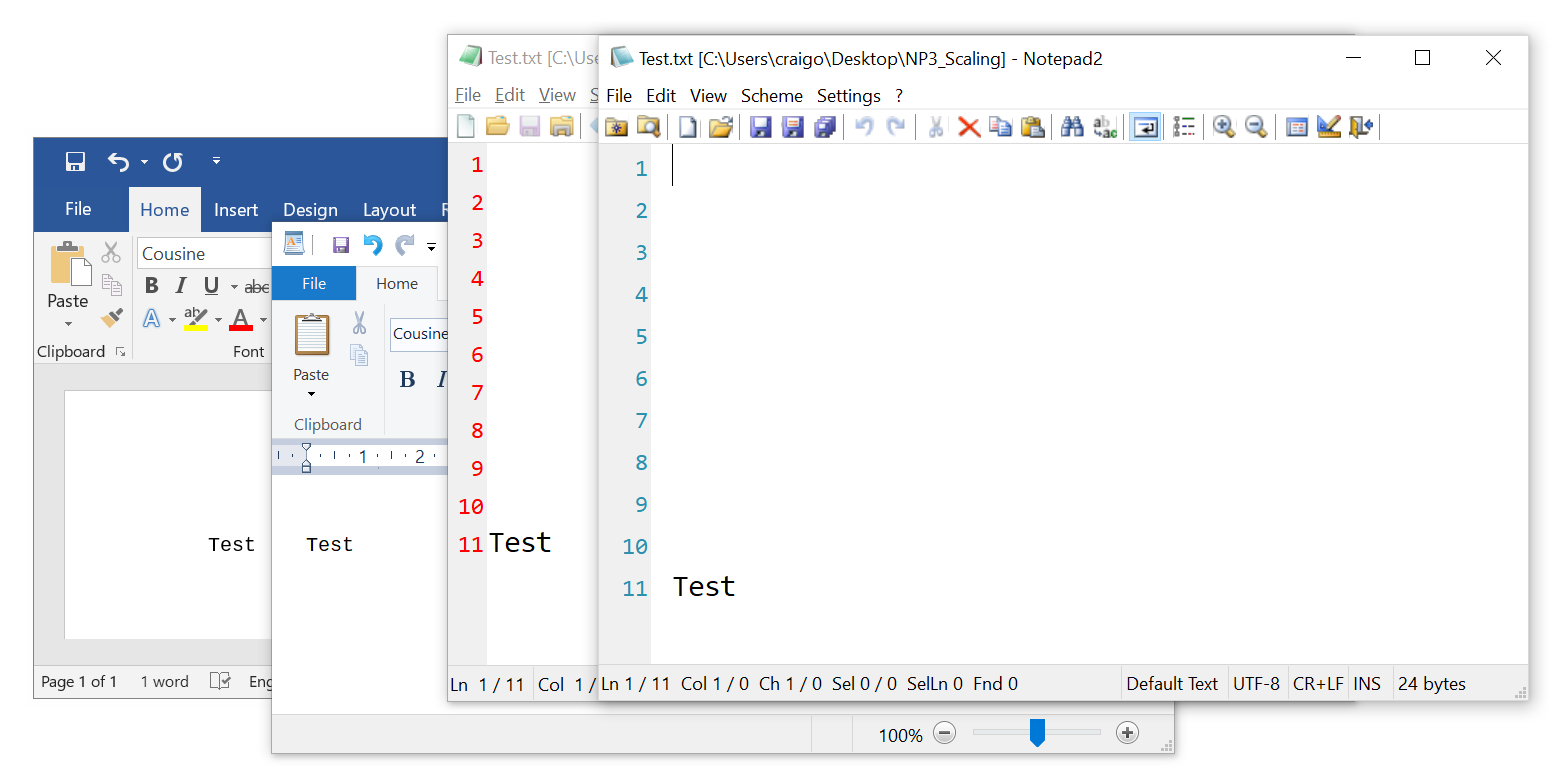
Wordpad included in case the problem was with Word.
Looks like the Notepads are the same, both larger than rendered in Word and Wordpad.
Zufuliu Notepad2 using out-of-box settings except Default Font (Cousine Regular 10). The same can be seen when using Consolas Regular 10 in all applications.
craigo-
on 19 Aug 2018
@craigo- Thank you, seems font in Notepad2 is even bigger.
zufuliu
on 20 Aug 2018
@craigo- Can you build the source code (either Notepad3 or Notepad2)?
What value for dpi for following code (in Helpers.c UINT GetCurrentDPI(HWND hwnd)):
    /*if (dpi == 0)*/ {
        // FIXME: seems always get 96
        HDC hDC = GetDC(hwnd);
        dpi = GetDeviceCaps(hDC, LOGPIXELSX);
        ReleaseDC(hwnd, hDC);

                // code used by SciTE
        hDC = CreateCompatibleDC(NULL);
        dpi = GetDeviceCaps(hDC, LOGPIXELSX);
        DeleteDC(hDC);
    }
@craigo- Sorry for ask you to debug the code. This bug is fixed by https://github.com/zufuliu/notepad2/commit/3b835c72df8645636806c91b029e4c6adbb85329.
It was my fail: changed the scaling but not logout/reboot and not observed the bug.
@RaiKoHoff Can you build new beta test with changes in https://github.com/zufuliu/notepad2/commit/3b835c72df8645636806c91b029e4c6adbb85329.
zufuliu
on 20 Aug 2018
Please test development beta _TinyExpr_4.18.820.1062.
@zufuliu : thank you for the analysis and the DPI Awareness changes you provide.
RaiKoHoff
on 20 Aug 2018
@craigo- What's the result of moving open Notepad3 (above beta _TinyExpr_4.18.820.1062) window between the built-in High DPI screen and the external normal screen.
- Moving to the High DPI screen, open the test file, moving Notepad3 to the normal screen, is the font size scale down?
- Moving to the normal screen, open the test file, moving Notepad3 to the High DPI screen, is the font size scale up?
In both case, after moving to the new screen, changing rendering technology from GDI to D2D (and vice versa) has some effects?
zufuliu
on 20 Aug 2018
@zufuliu - have had to blow away that computer (for reasons not related to its displays); am busy rebuilding it now. Will test when I'm next able (probably within the next 24 hours).
@RaiKoHoff - thanks, will test when I can (1062-64, or whatever build you're up to!)
craigo-
on 21 Aug 2018
@zufuliu : is it OK for you to be mentioned (your GitHub reference) in Notepad3's "Acknowledgments" (About Box)?
RaiKoHoff
on 22 Aug 2018
@RaiKoHoff No problem, thank you.
zufuliu
on 23 Aug 2018
@craigo- : on DPI scaling tests, please check behavior of HighDPI toolbar described in #563 too 😃
RaiKoHoff
on 23 Aug 2018
@RaiKoHoff This is bug is not fixed yet.
One is the margin width bug, fixed by https://github.com/zufuliu/notepad2/commit/96811f5dd7b97bf3e239c33ad7a4498789f13f69. There are other Scintilla APIs which using pixel as unit, but I don't find their effects on changing DPI.
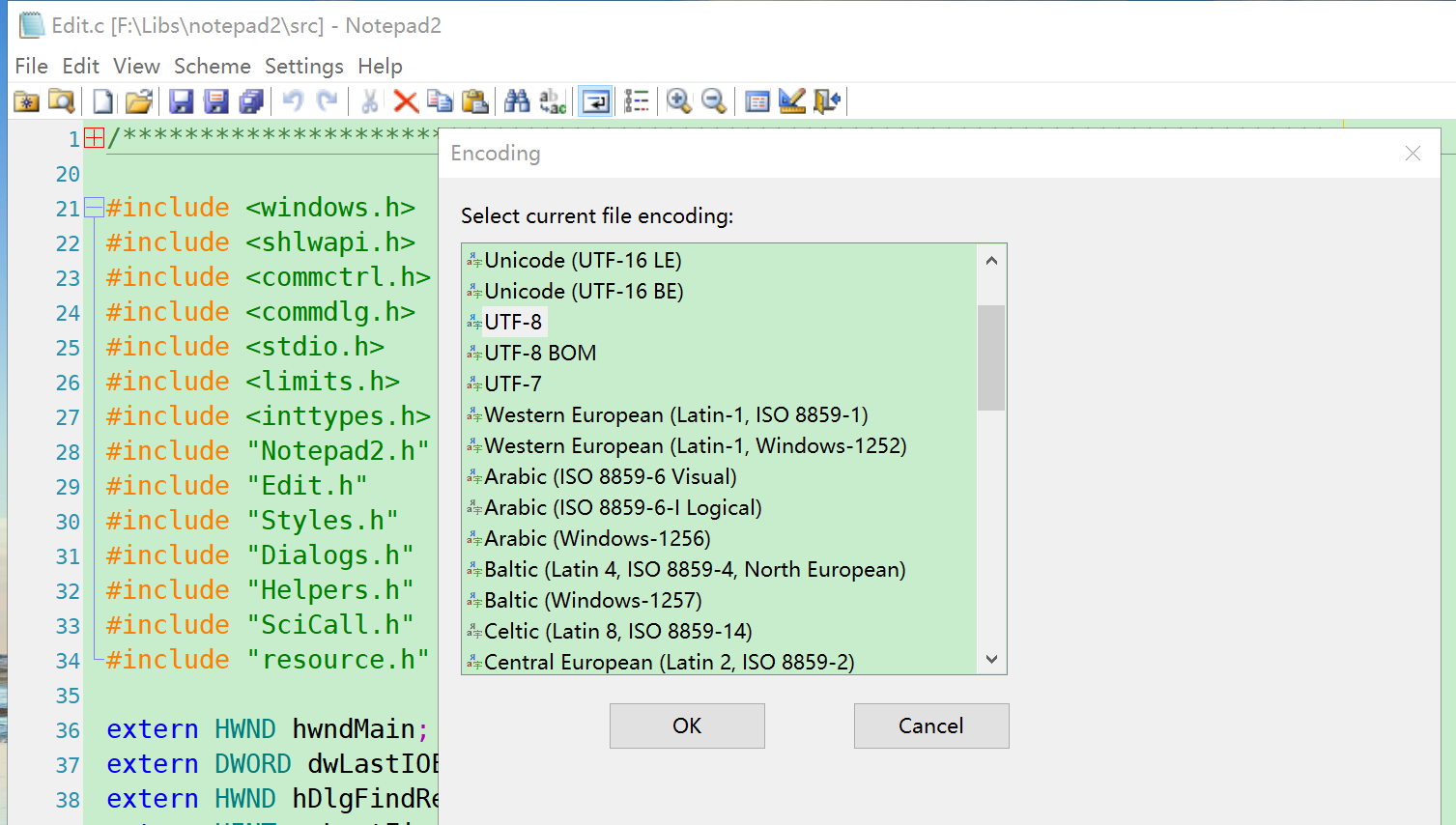
Another bug is Encoding and Scheme selection dialog, they only looks well on main display but not on second display.
zufuliu
on 25 Aug 2018
Other dialogs have same problem: Favorites, Recent Files.
zufuliu
on 25 Aug 2018
@zufuliu : thank you for the hint, I will check this ...
RaiKoHoff
on 25 Aug 2018
As far as I am concerned, this issue may be closed....
 hpwamr
on 10 Dec 2018
hpwamr
on 10 Dec 2018
Related issues
 MelchiorGaspar
·
30Comments
MelchiorGaspar
·
30Comments
 Mitezuss
·
42Comments
Mitezuss
·
42Comments
 kofifus
·
33Comments
kofifus
·
33Comments
 bravo-hero
·
51Comments
craigo-
·
79Comments
bravo-hero
·
51Comments
craigo-
·
79Comments