- The Run... command doesn't pass the file selected to its command and it is questionable whether it belongs there. It is either 1) an oversight to miss the path argument, or 2) designed behavior, where the item should be moved to the bottom of this menu due to irrelevance of the other items which are all associated with the file selected.
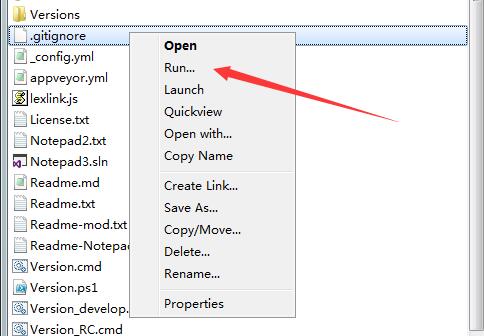
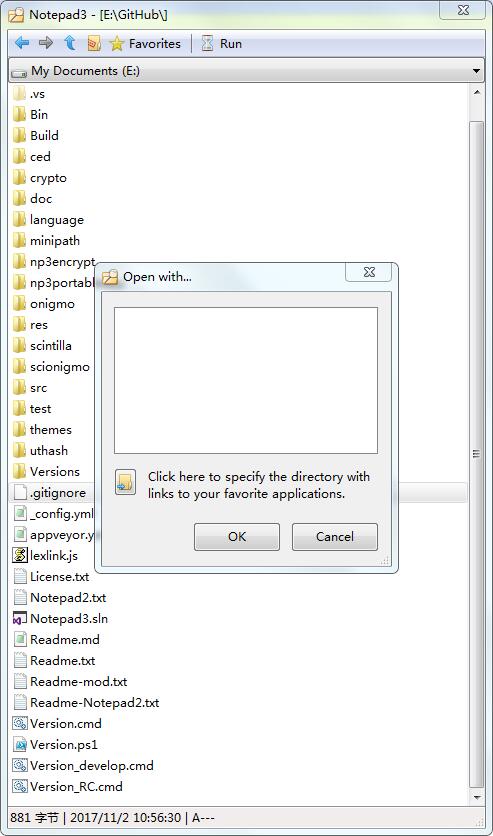
- What does Open With... do? Well, it could have been 'please select a program and let me open this file with it' then what is the necessity of Run...?
 lhmouse
All 7 comments
Some explanation:
- The
Run...menu entry: Opens a dialog pre-filled with the selected item to execute (as if it has been double-clicked - file type associated default application will be applied). - The
Launchmenu entry: Execute the selected item directly, bypassing theRun...dialog. - The
Open with...menu entry: Opens a dialog (working dir: favorite apps) to select an application, which should be used to open the selected item with (e.g. an Editor).
 RaiKoHoff
on 24 Jul 2018
RaiKoHoff
on 24 Jul 2018
Well, then I think Run... should be moved to the bottom of that menu, following a separator.
The Open and Launch names, being appropriate and precise, are undescriptive and misleading. I suggest changing Open to Open with Notepad3 to avoid confusion with the command with the same name elsewhere.
(BTW, even when opening a file in Notepad3, if you right click files in the Open dialog, it is Select that is the default (bold) menu item, not *Open.)
lhmouse
on 25 Jul 2018
Ok, menu entry Open, is not always "Open w/ Notepad". In case of a directory, MiniPath changes to this directory. In case of "_Stand-Alone-Minipath_", it opens the selected file with a Target Application defined in minipath.ini, so I have following suggestion:
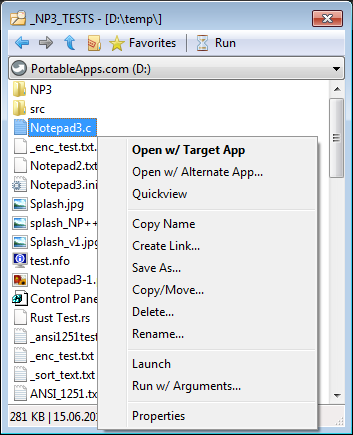
Maybe later, someone can try to evaluate the defined Target Application name and place this name into the menu entry "Open w/ ${target-app}"
RaiKoHoff
on 25 Jul 2018
Hmm, I suggest conditionally altering the text of that entry (for directories and non-directories). Open with Target App is nothing but an accurate yet confusing message so I vote against it.
lhmouse
on 25 Jul 2018
Hope I found a satisfying solution for the context menu [X_MUI v4.18.727.1033 (dbbe91d)].
RaiKoHoff
on 27 Jul 2018
I notice that now when the Run... entry is clicked, the filename is copied into the input box which can be overwritten thereafter, but anyway, this is now more predictable than before. :+1:
The Open entry now matches the behavior of a Windows Open dialog box and is much better than before. Thanks for your work.
... From now on I have to consider how to translate Run with Arguments... precisely, because in Chinese a verb modifier is always put in front of the corresponding verb, no matter how long that modifier is (especially a subordinate clause). If the name becomes too long it'd end up in something complicated and unreadable. :joy:
lhmouse
on 27 Jul 2018
Hello @lhmouse and @RaiKoHoff ,
Thanks for clarifying and for the updating of the menu of MiniPath. 🤔
Tested OK with Notepad3 (64-bit) X_MUI v4.18.727.1033 in French language.
 hpwamr
on 27 Jul 2018
hpwamr
on 27 Jul 2018
Related issues
 vvyoko
·
3Comments
vvyoko
·
3Comments
 bravo-hero
·
3Comments
bravo-hero
·
3Comments
 dlong500
·
3Comments
dlong500
·
3Comments
 craigo-
·
3Comments
bravo-hero
·
3Comments
craigo-
·
3Comments
bravo-hero
·
3Comments
Most helpful comment
Hello @lhmouse and @RaiKoHoff ,
Thanks for clarifying and for the updating of the menu of MiniPath. 🤔
Tested OK with
Notepad3 (64-bit) X_MUI v4.18.727.1033in French language.