Notepad3: "Indent" function replaces selected text
Beta Build 3.18.125.841.
When using the "Indent" function with a selection, Notepad3 replaces the selection with a tab. Notepad2 4.2.25 and Notepad2-mod 4.2.25.998 indent the selection rather than replace it.
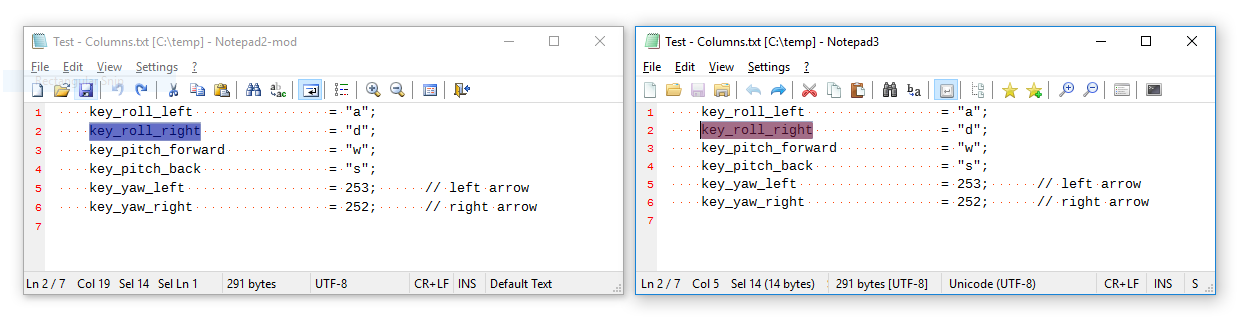
Screenshots follow - Notepad2-mod on the left, Notepad3 on the right.
Selection made:
Edit -> Block -> Indent:
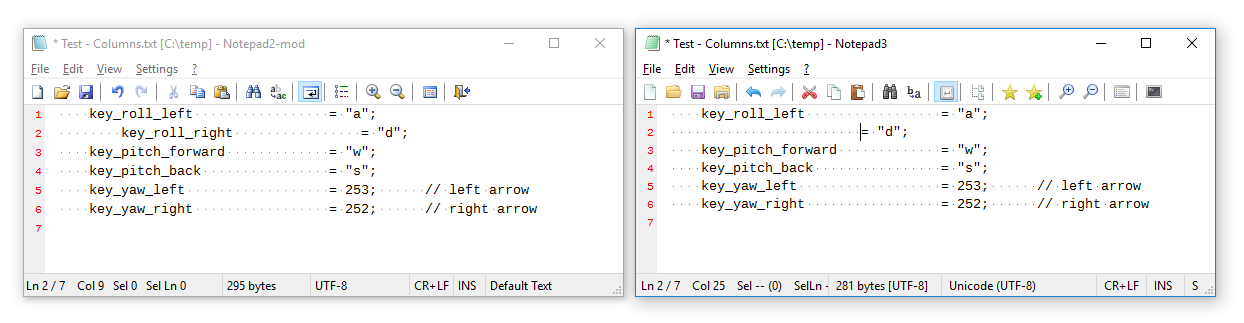
I'm thinking that the behaviour of our predecessors is the better option, but am conscious that it doesn't equate to the Tab keyboard shortcut very well!
 craigo-
All 14 comments
Okay, I am going to revert to predecessor's TAB indentation handling.
By the way: The Accelerator Key Ctrl+TAB ignores "TAB_INDENTS" and "TABS_AS_SPACES" settings and forces TAB (t) insertion.
 RaiKoHoff
on 26 Jan 2018
RaiKoHoff
on 26 Jan 2018
Please check beta 3.18.126.843.
RaiKoHoff
on 26 Jan 2018
Thanks, @RaiKoHoff. I tested your change and have been mulling it over...
Presently, there is still a difference between the behaviour of Notepad3 and its predecessors: pressing Tab when there is a selection:
- Notepad2 & Notepad2-mod: replace the selection with tabs (or spaces)
- Notepad3: indent the selection with tabs (or spaces)
I am more comfortable with Notepad2*'s behaviour in this scenario... It is more consistent with what I would consider standard Windows UI practice.
The problem I think comes from using the Tab key as a keyboard shortcut (accelerator). To take this to an illogical extreme, it would be weird to tie a Notepad3 function to the a key 😄
So I was wondering whether we look at this in a slightly different way... Let the Tab key on its own just behave as a regular key, and reorganise the "Indent / Unindent" functions' keyboard shortcuts.
Here is where I got to:
| Function: | Menu Item: | KB Shortcut (current): | KB Shortcut (proposed): |
| ----- | ----- | ----- | ----- |
| Indent | Edit -> Block -> Indent | Tab | Ctrl+Tab |
| Unindent | Edit -> Block -> Unindent | Shift+Tab | Ctrl+Shift+Tab |
| Force Insert Tab | (none) | Ctrl+Tab | Shift+Tab |
The only slight niggle I have is that bottom-right cell. It's not quite consistent (the Shift modifier conveying the meaning of an "inverse" action), but it fits. (The Alt key modifier is not a good choice; Windows already uses it.)
What do you think? Any alternatives?
craigo-
on 27 Jan 2018
I reverted the TAB on Selection behavior back to VisualStudio behavior (which is similar or same as NP3' predecessors), relying on Scintillas's standard. Please see beta version 3.18.128.846.
RaiKoHoff
on 28 Jan 2018
@RaiKoHoff, I can't yet see it in the Dropbox folder...
craigo-
on 28 Jan 2018
@craigo- : sorry sync was switched off ... 😓
There is a difference to VS: In case of rectangular selection:
- NP3: replaces the R-SelBox with TABs/Spaces
- VS: does a indentation of the rectangular box
RaiKoHoff
on 28 Jan 2018
Cheers, @RaiKoHoff. I have beta build 846 now.
In this build, with a selection, Edit -> Block -> Indent and the Tab key now do the same thing: replace the selection with tabs/spaces. It's at least consistent: the accelerator key and the menu selection do the same thing.
The problem is in this situation I think they should do different things, i.e.:
- Pressing
Tabshould replace the selection with tabs/spaces (Notepad2* does this, Notepad3 does this) - Pressing
Edit -> Block -> Indentshould indent the selection with tabs/spaces (Notepad2* does this, Notepad3 does not do this)
I'm seeing the Tab key and the the "Indent" function as quite separate things - hence my suggestion above to decouple the "Indent" function with an unmodified Tab keypress.
Does that make sense?
craigo-
on 28 Jan 2018
Yes, that makes sense, please try beta version 3.18.129.847.
RaiKoHoff
on 29 Jan 2018
@craigo- : Sorry, for the short reply with a beta version only, it has been very late last night.
The indentation now should be similar to VisualStudio (regarding TAB-Key and Edit -> Advanced -> Increase Line Indent).
Exceptions are: Scintilla's "Raw TAB Indentation" does not preserve selection, but switches to "Full Line Selection", while VS preserves selection. (I am going to change this)
And, of cause, the behavior on rectangular selection is different - I have no implementation yet.
RaiKoHoff
on 29 Jan 2018
No problem, @RaiKoHoff... We all have lives to lead!
Thanks for that... I've tested beta build 847 and it does what I've asked for. We are now fully back to our predecessor's behaviour, with the added bonus of reinstating the selection on an undo.
There is one more use case I've found that is inconsistent: when one or more full lines are selected. Pressing Tab and selecting Edit -> Block -> Indent do the same thing: indent the selected lines with tabs/spaces. (Notepad2* has the same behaviour.)
I'm never completely happy with inconsistencies, but I'm prepared to let this one go if others are against changing it.
Did anyone have any thoughts regarding my suggestions for changing the accelerator keys?
craigo-
on 29 Jan 2018
My point of view is: VisualStudio behavior (regarding TAB-Key and Edit -> Advanced -> Increase Line Indent) is the same and I dislike to break this. Maybe contrary behavior of leading Editors (UltraEdit, Notepad++, etc.) will change my mind ...
RaiKoHoff
on 29 Jan 2018
I'd like to think that Notepad3 is a leading editor. That's certainly what I'm working towards!
craigo-
on 29 Jan 2018
I tried to get closer to VS (:grin:) (indentation of multi-line selection block with "flapping" ends, as promised in https://github.com/rizonesoft/Notepad3/issues/319#issuecomment-361170199).
Please try beta version 3.18.129.848.
By the way: A million thanx for thoroughly testing to @craigo- and @engelhro, appreciating it so much.
RaiKoHoff
on 29 Jan 2018
I'll close this for now... If there is any will to modify the keyboard shortcuts as described above, we can reopen.
craigo-
on 1 Feb 2018
Related issues
 dlong500
·
3Comments
dlong500
·
3Comments
 valhristov
·
3Comments
valhristov
·
3Comments
 omega32
·
3Comments
omega32
·
3Comments
 vvyoko
·
3Comments
vvyoko
·
3Comments
 blackcrack
·
3Comments
blackcrack
·
3Comments
Most helpful comment
I'd like to think that Notepad3 is a leading editor. That's certainly what I'm working towards!