In the new empty window cut and copy are enabled and ready to cut and copy nothing.
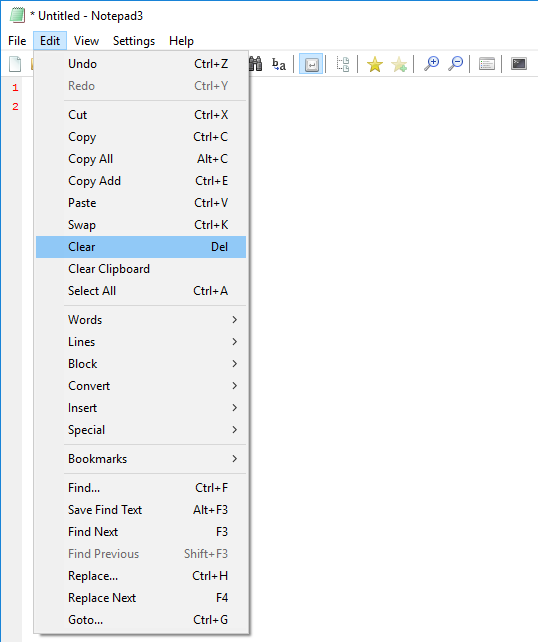
How about replacing "Clear" with "Delete"?
v729
 ghost
ghost
All 17 comments
I am pretty sure @9412423209 is referring to the cut and copy items in the Edit menu being active... The toolbar icons are disabled:
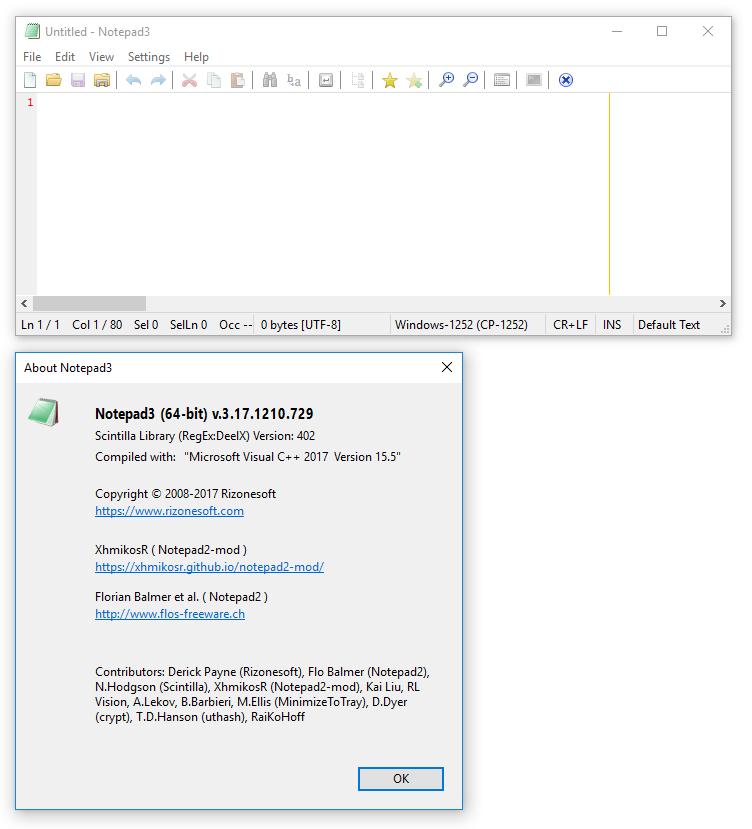
This behaviour is also present in the current beta (3.17.1220.757).
(Both Notepad2 4.2.25 and Notepad2-mod 4.2.25r998 grey out these options correctly.)
I have no problem with renaming Clear to Delete...
 craigo-
on 21 Dec 2017
craigo-
on 21 Dec 2017
I was more like this
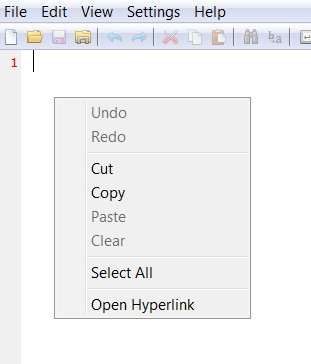
but they seem to have common source...
ghost
on 21 Dec 2017
Ah, the right-click option. Probably using the same elements as the Edit menu.
craigo-
on 21 Dec 2017
Main menu and context menu share the same code, toolbar is updated separately and "yes" there are inconsistencies. I will fix that for next release ...
By the way: cut and copy can be done w/o selection, meaning: current line is cut/copied (Ctrl-X,Ctrl-C).
 RaiKoHoff
on 21 Dec 2017
RaiKoHoff
on 21 Dec 2017
Ah, I remember this now... Issue #32 I think. So, the Cut and Copy buttons, Edit menu entries and right-click options should in some cases be active.... But probably not in an empty buffer immediately after program launch?
craigo-
on 21 Dec 2017
@craigo- Please confirm fixed and close this issue. New release available on the Notepad3 download page. 😸 Find the change log on the Notepad3 update page. 😺 Thanks for testing.
 rizonesoft
on 23 Dec 2017
rizonesoft
on 23 Dec 2017
This is not my issue... But I have tested and the first problem that @ghost mentioned is fixed in the latest release (3.17.1223.778).
The one thing that has not been addressed or discussed is the renaming of Clear to Delete...
craigo-
on 25 Dec 2017
Clear has been renamed to Delete ... (no one complaint about renaming it)
RaiKoHoff
on 26 Dec 2017
@RaiKoHoff No complaints from me 😸
rizonesoft
on 27 Dec 2017
@ghost A new Notepad3 version available here. Please check if this issue has been resolved and close it.
rizonesoft
on 28 Dec 2017
Cleaning up the Notepad3 issues section. Closing this issue.
rizonesoft
on 30 Dec 2017
Clear has been renamed to Delete ... (no one complaint about renaming it)
@RaiKoHoff, where did you rename this? In beta build 3.18.106.804, the "Edit" menu entry is still named "Clear":
craigo-
on 6 Jan 2018
Right 😬 - wait for 3.18.106.807
RaiKoHoff
on 6 Jan 2018
Thanks. Feel free to reclose.
craigo-
on 6 Jan 2018
@ghost: Please test and close this issue, if satisfied.
RaiKoHoff
on 13 Jan 2018
@ghost is a deleted user, will not close this issue.
 SeaHOH
on 13 Jan 2018
SeaHOH
on 13 Jan 2018
@SeaHOH Thanks for letting us know. Closing this issue.
rizonesoft
on 14 Jan 2018
Related issues
 Dothion
·
35Comments
Dothion
·
35Comments
 kofifus
·
53Comments
ghost
·
36Comments
kofifus
·
53Comments
ghost
·
36Comments
 bravo-hero
·
51Comments
kofifus
·
33Comments
bravo-hero
·
51Comments
kofifus
·
33Comments