Node-red-contrib-homekit-bridged: [Setup Help]: SecuritySystem - Changing Menu in Homekit / Numbers for States
Setup Help
RPI3
-Homebridge
-NodeRed
Help Needed
Hey, the SecuritySystem Service works well.
But, is it possible to change the Menu in HomeBridge / Homekit?
It has (i am german) Anwesend, Abwesend, Nacht, Aus.
I only need Aus, Abwesend, Nacht.
It would be fine, if i can choose what i want to be use in Homekit / Homebridge, and i cant find a documentation.
Thanks for u guys!
Stay Health!
And sorry for my bad english.
King regards, Torben
 Torben80
All 8 comments
RPI3
-Homebridge
-NodeRed
@Torben80 : are you sure using this repos assets node-red-contrib-homekit-bridged?
It is different than Homebridge. For Homebridge you may find (German speaking) help here
 djiwondee
on 21 Dec 2020
djiwondee
on 21 Dec 2020
Just a quick comment - yes this is possible.
If you’re using nodered (our plugin) then I can lead you in the right direction but not right now, I should be headed to work shortly.
mid you’re doing nodered it will be something in the characteristic properties field, you need some kind of "validValues"={0,1,3} for the current alarm state and target alarm state. I’m not sure if those are the right values (I don’t know German, I’m not sure if you want to drop home, away, or night mode).
 crxporter
on 21 Dec 2020
crxporter
on 21 Dec 2020
Update. I've checked the JSON to use - it would look something like this in characteristic properties:
{
    "SecuritySystemCurrentState":{
        "validValues": [0,2,3,4]
    },
    "SecuritySystemTargetState": {
        "validValues": [0,2,3]
    }
}
Current state gets 4 (alarm) but target state doesn't need 4.
crxporter
on 21 Dec 2020
Update. I've checked the JSON to use - it would look something like this in characteristic properties:
{
    "SecuritySystemCurrentState":{
        "validValues": [0,2,3,4]
    },
    "SecuritySystemTargetState": {
        "validValues": [0,2,3]
    }
}
Current state gets 4 (alarm) but target state doesn't need 4.
HA! That looks working fine for me. Thanks.
Is it possible to change the Names of the Menu in HomeKit now?
In English, i think you have home, away, or night mode, and in german it is "Anwesend, Abwesend, Nacht".
These Names are ... bad... can i use something like this:
``json
"SecuritySystemTargetState": {
"validNames": [Bli,Bla,Blub]
}
or
"SecuritySystemTargetState": {
"validNames": [0:"Bli",1:"Bla",2:"Blub"]
}``
Thanks for your Support,
Great Job!
Torben
Torben80
on 22 Dec 2020
Unfortunately the state names can't be changed. They're set by Apple.
from the Apple document:
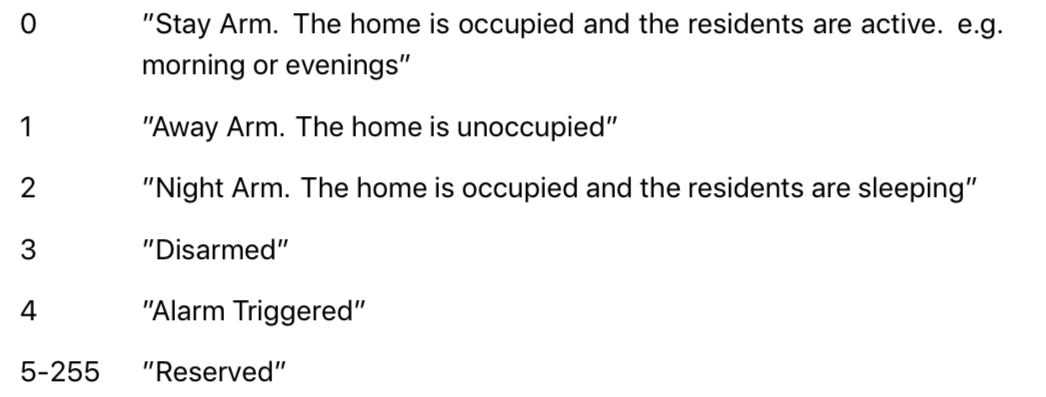
PS: I'm glad the solution works to hide your unused arming mode!
crxporter
on 22 Dec 2020
Ok, i am wondering.
Because in my Homebridge (v1.1.6 ) there will be created a Switch frome NodeRed (SecuritySystem). The name (topics) of the switch has the same names like the switch in Homekit.
Thats way i am asking for renaming the Mode-Names. If the switch will be created by "
node-red-contrib-homekit-bridged " , it shoould be possible to change the names, or isn't it?
Thx,
and king regards
Torben
Torben80
on 22 Dec 2020
Switch names are assigned in nodered yes. Buy you can't change security "away" mode to "elephant" mode.
crxporter
on 22 Dec 2020
Ok, thx!
Thats it! U helped me much.
See u next time ;-)
King Regards Torben
Torben80
on 22 Dec 2020
Related issues
 Delphius7
·
5Comments
Delphius7
·
5Comments
 Barabba11
·
3Comments
Barabba11
·
3Comments
 TristanMW
·
11Comments
TristanMW
·
11Comments
 Shaquu
·
9Comments
Shaquu
·
9Comments
 Kowy54
·
3Comments
Kowy54
·
3Comments
Most helpful comment
Ok, thx!
Thats it! U helped me much.
See u next time ;-)
King Regards Torben