Node-red-contrib-homekit-bridged: Unable to add Accessory
I followed the how-to regarding the install of contrib-homekit-bridged but it doesn't seem like it installed correctly.
I am unable to edit/add an accessory
Attached is a image on my issue
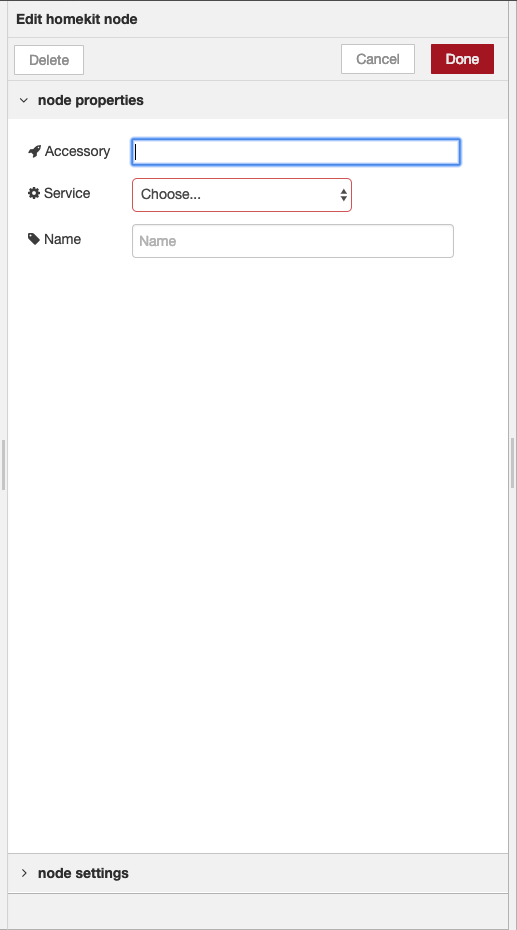
Please advise on what I should do to fix it
Thanks a lot!
 TristanMW
All 11 comments
I am using a raspberry pi
TristanMW
on 12 Mar 2019
Hello @TristanMW I am happy you are here :)
Indeed it looks like you did not installed our module properly.
Go to your node-red root folder (possibly ~/.node-red/)
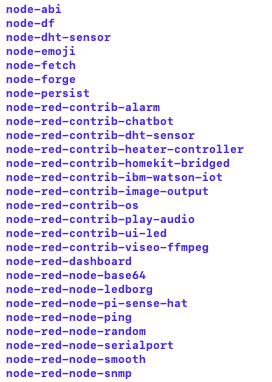
Go to node_modules and look what node-red-contrib modules you got there. I assume you have something else installed called homekit aswell.
 Shaquu
on 12 Mar 2019
Shaquu
on 12 Mar 2019
You can install module from root of node-red using:
npm i node-red-contrib-homekit-bridged
Or just install it via node-red panel.
Remember you need avahi too:
sudo apt-get install libavahi-compat-libdnssd-dev
Shaquu
on 12 Mar 2019
I used to have the original contrib-homekit node until I found that this version which is active.
Removed it then tried installing this version ... is it possible that the old files are still there?
_Remember you need avahi too:
sudo apt-get install libavahi-compat-libdnssd-dev_ - Did this aswell
TristanMW
on 12 Mar 2019
TristanMW
on 12 Mar 2019
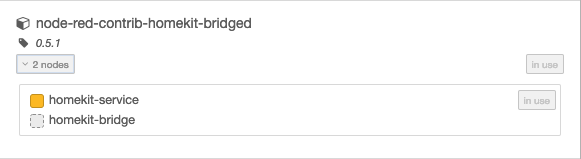
Is the homekit-bridge node supposed to be greyed out?
Apologies for all the images - easier to explain then trying to describe with words
TristanMW
on 12 Mar 2019
Images are completly fine!!
Okay so let's do this:
- show me content of package.json (root of node-red)
- uninstall node-red-contrib-homekit-bridged, make sure folder is removed
- then install it again
Are you creating new nodes in node-red or trying to modify the old one?
Grey color is fine as it is config node - not possible to add manualy from sidebar.
Have you restarted node-red?
Have you refreshed your page where you acces node-red?
Shaquu
on 12 Mar 2019
package.json:
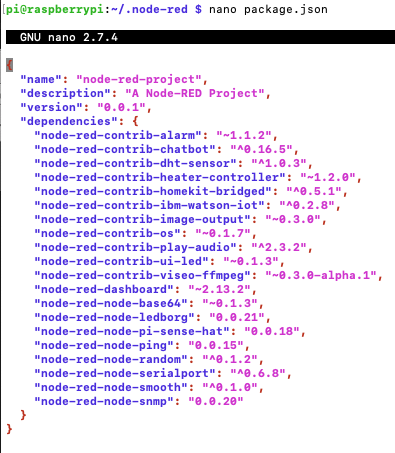
_uninstall node-red-contrib-homekit-bridged, make sure folder is removed_ - Will do this now
I am creating a new one and double checked that all old accessories were removed from the "configuration node" tab next to debug
I have not restarted node-red and come to think of it I should have tried that first haha
TristanMW
on 12 Mar 2019
Agggg TRISTAN!
So restarting nodered-service and pi reboot (just incase) fixed the issue ...
Thanks a lot Shaquu
TristanMW
on 12 Mar 2019
hahahahaha
TristanMW
on 12 Mar 2019
Good for you @TristanMW !!
Closing :)
Shaquu
on 12 Mar 2019
Related issues
 Kowy54
·
3Comments
Kowy54
·
3Comments
 mtjoernelund
·
8Comments
mtjoernelund
·
8Comments
 Torben80
·
8Comments
Torben80
·
8Comments
 djiwondee
·
4Comments
djiwondee
·
7Comments
djiwondee
·
4Comments
djiwondee
·
7Comments
Most helpful comment
Agggg TRISTAN!
So restarting nodered-service and pi reboot (just incase) fixed the issue ...
Thanks a lot Shaquu