Node-red-contrib-homekit-bridged: [FEATURE]: Add “if msg arrive on input pass through to output“ option, especially for switch
Since I’m also us node red ui, meaning using e. g. Switch for toogle guest WiFi on/of, it is valuable not pass through incoming payload to output. This help preventing loop, if the switch has also to reflect the status of a service initiated by 3rd party while also acting as the trigger of the same service
(See here for the option I mean)[https://discourse-cdn-sjc1.com/business6/uploads/nodered/original/2X/9/9c93ba1e3a79f176c812154e3eca5d42bb62f2f7.png]
 djiwondee
All 7 comments
This is an example of a flow:

On the left side you see a injection to get the current WIFI status from the router. The result is converted in a way to just set the switch in the node red UI with the recent status
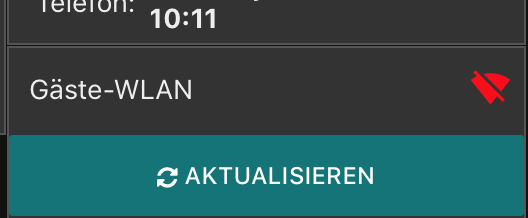
On the node red ui this switch can toggle the Guest WIFI status (node on right site of the flow) and will also initiate an injection to update the icon on the switch
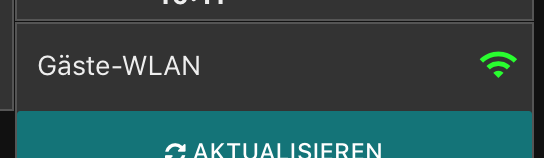
But the loop from right back to left is only possible because the switch doesn't pass its output based on an incoming message from the input:
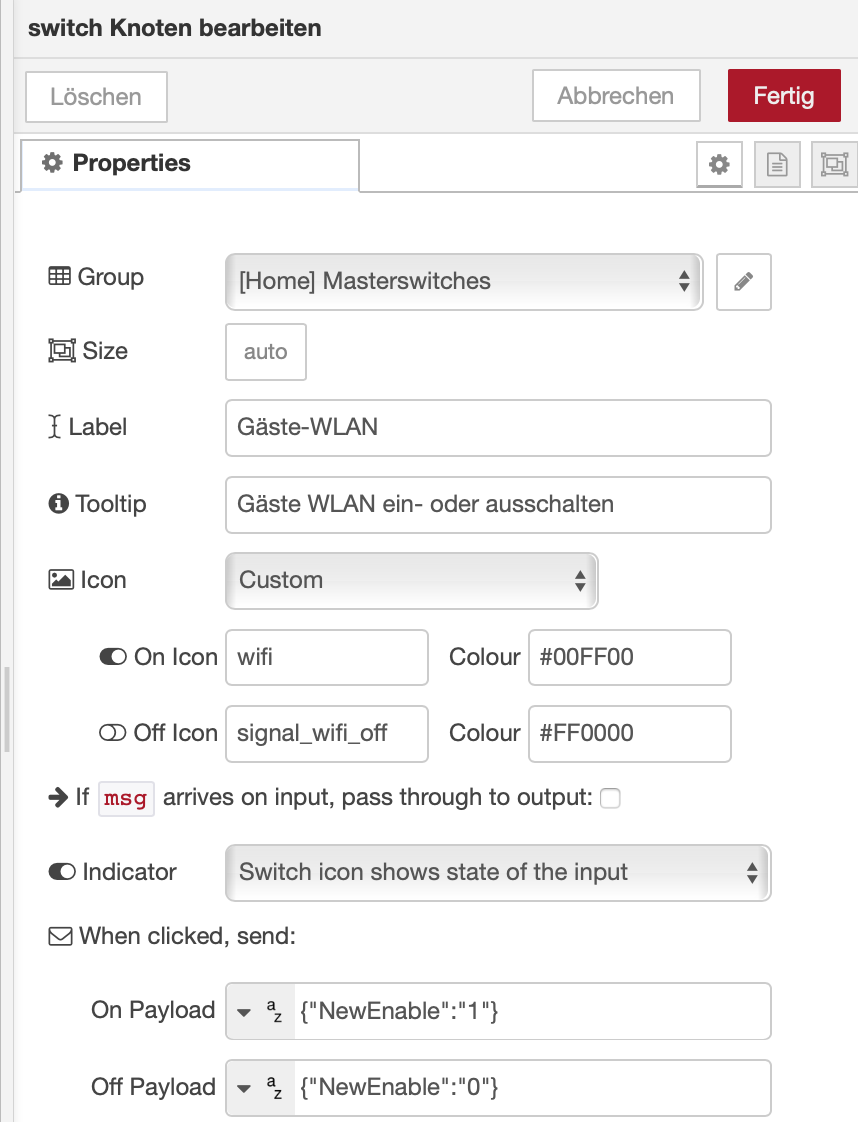
This approach has the significant advantage note to manage status in a variable and in a more complex logic.
djiwondee
on 20 Mar 2019
Can you paste your flow?
Let me see if I understand. I believe you're asking if the system can be set to always pass through messages because if it hasn't changed then the message won't be passed on, correct?
For example this flow:
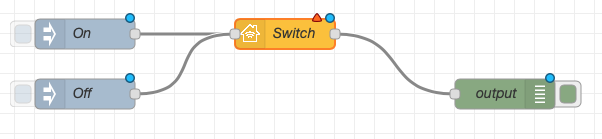
If "On" is sent 2 times consecutively then the second "On" command will never reach the debug node, correct?
Can it not be dealt with by just running new wires to the other side?
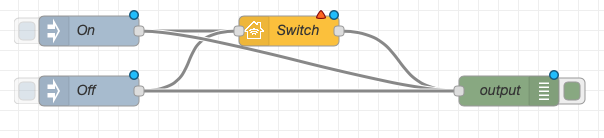
If the output needs to be filtered any more (I.e. msg coming from homekit) then the msg.hap.context can be checked on the right side of the node - see here
I may be missing something here but this seems like a reasonable approach?
 crxporter
on 20 Mar 2019
crxporter
on 20 Mar 2019
Hello @crxporter,
Let me see if I understand. I believe you're asking if the system can be set to always pass through messages because if it hasn't changed then the message won't be passed on, correct?
Nope. I would like to explicitly suppress the pass through of the input payload to the output payload. Otherwise you would have an endless loop in my example.
The example above is working quit well with Node-red UI only. Here is the code:
[
    {
        "id": "f15f0c40.ea99",
        "type": "comment",
        "z": "1ac5f8da.58656f",
        "name": "Guest WIFI on/off using Node-red UI",
        "info": "",
        "x": 200,
        "y": 900,
        "wires": []
    },
    {
        "id": "876dda98.d95f78",
        "type": "ui_text",
        "z": "1ac5f8da.58656f",
        "group": "3c67bcb2.fee184",
        "order": 2,
        "width": 0,
        "height": 0,
        "name": "",
        "label": "WLAN:    ",
        "format": "{{msg.payload.NewEnable}}",
        "layout": "row-left",
        "x": 1040,
        "y": 900,
        "wires": []
    },
    {
        "id": "b4ff23cf.3d64f",
        "type": "fritzbox-in",
        "z": "1ac5f8da.58656f",
        "device": "c5133590.6099d8",
        "name": "Set Guest WIFI based on Switch",
        "service": "urn:dslforum-org:service:WLANConfiguration:3",
        "action": "SetEnable",
        "arguments": "{\"NewEnable\":\"value\"}",
        "x": 1570,
        "y": 960,
        "wires": [
            [
                "119fe79a.8e30e"
            ]
        ]
    },
    {
        "id": "119fe79a.8e30e",
        "type": "fritzbox-in",
        "z": "1ac5f8da.58656f",
        "device": "c5133590.6099d8",
        "name": "Query Guest WIFI Status",
        "service": "urn:dslforum-org:service:WLANConfiguration:3",
        "action": "GetInfo",
        "arguments": "{}",
        "x": 500,
        "y": 960,
        "wires": [
            [
                "413b915e.27dca8",
                "3669a3cf.6c64fc",
                "d66a9dfe.0f12d"
            ]
        ]
    },
    {
        "id": "745c3cf6.9bf8dc",
        "type": "inject",
        "z": "1ac5f8da.58656f",
        "name": "5 Min trigger to query WIFI status",
        "topic": "",
        "payload": "",
        "payloadType": "date",
        "repeat": "300",
        "crontab": "",
        "once": true,
        "onceDelay": "20",
        "x": 210,
        "y": 960,
        "wires": [
            [
                "119fe79a.8e30e"
            ]
        ]
    },
    {
        "id": "35654b8e.09d4d4",
        "type": "ui_switch",
        "z": "1ac5f8da.58656f",
        "name": "",
        "label": "Gäste-WLAN",
        "tooltip": "Gäste WLAN ein- oder ausschalten",
        "group": "99a4dc86.46d248",
        "order": 1,
        "width": 0,
        "height": 0,
        "passthru": false,
        "decouple": "true",
        "topic": "",
        "style": "",
        "onvalue": "{\"NewEnable\":\"1\"}",
        "onvalueType": "str",
        "onicon": "wifi",
        "oncolor": "#00FF00",
        "offvalue": "{\"NewEnable\":\"0\"}",
        "offvalueType": "str",
        "officon": "signal_wifi_off",
        "offcolor": "#FF0000",
        "x": 1050,
        "y": 960,
        "wires": [
            [
                "b44094bf.1c8638"
            ]
        ]
    },
    {
        "id": "b44094bf.1c8638",
        "type": "json",
        "z": "1ac5f8da.58656f",
        "name": "Convert payload for API",
        "property": "payload",
        "action": "",
        "pretty": true,
        "x": 1290,
        "y": 960,
        "wires": [
            [
                "b4ff23cf.3d64f"
            ]
        ]
    },
    {
        "id": "413b915e.27dca8",
        "type": "template",
        "z": "1ac5f8da.58656f",
        "name": "Format API response",
        "field": "payload",
        "fieldType": "msg",
        "format": "handlebars",
        "syntax": "mustache",
        "template": "{\"NewEnable\":\"{{payload.NewEnable}}\"}",
        "output": "str",
        "x": 830,
        "y": 960,
        "wires": [
            [
                "35654b8e.09d4d4"
            ]
        ]
    },
    {
        "id": "3669a3cf.6c64fc",
        "type": "change",
        "z": "1ac5f8da.58656f",
        "name": "EventMsg Set Label ",
        "rules": [
            {
                "t": "change",
                "p": "payload.NewEnable",
                "pt": "msg",
                "from": "0",
                "fromt": "str",
                "to": "Gastzugang aus",
                "tot": "str"
            },
            {
                "t": "change",
                "p": "payload.NewEnable",
                "pt": "msg",
                "from": "1",
                "fromt": "str",
                "to": "Gastzugang ein",
                "tot": "str"
            }
        ],
        "action": "",
        "property": "",
        "from": "",
        "to": "",
        "reg": false,
        "x": 830,
        "y": 900,
        "wires": [
            [
                "876dda98.d95f78"
            ]
        ]
    },
    {
        "id": "3c67bcb2.fee184",
        "type": "ui_group",
        "z": "",
        "name": "Ereignisse",
        "tab": "258c6649.0213da",
        "order": 5,
        "disp": true,
        "width": "6",
        "collapse": false
    },
    {
        "id": "c5133590.6099d8",
        "type": "fritzbox-config",
        "z": "",
        "name": "DjiwondeeFritz",
        "host": "fritz.box",
        "port": "49443",
        "ssl": true
    },
    {
        "id": "99a4dc86.46d248",
        "type": "ui_group",
        "z": "",
        "name": "Masterswitches",
        "tab": "258c6649.0213da",
        "order": 6,
        "disp": false,
        "width": "6",
        "collapse": false
    },
    {
        "id": "258c6649.0213da",
        "type": "ui_tab",
        "z": "",
        "name": "Home",
        "icon": "home",
        "order": 1
    }
]
You must make sure to have node-red-contrib-fritz Module installed and a AVM FritzBox. But I think you know that...
djiwondee
on 20 Mar 2019
Got it.
So yes that's simple enough with the homekit node, you'll need to do like the readme says and put the following node just to the right of homekit:
[{"id":"","type":"switch","z":"","name":"check hap.context","property":"hap.context","propertyType":"msg","rules":[{"t":"nnull"}],"checkall":"true","repair":false,"outputs":1,"x":0,"y":0,"wires":[]}]
This says "if the msg.hap.context is not null then pass through the message"
Any message that is passed through the homekit node (as is causing you trouble) will have a null msg.hap.context
Any message that orginates in the homekit node (I.e. "hey siri turn off the light") will have a property in the msg.hap.context and thus not be null.
That's how the homekit node can handle this issue. The flow above doesn't have any homekit nodes so I'm not sure how to handle it with them. If you're having the problem with other nodes I'd recommend heading over to their github pages or the node red forum
crxporter
on 20 Mar 2019
Hello @crxporter ,
This says "if the msg.hap.context is not null then pass through the message"
Any message that is passed through the homekit node (as is causing you trouble) will have a null msg.hap.context
you got it to the point. The approach work quite well. If you like you can close that enhancement request since your solution is valid with what we have! I've never thought about the sense of hap.context! Many thanks to you! And btw: it is worth to ad this to the README.md
djiwondee
on 20 Mar 2019
Sorry it took me a minute to figure out!! I use the hap.context check in most of my functions to prevent loops...
I don't have "close" powers but you should since you opened the issue.
crxporter
on 20 Mar 2019
@crxporter thanks for resolving this subject :)
I am closing as @djiwondee agreed to this.
 Shaquu
on 20 Mar 2019
Shaquu
on 20 Mar 2019
Related issues
 Barabba11
·
3Comments
Barabba11
·
3Comments
 mtjoernelund
·
8Comments
djiwondee
·
4Comments
mtjoernelund
·
8Comments
djiwondee
·
4Comments
 Torben80
·
8Comments
Torben80
·
8Comments
 TristanMW
·
11Comments
TristanMW
·
11Comments
Most helpful comment
Got it.
So yes that's simple enough with the homekit node, you'll need to do like the readme says and put the following node just to the right of homekit:
This says "if the
msg.hap.contextis not null then pass through the message"Any message that is passed through the homekit node (as is causing you trouble) will have a null
msg.hap.contextAny message that orginates in the homekit node (I.e. "hey siri turn off the light") will have a property in the
msg.hap.contextand thus not be null.That's how the homekit node can handle this issue. The flow above doesn't have any homekit nodes so I'm not sure how to handle it with them. If you're having the problem with other nodes I'd recommend heading over to their github pages or the node red forum