Node-red-contrib-homekit-bridged: [Feature Request]: Television gets generic House icon in iOS 14
Describe the bug
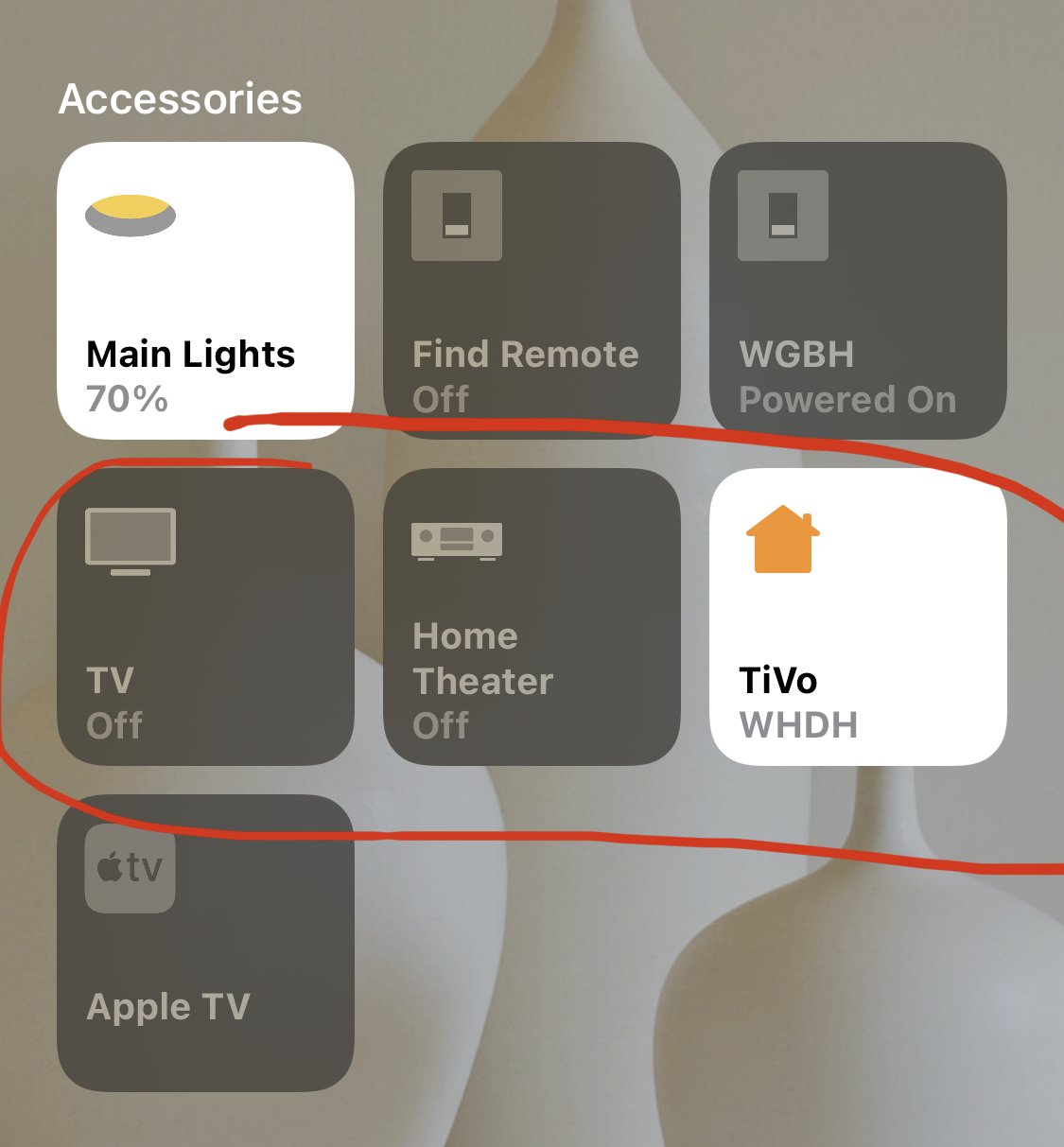
As of iOS 14 GM, a node-red based Television accessory has a generic "house" icon, rather than a TV icon, in the Home app. I believe this appeared in GM, and wasn't in the betas of iOS 14, but am not 100% certain
To Reproduce
Steps to reproduce the behavior:
- Create a Television accessory
- see its icon
Expected behavior
In iOS 13, all Television accessories had a generic TV panel as the icon. iOS 14 introduced new options (such as a receiver, or a TV panel with a STB attached), but apparently you have to do something to select one, it doesn't default to the TV panel anymore
Screenshots
In my screenshot, TV is a real HomeKit TV, has a TV icon. Home Theater is a Homebridge-based receiver. The plugin was updated, and has a receiver icon. in iOS 13 it appeared as a TV. TiVo is a NRCHKB-based Television accessory, in iOS 13 it had a TV icon, now it has a house.
Desktop (please complete the following information):
- OS: rPi 2
- Node version: 12.16.2
- NPM version: 6.14.4
- NodeRed version: 1.0.1
- NRCHKB Plugin Version: 1.2.0
Additional context
I saw a reddit thread, but can't find it now, reporting this problem in homebridge. Someone said you need to update the plugin to select the icon type. Apparently if you don't, it defaults to the house instead of the TV.
 mishakim
All 20 comments
This is fixable but will likely require a new version of the plugin. I believe all still works, correct? Just shows a house instead of a tv?
Related issue on HAP-NodeJS with more discussion and a couple other references:
 crxporter
on 19 Sep 2020
crxporter
on 19 Sep 2020
We’ve never had icon options for tv before. It’s odd to me that the icon is decided by the service instead of within homekit app like a light bulb or valve item...
crxporter
on 19 Sep 2020
Yes, works fine, just a cosmetic issue
mishakim
on 19 Sep 2020
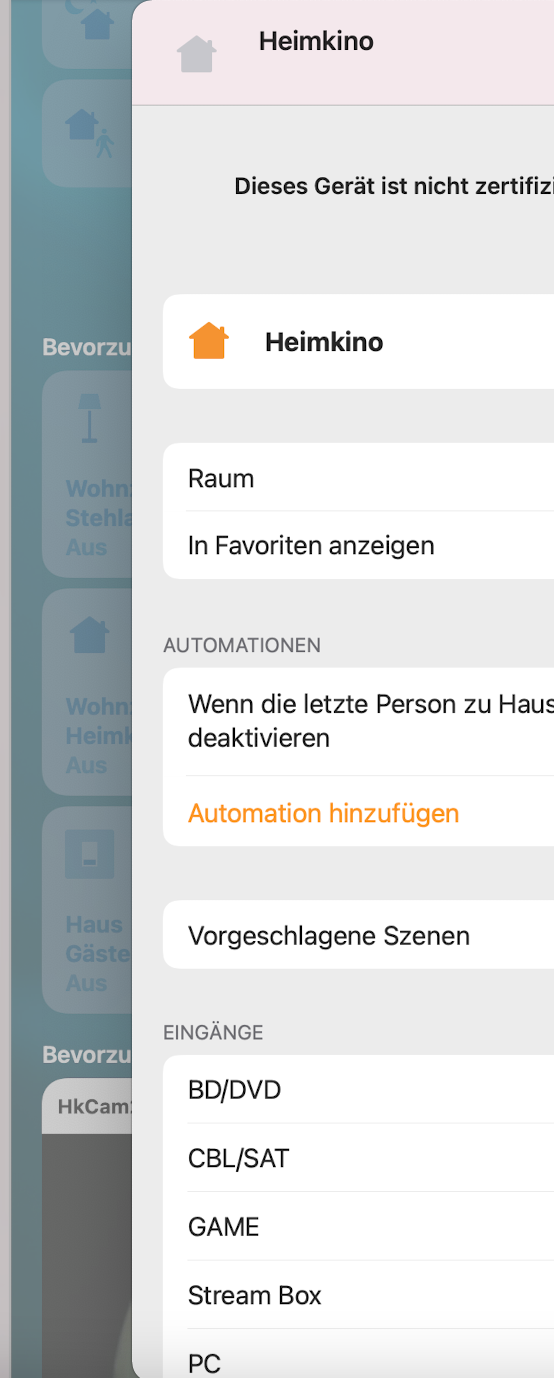
Just FYI: can confirm - works fine but macOS BigSur Beta is also showing the home icon instead of TV. Seems to be a recent change in iOS and macOS. Previous betas of it were right!
 djiwondee
on 19 Sep 2020
djiwondee
on 19 Sep 2020
This might be resolved via #310
It looks like it can be caused by the bridge.
Possibly when we eject from the bridge for some accessories then they will start to behave better.
Also for consideration:
homebridge/HAP-NodeJS#846
If I am right then this is no longer a Bug but New Feature.
 Shaquu
on 20 Sep 2020
Shaquu
on 20 Sep 2020
In this plugin is it fixed and working:
https://github.com/lukasroegner/homebridge-philips-hue-sync-box/issues/23
 S474N
on 25 Sep 2020
S474N
on 25 Sep 2020
In this plugin is it fixed and working:
lukasroegner/homebridge-philips-hue-sync-box#23
They did it by making it an external accessory, rather than bridged.
mishakim
on 25 Sep 2020
@mishakim and is possible another way?
S474N
on 26 Sep 2020
They did it by making it an external accessory, rather than bridged.
This is a proposed feature for the next version. Turns out there are a few services which will do better as non-bridged accessories. That’s the potential fix for #310 - we are hopeful it will help television and camera services as well. Stand by for the next dev branch.
crxporter
on 27 Sep 2020
@NRCHKB/test please check if latest dev solves the issue
Shaquu
on 2 Nov 2020
@radokristof please confirm if you succesfully create Television Service with correct Accessory icon on dev version.
Shaquu
on 6 Nov 2020
Nope - Once I got the dev branch installed and working, setup a new TV as a stand-alone accessory, it still has a house icon.
Also, not sure if the Wait for Setup message option should be used here? TVs seemed to need setup commands in the past, but checking that box leaves it "waiting for setup" despite getting the appropriate messages.
Edit: after deleting the TV and trying again, as the input selector wasn't working, now I can't add the accessory at all. The Home App doesn't see it to add, and manually entering the code doesn't do anything. The NodeRed debug log has an entry of "ERROR: Cannot update reachability of non-bridged accessory!" for each of the linked input source nodes immediately upon restarting.
My bridged TV also quit working, it seems the old way of injecting setup doesn't work, and I can't figure out the new way. If I check the box to wait, I get errors from the linked services, and an error about the syntax of the setup message from the parent. But when I conform to what it says it wants, it just stays in the Waiting for Setup state.
mishakim
on 6 Nov 2020
@mishakim just to check, are you running dev 14? Came out about 4 hours ago.
crxporter
on 6 Nov 2020
No, looks like I'm on 11. Tried bumping to 14 but it didn't work, still on 11. What is the correct command to get the latest version of a branch?
mishakim
on 6 Nov 2020
Inside the nodered data folder:
npm i [email protected]
 TheNON75
on 6 Nov 2020
TheNON75
on 6 Nov 2020
That's what I thought, and did, but the pallet manager shows I'm still on 11, and that's what HomeKit nodes show pre-filled in the version fields
Looking at the code itself, I do have 14 installed, the UI is just not reflecting that. Not sure if that means there's something cached I need to clear, or some file in 14 is reporting the wrong version to the UI?
mishakim
on 6 Nov 2020
@mishakim if pallet shows 11 then 11 is installed. Possibly your node-red is running from other place then you installed 14. By default it is ~/.node-red
Also join us on our Discord so we can chat about that dev and other stuff :)
Shaquu
on 6 Nov 2020
Ok. Not sure why that is (installed 11 and then 14 in the same place, same command), but my node-red version was 1.0.1, so I'm updating the whole thing right now, will come back to this later.
just realized I included --save when I installed 11, that's probably it. node-red installer is running now, so I'll clean it app up in a bit
mishakim
on 6 Nov 2020
Cleaned everything up, and it is now working - I have the TV icon, and then got it working with the STB icon instead. I'm still having problems with inputs, but I can start a new issue for that, as it's not related to 1.3 as far as I know.
mishakim
on 6 Nov 2020
Closing as reporter accepted resolution (on dev currently).
Shaquu
on 12 Nov 2020
Related issues
 Barabba11
·
3Comments
Shaquu
·
9Comments
Shaquu
·
10Comments
Barabba11
·
3Comments
Shaquu
·
9Comments
Shaquu
·
10Comments
 Torben80
·
8Comments
djiwondee
·
7Comments
Torben80
·
8Comments
djiwondee
·
7Comments
Most helpful comment
This is a proposed feature for the next version. Turns out there are a few services which will do better as non-bridged accessories. That’s the potential fix for #310 - we are hopeful it will help television and camera services as well. Stand by for the next dev branch.