Node-red-contrib-homekit-bridged: [Bug]: "Bridge publish failed due to: TypeError: Cannot read property 'port' of undefined"
Describe the bug
Impossible to set up a user-defined port :
"Bridge [bd8857c2.48232] publish failed due to: TypeError: Cannot read property 'port' of undefined"
And I don't know the default port... Port is set up with an integer, and any number fails.
It worked before the update few days ago.
To Reproduce
Steps to reproduce the behavior:
- Set up a new homekit-bridge
- Define a port number
- Valid everything & create an object
- See error
Expected behavior
I expect a normal behavior to a simple int (port number), and at least the default port.
Desktop (please complete the following information):
- OS: Raspbian + Yunohost 4.0.6.1
- Node version: v12.18.3
- NPM version: 6.14.6
- NodeRed version: v1.1.3
- NRCHKB Plugin Version: 1.2.0
 Maeloch
All 26 comments
A couple questions, were you previously using custom port? What is the last version which worked properly if you remember? Or approximate date you would have installed the previous version.
The error doesn’t look like it’s failing when setting port, it looks like it fails when it looks for a port (can’t find port within the bridge). Are all of your services assigned bridges, parent nodes, etc?
 crxporter
on 5 Sep 2020
crxporter
on 5 Sep 2020
Thanks.
I was previously using a custom port, 1884. I have a firewall so I have to specify which port I want to open. Thus all my services have known or assigned port (such as Mosquitto on 1883).
The bridge worked with the previous version, maybe 1.1.0, prior to the 1.2.0 I install few weeks ago.
I also try a reinstallation of Node-Red, but the behaviour remain the same. With another Node-Red instance, I note the same behaviour (Node-Red on MacOS (v1.1.3) & Node.js (v14.4.0)).
At least does the default port is known ? I searched in the code without any success.
Maeloch
on 6 Sep 2020
I’ve been under the impression that homekit switches ports when it wants across a pretty good range of ports used. I believe the config in the bridge is for mdns configuration.
I don’t really know how to continue. You could try our discord group (see link in readme) there’s a few guys there I could flag who may have some suggestions. I’m currently driving across USA so I can’t test much...
Finally I would call in the real pro but he’s on vacation currently. Shaquu is the man you need, if you’re not fixed up when he returns I’ll send him right over.
crxporter
on 6 Sep 2020
I'm experiencing the same problem after both an upgrade to NRCHKB v 1.2.0 and a fresh install of Node-RED with the same version. The bug was not present before upgrading til v1.2.0.
This is the log on startup:
4 Sep 19:05:24 - [info] Node-RED version: v1.1.3
4 Sep 19:05:24 - [info] Node.js version: v12.18.3
4 Sep 19:05:24 - [info] Linux 5.4.51+ arm LE
4 Sep 19:05:29 - [info] Loading palette nodes
4 Sep 19:05:46 - [info] Settings file : /X/.node-red/settings.js
4 Sep 19:05:46 - [info] Context store : 'default' [module=memory]
4 Sep 19:05:46 - [info] User directory : /X/.node-red
4 Sep 19:05:46 - [warn] Projects disabled : editorTheme.projects.enabled=false
4 Sep 19:05:46 - [info] Flows file : /X/.node-red/[].json
4 Sep 19:05:47 - [info] Starting flows
4 Sep 19:05:48 - [info] Started flows
4 Sep 19:05:49 - [info] Server now running at http://[]/
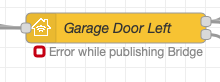
4 Sep 19:05:53 - [error] [homekit-service:Garage Door Left] Bridge [y] publish failed due to: TypeError: Cannot read property 'port' of undefined
This configuration fails with the above mentioned error message (PIN and port blanked for security):
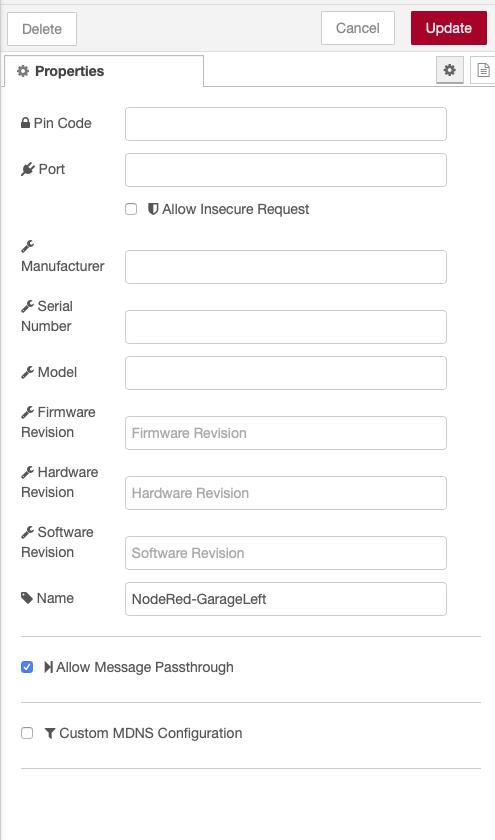
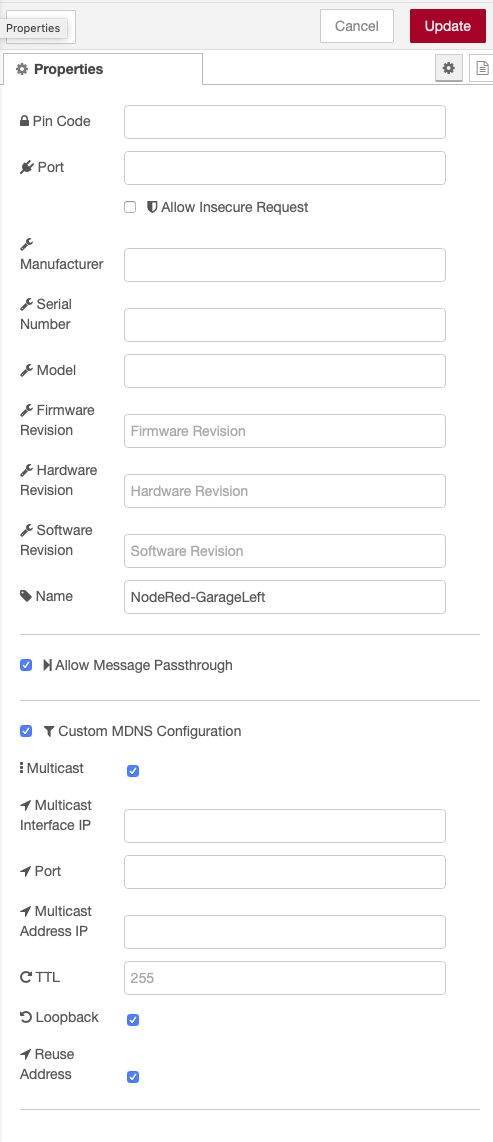
This configuration works without the above mentioned error message (note that all fields under _Custom MDNS Configuration_ are left empty):
 WTell
on 7 Sep 2020
WTell
on 7 Sep 2020
I’m sorry to not be more help. I also don’t remember how long Shaquu is on vacation. Once I see him back I’ll send him right over.
@Maeloch in the meantime, can you try the workaround suggested? Check the box for “custom MDNS configuration” and see if things work. Hopefully that can get you running until our developer is back to have a look.
crxporter
on 7 Sep 2020
Unfortunately, this latest solution doesn't work... At beginning, there is no error, which is great ! But the bridge is now not discoverable on the iPhone Home app. Worst: Node-Red crash after 5 seconds:
[red] Uncaught Exception:
Error: bind EADDRINUSE 0.0.0.0:5353
at dgram.js:338:20
at processTicksAndRejections (internal/process/task_queues.js:85:21)
nodered.service: Main process exited, code=exited, status=1/FAILURE
-- Subject: Unit process exited
-- Defined-By: systemd
-- Support: https://www.debian.org/support
--
-- An ExecStart= process belonging to unit nodered.service has exited.
--
-- The process' exit code is 'exited' and its exit status is 1.
Sep 07 19:57:34 systemd[1]: nodered.service: Failed with result 'exit-code'.
-- Subject: Unit failed
-- Defined-By: systemd
I don't know to solve it without reinstall, again, Node-Red...
Let's go to the Discord to seek for a solution !
Maeloch
on 7 Sep 2020
Hi @Maeloch,
I tried to reproduce the issue, however I do not have a similar setup.
My NR is running in docker (the latest NRCHKB docker release) and have no vlans or firewall on the local network.
What I did is, specified a port right under the pin code and did not touch any other settings (did not specify custom dns).
According to my understanding, the above is in line with your approach.
With the defined port I was able to add the bridge to homekit.
However....
First I did this to an already existing bridge which was causing me some issues and did not appear in homekit for adding. I tried to cleanup up some files and folders one by one, but due to limited time I switched to a brute approach.
I cleaned up the data folder (flows.json backed up) and tried again, then it worked.
Do you have the possibility to try the above approach?
 TheNON75
on 8 Sep 2020
TheNON75
on 8 Sep 2020
Same issue for me. I reverted to @1.1.0 and that fixed it.
 dxdc
on 10 Sep 2020
dxdc
on 10 Sep 2020
Hi @TheNON75,
I'm affraid to purge NR from my Yunohost server, I absolutely don't want to break it. However, I observed the same behaviour on another fresh install (on the Mac), thus a priori clean.
Maeloch
on 12 Sep 2020
Hi @Maeloch
Sure, I can fully understand.
What do you mean by fresh nr on Mac?
Same settings as on rpi or you left it to be pure without firewall etc?
TheNON75
on 12 Sep 2020
Hi @TheNON75
On the Mac I installed NR few days ago (before ask for help here) to test the whole code on a new and fresh NR. However, as you suppose, it's not exactly the same config as the rpi: no firewall, no server...
NB1: In the mac directory (~/.node-red), I note a homekit-persist directory that I don't find on the rpi (sudo find / -name homekit).
NB2: In the rpi, the json file for the flows is named '>>', not something.json.
Maeloch
on 15 Sep 2020
Hi @Maeloch
The naming seems to be weird. I asssume you are running nodered on the rpi native and not in docker.
Nevertheless: in many similar cases it was confirmed that
1) backing up the flows (by file copy or export), 2) stopping nr,
2) cleaning up the nodered data folder,
3) starting nr
4) installing nrchkb
5) restoring flows or importing them
Solved the issue
Now as you have a fresh nr, can you try to import your flows from rpi to the Mac? So this way you can simulate the suggestion safely and get closer to the root cause
Ps.: In case the matter is not urgent or you have currently no time to tinker with it, you may wait until the main brain is back from his holiday. (Should occur very soon)
TheNON75
on 15 Sep 2020
Hi @TheNON75
Safe way to test everything ! So :
- erase of every trace of NR on the mac (rm -rf .node-red)
- install NR with npm (sudo npm install -g --unsafe-perm node-red)
- start NR (node-red)
- install nrchkb with NR manage palette
- create brigde, default parameters except names
and it works.
I scan my ports after fews deploys. As said before, nrchkb port change each times (65453, 65478, 49175, ...).
But when I define a port, same error... I'm not feeling closer to the root of the error...
Maeloch
on 16 Sep 2020
It feels like it is caused by file structure change and browser cache.
I cannot find any other reason yet.
Do you still have this problem @Maeloch ?
If yes then please try this:
- Remove node-red-contrib-homekit-bridged folder from node_modules of your node-red installation
- Clean cache and other data for node-red website in your browser (localhost:1880?).
 Shaquu
on 20 Sep 2020
Shaquu
on 20 Sep 2020
Hi @Shaquu
I follow these steps, on the "test" server:
1. I remove the directory homekit-persist (rm -rf .node-red/homekit-persist)
2. I remove the module node-red-contrib-homekit-bridged (rm -rf .node-red/node_modules/node-red-contrib-homekit-bridged)
3. I remove all caches of the browsers (with Onyx on MacOS) then reboot
4. I start NR on a new flow (without any something.json)
5. I install nrchb from the NR manage palette, create the bridge, etc.
And finaly, same error.
One question: if it is cache dependant of the browser, the error may not occur ? However I note the same behaviour with Firefox & Chrome.
Maeloch
on 20 Sep 2020
Cache is just about the node config view but it looks like is not an issue here.
Could you share your flow after error occurs?
Shaquu
on 20 Sep 2020
It is for th test the simpliest possible flow:
[{"id":"619ad402.f0fab4","type":"homekit-service","z":"9cd535e5.5544a8","isParent":true,"bridge":"cdb3b4c1.fec2d","parentService":"","name":"nom","serviceName":"Lightbulb","topic":"","filter":false,"manufacturer":"NRCHKB","model":"1.2.0","serialNo":"Default Serial Number","firmwareRev":"1.2.0","hardwareRev":"1.2.0","softwareRev":"1.2.0","cameraConfigVideoProcessor":"ffmpeg","cameraConfigSource":"","cameraConfigStillImageSource":"","cameraConfigMaxStreams":2,"cameraConfigMaxWidth":1280,"cameraConfigMaxHeight":720,"cameraConfigMaxFPS":10,"cameraConfigMaxBitrate":300,"cameraConfigVideoCodec":"libx264","cameraConfigAudioCodec":"libfdk_aac","cameraConfigAudio":false,"cameraConfigPacketSize":1316,"cameraConfigVerticalFlip":false,"cameraConfigHorizontalFlip":false,"cameraConfigMapVideo":"0:0","cameraConfigMapAudio":"0:1","cameraConfigVideoFilter":"scale=1280:720","cameraConfigAdditionalCommandLine":"-tune zerolatency","cameraConfigDebug":false,"cameraConfigSnapshotOutput":"disabled","cameraConfigInterfaceName":"","characteristicProperties":"{}","waitForSetupMsg":false,"outputs":2,"x":420,"y":140,"wires":[[],[]]},{"id":"cdb3b4c1.fec2d","type":"homekit-bridge","z":"","bridgeName":"test","pinCode":"111-11-111","port":"1884","allowInsecureRequest":false,"manufacturer":"NRCHKB","model":"1.2.0","serialNo":"Default Serial Number","firmwareRev":"1.2.0","hardwareRev":"1.2.0","softwareRev":"1.2.0","customMdnsConfig":false,"mdnsMulticast":true,"mdnsInterface":"","mdnsPort":"","mdnsIp":"","mdnsTtl":"","mdnsLoopback":true,"mdnsReuseAddr":true,"allowMessagePassthrough":true}]
Maeloch
on 20 Sep 2020
I fixed this in my setup by commenting out lines 75 through 79 in HapBridgeNode.js like this below. The logic is there to make sure you don't choose port 1880 but isn't working as intended.
/*if (self.port !== '' && ((self.port && self.port == 1880) || (self.mdnsConfig.port && self.mdnsConfig.port == 1880))) {
                self.error('Cannot publish Bridge \'' + self.name + '\' on port 1880 as it is reserved for node-red.');
                self.published = false;
                return false;
            }*/
 dalethomas81
on 24 Sep 2020
dalethomas81
on 24 Sep 2020
Hi @dalethomas81
This solution works ! Well play ! Thanks.
The file to modify (HapBridgeNode.js) is located:
/opt/yunohost/nodered/data/node_modules/node-red-contrib-homekit-bridged/build/lib/ --> Yunohost on Raspi
~/.node-red/node_modules/node-red-contrib-homekit-bridged/build/lib/ --> Node-red on Mac
Maeloch
on 30 Sep 2020
Reopen as it needs bugfix to be made in code (possibly).
Shaquu
on 8 Oct 2020
Just to confirm. I have the same error using node-red-contrib-homekit-bridged 1.2.0. It seems it's really the code hinted at by @dalethomas81 (self.mdnsConfig is undefined). For me, I could work around the problem by just ticking the "custom mdns config" box, but leaving everything empty, which seems to create the object. Then the bridge comes up.
Looking forward to the fix! 😉
 tsjensen
on 29 Oct 2020
tsjensen
on 29 Oct 2020
@tsjensen thanks for the confirm.
I believe I made a fix in 1.3.0-dev.6
Possibly soon I will make a minor release.
Shaquu
on 30 Oct 2020
That's great - thank you! 👍
tsjensen
on 30 Oct 2020
@NRCHKB/test please confirm if latest dev solves the issue.
Shaquu
on 3 Nov 2020
@Shaquu I had the same problem as @tsjensen. Upgrade to the 1.3.0-dev.6 fixed the issue
 bibixx
on 23 Nov 2020
bibixx
on 23 Nov 2020
As said, fix is available on dev branch. It will be released in 1.3 in near future.
Shaquu
on 12 Jan 2021
Related issues
 michaltaberski
·
6Comments
michaltaberski
·
6Comments
 Torben80
·
8Comments
Torben80
·
8Comments
 TristanMW
·
11Comments
TristanMW
·
11Comments
 MartiMan79
·
8Comments
MartiMan79
·
8Comments
 Barabba11
·
3Comments
Barabba11
·
3Comments
Most helpful comment
@Shaquu I had the same problem as @tsjensen. Upgrade to the
1.3.0-dev.6fixed the issue