Node-red-contrib-homekit-bridged: Niko homecontrol implentation
Hi just installed everything from node red.
Everything works on the browser and the iPhone but the actual state of a light does not change in my house
I have Niko home control 2 in my house and everything works fine with openhab and a bridge.
But it seems with node-red the outputs our not going through To My niko connected controller Which works through Mqtt
Anybody Any ideas
Thx
 geani
geani
All 44 comments
You probably need to add a function node that will convert the output form the homekit service node to something the niko controller can understand before sending it to the mqtt out node.
It won't magically work and some glue is nearly always needed.
 sjorge
on 24 Feb 2020
sjorge
on 24 Feb 2020
That I didn’t try.
Will test as soon as I get some time. Fingers crossed 🤞
Thx
geani
on 24 Feb 2020
@sjorge perhaps you don't have any idee how I can put all of this into node-red?
I think I'm having issues with mqtt, with mqtt.fx I can connect to my niko but through node-red it stays disconnected :( so I can not send anything through
geani
on 24 Feb 2020
I have no experience with the niki controller, all my functions are for use with zigbee2mqtt.
sjorge
on 24 Feb 2020
no problem ;) you helped a bit so that is already ok
great work with the things you already accomplished :)
geani
on 24 Feb 2020
Let’s start with 2 questions:
1 what do you have so far working with your Niko controller?
2 can you share your current node red (at least a screenshot, preferably the code copied from node red)?
with mqtt.fx I can connect to my niko but through node-red it stays disconnected
This seems to me like your mqtt setup in node red might not be quite right. The mqtt nodes in node red should say “connected”
 crxporter
on 24 Feb 2020
crxporter
on 24 Feb 2020
Niko and openHAB works like a charm ( but you can do more with node-red)
I’ve created a simple lightbulb without the function node this time
Screenshots of working interaction with niko


And this is the flow from node-red
[{"id":"bd92eb2.01c0318","type":"mqtt out","z":"b130cbdb.8b2188","name":"mqtt niko","topic":"hobby/control/devices/evt","qos":"","retain":"","broker":"5d8ecb6c.38f3bc","x":870,"y":500,"wires":[]},{"id":"5d8ecb6c.38f3bc","type":"mqtt-broker","z":"","name":"Niko Connected Controller","broker":"192.168.0.3","port":"8883","tls":"a5471e66.b8b0c","clientid":"fae70002774a4df1a4280c0c7b372d88","usetls":true,"compatmode":false,"keepalive":"60","cleansession":true,"birthTopic":"","birthQos":"0","birthRetain":"false","birthPayload":"","closeTopic":"","closeQos":"0","closeRetain":"false","closePayload":"","willTopic":"","willQos":"0","willRetain":"false","willPayload":""},{"id":"a5471e66.b8b0c","type":"tls-config","z":"","name":"","cert":"","key":"","ca":"","certname":"","keyname":"","caname":"ca-chain.cert.pem","servername":"","verifyservercert":true}]
geani
on 25 Feb 2020
It looks like your mqtt.fx is using port 8884 while your node red looks like 8883. Might want to check the mqtt broker config in node red to be sure your port, login, password, etc are correct...
It’s odd to see 8884, default insecure is 1883 and default secure is 8883
crxporter
on 25 Feb 2020
Tried already with 8883. Same result
But with openHAB I did have to add a homebridge binding that connect to the touch profiles off my Niko controller. In order to receive the itemslist
geani
on 25 Feb 2020
https://www.openhab.org/addons/bindings/nikohomecontrol/
That’s the bridge I’m talking about
But it’s Chinees to me ☺️
Don’t understand why to have mqtt and this bridge at same time. From what I read they use different ports
geani
on 25 Feb 2020
Why do you want to achieve this through MQTT?
Why don't you use the openHAB REST API (ie.: Node-RED openHAB node)?
At least these MQTT problems might disappear. Also 8883 is the default MQTT port for TLS. Do you use TLS also?
 radokristof
on 25 Feb 2020
radokristof
on 25 Feb 2020
@radokristof yes Niko is protected through TLS.
When I setup my own mqtt broker everything works fine,
But Niko uses its own broker with certificate and encryption. So I guess it must go through their own broker
geani
on 25 Feb 2020
@geani I see. Sorry I don't know anything about Niko.
So you use the Nikohome binding with openHAB? It seems it uses other methods to connect to Niko.
Anyway, if everything works from openHAB and you control your Niko system through openHAB, why don't you connect Node-RED to openHAB and not directly to Niko Home?
Than you don't have to mess around with MQTT certificates and other things, you can control openHAB (and all your items, doesn't matter what kind of device it is) easily from Node-RED.
radokristof
on 25 Feb 2020
@radokristof Imo discoverd node-red after openHAB.
So now I’m getting my items list from Niko through openHAB. Haven’t figured out how to get all my items directly in node-red
OpenHAB has a special binding bridge for Niko that I don’t find in node-red
geani
on 25 Feb 2020
why don't you connect Node-RED to openHAB
This would be a great option. Except I think you might be trying to keep your HomeKit (node red) setup up to date over openhab restarts.
That being said, I think you should check the MQTT setup in node red. Since it’s working in MQTT.fx you’ll want to copy that exactly. I looked more this morning and noticed you’re setting node red connection with TLS while you’re using a user name / password in MQTT.fx. It does seem that the (first) issue is the MQTT connection.
IP: 192.168.0.3
Port: 8884
TLS: no
Username: hobby
Password: •••••••••••••••
Start by trying a MQTT input connected to a debug node. Subscribe to #/# (that should show you everything). Then watch the debug to see if your Niko stuff is sending anything. Once that’s set right we can start building the function nodes to translate Niko -> HomeKit and HomeKit -> Niko
crxporter
on 25 Feb 2020
Will try this evening. Thx for the help
Ps how can I subscribe to #/#
Is that in mqtt.fx or in node-red?
geani
on 25 Feb 2020
The wildcard subscription is in node red. When you place a mqtt input node you’ll fill in the topic with “#/#” instead of the full topics that you are using.
Alternately you can use “hobby/control/devices/evt”.
If this doesn’t work and you are planning to stick with openhab, then you may have better luck starting out with the node red openhab nodes - that would allow you to connect all of your openhab items to anything in node red. Of course if you’re jumping ship from OH like I have you’ll of course want to get node red figured out.
crxporter
on 25 Feb 2020
Yeah seems node red is more advancedand you can do more with it
Still have to learn a bit.
Think I chose the wrong lessons in school 😜
geani
on 25 Feb 2020
@crxporter did exactly as you said but still nothing, mqtt not working at all pff :(
geani
on 25 Feb 2020
I just found this and it looks like your previous approach was correct using port 8884 and the SSL/TLS certificate. (Page 7)
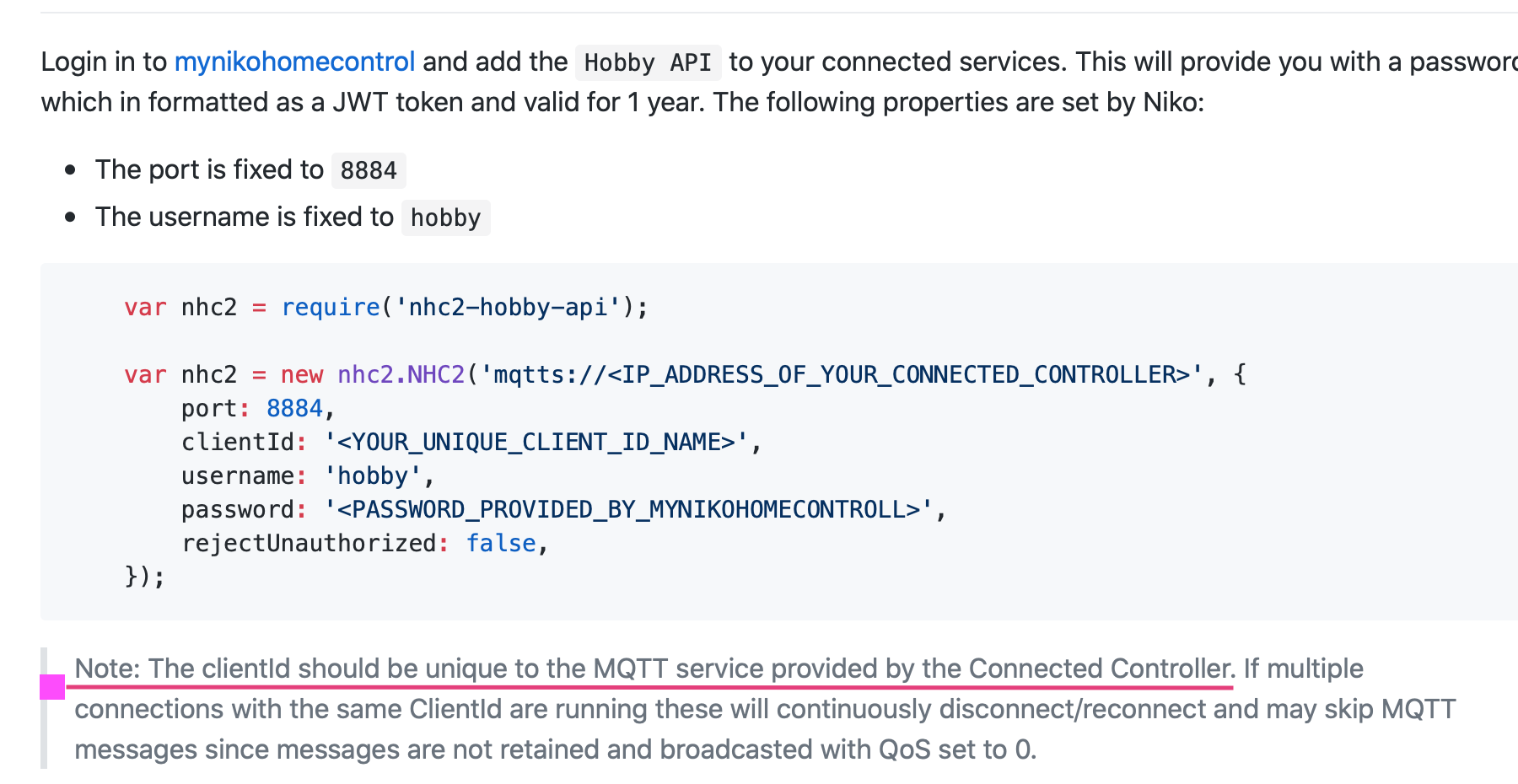
I found another project here is using port 8884, the hobby user name, unique client ID (leave blank in node red), your token as a password, and perhaps importantly is set “reject unauthorized : false”.
The reject unauthorized set to false may be important. I can’t really check any of my things right now but poke around the mqtt configuration to see if there’s a way to allow unauthorized connections.
crxporter
on 25 Feb 2020
It’s odd to me that your mqtt.fx is working but your nodered is not. Once you get that to show “connected” and start receiving messages you’ll be much closer to a working setup
crxporter
on 25 Feb 2020
yeah I know. I tried everything. its weird
geani
on 25 Feb 2020
perhaps something with the Client ID?
geani
on 25 Feb 2020
geani
on 25 Feb 2020
If the client id is left blank in node red then it will auto-generate a random client id.
You’re of course free to create your own unique client id.
crxporter
on 25 Feb 2020
my own broker works like a charm but niko, damn :)
must be something small to configure.
and niko is not feeling like helping the customers,
it's even mentioned in our documentation of the api
break it, fix it yourself :)
geani
on 25 Feb 2020
break it, fix it yourself
I saw that also. They’re so helpful!
Is there any kind of firewall between your node red and your Niko? Is port 8884 open everywhere on your network?
I’m waiting for my wife to come out of surgery just reading through various Github projects (linked above and this)... perhaps you could open an issue on one of those to see if they know any tricks to connect. I’d start with the homebridge one since it’s javascript like nodered.
crxporter
on 25 Feb 2020
no firewall that I'm aware off
wil read the GitHub Pages and can always ask.
what was the link for the homebridge one?
thanks for helping
geani
on 25 Feb 2020
Homebridge Niko:
crxporter
on 25 Feb 2020
now I see, I already contacted this person but he has no knowledge of that, I had to ask another person, but that one isn't responding :)
geani
on 25 Feb 2020
You’ll probably want to point out that you’re having trouble connecting to the mqtt and ask if there were any odd tricks they had to deal with in the Niko implementation of mqtt
crxporter
on 25 Feb 2020
ok will try that, hope they have answers
geani
on 25 Feb 2020
this is the binding that I installed in openhab to make things work.
you see that it connects to port 8883 of the niko controller.
and the touch profile is something I had to create on my home installation for it to recognise the items I have.
that I can not enter anywhere in node-red
it's something mark herwege created for openhab
I've sent him a message now, hopefully he'll re-ply with answers.
guess there has to be created something similar for node-red too

geani
on 25 Feb 2020
that's what I got from him
it's a lot :)
maybe you understand a bit
Nothing specific I remember. But I started well before the Hobby API became available. Anyway, that should not make a big difference. When testing the connection originally, I was using MQTT Spy to test the connection. When that was connecting, I knew I should be able to do it in Java. The underlying MQTT communication in the binding relies on the MQTT library used. In openHAB, the MQTT library was changed recently, but that did not impact the binding in any major way. So it looked like it was fairly stable to me.
One thing to be aware of is that the communication messages used by Niko are not very easy to map to a MQTT topic/subscribe mechanism. In an ideal world, MQTT messages should be status updates of a topic. But Niko decided to wrap the status of activities in messages that only convey the message type. That’s why I feel the standard MQTT binding in openHAB would be very challenged to provide an appropriate solution. You basically need to keep a copy of a representation of the model locally, instead of just reacting on events. It would require an awful amount of rules in openHAB to make the standard MQTT binding work for Niko Home Control. I don’t know NodeRed an any extend, but I sincerely hope it is easier on that side.
Cheers,
Mark
geani
on 25 Feb 2020
Are you running node red on a pi? Could you try installing it on your Mac (which has the functional mqtt.fx connection)? If you’ve indeed tried all the options in the mqtt settings then the next step is to check if there are network problems blocking the connection, easy way is to run NR on a machine known to be able to make the connection.
The explanation from the openhab developer is mostly saying that parsing the JSON to/from Niko was a big project. That’s the project you’ll have to look forward to once you get the mqtt connection to run.
crxporter
on 25 Feb 2020
yes on a pi, will install on Mac and let you know how it goes.
one question, with mqtt.fx. if I publish an event to the topic on my niko, should the light then switch on or is this connection just to test the communication?
geani
on 25 Feb 2020
if I publish an event to the topic on my niko, should the light then switch on
I would assume the light should turn on if you’re publishing the right message to the correct topic. Once the connection is good then you should have a two-way connection with the Niko where it publishes events when things change (switch a light switch? I don’t know what hardware you have) and it should receive your commands to control the Niko devices.
This is rough to test without having the hardware, in mostly describing what I would expect to see if it works similar to other devices.
crxporter
on 25 Feb 2020
then I think I have to look into mqtt on Mac to then, because I can't publish anything, everything comes on the screen but no lights turn on.
just installed node-red on Mac and its the samen with mqtt. no respond.
I use the pi to for openhab so it can be that the pi is not connecting properly, so normally I would have to install everything on my Mac to test, damn
geani
on 25 Feb 2020
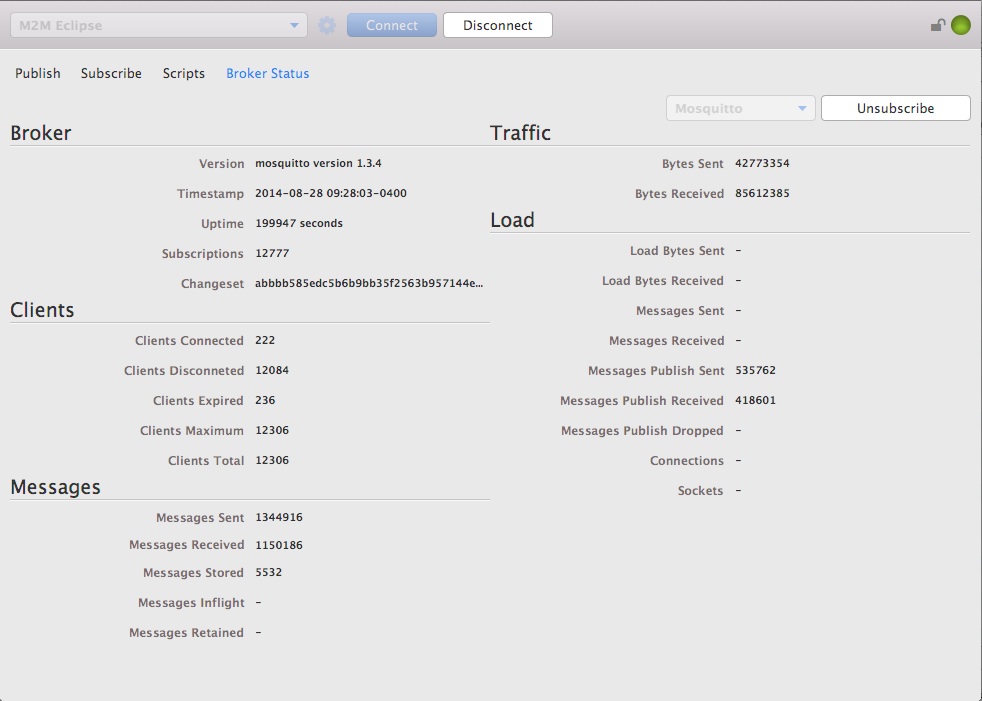
Tried everything from my Mac last night and it’s the same as on the pi.
What I did see.
In mqtt.fx my connection is online but when I click the button subscribe. Shown in screenshot I see nothing
But with my own broker I can. So I can view messages received etc,..
Maybe there’s still something with the broker that comes with Niko.
geani
on 26 Feb 2020
@geani would you mind to summarize current status in few words?
Is it a problem with NRCHKB, node-red or any other plugins of node-red or any other 3rd party libraries or applications?
Is there any why we can assist you more?
 Shaquu
on 1 Mar 2020
Shaquu
on 1 Mar 2020
Side note I haven’t responded since I don’t have any fresh ideas. Seems like an issue connecting between node red and Niko.
crxporter
on 1 Mar 2020
@Shaquu as you can see in previous posts there an attachment. In openHAB there’s a plugin or binding Niko home control II bridge.
I think that’s the one that’s making all the connections possible. Since that plugin doesn’t exist in node-red the journey ends here. I don’t have the knowledge to create something myself ;) but thanks for the help
geani
on 2 Mar 2020
@crxporter i understand. Do I may not work. I still learned things.
I’m trying to get things working now with openhab node.
Found you’re examples for the light and blinds ,etc but still have to learn. Don’t know if I can ask you questions somewhere else? Instead of writing this issues page full ☺️
geani
on 2 Mar 2020
@geani if we are through with Niko for now we can close this issue. If you come back to it later just comment and we can reopen.
For other questions - either open up a new issue for each or start a general issue like “general help connecting to openhab” or something.
Benefits of discussing here:
- others may have better suggestions than me, I know @radokristof is still using openhab which could be helpful for you
- future users can benefit from searching the issues here
I spend a decent amount of my free time here and am notified of all issues on the project so I’ll watch for your future questions!
crxporter
on 2 Mar 2020
Related issues
 djiwondee
·
7Comments
crxporter
·
3Comments
Shaquu
·
9Comments
djiwondee
·
7Comments
crxporter
·
3Comments
Shaquu
·
9Comments
 Supergiovane
·
9Comments
Supergiovane
·
9Comments
 a2sky
·
7Comments
a2sky
·
7Comments
Most helpful comment
@geani if we are through with Niko for now we can close this issue. If you come back to it later just comment and we can reopen.
For other questions - either open up a new issue for each or start a general issue like “general help connecting to openhab” or something.
Benefits of discussing here:
I spend a decent amount of my free time here and am notified of all issues on the project so I’ll watch for your future questions!