Node-red-contrib-homekit-bridged: RGB MQTT strip to HomeKit
Hello! I have three MQTT topics in a color strip- R, G, B. How can I combine and display them, manage them in HomeKit?
 a2sky
a2sky
All 7 comments
Here is an example I put together a while ago that has a color space conversion node along with some functions to help keep things synced.
You can start with the RGB section of the code and go from there. (Delete the HSV and HSL sections after importing)
You shouldn’t need to do much more than replace the inject and debug nodes with your mqtt nodes.
If you need more help I have questions:
-what are your incoming and outgoing topics?
-do your lights send r, g, and b separate or together?
-do you always send r, g, and b when controlling them?
-what is the scale of your input and output: 0-100 and 0-255 are common?
Have a look at the wiki page and I’ll be happy to coach a bit if you have more questions
 crxporter
on 25 Mar 2020
crxporter
on 25 Mar 2020
Thanks! I began to understand how it works, but I still can’t get it to work for me. There are four topics on the device:
- /devices/dev1/controls/Green
- /devices/dev1/controls/Red
- /devices/dev1/controls/Blue
- /devices/dev1/controls/RGB
In topics r, g, and b values from 0 to 255 are sent
In topics RGB values from 0 to 255 are sent, and they have the form 255;255;255
a2sky
on 25 Mar 2020
We can and probably should just use the 4th topic and always send all 3 values.
I’m busy now for a couple of hours but should have time this afternoon to put together a modified function to use the 4th topic.
Important question- are there other things controlling the device? Meaning do we also need to watch for the status of the device sending updates to keep homekit synced?
crxporter
on 25 Mar 2020
it is perfectly!)! yes, there is also a physical switch, it is connected to the RGB tape controller, and sends the values to the desired mqtt topics
a2sky
on 25 Mar 2020
Ok I think I have it! I have assumed a couple of things:
1- your strip input will always publish to /devices/dev1/controls/RGB
2- the format of that topic is always 255;255;255 (3 numbers separated by semicolon)
There is an inject node labeled "Input from /devices/dev1/controls/RGB (white test)" - replace that with your mqtt subscribed to /devices/dev1/controls/RGB. There is a debug node labeled "output to /devices/dev1/controls/RGB" - replace that with your mqtt posting to /devices/dev1/controls/RGB. (these are circled in red in my screenshot below)
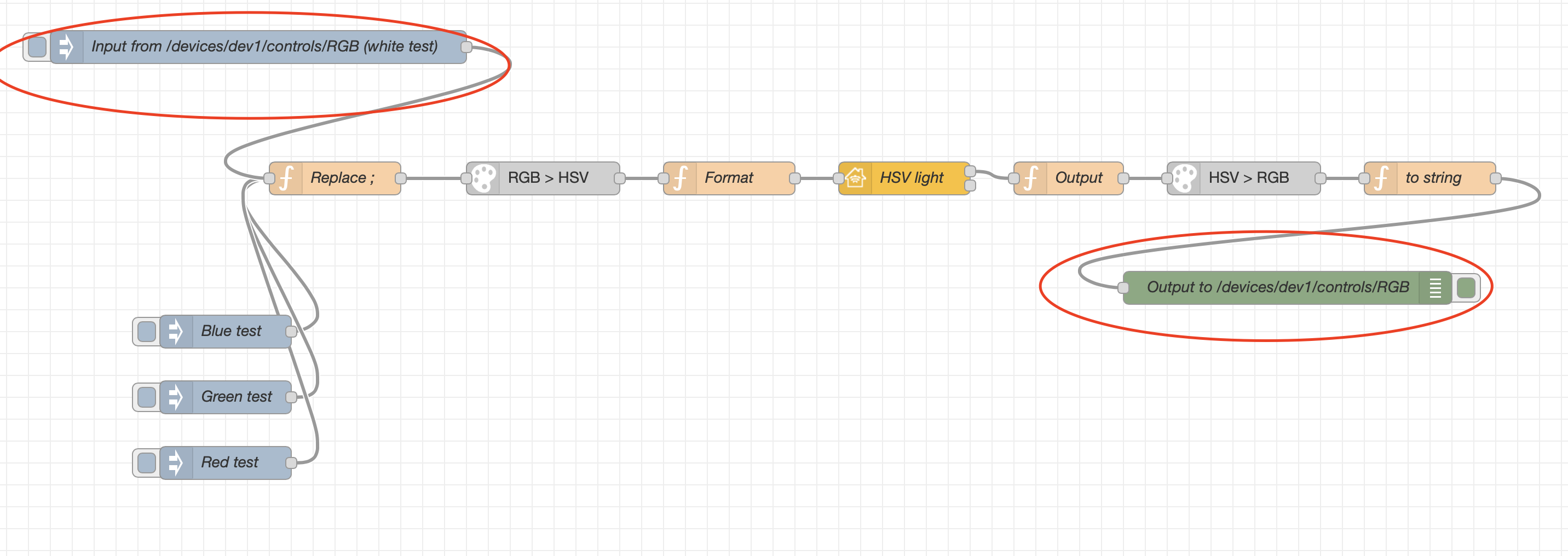
Finally the code to copy into node red- triple click here, copy, then hit "import from clipboard" in node red:
[{"id":"4c0ed781.0f1b78","type":"function","z":"f3d8120d.27f7e","name":"to string","func":"msg.payload = String(msg.payload).replace(',',';').replace(',',';');\n\nreturn msg;","outputs":1,"noerr":0,"x":1340,"y":460,"wires":[["4c922994.9a6f"]]},{"id":"90a2e15e.cbfe18","type":"color-convert","z":"f3d8120d.27f7e","input":"hsv","output":"rgb","outputType":"array","x":1170,"y":460,"wires":[["4c0ed781.0f1b78"]]},{"id":"4c922994.9a6f","type":"debug","z":"f3d8120d.27f7e","name":"Output to /devices/dev1/controls/RGB","active":true,"tosidebar":true,"console":false,"tostatus":false,"complete":"payload","targetType":"msg","x":1210,"y":560,"wires":[]},{"id":"db08b01b.f7f3c8","type":"function","z":"f3d8120d.27f7e","name":"Output","func":"var Hue = flow.get('Hue')||0;\nvar Saturation = flow.get('Saturation')||0;\nvar Brightness = flow.get('Brightness')||100;\n\nif(msg.payload.Hue){\n Hue = msg.payload.Hue;\n flow.set('Hue',Hue);\n}\nif(msg.payload.Saturation){\n Saturation = msg.payload.Saturation;\n flow.set('Saturation',Saturation);\n}\nif(msg.payload.Brightness){\n Brightness = msg.payload.Brightness;\n flow.set('Brightness',Brightness);\n}\nif (msg.hap !== undefined && msg.hap.context !== undefined) {\n if(msg.payload.On === true){\n return [{\"payload\":[Hue,Saturation,Brightness]}]\n }\n if(msg.payload.On === false){\n return [{\"payload\":[0,0,0]}]\n }\n else{\n return [{\"payload\":[Hue,Saturation,Brightness]}]\n }\n}","outputs":1,"noerr":0,"x":1010,"y":460,"wires":[["90a2e15e.cbfe18"]]},{"id":"bb163790.0cce2","type":"homekit-service","z":"f3d8120d.27f7e","isParent":true,"bridge":"90925253.c7c4c8","parentService":"","name":"HSV light","serviceName":"Lightbulb","topic":"","filter":false,"manufacturer":"Default Manufacturer","model":"Default Model","serialNo":"Default Serial Number","cameraConfigVideoProcessor":"","cameraConfigSource":"","cameraConfigStillImageSource":"","cameraConfigMaxStreams":"","cameraConfigMaxWidth":"","cameraConfigMaxHeight":"","cameraConfigMaxFPS":"","cameraConfigMaxBitrate":"","cameraConfigVideoCodec":"","cameraConfigAudioCodec":"","cameraConfigAudio":false,"cameraConfigPacketSize":"","cameraConfigVerticalFlip":false,"cameraConfigHorizontalFlip":false,"cameraConfigMapVideo":"","cameraConfigMapAudio":"","cameraConfigVideoFilter":"","cameraConfigAdditionalCommandLine":"","cameraConfigDebug":false,"cameraConfigInterfaceName":"","characteristicProperties":"{\n \"Brightness\":true,\n \"Hue\":true,\n \"Saturation\":true\n}","x":860,"y":460,"wires":[["db08b01b.f7f3c8"],[]]},{"id":"395838b8.7ade58","type":"function","z":"f3d8120d.27f7e","name":"Format","func":"var outmsg={};\nvar Hue = flow.get('Hue')||0;\nvar Saturation = flow.get('Saturation')||0;\nvar Brightness = flow.get('Brightness')||100;\n\nif(msg.payload[0]===0 && msg.payload[1]===0 && msg.payload[2]===0){\n outmsg.payload={\"On\":false};\n} else{\n Hue = msg.payload[0];\n flow.set('Hue',Hue);\n Saturation = msg.payload[1];\n flow.set('Saturation',Saturation);\n Brightness = msg.payload[2];\n flow.set('Brightness',Brightness);\n outmsg.payload={\n \"On\":true,\n \"Hue\":Hue,\n \"Saturation\":Saturation,\n \"Brightness\":Brightness\n }\n}\nreturn [outmsg];\n","outputs":1,"noerr":0,"x":700,"y":460,"wires":[["bb163790.0cce2"]]},{"id":"48d7fcb8.21956c","type":"color-convert","z":"f3d8120d.27f7e","input":"rgb","output":"hsv","outputType":"array","x":530,"y":460,"wires":[["395838b8.7ade58"]]},{"id":"83cdb6c1.4f63a","type":"function","z":"f3d8120d.27f7e","name":"Replace ;","func":"msg.payload = msg.payload.split(\";\");\nfor (n=0;n<3;n++){\n msg.payload[n]=Number(msg.payload[n])\n}\nreturn msg;","outputs":1,"noerr":0,"x":340,"y":460,"wires":[["48d7fcb8.21956c"]]},{"id":"516f455c.72ed54","type":"inject","z":"f3d8120d.27f7e","name":"Blue test","topic":"","payload":"3;5;255","payloadType":"str","repeat":"","crontab":"","once":false,"onceDelay":0.1,"x":240,"y":600,"wires":[["83cdb6c1.4f63a"]]},{"id":"e3044d88.d302","type":"inject","z":"f3d8120d.27f7e","name":"Green test","topic":"","payload":"23;255;2","payloadType":"str","repeat":"","crontab":"","once":false,"onceDelay":0.1,"x":240,"y":660,"wires":[["83cdb6c1.4f63a"]]},{"id":"45a92957.e7533","type":"inject","z":"f3d8120d.27f7e","name":"Red test","topic":"","payload":"255;5;9","payloadType":"str","repeat":"","crontab":"","once":false,"onceDelay":0.1,"x":240,"y":720,"wires":[["83cdb6c1.4f63a"]]},{"id":"c4bb9cce.902e38","type":"inject","z":"f3d8120d.27f7e","name":"Input from /devices/dev1/controls/RGB (white test)","topic":"","payload":"255;255;255","payloadType":"str","repeat":"","crontab":"","once":false,"onceDelay":0.1,"x":270,"y":340,"wires":[["83cdb6c1.4f63a"]]},{"id":"90925253.c7c4c8","type":"homekit-bridge","z":"","bridgeName":"Dev2","pinCode":"111-11-111","port":"","allowInsecureRequest":false,"manufacturer":"Default Manufacturer","model":"Default Model","serialNo":"Default Serial Number"}]
This is all updated and tested today with NRCHKB version 1.0.4. Give it a try and let me know how things go.
crxporter
on 25 Mar 2020
Yes! Everything works great! Thank you very much for your work!
a2sky
on 25 Mar 2020
Excellent! Come back anytime!
crxporter
on 25 Mar 2020
Related issues
 TristanMW
·
11Comments
TristanMW
·
11Comments
 djiwondee
·
11Comments
djiwondee
·
11Comments
 Delphius7
·
3Comments
Delphius7
·
3Comments
 michaltaberski
·
6Comments
michaltaberski
·
6Comments
 Supergiovane
·
9Comments
Supergiovane
·
9Comments
Most helpful comment
Ok I think I have it! I have assumed a couple of things:
1- your strip input will always publish to
/devices/dev1/controls/RGB2- the format of that topic is always
255;255;255(3 numbers separated by semicolon)There is an inject node labeled "Input from /devices/dev1/controls/RGB (white test)" - replace that with your mqtt subscribed to
/devices/dev1/controls/RGB. There is a debug node labeled "output to /devices/dev1/controls/RGB" - replace that with your mqtt posting to/devices/dev1/controls/RGB. (these are circled in red in my screenshot below)Finally the code to copy into node red- triple click here, copy, then hit "import from clipboard" in node red:
This is all updated and tested today with NRCHKB version 1.0.4. Give it a try and let me know how things go.