Node-red-contrib-homekit-bridged: Duplicate device buttons in the Home app
Describe the bug
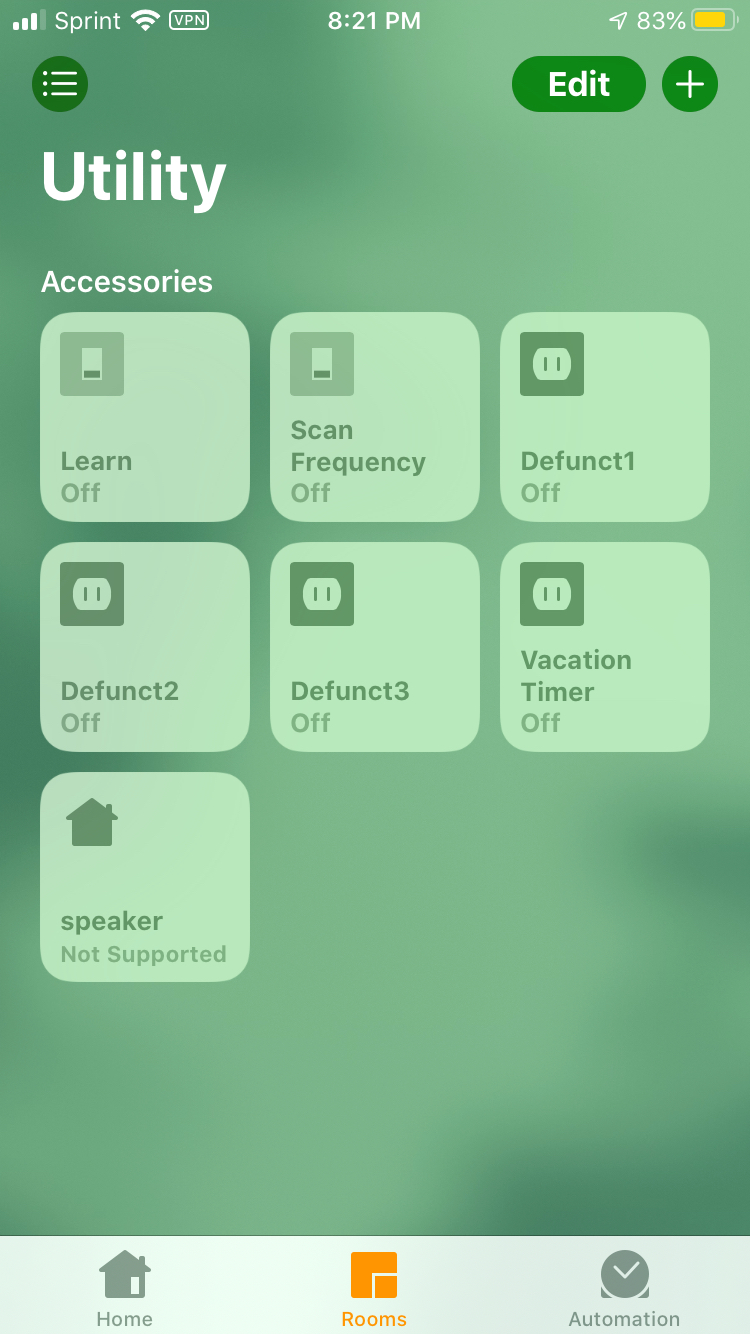
This might be the result of a misconfig or misunderstanding on my part, but I have 1 "device" I created that has 3 defunct duplicates in the home app on my iphone. I renamed them (as "Defunct1,2,3") in the home app so I wouldn't mistakenly use the wrong one.
I have dozens of other devices that I created to mirror my homebridge install for testing, but none of them have duplicates. This is the first pseudo-device I've tried to create that just turns on/off my vacation timer node.
To Reproduce
Steps to reproduce the behavior:
I'm not sure how to reproduce it, but I can show you how I have it set up:

Expected behavior
There should only be 1 "Vacation Timer" button in the home app.
Flow
See above
Screenshots
Node the 3 buttons I renamed to "defunct". They were "Vacation Timer" and did not work.
Additional context
When I initially created the vacation timer "device", there was only 1. I think it may be getting duplicated when I restart my Pi.
 hepcat72
All 23 comments
Version of this plugin?
Version of node-red?
Version of iOS?
There are many recent improvements which are currently in the dev branch only. That being said, this is a bug I have not ever heard of. If you delete the bridge and add your vacation timer item back, can you repeat the issue?
 crxporter
on 27 Jan 2020
crxporter
on 27 Jan 2020
Version of this plugin?
0.7.1
Version of node-red?
EDIT (whoops, I gave you the version of node.js)
Node.js: v11.12.0
Node-Red: 1.0.2
Version of iOS?
13.3
There are many recent improvements which are currently in the dev branch only. That being said, this is a bug I have not ever heard of. If you delete the bridge and add your vacation timer item back, can you repeat the issue?
I'll have to get back to you on that.So, to do that, I take it, I'd have to click on the pencil icon next to the bridge select list in one of the nodes and click delete? Then would I have to re-select the new bridge in all the homekit nodes?
hepcat72
on 27 Jan 2020
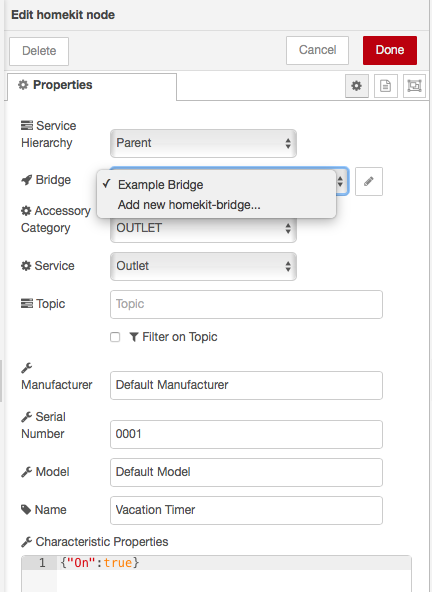
Here are the properties of that node and the contents of the bridge select list:
hepcat72
on 27 Jan 2020
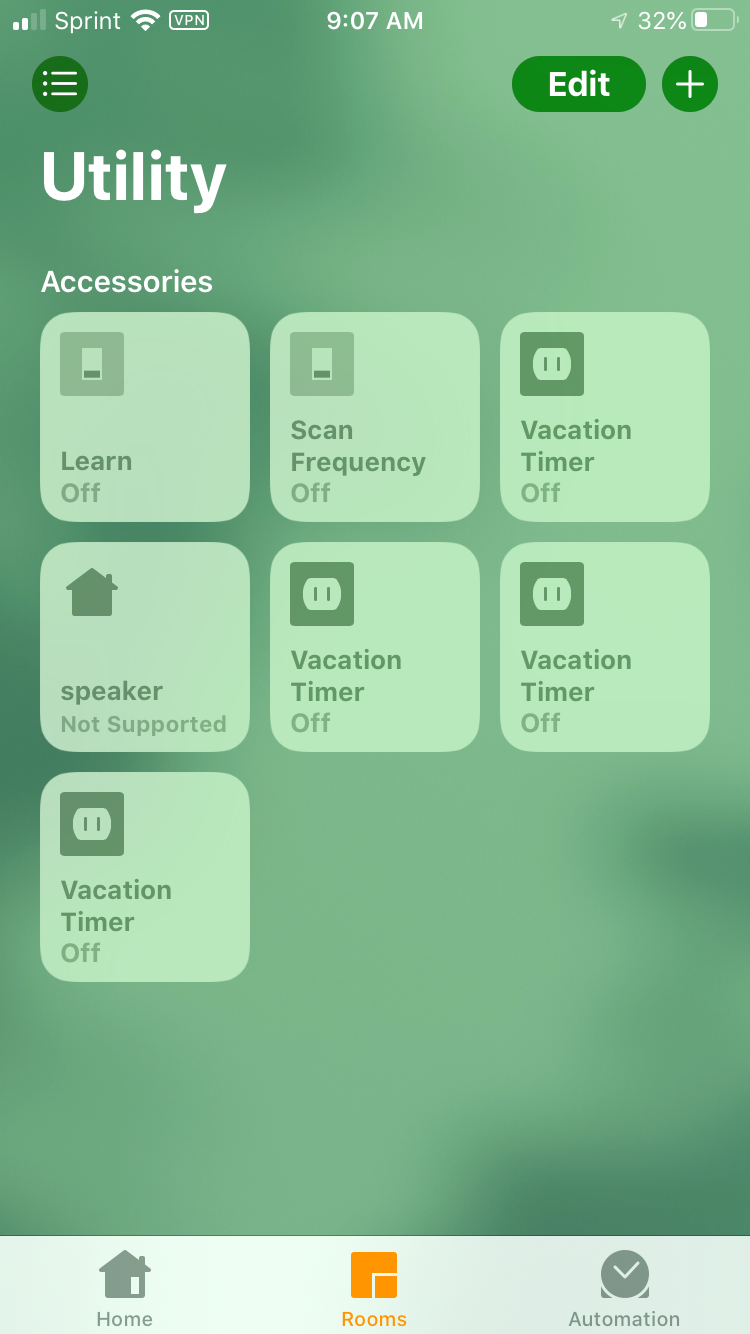
I just updated the HomeKit node to 0.8.0 and restarted Node Red. The 4 vacation time or buttons are back with their original names.
hepcat72
on 27 Jan 2020
To delete the bridge you will need to go to the configuration nodes and delete the entire bridge. Then be sure to delete all accessories as well.
Either before or after this, you will want to delete the bridge from your home app. Go to the main screen, click the "house" icon in the top left, then find and remove your bridge.
Once you've done that, go ahead and "deploy" then start adding homekit back in.
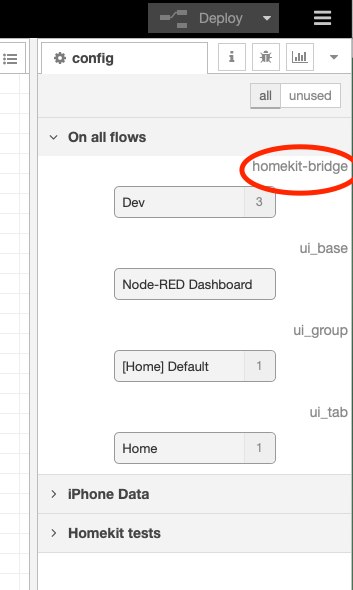
Where to find the configuration nodes:
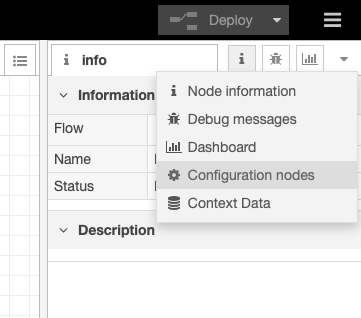
You may have many configuration nodes, you are looking for one that says "homekit bridge" :
crxporter
on 27 Jan 2020
Following this - if you can recreate the issue we will check with @shaquu and others to see if anyone else has seen this bug.
crxporter
on 27 Jan 2020
By "accessories", do you mean the 26 homekit nodes I added to my homekit flow? That's a lot of work.
Perhaps I found another clue/the cause. I was just looking through the config node settings to see what deletion entailed and I looked at the select list of flows that have homekit nodes on them (indicated by an asterisk in the select list). My vacation subflow has a copy of the vacation timer node that I'd forgotten about. My note in that flow was that I'd put it there so that if I run that subflow by any other means than via the home app, the status of the button in the home app would be updated.
I'll bet that's the reason the vacation timer node appears 4 times in the home app.
My rudimentary understanding of subflows is that they are a "template". They don't exist or run unless called in a real flow. So perhaps when I turn on or off the vacation timer, it is calling the subflow and creating a duplicate node?
hepcat72
on 27 Jan 2020
My rudimentary understanding of subflows is that they are a "template". They don't exist or run unless called in a real flow. So perhaps when I turn on or off the vacation timer, it is calling the subflow and creating a duplicate node?
If you have a "subflow" node placed in your flow (not just saved for later in the sidebar) then it will be deployed and will make extra accessories.
That being said, the HomeKit nodes do not work with subflows, there was another question about this a while ago and the conclusion was to recommend not ever placing a homekit node inside of a subflow. Try removing the homekit item from all subflows and see if you still have the quadruple item.
crxporter
on 27 Jan 2020
OK. Let me ask this first. Can a single accessory have a copy on multiple (non-sub) flows and yet still be represented in the home app as a single button? If so, I was thinking that I would convert the subflow into a regular flow that takes an input.
hepcat72
on 27 Jan 2020
Can a single accessory have a copy on multiple (non-sub) flows and yet still be represented in the home app as a single button?
No, this would create multiples of the accessory (whether it's in a subflow or not). To do this you would want to use link nodes all going back to the single homekit accessory.
I think we are making progress, let me put together a quick example for you and send a screen shot.
crxporter
on 27 Jan 2020
OK, great. I was confused. I was operating under a different paradigm such as the one for wemo, where you drag on a node from the sidebar and select the device it's for in a select list. You can have multiple nodes on different flows for the same device. It didn't occur to me that I couldn't design flows this way for homekit-bridged.
hepcat72
on 27 Jan 2020
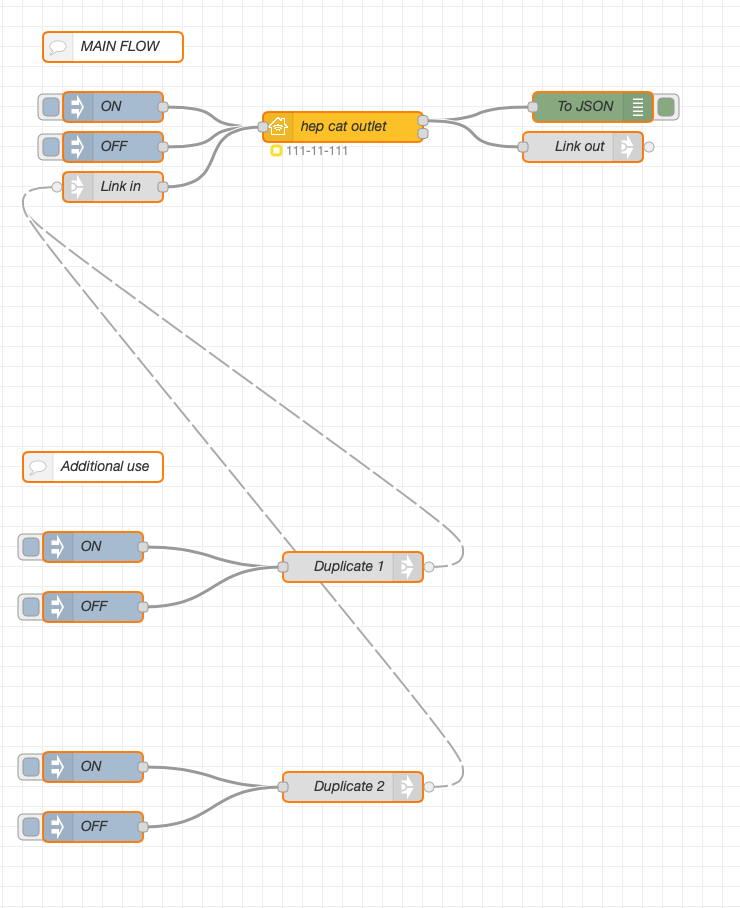
Have a look at this, feel free to ask more questions. The Link Node is your friend on this one - you can place a link going into and out of the homekit node. Then whenever you want to add another trigger to turn on/off the homekit node you'd just connect to that link. Links can be set up within a single flow tab or jump across flow tabs.
Here's a quick concept of what it would look like. The dashed lines between links show up when they're properly configured and selected.
crxporter
on 27 Jan 2020
OK, I was just looking at this and I'm a little confused.
So I have my vacation flow. It turns on or off vacation mode when it gets an input.
It can be turned on via:
- An IFTTT button widget
- An IFTTT geofence (on days marked in my calendar as "vacation")
- An injection node in the same flow that handles the incomming IFTTT webhook
- And my new homekit "vacation timer" button (in the home app)
That homekit "vacation timer" node copy I had created inside the vacation flow was a dead end. I'm a little concerned that if I instead, link out to the vacation timer homekit node to update the button in my home app, it will create a loop? Because that vacation timer homekit node calls the vacation flow.
If the homekit node receives an input in node red, does it trigger the output or does it simple update the button state in the home app?
The alternative would be that I would have to send all 4 vacation mode triggers through the vacation timer homekit node.
Can you clear up my confusion here? Other nodes I've used have a status update node and a separate node that triggers an action.
hepcat72
on 29 Jan 2020
There should be many ways to do this, you can probably leave all of your IFTTT items as they are.
Let’s step back a bit - what does the vacation timer actually trigger? Does it send an IFTTT message, set a global variable in node red, send an HTTP request, send an email, send a MQTT message...
A look inside the vacation subflow would be very helpful.
Once we get that figured out, there are various ways to link it to homekit. The important parts about a homekit item are:
-set the homekit item to on (inject {"On":true}) whenever the vacation mode turns on regardless what turns it on
-set the homekit item to off (inject {"On":false}) whenever the vacation mode turns off regardless what turns it off
-be able to send on/off messages from the homekit item into the vacation timer
I think the next thing I need to make better recommendations is a look inside that vacation subflow.
PS: remind me to show you the loop prevention node if I forget. On newer versions of this plugin (I think dev branch) it’s a little easier but still possible with your version 0.7.1.
crxporter
on 29 Jan 2020
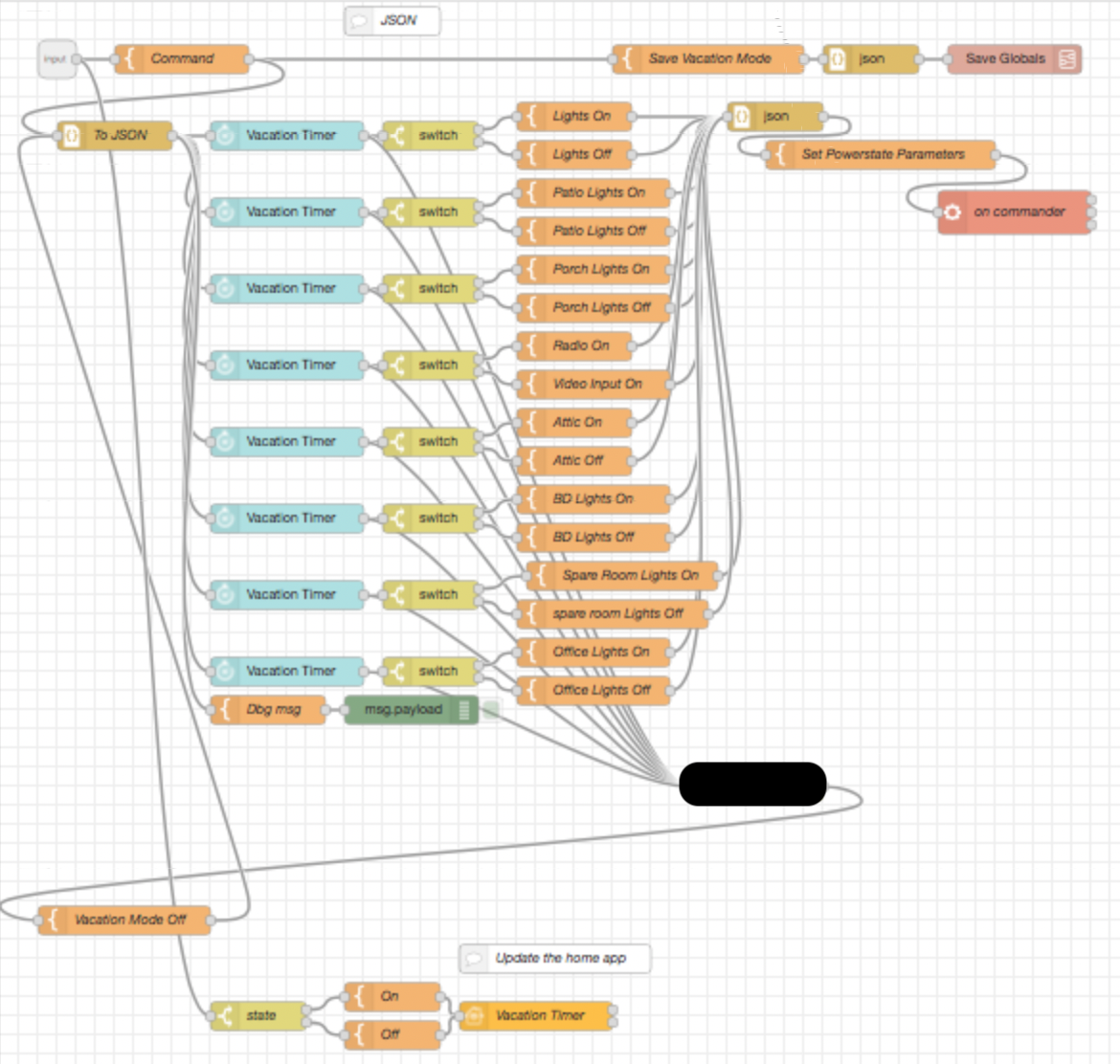
Perhaps I'm being overly cautious, but there is some sensitive info in the flow, so I'm a little wary of sharing it. It's probably fine, but for now, I'll share a redacted screen-cap and describe it.
The input in to the vacation subflow indicates whether to turn vacation mode on or off. It saves that in a global by calling another subflow I've created to save global variables.
It takes that on/off input and sends it to a series of "Vacation Timer" nodes, each with a separate set of settings for when to randomly turn on/off various devices.
I added a little loop in there to turn off vacation mode in a specific instance. (It should be turned off when we arrive home via a geofence, but since we have Sprint (which uses a cdma network), that webhook can fail if we're on the phone when we cross the geofence boundary, so I added that loop as a backup.)
I realized after posting my last comment that I can use your link suggestion if I call it in those other places that call the vacation subflow instead of from inside the subflow. It creates a bit of redundancy that way, but it avoids the infinite loop. Although, I can think of another way which would avoid the redundancy.
hepcat72
on 29 Jan 2020
Note that I have not yet removed that vacation timer homekit node from the flow. It's that one at the bottom that we believe caused the duplicates in the home app.
hepcat72
on 29 Jan 2020
Perhaps I'm being overly cautious, but there is some sensitive info in the flow
Not a problem at all.
So - the timer is essentially turning on / off your lights when you are away. Cool.
- Yes, the vacation timer inside of duplicated subflows is the source of your repeated items in homekit.
- You will need to put together an "input side" for the homekit item. This will be the stuff that keeps your homekit button up-to-date about whether you're in vacation mode or not.
- You will need to put together an "output side" for the homekit item. This will be the stuff that switches vacation mode on or off when you click the "vacation timer" button in the iPhone Home app.
Item 1 is simple, clear that "update home app" area out.
Item 2 should be simple - here is a concept of what I would do, based on your "update home app" there in your subflow you just shared. My idea is to take the global.VacationTimer every 15 seconds and put it through your state switch and on/off templates (I don't know if that is your global variable, rename it as necessary).
Item 3 is also simple, but you need to include the infinate-loop prevention node. The first node to the right of your HomeKit item will be a Function node. Then you can continue with what you had before (switch, on/off templates, json, and vacation subflow).
Conceptually, the flow should look like this:
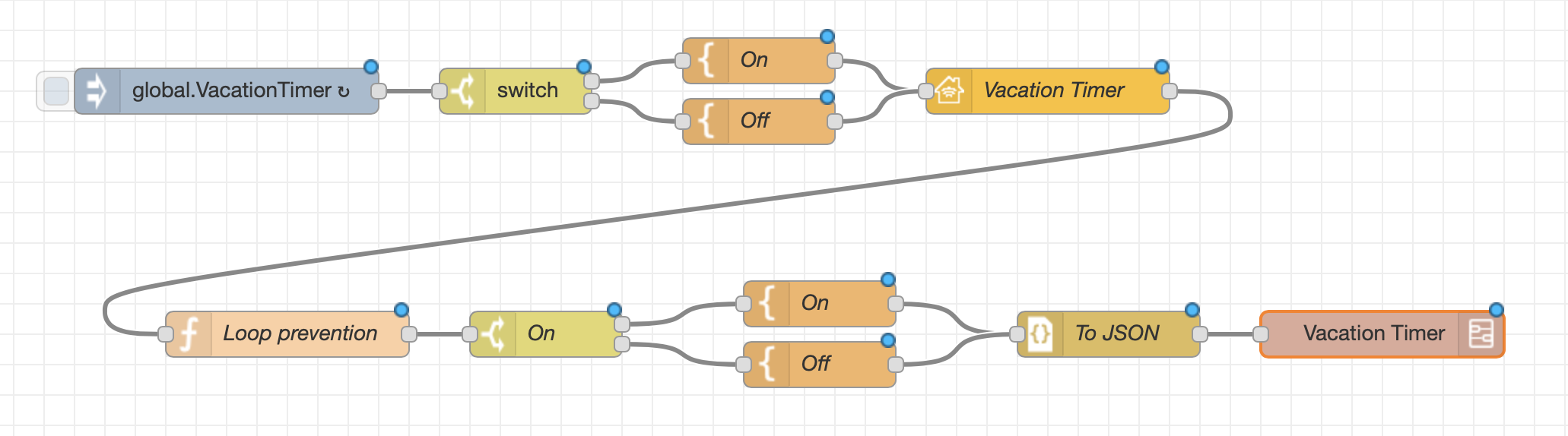
I can't give you exact code since I don't know what's in all of your templates and switches but that's fine, I think you can take it from here based on your comments over the last few days.
Finally the loop prevention function contains this javascript:
if (msg.hap !== undefined && msg.hap.context !== undefined) {
    return msg;
}
return;
This function prevents pass-through messages. If the message originates from the home app, it will have a property msg.hap.context. If both msg.hap and msg.hap.context are defined then the message is from homekit and it should be passed on. Otherwise the flow stops at the function node.
Let me know if you're confused by any of this - I've been using nodered for a while now so I might have blown past some crucial details assuming you could figure it out.
crxporter
on 29 Jan 2020
I figured out why there are specifically 3 duplicates of that vacation timer button in the home app. It's not creating them when it runs. It creates 1 for every instance of that subflow node that exists in real flows. I realized that when I looked at the subflow properties and saw:

hepcat72
on 30 Jan 2020
So it looks like you have to quit using subflows and switch them into links?
Sent with GitHawk
 Shaquu
on 30 Jan 2020
Shaquu
on 30 Jan 2020
I'm a step ahead of you. In the middle of doing that now.
hepcat72
on 30 Jan 2020
Ugh. The 3rd instance is itself inside a subflow.
hepcat72
on 30 Jan 2020
OK. Changes made and deployed. I copied the flow in the vacation subflow to a real flow with a link in. I replaced all instances of the vacation subflow with links out to the new flow. I replaced the Vacation Timer (homekit) copy (in the new vacation flow) with a link out and added a link in going to the one remaining vacation timer homekit node. I also added the loop prevention after the vacation timer homekit node. And I deleted the vacation subflow.
I'll close this issue and if I discover any problems, I'll re-open, but I think this is now good. I can't confirm the elimination of the buttons in the home app yet. I did this all via VNC, so my phone isn't on my home network yet. Besides, I suspect I'll need to restart node red (and/or the pi itself). I'll do that eventually (likely before my next vacation ;) ).
hepcat72
on 30 Jan 2020
If you’re happy I’m happy! Come back anytime for more help!
crxporter
on 30 Jan 2020
Related issues
 Barabba11
·
3Comments
Barabba11
·
3Comments
 djiwondee
·
7Comments
djiwondee
·
7Comments
 thomasssso
·
10Comments
thomasssso
·
10Comments
 a2sky
·
7Comments
a2sky
·
7Comments
 michaltaberski
·
6Comments
michaltaberski
·
6Comments