Node-red-contrib-homekit-bridged: Thermostat not seeing all payloads
I had a working flow for my Nest Thermostat (still Nest Account; not migrated to Google) and updated yesterday to the latest version of homekit-bridged. My HomeKit flow now does not see my payloads of "CoolingThresholdTemperature" and "HeatingThresholdTemperature".
I do, however, receive other payloads for Target Temp, Current Temp, Mode, Humidity, etc. My flow below:
[{"id":"d2cfd171.024b7","type":"openhab2-in","z":"e6bbd35.b5b93b","name":"Current State","controller":"94180d70.3b3da","itemname":"HallwayThermostat_CurrentState","x":111,"y":133,"wires":[["4a584298.bc0404"],[]]},{"id":"e989f93e.e7e6e","type":"openhab2-in","z":"e6bbd35.b5b93b","name":"Current Mode","controller":"94180d70.3b3da","itemname":"HallwayThermostat_CurrentMode","x":122.5,"y":241,"wires":[["54c98f11.54bfa8"],[]]},{"id":"83f1d642.e6631","type":"openhab2-in","z":"e6bbd35.b5b93b","name":"Current Humidity","controller":"94180d70.3b3da","itemname":"HallwayThermostat_Humidity","x":143,"y":541,"wires":[["e58c9147.4d60f8"],[]]},{"id":"898a046a.a733e","type":"trigger","z":"e6bbd35.b5b93b","op1":"","op2":"","op1type":"nul","op2type":"payl","duration":"500","extend":true,"units":"ms","reset":"","bytopic":"all","name":"","x":327.5,"y":485,"wires":[["1f35639d.671c1c"]]},{"id":"ff2371d6.23dfe8","type":"trigger","z":"e6bbd35.b5b93b","op1":"","op2":"","op1type":"nul","op2type":"payl","duration":"500","extend":true,"units":"ms","reset":"","bytopic":"all","name":"","x":327.5,"y":441,"wires":[["b2b102b3.6fb89"]]},{"id":"40e0bcb1.4df9a4","type":"trigger","z":"e6bbd35.b5b93b","op1":"","op2":"","op1type":"nul","op2type":"payl","duration":"500","extend":true,"units":"ms","reset":"","bytopic":"all","name":"","x":301,"y":388,"wires":[["49b6ae55.b348d8"]]},{"id":"54c98f11.54bfa8","type":"switch","z":"e6bbd35.b5b93b","name":"","property":"payload","propertyType":"msg","rules":[{"t":"eq","v":"COOL","vt":"str"},{"t":"eq","v":"HEAT","vt":"str"},{"t":"eq","v":"HEAT_COOL","vt":"str"},{"t":"eq","v":"ECO","vt":"str"}],"checkall":"true","repair":false,"outputs":4,"x":284.5,"y":249,"wires":[["e8c08d37.24d81"],["b6e2d4e7.265348"],["d3e90825.df99c8"],["c752e6d1.9721"]]},{"id":"4a584298.bc0404","type":"switch","z":"e6bbd35.b5b93b","name":"","property":"payload","propertyType":"msg","rules":[{"t":"eq","v":"COOLING","vt":"str"},{"t":"eq","v":"HEATING","vt":"str"},{"t":"eq","v":"OFF","vt":"str"}],"checkall":"true","repair":false,"outputs":3,"x":279,"y":170,"wires":[["8e7e80d4.8f7cf"],["9722c5da.17ab3"],["4c89843b.93ef0c"]]},{"id":"8e7e80d4.8f7cf","type":"change","z":"e6bbd35.b5b93b","name":"Current Cool","rules":[{"t":"set","p":"payload","pt":"msg","to":"{\"CurrentHeatingCoolingState\":2}","tot":"json"}],"action":"","property":"","from":"","to":"","reg":false,"x":460.5,"y":57,"wires":[["8a956502.51666"]]},{"id":"9722c5da.17ab3","type":"change","z":"e6bbd35.b5b93b","name":"Current Heat","rules":[{"t":"set","p":"payload","pt":"msg","to":"{\"CurrentHeatingCoolingState\":1}","tot":"json"}],"action":"","property":"","from":"","to":"","reg":false,"x":459.5,"y":108,"wires":[["8a956502.51666"]]},{"id":"4c89843b.93ef0c","type":"change","z":"e6bbd35.b5b93b","name":"Current Off","rules":[{"t":"set","p":"payload","pt":"msg","to":"{\"CurrentHeatingCoolingState\":0}","tot":"json"}],"action":"","property":"","from":"","to":"","reg":false,"x":458.5,"y":161,"wires":[["8a956502.51666"]]},{"id":"e8c08d37.24d81","type":"change","z":"e6bbd35.b5b93b","name":"Target Cool","rules":[{"t":"set","p":"payload","pt":"msg","to":"{\"TargetHeatingCoolingState\":2}","tot":"json"}],"action":"","property":"","from":"","to":"","reg":false,"x":460.5,"y":204,"wires":[["8a956502.51666"]]},{"id":"b6e2d4e7.265348","type":"change","z":"e6bbd35.b5b93b","name":"Target Heat","rules":[{"t":"set","p":"payload","pt":"msg","to":"{\"TargetHeatingCoolingState\":1}","tot":"json"}],"action":"","property":"","from":"","to":"","reg":false,"x":461.5,"y":249,"wires":[["8a956502.51666"]]},{"id":"d3e90825.df99c8","type":"change","z":"e6bbd35.b5b93b","name":"Target Auto","rules":[{"t":"set","p":"payload","pt":"msg","to":"{\"TargetHeatingCoolingState\":3}","tot":"json"}],"action":"","property":"","from":"","to":"","reg":false,"x":465.5,"y":291,"wires":[["8a956502.51666"]]},{"id":"c752e6d1.9721","type":"change","z":"e6bbd35.b5b93b","name":"Target Eco","rules":[{"t":"set","p":"payload","pt":"msg","to":"{\"TargetHeatingCoolingState\":0}","tot":"json"}],"action":"","property":"","from":"","to":"","reg":false,"x":465.5,"y":335,"wires":[["8a956502.51666"]]},{"id":"e58c9147.4d60f8","type":"function","z":"e6bbd35.b5b93b","name":"","func":"msg.payload = {\n CurrentRelativeHumidity: + parseFloat(msg.payload).toFixed(1)\n};\nreturn msg;","outputs":1,"noerr":0,"x":493.5,"y":543,"wires":[["8a956502.51666"]]},{"id":"1f35639d.671c1c","type":"function","z":"e6bbd35.b5b93b","name":"","func":"{\nval = parseFloat(msg.payload).toFixed(1);\nf = (val - 32) * (5/9);\n}\n\n{\nmsg.payload = {\n CoolingThresholdTemperature: + f\n }\n;\n}\nreturn msg;","outputs":1,"noerr":0,"x":494.5,"y":502,"wires":[["8a956502.51666"]]},{"id":"b2b102b3.6fb89","type":"function","z":"e6bbd35.b5b93b","name":"","func":"{\nval = parseFloat(msg.payload).toFixed(1);\nf = (val - 32) * (5/9);\n}\n\n{\nmsg.payload = {\n HeatingThresholdTemperature: + f\n }\n;\n}\nreturn msg;","outputs":1,"noerr":0,"x":493.5,"y":458,"wires":[["8a956502.51666"]]},{"id":"61792646.901cd","type":"function","z":"e6bbd35.b5b93b","name":"","func":"{\nval = parseFloat(msg.payload).toFixed(1)\nf = (val - 32) * (5/9);\n\n}\n{\nmsg.payload = {\n CurrentTemperature: + f\n\n}\n}\nreturn msg;","outputs":1,"noerr":0,"x":493,"y":377,"wires":[["8a956502.51666"]]},{"id":"49b6ae55.b348d8","type":"function","z":"e6bbd35.b5b93b","name":"","func":"{\nval = parseFloat(msg.payload).toFixed(1);\nf = (val - 32) * (5/9);\n}\n\n{\nmsg.payload = {\n TargetTemperature: + f\n }\n;\n}\nreturn msg;","outputs":1,"noerr":0,"x":494,"y":417,"wires":[["8a956502.51666"]]},{"id":"9267f1ac.f42aa","type":"switch","z":"e6bbd35.b5b93b","name":"HomeKit Triggered","property":"hap.context","propertyType":"msg","rules":[{"t":"nnull"}],"checkall":"true","repair":false,"outputs":1,"x":882.5,"y":250,"wires":[["113879f9.4bc166"]]},{"id":"81e64d20.dee7c8","type":"json","z":"e6bbd35.b5b93b","name":"","property":"payload","action":"","pretty":false,"x":835.5,"y":319,"wires":[["5879c73a.b5b42"]]},{"id":"5879c73a.b5b42","type":"switch","z":"e6bbd35.b5b93b","name":"","property":"payload","propertyType":"msg","rules":[{"t":"cont","v":"TargetTemperature","vt":"str"},{"t":"cont","v":"HeatingThreshold","vt":"str"},{"t":"cont","v":"CoolingThreshold","vt":"str"}],"checkall":"true","repair":false,"outputs":3,"x":972.5,"y":349,"wires":[["7c60148d.54fa7c"],["e4f7c4e0.9b5428"],["793bb3f0.704694"]]},{"id":"113879f9.4bc166","type":"template","z":"e6bbd35.b5b93b","name":"","field":"payload","fieldType":"msg","format":"handlebars","syntax":"mustache","template":"{{payload.TargetHeatingCoolingState}}","output":"str","x":1047.5,"y":218,"wires":[["3d9c6788.834d6"]]},{"id":"3d9c6788.834d6","type":"switch","z":"e6bbd35.b5b93b","name":"","property":"payload","propertyType":"msg","rules":[{"t":"eq","v":"0","vt":"str"},{"t":"eq","v":"1","vt":"str"},{"t":"eq","v":"2","vt":"str"},{"t":"eq","v":"3","vt":"str"}],"checkall":"true","repair":false,"outputs":4,"x":1199.5,"y":185,"wires":[["461c51a7.5b0bb8"],["2e6a8865.05df98"],["5e356f20.1912a"],["e49b0063.241dc"]]},{"id":"461c51a7.5b0bb8","type":"change","z":"e6bbd35.b5b93b","name":"Eco","rules":[{"t":"set","p":"payload","pt":"msg","to":"ECO","tot":"str"}],"action":"","property":"","from":"","to":"","reg":false,"x":1331.5,"y":95,"wires":[["c90b9628.9f1888"]]},{"id":"2e6a8865.05df98","type":"change","z":"e6bbd35.b5b93b","name":"Heat","rules":[{"t":"set","p":"payload","pt":"msg","to":"HEAT","tot":"str"}],"action":"","property":"","from":"","to":"","reg":false,"x":1334.5,"y":148,"wires":[["c90b9628.9f1888"]]},{"id":"5e356f20.1912a","type":"change","z":"e6bbd35.b5b93b","name":"Cool","rules":[{"t":"set","p":"payload","pt":"msg","to":"COOL","tot":"str"}],"action":"","property":"","from":"","to":"","reg":false,"x":1334.5,"y":203,"wires":[["c90b9628.9f1888"]]},{"id":"e49b0063.241dc","type":"change","z":"e6bbd35.b5b93b","name":"Auto","rules":[{"t":"set","p":"payload","pt":"msg","to":"HEAT_COOL","tot":"str"}],"action":"","property":"","from":"","to":"","reg":false,"x":1336.5,"y":261,"wires":[["c90b9628.9f1888"]]},{"id":"d633306b.e985e","type":"trigger","z":"e6bbd35.b5b93b","op1":"","op2":"","op1type":"nul","op2type":"payl","duration":"500","extend":false,"units":"ms","reset":"","bytopic":"all","name":"","x":1350,"y":357,"wires":[["c4ede060.7a495"]]},{"id":"9f38c254.f25e58","type":"trigger","z":"e6bbd35.b5b93b","op1":"","op2":"","op1type":"nul","op2type":"payl","duration":"500","extend":false,"units":"ms","reset":"","bytopic":"all","name":"","x":1350.5,"y":401,"wires":[["a7e1b759.bbbfa"]]},{"id":"7e63e238.ef3df4","type":"trigger","z":"e6bbd35.b5b93b","op1":"","op2":"","op1type":"nul","op2type":"payl","duration":"500","extend":false,"units":"ms","reset":"","bytopic":"all","name":"","x":1350.5,"y":447,"wires":[["d14da9be.99ccd8"]]},{"id":"c90b9628.9f1888","type":"openhab2-out","z":"e6bbd35.b5b93b","name":"Target Mode","controller":"94180d70.3b3da","itemname":"HallwayThermostat_CurrentMode","topic":"ItemCommand","payload":"","x":1520.5,"y":184,"wires":[[]]},{"id":"c4ede060.7a495","type":"openhab2-out","z":"e6bbd35.b5b93b","name":"Target Temp","controller":"94180d70.3b3da","itemname":"HallwayThermostat_TargetSetPoint","topic":"ItemCommand","payload":"","x":1523.5,"y":374,"wires":[[]]},{"id":"a7e1b759.bbbfa","type":"openhab2-out","z":"e6bbd35.b5b93b","name":"Auto Heat Target","controller":"94180d70.3b3da","itemname":"NestHallwayThermostat_MinSetPoint","topic":"ItemCommand","payload":"","x":1543,"y":420,"wires":[[]]},{"id":"d14da9be.99ccd8","type":"openhab2-out","z":"e6bbd35.b5b93b","name":"Auto Cool Target","controller":"94180d70.3b3da","itemname":"NestHallwayThermostat_MaxSetPoint","topic":"ItemCommand","payload":"","x":1540,"y":465,"wires":[[]]},{"id":"7c60148d.54fa7c","type":"function","z":"e6bbd35.b5b93b","name":"","func":"{\nval = msg.payload.substring(21,msg.payload.length - 1)\nf = (val * (9/5)) + 32;\ng = (Math.round(f));\npl = g + \" °F\";\n}\n\n{\nmsg.payload = pl;\n \n}\n\nreturn msg;","outputs":1,"noerr":0,"x":1187,"y":332,"wires":[["d633306b.e985e"]]},{"id":"e4f7c4e0.9b5428","type":"function","z":"e6bbd35.b5b93b","name":"","func":"{\nval = msg.payload.substring(31,msg.payload.length - 1)\nf = (val * (9/5)) + 32;\ng = (Math.round(f));\npl = g + \" °F\";\n}\n\n{\nmsg.payload = pl;\n \n}\n\nreturn msg;","outputs":1,"noerr":0,"x":1187,"y":388,"wires":[["9f38c254.f25e58"]]},{"id":"793bb3f0.704694","type":"function","z":"e6bbd35.b5b93b","name":"","func":"{\nval = msg.payload.substring(31,msg.payload.length - 1)\nf = (val * (9/5)) + 32;\ng = (Math.round(f));\npl = g + \" °F\";\n}\n\n{\nmsg.payload = pl;\n \n}\n\nreturn msg;","outputs":1,"noerr":0,"x":1187,"y":443,"wires":[["7e63e238.ef3df4"]]},{"id":"8a956502.51666","type":"homekit-service","z":"e6bbd35.b5b93b","isParent":true,"bridge":"3cfa19b7.26420e","accessoryCategory":"THERMOSTAT","parentService":"","name":"Thermostat","serviceName":"Thermostat","topic":"","filter":false,"manufacturer":"Default Manufacturer","model":"Default Model","serialNo":"Default Serial Number","cameraConfigVideoProcessor":"","cameraConfigSource":"","cameraConfigStillImageSource":"","cameraConfigMaxStreams":"","cameraConfigMaxWidth":"","cameraConfigMaxHeight":"","cameraConfigMaxFPS":"","cameraConfigMaxBitrate":"","cameraConfigVideoCodec":"","cameraConfigAudioCodec":"","cameraConfigAudio":false,"cameraConfigPacketSize":"","cameraConfigVerticalFlip":false,"cameraConfigHorizontalFlip":false,"cameraConfigMapVideo":"","cameraConfigMapAudio":"","cameraConfigVideoFilter":"","cameraConfigAdditionalCommandLine":"","cameraConfigDebug":false,"cameraConfigSnapshotOutput":"disabled","characteristicProperties":"{}","x":657,"y":264,"wires":[["9267f1ac.f42aa","81e64d20.dee7c8"],[]]},{"id":"3dba816a.f663c6","type":"openhab2-in","z":"e6bbd35.b5b93b","name":"Current Temp","controller":"94180d70.3b3da","itemname":"HallwayThermostat_CurrentTemperature","x":127,"y":333,"wires":[["61792646.901cd"],[]]},{"id":"e02cee4d.7e7658","type":"openhab2-in","z":"e6bbd35.b5b93b","name":"Target Temp","controller":"94180d70.3b3da","itemname":"HallwayThermostat_TargetSetPoint","x":126,"y":385,"wires":[["40e0bcb1.4df9a4"],[]]},{"id":"59c77a9.38cd904","type":"openhab2-in","z":"e6bbd35.b5b93b","name":"Auto Heat Target","controller":"94180d70.3b3da","itemname":"NestHallwayThermostat_MinSetPoint","x":130,"y":433,"wires":[["ff2371d6.23dfe8"],[]]},{"id":"b3b86f79.fcaca8","type":"openhab2-in","z":"e6bbd35.b5b93b","name":"Auto Cool Target","controller":"94180d70.3b3da","itemname":"NestHallwayThermostat_MaxSetPoint","x":129,"y":484,"wires":[["898a046a.a733e"],[]]},{"id":"94180d70.3b3da","type":"openhab2-controller","z":"","name":"OpenHAB","protocol":"http","host":"localhost","port":"8080","path":"","username":"openhabian","password":"#####"},{"id":"3cfa19b7.26420e","type":"homekit-bridge","z":"","bridgeName":"Hallway","pinCode":"100-99-103","port":"","allowInsecureRequest":false,"manufacturer":"Default Manufacturer","model":"Default Model","serialNo":"Default Serial Number","customMdnsConfig":false,"mdnsMulticast":true,"mdnsInterface":"","mdnsPort":"","mdnsIp":"","mdnsTtl":"","mdnsLoopback":true,"mdnsReuseAddr":true,"allowMessagePassthrough":true}]
Perhaps not very elegant, but it did work. 😬
Currently, now I can only adjust heating/cooling when it's in the dedicated mode. Auto Mode now no longer functions. When not using my Node-RED HomeKit flow, my API calls to adjust the thresholds still work.
 syndicate0017
All 16 comments
What is a version of the node-red and node-red-contrib-homekit-bridged you use?
 Shaquu
on 29 Nov 2019
Shaquu
on 29 Nov 2019
Sorry. I didn't see your initial response to this issue. I have removed the bridge and re-added and I am now able to see Threshold payloads (guess I should have tried that earlier). However, my payloads are being rounded down to whole numbers at the HomeKit node (target, current, and thresholds).
Node Red Version : v0.20.7
HomeKit Bridged Version: 0.8.0
I have tried just about everything that I am aware of in case it was a math issue, but up until the final function before I send to HomeKit, I have the correct values.
Using a debug node, I can see that my function will have a payload like 20.6 that is sending to the HomeKit node. A debug node on the output of the HomeKit node shows that it is inexplicably dropped to 20. As I'm sure you're aware, a 0.5 degree differential in Celsius makes quite the difference....
Is there a characteristic that I need to add to the node in order for it to look past the integer?
syndicate0017
on 16 Dec 2019
I think issue exists in hap-nodejs or its a problem with latest HomeKit versions.
I think I read about it on hap-nodejs github site.
Might be this
https://github.com/KhaosT/HAP-NodeJS/pull/751
On 16 Dec 2019, 19:08 +0100, syndicate0017 notifications@github.com, wrote:
Sorry. I didn't see your initial response to this issue. I have removed the bridge and re-added and I am now able to see Threshold payloads (guess I should have tried that earlier). However, my payloads are being rounded down to whole numbers at the HomeKit node (target, current, and thresholds).
Node Red Version : v0.20.7
HomeKit Bridged Version: 0.8.0
I have tried just about everything that I am aware of in case it was a math issue, but up until the final function before I send to HomeKit, I have the correct values.
Using a debug node, I can see that my function will have a payload like 20.6 that is sending to the HomeKit node. A debug node on the output of the HomeKit node shows that it is inexplicably dropped to 20. As I'm sure you're aware, a 0.5 degree differential in Celsius makes quite the difference....
Is there a characteristic that I need to add to the node in order for it to look past the integer?
—
You are receiving this because you commented.
Reply to this email directly, view it on GitHub, or unsubscribe.
Shaquu
on 16 Dec 2019
Just as a follow up to this issue. I'm thinking iOS 13 doesn't seem to be the root cause of the issue. As that link seems to say it only does not allow TargetTemperature to be set in 0.5 degree increments in iOS 13 in the HomeKit GUI. Siri etc would still work theoretically. In my case, any temperature payload (Current, Target, HeatingThreshold, CoolingThreshold) was affected. the This wasn't just a what's being set in HomeKit GUI(I probably wasn't very clear). I could actually see where the Homekit-Bridge node itself dropped anything that wasn't an integer.
My payload that arrived from Nest app, HomeKit, API, etc comes out of my function node as 20.6. As soon as it gets to the bridge node, it is truncated to 20. No decimal after or anything. I tried deleting my bridges, uninstalling and re-install homekit-bridge-contrib with no success.
I did however find what fixed it was going back to the original Homekit-contrib node. Obviously this node is no longer in development and is missing quite a few critical features. Is there a difference in the HAP-nodeJS version that is used between homekit-contrib and homekit-bridged-contrib? I'm perfectly happy to do further testing or open another issue somewhere else if what I'm seeing doesn't apply here.
syndicate0017
on 3 Jan 2020
homekit-contrib uses very old version of HAP-nodeJS and our nrchkb uses latest if possible (current master branch uses version which has some problems from what can I see).
Next planned release will solve many problems.
Shaquu
on 3 Jan 2020
Hi All,
Actually I am reading Netatmo weather station data in openhab and publishing it to HomeKit. The temperature values are absolutely ok, x.0 or x.5 which are the results of an appropriate rounding.
Meanwhile I’ve decided to turn to node-red as the HomeKit integration of OH is not really sophisticated (e.g. no parent-child, not too much supported things etc.)
I did several tests with the latest version (HomeKit bridged 0.8.0) and the outcome is, the payload is rounded down to the nearest integer and so HomeKit displays the values really incorrectly :(
Is the resolution amongst the above mentioned many things in the queue as well?
Thanks in advance
 TheNON75
on 3 Feb 2020
TheNON75
on 3 Feb 2020
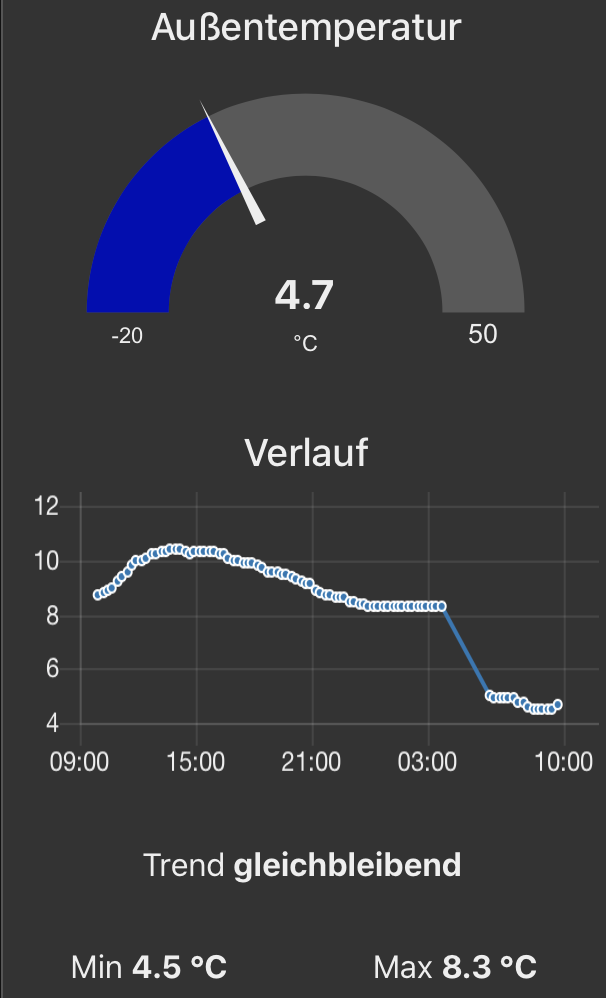
@TheNON75 how do you access Netatmo? I'm using node-red-contrib-netatmo reading station data from their cloud-API. I can at least agree values accessed from there API is not rounded and displayed with decimals in the node-red Dashboard:
The representation in HomeKit is indeed rounded:
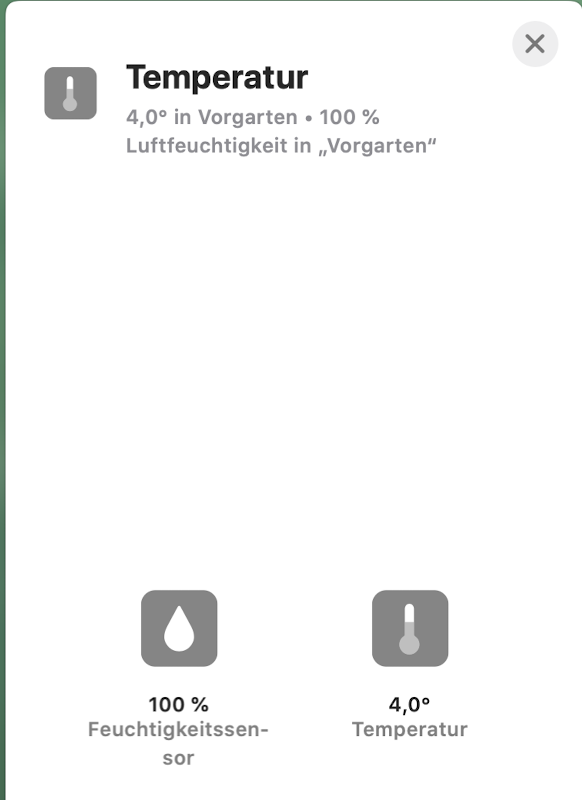
I'm sure I've seen non rounded values before iOS 13, macOS13 in the HomeKit apps. So I'm not sure whether NRCHKB nor HAP-NodeJS is causing the roundings. I decide to live with that since I'm not able to feel the decimals ;-)
 djiwondee
on 4 Feb 2020
djiwondee
on 4 Feb 2020
Rounding in home.app should be resolved in next release. #173
Shaquu
on 4 Feb 2020
@djiwondee
I am accessing it via openhab through the Netatmo binding.
By publishing it from openhab to HK with its HomeKit integration, it is fully ok with me as mentioned in my above post

Anyhow, I prefer to see 23 instead of 22 in case of 22,98653, so looking forward to the mentioned fix
TheNON75
on 4 Feb 2020
Hi All,
In the release notes of 1.0.1 I saw not much about the resolution of the above discussed rounding issue.
Can someone confirm if it has been sorted out?
Thanks
TheNON75
on 25 Feb 2020
Hi, like stated it wasn’t a bug in nrchkb itself it’s why it’s not in the changelog.
But it should be fixed now. Still need someone to confirm.
Shaquu
on 25 Feb 2020
Well, hope to have soon some time to play around
Edit:
@Shaquu, It works as intended, many thanks!
TheNON75
on 25 Feb 2020
Thanks for testing. Closing.
Shaquu
on 1 Mar 2020
Sorry. I didn't see your initial response to this issue. I have removed the bridge and re-added and I am now able to see Threshold payloads (guess I should have tried that earlier). However, my payloads are being rounded down to whole numbers at the HomeKit node (target, current, and thresholds).
Node Red Version : v0.20.7
HomeKit Bridged Version: 0.8.0I have tried just about everything that I am aware of in case it was a math issue, but up until the final function before I send to HomeKit, I have the correct values.
Using a debug node, I can see that my function will have a payload like 20.6 that is sending to the HomeKit node. A debug node on the output of the HomeKit node shows that it is inexplicably dropped to 20. As I'm sure you're aware, a 0.5 degree differential in Celsius makes quite the difference....
Is there a characteristic that I need to add to the node in order for it to look past the integer?
Removing and re-adding the bridge did not work for me. In auto I do not see the threshold values - only the average value as 'TargetTemperature'. Is there anything else you did to resolve this?
 dalethomas81
on 11 Mar 2021
dalethomas81
on 11 Mar 2021
@dalethomas81 The issue is very old, solved and closed a long time ago. What version of nrchkb are you on? The current stable is 1.2.0
In case you are still having problems, please open a new issue.
TheNON75
on 11 Mar 2021
I am on 1.20 and still having this issue. I will open a new ticket. Thank you.
Sent from my iPhone
On Mar 11, 2021, at 7:03 AM, TheNON75 @.*> wrote:
The issue is very old. What version of nrchkb are you on? The current stable is 1.2.0—
You are receiving this because you commented.
Reply to this email directly, view it on GitHub, or unsubscribe.
dalethomas81
on 11 Mar 2021
Related issues
djiwondee
·
7Comments
 MartiMan79
·
8Comments
MartiMan79
·
8Comments
 a2sky
·
7Comments
a2sky
·
7Comments
 Barabba11
·
3Comments
Barabba11
·
3Comments
 mtjoernelund
·
8Comments
mtjoernelund
·
8Comments