Node-red-contrib-homekit-bridged: [FEATURE] Add qrcode for Bridge
Idea is to add generated qrcode to join Bridge just like in Homebridge.
From what I see it's sort off provided in HAP-Nodejs as Accessory.setupURI()
We have to find out where in UI we can show this qrcode.
I would like you to:
- Vote with emote hand under this post
- If you are against then please provide some arguments so I can understand why :)
- If you are for idea then please provide some ideas how can we make it!
 Shaquu
All 57 comments
Would be REALLY cool if this could be provided in the debug panel on nodered.
Each time it’s deployed you could send a debug message with the code.
I have no idea if this is possible.
 crxporter
on 19 Mar 2019
crxporter
on 19 Mar 2019
@crxporter I like to say that everything is possible.
So we have first idea to place it in the node-red debug panel.
Sent with GitHawk
Shaquu
on 19 Mar 2019
Would be a really good feature. Also a good place seems to me the info panel of the node properties. But I guess this is static content? If the QR code becomes too complex what about the numeric code placed on so much home kit accessories for scanning and recognition
 djiwondee
on 19 Mar 2019
djiwondee
on 19 Mar 2019
Or maybe if you connect an URL node or some other nodes to one of your nodes in that bridge it should show that qr code on a specific website? Like http://ip_adress/homekitsetup. I don't know if this is possible with Node-RED
 radokristof
on 19 Mar 2019
radokristof
on 19 Mar 2019
I like the idea of a homekit uri (we have ui for the dashboard stuff), for now it can just display the code + QR code, but the generic name allows for adding other things later.
 sjorge
on 19 Mar 2019
sjorge
on 19 Mar 2019
For now I have made badge like this:

I based it on Homekit set up codes from the internet.
Image above is fully generated.
Shaquu
on 20 Mar 2019
Cool! Have tried a camera scan with iOS and it redirects me directly to the home app ;-)
djiwondee
on 20 Mar 2019
@Shaquu This is how a HomeKit badge/sticker looks like on a native HomeKit device :) This looks really cool if we can get it working somehow.
radokristof
on 20 Mar 2019
@djiwondee happy to hear it works.
@radokristof yes we can!
So once more. Where should we place this badge?
Shaquu
on 20 Mar 2019
@Shaquu to me that would be the right place:
So once more. Where should we place this badge?

djiwondee
on 20 Mar 2019
@Shaquu do we know when a bridge is succesfully added to a Home? If yes, we can place this badge on the Debug panel as others suggested until the bridge is succesfully added. However if we can make a simple webpage displaying only just this badge (and a little footer text to scan this qr code), that would be the best I think. Mainly because it can be viewed in almost full screen (just think about small screens, or high dpi screens).
radokristof
on 20 Mar 2019
I think the issue is that many of us have/will have many bridges.
It needs to be easy to find or we will just use the old method of typing 111-11-111 every time...
What about a persistent set of node-red errors/warnings? Can it be placed there? Or at least a link there that says something like "successfully deployed, click here for the qr code"

crxporter
on 20 Mar 2019
@crxporter That's why I thought of a seperate webpage because the link could be placed anywhere (and multiple times).
radokristof
on 20 Mar 2019
I could have add it to notifications.
But how do you see it?
5 seconds to see it?
One notification for every Bridge?
I have another idea.
Appearing qrcode when we hover over HomeKit node.
What do you think?
Shaquu
on 20 Mar 2019
@crxporter That's why I thought of a seperate webpage because the link could be placed anywhere (and multiple times).
I also like this idea
sjorge
on 20 Mar 2019
Appearing qrcode when we hover over HomeKit node.
I really like this idea. It would be most similar to what we have now - that the code appears under the node until the first command is sent.
I like the ui website idea as well but personally I would just type in the code before going to a UI interface. Now if that interface had other “stuff” then adding the code there as well would make sense to me.
I see the code as a one-time use item that should be very easy to access after setting up a new bridge...
crxporter
on 20 Mar 2019
Maybe a little QR button next to the edit button on each service were you select the bridge? Easy to lookup when you need it and in your face as you are configuring things, which you most likely are when you add your (new) bridge?
sjorge
on 20 Mar 2019
One thing is that it can be considered useless :)
But since I don't care and I am here for fun then I can spend a lot of hours on useless stuff which makes me happy enough to be able to work on bugs.
Second thing I want every user to use it at least once. So it must be well placed.
Shaquu
on 20 Mar 2019
@Shaquu Firstly, I can feel your needs... Secondly, I wouldn't say this is useless. Besides homebridge there isn't a complete HomeKit connector application. So if we keep on working to achieve the best HomeKit experience (closest to a native HomeKit Service/Bridge/etc...) it might become very useful...
radokristof
on 20 Mar 2019
As stated in #74
Please test and comment.
Feature on branch feature/qrcode
Shaquu
on 24 Mar 2019
I hope someone will look at this soon.
Shaquu
on 31 Mar 2019
@shaquu I’ve had a crazy week. I’ll see if I can run it tomorrow and provide some comments.
crxporter
on 31 Mar 2019
No rush. I just bump old issues to increase commitment.
Shaquu
on 31 Mar 2019
@Shaquu I'm finally taking a look at this. It's not working very well for me.
The QR scan works properly. HomeKit immediately recognizes it.
Then it goes to "Searching for accessory" and finally "Accessory not found"
I got it to work one time, I don't know what I did different. Adding these bridges the "old way" works just fine.

Let me know if I'm doing it wrong, meanwhile I'm headed back to the release version to try out this new TV item that works in iOS 12.2!
crxporter
on 31 Mar 2019
It looks like qrcode can’t be used to connect but only to enter pin. I don’t know if it’s good...
Wiadomość napisana przez crxporter notifications@github.com w dniu 31.03.2019, o godz. 22:51:
@Shaquu I'm finally taking a look at this. It's not working very well for me.
The QR scan works properly. HomeKit immediately recognizes it.
Then it goes to "Searching for accessory" and finally "Accessory not found"
I got it to work one time, I don't know what I did different. Adding these bridges the "old way" works just fine.
Let me know if I'm doing it wrong, meanwhile I'm headed back to the release version to try out this new TV item that works in iOS 12.2!
—
You are receiving this because you were mentioned.
Reply to this email directly, view it on GitHub, or mute the thread.
Shaquu
on 31 Mar 2019
I have tried using it, but it doesn't want to pop-up that QR code. How should I do that?
I have checked it that I have the dev branch installed in the folder (version number, files in directory, etc...).
radokristof
on 31 Mar 2019
It’s not on the dev branch. It’s on feature/qrcode
Wiadomość napisana przez Kristof Rado notifications@github.com w dniu 31.03.2019, o godz. 23:37:
I have tried using it, but it doesn't want to pop-up that QR code. How should I do that?
I have checked it that I have the dev branch installed in the folder (version number, files in directory, etc...).
—
You are receiving this because you were mentioned.
Reply to this email directly, view it on GitHub, or mute the thread.
Shaquu
on 1 Apr 2019
It looks like qrcode can’t be used to connect but only to enter pin.
Oh now I see the button after clicking the accessory! I wonder what changes in the qr code to give it the information necessary to discover the device at the first “add accessory” camera?
crxporter
on 1 Apr 2019
If you ever used Homebridge plugin which supported full discover then please link it so I can investigate.
Shaquu
on 1 Apr 2019
I haven't used homebridge for a long time - but this looks like it may be the PR where they added QR code support.
Also found this post from around the same time period.
I'm not sure if this is how your approach works or not, I'm still on chapter 1 of my JavaScript lessons... But I'm getting pretty good at finding stuff on github...
crxporter
on 1 Apr 2019
My second link above is from here
Apparently that's how they are putting together the QR codes?
crxporter
on 1 Apr 2019
Yep, thank you very much.
I did the same but thanks to you I found out that maybe I have to only enable WAC and it will work.
Wiadomość napisana przez crxporter notifications@github.com w dniu 01.04.2019, o godz. 23:47:
My second link above is from here
Apparently that's how they are putting together the QR codes?
—
You are receiving this because you were mentioned.
Reply to this email directly, view it on GitHub, or mute the thread.
Shaquu
on 2 Apr 2019
For now I can say - I didn't make it working better then the last time.
After a long time I can see this feature is still cool but I will not focus on that right now as it's less important then the others on our to-do list.
Shaquu
on 25 Apr 2019
@shaquu just saw this and wondered if it would give you any new ideas how to get this working.
I’m still not convinced it’s necessary but like you’ve said - why not add cool features?
crxporter
on 25 May 2019
That’s great!
However how we could use this? You print qr codes for each accessory and then later when you need to add a device, scan it? We just add a new accessory to one of the flows?
Sent from my iPhone
On 2019. May 25., at 19:24, crxporter notifications@github.com wrote:
@Shaquu just saw this and wondered if it would give you any new ideas how to get this working.
I’m still not convinced it’s necessary but like you’ve said - why not add cool features?
—
You are receiving this because you were mentioned.
Reply to this email directly, view it on GitHub, or mute the thread.
radokristof
on 26 May 2019
@shaquu had this started in the qr code branch but didn’t know how to make the scan work at the first step after “add accessory” in home app.
I was just browsing GitHub yesterday and thought this might give him a new idea to get it working...
crxporter
on 26 May 2019
Yes its great, because this will also push this project closer to the native HomeKit “feeling”. I’m just asking here that how we could use this to make the “inclusion” easier. Because if you buy a real HomeKit device you scan it and it will work. But here you must specify how it should work, right?
Sent from my iPhone
On 2019. May 26., at 15:28, crxporter notifications@github.com wrote:
@Shaquu had this started in the qr code branch but didn’t know how to make the scan work at the first step after “add accessory” in home app.
I was just browsing GitHub yesterday and thought this might give him a new idea to get it working...
—
You are receiving this because you were mentioned.
Reply to this email directly, view it on GitHub, or mute the thread.
radokristof
on 26 May 2019
If I am not mistaken, the idea was that this QR code would all the bridge device to HomeKit.
Similar to how scanning the code on a Trådfri gateway does.
So you won’t have to scan per assesoury.
~ sjorge
On 26 May 2019, at 15:31, Kristof Rado notifications@github.com wrote:
Yes its great, because this will also push this project closer to the native HomeKit “feeling”. I’m just asking here that how we could use this to make the “inclusion” easier. Because if you buy a real HomeKit device you scan it and it will work. But here you must specify how it should work, right?
Sent from my iPhone
On 2019. May 26., at 15:28, crxporter notifications@github.com wrote:
@Shaquu had this started in the qr code branch but didn’t know how to make the scan work at the first step after “add accessory” in home app.
I was just browsing GitHub yesterday and thought this might give him a new idea to get it working...
—
You are receiving this because you were mentioned.
Reply to this email directly, view it on GitHub, or mute the thread.
—
You are receiving this because you commented.
Reply to this email directly, view it on GitHub, or mute the thread.
sjorge
on 26 May 2019
Correct. Setup would be the same except instead of typing manually 111-11-111 To add the bridge, just scan the code.
crxporter
on 26 May 2019
Oh I know it. I just said this because on the link you provided it seemed that this feature is to scan every accessory. I was just confused
Sent from my iPhone
On 2019. May 26., at 15:47, crxporter notifications@github.com wrote:
Correct. Setup would be the same except instead of typing manually 111-11-111 To add the bridge, just scan the code.
—
You are receiving this because you were mentioned.
Reply to this email directly, view it on GitHub, or mute the thread.
radokristof
on 26 May 2019
@crxporter thanks for a link. I think it will be usefull.
Leaving exact link for me:
https://github.com/maximkulkin/esp-homekit/blob/19bde633d0a61e97f5e7cafa4d066b5a97335ebb/tools/gen_qrcode#L18
Shaquu
on 27 May 2019
Well I had a dream to add this feature but didn't have time to make it work properly.
It's stale right now. Will come back to it one day.
Shaquu
on 12 Oct 2019
I also think it would be a great feature to have this, but it is more important to add new device type and overall support.
radokristof
on 12 Oct 2019
+1 for this being neat but very low on the list of wants/needs. I say spend dev time elsewhere.
crxporter
on 14 Oct 2019
Psst. It works on feature/qrcode branch :)
Looks like 1.0.x fixed more problems then we expected...
Now we can discuss if we want that to go live and how this should looks like and where it should appear. Right now you have to point Service node with mouse after publish (and delay of 2 seconds).
Shaquu
on 19 Apr 2020
Service node, you mean the configuration node?
I think this is a good starting point... I don't know any better place for this...
radokristof
on 19 Apr 2020
Right now it is a Service node as on flow (this one you can move around the place).
You should try and see :) Also it is how it looks like.
Shaquu
on 19 Apr 2020
I tried "NO_RESPONSE" dev.4 branch.
Now qr code branch!
Also many thanks if you can point me to any kind of change log so I'll know what to test? Make sure nothing breaks?
crxporter
on 19 Apr 2020
Regarding NRCHKB on dev CHANGELOG is here but it is very general.
Regarding HAP NodeJS it is current diff for us - might be difficult to read (it is what I am doing right now to find some required changes on our site).
Also NO_RESPONSE fix is pretty short.
Basically it's the best to follow the code every commit to read small changes and not to read many at once which could be difficult.
Shaquu
on 19 Apr 2020
So... I tried downloading this branch with
git clone -b feature/qrcode [path]
Then move that to ~.node-red/node_modules
And now I don't have the plugin:

Can I get a crash course to install qr code branch?
crxporter
on 19 Apr 2020
Do that like this.
- Clone branch (you already did)
- Remove NRCHKB folder from node_modules
- In .node-red folder run
npm i <path>whereis a folder where the branch sits. For example npm i C:\Users\Shaq\IdeaProjects\node-red-contrib-homekit-bridged - Restart node-red
Shaquu
on 19 Apr 2020
Finally got it loaded up. QR code shows up great. Awesome, tries to pair.
Then I get an error "couldn't add"
AND THEN
I realized I'm an idiot and have an extra digit in the code. Can it throw an error if it's not xxx-xx-xxx?
But the QR code doesn't regenerate... I'm stuck with the first wrong code...
I deleted and re-added the bridge. No new code. Deleted all the homekit stuff, restarted nodered, add new - works. I like it!
Taking away the step of "not listed" and just being able to use the camera is pretty cool. Need to check how it goes with 2 bridges on one pi, changing the pair code, etc...
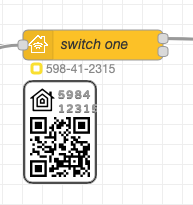
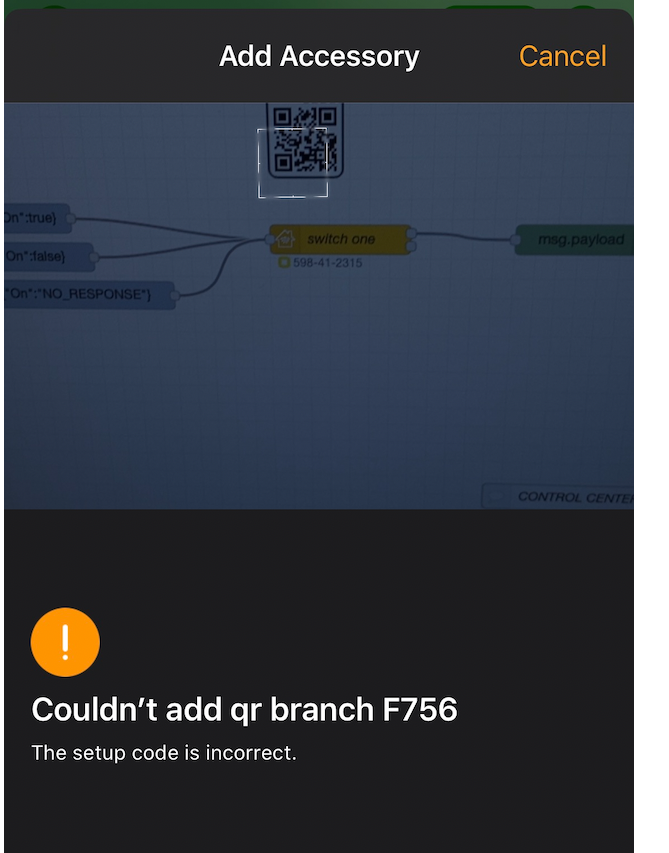
crxporter
on 19 Apr 2020
Cool, thanks for the test - you have found two bugs!
Also about visual part. How do you feel about that? Should it be displayed somewhere else or differently?
Shaquu
on 19 Apr 2020
This seems about right to me. I've never added a bridge to my phone while not looking at it in node red...
Another idea, can the QR code stop showing once the bridge is paired? I don't think it needs to show up every time we hover over a node forever...
crxporter
on 19 Apr 2020
What if the hover-code can only appear until it's been paired?
AND if possible, can it always appear one of these two places:
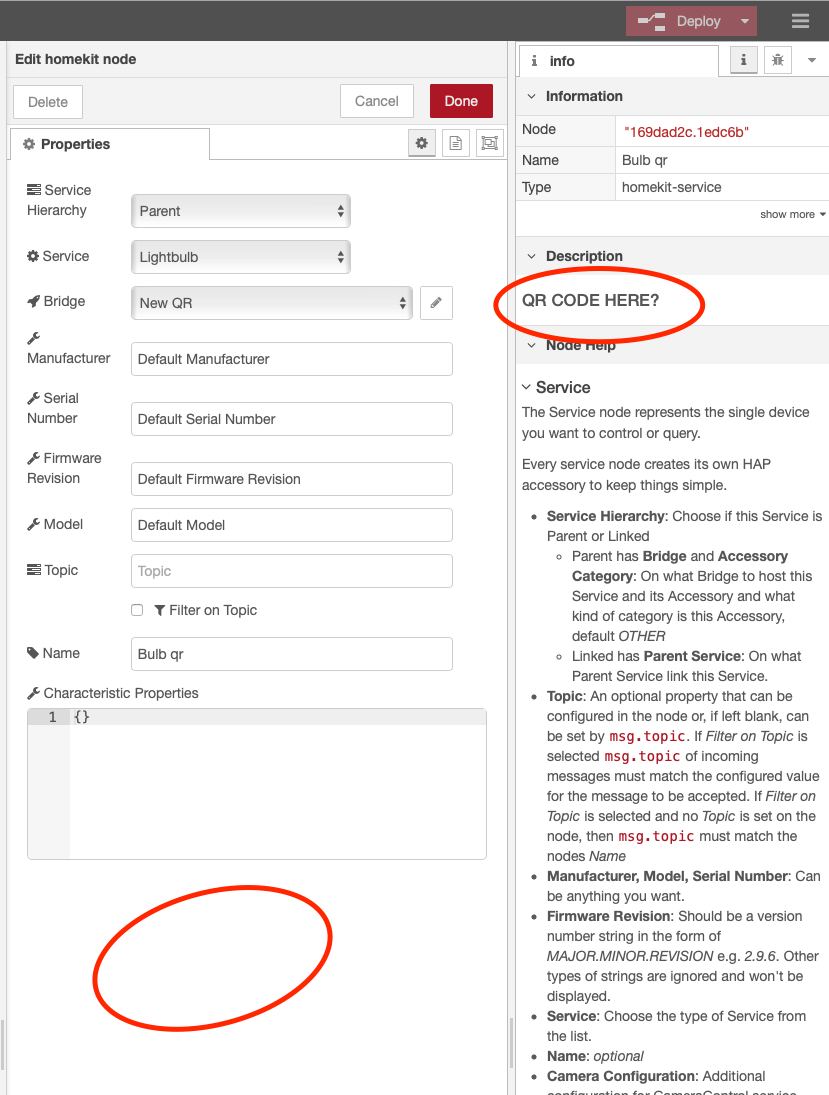
crxporter
on 19 Apr 2020
Hi, don't get me wrong, qr code is really fancy, but how to get it anywhere else than in the editor (nr) screen? It is then quicker to enter the pin manually.
 TheNON75
on 27 Oct 2020
TheNON75
on 27 Oct 2020
@TheNON75 it is why this feature is not done yet. It is just fancy :)
Other thing is that I am planning to disable weak pin codes (1111111, 22222 etc.) so qrcode would be useful.
Shaquu
on 28 Oct 2020
Related issues
 MartiMan79
·
8Comments
sjorge
·
7Comments
MartiMan79
·
8Comments
sjorge
·
7Comments
 TristanMW
·
11Comments
TristanMW
·
11Comments
 a2sky
·
7Comments
a2sky
·
7Comments
 Delphius7
·
5Comments
Delphius7
·
5Comments
Most helpful comment
@Shaquu Firstly, I can feel your needs... Secondly, I wouldn't say this is useless. Besides homebridge there isn't a complete HomeKit connector application. So if we keep on working to achieve the best HomeKit experience (closest to a native HomeKit Service/Bridge/etc...) it might become very useful...