Node-red-contrib-homekit-bridged: ServiceType Doorbell is not working
I try to use the service type _Doorbell_ as accessory for my setup but it doesn't work. Is this caused by the HomeKit API? Within a research on the web I found a lot of discussions questioning the support by Apple of this service type? Have you experienced similar behavior?
 djiwondee
All 35 comments
I think it might work. Can you share your flow from node-red?
By the way, please update to last version of node-red-contrib-homekit-bridged (0.4.0)
 Shaquu
on 22 Feb 2019
Shaquu
on 22 Feb 2019
Okay, I checked a little and I think that it's not yet supported in node-red HomeKit.
I will mark it as new feature and possibly start working on that in a few days.
Shaquu
on 22 Feb 2019
Would you still like to get the flow extracted from node-red? The workaround I use right now is the _Motion Detection_ service type
djiwondee
on 22 Feb 2019
Do you use all features Doorbell should give like camera and notifications?
Shaquu
on 22 Feb 2019
Right now the adapter to my simple classic door bell I’ve built is only able to detect whether the door bell button has been pressed (bell rings). This sends a payload button pressed yes/no to an MQTT-broker connected with node red. There is no camera. But indeed, notification is what I intend to get.
djiwondee
on 23 Feb 2019
Just FYI regarding Doorbell not supported by Apple, please refer https://appleinsider.com/articles/18/08/02/apples-removal-of-the-homekit-doorbell-category-is-no-cause-for-alarm
djiwondee
on 23 Feb 2019
I have read info somewhere that doorbell got back to HomeKit but can’t find source.
By the way read this one as a proof that doorbell is existing:
https://www.theverge.com/2019/1/6/18168357/netatmos-smart-doorbell-apple-homekit-compatible-ces-2019
One and half mont ago news.
Shaquu
on 23 Feb 2019
Recently I created Doorbell and attached camera and it sort off worked.
I think I am gonna investigate more next week.
Anyway way it will require changes in the code to work.
Shaquu
on 27 Feb 2019
I use the homebridge videodoorbell and it works fine with a ip cam.. but i would like it to work with this plugin to clean up some Flows
 dezral
on 1 Mar 2019
dezral
on 1 Mar 2019
The doorbel service is ready as far as I know - but has been disabled in iOS and Mac OS home apps.
It used to be listed on their website - it is not currently.
I believe we need an iOS / Mac update for this one. Anyone running iOS public beta? It could be added back any time.
Essentially it works the same as a stateless programmable switch.
 crxporter
on 12 Mar 2019
crxporter
on 12 Mar 2019
Haven’t tried stateless programmable switch. Right now I’m using motion detection for exact the purpose hardware door bell button has been pressed or not.
Am 12.03.2019 um 19:49 schrieb crxporter notifications@github.com:
The doorbel service is ready as far as I know - but has been disabled in iOS and Mac OS home apps.
It used to be listed on their website - it is not currently.
I believe we need an iOS / Mac update for this one. Anyone running iOS public beta? It could be added back any time.
Essentially it works the same as a stateless programmable switch.
—
You are receiving this because you authored the thread.
Reply to this email directly, view it on GitHub https://github.com/node-red-contrib-homekit/node-red-contrib-homekit-bridged/issues/38#issuecomment-472134260, or mute the thread https://github.com/notifications/unsubscribe-auth/Ajc6xsa2CwBtb3LBhFgWVkgqvIzlG31Qks5vV_bLgaJpZM4bJjdt.
djiwondee
on 12 Mar 2019
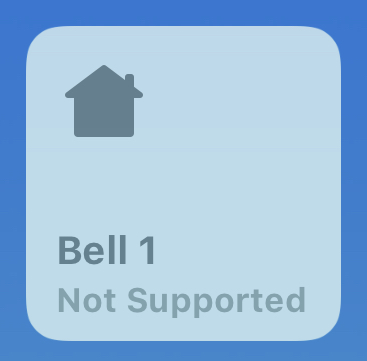
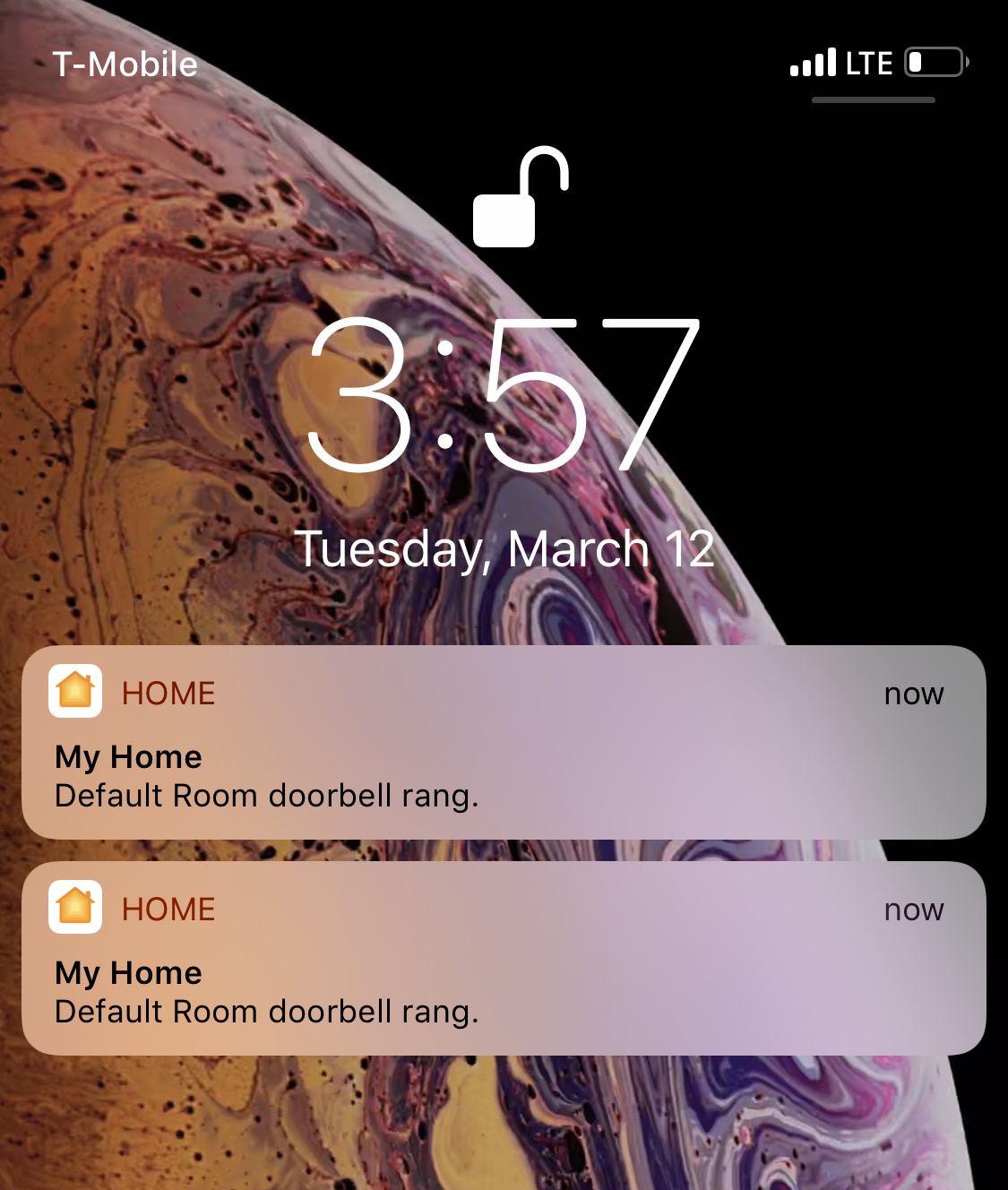
I just tried it on my phone and - it does work kind of...
Homekit shows "not supported" like this:
But if I send a signal like `{"ProgrammableSwitchEvent":0} then I get alerts from the home app:
I tried putting the bell in a room with a camera / door lock and I don't get rich alerts as discussed here.
The Eve app shows the doorbell looking exactly the same as a stateless switch.
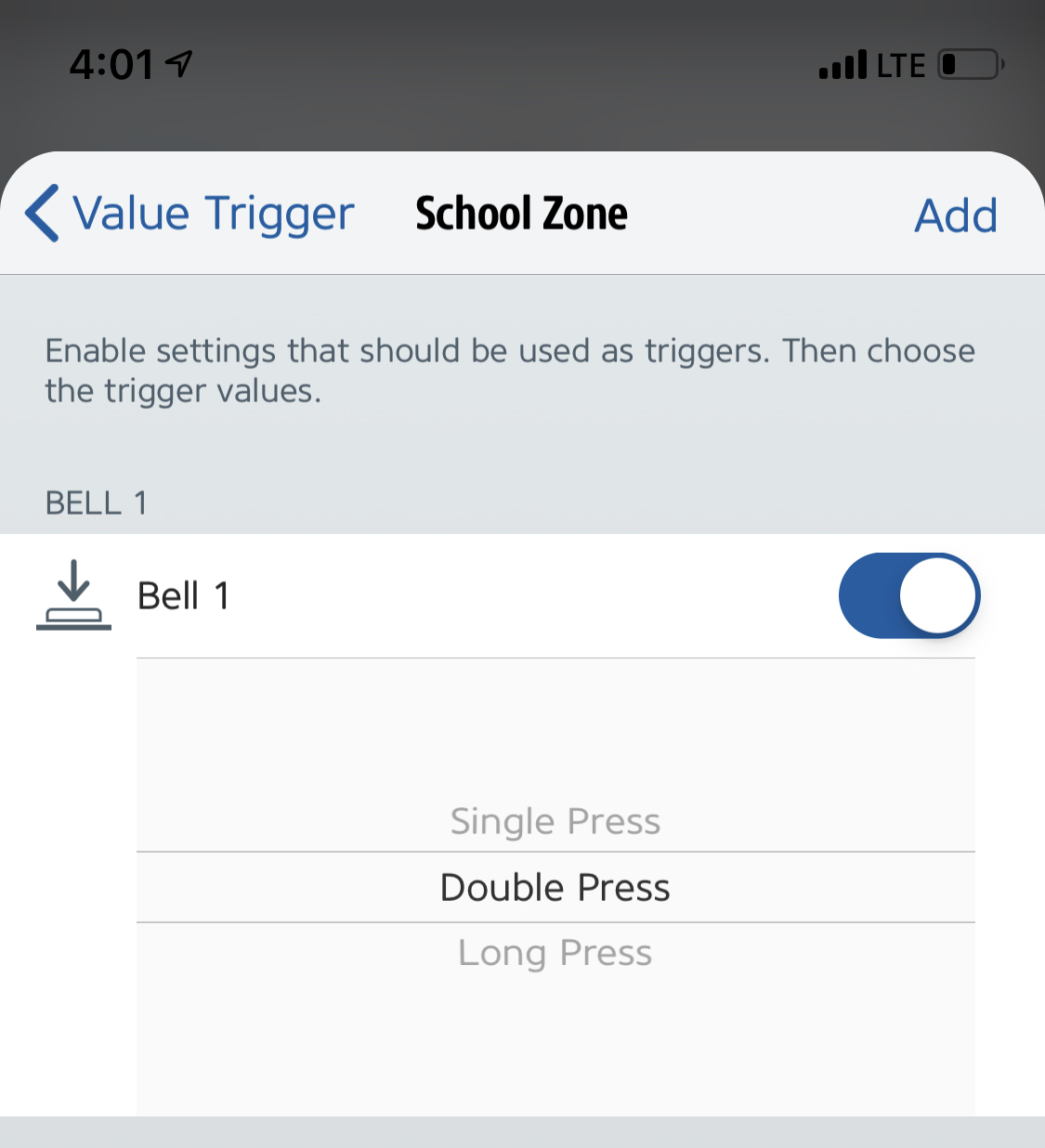
The difference between stateless switch and doorbell seems to be the notification option - meaning stateless switch will not send notifications while doorbell (obviously) will.
crxporter
on 12 Mar 2019
Update. This works great.
Steps to reproduce:
- Make a doorbell service
- Put it in the same room as a camera/lights/door lock
- Send the payload
{"ProgrammableSwitchEvent":0}
It seems like when I was testing earlier the bell item was either in a different room or I was sending a 1 or 2 to the ProgrammableSwitchEvent.
You won't be able to adjust the settings in homekit, it will show "device not supported" as shown above. Doorbell notifications are apparently on by default in HomeKit so the rich notifications are coming through with my camera image, option to turn on lights, and option to unlock my door.
Camera previews show up and everything. Here's a screenshot of the computer banner and the phone after tapping the notification:

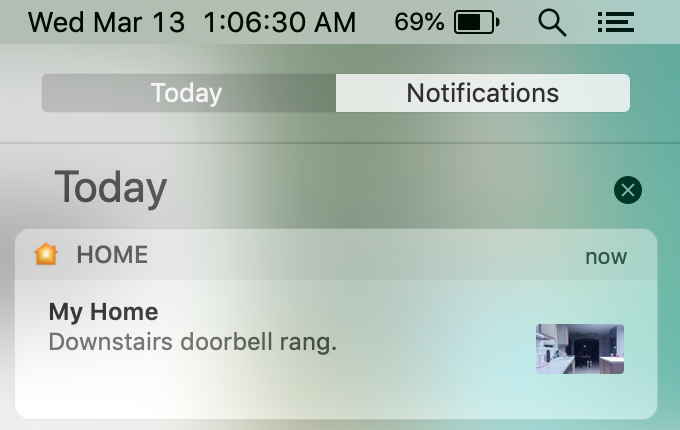
Looks like I need to run a wire from my doorbell to my Pi this weekend!
@djiwondee - I don't know if you're running dev yet but this code is for the dev branch. Let me know if you can't get steps 1-3 above working and I'll be happy to help! Thanks for asking this question, I've just assumed it didn't work so I never really dug into it.
[{"id":"f9da176b.3b4af8","type":"homekit-service","z":"3e0d11cf.29e996","isParent":true,"bridge":"4adad17b.3ee4a8","parentService":"","name":"Bell 1","serviceName":"Doorbell","topic":"","filter":false,"manufacturer":"Default Manufacturer","model":"Default Model","serialNo":"Default Serial Number","characteristicProperties":"{}","x":350,"y":260,"wires":[[]]},{"id":"85ff84ca.d04b08","type":"inject","z":"3e0d11cf.29e996","name":"0","topic":"","payload":"{\"ProgrammableSwitchEvent\":0}","payloadType":"json","repeat":"","crontab":"","once":false,"onceDelay":0.1,"x":130,"y":220,"wires":[["f9da176b.3b4af8"]]},{"id":"4adad17b.3ee4a8","type":"homekit-bridge","z":"","bridgeName":"release 05","pinCode":"111-11-111","port":"","allowInsecureRequest":false,"manufacturer":"Default Manufacturer","model":"Default Model","serialNo":"Default Serial Number"}]
Hello @crxporter,
have just tested that simple doorbell setup within 0.5.1:
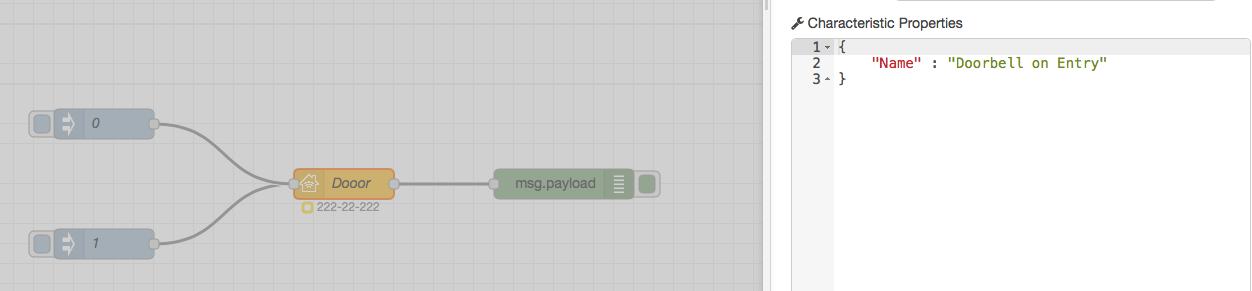
[{"id":"703c0240.785004","type":"homekit-service","z":"9f4a80ed.e417","bridge":"890aedc6.d0b418","name":"Dooor","serviceName":"Doorbell","topic":"","manufacturer":"Default Manufacturer","model":"Default Model","serialNo":"Default Serial Number","characteristicProperties":"{\n \"Name\" : \"Doorbell on Entry\"\n}","x":1130,"y":620,"wires":[["9d921ed1.323ca"]]},{"id":"9d921ed1.323ca","type":"debug","z":"9f4a80ed.e417","name":"","active":true,"tosidebar":true,"console":false,"tostatus":false,"complete":"false","x":1350,"y":620,"wires":[]},{"id":"fc559ddc.585d78","type":"inject","z":"9f4a80ed.e417","name":"0","topic":"","payload":"{\"ProgrammableSwitchEvent\":0}","payloadType":"json","repeat":"","crontab":"","once":false,"onceDelay":0.1,"x":890,"y":560,"wires":[["703c0240.785004"]]},{"id":"fefa7c62.f38408","type":"inject","z":"9f4a80ed.e417","name":"1","topic":"","payload":"{\"ProgrammableSwitchEvent\":1}","payloadType":"json","repeat":"","crontab":"","once":false,"onceDelay":0.1,"x":890,"y":680,"wires":[["703c0240.785004"]]},{"id":"890aedc6.d0b418","type":"homekit-bridge","z":"","bridgeName":"Node-Red-HAP-Bridge-02","pinCode":"222-22-222","port":"","allowInsecureRequest":false,"manufacturer":"Default Manufacturer","model":"Default Model","serialNo":"Default Serial Number"}]
The Home.app is only showing an alarm if the ProgrammableSwitchEventinjected toogles e. g. 0 --> 1 --> 0...). If you inject e. g. a sequence 0 --> 1 --> 1 --> 1 only _one_ alarm raises in the Home.App

In addition to that I haven't recognized any dependency in which room the service is located.
Further more, for me it is ok if home.app setting showing "Non certified" in the properties, but having this on the accessory icon in the home is not so nice. Again my summery is still service type doorbell is not well implemented right now in HomeKit. Lets see what happens with next release of iOS and upcoming equipment on the market like Netatmo. To me this product may be delayed because of the not well implemented support of that service in HomeKit.
djiwondee
on 13 Mar 2019
The Home.app is only showing an alarm if the ProgrammableSwitchEventinjected toogles e. g. 0 --> 1 --> 0...). If you inject e. g. a sequence 0 --> 1 --> 1 --> 1 only one alarm raises in the Home.App
Interesting - this isn't what I'm seeing. Every time I send the {"ProgrammableSwitchEvent":0} I get the "rich alert"
I haven't recognized any dependency in which room the service is located
The room is important for the rich notification. See above when I force-touch the notification I get a view of my camera, the option to turn on lights, and the option to unlock my door.
Anyway I think as far as the node-red-contrib-homekit project is concerned, this is about all we can do until Apple changes the doorbell to be a supported item. I even ran it on the iOS 12.2 beta on my iPad last night with the same results - hopefully apple can change that last minute and release this feature!
@Shaquu - unless you're working on something awesome with linked services I think we are probably good to close this until apple updates things?
crxporter
on 13 Mar 2019
I've been fiddling with this today. Here are some notes.
I can create a camera or motion parent service with a linked doorbell service and send "doorbell alert" notifications into the Home app.
I can create a doorbell parent service with a linked camera or motion service and send "doorbell alert" notifications into the Home app.
Of course the camera is always "no image available" but I can control whether the doorbell notification comes in based on whether the linked item has notifications on or not.
Additionally the rich notifications don't work with this setup meaning I don't have the option to turn on/off lights, unlock doors, etc when the doorbell notification pops up. I've tried this on a setup both with and without a home hub.
It seems like to get rich notifications I have to have the doorbell service in a room together with a functioning camera.
@Shaquu - I'm curious if you've gotten any camera streams working yet (do you have a branch with that testing?). I think if we had a working camera stream parent device with a doorbell linked device then the doorbell would actually work as expected without the "not supported" icon.
If that works I think it would mean the Home app is looking for doorbells as linked services to cameras. This is similar to battery - if we put stand alone battery it says "not supported" but if we put battery linked to anything else we get battery status.
Edit
Another observation. My current camera does NOT show an option to enable/disable notifications. The (non functional) node red camera + doorbell linked DOES show an option in the camera to enable/disable notifications...
crxporter
on 19 Mar 2019
@crxporter thanks for sharing the observations. Could imagine you are right, doorbell is only working as linked service. Will do my own test, but need some days for that since I’m on a business trip the next two days
djiwondee
on 19 Mar 2019
It seems this project might have it figured out. Might get you started on the right path...
crxporter
on 19 Mar 2019
@crxporter I don't have video source for camera so can't work on that yet ;/ Someone shared tutorial for streaming video via VLC but not working for me.
Shaquu
on 19 Mar 2019
Maybe I'll load that linked project - should work on my pi zero. I'll try for myself to see what it looks like - since nobody ever provides screenshots of their programs :-/
crxporter
on 19 Mar 2019
I ordered ZeroCam OV5647 5MPx so I wil be able to start working on Camera this week(end).
And I will share screenshots :+1:
Shaquu
on 20 Mar 2019
Awesome. I ended up spending 2 or 3 hours last night trying to set up my camera to run an RTSP stream. I could get it to do HTTP stream and pull it up in VLC on my laptop, but I couldn't ever connect to the RTSP stream.
I think I'll just hold off until this works inside of node red. I understand node red much better.
ALSO - the more I think of it the more I'm convinced that "doorbell" is just meant to be a linked service to a camera.
crxporter
on 20 Mar 2019
It used to be Parent:
9.30 Doorbell
The Doorbell Service describes a doorbell and is the primary service of the Video Doorbell Profile.
Shaquu
on 20 Mar 2019
It used to be Parent:
There you go again knowing what the official documentation says... Based on my fiddling yesterday - it actually works either way, doorbell or camera is parent looks the same in home app. Either is a little broken still with our setup... Or else I just don't know how to set it up, that's more likely.
crxporter
on 20 Mar 2019
Great findings! I also just added a doorbell service and see the "ring notification" behavior and when a working camera is placed in the same room I believe it would show up in the rich notification. As @Shaquu is already working on a camera node implementation in #16 I am happy to do alpha / beta testing of these new functionalities.
 matthub
on 23 Mar 2019
matthub
on 23 Mar 2019
16 RTSP Camera support is on feature/camera branch
Please test it accordingly to this Issue!
Shaquu
on 21 Jun 2019
I close the Issue due to inactivity and that Doorbell is proved to work in #16
If you come back here and still have a problem then feel free to comment here or open new Issue.
Shaquu
on 23 Jun 2019
To create Doorbell you just make Doorbell Parent Service.
To create Video Doorbell you make Doorbell Parent Service and CameraControl Linked Service (currently on feature/camera branch).
Then you have to send {"ProgrammableSwitchEvent":0} to Doorbell input.
Shaquu
on 23 Jun 2019
To create Doorbell you just make Doorbell Parent Service.
To create Video Doorbell you make Doorbell Parent Service and CameraControl Linked Service (currently on feature/camera branch).Then you have to send
{"ProgrammableSwitchEvent":0}to Doorbell input.
Hi
I did this and I only got a notification. When I click on it the home app opens and there I can tick on the camera and it displays streams my video.
How do you get a "doorbell" rich notification with snapshot to your mobile phone?
and an option to turn on lights, and option to unlock my door.
Someone can share a flow?
 debouttek
on 14 Dec 2019
debouttek
on 14 Dec 2019
Nobody?
debouttek
on 20 Dec 2019
@debouttek
How do you get a "doorbell" rich notification with snapshot to your mobile phone?
and an option to turn on lights, and option to unlock my door.
I got you. I'll share what I understand about this setup and then share my flow.
First up - the rich notification will show items only in the same room as the doorbell/camera device. So the doorbell, lights to turn on, and lock will need to be in the same homekit room in the home app.
Note - this flow is NodeRED v.0.20.5 and NRCHKB v.0.6.2. I haven't updated in a while. The flow is running on a Pi Zero W with an official Raspberry Pi brand camera. Sorry - I did not document how I set up the camera.
Flow:
[{"id":"d0807b39.e192e8","type":"inject","z":"5c556f09.930f38","name":"0","topic":"","payload":"{\"ProgrammableSwitchEvent\":0}","payloadType":"json","repeat":"","crontab":"","once":false,"onceDelay":0.1,"x":90,"y":320,"wires":[["edbe69fe.c3b9"]]},{"id":"edbe69fe.c3b9","type":"homekit-service","z":"5c556f09.930f38","isParent":true,"bridge":"6a23067c.b06ea","accessoryCategory":"VIDEO_DOORBELL","parentService":"","name":"Kitchen Bell","serviceName":"Doorbell","topic":"","filter":false,"manufacturer":"Default Manufacturer","model":"Default Model","serialNo":"Default Serial Number","cameraConfigVideoProcessor":"ffmpeg","cameraConfigSource":"","cameraConfigStillImageSource":"","cameraConfigMaxStreams":2,"cameraConfigMaxWidth":1280,"cameraConfigMaxHeight":720,"cameraConfigMaxFPS":10,"cameraConfigMaxBitrate":300,"cameraConfigVideoCodec":"libx264","cameraConfigAudioCodec":"libfdk_aac","cameraConfigAudio":false,"cameraConfigPacketSize":1316,"cameraConfigVerticalFlip":false,"cameraConfigHorizontalFlip":false,"cameraConfigMapVideo":"0:0","cameraConfigMapAudio":"0:1","cameraConfigVideoFilter":"scale=1280:720","cameraConfigAdditionalCommandLine":"-tune zerolatency","cameraConfigDebug":false,"characteristicProperties":"{}","x":270,"y":340,"wires":[["e099ad5f.1b9f"]]},{"id":"e099ad5f.1b9f","type":"debug","z":"5c556f09.930f38","name":"","active":true,"tosidebar":true,"console":false,"tostatus":false,"complete":"false","x":530,"y":440,"wires":[]},{"id":"6d7d65cf.5d16ac","type":"homekit-service","z":"5c556f09.930f38","isParent":false,"bridge":"","accessoryCategory":"OTHER","parentService":"edbe69fe.c3b9","name":"Camera","serviceName":"CameraControl","topic":"","filter":false,"manufacturer":"Default Manufacturer","model":"Default Model","serialNo":"Default Serial Number","cameraConfigVideoProcessor":"ffmpeg","cameraConfigSource":"-re -f video4linux2 -i /dev/video0","cameraConfigStillImageSource":"","cameraConfigMaxStreams":"4","cameraConfigMaxWidth":1280,"cameraConfigMaxHeight":720,"cameraConfigMaxFPS":"20","cameraConfigMaxBitrate":"500","cameraConfigVideoCodec":"h264_omx","cameraConfigAudioCodec":"libfdk_aac","cameraConfigAudio":false,"cameraConfigPacketSize":1316,"cameraConfigVerticalFlip":false,"cameraConfigHorizontalFlip":false,"cameraConfigMapVideo":"0:0","cameraConfigMapAudio":"0:1","cameraConfigVideoFilter":"scale=1280:720","cameraConfigAdditionalCommandLine":"-tune zerolatency","cameraConfigDebug":false,"characteristicProperties":"{}","x":280,"y":460,"wires":[["e099ad5f.1b9f"]]},{"id":"6a23067c.b06ea","type":"homekit-bridge","z":"","bridgeName":"Bells","pinCode":"832-91-199","port":"","allowInsecureRequest":false,"manufacturer":"Default Manufacturer","model":"Default Model","serialNo":"Default Serial Number","customMdnsConfig":false,"mdnsMulticast":true,"mdnsInterface":"","mdnsPort":"","mdnsIp":"","mdnsTtl":"","mdnsLoopback":true,"mdnsReuseAddr":true}]
Screenshot:

Rich notifications work for this - if the 0 gets injected, my devices get rich notifications with a preview and the little button to turn on the lights. Note that you must have a homepod/apple tv/ipad hub running for this to work.
crxporter
on 20 Dec 2019
@debouttek
How do you get a "doorbell" rich notification with snapshot to your mobile phone?
and an option to turn on lights, and option to unlock my door.I got you. I'll share what I understand about this setup and then share my flow.
First up - the rich notification will show items only in the same room as the doorbell/camera device. So the doorbell, lights to turn on, and lock will need to be in the same homekit room in the home app.
Note - this flow is NodeRED v.0.20.5 and NRCHKB v.0.6.2. I haven't updated in a while. The flow is running on a Pi Zero W with an official Raspberry Pi brand camera. Sorry - I did not document how I set up the camera.
Flow:
[{"id":"d0807b39.e192e8","type":"inject","z":"5c556f09.930f38","name":"0","topic":"","payload":"{\"ProgrammableSwitchEvent\":0}","payloadType":"json","repeat":"","crontab":"","once":false,"onceDelay":0.1,"x":90,"y":320,"wires":[["edbe69fe.c3b9"]]},{"id":"edbe69fe.c3b9","type":"homekit-service","z":"5c556f09.930f38","isParent":true,"bridge":"6a23067c.b06ea","accessoryCategory":"VIDEO_DOORBELL","parentService":"","name":"Kitchen Bell","serviceName":"Doorbell","topic":"","filter":false,"manufacturer":"Default Manufacturer","model":"Default Model","serialNo":"Default Serial Number","cameraConfigVideoProcessor":"ffmpeg","cameraConfigSource":"","cameraConfigStillImageSource":"","cameraConfigMaxStreams":2,"cameraConfigMaxWidth":1280,"cameraConfigMaxHeight":720,"cameraConfigMaxFPS":10,"cameraConfigMaxBitrate":300,"cameraConfigVideoCodec":"libx264","cameraConfigAudioCodec":"libfdk_aac","cameraConfigAudio":false,"cameraConfigPacketSize":1316,"cameraConfigVerticalFlip":false,"cameraConfigHorizontalFlip":false,"cameraConfigMapVideo":"0:0","cameraConfigMapAudio":"0:1","cameraConfigVideoFilter":"scale=1280:720","cameraConfigAdditionalCommandLine":"-tune zerolatency","cameraConfigDebug":false,"characteristicProperties":"{}","x":270,"y":340,"wires":[["e099ad5f.1b9f"]]},{"id":"e099ad5f.1b9f","type":"debug","z":"5c556f09.930f38","name":"","active":true,"tosidebar":true,"console":false,"tostatus":false,"complete":"false","x":530,"y":440,"wires":[]},{"id":"6d7d65cf.5d16ac","type":"homekit-service","z":"5c556f09.930f38","isParent":false,"bridge":"","accessoryCategory":"OTHER","parentService":"edbe69fe.c3b9","name":"Camera","serviceName":"CameraControl","topic":"","filter":false,"manufacturer":"Default Manufacturer","model":"Default Model","serialNo":"Default Serial Number","cameraConfigVideoProcessor":"ffmpeg","cameraConfigSource":"-re -f video4linux2 -i /dev/video0","cameraConfigStillImageSource":"","cameraConfigMaxStreams":"4","cameraConfigMaxWidth":1280,"cameraConfigMaxHeight":720,"cameraConfigMaxFPS":"20","cameraConfigMaxBitrate":"500","cameraConfigVideoCodec":"h264_omx","cameraConfigAudioCodec":"libfdk_aac","cameraConfigAudio":false,"cameraConfigPacketSize":1316,"cameraConfigVerticalFlip":false,"cameraConfigHorizontalFlip":false,"cameraConfigMapVideo":"0:0","cameraConfigMapAudio":"0:1","cameraConfigVideoFilter":"scale=1280:720","cameraConfigAdditionalCommandLine":"-tune zerolatency","cameraConfigDebug":false,"characteristicProperties":"{}","x":280,"y":460,"wires":[["e099ad5f.1b9f"]]},{"id":"6a23067c.b06ea","type":"homekit-bridge","z":"","bridgeName":"Bells","pinCode":"832-91-199","port":"","allowInsecureRequest":false,"manufacturer":"Default Manufacturer","model":"Default Model","serialNo":"Default Serial Number","customMdnsConfig":false,"mdnsMulticast":true,"mdnsInterface":"","mdnsPort":"","mdnsIp":"","mdnsTtl":"","mdnsLoopback":true,"mdnsReuseAddr":true}]Screenshot:
Rich notifications work for this - if the
0gets injected, my devices get rich notifications with a preview and the little button to turn on the lights. Note that you must have a homepod/apple tv/ipad hub running for this to work.
Thanks !!! forgot the lamp...
debouttek
on 23 Dec 2019
@debouttek can it be closed now?
Shaquu
on 27 Dec 2019
@debouttek can it be closed now?
Yes! It works Great.
debouttek
on 27 Dec 2019
Sorry for reviewing an old threat, but I am struggling with the rich notifications as described by others in this thread. I have a working camera in Homekit that streams just fine. I have added a doorbell service which also works fine, i.e. I get a notification when I send a {"ProgramableSwitchEvent":0} to the doorbell service. However I only get the notification, no image from the camera and now other options. When I click the notification it just takes me to the home app.
Interesting thing is that I had it working at some point, but when I made some changes it stopped working and now it won't come back...
What I have done/tried so far:
- made sure that cam and doorbell are in the same room.
- tried to move both to another room than the default room.
- tried to make the doorbell a parent service and the cam a linked service.
- tried to make the cam parent service and the doorbell a linked service.
- tried with both as parent services.
- I have deleted both between each attempt to ensure that home kit picks up the most recent configuration.
No matter how I set it up each item individually works, i.e. I can stream video from the camera and I get regular notifications from the doorbell. But no matter what I do I cannot get the rich notifications.
I was starting to consider whether Apple have made some breaking changes in a recent iOS update. Are there anybody with more experience to share or have this working in the latest iOS version?
 mtjoernelund
on 14 Jul 2020
mtjoernelund
on 14 Jul 2020
Related issues
mtjoernelund
·
8Comments
crxporter
·
3Comments
 Barabba11
·
3Comments
djiwondee
·
7Comments
Barabba11
·
3Comments
djiwondee
·
7Comments
 michaltaberski
·
6Comments
michaltaberski
·
6Comments
Most helpful comment
I ordered ZeroCam OV5647 5MPx so I wil be able to start working on Camera this week(end).
And I will share screenshots :+1: