Hi, thanks for this sweet project! I know SVG <text> elements don't quite wrap yet, and I was wondering if I've missed a way to get axis label text to wrap that currently exists in this project? I've come across https://github.com/d3plus/d3plus-text, but I'm unsure of ways to interop between nivo & d3. There is also the hacky <tspan> element which could be deployed at some level, but that feels like I'm barking up the wrong tree.
Has this problem already been solved? If not, is it planned on being solved, or is help required?

 rpearce
All 33 comments
Hi @rpearce,
You'll have to use tspan for now, the problem with SVG text wrap support in nivo, is the various chart implementations: SVG/Canvas/HTML.
Also nivo provides an HTTP rendering API and all the existing solutions relies on the DOM to get text size and stuff, making those unusable for SSR :(
The first step to make this less annoying should be to support line breaks at least.
 plouc
on 21 Nov 2018
plouc
on 21 Nov 2018
Alright, I'll see what I can cook up. Thanks for getting back so quickly
rpearce
on 21 Nov 2018
Maybe you can try to use the lib you mentioned using a custom renderTick function, however it seems that the lib adds several deps which can increase the size of your bundle, and are somehow useless in a React context such as d3-selection.
plouc
on 21 Nov 2018
On the SSR-side, would pre-rendering on the server with GoogleChrome/puppeteer allow for that sort of analysis? Sounds more like a paid service at that point :)
I'll try a custom renderTick but perhaps without that lib
rpearce
on 21 Nov 2018
yes you could use puppeteer, but that's a whole different kind of setup :)
for example this is generated using react-dom/server.
plouc
on 21 Nov 2018
Gotcha. That is very cool
rpearce
on 21 Nov 2018
The repository is available here => https://github.com/plouc/nivo-api, but I'm currently moving it to the main repo.
plouc
on 21 Nov 2018
Update: here's what I'm currently going with...
axisBottom={{
tickSize: 0,
tickPadding: 25,
tickRotation: 0,
renderTick: ({
opacity,
textAnchor,
textBaseline,
textX,
textY,
theme,
value,
x,
y
}) => {
return (
<g
transform={`translate(${x},${y})`}
style={{ opacity }}
>
<text
alignmentBaseline={textBaseline}
style={theme.axis.ticks.text}
textAnchor={textAnchor}
transform={`translate(${textX},${textY})`}
>
{getTspanGroups(value)}
</text>
</g>
)
}
}}
where getTspanGroups is an Array of <tspan> elements that are no longer than 15 characters (not dynamic ... but passable).
Best I can do for now!
rpearce
on 25 Nov 2018
In case this is helpful to anyone, I wrote a somewhat flexible getTspanGroups function that can be inserted to the same place in rpearce's code.
Just a heads up - this was written in Typescript
const getTspanGroups = (value: string, maxLineLength: number, maxLines: number = 2) => {
        const words = value.split(' ')

        type linesAcc = {
            lines: string[],
            currLine: string
        }

        //reduces the words into lines of maxLineLength
        const assembleLines: linesAcc = words.reduce( (acc: linesAcc, word: string) => {
            //if the current line isn't empty and the word + current line is larger than the allowed line size, create a new line and update current line
            if ( (word + acc.currLine).length > maxLineLength && acc.currLine !== '') {
                return {
                    lines: acc.lines.concat([acc.currLine]),
                    currLine: word
                }
            }
            //otherwise add the word to the current line
            return {
                ...acc,
                currLine: acc.currLine + ' ' + word
            }

        }, {lines: [], currLine: ''})

        //add the ending state of current line (the last line) to lines
        const allLines = assembleLines.lines.concat([assembleLines.currLine])

        //for now, only take first 2 lines due to tick spacing and possible overflow
        const lines = allLines.slice(0, maxLines)
        let children: JSX.Element[] = []
        let dy = 0

        lines.forEach( (lineText, i) => {
            children.push(
                <tspan x={0} dy={dy} key={i}>
                    {
                        // if on the second line, and that line's length is within 3 of the max length, add ellipsis
                        (1 === i && allLines.length > 2) ? lineText.slice(0, maxLineLength - 3) + '...' : lineText
                    }
                </tspan>
            )
            //increment dy to render next line text below
            dy += 15
        });

        return children
    }
 ByronBecker
on 21 Jan 2019
ByronBecker
on 21 Jan 2019
That's great, @ByronBecker. If I had it my way, I'd say that this lib should make use of foreignObject and use proper HTML for this to auto-wrap, but there are some legacy browser compatibility issues
rpearce
on 21 Jan 2019
Update: here are two ways to break the string into an array of strings of 15 characters (adjust to your needs) using only regex:
const str = '...'
const pattern = /([^\s].{0,14}(?=[\s\W]|$))/gm
str.match(pattern)

// or, if you care less about whitespace and precision but want speed

const str = '...'
const pattern = /(.{1,15}\W)|(.{1,15})/gm;
str.match(pattern).map(match => match.trim())
@rpearce, foreignObject is not processable by simple SVG viewers, that's why I avoid using it.
plouc
on 24 Mar 2019
also, it won't work for canvas implementations :/
plouc
on 24 Mar 2019
is there a way to wrap text in axisLeft? I tried to write a function and add it to the tspan, but it doesn't work .
    wrapType(str) {
        if (str.length > 16) {
            // if string is longer than 16 characters
            var p = 16;
            while (p > 0) {
                // loop through the string and check each char
                if ((str.charAt(p) === " " || str.charAt(p) === "-")) {
                    // if a dash or space is found, wrap the string
                    var left = (str.charAt(p) === "-") ? str.substring(0, p + 1) : str.substring(0, p);
                    var right = str.substring(p + 1);
                    return left + "\n" + this.wrapType(right); // return the wrapped string
                }
                p--;
            }
        }
        return str; // return the original string
    }
 axisLeft={{
            tickSize: 10,
            tickPadding: 5,
            tickRotation: 1,
            legend: '',
            legendPosition: 'middle',
            legendOffset: -40,
              renderTick: ({
                opacity,
                textAnchor,
                textBaseline,
                textX,
                textY,
                theme,
                value,
                x,
                y
            }) => {
                return (
                <g
                transform={`translate(${x},${y})`}
                >
                    <text
                    alignmentBaseline={textBaseline}
                    textAnchor={textAnchor}
                    transform={`translate(${textX},${textY})`}
                    >
                    {this.wrapType(value)}
                    </text>
                </g>
                )
            }
        }}
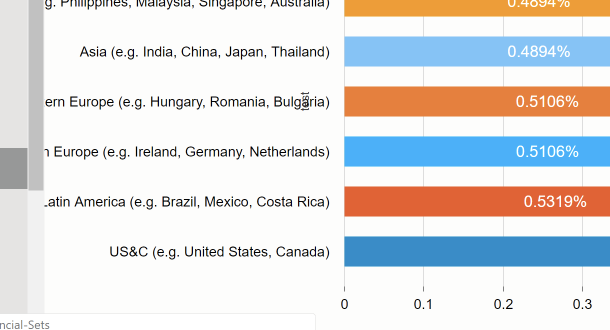
 elyfuentes27
on 13 Jun 2019
elyfuentes27
on 13 Jun 2019
@elyfuentes27, I don't see where you used a tspan
plouc
on 29 Jun 2019
@plouc Yes, I tried that but didn't work so I removed it from the code. Any suggestion of what should I do in this situation? Thank you
elyfuentes27
on 8 Jul 2019
@elyfuentes27, can you please reproduce what you tried on codesandbox? thanks
plouc
on 12 Jul 2019
@plouc Thanks for taking some time from your busy schedule! Here is a link to an example of what I tried to do. I can see in the Console that Text was wrapped, but It doesn't render that on the browser.
https://codesandbox.io/embed/dazzling-khorana-83r62
Not Sure what are my options.
Maybe
- Could we have something like Readmore or less?
- On Hover only shows full label Text, and on Axis we Truncate Text.
Thanks!
elyfuentes27
on 13 Jul 2019
Hi!
Just FYI I did the following to deal with this :
- Used :
https://www.npmjs.com/package/truncate-htmlto truncate Axis Label - Added the complete string in the tooltip :
tooltip={({ indexValue, value, color }) => (
            <strong>
               {indexValue}: <tspan style={{color: color}}>{value}</tspan>
            </strong>
        )}
Thanks!
elyfuentes27
on 25 Jul 2019
Hello!
I want to apply this to the legends in a bar graph, but I dont get how to make this.
in the @rpearce answer , I see the "renderTick" porperty that recieves a function, but, looking at the legends properties they aren't functions, so I don't know how to do it.
also when he calls the function getTspanGroups(value), does the function return and array of tspans? is something like divide a value with split method?
or in stead of that should I use the options that was suggested by @rpearce with regex??
?
thanks! and excuse me,I 'm kind of new with this.
 sueherrera30
on 27 Aug 2019
sueherrera30
on 27 Aug 2019
@sueherrera30
I see the "renderTick" porperty that recieves a function, but, looking at the legends properties they aren't functions
I believe renderTick accepts a function, as shown here by the PropType expectation:
You may be thinking that it accepts a _component_, but a component is nothing more than a function at the end of the day.
also when he calls the function getTspanGroups(value), does the function return and array of tspans?
Here, I wrote ...where getTspanGroups is an Array of <tspan> elements that are no longer than 15 characters (not dynamic ... but passable), so "yes" to your question.
rpearce
on 28 Aug 2019
@elyfuentes27 can you show us a codesandbox of what you changed to make it work? I don't quite understand..
 CallumHemsley
on 26 Sep 2019
CallumHemsley
on 26 Sep 2019
@CallumHemsley -> This is just an example:
https://codesandbox.io/embed/react-bar-chart-using-nivo-83r62?fontsize=14.
Hope this helps.
elyfuentes27
on 26 Sep 2019
@elyfuentes27 Thank you.
CallumHemsley
on 27 Sep 2019
@rpearce where are you getting the theme attribute from? Mine is undefined when trying to use your code
CallumHemsley
on 27 Sep 2019
@rpearce where are you getting the
themeattribute from? Mine is undefined when trying to use your code
At the time of writing, theme is pulled off of an object sent by nivo in the callback for renderTick. Separately, theme was something passed in to nivo components then, as well (an object for defining your defaults).
Unfortunately, I am not using nivo any more and am not up to date on the changes that have happened in the past year.
rpearce
on 27 Sep 2019
Here's what worked for me.
axisLeft: {
        tickSize: 8,
        tickPadding: 4,
        renderTick: HorizontalTick,
      },
/**
 * Returns a tick element that wraps text for the given number of lines and adds an ellipsis if the text can't fit. This can be passed to the renderTick method.
 */
const HorizontalTick = ({ textAnchor, textBaseline, value, x, y }) => {
  const MAX_LINE_LENGTH = 16;
  const MAX_LINES = 2;
  const LENGTH_OF_ELLIPSIS = 3;
  const TRIM_LENGTH = MAX_LINE_LENGTH * MAX_LINES - LENGTH_OF_ELLIPSIS;
  const trimWordsOverLength = new RegExp(`^(.{${TRIM_LENGTH}}[^\\w]*).*`);
  const groupWordsByLength = new RegExp(
    `([^\\s].{0,${MAX_LINE_LENGTH}}(?=[\\s\\W]|$))`,
    'gm',
  );
  const splitValues = value
    .replace(trimWordsOverLength, '$1...')
    .match(groupWordsByLength)
    .slice(0, 2)
    .map((val, i) => (
      <tspan
        key={val}
        dy={12 * i}
        x={-10}
        style={{ fontFamily: 'sans-serif', fontSize: '11px' }}
      >
        {val}
      </tspan>
    ));
  return (
    <g transform={`translate(${x},${y})`}>
      <text alignmentBaseline={textBaseline} textAnchor={textAnchor}>
        {splitValues}
      </text>
    </g>
  );
};
 tylercrosse
on 11 Dec 2019
tylercrosse
on 11 Dec 2019
use @vx/text
```jsx
import React from 'react';
import { Text } from '@vx/text';
const RadarLabel = ({ id, anchor }) => {
return (
fontSize='10px'
verticalAnchor={anchor}
>
{id}
);
};
export default RadarLabel;
```
 sibelius
on 16 Dec 2019
sibelius
on 16 Dec 2019
This won't be supported as it's specific to SVG, please have a look at the suggested approaches if you want to implement this.
plouc
on 15 Jan 2020
@plouc,
will this renderTick work with tickRotation? I see the renderTick working fine but the tickRotation is not happening whenever I use renderTick. Is there a way to get it to working?
 Lekha30
on 8 Apr 2020
Lekha30
on 8 Apr 2020
I have my axis bottom formatted like this:
format: '%m/%d/%Y %H:%M %p',
I want the time to appear on a new line. Every way of trying to split on new line doesn't work or gives me an extra space. I think I am going to have to wrap the to go to another line like some of the responses above. However, the responses above seem very elaborate. Is there a more elegant way of doing this within nivo chart? Thanks.
 ymenase
on 22 Apr 2020
ymenase
on 22 Apr 2020
@rpearce,
foreignObjectis not processable by simple SVG viewers, that's why I avoid using it.
@plouc so does this mean foreignObject will not render? I am on a project that does not need to support various browsers (we are using puppeteer to generate PDFs). I attempted to use foreignObject within the pie chart radial label to achieve word wrapping.
I see the foreignObject within the DOM but it is hidden.
thanks!
 dkim-thomas
on 20 May 2020
dkim-thomas
on 20 May 2020
@tylercrosse do you have a sandbox example of this code? I tryed in my own code, but didn't worked ...
 EddyJens
on 21 May 2020
EddyJens
on 21 May 2020
Related issues
 Haaziq-Uvais
·
3Comments
Haaziq-Uvais
·
3Comments
 luisrudge
·
3Comments
luisrudge
·
3Comments
 zhe1ka
·
3Comments
zhe1ka
·
3Comments
 ellipticaldoor
·
4Comments
ellipticaldoor
·
4Comments
 serendipity1004
·
3Comments
serendipity1004
·
3Comments
Most helpful comment
In case this is helpful to anyone, I wrote a somewhat flexible getTspanGroups function that can be inserted to the same place in rpearce's code.
Just a heads up - this was written in Typescript