Nivo: Add a theme option to change the color of the LineSlicesItem's line
https://github.com/plouc/nivo/blob/master/packages/line/src/LineSlicesItem.js#L36
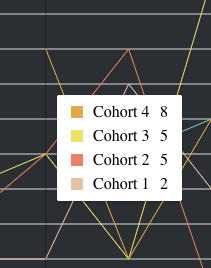
It's fixed as #000, making it hard to use with dark backgrounds:
 luisrudge
👍5
All 3 comments
I could use this one too! I have a similar background.
 acomito
on 29 Oct 2018
acomito
on 29 Oct 2018
:100: this would be a great improvement, though passing in any number of styles would probably make it even more flexible (as is done elsewhere)
 rpearce
on 5 Dec 2018
rpearce
on 5 Dec 2018
👍1
Fixed by https://github.com/plouc/nivo/pull/512/commits/bd7a40545229bd9f2e635ef57681df91ba90e1ce, you can customize it using theme.crosshair.line, which default to:
crosshair: {
    line: {
        stroke: '#000000',
        strokeWidth: 1,
        strokeOpacity: 0.35,
    },
}
 plouc
on 17 Apr 2019
plouc
on 17 Apr 2019
👍5
Was this page helpful?
0 / 5 - 0 ratings
Related issues
 ellipticaldoor
·
4Comments
ellipticaldoor
·
4Comments
 zhe1ka
·
3Comments
zhe1ka
·
3Comments
 gcloeval
·
3Comments
gcloeval
·
3Comments
 cedmax
·
4Comments
cedmax
·
4Comments
 knackjax
·
3Comments
knackjax
·
3Comments
Most helpful comment
Fixed by https://github.com/plouc/nivo/pull/512/commits/bd7a40545229bd9f2e635ef57681df91ba90e1ce, you can customize it using
theme.crosshair.line, which default to: