Ngx-extended-pdf-viewer: Update to pdf.js 2.4.456
A few minutes ago, @timvandermeij released the next version of pdf.js.
ngx-extended-pdf-viewer should update to the next version.
 stephanrauh
All 10 comments
You're really fast; good to see that you're willing to use the latest PDF.js version! Enjoy the new release and let us know if there are any problems we can help out with.
 timvandermeij
on 19 Mar 2020
timvandermeij
on 19 Mar 2020
@timvandermeij It's slightly off-topic, but after our discussions I think you'd like to hear I've started to modify the look of the PDF viewer. Currenty, it's a very small change. It's simply adopting Google's Material Design icons. Even so, I hope it'll help you to distinguish between native pdf.js bugs and bugs reported by users of ngx-extended-pdf-viewer:

stephanrauh
on 19 Mar 2020
Yes, those modifications will help to distinguish the default viewer from your viewer. Thanks!
timvandermeij
on 19 Mar 2020
@timvandermeij I've just managed to run the first smoke test. My first impressions:
- You've reduced the size of the JavaScript files a lot. Awesome! Thanks!
- There are many small changes, such as replacing single quotes by double quotes (in the binaries). That's fine by me, it just slowed me down a bit. On the plus side: it allowed me to spot an error. The "remove borders" options didn't work in the ES5 version of ngx-extended-pdf-viewer.
- Most things work, apart from a few layout glitches and weird behavior when zooming out. That's probably my piece of cake.
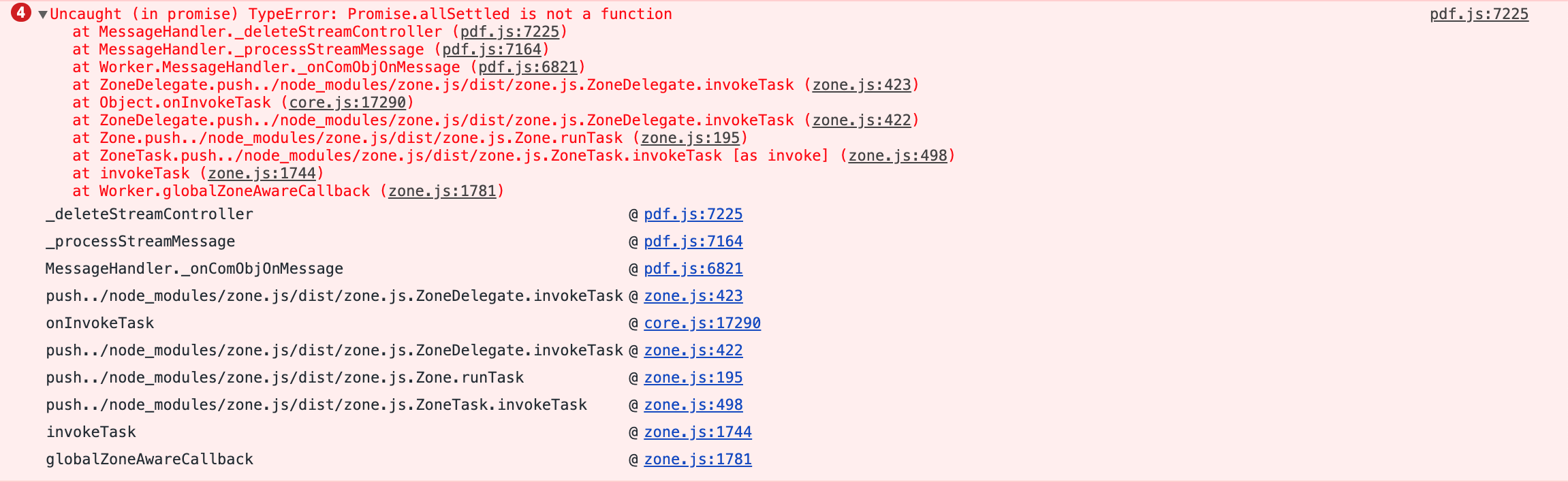
- However, I observe error message I can't figure out. They don't seem to hurt much, but still, can you give me a clue what's wrong? Here's the screenshot:
Best regards,
Stephan
stephanrauh
on 23 Mar 2020
PDF.js builds are now non-polyfilled/non-Babel-translated by default, so a modern browser is required. Most modern browsers support Promise.allSettled, see https://developer.mozilla.org/en-US/docs/Web/JavaScript/Reference/Global_Objects/Promise/allSettled. This is also why the files are smaller; large polyfills are no longer required.
However, if you need support for older browsers you might not want to use the default build just yet, but switch to the ES5-compatible build (the one that was the default before). In pdfjs-dist we also ship the es5 folder with an ES5-compatible build that does still include all polyfills/Babel translations. For example in our Node.js example we still use the ES5-compatible build because Node.js doesn't have all functionality a regular browser has; see https://github.com/mozilla/pdf.js/blob/master/examples/node/pdf2svg.js#L17 for how it's used. You can simply include the build from the es5 folder and everything should work the same as before.
timvandermeij
on 23 Mar 2020
Weird - I'm using Firefox. Shouldn't be that legacy. :) But it really looks like a polyfill issue. Thanks for the hint!
BTW, I usually build the library from source - both the ES5 version and the ES2015 version. That enables me to test the master branch every once in a while.
stephanrauh
on 24 Mar 2020
@timvandermeij Holy crap, the problem isn't caused by a missing polyfill, but by a polyfill I didn't even know of! Angular uses zone.js to add value to standard APIs like Promise. For some reason, it locks the version number in the package.json by default. Updating to a current zone.js solves the issue.
Thanks again! Without your hint I'd still be clueless!
stephanrauh
on 24 Mar 2020
Ah, good to hear that you found it! According to https://developer.mozilla.org/en-US/docs/Web/JavaScript/Reference/Global_Objects/Promise/allSettled Firefox indeed supports Promise.allSettled since version 71. Unfortunately we see problems with polyfills quite often; https://github.com/mozilla/pdf.js/search?q=zone.js&type=Issues is just a small collection of zone.js-related issues, but there are also other polyfills that do this. One that often happens is extending Array.prototype with enumerable options, for which we recently even had to implement detection in the library because it happened quite often and caused cryptic errors; see https://github.com/mozilla/pdf.js/pull/11582/files.
timvandermeij
on 24 Mar 2020
Whow. Sounds like Don Quijote fighting windmills. Tim, when we meet in person (after the corona crisis), I'm gonna buy you a beer! Or a coffee, whichever you prefer. :)
stephanrauh
on 24 Mar 2020
The feature has landed with version 3.0.0-beta.0. I didn't encounter any problem. Good work, @timvandermeij!
stephanrauh
on 28 Mar 2020
Related issues
 JaceAD
·
7Comments
JaceAD
·
7Comments
 RahmatAliMalik5
·
7Comments
RahmatAliMalik5
·
7Comments
 dheerajm91
·
6Comments
dheerajm91
·
6Comments
 rscherer
·
7Comments
rscherer
·
7Comments
 i7i5
·
3Comments
i7i5
·
3Comments
Most helpful comment
You're really fast; good to see that you're willing to use the latest PDF.js version! Enjoy the new release and let us know if there are any problems we can help out with.