Ngx-extended-pdf-viewer: ciritical bug: cmap folder should be included in assets folder!
Check this first
- Does the bug also happen on https://mozilla.github.io/pdf.js/web/viewer.htm? No.
- Does the bug also happen on https://pdfviewer.net/simple? Yes
Describe the bug
A clear and concise description of what the bug is.
Some pdf include special character that doesn't support by pdf.js as default.
To support the character, pdf.js load cmap file lazily.
You can set cmap folder by defaultOptions.cMapUrl.
But in ngx-extended-pdf-viewer, it does not include cmap folder and doesn't include documentation how to set cmap folder.
I suggest that we should include https://github.com/mozilla/pdfjs-dist/tree/master/cmaps files in node_modules/ngx-extended-pdf-viewer/assets/cmaps/ folder.
and we should add the documentation to make developers
add to angular.json
              {
                "glob": "**/*",
                "input": "node_modules/ngx-extended-pdf-viewer/assets/cmaps",
                "output": "/assets/cmaps/"
              },
add defaultOptions.cMapUrl = './assets/cmaps/'; in their code.
Version info
- Version of ngx-extended-pdf-viewer: 1.8.4 or 2.0.0-alpha.x
Demo PDF file
Sorry for not providing PDF. its problem was occured with my client's website so the pdf was commercial usage. I cannot share you the pdf. But it is problem that we not include cmap files.
Additional context
 leo6104
All 3 comments
In my project, i fix the cmap files issue with these step.
npm install pdfjs-dist -D
Add to angular.json "scripts" part
               {
                "glob": "**/*",
                "input": "node_modules/pdfjs-dist/cmaps",
                "output": "/assets/cmaps/"
              },
Add to typescript (where i add ngx-extended-pdf-viewer)
defaultOptions.cMapUrl = './assets/cmaps/';
It solve the issue with my project.
Maybe some rendering problem in other issue can be resolved with these solution.
leo6104
on 12 Feb 2020
No problem. I've just published version 2.0.0-alpha.8 containing the CMAP files and the default configuration to find them automatically. Would you mind to test the new version?
You know, I've been investigating the topic of CMAP files several times. The only reason I didn't add them earlier was I didn't know how to test them. I still don't. I've learned CMAP files are primarily needed by old PDF documents written in Korean, Chinese or Japanese. However, I haven't been able to find such a file. Every file I've found is displayed correctly without the CMAP files.
So I'd appreciate your help. Hope the new version fixes your problems. You can drop the defaultOptions bit, I've made the correct folder the default.
Best regards,
Stephan
 stephanrauh
on 12 Feb 2020
stephanrauh
on 12 Feb 2020
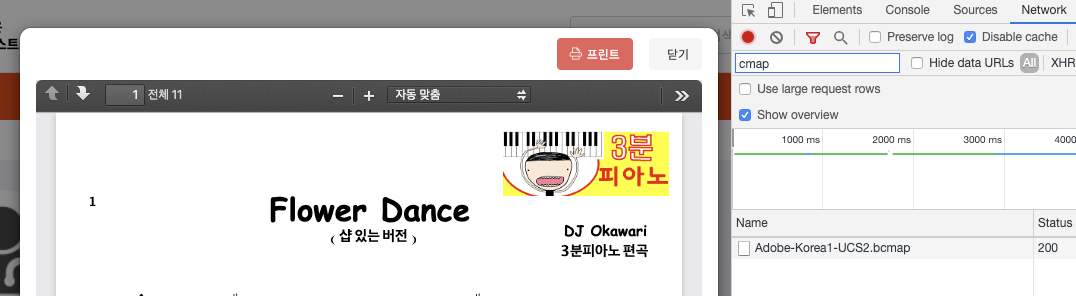
Thank you for your quick response & publish. It works! :)
leo6104
on 13 Feb 2020
Related issues
 mkanwar
·
6Comments
mkanwar
·
6Comments
 sameerAhmad9291
·
7Comments
sameerAhmad9291
·
7Comments
 RahmatAliMalik5
·
7Comments
RahmatAliMalik5
·
7Comments
 ravikumarbggit
·
10Comments
ravikumarbggit
·
10Comments
 vijucalicut
·
5Comments
vijucalicut
·
5Comments
Most helpful comment
No problem. I've just published version 2.0.0-alpha.8 containing the CMAP files and the default configuration to find them automatically. Would you mind to test the new version?
You know, I've been investigating the topic of CMAP files several times. The only reason I didn't add them earlier was I didn't know how to test them. I still don't. I've learned CMAP files are primarily needed by old PDF documents written in Korean, Chinese or Japanese. However, I haven't been able to find such a file. Every file I've found is displayed correctly without the CMAP files.
So I'd appreciate your help. Hope the new version fixes your problems. You can drop the
defaultOptionsbit, I've made the correct folder the default.Best regards,
Stephan