Ngx-extended-pdf-viewer: view pdf document in Html elements not using canvas element
Is your feature request related to a problem? Please describe.
I want to display pdf document in html elements format. As i will be easy for web crawls to extract text from pdf file.
Describe the solution you'd like
UseCanvasDisplay flag will be easy to use feature.
ngx-extended-pdf-viewer:

ng2-pdf-view:

 sameerAhmad9291
All 7 comments
Please try setting [handTool]="true". That's probably the default with Vadim's component. I deactivated the feature by default when I learned it costs a lot of performance.
BTW: Please report back if that solves your requirement or not.
Thanks in advance,
Stephan
 stephanrauh
on 12 Sep 2019
stephanrauh
on 12 Sep 2019
@stephanrauh if want google bot to read pdf document and index content.
Does Canvas would be best option in this case?
sameerAhmad9291
on 13 Sep 2019
Its not working check html element.
[handTool]="true"
[src]="pdfSrcPath"
useBrowserLocale="true">
sameerAhmad9291
on 13 Sep 2019
Whow, that's quite a challenge for the Google crawler: first it has to run the Angular application, and then it has to run the PDF viewer. Currently, none of my PDF files of the showcase made it into the Google index.
The best option is to add a direct link to your PDF file. That's something Google can easily find and interpret. It's a bit tricky because you want to show the PDF files as embedded files. I'm not sure it's a good idea to provide a direct link to the PDF, plus a redirection to your application that's only active for humans. That'd be a good solution, but as far as I remember, Google doesn't like that (for good reasons).
Here's more info: https://www.thewebmaster.com/seo/2016/feb/24/google-we-index-pdfs-just-like-any-other-web-page/
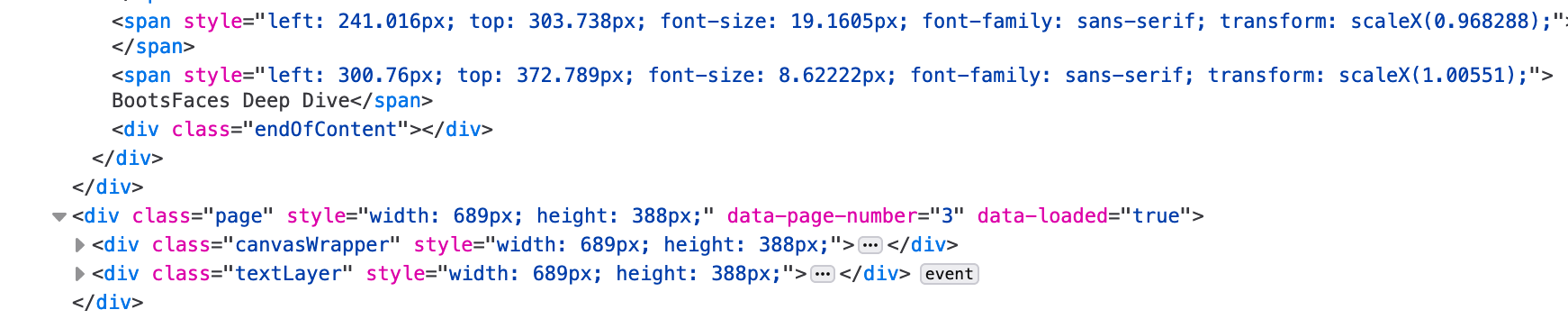
BTW, there's at least one document on the showcase including the text layer:
https://pdfviewer.net/find
stephanrauh
on 13 Sep 2019
Sorry, it seem's I've given you exactly the opposite of the correct advise. Try setting handTool="false" or handToolButton=true`. I've just looked up the (internal) code snippet responsible for activating the text layer:
    if (!this.handTool) {
      options.set('textLayerMode', 1);
    } else {
      options.set('textLayerMode', this.showHandToolButton ? 1 : 0);
    }
(That's a part of the implementation of ngx-extended-pdf-viewer, not something you should use in your application).
stephanrauh
on 13 Sep 2019
[handTool]="false" worked
Thanks.
sameerAhmad9291
on 13 Sep 2019
That's great news!
stephanrauh
on 13 Sep 2019
Related issues
 dheerajm91
·
3Comments
dheerajm91
·
3Comments
 4vitek
·
5Comments
4vitek
·
5Comments
 mkanwar
·
6Comments
mkanwar
·
6Comments
 vfabregat
·
5Comments
vfabregat
·
5Comments
 RahmatAliMalik5
·
7Comments
RahmatAliMalik5
·
7Comments
Most helpful comment
Sorry, it seem's I've given you exactly the opposite of the correct advise. Try setting
handTool="false"orhandToolButton=true`. I've just looked up the (internal) code snippet responsible for activating the text layer:(That's a part of the implementation of ngx-extended-pdf-viewer, not something you should use in your application).