Ngx-extended-pdf-viewer: Up/down keypress for pdf viewer is overriding up/down kepress for all other elements
Hi - I noticed this problem happening when using angular material select fields. When the select box is opened, you can't use up and down arrows to navigate the options if the pdf viewer is also somewhere on the page.
The problem appears to be an event listener on this div: viewerContainer.
No matter where you are on the page, this div will take control of up/down arrows events. It looks like the up/down arrow for the pdf viewer should only activate if the user has focused on the viewer itself and that would solve the issue.
The problem happens in all versions, from what I can tell.
 CMadden8
All 18 comments
@timvandermeij @Snuffleupagus Without having dug into the issue myself yet, my gut already tells me you guys might be interested in this bug. According to @CMadden8, your PDF viewer - and viewer.js in particular - seem to watch the keyboard a bit too eagerly. Even if it is used in embedded mode, it catches all up/down arrow events, including the events targeted at a combobox or dropdown menu outside the PDF viewer.
 stephanrauh
on 25 Aug 2019
stephanrauh
on 25 Aug 2019
Just an update on this. The problem goes away for me if I manually remove the div with the class 'page' using dev tools.
It's 'viewerContainer -> viewer -> page' when drilling down. But using firebug, I see there are no event listeners detected on this element. And trying to remove any that firebug may have missed via the console doesn't fix the issue. I've also tried absolutely positioning the page class element way off the page, to see if its dimensions were the issue, but that didn't fix it either.
Very difficult to tell what exactly is causing the problem.
CMadden8
on 26 Aug 2019
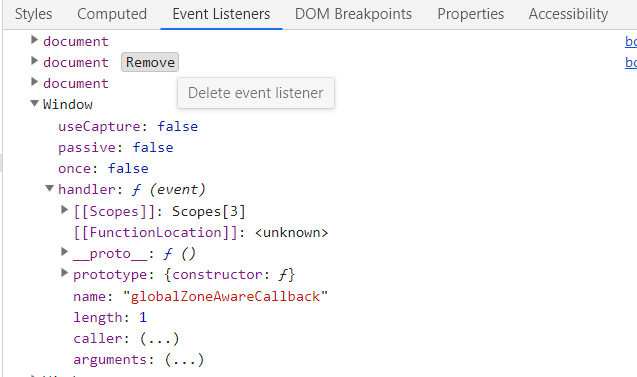
All right, I used chrome dev tools this time and investigated the event handlers with dev tools. Chrome allows you to remove them one-by-one, which is useful. I removed the below event handler for 'keydown' called 'globalZoneAwareCallback' and it fixed the problem. I didn't notice any side effects to this, but I also don't yet know how to properly remove it with JavaScript. As a quick fix hack, it would work until a real solution is in place.
CMadden8
on 26 Aug 2019
@stephanrauh @timvandermeij @Snuffleupagus - I failed to find a workaround, outside of directly editing the view.js file.
The problem line is:
if (!handled && !isViewerInPresentationMode) {
      if (evt.keyCode >= 33 && evt.keyCode <= 40 || evt.keyCode === 32 && curElementTagName !== 'BUTTON') {
        ensureViewerFocused = true;
      }
    }
Specifically ensureViewerFocused = true. Commenting this out solved all of the problems.
On the app we're using this on, users use the keyboard almost exclusively to navigate, so I had to get some fix in place. No idea how you can use hacked versions of npm module files instead of the official ones, but I'm sure there's a way.
CMadden8
on 27 Aug 2019
Well, ngx-extended-pdf-viewer is all about modifying pdf.js. :)
I try to manipulate the original files as little as possible, but sometimes I can't avoid that. I've event written programs to manipulate the pdf.js binaries.
Judging from what I've read so far, the solution is to bind the event listener not to the window event, but to the select box, where it belongs. After solving #125 I've decided to put your issue onto the top of the list. Stay tuned!
stephanrauh
on 27 Aug 2019
I've found some documentation in the original file app.js:
  if (!handled && !isViewerInPresentationMode) {
    // 33=Page Up  34=Page Down  35=End    36=Home
    // 37=Left     38=Up         39=Right  40=Down
    // 32=Spacebar
    if ((evt.keyCode >= 33 && evt.keyCode <= 40) ||
        (evt.keyCode === 32 && curElementTagName !== 'BUTTON')) {
      ensureViewerFocused = true;
    }
  }

  if (ensureViewerFocused && !pdfViewer.containsElement(curElement)) {
    // The page container is not focused, but a page navigation key has been
    // pressed. Change the focus to the viewer container to make sure that
    // navigation by keyboard works as expected.
    pdfViewer.focus();
  }
I don't think the author had the embedded mode in mind. So I agree with you, @CMadden8 , and de-activate the focusing bit not.
@Snuffleupagus You're the last one who's edited these lines. Can you tell us something about it? I know it's four years ago... but still, are you fine with deactivating forcing the focus to the PDF viewer in embedded mode when one of the navigation key has been hit?
stephanrauh
on 28 Aug 2019
I've just published version 1.1.1. That should solve the issue for you. However, I'm waiting for the answer of Snuffleupagus. If he's got a convincing answer why forcing the focus on the PDF viewer is important, I'll make it configurable. Until then, I'll close the issue.
Before I forget: @CMadden8 Thanks a lot for digging and debugging so deep into the topic! Your help made investigating the topic a breeze. Awesome!
stephanrauh
on 28 Aug 2019
No worries @stephanrauh - and the quick resolution is much appreciated! This will be a great help on the project.
CMadden8
on 28 Aug 2019
Well... my bugfix might be even better if I'd double-checked the error messages in the console window. :) It worked, but only by accident. The next version - probably 1.2.0 - is going to fix this.
stephanrauh
on 29 Aug 2019
@stephanrauh - yes, I noticed a random 'isEbedded' error in the console. Seems like you added a check for your take on this library... It doesn't break the app, and it's very sporadic, so it's more akin to a 'warning' than an error. The last release fixed a huge issue for our project - some people will not go near a mouse these days! Cheers for staying on top of things - the library is A1 +1
CMadden8
on 30 Aug 2019
Are you already using version 1.2.0? It fixes the "isEmbedded" bit.
Oh, and thanks for all the nice words. I have to admit this kind of feedback keeps me going. Open source is so much fun! It just feels good to do something interesting and to learn it helps other people!
stephanrauh
on 30 Aug 2019
@stephanrauh We're using 1.1.1. I think devs should get 'compensation' for their hard work on 'open source'. Kind of like a musician gets paid for being played on the radio. That it doesn't happen is a bit wrong to me, but maybe things will change
CMadden8
on 30 Aug 2019
My words exactly. :) For me, everything's fine. I'm a modest person who's accidentally trudged into software industry, learning that it's paying well only after arriving. Actually, open source has already paid for me: I've managed to get an attractive job because of my good public reputation.
But I know many other talented programmers who'd really love to participate in an open-source project. But they can't, because they're short of spare time and money. At least the latter could be fixed!
stephanrauh
on 30 Aug 2019
As for the promotion bit: well, it's as easy as writing a Tweet. If you're more ambitious, write a nice article on a popular platform like Medium.com, Sitpoint, or Dzone. If your article is really good, I'd even recommend it to Jaxenter.com. Another option that's attractive to many people is publishing a short YouTube video, or creating a presentation and publishing it on Slideshare.com.
Oh, did I already mention conference talks?
(As you can see, a large part of my work is marketing... and we do all this at work. My favorite video being this one).
But seriously, I'm already happy with all you've done. Reporting bugs is hard work, too!
stephanrauh
on 30 Aug 2019
@stephanrauh - this bug is back again in the 1.2.0 release. The console log errors were fixed, but it's passing the !isEmbedded check even though it's embedded and firing the automatic focus on the viewer on keydown. I tried adjusting the isEmbedded logic but had no luck using window.
I was thinking maybe if you had a unique ngx-extended-pdf-viewer id in your own html that wraps it, you could use the existence of that as a check. But I guess you're trying to have it work for any library that tries to embed it.
Had to edit out references to the company projects btw - doesn't seem a great idea in hindsight... But yes, the bug is unfortunately confirmed in this latest release, so need to reopen the case.
CMadden8
on 2 Sep 2019
Sigh! OK, I'm kissing the line ensureViewerFocused = true; good bye. You're right, ngx-extended-pdf-viewer is always embedded, so considering the non-embedded case doesn't make a lot of sense. I just hoped it'd make submitting a PR to pdf.js itself easier.
BTW: I'm sure you can talk about the PDF viewer without talking about your company project :).
stephanrauh
on 3 Sep 2019
I've just published version 1.3.1. It should fix the bug. This time for real, I hope. :)
stephanrauh
on 3 Sep 2019
It does seem to be more trouble than it's worth!
I prefer to be careful with the company stuff, as you never know who's reading this stuff. Either way, I think the feature I mentioned is too niche to be of use in the library you made. It would also be a headache to try and turn it into something reusable - I think enough is asked of open source devs as is!
That said, I'll sure to be back with more bugs, at some stage! And obviously an attempt to at least fix them beforehand. Cheers again for keeping on top of this one - it's much-appreciated
CMadden8
on 4 Sep 2019
Related issues
 leo6104
·
3Comments
leo6104
·
3Comments
 sameerAhmad9291
·
7Comments
sameerAhmad9291
·
7Comments
 RahmatAliMalik5
·
7Comments
RahmatAliMalik5
·
7Comments
 MKITConsulting
·
5Comments
MKITConsulting
·
5Comments
 Dev-Akshay-Shelke
·
10Comments
Dev-Akshay-Shelke
·
10Comments