Nextcloud-vue: Breadcrumb component
Would it be of interest to have a component for the breadcrumb bar? I currently use a breadcrumb bar in one of my apps and wonder whether other apps might also need it.
 raimund-schluessler
All 10 comments
Does it make sense for other apps?
I think we only use it in files, so not sure this should be a standard :thinking: cc @jancborchardt
 skjnldsv
on 10 Jan 2020
skjnldsv
on 10 Jan 2020
At least three apps I am aware of use a breadcrumb:
Files:

Gallery:

Deck:

Not sure about others.
raimund-schluessler
on 10 Jan 2020
I think Deck is supposed to be changed (I remember a conversation somewhere where Jan wanted to remove this)
And Gallery is killed for 18 :eyes:
skjnldsv
on 10 Jan 2020
Ah, so it is Files only 😄
raimund-schluessler
on 10 Jan 2020
(I remember a conversation somewhere where Jan wanted to remove this)
skjnldsv
on 10 Jan 2020
But anyway, if we do the files to vue, it's always a good habit to properly design components so they can be extracted independently from the app they're used.
So we could still create a breadcrumb component after it's done for files and move it there :thinking:
skjnldsv
on 10 Jan 2020
Yeah – so on one hand it can be in a component to have it made properly.
On the other hand we could then just kind of leave it out of the docs because we discourage using it. Because as we see, apps will use a component even if it makes no sense, and breadcrumbs really only make sense for files. :)
 jancborchardt
on 15 Jan 2020
jancborchardt
on 15 Jan 2020
I wrote a breadcrumb component for an app I work on. It resizes with the available space and shows hidden folders in a dropdown. I think it works quite well, even better than the breadcrumb in the files app which is sometimes behaving a bit odd.
The version in the files app sometimes hides folders for one viewport width and shows them for narrower sizes.
Wide:

Narrow:

This doesn't happen with the vue component:
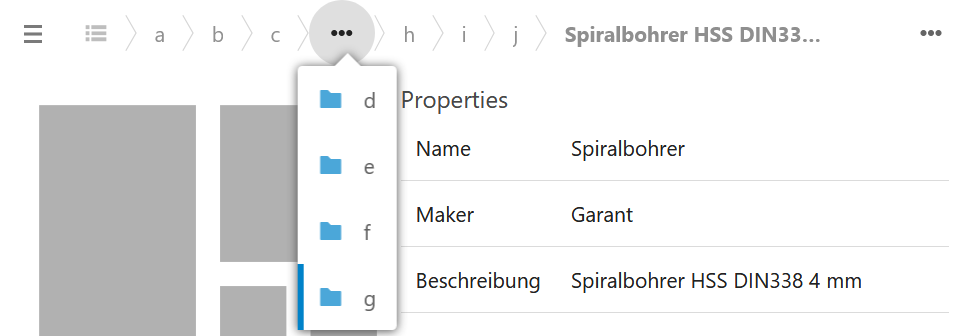
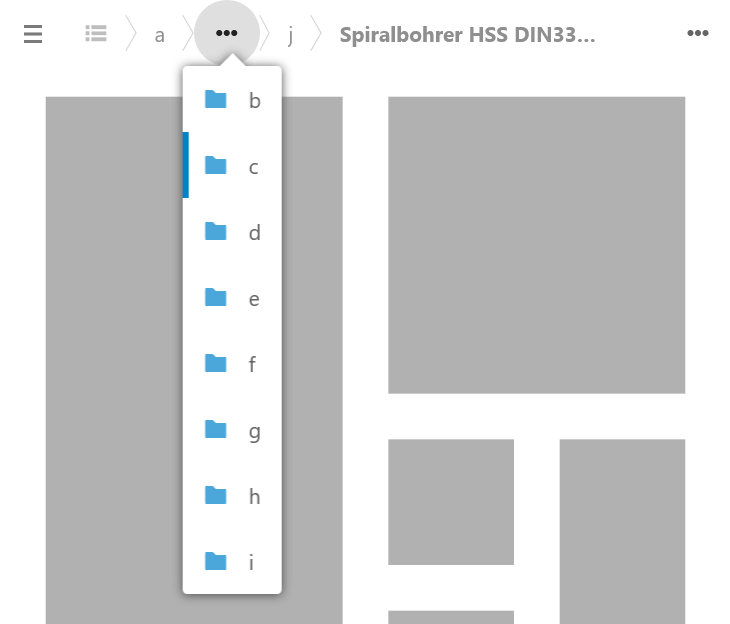
The code would probably need some adjustments to be used as a general component, but I am quite sure it could be used as a starting point for a version used in the files app.
Let me know if you are interested in the code.
raimund-schluessler
on 11 Mar 2020
Let me know if you are interested in the code.
Could you open a pr for this component? :)
skjnldsv
on 11 Mar 2020
Could you open a pr for this component? :)
PR is in #913
raimund-schluessler
on 14 Mar 2020
Related issues
skjnldsv
·
9Comments
 ma12-co
·
7Comments
ma12-co
·
5Comments
jancborchardt
·
3Comments
ma12-co
·
7Comments
ma12-co
·
5Comments
jancborchardt
·
3Comments
 roadrunnerjb
·
5Comments
roadrunnerjb
·
5Comments
Most helpful comment
I wrote a breadcrumb component for an app I work on. It resizes with the available space and shows hidden folders in a dropdown. I think it works quite well, even better than the breadcrumb in the files app which is sometimes behaving a bit odd.
The version in the files app sometimes hides folders for one viewport width and shows them for narrower sizes.

Wide:
Narrow:

This doesn't happen with the vue component:

The code would probably need some adjustments to be used as a general component, but I am quite sure it could be used as a starting point for a version used in the files app.
Let me know if you are interested in the code.