
All 45 comments
@aj3423 can you build from source? cause i want you to test out this specific commit to see if the issue is related to skripo/fontkit update or the new font loader
 exoticus
on 21 Apr 2020
exoticus
on 21 Apr 2020
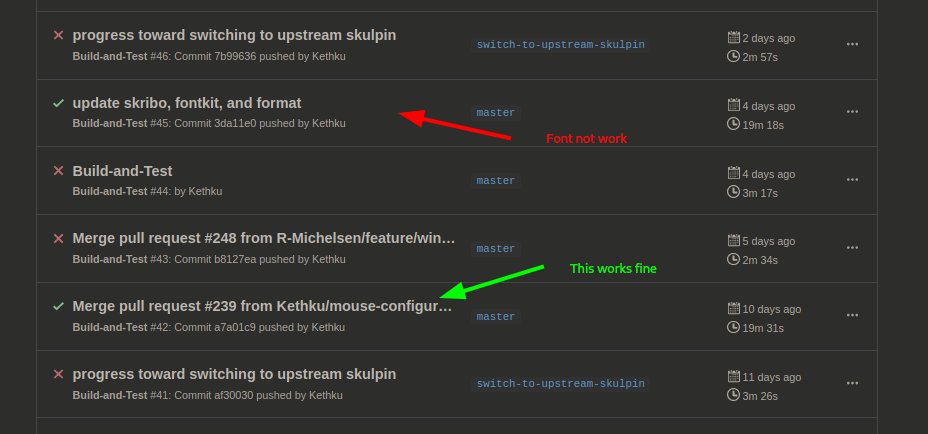
@exoticus I tried build from different commits, seems this commit causes the problem: 90d5329b88cdf7820e4d4e92778dc0ddb9933888

But then I tried, switch to master, replace the define! { with cfg_if::cfg_if! {, compile, the font problem still exists...
 aj3423
on 21 Apr 2020
aj3423
on 21 Apr 2020
same here, build from source
 DemonCloud
on 21 Apr 2020
DemonCloud
on 21 Apr 2020
@aj3423 i am not sure how would that cause any problem, it's a language feature to use aliases, what do you mean by seems this commit causes the problem you mean the font problem or a build problem?
@DemonCloud you mean same font issue on linux?, building specifically this commit?
exoticus
on 21 Apr 2020
@aj3423 apologies, i saw that you said that it caused the font issue in the photo, there's no logical explanation why that would fail except cfg(target_os = "linux") is not evaluating to true for some reason
exoticus
on 21 Apr 2020
@exoticus I don't know Rust, how can I add some log message or popup box to check the cfg(target_os = "linux") ?
aj3423
on 21 Apr 2020
@aj3423 alright, so i would need your assistance of we're gonna fix this as i don't have a linux machine handy, can you replace the whole define! block with this
    const SYSTEM_DEFAULT_FONT: &str = "Droid Sans Mono";
    const SYSTEM_SYMBOL_FONT: &str = "Unifont";
    const SYSTEM_EMOJI_FONT: &str = "Noto Color Emoji";
if the font problem persists then it's not about the define which would make sense
exoticus
on 21 Apr 2020
@aj3423 alright, so i would need your assistance of we're gonna fix this as i don't have a linux machine handy, can you replace the whole
define!block with thisconst SYSTEM_DEFAULT_FONT: &str = "Droid Sans Mono"; const SYSTEM_SYMBOL_FONT: &str = "Unifont"; const SYSTEM_EMOJI_FONT: &str = "Noto Color Emoji";Just tried this, same problem.
aj3423
on 21 Apr 2020
@aj3423 you have set guifont in your init.vim? if so, try not to set a custom font just to see if default font loads correctly, if not can you make sure Droid Sans Mono is installed _it should be prebundled with linux_
If it didn't work can you tell me what distro you're on?
@DemonCloud could you please specify your distro too?
exoticus
on 21 Apr 2020
@exoticus I didn't set guifont, but now I tried set guifont=Console:h14 in vimrc, or set it at runtime, same problem. Indeed there is no Droid Sans Mono on my machine, still trying to find out how to install it. There is only fonts-droid-fallback on my machine..
fc-list | ag "Droid Sans"
/usr/share/fonts/truetype/droid/DroidSansFallbackFull.ttf: Droid Sans Fallback:style=Regular
My environment is Kali Linux, maybe it can be reproduced with Windows WSL
aj3423
on 21 Apr 2020
@aj3423 can you try to set gui font to that?, i just wanna know if the font loader is totally broken on linux or is it specific to some font/font family
unfortunately i'am on macOS, but i am gonna install linux in order to see how did the font loader regress
exoticus
on 21 Apr 2020
I tried set guifont=Droid\ Sans\ Fallback:h14 in vimrc, and no matter set it to any font, all the ame problem
aj3423
on 21 Apr 2020
alright, i have to install linux to get to the root of this problem then
exoticus
on 21 Apr 2020
Now I know how git works.. Previously I checked on different branch.. I'll check again, to see which commit on master caused this. I'll be back in 2 hours and check it.
aj3423
on 21 Apr 2020
Just FYI, I have the same Problem on Linux and set guifont resolves the Problem. E.g :set guifont=DejaVuSansMono.
 pmkap
on 21 Apr 2020
pmkap
on 21 Apr 2020
@pmkap at least this tells me that font loader is working
@aj3423 can you try that, if it works then it's just the matter of adding more fallbacks for linux
exoticus
on 21 Apr 2020
@exoticus The :set guifont=DejaVuSansMono works, but only for English charactors, Utf-8 or Unicode charactors still displayed as square.
I tried build from these 9 commits, here's the result:
ed917b2  font issue, all char is square
9af54bf  font issue, all char is square

ca9829f
    English displayed correctly, Utf-8 is square.
    font become very small, and cursor miss-aligned
    After set guifont to DejaVuSansMono, font size become correct, but Utf-8 is still square

fb9c877
9e6c41a
ab38826
    these 3 fail to run, error:
        thread 'main' panicked at 'index out of bounds: the len is 0 but the index is 0',
        /rustc/b8cedc00407a4c56a3bda1ed605c6fc166655447/src/libcore/slice/mod.rs:2791:10
        note: run with `RUST_BACKTRACE=1` environment variable to display a backtrace
b085176
    doesn't compile, error:
        error: proc-macro derive panicked
        --> src/renderer/caching_shaper.rs:45:10
        |
        45 | #[derive(RustEmbed)]
c2b2d12
    all works fine(both English and Utf-8)
70cf0a5
    all works fine(both English and Utf-8)
@aj3423 so here's the reasons for your findings, first if set guifont=DejaVuSansMono works then neovide isn't miss-behaving, and the issue is just that some distros appear to not have Droid Sans Mono pre installed, should be easy fix if we add DejaVu as a fallback though. For the utf8 characters and why they worked before here is an explanation.
Originally neovide shipped with a full set of fonts that covered a lot of languages _(japanese, chinese, etc)_ that's why it worked, however it was a lot to bundle built in _50+mb_ , moreover not every user would want to the use same font so we opted for a fallback system to simple system built-in fonts. Consolas (Windows), Menlo (macOS), Droid Sans Mono (Linux).
Now the reason DejaVuSansMono shows only english is that it doesn't contain other characters, a simple fix would be installing NotoSansMonoCJKjp on your system (the font that was before bundled with neovide) and use it normally with set guifont
I'd really appreciate if you try the fix and report if it works for you
exoticus
on 21 Apr 2020
Unfortunately that will result in less than ideal latin characters wouldn't it?
 Kethku
on 21 Apr 2020
Kethku
on 21 Apr 2020
@Kethku that's why i am currently thinking about the ability to specify multiple fonts, which will have the added benefit of making neovide capable of loading separate glyph fonts etc, eliminating even the need for patched (nerd) fonts as neovide will _patch_ them together by means of fallback
exoticus
on 21 Apr 2020
I like the idea, but I'm worried about coming up with the correct mechanism for configuring it. Especially when competing guis just do it by default with os font fallback
Kethku
on 21 Apr 2020
@Kethku honestly things like font fallback should've been delegated to the system (we shouldn't be dealing or frankenstein-ing font fallbacks like that) idk what to blame here, font-kit or skribo. However as means of temporary working state i think that this is the easiest solution
exoticus
on 21 Apr 2020
Its less something to blame and more the work hasn't been done yet https://raphlinus.github.io/rust/skribo/text/2019/04/04/font-fallback.html
Kethku
on 21 Apr 2020
@Kethku yeah i didn't mean blame in a bad way, just that OSs deal best with all these font fallback shenanigans
exoticus
on 21 Apr 2020
I wonder if the long term solution would be to do both. Add configuration for font fallback lists and then also ship a version with a ton of embedded fonts like it was previously for those who want it. Then when propper font fallback comes out we just switch to that
Kethku
on 21 Apr 2020
@Kethku i'd always try to find the best possible solution without stuffing the executable with embedded fonts, and i really think that the right recipe of fallbacks can handle a wide variety of characters on each system, So for instance instead of defaulting to only 1 font for each system, a series of fonts should be loaded (in order), and i believe that each system comes preloaded with enough fonts to do just that.
Plus user should handle installing required fonts for his/her language we just make it discoverable and easy to load them with a fallback list
exoticus
on 21 Apr 2020
@exoticus I tried noto font package with master branch, it works, English and Utf-8 shows correctly. But there're some new problems like window very small, no cursor, don't know if they're related to the font issue.
aj3423
on 21 Apr 2020
@aj3423
like window very small, no cursor, don't know if they're related to the font issue.
this shouldn't be font related at all, can you attach a screenshot of that?
exoticus
on 21 Apr 2020
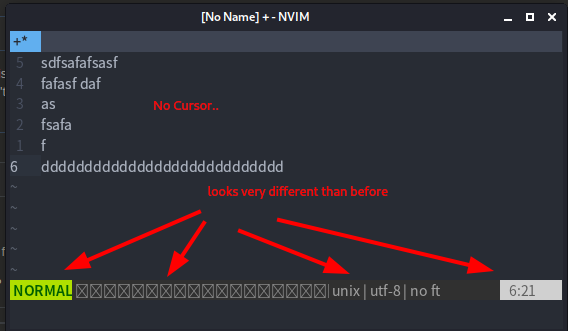
@exoticus After installed the 1GB noto fonts, the initial Neovide window looks like this:

The window is small no matter set guifont to anything in vimrc.
I tried uninstall the Noto font , the window becomes normal size again.
Re-install Noto font, small again ..
And after drag it to normal size, there is no cursor, and everything looks very different than before.
aj3423
on 21 Apr 2020
@aj3423 oh, you didn't have to download the whole 1gb but won't hurt anyway. the window/cursor thing shouldn't be related to the font issue, but concentrating on fonts as a starter, the boxes in statusline are wrong, but the other arrows what do you expect there? did you have powerline glyphs there and they don't render?
exoticus
on 21 Apr 2020
the window size may be related to the font problem if the loaded font reports poor metrics
Kethku
on 21 Apr 2020
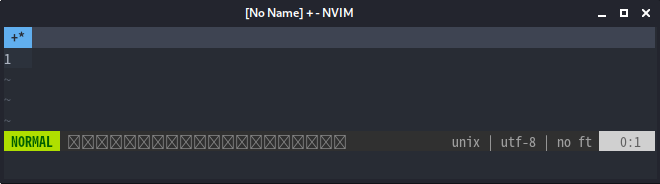
The boxes is a plugin noscrollbar , I configured like this in vimrc: noscrollbar#statusline(20,'-','◫',['◧'],['◨'])
, normally it should look like:

But now it looks like:
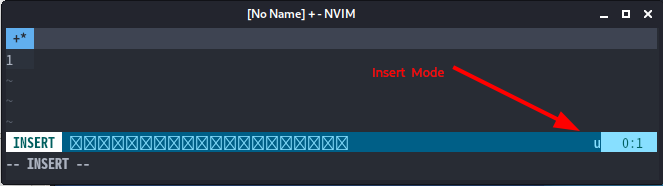
And with Insert mode, seems miss aligned
aj3423
on 21 Apr 2020
@Kethku checkout gitter please
exoticus
on 21 Apr 2020
@aj3423 how do you set guifont, and to what font do you set it, can you try just Noto Sans Mono
exoticus
on 21 Apr 2020
@exoticus I tried set guifont=Noto\ Sans\ Mono in vimrc, only works for English characters, Utf-8 is squared, and the lightline bar works fine. But with set guifont=Noto\ Sans\ Mono\ CJK\ SC, Utf-8 is ok, but the lightline bar is messed up.
aj3423
on 21 Apr 2020
@aj3423 can i ask you for one more thing? can you install the the fonts that was bundled with neovide before and try to use them in your curren build?
This should give you original neovide behavior
exoticus
on 21 Apr 2020
@exoticus Downloaded and tried all of these in vimrc,
set guifont=FiraCode\ Nerd\ Font " English OK, Utf8 Square
set guifont=Fira\ Code " English OK, Utf8 Square
set guifont=DejaVuSansMono " English OK, Utf8 square
set guifont=Noto\ Sans\ Mono\ CJK\ JP " text shows correctly, but size looks strange, and in insert mode the "unix | utf8 | vim" bar is miss aligned
By utf-8 I mean Chinese characters, so I tried set guifont=Noto\ Sans\ Mono\ CJK\ SC, I'm not sure if the "SC" means "Simplified Chinese", but this seems the closest one from that 1GB font package, but still messes up the lightline bar.
aj3423
on 21 Apr 2020
@aj3423 Alright, it's just because no one of these four contain all the required character, @Kethku will be adding a new multiple fallback feature that will fix your problem, will also allow for creating or customizing your own font out of multiple ones
Thanks for your help! really appreciated
exoticus
on 21 Apr 2020
OK, thanks, but why does Neovide require additional font anyway? I don't see any other software ships with a font package. Can Neovide use the font that nvim uses? Or use the system font by default ?
aj3423
on 21 Apr 2020
@aj3423 ofcourse!, it _used_ to ship with fonts before but the master branch now does exactly what you're saying, it either uses font in vimrc, or if there's none it'll fallback to system defaults. The issue you encountered just happened because of the way neovide fallbacks right now, however this will be alleviated with the changes mentioned above.
exoticus
on 21 Apr 2020
@exoticus Looking forward to the new release, can help with test that.
aj3423
on 21 Apr 2020
@aj3423 thanks, that would be nice
exoticus
on 21 Apr 2020
For the current state, maybe the Droid Sans Package should be listed as a dependency.
pmkap
on 22 Apr 2020
@aj3423 do you have unifont fonts?
You can install the font with
sudo apt install ttf-unifont
 jamespotz
on 24 Apr 2020
jamespotz
on 24 Apr 2020
@aj3423 do you have
unifontfonts?
You can install the font with
sudo apt install ttf-unifont
@jamespotz Thanks. Indeed... Everything seems to work after apt install ttf-unifont, All fonts works correctly for English, Utf-8, and GUI element
aj3423
on 24 Apr 2020
Related issues
 habamax
·
67Comments
habamax
·
67Comments
 ssxwcz
·
50Comments
ssxwcz
·
50Comments
 reisub0
·
39Comments
Kethku
·
87Comments
reisub0
·
39Comments
Kethku
·
87Comments
 harish2222
·
31Comments
harish2222
·
31Comments