
os
windows 10 1909
version
NVIM v0.5.0-nightly-4-g2e14dffbb
Build type: RelWithDebInfo
LuaJIT 2.1.0-beta3
Compilation: C:/Program Files (x86)/Microsoft Visual Studio/2017/Community/VC/Tools/MSVC/14.16.27023/bin/Hostx86/x64/cl.exe /DWIN32 /D_WINDOWS /W3 /MD /Zi /O2 /Ob1 /DNDEBUG -DMIN_LOG_LEVEL=3 /W3 -D_CRT_SECURE_NO_WARNINGS -D_CRT_NONSTDC_NO_DEPRECATE -DWIN32 -D_WIN32_WINNT=0x0600 -DINCLUDE_GENERATED_DECLARATIONS -DUTF8PROC_STATIC -DNVIM_MSGPACK_HAS_FLOAT32 -DNVIM_UNIBI_HAS_VAR_FROM -IC:/projects/neovim/build/config -IC:/projects/neovim/src -IC:/projects/nvim-deps/usr/include -IC:/projects/neovim/build/src/nvim/auto -IC:/projects/neovim/build/include
Compiled by appveyor@APPVYR-WIN
Features: -acl +iconv +tui
See ":help feature-compile"
system vimrc file: "$VIM\sysinit.vim"
fall-back for $VIM: "C:/Program Files/nvim/share/nvim"
Run :checkhealth for more info
 ssxwcz
All 50 comments
Unfortunately I know exactly zero about how chinese characters are input into windows, let alone input into a winit app. If this is going to land, I will need help.
 Kethku
on 11 Feb 2020
Kethku
on 11 Feb 2020
I do n’t know anything about rust, I ’m sorry I ca n’t help you
ssxwcz
on 11 Feb 2020
 ErrEoE
on 20 Feb 2020
ErrEoE
on 20 Feb 2020
This link isn't super helpful as the ime support has to be done at the window level. Luckily I just switched neovide to use sdl2 which appears to have support for it. That said, just knowing how it works doesn't give me the knowledge to test it myself... So I may still need assistance to handle this.
Functionally the text input manipulation should be done at the vent level with text editing and text input events.SDL docs have more detail
Kethku
on 20 Feb 2020
This link isn't super helpful as the ime support has to be done at the window level. Luckily I just switched neovide to use sdl2 which appears to have support for it. That said, just knowing how it works doesn't give me the knowledge to test it myself... So I may still need assistance to handle this.
Functionally the text input manipulation should be done at the vent level with text editing and text input events.SDL docs have more detail
Hello, I upgraded to the latest version and tested Chinese input, already supported the input Chinese, but the candidate box for the Chinese input method cannot be displayed.
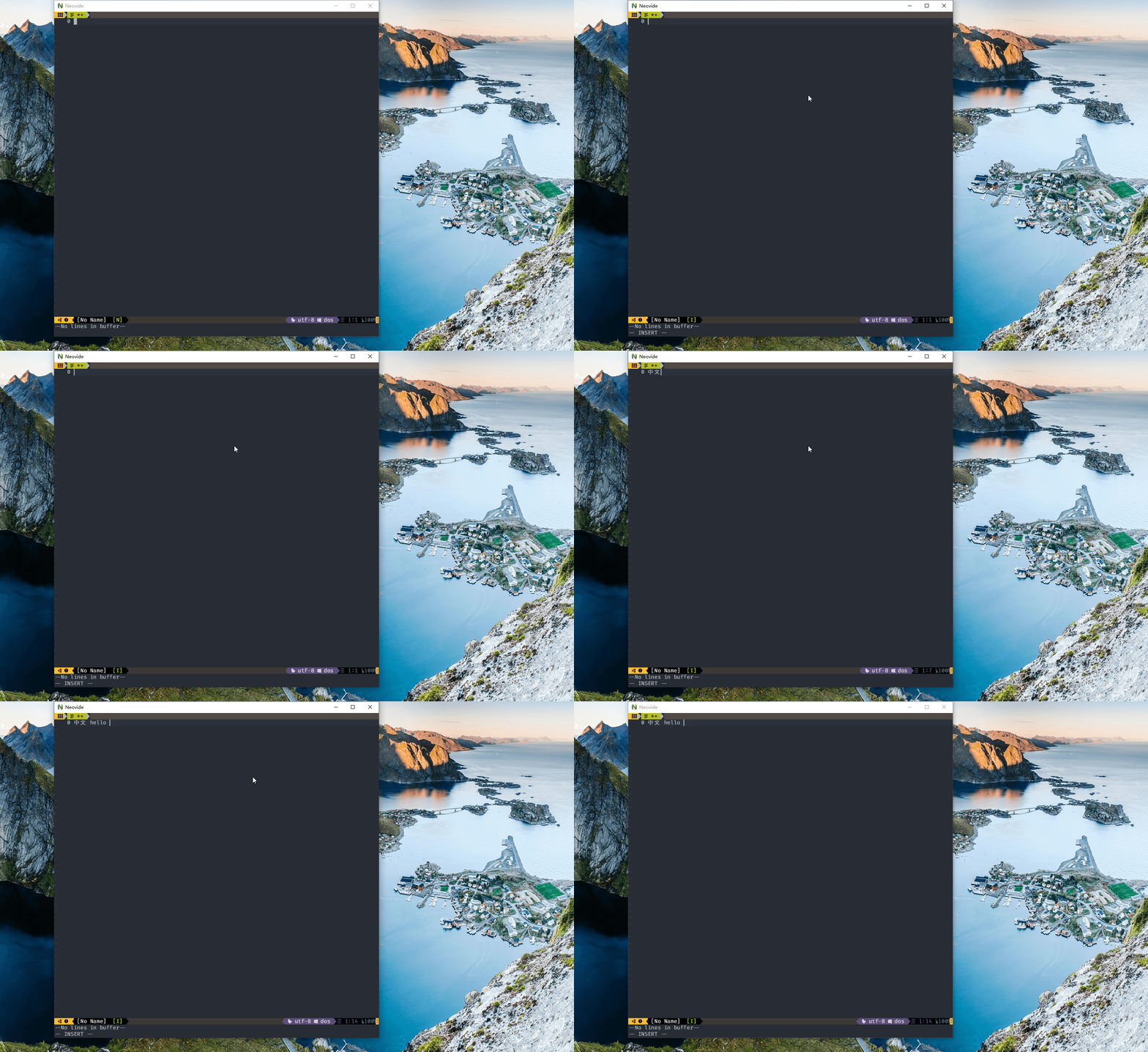
In addition, I found a more serious bug, when I switch input method, the input value will become like this
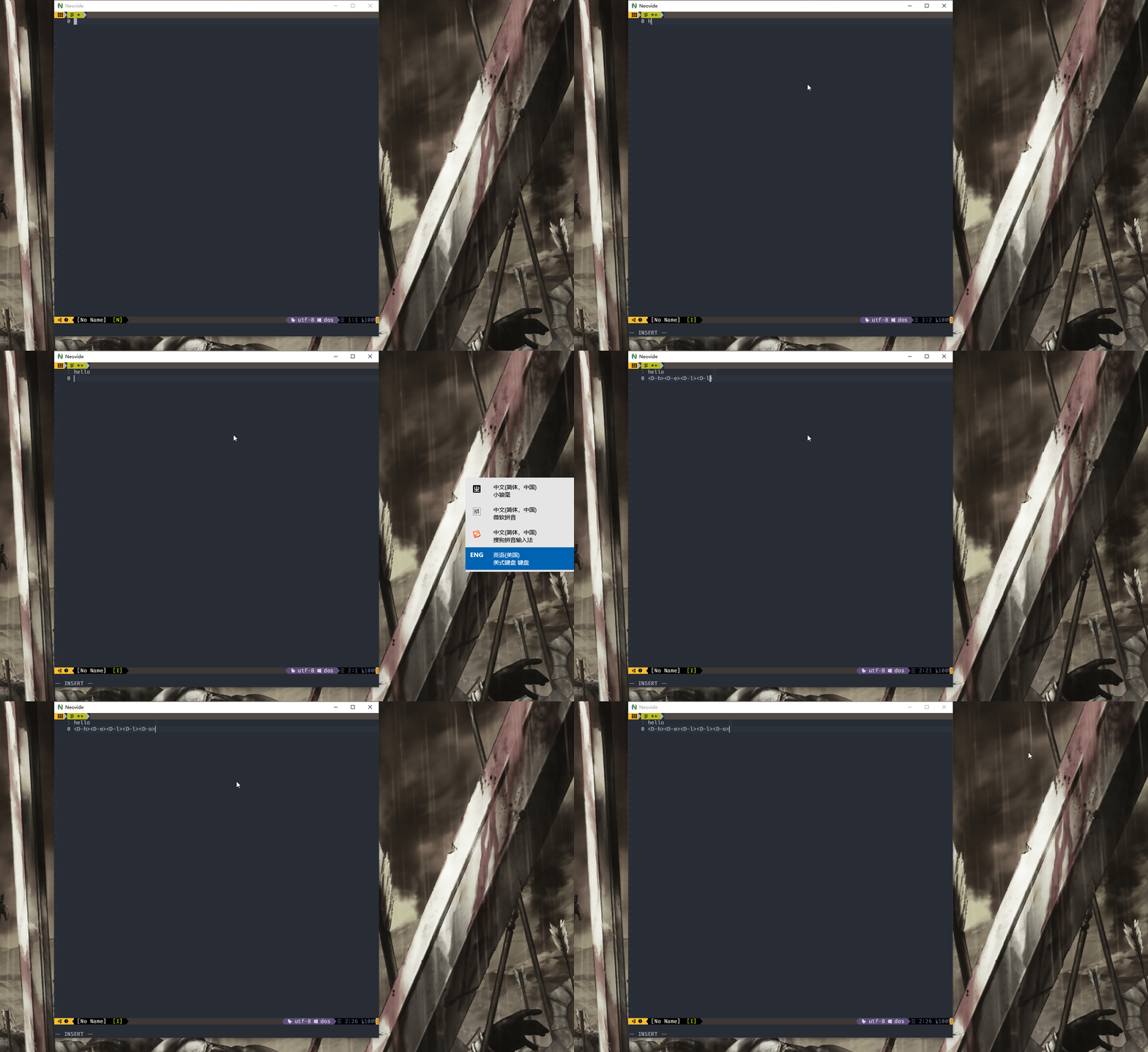
ssxwcz
on 6 Mar 2020
@ssxwcz the D means you have the gui key held down. In the case of windows that means the windows key. I'm not sure why that is being reported as held down when you switch languages...
Kethku
on 7 Mar 2020
Could you run with the --log commandline argument and upload the log file that gets generated after reproing the bug?
Kethku
on 7 Mar 2020
Could you run with the --log commandline argument and upload the log file that gets generated after reproing the bug?
ssxwcz
on 7 Mar 2020
Thats very weird. Can you list the exact steps in which order you do them? And also which keyboard layout you switch from and which you switch to? This looks atm like a bug in sdl...
Kethku
on 7 Mar 2020
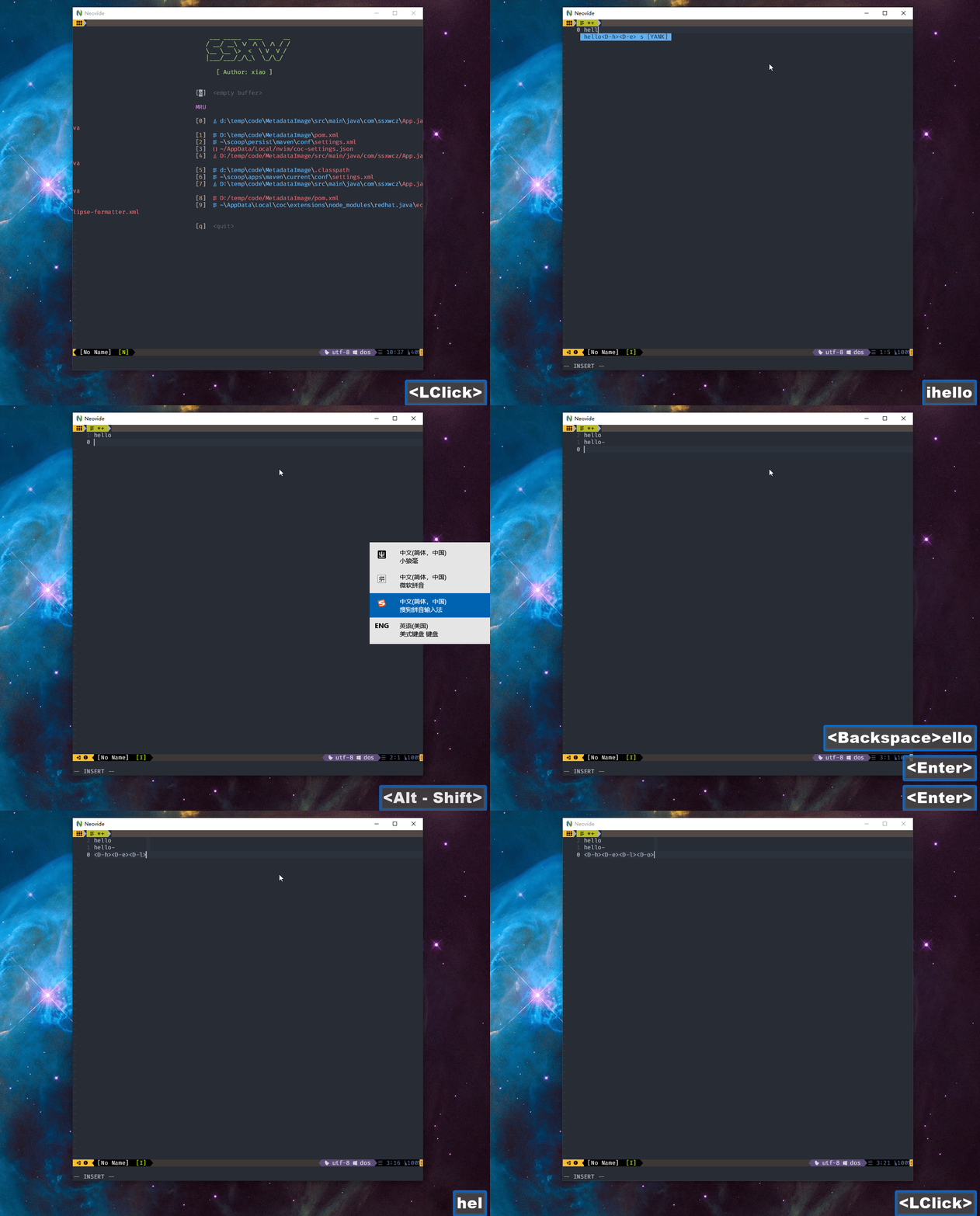
This happens when I open a file in the neovide and switch from Microsoft American keyboard to any input method,
I am using win space shortcut to switch the input method And when I use the shift Alt key switch input method, that doesn't happen
ssxwcz
on 8 Mar 2020
if you tap the windows key afterward does it fix itself?
Kethku
on 8 Mar 2020
Yes, when I hit the Windows key again, it will return to normal
ssxwcz
on 8 Mar 2020
Ok I think I understand what is going on.
Kethku
on 8 Mar 2020
I think the jump to the input window causes sdl to miss when the windows key modifier gets unpressed.
Kethku
on 8 Mar 2020
The strange bit is that it just inputs the D as though it isn't a modifier...
Kethku
on 8 Mar 2020
Unfortunately I can't reproduce this error with the D key. That said, I haven't actually seen any request for it. So I will remove it.
Kethku
on 14 Mar 2020
Done. Try again?
Kethku
on 14 Mar 2020
@ssxwcz
Kethku
on 14 Mar 2020
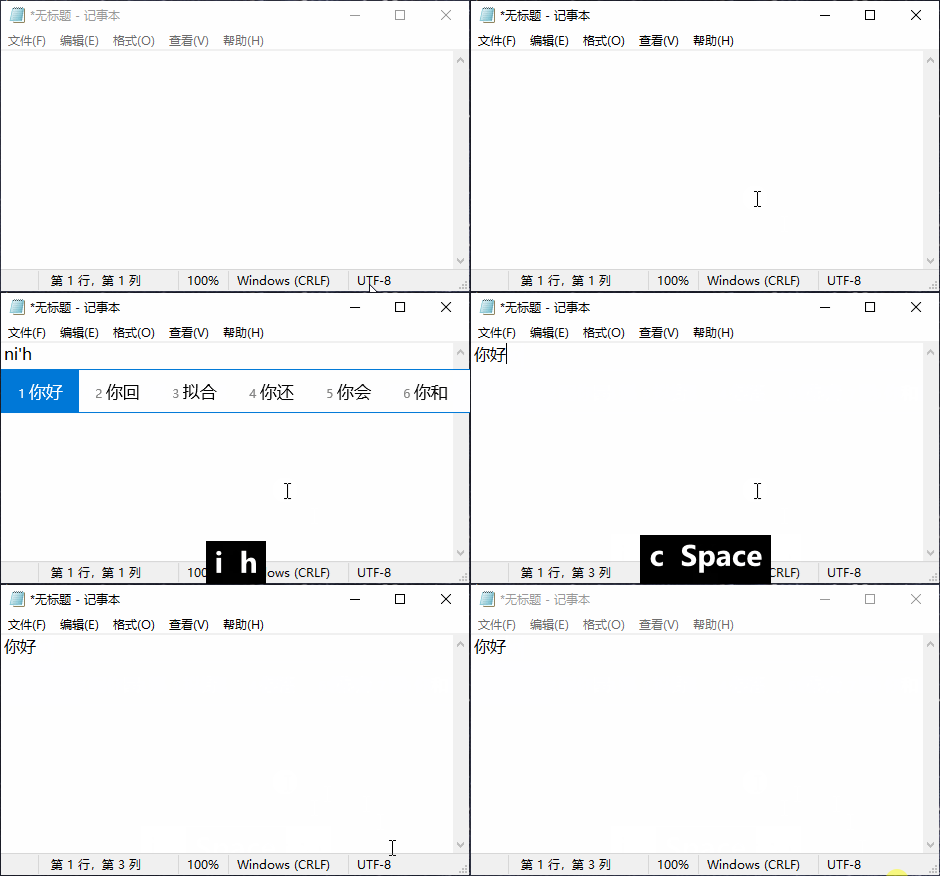
Hello I just tested the commit (3cfab0b) and found that \ However the candidates box of input methods still does not show, and the characters does not disappear when a word is selected. What should have happened: The IME used here is the Windows 10's built-in Microsoft Pinyin. Haven't tested other IMEs though.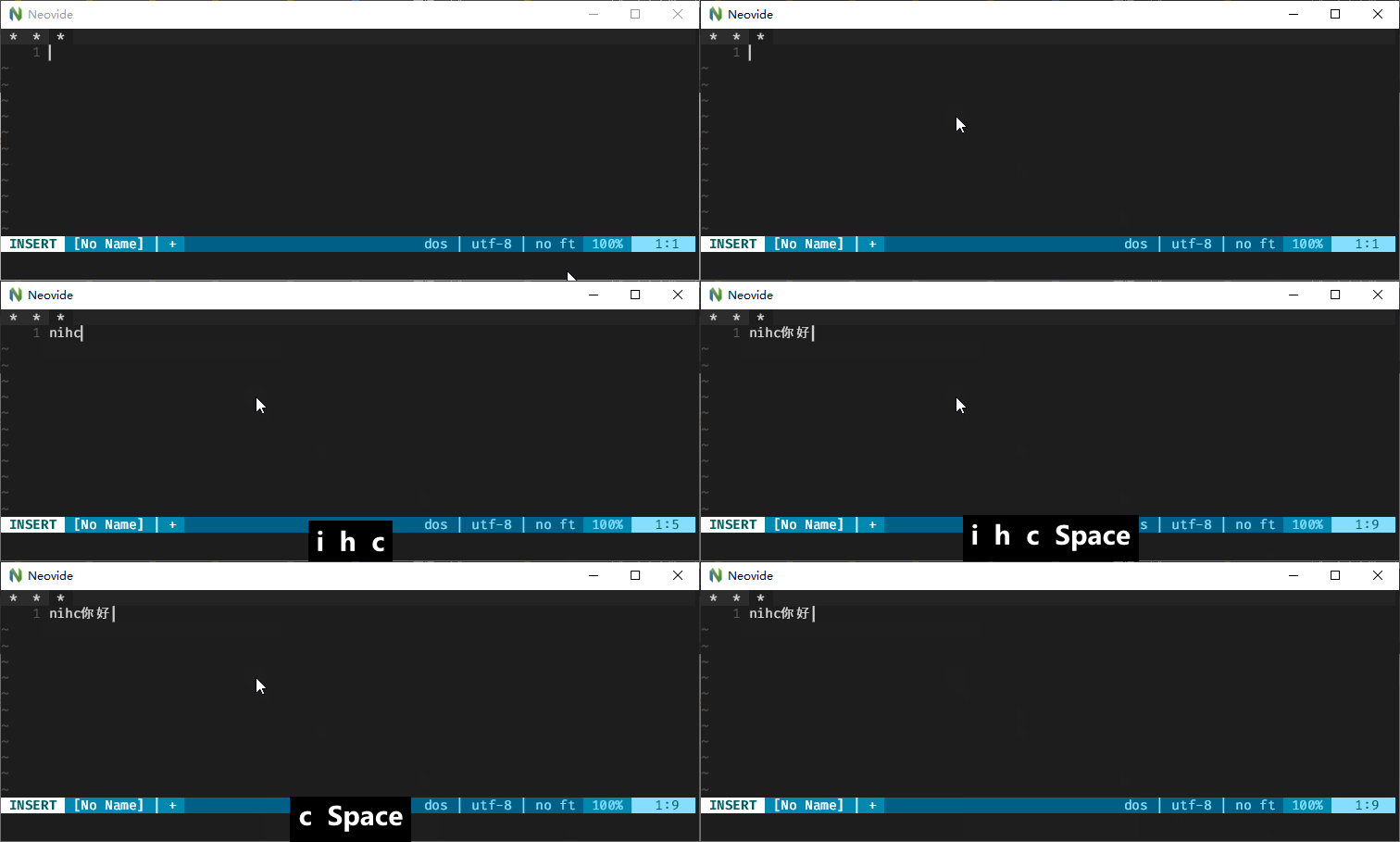
 ddadaal
on 14 Mar 2020
ddadaal
on 14 Mar 2020
Ok. I think I know how to do this. I will have to add support for the TextEditing events in SDL2. To get the text to show up I will use a special overlay with black background and white text at the cursor location. During a text editing operation the input characters will get printed out to the right of the cursor, and once a given textedit is confirmed, it will trigger the insert into neovim itself.
Does this sound reasonable to you? Having never used IME in windows before, I don't know what is the best strategy here.
Kethku
on 15 Mar 2020
Alternatively it seems like the windows IME candidate box might be a better UI? What is your recommendation?
Kethku
on 15 Mar 2020
I am sorry I don't have any experience on text editing stuff, but in my opinion your solution makes good sense. Also, the nvim-qt has a similar behavior and it works fine.
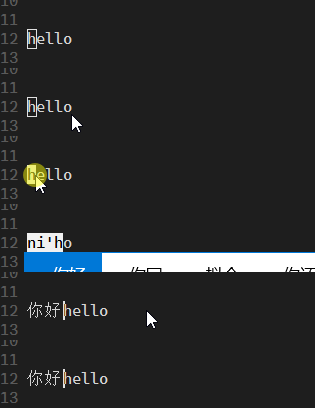
As for the candidate box, I just did a quick research on the Internet and found it might be the problem of SDL itself. There is a relatively new thread on SDL discourse talking about IME candidate box and there is no solution provided yet. Perhaps there is no way rather than waiting for SDL to fix this?
ddadaal
on 15 Mar 2020
@ddadaal I believe you mean preedit area rather than candidate box. The one that you showed is on-the-spot preedit which is rare on linux (for me), usually people use over-the-spot preedit method.
 pickfire
on 16 Jun 2020
pickfire
on 16 Jun 2020
@Kethku Do you start support IME? i want to contribute and maybe i can fix this bug.
Alternatively it seems like the windows IME candidate box might be a better UI? What is your recommendation?
I dont how to make windows ime candidate box display with sdl2. it seems catch the ime event?
 l1nxy
on 17 Jul 2020
l1nxy
on 17 Jul 2020
I have not started on it really. I would be happy if someone would take on fixing it though. SDL2 does seem to support the feature at least partially. Docs for the feature are here: https://wiki.libsdl.org/Tutorials/TextInput and I believe it should be pretty similar in the rust bindings.
Kethku
on 18 Jul 2020
I have not started on it really. I would be happy if someone would take on fixing it though. SDL2 does seem to support the feature at least partially. Docs for the feature are here: https://wiki.libsdl.org/Tutorials/TextInput and I believe it should be pretty similar in the rust bindings.
There is some problem with SDL2 IME event, because neovide catch all key input by key_down event ,but if we input by IME,it will produce key_down event and text_input event both. so i think we could not deal all input by key_down, or maybe we need a trigger to control input event, it could not always active but it should be opened when user swith some non-english IME.
If neovode deal input event by text_input event ,some function key and modifier key can't work. so i think we need make a
perfect solution; it can deal all modifier key input and textinput.
The conclusion is we need deal all key input and distinguish it that is a normal key input or IME input.
If you have any question or solution ,plz tell me.
Thank you,:)
l1nxy
on 19 Jul 2020
Maybe we can open textinput event when neovide switch to insert mode, and close textinput evnet when quit insert mode. do you guys have any idea?
l1nxy
on 19 Jul 2020
@l1nxy I think it is better to ping people that write IME. I had change some code in the past regarding interfacing with IME but it's in linux, I bet other platforms are different.
There is multiple ways, some method (over-the-spot preedit area) is not favorable in other operating system like osx but it is still quite common to see them in linux.
pickfire
on 19 Jul 2020
Another option would be to revive the winit windowing system and see if it's support of ime is better
Kethku
on 19 Jul 2020
I am running ubuntu 20.04, but I even can not switch IME to enter chinese
 uhuntu
on 28 Aug 2020
uhuntu
on 28 Aug 2020
@uhuntu Are you using gnome wayland or gnome xorg?
pickfire
on 28 Aug 2020
@uhuntu Are you using gnome wayland or gnome xorg?
xorg
uhuntu
on 31 Aug 2020
I have confirmed that IME is not supported today in winit. This bodes poorly :(
Kethku
on 31 Aug 2020
There's one function that exists to set the location of the IME box, but yea not much else.
 j4qfrost
on 31 Aug 2020
j4qfrost
on 31 Aug 2020
348
uhuntu
on 1 Sep 2020
I think I found the root cause. https://github.com/rust-lang/cargo/issues/7914
So the command line would be:
cargo run -Z features=itarget
I'm not sure I understand how this relates to the IME problem
Kethku
on 2 Sep 2020
You can see the PR I closed here: #350
The major trouble is the below statement run in Linux!
[target.'cfg(windows)'.dependencies]
winapi = { version = "0.3.8", features = ["winuser"] }
sdl2-sys = { version = "0.34", default-features = false, features = ["bundled", "static-link"] }

[target.'cfg(windows)'.build-dependencies]
winres = "0.1.11"
sdl2-sys = { version = "0.34", default-features = false, features = ["bundled", "static-link"] }
After studying the thread here: https://github.com/rust-lang/cargo/issues/1197
I realized that actually it was a long term bug.
In linux, if it go with features = ["bundled", "static-link"], the IME would not show.
uhuntu
on 2 Sep 2020
Can you confirm that your changes enable IME to show? @Kethku I had previously removed the sdl2-sys build dependency, because I was having issues building with arch, but the removal is unnecessary, since you can fix it with CFLAGS=-fcommon. It was more an annoyance than a real bug. Is this an issue for Windows? I didn't notice because the CI was green.
j4qfrost
on 2 Sep 2020
uhuntu
on 10 Sep 2020
On windows building sdl2 requires significant build tools which are not readily available on all machines. Further installing them breaks some other projects in my experience. So I had included the build dependency for static linking as a way to get around this.
Sounds like the issue on other platforms is getting fixed?
Kethku
on 11 Sep 2020
Yes, there is a bug in SDL 2.0.10 https://github.com/Rust-SDL2/rust-sdl2/pull/1025#issuecomment-690712394
uhuntu
on 11 Sep 2020
Some interesting readings:
https://discourse.libsdl.org/t/ime-input-method-editor-planning/16334/6
https://stackoverflow.com/questions/31219331/cannot-turn-on-input-method-on-a-sdl2-created-window
https://bugzilla.libsdl.org/show_bug.cgi?id=3421
https://discourse.libsdl.org/t/can-i-use-sdl-disable-windows-ime-and-ignore-other-input-at-the-same-time-without-hacks/24468
uhuntu
on 16 Sep 2020
This is very unfortunate :(
Kethku
on 16 Sep 2020
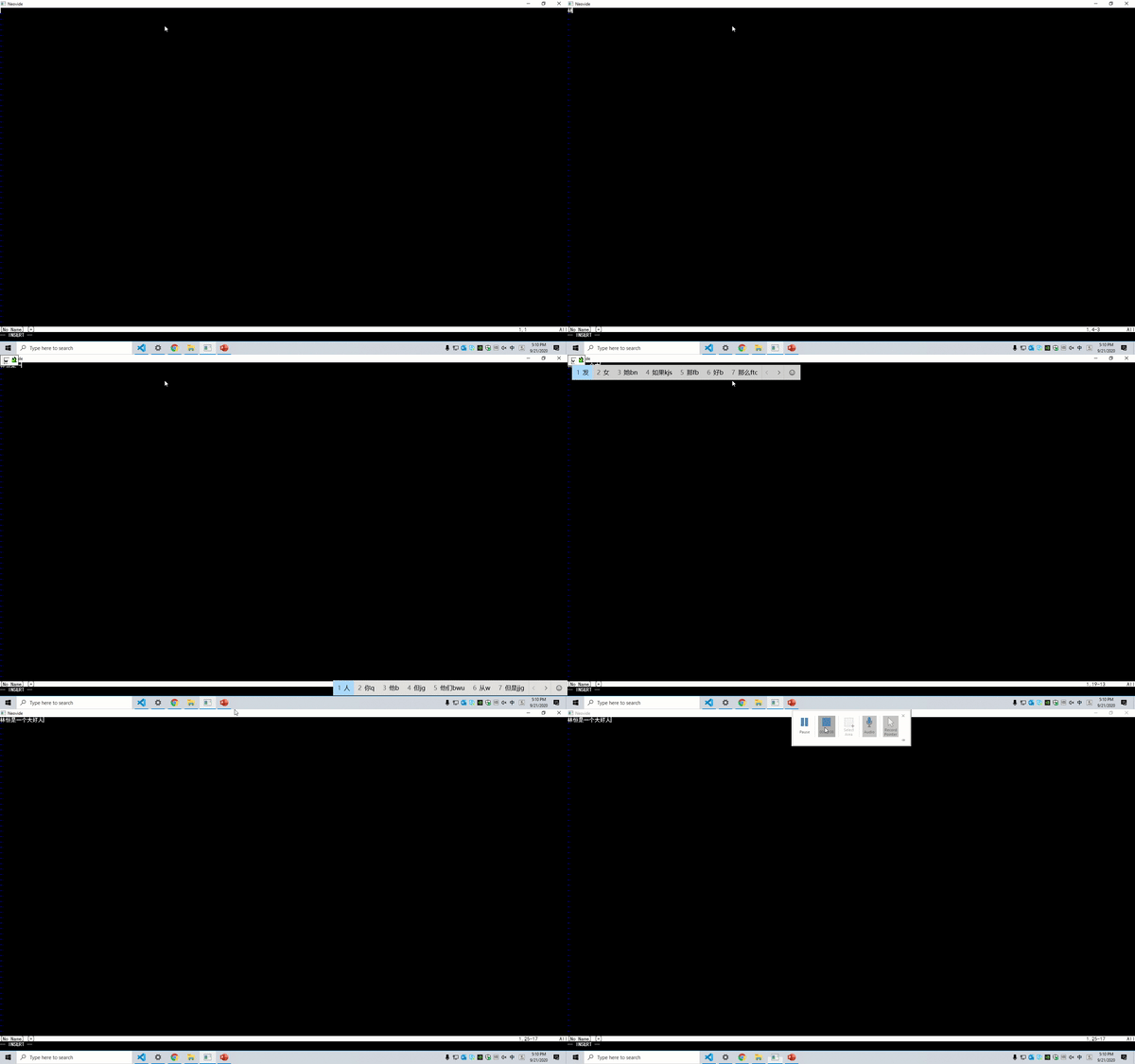
We will see if we can finally figure it out by glfw https://github.com/aclysma/skulpin/tree/glfw
uhuntu
on 19 Sep 2020
uhuntu
on 21 Sep 2020
Yeah, we almost get it done :)
uhuntu
on 21 Sep 2020
uhuntu
on 21 Sep 2020
uhuntu
on 9 Oct 2020
closing in favor of https://github.com/Kethku/neovide/issues/445
Kethku
on 11 Jan 2021
Related issues
 wbthomason
·
35Comments
wbthomason
·
35Comments
 IBS27
·
29Comments
IBS27
·
29Comments
 Ninmi
·
53Comments
Ninmi
·
53Comments
 ABitMoreDepth
·
25Comments
ABitMoreDepth
·
25Comments
 shaunsingh
·
27Comments
shaunsingh
·
27Comments
Most helpful comment
Hello, I upgraded to the latest version and tested Chinese input, already supported the input Chinese, but the candidate box for the Chinese input method cannot be displayed.

In addition, I found a more serious bug, when I switch input method, the input value will become like this
