Neovide: Neovide fails to start on Ubuntu 19.10
Hi folks,
Thought i would give this project a try, I've installed the build dependencies per your instructions and compiled the application from source. Upon running, neovide seems to error out with the following error message:
 RUST_BACKTRACE=full neovide
X Error of failed request:  BadDrawable (invalid Pixmap or Window parameter)
  Major opcode of failed request:  149 ()
  Minor opcode of failed request:  4
  Resource id in failed request:  0x1c0000c
  Serial number of failed request:  239
  Current serial number in output stream:  247
I'm running Ubuntu 19.10, with i3 as a window manager, against the AppImage version of neovim, which is currently at version 0.4.3.
Please let me know what additional information I can provide to help diagnose!
 ABitMoreDepth
All 25 comments
Do you have confirmation that vulkan works on your machine in other applications?
 Kethku
on 2 Mar 2020
Kethku
on 2 Mar 2020
A similar issue here: https://github.com/rust-windowing/winit/issues/748 appears to indicate that its a system wide vulkan issue
Kethku
on 2 Mar 2020
What kind of GPU do you have? Did you install the correct drivers? I have also heard that AppImages are bad business and cause all kinds of issues. Maybe building Neovim from source can help.
 SirJson
on 2 Mar 2020
SirJson
on 2 Mar 2020
I can run neovim and neovim-gtk just fine, so I believe that the neovim part of this may not be the issue, but I can try compiling neovim from source. I'll look into the vulkan stuff as well.
The machine I am using is a Dell XPS with a discrete nvidia gpu, which to my knowledge is running appropriate drivers (not nouveau).
Thanks for the pointers, I'll do some digging. :)
EDIT:
I installed the vulkan demo tools and can run both vkcube and vkcubepp without issue, so I'm guessing the vulkan layer is ok?
When starting neovide, I see a window for the briefest of moments before it exits, I wonder if perhaps its i3 that is misbehaving, I'll re-login with a different window manager soon to check that
ABitMoreDepth
on 3 Mar 2020
I'm running i3 with an Nvidia GPU and Ubuntu 19.10 so that shouldn't be the problem. Are you using plain i3 or i3 + compositor?
SirJson
on 3 Mar 2020
That's an interesting point, I am running Compton as well,
ABitMoreDepth
on 3 Mar 2020
I'm using KDE on Arch, same problem. Installed Neovide from the AUR.
 PillTime
on 4 Mar 2020
PillTime
on 4 Mar 2020
I checked with compton disabled and the same error persists.
ABitMoreDepth
on 4 Mar 2020
Can you try running a debug build?
Sent with GitHawk
Kethku
on 4 Mar 2020
Also the aur instructions were misleading as that package is woefully out of date. For now I have remove it from the readme as the better supported option is to build from source directly
Sent with GitHawk
Kethku
on 4 Mar 2020
So try building from source, or running from the build assets shown in one of the successful builds here: https://github.com/Kethku/neovide/actions
Sent with GitHawk
Kethku
on 4 Mar 2020
It looks like a cargo clean && cargo build of neovide has made no difference unfortunately. I'll try and pull the neovim source, but that from scratch and run against that, see if that somehow makes a difference after work this evening.
(But neovim-gtk runs against the appimage neovim client without issue).
EDIT: Updated to clarify I built neovide from source
ABitMoreDepth
on 4 Mar 2020
I meant building neovide from source just to be clear
Sent with GitHawk
Kethku
on 4 Mar 2020
The Aur package is very out of date. Cloning yourself ensure you get the most recent bits
Sent with GitHawk
Kethku
on 4 Mar 2020
Building from source still doesn't work.
 ~/Dow/neovide > cargo run --release
    Finished release [optimized + debuginfo] target(s) in 1.18s
     Running `target/release/neovide`
X Error of failed request:  BadDrawable (invalid Pixmap or Window parameter)
  Major opcode of failed request:  149 ()
  Minor opcode of failed request:  4
  Resource id in failed request:  0x580000c
  Serial number of failed request:  227
  Current serial number in output stream:  235
@Kethku Just mention, the AUR package is not out of date, please check the comment.
 peeweep
on 5 Mar 2020
peeweep
on 5 Mar 2020
Added it back but swapped to the git one so that we run into this less
Kethku
on 5 Mar 2020
@kethku is there any additional diagnostics I can provide to help you find the issue?
ABitMoreDepth
on 5 Mar 2020
I'm not sure... Something about your graphics setup causes the renderer to not be able to create a surface I think. Running debug and getting me a stacktrace might help but I don't know...
Sent with GitHawk
Kethku
on 5 Mar 2020
My laptop has both Nvidia and Intel graphics, and I'm using optimus-manager to switch between them.
Nvidia graphics (what I was using before) doesn't work.
Intel graphics works!
I'm using the proprietary Nvidia drivers.
PillTime
on 5 Mar 2020
Are the nvidia drivers up to date? I ran into this with a work machine on windows and had to update my drivers
Kethku
on 5 Mar 2020
Yeah, they are.
PillTime
on 5 Mar 2020
I've got nothing for you unfortunately. If intel graphics works, then youre probably good
Kethku
on 5 Mar 2020
I spent some time with the debugger this morning, I appear to get here:
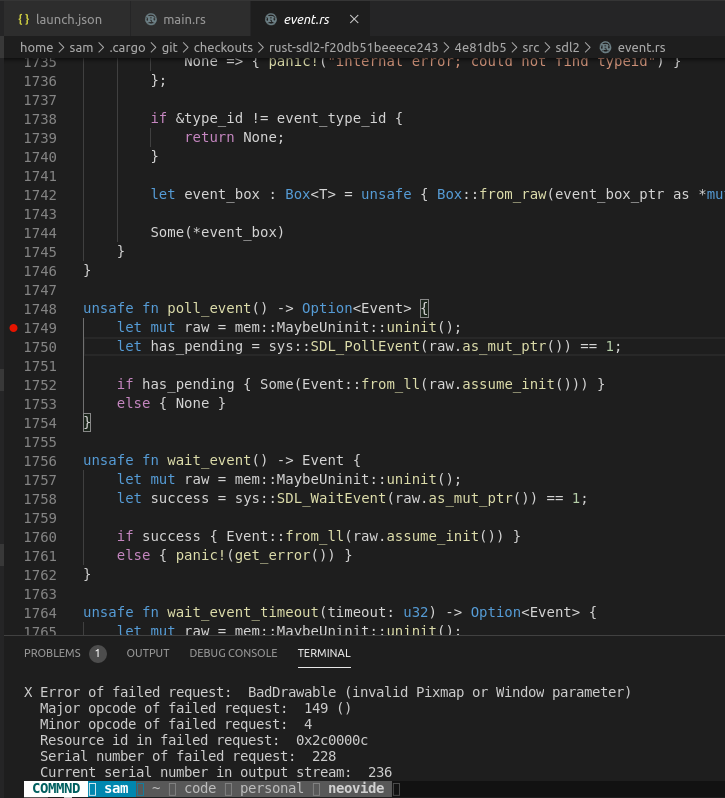
For some reason, the SDLPoll_Event call is what triggers the error. I don't seem to be able to step into that call, it just bails I'm afraid.
Does that yield any useful information?
ABitMoreDepth
on 7 Mar 2020
Interesting, I got neovide running by adjusting some nvidia settings, so I'm guessing something about the dual GPU laptops + vulkan isn't quite playing ball.
For anyone else who gets here, the following settings in nvidia-settings work for me:
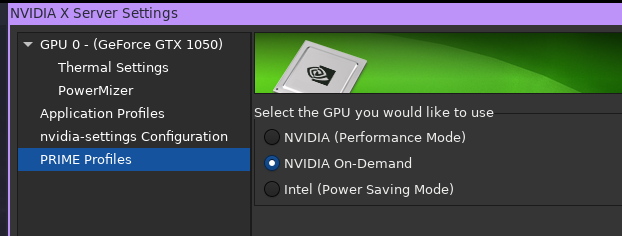
Thanks @Kethku for your help in trying to get things to behave, I don't think this is an issue specific to neovide. :)
ABitMoreDepth
on 7 Mar 2020
Related issues
 habamax
·
67Comments
SirJson
·
22Comments
habamax
·
67Comments
SirJson
·
22Comments
 valrus
·
21Comments
valrus
·
21Comments
 SirVer
·
26Comments
SirVer
·
26Comments
 svermeulen
·
26Comments
svermeulen
·
26Comments