Neovide: doesn't start on Win10 with nvim-nightly
Hi, I wanted to check neovide but it doesn't start for me.
I use neovim-nightly, installed via scoop (it works ok as a standalone and embedded as a firenvim in firefox)
NVIM v0.5.0-330-g71ee46acc
Build type: RelWithDebInfo
LuaJIT 2.1.0-beta3
Compilation: C:/Program Files (x86)/Microsoft Visual Studio/2017/Community/VC/Tools/MSVC/14.16.27023/bin/Hostx86/x64/cl.exe /DW...ects/neovim/src -IC:/projects/nvim-deps/usr/include -IC:/projects/neovim/build/src/nvim/auto -IC:/projects/neovim/build/include
Compiled by appveyor@APPVYR-WIN

Features: -acl +iconv +tui
See ":help feature-compile"

   system vimrc file: "$VIM\sysinit.vim"
  fall-back for $VIM: "C:/Program Files/nvim/share/nvim"

Run :checkhealth for more info
When I start neovide.exe nothing pops up, I can see a process of neovide but that is it.

 habamax
All 67 comments
Is nvim in your global path? Thats an off the top of my head guess. To get a better idea I think I will need some logging (which I haven't built yet :P). I'm running nvim 0.5.0-317 so I don't think that is the issue unless something broke very recently.
 Kethku
on 27 Jan 2020
Kethku
on 27 Jan 2020
Is nvim in your global path?
yes. I do start terminal nvim.exe from anywhere and it works. But it is shim not a real executable as far as I understand. Or whatever scoop does with it :)
habamax
on 27 Jan 2020
Hmmm thats interesting... That might be causing the problem. I will try this soon. I'm putting out other fires atm ;)
Kethku
on 27 Jan 2020
Oops nevermind. That was a comment on the wrong issue.
Kethku
on 28 Jan 2020
Still need to try out a scoop install of nvim
Kethku
on 28 Jan 2020
I'm having the same issue. Process is running in the background, but doesn't open a window, and seems to just stay there not doing anything.
I started doing some printf-based debugging, and it seems it hangs during this line in main.rs
initialize(&BRIDGE);
The call to ui_loop() doesn't seem to ever be executed
 jonvaldes
on 29 Jan 2020
jonvaldes
on 29 Jan 2020
how did you install neovim?
Kethku
on 29 Jan 2020
I'm tracking it down, and I think the issue is likely that there's an error message in the loading of my init.vim, which only happens when starting neovide. While other guis are able show these error messages, it seems neovide hangs before even creating the window, as the Bridge initialization is blocked wating for the nvim process to be ready.
Also, I suspect the reason my init.vim is failing is that neovide doesn't set up the $VIMRUNTIME variable, which other nvim guis do set to the directory of the gui executable (or maybe to CWD?)
jonvaldes
on 29 Jan 2020
As for your question, I have neovim in a local directory in my home, which I added to my %PATH%
jonvaldes
on 29 Jan 2020
This is fantastic. Thank you for the background. This should give me enough to investigate further
Kethku
on 29 Jan 2020
I had the same problem with pre-built binary on Windows 10 with scoop
neovim. I worked around by building from source.
On Wed, 29 Jan 2020 at 13:34, Keith Simmons notifications@github.com
wrote:
how did you install neovim?
—
You are receiving this because you are subscribed to this thread.
Reply to this email directly, view it on GitHub
https://github.com/Kethku/neovide/issues/49?email_source=notifications&email_token=AA2ECZ6OGBIJGFJH5TO4QJTRAEZ7RA5CNFSM4KL4EKAKYY3PNVWWK3TUL52HS4DFVREXG43VMVBW63LNMVXHJKTDN5WW2ZLOORPWSZGOEKGJWZI#issuecomment-579640165,
or unsubscribe
https://github.com/notifications/unsubscribe-auth/AA2ECZ6GKO77VCW2YLIJXFLRAEZ7RANCNFSM4KL4EKAA
.
--
Aravind
 aravind2612krishna
on 29 Jan 2020
aravind2612krishna
on 29 Jan 2020
Interesting. I'm not sure why that would fix it...
Kethku
on 29 Jan 2020
Yup, setting VIMRUNTIME solved this for me.
I just added this line at the top of my init.vim:
let $VIMRUNTIME='C:/Users/jvaldes/bin/Neovim/share/nvim/runtime'
Edit: the vimruntime problem is kinda unrelated to neovide. It's a general neovim issue which nvim-qt seems to solve under the hood, by fixing the runtime path without you noticing:
https://github.com/equalsraf/neovim-qt/blob/d87353c16a59c6e412a35e3e66716e5649fecb26/src/gui/app.cpp#L266
Edit 2: Setting the VIMRUNTIME variable this way ended up leading to all sort of problems related to vim not finding syntax files, some plugins malfunctioning... In the end I just copied the neovim runtime data to the directory where it's expecting them to be, under Program Files/nvim/share. This seems to have solved all issues
jonvaldes
on 29 Jan 2020
I will definitely do this, but I also think its important the init script errors don't freeze things. I will look into it. Probably won't get to it tonight though (its late here)
Kethku
on 29 Jan 2020
The init error part of this bug should be fixed now.
Kethku
on 29 Jan 2020
Investigating solving the vimruntime issue now
Kethku
on 29 Jan 2020
I did some looking. It kinda looks like there is a special nvim-qt runtime path which is set
Otherwise nvim has a set of init scripts it adds via its own runtime path. I'm not sure what the compliant solution is...
Kethku
on 29 Jan 2020
At the very least error messages should show up on startup now instead of silently failing.
Kethku
on 29 Jan 2020
Just to let you know -- with my init.vim I don't get any messages in nvim-qt and nvim.
habamax
on 29 Jan 2020
Do you get a message in current master of neovide? If so you should be able to see them now. Could you tell me what they are?
Kethku
on 29 Jan 2020
Do you get a message in current master of neovide? If so you should be able to see them now. Could you tell me what they are?
Nope, I am OP, and I still unable to run neovide -- have just tried recent release. Neovide doestn't start.
habamax
on 29 Jan 2020
I haven't made a release in a while. Could you try building from master? Alternatively I can create an updated release shortly
Kethku
on 29 Jan 2020
I haven't made a release in a while. Could you try building from master? Alternatively I can create an updated release shortly
Oh. I can try it :), I don't have anything rust-dev related on my machine.
habamax
on 29 Jan 2020
I can create an updated release shortly
But this would be much easier of course :)
habamax
on 29 Jan 2020
Ok I will make an updated release. Give me a sec
Kethku
on 29 Jan 2020
Alright I released 0.4.0 which is a bug fix release and embeds fonts
Kethku
on 29 Jan 2020
Alright I released 0.4.0 which is a bug fix release and embeds fonts
Thx! Tried it -- all the same, silently nothing happens.
habamax
on 29 Jan 2020
Hrmmm. In that case it would be very useful if you could try building as debug and run from a command prompt so as it capture the output. I suspect it will give a better hint there.
Kethku
on 29 Jan 2020
Just for completion sake. I just downloaded the latest nvim nightly and it works fine on my machine. So the debug build runtime output would be greatly helpful here.
Kethku
on 29 Jan 2020
Hrmmm. In that case it would be very useful if you could try building as debug and run from a command prompt so as it capture the output. I suspect it will give a better hint there.
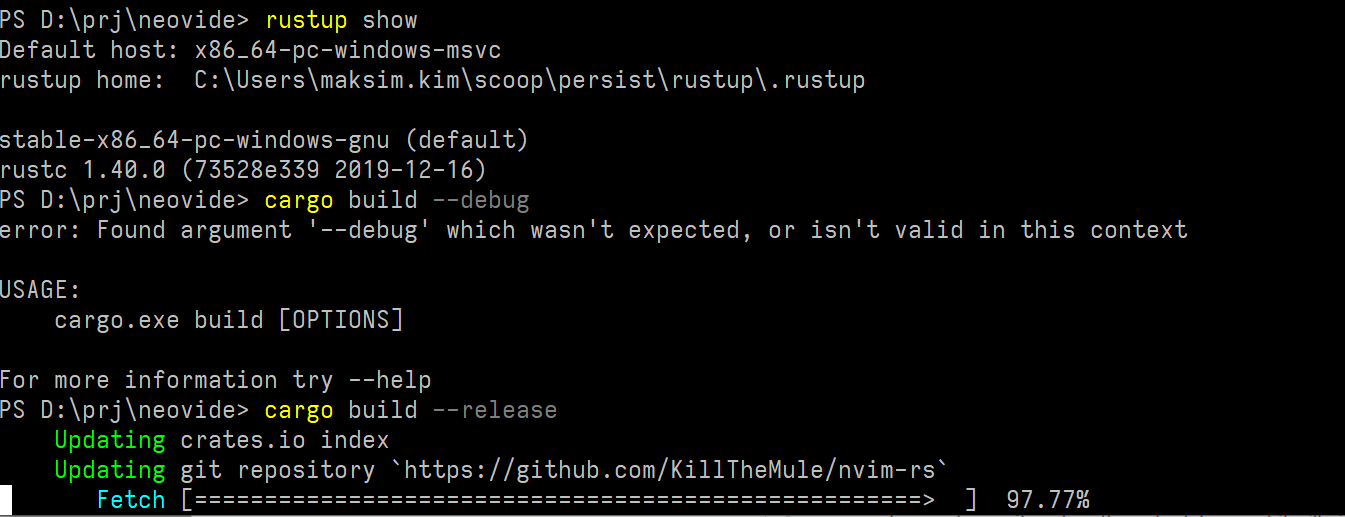
And how do you build non-release version? I mean I have tried cargo build --debug but it doesn't work.
habamax
on 30 Jan 2020
habamax
on 30 Jan 2020
I guess I am out of luck:
error: failed to run custom build command for `harfbuzz-sys v0.3.4`

Caused by:
  process didn't exit successfully: `D:\prj\neovide\target\release\build\harfbuzz-sys-20130d0bb493f3a2\build-script-build` (exit code: 1)
--- stdout
cargo:rerun-if-env-changed=HARFBUZZ_SYS_NO_PKG_CONFIG
TARGET = Some("x86_64-pc-windows-gnu")
OPT_LEVEL = Some("3")
HOST = Some("x86_64-pc-windows-gnu")
CXX_x86_64-pc-windows-gnu = None
CXX_x86_64_pc_windows_gnu = None
HOST_CXX = None
CXX = None
CXXFLAGS_x86_64-pc-windows-gnu = None
CXXFLAGS_x86_64_pc_windows_gnu = None
HOST_CXXFLAGS = None
CXXFLAGS = None
CRATE_CC_NO_DEFAULTS = None
DEBUG = Some("true")
CARGO_CFG_TARGET_FEATURE = Some("fxsr,sse,sse2")
running: "g++.exe" "-O3" "-ffunction-sections" "-fdata-sections" "-g" "-fno-omit-frame-pointer" "-m64" "-std=c++11" "-o" "D:\\prj\\neovide\\target\\release\\build\\harfbuzz-sys-0f58fb7556c6fb12\\out\\harfbuzz/src/harfbuzz.o" "-c" "harfbuzz/src/harfbuzz.cc"
cargo:warning=In file included from harfbuzz/src/harfbuzz.cc:5:
cargo:warning=harfbuzz/src/hb-buffer.cc: In member function 'bool hb_buffer_t::message_impl(hb_font_t*, const char*, va_list)':
cargo:warning=harfbuzz/src/hb-buffer.cc:2032:40: warning: function 'bool hb_buffer_t::message_impl(hb_font_t*, const char*, va_list)' might be a candidate for 'gnu_printf' format attribute [-Wsuggest-attribute=format]
cargo:warning=   vsnprintf (buf, sizeof (buf), fmt, ap);
cargo:warning=                                        ^
cargo:warning=during RTL pass: final
cargo:warning=In file included from harfbuzz/src/harfbuzz.cc:9:
cargo:warning=harfbuzz/src/hb-font.cc: In function 'hb_bool_t hb_font_get_nominal_glyph_nil(hb_font_t*, void*, hb_codepoint_t, hb_codepoint_t*, void*)':
cargo:warning=harfbuzz/src/hb-font.cc:111:1: internal compiler error: in based_loc_descr, at dwarf2out.c:14318
cargo:warning= }
cargo:warning= ^
cargo:warning=libbacktrace could not find executable to open
cargo:warning=Please submit a full bug report,
cargo:warning=with preprocessed source if appropriate.
cargo:warning=See <https://sourceforge.net/projects/mingw-w64> for instructions.
exit code: 1

--- stderr


error occurred: Command "g++.exe" "-O3" "-ffunction-sections" "-fdata-sections" "-g" "-fno-omit-frame-pointer" "-m64" "-std=c++11" "-o" "D:\\prj\\neovide\\target\\release\\build\\harfbuzz-sys-0f58fb7556c6fb12\\out\\harfbuzz/src/harfbuzz.o" "-c" "harfbuzz/src/harfbuzz.cc" with args "g++.exe" did not execute successfully (status code exit code: 1).


warning: build failed, waiting for other jobs to finish...
error: build failed
cargo build without any arguments does debug
Kethku
on 30 Jan 2020
As for the build error, looks like you don't have gcc installed. Not sure why it is trying that instead of msvc...
Kethku
on 30 Jan 2020
How did you install rust? Via rustup? If so, did you opt for the msvc version or gnu? I find msvc is way more reliable on windows
Kethku
on 30 Jan 2020
How did you install rust? Via rustup? If so, did you opt for the msvc version or gnu? I find msvc is way more reliable on windows
rustup indeed. I didn't do any options...

habamax
on 30 Jan 2020
If you're not too worried, I can host a debug build on my computer. You can access it here 02credits.ddns.net/Neovide.exe
Kethku
on 30 Jan 2020
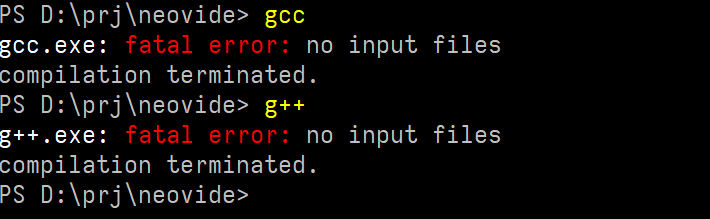
As for the build error, looks like you don't have gcc installed. Not sure why it is trying that instead of msvc...
I have:
habamax
on 30 Jan 2020
I built that off of master with debug on so it should pop a cmd prompt. To watch the data go by though you'd have to start it from a command prompt so it doesn't just disappear.
Kethku
on 30 Jan 2020
If you're not too worried, I can host a debug build on my computer. You can access it here 02credits.ddns.net/Neovide.exe
sure let's try. For now this link shows Server Not Found.
habamax
on 30 Jan 2020
really? Thats very odd. http://02credits.ddns.net/Neovide.exe
Kethku
on 30 Jan 2020
We're just running into all the pitfalls :P
Kethku
on 30 Jan 2020
maybe it was a spelling error? The link is working for me...
Kethku
on 30 Jan 2020
This is funny:

Something happening, then nothing happens in the end.
habamax
on 30 Jan 2020
maybe it was a spelling error? The link is working for me...
firefox uses https by default....
habamax
on 30 Jan 2020
I've got nothin. :(
Kethku
on 30 Jan 2020
You handy with a debugger? I can get you some symbols
Kethku
on 30 Jan 2020
You handy with a debugger? I can get you some symbols
well, like 15 years ago I tried softice... But since then I hadn't touched this kind of software.
But of course I can/will do things if you guide me.
habamax
on 30 Jan 2020
No idea what softice is :P Unfortunately I'm only very vaguely handy so I don't think I could guide you remotely. Let me scatter printlns around the app and give you an "instrumented build"
Kethku
on 30 Jan 2020
What kind of machine are you running. How confident are you that it has vulkan support? Is it an at least somewhat recent gpu?
Kethku
on 30 Jan 2020
btw I'm going to have to leave soon as its getting late here. Further I'm flying all tomorrow so it might be a while before I can get back to debugging this with you :(
Kethku
on 30 Jan 2020
What kind of machine are you running. How confident are you that it has vulkan support? Is it an at least somewhat recent gpu?

habamax
on 30 Jan 2020
btw I'm going to have to leave soon as its getting late here. Further I'm flying all tomorrow so it might be a while before I can get back to debugging this with you :(
Np, let's continue when you have time
habamax
on 30 Jan 2020
That should be a supported setup. If only barely.
Kethku
on 30 Jan 2020
I will look into setting up logging on the plane and get back to you
Kethku
on 30 Jan 2020
Logging is implemented, better error messaging is in, and a new window system is implemented. Could you try building from the sdl2 branch and see if that changes anything?
Kethku
on 16 Feb 2020
@habamax
Kethku
on 16 Feb 2020
Do you think now I would be able to build it from source code?
habamax
on 16 Feb 2020
maybe. I added some more instructions in the readme in the sdl2 branch. Specifically
- Install CMake. I use chocolatey: choco install cmake --installargs '"ADD_CMAKE_TO_PATH=System"' -y
- Install LLVM. I use chocolatey: choco install llvm -y
Those dependencies may incidentally fix your issue
Kethku
on 16 Feb 2020
If you aren't able to build from source still though, I will ping this thread again once I have merged the sdl2 branch and made a release for you to try
Kethku
on 16 Feb 2020
@habamax sdl2 merged and the current release has it
Kethku
on 16 Mar 2020
@Kethku it works!
Thank you!
habamax
on 17 Mar 2020
This happens when I install vim and nvim-nightly via scoop
 sfengyuan
on 31 Oct 2020
sfengyuan
on 31 Oct 2020
Hm this still seems to happen for me for both neovide 0.5.0 (scoop) and 0.7.0 (from releases) with an empty init.vim (I added the line finish at the beginning to immediately exit). I tried running neovide --wsl from powershell and neovide.exe --wsl from wsl (for both versions), and both lead to similar results (window not appearing or appearing and immediately closing)
wsl has an appimage of nvim nightly in path
 starptr
on 22 May 2021
starptr
on 22 May 2021
Facing the same issue on Windows 10.
 kabirnayeem99
on 18 Jun 2021
kabirnayeem99
on 18 Jun 2021
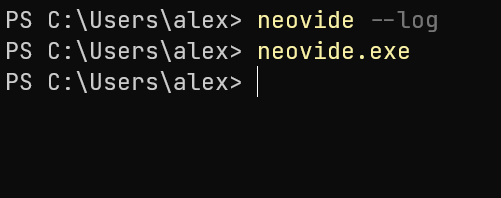
@starptr @kabirnayeem99 Can you try running the latest build from actions (https://github.com/Kethku/neovide/actions/runs/947940077) instead? If the issue persists, please try running neovide with neovide --log, and send the results here.
 shaunsingh
on 18 Jun 2021
shaunsingh
on 18 Jun 2021
I have installed this version. But the same issue persists. Double clicking on the .exe file opens neovide, but i can't open it from cmd.
kabirnayeem99
on 18 Jun 2021
Related issues
 Ninmi
·
53Comments
Ninmi
·
53Comments
 wbthomason
·
35Comments
wbthomason
·
35Comments
 harish2222
·
31Comments
harish2222
·
31Comments
 khalidchawtany
·
23Comments
Kethku
·
87Comments
khalidchawtany
·
23Comments
Kethku
·
87Comments
Most helpful comment
I will definitely do this, but I also think its important the init script errors don't freeze things. I will look into it. Probably won't get to it tonight though (its late here)