Neovide: I am facing a problem in opening neovide
I have downloaded windows binary from neovide release but it is not even opening
 harish2222
All 31 comments
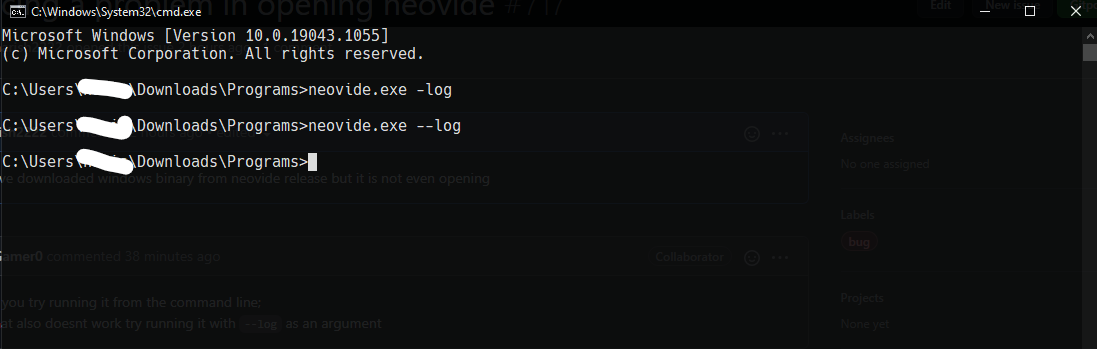
can you try running it from the command line;
if that also doesnt work try running it with --log as an argument
 PyGamer0
on 13 Jun 2021
PyGamer0
on 13 Jun 2021
Yes, I done it and got the log file uploaded it
neovide_rCURRENT.log
but I haven't builder it using rust
it have installed the binary from neovide releases version 0.7
harish2222
on 13 Jun 2021
What version of neovim do you have installed? Is it on the path? Do you set guifont in your config?
 Kethku
on 13 Jun 2021
Kethku
on 13 Jun 2021
I am using neovim NVIM v0.5.0-dev+1385-g93f15db5d
harish2222
on 13 Jun 2021
can you tell me how to use neovide if I had installed the binary from github release
harish2222
on 13 Jun 2021
I'm guessing that the issue is due to guifont settings in your vim config. The release version of neovide fails if the guifont is set to a name which the font system can't find. I'd try running with neovide --clean to see if it runs that way. If it does, then that indicates that the problem is with the guifont setting
Kethku
on 13 Jun 2021
So should I clear my nvim folder and do it
harish2222
on 13 Jun 2021
--clean should run without your config. No need to clear your nvim folder
Kethku
on 13 Jun 2021
I am not able to understand how to use neovide could you please explain how to link it with my neovim
harish2222
on 13 Jun 2021
When I am trying to build neovide I am getting this error
LINK : fatal error LNK1181: cannot open input file 'SDL2.lib'
harish2222
on 13 Jun 2021
@harish2222 It seems like you might have downloaded an older binary. We have builds that use opengl now, here is the latest one https://github.com/Kethku/neovide/actions/runs/933593677
This removes SDL as a dependency.
 j4qfrost
on 13 Jun 2021
j4qfrost
on 13 Jun 2021
I have downloaded it and runned it but no getting this error
Check the log file
neovide_rCURRENT.log
harish2222
on 13 Jun 2021
That isn't really an error. Is neovide just not starting up now? What is the behavior?
j4qfrost
on 13 Jun 2021
it is starting the neovide window and then collapsing without showing any output
harish2222
on 13 Jun 2021
And when I built the vulken based neovide I get an error.
Saying neovide is not a command
harish2222
on 16 Jun 2021
I cannot open it in windows too. When I run neovide --version with RUST_BACKTRACE=full, it gives:
Neovide version: 0.7.0
dpi fix applied
thread 'main' panicked at 'Failed to create window: SdlError("Failed loading vulkan-1.dll: The specified module could not be found.\r\n")', src\window\sdl2\mod.rs:442:10
stack backtrace:
   0:     0x7ff79ca0a898 - <unknown>
   1:     0x7ff79c8fb8cb - <unknown>
   2:     0x7ff79ca097c8 - <unknown>
   3:     0x7ff79ca08d4c - <unknown>
   4:     0x7ff79ca07eb2 - <unknown>
   5:     0x7ff79ca115a5 - <unknown>
   6:     0x7ff79ca114ff - <unknown>
   7:     0x7ff79ca1149f - <unknown>
   8:     0x7ff79c8f9d50 - <unknown>
   9:     0x7ff79c8fff33 - <unknown>
  10:     0x7ff79c875174 - <unknown>
  11:     0x7ff79c8089ac - <unknown>
  12:     0x7ff79c859a66 - <unknown>
  13:     0x7ff79c8058c9 - <unknown>
  14:     0x7ff79cf68bc0 - SDL_wcsstr
  15:     0x7fff72d97034 - BaseThreadInitThunk
  16:     0x7fff74682651 - RtlUserThreadStart
 jackysee
on 18 Jun 2021
jackysee
on 18 Jun 2021
@jackysee try running an executable from here https://github.com/Kethku/neovide/actions/runs/947940077
PyGamer0
on 18 Jun 2021
@PyGamer0 this build can be opened OK on my windows!
jackysee
on 19 Jun 2021
And when I built the vulken based neovide I get an error.
Saying neovide is not a command
@harish2222 can you paste exactly what command you run? Neovide is not a command means that you don't have neovide on your path. Closing immediately after running is usually due to either an invalid font setting in your vim config or not finding the neovim executable on your path.
Kethku
on 19 Jun 2021
I have used all the commands to run neovide
used remote TCP
used ssh
nothing worked.
also removed the nvim config folder and make a new one with the same name and insert an init.vim file having just one setting that is
set number
set relativenumber
After adding these to my new neovim config I used the same commands again but nothing showed up rather a new console opened up with plain black screen
harish2222
on 21 Jun 2021
Neovide when run on windows trys to run an executable called neovim on startup. If it can't find it, it will likely just close out. If you are running neovide with the wsl command, it will try to locate a neovim executable inside your wsl install and run that. I'm guessing the problem you are encountering is that Neovide can't find the neovim executable.
@harish2222 its almost certainly something weird about your configuration or path. Neovim must be on your path to run. Also "neovide is not a command" means that neovide itself isn't on your path. I'm not sure we can help you unless you can verify that both of those things are true.
With respect to which version of neovide to use, I recommend using one from the github actions page rather than the releases. The current release on the releases page requires both sdl2 and vulkan to work properly which may be confusing things.
Could you also give some details about what version of windows are your running?
Kethku
on 21 Jun 2021
My neovim is set to system variable in environment variables. And I am using windows 21H1 build version
- With that I am using spacevim for instance and wanted to try neovide, now spacevim config is controlling neovim so is it necessary to remove it.
- even used
--wslit looks for neovim but doesn't show any output only the neovide window is opened and crashes. - I use an old system would that be a problem
harish2222
on 22 Jun 2021
Check out the log file output that I am getting
neovide_rCURRENT.log
harish2222
on 22 Jun 2021
I installed neovide (0.5.0) with scoop and had the same problem.
neovide_rCURRENT.log
 xianzheTM
on 23 Jun 2021
xianzheTM
on 23 Jun 2021
@xianzheTM Is your window collapsing after you run neovide. If so you are facing the same problem that I am facing
harish2222
on 23 Jun 2021
@harish2222 yes,Open it, the shape of the window appears, and then it crashes.
xianzheTM
on 23 Jun 2021
@xianzheTM Was neovide working for you before if so
Can it be the neovim version that can be trouble or any other for neovide's crashing
harish2222
on 23 Jun 2021
@harish2222 I am using neovide for the first time ...😢
xianzheTM
on 23 Jun 2021
@xianzheTM try an executable from here
PyGamer0
on 30 Jun 2021
I am getting the same error again this time I am have used both versions of neovim version = 0.4.4 and version = 0.5
nothing worked gave the same error as pervious
harish2222
on 30 Jun 2021
@xianzheTM try an executable from here
It's worked for me!
xianzheTM
on 1 Jul 2021
Related issues
 shaunsingh
·
27Comments
shaunsingh
·
27Comments
 svermeulen
·
26Comments
svermeulen
·
26Comments
 wbthomason
·
35Comments
wbthomason
·
35Comments
 reisub0
·
39Comments
reisub0
·
39Comments
 Ninmi
·
53Comments
Ninmi
·
53Comments
Most helpful comment
@xianzheTM try an executable from here