Neovide: Error while building Neovide on M1 Mac.
I have been wanting to try out Neovide for the past few days. I followed all the instructions in the readme to install it. But when I run cargo build --release I get a huge error.
The error is quite long so I put it in the file below.
error.txt
I tried many things but it just doesn't seem to work
Since this didn't work I installed the .app file from the releases. After installation when I tried to open it, I get the following error.
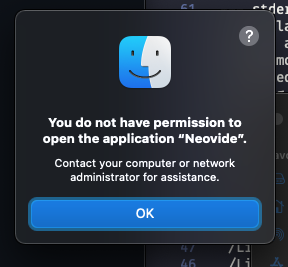
After looking at some other issues I went into the Neovide.app/Contents/MacOS directory and ran chmod +x neovide.
It started launching after the usual macOS security stuff. But it crashes immediately after launching.
I have Xcode installed.
I am running macOS 11.4 on an M1 Mac Mini.
(Btw I used the 0.7.0 version of Neovide. I tried this with other versions too. No luck!)
@Kethku I just wanted to know when the homebrew cask for Neovide will come out. It will be much easier.
 IBS27
IBS27
All 29 comments
I have been wanting to try out Neovide for the past few days. I followed all the instructions in the readme to install it. But when I run cargo build --release I get a huge error.
Please try downloading the prebuilt binary from here: https://github.com/Kethku/neovide/suites/3053893722/artifacts/69453974, it should run natively as well. The download on the releases page is fairly outdated and is still based on the Vulkan platform
Since this didn't work I installed the .app file from the releases. After installation when I tried to open it, I get the following error.
The issue should be fixed (https://github.com/Kethku/neovide/issues/447) with the latest release
@Kethku I just wanted to know when the homebrew cask for Neovide will come out. It will be much easier.
I'm working on adding homebrew support. We will likely wait until a stable release is created, which should happen very soon. I expect the homebrew cask to be out sometime in the next week or two.
 shaunsingh
on 22 Jun 2021
shaunsingh
on 22 Jun 2021
I downloaded the prebuilt binary but I get this error when opening it from the terminal or from finder.
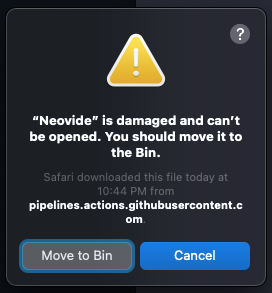
Great to see homebrew support is on the way!!
IBS27
on 22 Jun 2021
Looks like theres an issue with code signing the app during the build process, ill take a look at it soon.
In the meantime, can you try running the following commands?
sudo xattr -lr /path/to/neovide.app
sudo xattr -cr /path/to/neovide.app
sudo codesign -f -s /path/to/neovide.app
Apple checks files for malware when you run them, and quarantines them if nessecary. This essentially un-quarantines the app and code signs the executables so you can run them safely.
shaunsingh
on 23 Jun 2021
I tried all three commands. Nothing worked. Earlier I had also installed the Gatekeeper helper tool and tried it. But, even that didn't work.
IBS27
on 23 Jun 2021
Can you try downloading the intel version, and see if it launches, or does it give the same error?
shaunsingh
on 23 Jun 2021
I tried it. It doesn't give me any error saying it is damaged. But, it crashes immediately if I open it from the finder. But I tried to open it from the terminal with open Neovide.app and it worked.
IBS27
on 23 Jun 2021
But there are some errors with rendering NERDTree.
This is how it looks in terminal Neovim:
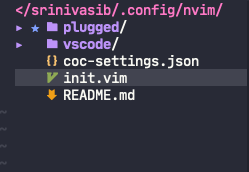
This is how it looks in Neovide:
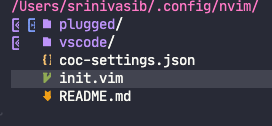
Also, I can't open it in the directory I want to. It always opens in the root directory.
IBS27
on 23 Jun 2021
I'm currently working on fixing the macOS build issue, so that should be resolved soon. As for the icons, make sure you have guifont set to a font that supports those glyphs (e.g. a nerd font)
Also, I can't open it in the directory I want to. It always opens in the root directory.
Alias the neovide exutable itself to neovide for the time being. You can then open files in directories using
cd (wherever)
neovide (filename)
(to locate the executable right click on .app, show package contents, there should be a thing with the terminal icon that says neovide, then add it to your zshrc.)
shaunsingh
on 23 Jun 2021
I have set it to the JetBrainsMono nerd font. So, it should work.
IBS27
on 23 Jun 2021
Can you assist me on how to create an alias for opening neovide in the current terminal directory?
IBS27
on 23 Jun 2021
Assuming your using zsh, open your ~/.zshrc file (e.g. nvim ~/.zshrc) and add the following line
alias neovide="/Users/shauryasingh/IdeaProjects/neovim/neovide/target/release/neovide"
where neovide at the end is the path to the executable. If you have neovide in your application folder, it may look something like
alias neovide="/Applications/Neovide.app/Contents/MacOS/neovide"
shaunsingh
on 23 Jun 2021
But, when I do that even though the app opens and runs, I get this in the terminal:

IBS27
on 23 Jun 2021
Thats normal behavior, let me know if you run into any other issues!
shaunsingh
on 23 Jun 2021
By when do you think the native M1 build can be fixed?
IBS27
on 23 Jun 2021
Most likely after https://github.com/Kethku/neovide/pull/746 is done, reviewed, and merged.
shaunsingh
on 23 Jun 2021
Ok. And do you have any suggestions for the icon rendering issue. I tried a few other nerdfonts but none of them worked.
IBS27
on 23 Jun 2021
And, the smooth scrolling is not that smooth. It says multigrid has to be enabled. I just wanted to know how to do that.
IBS27
on 23 Jun 2021
And, the smooth scrolling is not that smooth. It says multigrid has to be enabled. I just wanted to know how to do that.
Never mind. I got to know.
IBS27
on 23 Jun 2021
Ok. And do you have any suggestions for the icon rendering issue. I tried a few other nerdfonts but none of them worked.
No idea, sorry. You can try changing the icons in your configuration if you would like
And, the smooth scrolling is not that smooth. It says multigrid has to be enabled. I just wanted to know how to do that.
You have to launch neovide with the multigrid flag (`neovide --multiGrid) You figured it out never mind then.
shaunsingh
on 23 Jun 2021
I'll try that. Thanks
IBS27
on 23 Jun 2021
Is there any way I could add a padding to the windows?
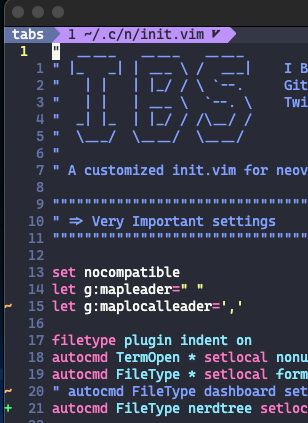
As you can see in the above pic the window seems to be cut a bit on the top and even on the left. Is there any way to solve this?
IBS27
on 23 Jun 2021
In Neovide the auto brackets plugin isn't working.
In terminal neovim if I type { or " or something like that, the second bracket is automatically typed. For this functionality, I use this plugin 'jiangmiao/auto-pairs'.
However, the same functionality doesn't work in neovide. I tried a bunch of plugins with similar features but none of them worked.
What could be the reason for this?
IBS27
on 24 Jun 2021
Sorryyy. Closed it by mistake.
IBS27
on 24 Jun 2021
I would take a look at this issue: https://github.com/Kethku/neovide/issues/445, its a bug with dead keys.
shaunsingh
on 24 Jun 2021
But there are some errors with rendering NERDTree.
This is how it looks in terminal Neovim:
This is how it looks in Neovide:
Also, I can't open it in the directory I want to. It always opens in the root directory.
Regarding this problem, I found out that some glyphs were not rendering in neovide. I used the same font in both terminal and neovide and it renders without problems in the terminal. I think this is an issue with rendering in neovide.
Do you have any suggestions as to what I can do?
IBS27
on 24 Jun 2021
I would take a look at this issue: #445, its a bug with dead keys.
But is there a solution already implemented for this?
Until this is fixed, I can't use Neovide for coding. 😔
IBS27
on 24 Jun 2021
But is there a solution already implemented for this?
Not yet. You can make some basic autopair functionality with nnoremap (nnoremap [ [] for example) and see if it works.
Regarding this problem, I found out that some glyphs were not rendering in neovide. I used the same font in both terminal and neovide and it renders without problems in the terminal. I think this is an issue with rendering in neovide.
I would create a separate issue for this. Describe what build of neovide and neovim you're using, as well as exactly what font. Certain fonts (isoveka for example) have edge cases where they don't function correctly
shaunsingh
on 24 Jun 2021
I am using the latest prebuilt binary for intel macs as the m1 build didn't work on my m1 mac. My neovim version is 0.5.0.
The font I am currently using is CaskaydiaCove Nerd Font. But I have also tried it with the FiraCode, FuraCode and JetBrainsMono nerd fonts. None of them worked.
IBS27
on 24 Jun 2021
@IBS27 you can continue the discussion here: https://github.com/Kethku/neovide/issues/748, if you would like.
shaunsingh
on 24 Jun 2021
Related issues
 ssxwcz
·
50Comments
ssxwcz
·
50Comments
 khalidchawtany
·
23Comments
khalidchawtany
·
23Comments
 Kethku
·
44Comments
Kethku
·
44Comments
 SirVer
·
26Comments
SirVer
·
26Comments
 Ninmi
·
53Comments
Ninmi
·
53Comments
Most helpful comment
Please try downloading the prebuilt binary from here: https://github.com/Kethku/neovide/suites/3053893722/artifacts/69453974, it should run natively as well. The download on the releases page is fairly outdated and is still based on the Vulkan platform
The issue should be fixed (https://github.com/Kethku/neovide/issues/447) with the latest release
I'm working on adding homebrew support. We will likely wait until a stable release is created, which should happen very soon. I expect the homebrew cask to be out sometime in the next week or two.