Nativefier: Application window always contain "nativefier-some-id" in the name even when specifying a custom name
when generating an application, specifying the name argument like:
nativefier --name "Some Awesome App" "http://medium.com"
The window name appears like awesome-app-nativefier-some-random-id. Is there anyway I can just have the name I specified and not append the nativefier part?
Thank you.
 brpaz
brpaz
All 16 comments
cannot confirm, shows Some Awesome App and then changes to Medium - ...
nativefier 7.7.0
 mxdpeep
on 10 Sep 2019
mxdpeep
on 10 Sep 2019
Sorry, I wasn´t clear enough. I am not talking about the Application title itself, but the name that appears in the window list or in the application icon in the dock.
I am using Fedora Linux. The same happens in Ubuntu.
See here: https://imgur.com/a/AMh1Sxg
brpaz
on 11 Sep 2019
Can confirm I see the same thing as @brpaz
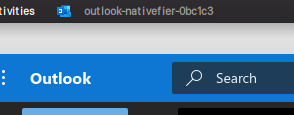
Created with:
nativefier \
--name "Outlook" \
--icon ~/Desktop/outlook.png \
--internal-urls ".*(office|office365|sharepoint|microsoft|onenote)\.(com).*" \
--tray \
--counter \
--single-instance \
'https://outlook.office.com'
Edit:
If you create a custom .desktop file to launch the application. You can set the window class properly.
~/.local/share/applications/outlook.desktop
[Desktop Entry]
Name=Outlook
Comment=Outlook Web
GenericName=Outlook
Exec=/opt/outlook/outlook
Icon=/opt/outlook/resources/app/icon.png
Type=Application
StartupNotify=true
StartupWMClass=outlook-nativefier-0bc1c3
Categories=Office;
Keywords=outlook;
Set the StartupWMClass to the id generated by nativefier. You can also verify that class by opening the app and it a separate terminal run xprop WM_CLASS and click the window title. This will give you the correct class name to use.
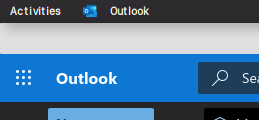
 chriscarpenter12
on 14 Sep 2019
chriscarpenter12
on 14 Sep 2019
Got a similar issue here.
The name is fine in the dock, but it's the same weird id thing in the menu (and application support folder).
Not the most elegant 😕
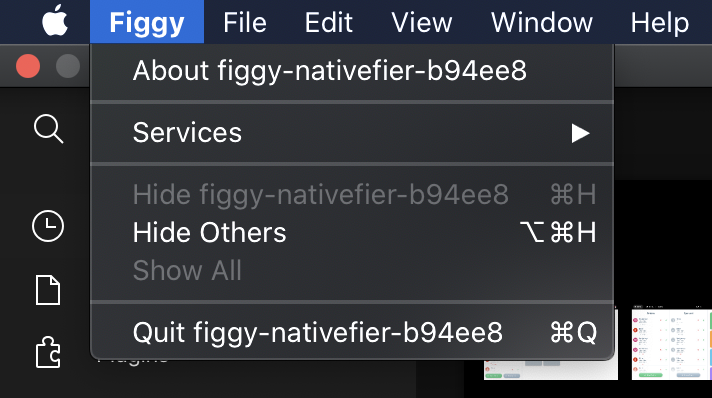
 ravenyu
on 15 Sep 2019
ravenyu
on 15 Sep 2019
not related to Windows then, I cannot confirm on Linux, I am using WSL and headless only
mxdpeep
on 17 Sep 2019
Has anyone got a solution to this? Same problem on 7.7.0 on Mac OS 10.14.6. The about screen shows xxxx-nativefier-id when setting a custom app name or leaving it to default.
 m2de
on 14 Dec 2019
m2de
on 14 Dec 2019
Submitted a PR for it. Fingers crossed.
 0xnu
on 26 Dec 2019
0xnu
on 26 Dec 2019
@0xnu there are a few failing tests on your PR. Probably will need to resolve that before it's a candidate for merging.
 voltechs
on 6 Jan 2020
voltechs
on 6 Jan 2020
@0xnu there are a few failing tests on your PR. Probably will need to resolve that before it's a candidate for merging.
@voltechs All done. Thanks a lot.
0xnu
on 11 Jan 2020
Long-time issue on Linux GNOME desktop environment.
Reproduced on GNOME Shell 3.28.4
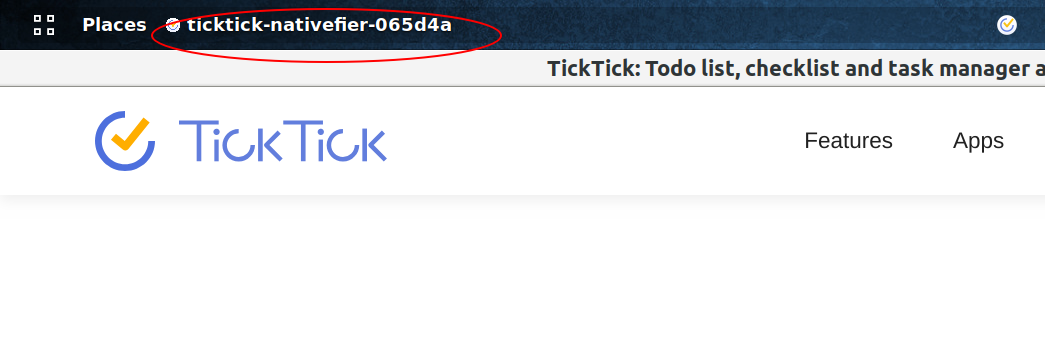
 SiqingYu
on 4 Feb 2020
SiqingYu
on 4 Feb 2020
@chriscarpenter12's solution works like a charm.
SiqingYu
on 4 Feb 2020
Confirmed on Ubuntu-18.04 using Nativefier v8.0.4:

nativefier "https://ticktick.com" /tmp/nativefier/ticktick
      --icon /tmp/nativefier/ticktick.png
      --name "TickTick"
      --internal-urls ".*(ticktick)\.(com).*"
      --tray
      --single-instance
@SiqingYu @chriscarpenter12 Same, the Desktop solution above works like a charm. Thanks :rocket:
Unrelated to the random ID, but for those looking to use ansible, I made a role to install TickTick with similar settings to the Outlook example above.
Source: https://github.com/iancleary/personal-ansible/tree/v0.6.0/roles/ticktick
 iancleary
on 21 Mar 2020
iancleary
on 21 Mar 2020
You can simply update the name in the resources/app/package.json after nativefying the app as a workaround until the PR gets merged.
nativefier -n Riot https://riot.im/app/
jq '.name="Riot"' ~/Riot-linux-x64/resources/app/package.json
 asdil12
on 21 Apr 2020
asdil12
on 21 Apr 2020
@asdil12 Thank you! Confirming that also allows worked for me.
That also allows users on Ubuntu/GNOME to save the application to their Favorites Bar.
iancleary
on 21 Apr 2020
@chriscarpenter12 's solution not only works but seems like the best way to install and register an application on Linux. It provides a launcher that can be added to the desktop or searchable in the applications menu.
I'd like to work on a PR to provide a command-line option for this behavior.
Any thoughts/suggestions on where I should start looking?
 prampey
on 5 May 2020
prampey
on 5 May 2020
While @chriscarpenter12 's solution doesn't change the app's name in the GNOME lock screen notification, @asdil12 's solution changes it.
SiqingYu
on 22 Dec 2020
Related issues
 ranzou06
·
3Comments
ranzou06
·
3Comments
 desimaniac
·
4Comments
desimaniac
·
4Comments
 danielyli
·
5Comments
danielyli
·
5Comments
 StyxOfDynamite
·
4Comments
StyxOfDynamite
·
4Comments
 citrusui
·
3Comments
citrusui
·
3Comments
Most helpful comment
Can confirm I see the same thing as @brpaz
Created with:
Edit:
If you create a custom
.desktopfile to launch the application. You can set the window class properly.~/.local/share/applications/outlook.desktopSet the
StartupWMClassto the id generated by nativefier. You can also verify that class by opening the app and it a separate terminal runxprop WM_CLASSand click the window title. This will give you the correct class name to use.