Nativefier: Support flag to disable desktop notifications for site
Description
I've packaged an app that frequently sends notifications via the desktop notification API, I can't seem to opt out for the packaged app.
Steps to reproduce issue
Package a web page that sends notifications via the Notifications API.
Details
- Are you nativefying a public website?
Yes, but Login is required before issue is observable. - Full nativefier command used to build your app:
npm install nativefier -g - Version of Nativefier (run
nativefier --version):7.5.4 - Version of node.js (run
node --version):v6.11.2 - OS:
macOS High Sierra - Error message / stack trace (if any):
<Error message / Stack trace here>
 StyxOfDynamite
All 4 comments
@StyxOfDynamite thanks for the feedback. What do you mean by "I can't seem to opt out for the packaged app"?
 ronjouch
on 13 Feb 2018
ronjouch
on 13 Feb 2018
So in browser, I can disable certain sites from posting notifications.
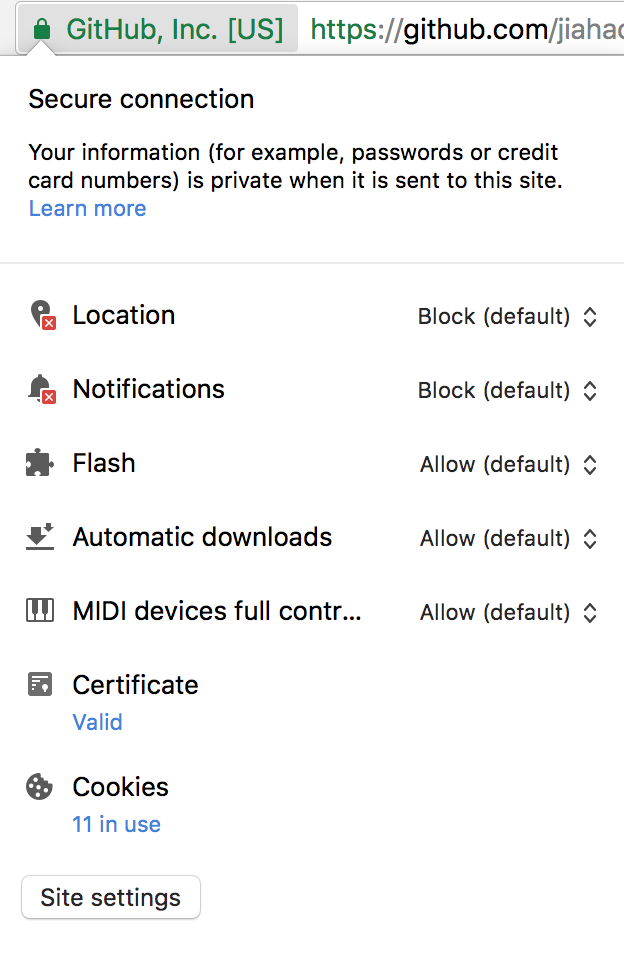
I have this disabled for most if not all sites, including the one I'm attempting to package up. Once the website is packaged/bundled I was never asked if the electron app should be allowed to show notifca tions, and I can't seem to disable them.
StyxOfDynamite
on 13 Feb 2018
Ah, no, we don't have that feature for now, neither as flag nor in the interface. Contributions welcome 🙂.
ronjouch
on 13 Feb 2018
A workaround is to use the --inject option to inject a .js file with the line delete window.Notification
 mdh34
on 2 Mar 2018
mdh34
on 2 Mar 2018
Related issues
 jasonivers
·
4Comments
jasonivers
·
4Comments
 citrusui
·
3Comments
citrusui
·
3Comments
 DougBeney
·
5Comments
DougBeney
·
5Comments
 marcelocecin
·
4Comments
marcelocecin
·
4Comments
 robertmylne
·
5Comments
robertmylne
·
5Comments
Most helpful comment
A workaround is to use the
--injectoption to inject a .js file with the linedelete window.Notification