Multi-account-containers: Regression: Keyboard naivgation broken
My preferred way to open a new container is with control+. then use up/down arrows to select a container and press enter. The new UI adds some friction:
- Up/down arrows are no longer supported, so I had to switch to tab/shift+tab
- I have to press tab six times to cycle through the top menu before the first container is highlighted for selection
- Pressing enter on a container now opens a submenu in which I have to press tab twice again, then enter again, to open it
I'm sure it's a nice addition for some, but I'm unlikely to use the numeric shortcuts – I'm a TKL keyboard user so my touch-typing skills are iffy for the number keys 😅
_Originally posted by @redoPop in https://github.com/mozilla/multi-account-containers/issues/1784#issuecomment-656877564_
 maxxcrawford
All 12 comments
Not only up + down, but with Ctnl+N and Ctnl+P (e.g. universal emacs bindings [coming from a Vim user 😊])
 peterhadlaw
on 10 Jul 2020
peterhadlaw
on 10 Jul 2020
To open new tab in certain container:
before:
ctrl+. -> down, down -> enter
now:
ctrl+. -> move hand from keyboard to mouse -> move cursor to the needed container -> click -> move cursor to "Open new tab in this container" -> click
or
right click on "+" (new tab item) -> select container
Absolutely broken.
There must be a way to open container without mouse.
UI/UX designer who worked on this update must be fired immediately.
 vtuu
on 11 Jul 2020
vtuu
on 11 Jul 2020
I also need some way of quickly opening up a new tab in a specific container tab via keyboard - not sure how the developers intend for me to separate different Google accounts using container tabs otherwise. Is the recommended method to use the mouse for interacting with container tabs? Is there data on how users typically used the extension before 7.0?
 erjiang
on 11 Jul 2020
erjiang
on 11 Jul 2020
I did add my feedback in #1784
I am referencing my comment from previous thread here:
https://github.com/mozilla/multi-account-containers/issues/1784#issuecomment-656944506
_The keyboard navigation is not working with the new update. This is a huge productivity miss.
-Before the release I could do the following:
press CTRL + .
navigate using the arrow keys to the profile and then hit ENTER and I have a webpage open in that container.
-With the current design, there is an too many key presses to use to open a webpage in a container. Here what the new update did:
CTRL + . => Opens the main menu.
Then ALT/TAB (or arrow keys when it gets fixed #1785 ) to scroll to the selected container.
Then hit Enter, to go inside the container's menu.
Then scroll down again to select the option "Open new Tab in this container".
Entering a nested menu to open in a specific container in my opinion every time is a huge productivity miss for a keyboard user.
It would be nice to have an option to switch back the behavior to the default via a config option while keeping the new UI look. If a user needs to go to the nested menu, then a additional shortcut such as SHIFT and something else, will take inside the nested menu would be an added bonus._
Perfect Alternative suggested by @hr-curtissimo
Ref: https://github.com/mozilla/multi-account-containers/issues/1784#issuecomment-656938918
 extr3metech
on 11 Jul 2020
extr3metech
on 11 Jul 2020
It seems you can do Ctrl + . and then 1-9. Unfortunately, it only works with top-row numbers and not keypad.
 capi
on 11 Jul 2020
capi
on 11 Jul 2020
It seems you can do Ctrl + . and then 1-9. Unfortunately, it only works with top-row numbers and not keypad.
The add-on description still says:
Ctrl + . (period) keyboard shortcut is available to open the containers panel. You can then use tab and the enter keys to open new container tabs.
I see now that there are options to set "Container to open with keyboard shortcut X". There still could be some UI improvements to match up the order of the containers and their shortcuts or something similar. Right now my second-most-used container is 7th in my list. If I assign it to keyboard shortcut 2, the list no longer matches the shortcut numbers - I'd rather reorder my list of containers.
Edit: Actually, it's even more confusing because I changed the extension's Ctrl-Shift-2 keyboard shortcut, and now Ctrl-. 2 does something different from Ctrl-Shift-2.
erjiang
on 13 Jul 2020
I've renamed all my containers to start with the shortcut number 1-9.
Also, if you choose to get used to hitting tab multiple times to highlight the container you want, it's worth noting that shift-tab to reverse direction is actually faster when you have 3+ containers.
 harrybailey
on 13 Jul 2020
harrybailey
on 13 Jul 2020
Like a lot of people in multiple issues, my keyboard workflow for opening up new tabs stopped working without warning. A lot of people in this thread mention ctrl+. and then using the up and down errors, but I had a different variation. Maybe I'm losing it, but my muscle memory from before the update suggests I used to be able to do ctrl+., w and then enter to open up a new "Work" container. This seems very similar in concept to https://github.com/mozilla/multi-account-containers/issues/1796, except that I used the first letter of each container to highlight that container in the list before pressing enter to open a new tab.
 dhedlund
on 14 Jul 2020
dhedlund
on 14 Jul 2020
I just updated to 7.0.1 and it's still not possible to navigate the panel with the arrow keys. I have to hit tab twice, and then the arrow keys work. I suspect this is due to the addon being pinned to the overflow menu.
 hackel
on 15 Jul 2020
hackel
on 15 Jul 2020
@hackel Logged an issue there. Does the arrows keys work for you when it's not in the overflow menu?
maxxcrawford
on 15 Jul 2020
@maxxcrawford
Firefox 78.0.2 (20200708170202), Windows 10 x64, Firefox Multi-Account Containers v7.0.2
The up/down keys do not work straight away for me. I mean: after Ctrl+. I have to press Tab and only then they will work for sure. The icon is on toolbar, just before the overflown icon.
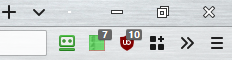
To be more precise: sometimes they actually work straight away... but most of the time they do not.
For example:
Ctrl+., thenTabthen usedownkey few times -- just to see that up/down works.- Now press
Escto close the popup. - Press
Ctrl+.again (no need to useTabhere) and try to use up/down keys -- they work (almost always). Great! - Press
Escquickly few times in a row (1st press will close the popup). - Repeat step 3 again: it does not work now without the
Tab(you have to do step 1 for up/down to work).
 bazzik
on 17 Jul 2020
bazzik
on 17 Jul 2020
It seems you can do
Ctrl + .and then1-9. Unfortunately, it only works with top-row numbers and not keypad.
Could it be that this functionality is no longer working?
Not sure if it is related to the FF 79 upgrade or yet another upgrade of the plugin?
 tobstarr
on 6 Aug 2020
tobstarr
on 6 Aug 2020
Related issues
 fire9901
·
3Comments
fire9901
·
3Comments
 o-l-a-v
·
4Comments
o-l-a-v
·
4Comments
 CircleCode
·
3Comments
CircleCode
·
3Comments
 krishnanunnir
·
3Comments
krishnanunnir
·
3Comments
 goodevilgenius
·
3Comments
goodevilgenius
·
3Comments
Most helpful comment
Like a lot of people in multiple issues, my keyboard workflow for opening up new tabs stopped working without warning. A lot of people in this thread mention
ctrl+.and then using the up and down errors, but I had a different variation. Maybe I'm losing it, but my muscle memory from before the update suggests I used to be able to doctrl+.,wand thenenterto open up a new "Work" container. This seems very similar in concept to https://github.com/mozilla/multi-account-containers/issues/1796, except that I used the first letter of each container to highlight that container in the list before pressing enter to open a new tab.