Multi-account-containers: Twitter keeps making me log on when added to a container
I have created several containers for several different site (youtube, twitter, etc). They all work, but when twitter is in a container, it makes me sign into it every time. Youtube and the others are remembering my login. Any way to prevent this?
 fire9901
All 3 comments
I have seen this, but it stopped happening to me, and I wasn't sure why. If it is still happening, can you provide the following information?
- Multi-Account Containers Version:
- Operating System + Version:
- Firefox Version:
- Other installed Add-ons + Version + Enabled/Disabled-Status:
<!-- To be able to copy & paste the full list of your Add-ons navigate to "about:support"
and scroll down to "Extensions" -->
 - Do you have tracking protection on Standard, Strict, or Custom?

### Steps to reproduce
1.
2.
3.

### Actual behavior


### Expected behavior
 kendallcorner
on 4 Dec 2019
kendallcorner
on 4 Dec 2019
See below:
From: Kendall Werts notifications@github.com
Sent: Wednesday, December 4, 2019 2:51 PM
To: mozilla/multi-account-containers multi-account-containers@noreply.github.com
Cc: fire9901 kbailey@outlook.com; Author author@noreply.github.com
Subject: Re: [mozilla/multi-account-containers] Twitter keeps making me log on when added to a container (#1592)
I have seen this, but it stopped happening to me, and I wasn't sure why. If it is still happening, can you provide the following information?
Multi-Account Containers Version: 6.1.1
Operating System + Version: Windows 10 v2004 (build 19035.1)
Firefox Version: 71.0
Other installed Add-ons + Version + Enabled/Disabled-Status:
Amazon.com 1.1 true [email protected]
Bing 1.0 true [email protected]
Bitwarden - Free Password Manager 1.41.0 true {446900e4-71c2-419f-a6a7-df9c091e268b}
Bloody Vikings! 0.9.4 true [email protected]
Decentraleyes 2.0.13 true jid1-BoFifL9Vbdl2zQ@jetpack
Disconnect 5.19.3 true 2.[email protected]
DuckDuckGo 1.0 true [email protected]
DuckDuckGo Privacy Essentials 2019.9.12 true jid1-ZAdIEUB7XOzOJw@jetpack
eBay 1.0 true [email protected]
Enhancer for YouTube™ 2.0.98.2 true [email protected]
Facebook Container 2.0.3 true @contain-facebook
Firefox Multi-Account Containers 6.1.1 true @testpilot-containers
Ghostery – Privacy Ad Blocker 8.4.5 true [email protected]
Google 1.0 true [email protected]
HTTPS Everywhere 2019.11.7 true [email protected]
iCloud Bookmarks 2.1.23 true [email protected]
Malwarebytes Browser Guard 2.1.4 true {242af0bb-db11-4734-b7a0-61cb8a9b20fb}
Privacy Badger 2019.11.18 true jid1-MnnxcxisBPnSXQ@jetpack
Twitter 1.0 true [email protected]
uBlock Origin 1.24.2 true [email protected]
Wikipedia (en) 1.0 true [email protected]
Application Guard Extension 2.0.1909.10001 false [email protected]
- Do you have tracking protection on Standard, Strict, or Custom? Strict
Steps to reproduce
1.
2.
3.
Actual behavior
Expected behavior
—
You are receiving this because you authored the thread.
Reply to this email directly, view it on GitHubhttps://nam04.safelinks.protection.outlook.com/?url=https%3A%2F%2Fgithub.com%2Fmozilla%2Fmulti-account-containers%2Fissues%2F1592%3Femail_source%3Dnotifications%26email_token%3DAN6FWZM5ASFXY427Y7DUG2TQXAJZXA5CNFSM4JU3DFZ2YY3PNVWWK3TUL52HS4DFVREXG43VMVBW63LNMVXHJKTDN5WW2ZLOORPWSZGOEF6OJHI%23issuecomment-561833117&data=02%7C01%7C%7C980f2063a09842d9685a08d778fb9ca4%7C84df9e7fe9f640afb435aaaaaaaaaaaa%7C1%7C0%7C637110894361190258&sdata=cCXbzBiv4o7gy%2B%2BC9nmMmXkfdbrWkKhSP0JOXpxah1A%3D&reserved=0, or unsubscribehttps://nam04.safelinks.protection.outlook.com/?url=https%3A%2F%2Fgithub.com%2Fnotifications%2Funsubscribe-auth%2FAN6FWZKRJGWGIWXXKSAJIELQXAJZXANCNFSM4JU3DFZQ&data=02%7C01%7C%7C980f2063a09842d9685a08d778fb9ca4%7C84df9e7fe9f640afb435aaaaaaaaaaaa%7C1%7C0%7C637110894361200265&sdata=OJv0%2B6TSTQdrPFSXVgzZ51msUHXM4rgxDmZKBf8VIv8%3D&reserved=0.
fire9901
on 4 Dec 2019
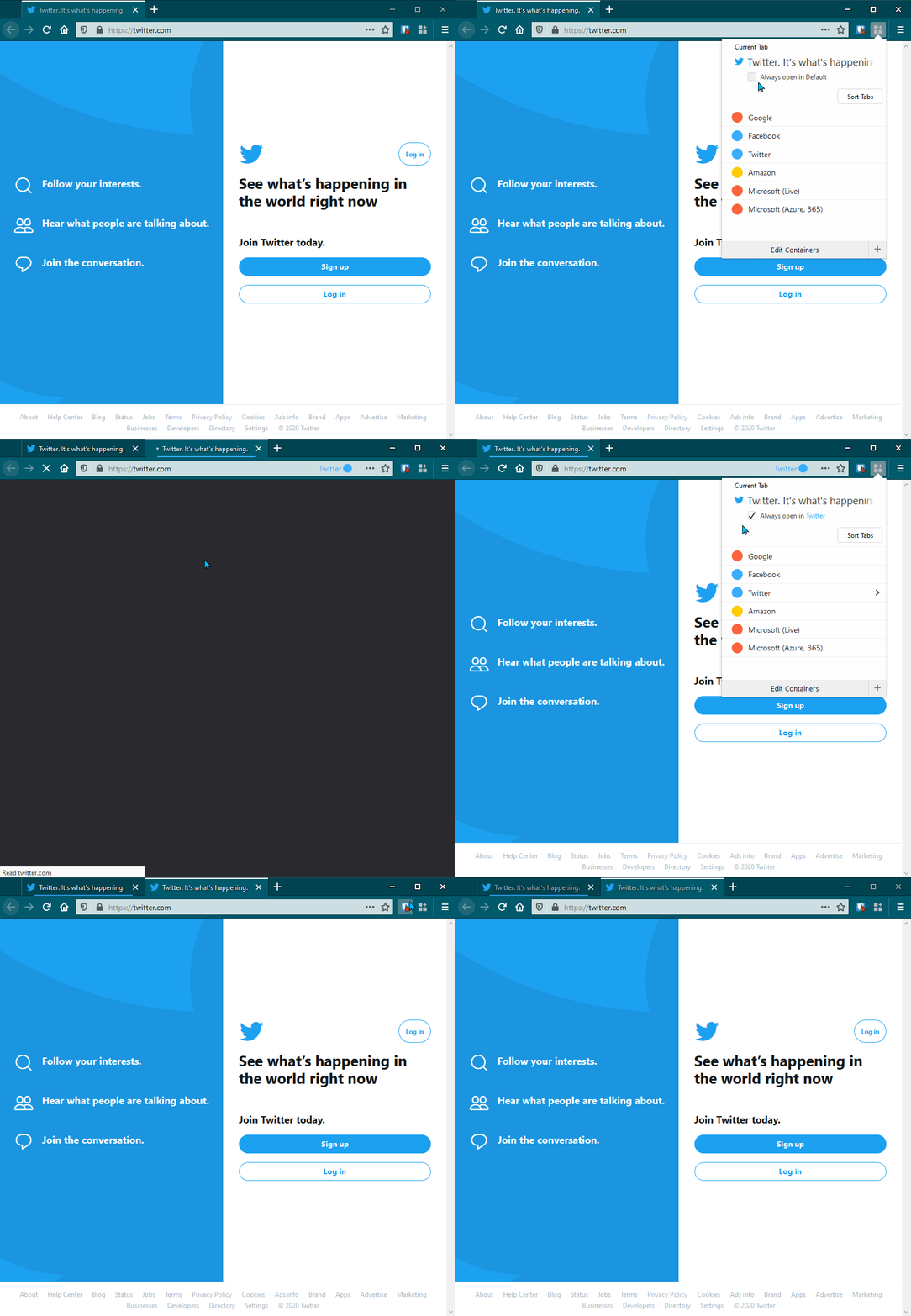
This is happening to me too. Specifically, "https://twitter.com/" will not open in the selected container, while "https://twitter.com/home" will.
 jdgregson
on 3 Jan 2020
jdgregson
on 3 Jan 2020
Related issues
 jnachtigall
·
5Comments
jnachtigall
·
5Comments
 ericlathrop
·
3Comments
ericlathrop
·
3Comments
 jbyler
·
4Comments
jbyler
·
4Comments
 krishnanunnir
·
3Comments
krishnanunnir
·
3Comments
 budhajeewa
·
4Comments
budhajeewa
·
4Comments