Multi-account-containers: Add shortcuts and menu item to hide/unhide all Container tabs.
Spin-off of https://github.com/mozilla/testpilot-containers/issues/331#issuecomment-284218202
It would be nice to quickly hide all (or certain container groups) quickly with a shortcut. Use case: Someone enters the room and you want to hide all Personal (and/or Shopping) container tabs.
Currently I can only hide a container one by one, but neither all at once and also not (all at once) with a shortcut:

 jnachtigall
All 5 comments
Thanks for the suggestion!
How would a user reopen the same container (probably shift + shortcut to reopen last)?
Do you have any suggestions on a shortcut?
 jonathanKingston
on 5 Mar 2017
jonathanKingston
on 5 Mar 2017
How would a user reopen the same container (probably shift + shortcut to reopen last)?
Do you have any suggestions on a shortcut?
Rethinking it, I guess this ticket is two issues in one:
1) Add a way to globally hide/unhide all containers. I think this could be done be adding an "eye icon toggle" next to the sort icon with a tooltip "Hide (or show/unhide) all containers" at:

Shortcuts suggestion is very difficult because one has to make sure it is not conflicting with anything else on Browser, popular Add-ons or OS. Maybe Ctrl+K Ctrl+<something-else> (K for container for easy memorization). That is, Ctrl+K followed immediately by Ctrl+<something-else>. VSCode has these compound shortcodes (link) and I really like these.
- Add a shortcuts to all individual containers, maybe
Ctrl+K Ctrl+<number>, e.g.: Ctrl+K Ctrl+1to toggle Personal containers visibility (Hide/Show this container)Ctrl+K Ctrl+2to toggle Work containers visibility (Hide/Show this container)Ctrl+K Ctrl+3to toggle Finance containers visibility (Hide/Show this container)
But again really think twice before adding a shortcut because usually this cannot be undone/changed later easily ;)
jnachtigall
on 6 Mar 2017
Hi, in addition to hiding _all_ containers, people using containers for tab management may want to switch between containers (without having to switch between windows).
Use case: "Let's hide my work tabs and do some reading for the next hour!"
Suggestion for UI:
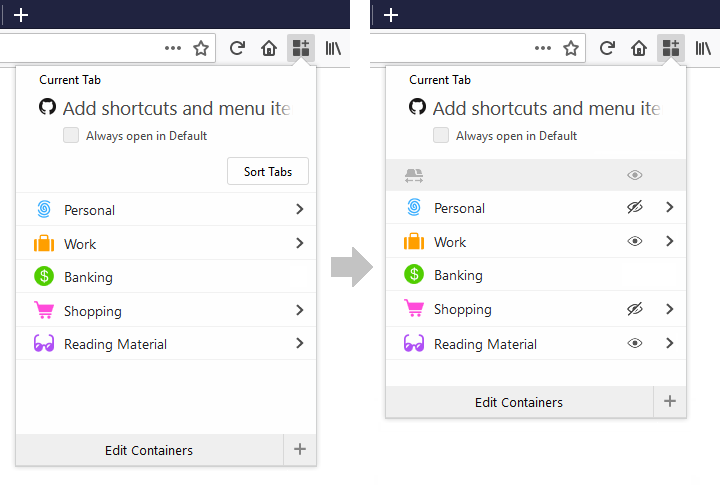
PS. "Always open in Default" doesn't make much sense, does it? A checkbox to activate the already default behavior?
 rubcap
on 4 Aug 2017
rubcap
on 4 Aug 2017
This UI makes a lot of sense. I didn't understood the hide/show feature before reading an article explaining it to me. I even thought the feature had been removed.
Hope this UI will get some traction, thanks!
 almet
on 11 Dec 2017
almet
on 11 Dec 2017
Hi, in addition to hiding _all_ containers, people using containers for tab management may want to switch between containers (without having to switch between windows).
Use case: "Let's hide my work tabs and do some reading for the next hour!"
Suggestion for UI:
PS. "Always open in Default" doesn't make much sense, does it? A checkbox to activate the already default behavior?
Yeah, I think too that suggested UI will be a greater option to hide/unhide button.
It is so cumbersome, to opening containers one by one to hide all containers.
I suggest too to add to tab context menu options to hide container to which the tab belongs for better management.
 kris7453
on 13 Feb 2020
kris7453
on 13 Feb 2020
Related issues
 bcb44
·
4Comments
bcb44
·
4Comments
 jonhoo
·
4Comments
jonhoo
·
4Comments
 ximex
·
3Comments
ximex
·
3Comments
 coot
·
3Comments
coot
·
3Comments
 skank
·
3Comments
skank
·
3Comments
Most helpful comment
Hi, in addition to hiding _all_ containers, people using containers for tab management may want to switch between containers (without having to switch between windows).
Use case: "Let's hide my work tabs and do some reading for the next hour!"
Suggestion for UI:

PS. "Always open in Default" doesn't make much sense, does it? A checkbox to activate the already default behavior?