Mremoteng: Wallpaper does always show, colour depth does not apply
Connecting from a Windows 10 machine to Win2016/10 always shows the wallpaper, also colour depth settings do not apply.
Using latest beta/alpha 1.75.6179.28241
|||
|--:|---|
|Operating system | Windows 7 x64 |
|mRemoteNG version| 1.75 aplha 3 |
 nighty2k7
All 14 comments
can confirm wallpaper issue, never tried color tho
 ghost
on 28 Dec 2016
ghost
on 28 Dec 2016
Hmm.... I thought I saw some other reports of similar problems, but with different RDP options...
I'll look into this further. No ETA at this time.
 kmscode
on 4 Jan 2017
kmscode
on 4 Jan 2017
Hi, any news on this issue?
To be honest, RDP with wallpapers, effects and not being able to use 16bit sucks performace-wise. Performance could be so much better if those parameters would be parsed correctly.
Cheers and thanks
Nighty
nighty2k7
on 1 Sep 2017
This appears to continue to be an issue. Any feedback on this?
 boomshankerx
on 27 Feb 2019
boomshankerx
on 27 Feb 2019
Can confirm this issue is still present: 1.76.20.24615
Weird that this issue is open since late 2016 and @kmscode tagged it as High Priority, I wonder what the other priorities are like and what their names are.
 ner00
on 23 Jun 2019
ner00
on 23 Jun 2019
It appears as though @kmscode may have gotten busy doing something else. Commits are down in 2019. Such is the life of the free software programmer. Maybe we should offer to throw some money at it by way of donations. I'm using MS RDP client on slow connections to Windows 10 for now. @sparerd seems to be active. Maybe he can shed some light on this. Some feedback either way would be appreciated.
boomshankerx
on 23 Jun 2019
Yeah, I was only half-joking.
I don't think that throwing money at it is the way to go, but if that got this annoying and important bug to get fixed fairly quickly I would have to agree. As for the claim that I have read somewhere that this is exclusively related to Win10 hosts/guests, that's not true - the problem is the guest system (and by extension mRemoteNG client), I can say that during my testing this issue was confirmed on Windows 8.1, Windows Server 2012 R2, Windows 10 - probably everything in between up to Windows Server 2019; I haven't tested OSes older than Windows Server 2008 R2 (this one was the only where it worked).
I downloaded the source and played around with the variables, even though I don't understand the integration with RDP. In RdpProtocol.cs you have the SetPerformanceFlags() function which seems to be where the magic happens.
{
//pFlags += Convert.ToInt32(RDPPerformanceFlags.DisableWallpaper);
pFlags += 1;
}
I tried setting static values (pFlags += 1;) to see if something different would happen but no. As previously, it worked for Win2008 R2 guests, but failed against Win8.1/Win2012 R2/Win10 guests. Whatever it is, the guest OSes aren't receiving the performance flags properly. It's kind of funny because you can use the native client from Windows 2008 (RDP client 8.1) to connect to any of those guest systems and the performance flags will work perfectly, yet not with mRemoteNG, it must be something rooted deeper in the way the RDP connection is constructed. I'm afraid I don't have enough knowledge to work it out.
ner00
on 23 Jun 2019
Ok, did some digging on this one and I figured it out. For remote hosts from Win8 and up*, the remote connection expects to have a value for NetworkConnectionType that is anything except "Automatically Detect". If we set the connection type to anything else, the performance flags are honored by the remote server. Since we were previously not using this setting, it was using its default value of "automatically detect", and thus making win8+ remote hosts ignore our performance flags.
A fix will be available in the next mRemoteNG v1.77 alpha.
This is related to the networkautodetect:i:0 and connection type:i:1 settings in the rdp file and the Experience/Performance section of MSTSC. Example below:
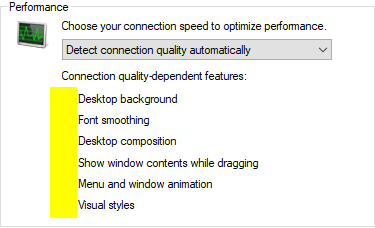
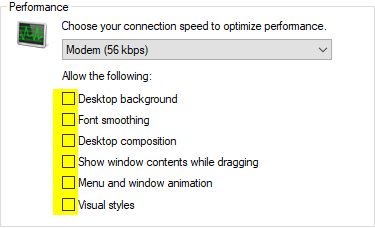
* To be more precise, only servers using RDP protocol version 7 and higher are aware of this setting.
 sparerd
on 23 Jun 2019
sparerd
on 23 Jun 2019
Wow, 2 and a half year after my initial post :)
Thank you!!
nighty2k7
on 23 Jun 2019
@sparerd Well, that's great news!

Unfortunately for me, I spent the last 5 hours chasing that and got this crude workaround (mRemoteV1\Connection\Protocol\RDP\RdpProtocol.cs):
                //not user changeable
                _rdpClient.AdvancedSettings2.GrabFocusOnConnect = true;
                _rdpClient.AdvancedSettings3.EnableAutoReconnect = true;
                _rdpClient.AdvancedSettings3.MaxReconnectAttempts = Settings.Default.RdpReconnectionCount;
                _rdpClient.AdvancedSettings2.keepAliveInterval = 60000; //in milliseconds (10,000 = 10 seconds)
                _rdpClient.AdvancedSettings5.AuthenticationLevel = 0;
                _rdpClient.AdvancedSettings2.EncryptionEnabled = 1;

                //NetworkConnectionType setting (uint), if not specified forces autodetection (https://docs.microsoft.com/en-us/windows/desktop/termserv/imsrdpclientadvancedsettings7-networkconnectiontype)
                //TODO: Create and bind to user interface control
                //1: Modem (56 kbps)
                //2: Low-speed broadband (256 kbps - 2 Mbps)
                //3: Satellite (2 Mbps - 16 Mbps with high latency)
                //4: High-speed broadband (2 Mbps - 10 Mbps)
                //5: WAN (10 Mbps or higher with high latency)
                //6: LAN (10 Mbps or higher)
                //(undefined): Detect connection quality automatically
                _rdpClient.AdvancedSettings8.NetworkConnectionType = 1;
This won't be worth for much longer, only until v1.77a, which is a good thing - yet: https://github.com/ner00/mRemoteNG/commit/208e5e09ffa76d08920600a9df9343512ffc3a7d
Compiled portable: mRemoteNG v1.77Alpha-1
ner00
on 23 Jun 2019
Thanks so much @sparerd. Honestly this is a game changer. You just went to the top of my beer money list.
boomshankerx
on 23 Jun 2019
Really thanks, not even removing the wallpaper had worked before, this is great news!
nighty2k7
on 23 Jun 2019
Thanks for sharing @ner00, that's the one. I'm not entirely sure if any of the values (1-6) actually do anything on their own in the RDP client. I wasn't planning on making the network type user-facing (we're just setting it to modem right now, like you are.) If anyone has any more info about the network types setting, please let me know.
@boomshankerx Haha, glad to help 🍻
@nighty2k7 No problem, sorry it took so long to get to it ☹️
sparerd
on 23 Jun 2019
Thanks for sharing @ner00, that's the one. I'm not entirely sure if any of the values (1-6) actually do anything on their own in the RDP client. I wasn't planning on making the network type user-facing (we're just setting it to modem right now, like you are.) If anyone has any more info about the network types setting, please let me know.
I think you're correct, I just assumed because of the flags described in: https://docs.microsoft.com/en-us/windows/desktop/termserv/imsrdpclientadvancedsettings7-networkconnectiontype
But doing a couple of tests, you realize that the only purpose of the 1-6 values is mostly just to populate the RDP client UI with the appropriate settings on the 'Performance' tab and toggle the pre-existing performance settings accordingly. As long as connection type is anything between 1-6, and networkautodetect is 0 or undefined, then the settings seem to be honored.
EDIT: Also, I agree that the network type doesn't need to be user-facing, being able to set the performance options individually as they already appear is more than enough.
ner00
on 23 Jun 2019
Related issues
 mmcnay
·
4Comments
mmcnay
·
4Comments
 Taelyn
·
4Comments
Taelyn
·
4Comments
 MarkoMusa
·
4Comments
sparerd
·
3Comments
MarkoMusa
·
4Comments
sparerd
·
3Comments
 archonik
·
3Comments
archonik
·
3Comments
Most helpful comment
@sparerd Well, that's great news!
Unfortunately for me, I spent the last 5 hours chasing that and got this crude workaround (
mRemoteV1\Connection\Protocol\RDP\RdpProtocol.cs):This won't be worth for much longer, only until v1.77a, which is a good thing - yet: https://github.com/ner00/mRemoteNG/commit/208e5e09ffa76d08920600a9df9343512ffc3a7d
Compiled portable: mRemoteNG v1.77Alpha-1